
Activepieces vs Kestra: Features, Pricing (2026 Guide)

Oct 30, 202615 min read
Choose Activepieces if non-engineers build app-to-app and AI-agent automations, or if you embed automation in your own product. Its core is MIT-licensed. Choose Kestra if engineers orchestrate data and infrastructure pipelines as code. They overlap less than their feature lists suggest.
Activepieces is an open-source, no-code automation platform where non-engineers connect apps and build AI agents, while Kestra is an open-source orchestration platform where engineers define data and infrastructure workflows as code.
Activepieces is for teams where operations, marketing or support staff build flows in a visual editor, and for SaaS companies that want automation inside their own app. Every plan, including the free one, allows unlimited flows.
Kestra is for engineers who define workflows in YAML, keep them in Git and run them against data stores and infrastructure.
Activepieces vs Kestra in one table and one verdict
At-a-glance comparison table
Eight points decide most purchases, and the table sets the two tools side by side on them.
| Activepieces | Kestra | |
|---|---|---|
| Built for | No-code app and AI-agent automation | Code-defined data and infrastructure orchestration |
| Hosting | Cloud or self-hosted | Self-hosted or managed enterprise deployment |
| Licence | Open source core, commercial licence for enterprise features | Open source core, commercial enterprise edition |
| Pricing and entry price | Self-serve plans on the pricing page; self-hosted enterprise quoted by sales | Enterprise edition quoted by sales |
| SSO and admin | SSO beyond the Team plan goes through sales | SSO and governance in the enterprise edition |
| AI agents | Built-in agent building for non-engineers | AI tasks written inside YAML flows |
| Integrations | Library of pieces, listed on the pieces page | 2,400 integrations claimed |
| Embedding | Designed to embed in your product | Not positioned for embedding |
Kestra claims 2,400 integrations, so its catalogue is wide.
For scale, n8n, a third tool, claims 2,584. Raw counts don't separate these products. Check whether the specific apps you use are covered.
Everything above reflects each vendor's public pages as of 30 October 2026.
For a team where operations, marketing or support staff need to turn a described process into working automation, Activepieces is the better fit.
You open the built-in chat, describe a process that touches your connected apps, and check what it publishes: a live flow in your account, with a run trace showing exactly what happened.
Kestra remains the stronger choice if your engineers define data and infrastructure pipelines in YAML and keep them in Git. But for people who shouldn't need an engineer to get an app-to-app or AI-agent flow running, Activepieces gets them there without the hiring step.
If you are running this arithmetic for your own team, see what the same workload costs on Activepieces.
What workflow automation and orchestration each tool means
Workflow automation connects apps through a visual sequence of steps, while orchestration runs scheduled, event-driven pipelines that you define as code.
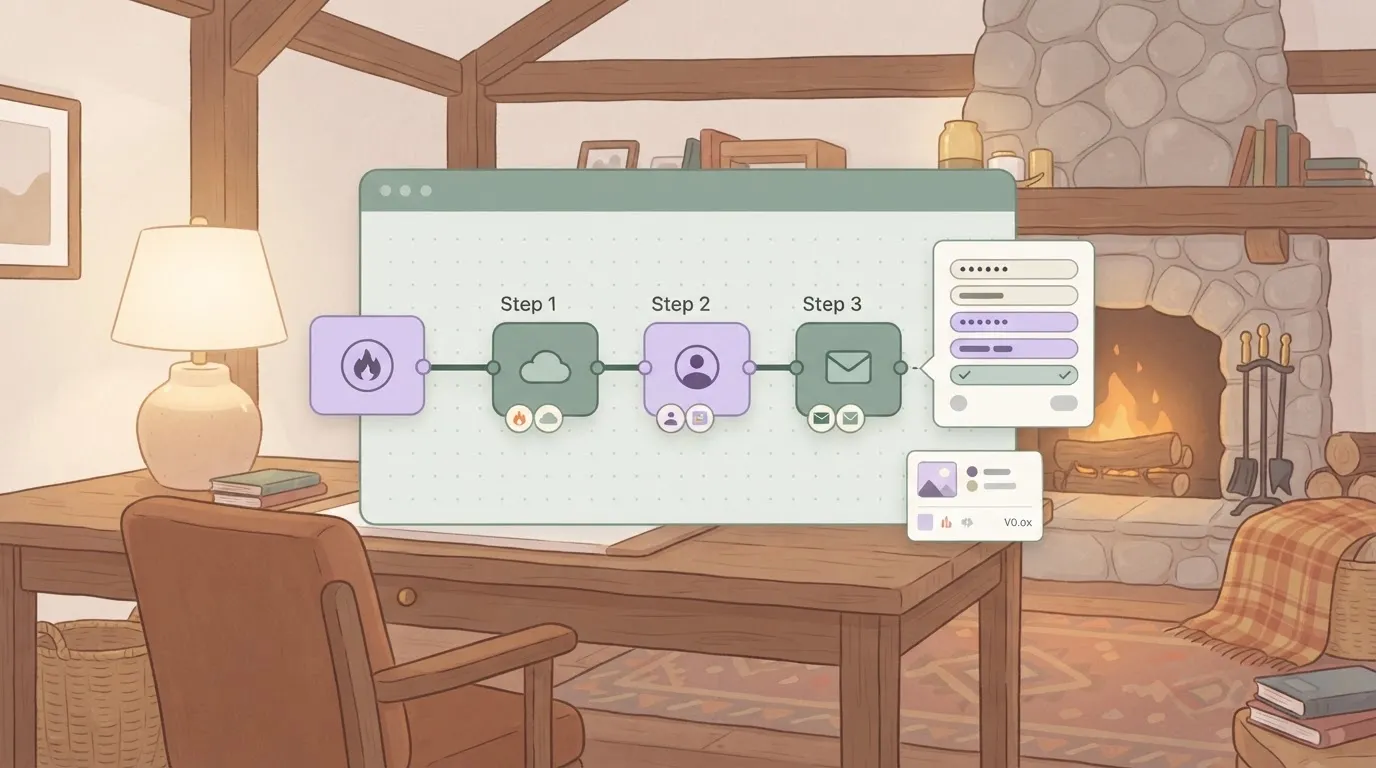
The two panels show the difference: on the left, a canvas where one trigger feeds three steps, each linked to an app; on the right, a YAML file beside a clock and an event arrow, with plugin blocks leading to a data store, which means the right can be version-controlled while the left cannot.
How Activepieces works
You build a flow in a browser canvas. Every flow starts with one trigger, such as an incoming webhook or a new row in a spreadsheet.
Steps run after it in order. Each step is either an integration (a connector to an app) or a built-in action such as a branch or a loop.
To add a step, you pick the app, authorize the connection, fill in the fields and test it against sample data. Nobody has to write code to get a working flow, so a person who knows the business process can own it.
How Kestra works
A flow is a YAML file that declares an identifier, a namespace, and a list of tasks, and triggers sit in the same file.
A schedule trigger takes a cron expression, and other triggers fire on a webhook or on an event, such as another flow finishing.
Each plugin covers one system, such as a database, object storage or a script runner, and plugins supply the tasks and triggers. Tasks pass outputs to the tasks after them, and the final data lands in a store you name.
The UI can edit flows, but the YAML is the source of truth. That means you can review, version and deploy flows like any other code.
The canvas model fits work that moves information between business apps:
- Routing a form submission to a CRM
- Notifying a team channel
- Passing a request to an AI agent step
- The people who build these flows are often not engineers
The YAML model fits work that moves and transforms data on a schedule or in response to events:
- Nightly loads into a warehouse
- File-arrival processing
- Infrastructure jobs
- The people who build these flows are engineers who already work in repositories and pipelines
Who writes workflows in each platform
Kestra assumes the person writing the flow is an engineer who is comfortable with YAML, Git and a terminal, and it's built around that assumption. A visual-first tool assumes the opposite: the builder works in a browser and may never open a repository.
Visual builder versus YAML
Kestra's UI includes an editor with a topology view, so you can see the graph, but the file is the source of truth, and you edit the file.
If you read YAML daily, this suits you. For a finance analyst or a marketing operations lead, the first flow means learning syntax, plugin names and templating before anything runs. The learning curve is short for engineers and steep for everyone else.

A visual builder reverses this: the builder picks a trigger, adds steps and maps fields on a canvas, and because no syntax is involved the learning curve is gentle for non-engineers.
Version control and review
With Kestra, versions live in Git. A change is a diff, a diff goes through a pull request, and a teammate reviews it before it merges.
Kestra can sync flows with a Git repository, and a Terraform provider exists for teams that manage flows as infrastructure.
When a run fails, Kestra's error handlers and alerting send the failure to whoever is on call, usually the engineering team that wrote the flow.
In a visual builder, the author is often a business user. Review happens inside the product rather than in a pull request, and the person paged may not be the one who built the flow.
Activepieces lets that business user skip the canvas as well: describe a process in its built-in chat and it builds and publishes the flow, the same kind of artifact a person would have assembled by hand.

Because RBAC, audit logs and run traces apply to it exactly as they do to hand-built flows, whoever is paged can read what happened without knowing who or what wrote it.
Ask the chat for a process that touches your connected apps and you get a live flow in your account, and its first run leaves a trace you can read step by step. MoneyGram, Moneypenny, Alan and FundingSocieties run Activepieces.
Pricing, hosting and licensing compared
Who must talk to a salesperson before you can budget? Read the table below against that question.
Activepieces publishes self-serve prices for Free, Plus ($20 a month) and Team ($200 a month), while Embed starts at $36,000 a year through sales, so Embed reaches only enterprise customers.
Kestra is free to self-host in its open-source edition and quotes every paid edition through sales.
| Activepieces | Kestra | |
|---|---|---|
| Entry price | Plus $20/mo; Team $200/mo; Embed $36k/yr | Free open-source edition; paid editions by sales quote |
| Sales-quoted plans | Self-hosted enterprise, SSO beyond Team | Every paid edition |
| Self-hosted edition and licence | Community edition under MIT; enterprise features under a commercial licence | Open-source edition under Apache 2.0; Enterprise edition under a commercial licence |
| SSO and admin | SSO starts at Team | SSO and role-based access sit in the Enterprise edition |
With the listed prices, a team lead can put Plus or Team on a card without a procurement thread. With Kestra's quote-only model, you can't size the paid cost until you have a call.
On Activepieces, Plus is the entry paid plan at $20 a month, and Team, at $200 a month, is the first tier that includes SSO.
Embed, from $36,000 a year through sales, is the plan for putting automations inside your own product, so it's the one to price if customers will see the builder.
You can also self-host the MIT community edition. Anything marked enterprise on the self-hosted side goes through the sales form.
You can run Kestra's Apache 2.0 open-source edition on your own infrastructure with no licence fee. Its paid Enterprise edition adds the access controls larger teams ask for.
Its price isn't published, so ask for a quote before you assume the free edition covers your audit needs.
"Supports SSO" isn't enough to go on. Ask each vendor which protocol it uses (SAML or OpenID Connect), on which plan, and whether role-based access comes with it. Then check that your identity provider supports that protocol. That check decides whether a plan fits.
Worth checking against a plan that does not meter every step: one credit covers a whole run on Activepieces.
AI agents, integrations and embedding compared
Kestra fits data and batch workloads better, while Activepieces fits business-app automation, AI agents and embedding, and its free plan already includes Agents. The three checks below show where each line falls.
AI agents
Ask one question: who builds the agent? If a non-engineer assembles it from a visual builder and connects it to CRM, email and chat tools, you want agent steps inside the same flow editor as your app triggers.
If an engineer wires an LLM call into a pipeline, an AI task declared in YAML next to the data steps does the job.
Integrations and custom connectors compared
Each vendor publishes an integration count, and the chart labels each bar with its source page. Activepieces lists 772, Kestra lists 2,400+, and n8n lists 2,584.
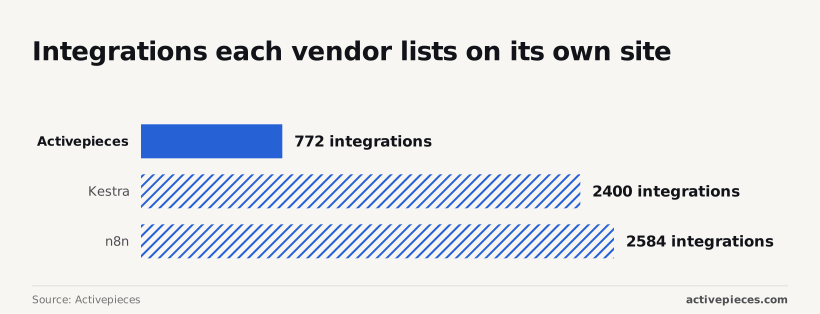
More integrations doesn't mean more of your apps are covered. Kestra's count leans toward databases, cloud storage, message queues and scripting runtimes.
If your stack is Snowflake, S3 and Kafka, that count works in your favour. If your stack is HubSpot, Slack and Gmail, check those exact names on the pages rather than the totals.
Both tools let you write your own connector when one is missing: Activepieces integrations are TypeScript packages, while Kestra plugins are written in Java. So ask which language your team already ships in.
Embedding automation in your own product
Embedding means your customers build or run automations inside your app, without seeing a separate vendor login. Activepieces has an embedding option for this, and it's sold through its sales form.
If only your engineers run the flows, embedding isn't a deciding factor.
Where code-defined orchestration is the better choice
Kestra wins outright on work that a canvas of app steps isn't built for. If your pipelines load a warehouse nightly, process files as they arrive or run infrastructure jobs, a tool designed around schedules, events and data stores will serve you better than Activepieces.
On authorship, YAML is an advantage when your builders are engineers.
Flows are plain text, so they diff, get reviewed and deploy through the same pull requests as the rest of your code, and Git sync and the Terraform provider suit teams already managing infrastructure that way. A business-user canvas gives up some of that rigour.
On cost, Kestra's Apache 2.0 open-source edition runs on your own infrastructure with no licence fee, and the licence is permissive. If you have engineers to operate it, you can start without talking to anyone. The trade-off is that paid editions are quote-only.
On integrations and AI, the 2,400+ catalogue is a real strength for databases, cloud storage, queues and scripting runtimes. An engineer who wants an LLM call between a transform and a load can declare it in the same file as the rest of the pipeline.
Embedding is the one criterion where Kestra doesn't compete.
Cases where engineering-owned pipelines settle it
A data platform team with a warehouse, an object store and a message queue is the clearest case. Its builders already live in Git, its failures already route to an on-call rota, and its integrations are databases rather than SaaS apps.
On every row of the table except embedding, Kestra matches that team's habits better than a canvas does.
A second case is a team that wants no vendor conversation at the start. Engineers can prove a pipeline on their own infrastructure under Apache 2.0, and the paid edition becomes a question only when SSO and governance do.
A visual builder would add nothing that pipeline needs.
Mistakes teams make choosing between Activepieces and Kestra
Pricing the wrong choice is the costliest error, and five mistakes cause most of it. The list below pairs each one with the fact that refutes it, so check your shortlist against it before you open a pricing page.
- Treating the two as like-for-like: one builds app-to-app automations in a visual editor, the other runs data and infrastructure pipelines defined as code.
- Ranking by integration count: the published numbers differ by more than 3x, but they count different things.
- Assuming anyone can maintain YAML: Kestra flows are YAML files, so someone on your team must be comfortable reviewing them.
- Calling open source free: the licence costs nothing, but servers, a database, upgrades and on-call time don't.
- Assuming compliance: SOC 2 is a report you request, not a badge you infer from a feature page.
Calling open source free: the licence costs nothing, but servers, a database, upgrades and on-call time don't.
Because both tools run workflows, they look interchangeable. They aren't.
A 3.3x gap tells you nothing about your stack: Activepieces lists 772 integrations and n8n lists 2,584, which means raw integration count doesn't account for which ones you actually need. List the ten apps you need and check each one by name.
A smaller catalogue that covers all ten beats a larger one that misses two.
Self-hosting moves the work to you: someone must patch, back up the database, and watch the queue. Ask who holds the pager before you count the licence as free.
Frequently asked questions and the next step
Unless engineers own your data pipelines as code, Activepieces fits. The questions below cover what's left, and the steps that follow take you to the right page.
Using the tools together
Can Activepieces and Kestra be used together? Yes. They run as separate services, so a Kestra flow can call an Activepieces webhook when a pipeline finishes, and an Activepieces flow can call Kestra's API to start a run.
Engineers keep the pipelines, and the business team keeps the app-to-app automations that react to them.
Ease of use and self-hosting
Is Kestra or Activepieces easier for non-developers? Activepieces, because flows are built in a visual builder. Kestra defines flows as YAML, so the person editing them needs to be comfortable with code and version control.
If the people building flows aren't engineers, that difference decides it.
Can I self-host both for free? Both publish an open-source edition you can run on your own infrastructure at no licence cost.
Features reserved for paid editions, such as enterprise administration, need a commercial plan on either side.
Compliance and next steps
Does Activepieces have SOC 2 certification? No. The SOC 2 programme is in progress, and it isn't a certification you can cite today. If your procurement process requires one, raise it with sales before you commit.
Work through these in order:
- Confirm who will own the flows. Non-engineers building app and AI-agent automations, or an embedded product feature, means Activepieces. Engineers running data and infrastructure pipelines as code means Kestra.
- For a self-serve Activepieces plan, go to activepieces.com/pricing.
- For self-hosted enterprise, SSO beyond the Team plan, or embedding, use the form at activepieces.com/sales.
- For Kestra's enterprise edition, request a quote through Kestra's own pricing page, since it's not published as a fixed price.
Related reading
References
Running the numbers
See what the same workload costs here.
Free forever plan, and every paid plan self-hosts at no extra cost.
See pricing Talk to sales