Activepieces vs Integrately: 2026 Comparison Guide

Oct 30, 202614 min read
When you need to control where automations run and who can see them, Activepieces runs on your own infrastructure or in its managed cloud, and its core is MIT-licensed.
Integrately is the faster route when a non-technical team wants ready-made automations running without owning any infrastructure.
Activepieces vs Integrately is a buying comparison between two workflow automation platforms: Activepieces, an open-source tool that can be self-hosted, used for AI agents or embedded in products, and Integrately, a hosted service of ready-made automations for non-technical teams.
Activepieces vs Integrately in one table
Who each tool is for
If your team needs to self-host, read and modify the source, build AI agents, or embed automation inside its own product, Activepieces covers all four, with an MIT-licensed core you can read, modify and run on your own servers.
The price of that control is that someone on your side has to make decisions about deployment and workflows.
Integrately is for non-technical teams that want pre-built automations switched on quickly, and it asks for far less setup in return.
The at-a-glance table
The table below sets the two tools side by side on the eight points that most often decide a purchase. Where a vendor hasn't published an answer, the cell says so rather than guessing, so treat those cells as questions to put to the vendor.
| Activepieces | Integrately | |
|---|---|---|
| Built for | Teams wanting control: self-hosting, AI agents, embedding | Non-technical teams wanting ready-made automations fast |
| Hosting | Cloud, or self-hosted on your own infrastructure | Hosted service; self-hosting not published |
| Licence | Open source community edition; enterprise features under a commercial licence | No open source licence published |
| Pricing and entry price | Self-serve plans on its pricing page; self-hosted enterprise quoted by sales | Plans on its pricing page; entry price $19.99 a month billed annually |
| SSO and admin | SSO beyond the Team plan is handled through sales | Not published |
| AI agents | Supported | Not published |
| Integrations | Count not confirmed here; see the vendor's integrations page | Count not confirmed here; see the vendor's integrations page |
| Embedding in your product | Supported | Not published |
Read every cell as of 30 October 2026, the date the vendor pages were read. Pricing, plan limits and integration counts change often. Confirm them on each vendor's own pricing page before you commit.
Activepieces is the better fit for teams that need to control where their automations run and who can see them, judged on how much of the enterprise feature set they keep once they choose that control.
The self-hosted air-gapped docs list the same enterprise features as the managed cloud pinned to an EU or US region with SOC 2 Type II: SSO, SCIM, custom RBAC, audit logs, release management and secret managers.
Going air-gapped therefore means full control rather than a fraction of the product. The trade-off is that someone on your side must own deployment and workflows, so Integrately remains the faster route for a non-technical team that wants ready-made automations without running any infrastructure.
The fastest way to settle a shortlist is to try one. Activepieces is free to try, no credit card.
Six criteria that decide this choice
Because plan details move, this comparison rests on six measures that stay put, each applied to Integrately and to its open-source counterpart.
An automation platform is software that watches one app for an event and then runs steps in other apps, so the measures are about who controls that machinery:
- Hosting control: whether you can run the platform on your own servers or only in the vendor's cloud.
- Licence: whether the source code is open to inspect, modify and self-run, or proprietary.
- Price at the same task volume: the monthly cost once both tools run the same workflows the same number of times.
- Admin and SSO plan: the tier at which single sign-on and team controls become available.
- AI agents: whether you can build agents that choose their own steps, or only run fixed sequences.
- Embedding: whether you can put the automation builder inside your own product.
Control over where data runs
Your workflow data passes through the vendor's infrastructure with Integrately, because it is a hosted, proprietary service that you can't run yourself. For a team with no data-residency obligations, that's a convenience: nothing to install or patch.
For a team with them, it settles the question before features come up.
An open-source licence with a self-hosted option moves that decision to you.
Price at the same task volume
Compare cost per completed workflow, not the headline plan price. Integrately bills by tasks, so first find out how each plan counts one: per run, or per action step inside a run.
A multi-step workflow can consume several tasks every time it fires, and that multiplier drives the monthly bill.
Ask which plan unlocks SSO and role-based controls, because that's often a higher tier than the one you would otherwise buy. Read the security documentation for each tool and ask for certification status in writing instead of assuming it.
For AI, test whether an agent can pick tools and branch on its own or only follow a fixed path.
For embedding, ask each vendor whether customers can use the builder inside your product under your branding. Integrately's strength is its ready-made automations, so confirm directly what it offers for both.
Integrately judged on every criterion
Integrately is a hosted, template-first product: you pick a ready-made automation and switch it on instead of building the flow yourself.
That suits a marketing or operations team with no developer, because setup is choosing and connecting rather than designing.
You work inside the vendor's hosted service, and that is the trade-off. I found no self-hosting option in its pricing page or docs, so teams with data-residency or on-premises requirements should ask Integrately directly.

Integrately pricing and task limits
The bill follows how often your automations run, not how many you build, because Integrately meters by tasks.
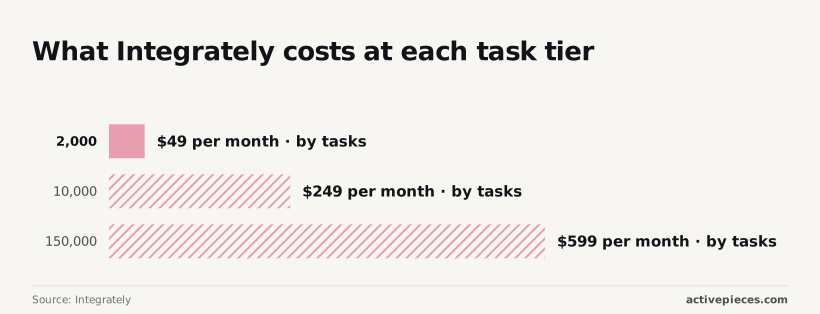
Integrately's pricing page lists $19.99 a month, billed annually, for 2,000 tasks and $239 a month, billed annually, for 150,000, so you need to estimate your monthly usage to select the right plan.
Divide each price by its task count. The unit economics appear: roughly 2.45 cents per task at the first tier, 2.49 cents at the second, and 0.4 cents at the third.

Moving from 2,000 to 10,000 tasks multiplies volume by five and the price by just over five, so the second tier buys no discount.
At 150,000 tasks you pay about six times less per task than at 10,000, and that is where the economics change.
Before you pick a tier, count how many tasks one run of your busiest automation consumes, because a multi-step flow can use several.
Integrately admin, AI and embedding features
On SSO, admin controls, AI agent capabilities or embedding Integrately inside your own product, the pricing page, docs and changelog give me no published detail I can quote. I won't guess at them.
If any of these is a requirement, ask Integrately in writing and get the answer tied to a named plan, because a feature that exists on one tier may not exist on the $19.99 one.
Where the hosted route is the better buy
Integrately's design removes the work that makes open source costly for a team without a developer. Nobody patches a server, schedules backups or answers an uptime alert, and the person who sets up an automation is the person who needs it.

On the criteria above, that wins on hosting effort and on time to a first working flow. It also gives a simple spending model when your needs match its templates: a plan fee tied to task volume, with no infrastructure line beside it.
A small team running common app-to-app jobs, such as moving form leads into a CRM, may never meet the limits that push others toward open source.
If that describes you, the control Activepieces offers is something you would carry without using, and Integrately is the sensible purchase.
Reading a table only gets you so far. Build the same workflow in Activepieces and compare it yourself.
Activepieces judged on the same criteria
With an MIT-licensed community edition and a choice of where it runs, Activepieces settles the control questions, but it asks for more technical comfort than a ready-made-automation tool does.
Open source and self-hosting
Your team can read, modify and run the code without a licence negotiation, because the community edition is MIT-licensed.
The same flows can run in the vendor-hosted cloud or on your own server, as the two panels below show. What to take from them is that the flow stays the same and only the operator changes.
On your own server that operator is your IT person, who handles upgrades, backups and uptime.
Cloud is the self-serve entry point, and its current plans and prices are on the pricing page. Self-hosted enterprise is quoted by sales, so budget for a conversation rather than a checkout.
Control is often sold by shrinking the self-hosted build, so the buyer with the strictest requirements gets the thinnest product.
Activepieces doesn't do that: the air-gapped edition keeps the enterprise controls you'd otherwise expect only in the cloud, including single sign-on, SCIM provisioning, custom roles, audit logs, release management and secret managers.
Regulated and public-sector organisations run that edition in production, and MoneyGram, Moneypenny, Alan and FundingSocieties run Activepieces too. Put the two feature lists in the docs side by side and the only difference you'll find is who operates the servers.

If you need SSO beyond the Team plan, add a sales conversation to the timeline, because it goes through sales. SOC 2 is in progress and not certified. If your procurement process requires a finished report, that gap is real today.
AI agents, integrations and embedding
You can embed Activepieces in your own product, and it includes AI agents. Embedding is the area that most needs engineering time. Its integrations are called pieces, and the library has grown quickly, according to Activepieces:
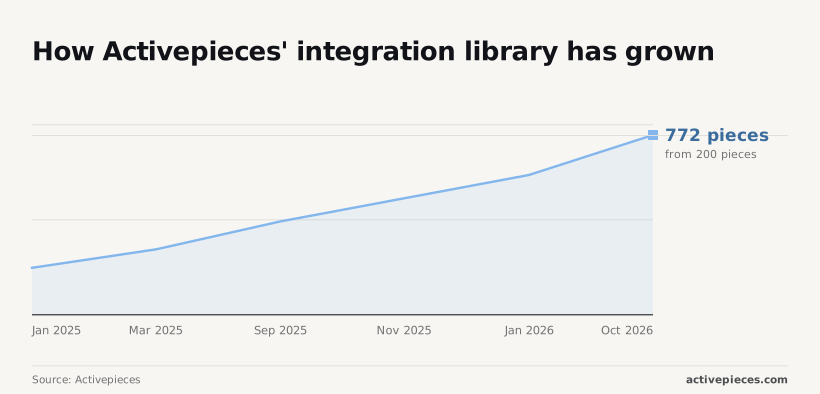
- 200 in January 2025
- 280 in March 2025
- 400 in September 2025
- 500 in November 2025
- 600 in January 2026
- 772 in October 2026
That's nearly four times the January 2025 count in about twenty-one months.
Which tool wins each deciding question
On G2 the two tools are close on ease and support. The decision turns on control: who runs the software, who can extend it, and what it costs at volume.
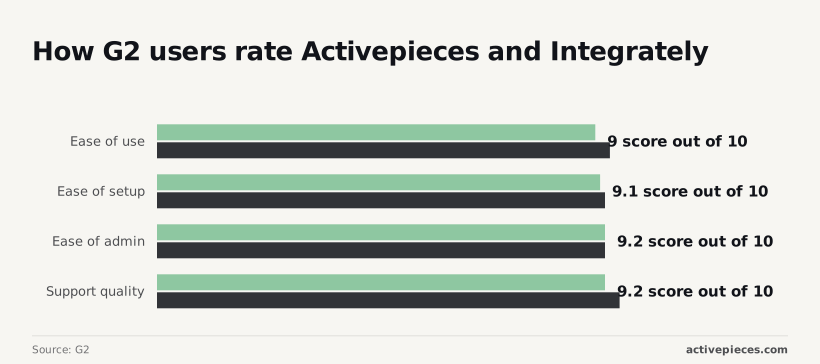
Ease of use scores 9 to 9.3 out of 10, which means neither tool needs a trainer.
Onboarding effort won't separate them: ease of setup is 9.1 to 9.2 and ease of admin is 9.2 for both. Support quality is 9.2 to 9.5, a gap of 0.3 points, too small to base a purchase on.
The table gives the winner on each question and the criterion behind it.
| Question | Winner | Criterion it ties to |
|---|---|---|
| Automations this week without technical staff | Integrately | Ready-made automations |
| Self-hosting or code audit | The open-source tool | Source you can run and read |
| Embedding | The open-source tool | Automation inside your product |
| AI agents | The open-source tool | Agents as part of the platform |
| High-volume cost | The open-source tool, self-hosted | Your servers set the bill |
For the fastest start, Integrately wins. It offers prebuilt automations you switch on rather than build, so a sales or operations team can have a working flow the same week without an engineer.
If your security review requires running the software on your own infrastructure or reading its code, the open-source tool qualifies and a hosted-only product doesn't.
To offer automation to your customers inside your product, you need a platform built to be embedded.
You build agents where your workflows already run, because they belong to the platform in the open-source tool.
At volume, self-hosting swaps per-task billing for infrastructure cost, which you can forecast like any other line item. Check both pricing pages against your monthly run count before deciding.
Mistakes buyers make choosing between these tools
Four costly automation platform buying mistakes
Comparing plan names instead of metered tasks and assuming a cheap plan includes SSO or embedding are two of the four costly mistakes. The other two are self-hosting without anyone to run it and counting integrations instead of checking your own apps.
Task metering and governance in automation tools
Plan names hide the meter. "Starter" and "Pro" tell you nothing until you know what counts as one task.
If a single workflow run with five steps consumes five tasks on one tool and one on another, the same workload bills at very different rates. Compare cost per completed run, not the sticker on the tier.
A cheap plan rarely carries governance. Single sign-on, audit trails and the right to embed automations in your own product are commonly held back for higher tiers or quoted by sales. Budget for the tier that includes them, or the entry price isn't your price.
Hosting and integrations
Self-hosting moves the bill, it doesn't remove it. The software may cost nothing, but upgrades, backups, uptime and security patches need an owner. With nobody on the payroll who will answer a failed-deployment alert, the saving is a liability booked under another name.
**Self-hosting moves the bill, it doesn't remove it.
Integration counts measure the catalogue, not your stack. A large number is irrelevant if your billing system or industry tool is missing, or is present with only the actions you don't need. Count the apps you use, and the specific actions inside them.
The pre-purchase check
Before buying, run this check:
- List your ten most important workflows and the apps each touches.
- Confirm each app and action exists, not just the app name.
- Convert each workflow to tasks under each vendor's metering and multiply by monthly runs.
- Write down whether you need SSO, audit logs or embedding, and confirm the plan that includes them.
- If self-hosting, name the person who owns it.
Verdict and the next step to take
Pick Integrately if the check found none of these needs: self-hosting, open source code, AI agents, or embedding automations in your own product. If it found any one of them, Activepieces covers it, with an MIT-licensed core you can self-host.
The verdict and when it flips
The reasoning is unit economics, not feature count. Integrately's cost is a plan fee for ready-made automations that a non-technical team can switch on quickly. That's cheap when your work matches its templates.
Once you need control, the arithmetic changes. If data must stay on your own servers, or customers must see automations inside your product, no amount of template convenience offsets the missing capability.
Without such a need, the extra control is something you would pay for in setup time and never use.
So the flip condition is narrow. One requirement from the check is enough to move the decision to Activepieces. Without one, the simpler tool is the sound purchase.
What to do this week
Run a trial on your own work and it will settle this faster than another comparison table. Each step produces a figure you can put in a spreadsheet.
- List your five most-used apps.
- Pick one real workflow that connects at least two of them, something your team runs now and not a demo.
- Build it on Integrately and record how long it takes.
- Build the same workflow on Activepieces and record the same.
- Compare setup time and task count on both. Task count is what each plan bills against, so it drives your monthly cost once the workflow runs at real volume.
With those results in hand, the next move depends on what you're buying. For self-serve plans, use the pricing page: https://www.activepieces.com/pricing. For self-hosted enterprise, SSO (single sign-on) beyond the Team plan, or embedding, use the sales form: https://www.activepieces.com/sales
Related reading
References
Still comparing
The fastest way to settle it is to build something.
Open source under MIT, so you can self-host the same thing later.
Start free Talk to sales