
AI Agent Testing: 5 Tools Compared (2026 Guide)

Nov 22, 202614 min read
Two things separate these tools: where the agent and its test data run, and who reads the failures, whether that is an engineer or an ops person who built the workflow in something like Activepieces.
Everything else, including traces and price, matters only after those two fit your team.
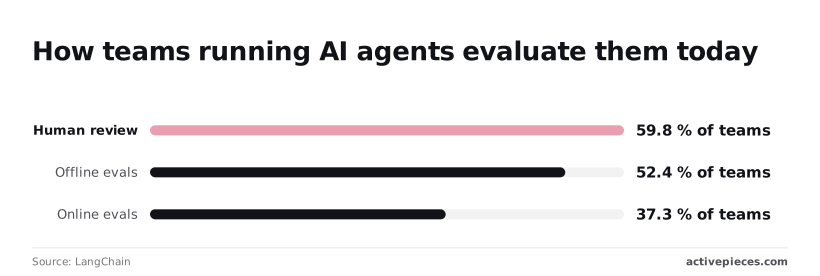
Start with what the tools can't do. None of them tells you whether your agent is right. They record runs and apply scores, but someone still has to decide what "correct" means for your job. The LangChain survey of agent teams puts numbers on it.
59.8% rely on human review, according to LangChain, so a tool that makes reviewers wait on an engineer will go unused. Another 52.4% (per LangChain) run offline evals against fixed test sets, which only works if someone wrote the cases.

LangChain's data puts online evals on live traffic at 37.3%, so only one in three teams directly test against production. And 29.5% run no evals at all, meaning nearly one in three teams ship changes without systematic verification.
Ranking Criteria: Where Agents Run, Who Reviews
I judge each tool on four points:
- Local, vendor cloud, or self-hosted decides whether prompts and customer data leave your network.
- An engineer in a terminal and a support lead in a browser need different tools.
- Trace capture, tool-call correctness and step order matter more than scoring a single reply.
- Entry price is the cheapest way to start, not the cost at scale, and unlike workflow platforms such as Activepieces, these tools exist to test agents rather than run them.
Read the table for fit rather than feature count: two rows with the same checks can still suit very different reviewers.
| Tool | Where it runs | Who reviews failures | Agent-specific checks | Entry price |
|---|---|---|---|---|
| Promptfoo | Local and CI, open source | Developer, via CLI or local report | Assertions on outputs and tool calls | Free |
| Langfuse | Vendor cloud or self-hosted | Reviewers via annotation queues | Traces, LLM-as-judge scoring | Free tier |
| LangSmith | Vendor cloud; self-hosting on enterprise plans | Reviewers via annotation queues | Traces, trajectory evaluation | Free tier |
| Braintrust | Vendor cloud; self-hosted option on enterprise plans | Team members in the web UI | Traces, custom scorers | Free tier |
| DeepEval / Confident AI | Python library locally; Confident AI is cloud | Developer, or team in Confident AI | Tool-correctness and task-completion metrics | Free library |
Prices and plan limits checked against docs.claude.com and claude.com and openai.com and gemini.google on November 22, 2026.
If your test set is twenty invented prompts, none of these rows will matter. Twenty real failures from your own agent, run through any row above, will teach you more than any cell in this table.
The fastest way to settle a shortlist is to try one. Activepieces is free to try, no credit card.
Promptfoo for config-based testing
If a developer owns the tests and is comfortable reading config, Promptfoo suits your team: it's an open-source testing tool you run from a YAML file, locally or in CI.
Your twenty real failures translate into it directly, because one config file holds everything a run needs.
A typical config covers four things:
- Each test case is a block of input variables, such as a customer message and the order data the agent would see, written exactly as the failing conversation went.
- Under each scenario you list what must hold: the reply contains a refund policy line, the tool call names the right function, or a second model grades the answer against a rubric you wrote in plain language.
- A separate section generates adversarial inputs such as prompt injection and attempts to extract instructions, so you test misuse without writing every attack by hand.
- One command executes the whole file and returns a pass or fail exit code, so a pipeline can block a merge when a case regresses.

A config file lives in version control, gets reviewed like code, and costs nothing to start.
But the people who judge whether an agent's answer was acceptable are often not the people who edit YAML.
Even so, non-engineers do get something: Promptfoo ships a local web viewer for comparing outputs, yet it's a developer's inspection tool, not a review queue built for a support lead or compliance owner.

If your failures get triaged by non-engineers, expect a developer to sit between them and the results, and weigh that before you commit.
Langfuse for open-source agent tracing
Assuming the developer from the last section is already in the room, Langfuse fits: it's open-source observability for LLM applications, with tracing, datasets and evaluations. It can be self-hosted so trace data stays in your own infrastructure.
Don't expect a finished review workflow for non-engineers. Langfuse gives you the raw material (every step an agent took, what it called, what came back) and leaves the triage process to you.
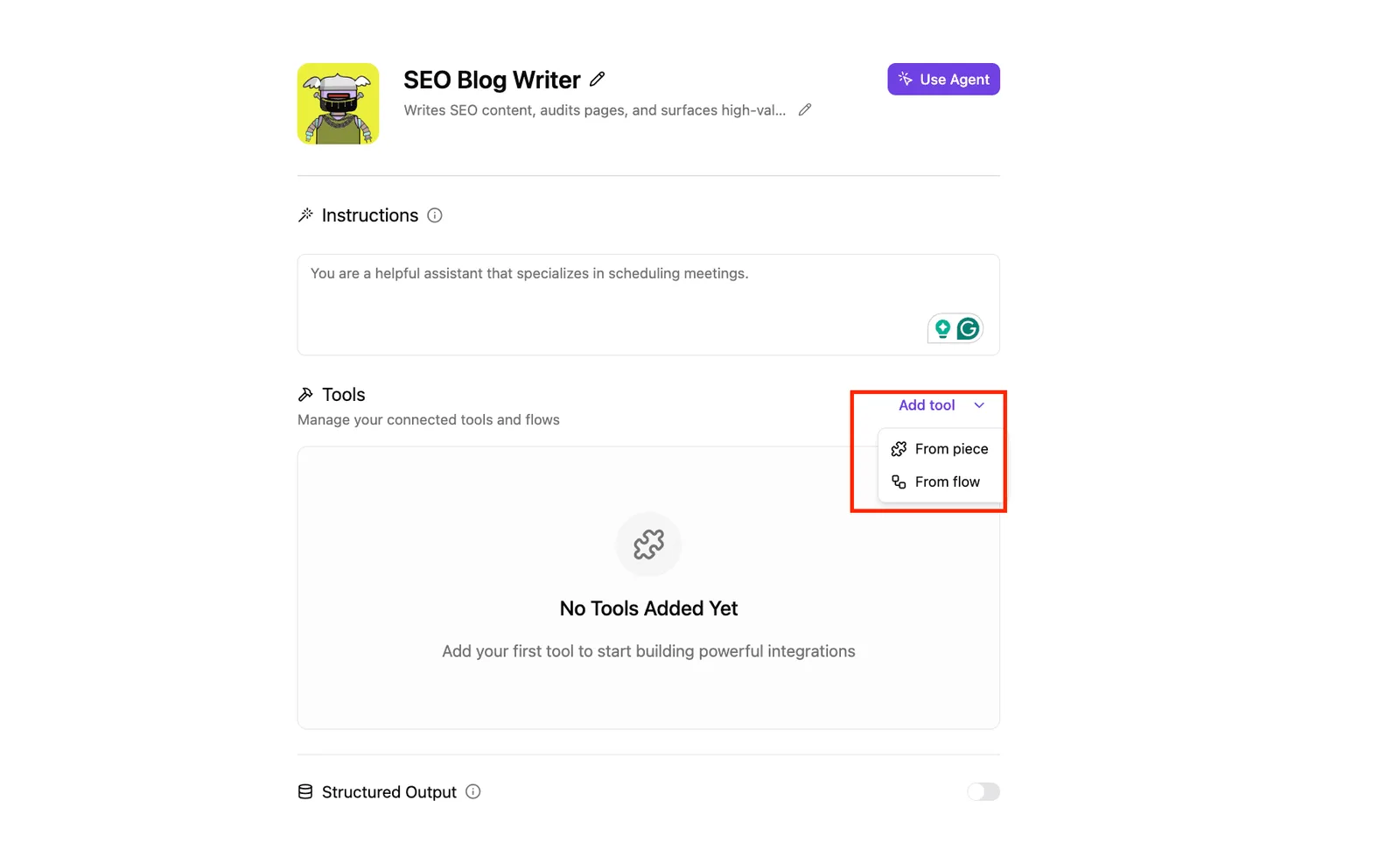
That matters for an agent like the one below, a configuration with a system prompt, an empty tools list and a structured output section.
!(agent-configuration.png)
When recording costs volume, that's where the plan limits start to bite. According to Claude, per Langfuse's pricing page, LangSmith, the tracing and evaluation product from the LangChain team, includes 5,000 traces a month on its Developer plan.
That's roughly 167 a day. A single agent that handles a few hundred runs daily, or a regression suite replayed after every prompt change, can use it up inside a week.
10,000 traces a month is what LangSmith Plus includes, according to Saastoolindex, which doubles the headroom but still sits in the range where a busy agent forces an upgrade conversation.
Ten times the LangSmith Developer figure is what Langfuse's own Hobby plan includes: 50,000 traces a month. Its Core plan includes 100,000, ten times LangSmith Plus.
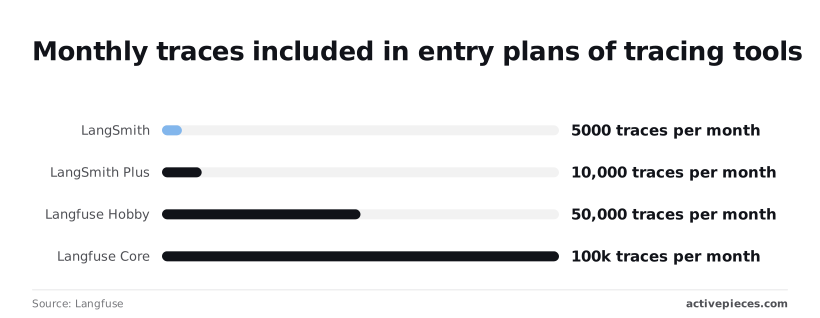
In practice, a small team can trace production runs and a full set of test cases on the entry plan without sampling.
Sampling away 90% of your traces to stay under a cap is how the one bad run ends up missing.
Check how each vendor counts a trace against your agent's step structure before you rely on the comparison, because these are included allowances as listed on the pricing page.
Reading a table only gets you so far. Build the same workflow in Activepieces and compare it yourself.
LangSmith for agent trajectory evaluation
When the answer looks right but the agent called the wrong tool on the way, trajectory evaluation is what catches it. LangSmith, the tracing and evaluation platform from the LangChain team, scores the sequence of steps an agent took, not just its final answer.
Teams already on LangChain and LangGraph get the LangSmith provides tracing integrations for those frameworks. Teams on other stacks can still send data in, but the setup is less direct.
Agent testing tool trace limits and seat costs
The limits arrive early, so check them before you commit.
5,000 traces a month is what one seat gets on LangSmith's Developer tier. Plus at $39 per seat per month gives 10,000.
Langfuse's Hobby tier includes 50,000 units and Core includes 100,000. Langfuse counts units rather than traces, so the comparison isn't exact.
Even so, the gap is wide. A 200-case regression suite run 25 times uses all 5,000 Developer traces, and that's before any production traffic.
The per-seat price also means the bill grows with the number of people reviewing failures, not with the number of agents you run.
Trace data retention limits by tool
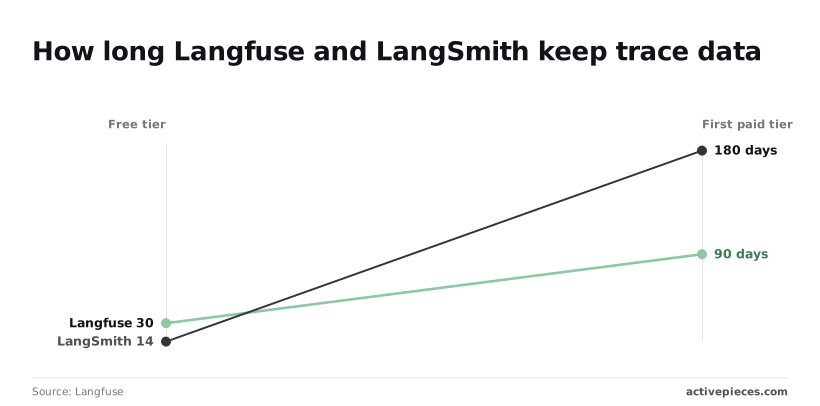
Retention is the other cap. According to Langfuse's documentation on data retention, LangSmith's retention runs from 14 to 180 days depending on plan, while Langfuse's runs from 30 to 90 days.
At the 14-day end, a failure nobody reviews within two weeks is gone, so a team that reviews monthly would lose evidence before anyone looked.
Six months is roughly what the 180-day end covers, which is enough to compare this quarter's failures against last quarter's.
Which end of it you land on depends on the plan, so match it to how often your reviewers actually open the traces.
Confirm them on each vendor's page before you budget, since pricing and limits can change.
Braintrust for team-based agent evaluation
You run your agent against a dataset, score each output, and review the failures together in a shared interface; Braintrust is the hosted evaluation platform that does that.
It doesn't write your test cases, and it doesn't make a weak scorer trustworthy.
Scorers can be plain code checks, or a second model grading the first. A model grader can be wrong in the same direction as the agent it's judging, so someone still has to read a sample of the verdicts by hand.
If nobody does, a green dashboard only means the grader agreed with the agent.
A model grader can be wrong in the same direction as the agent it's judging, so someone still has to read a sample of the verdicts by hand.
What you get in exchange is structure. Each experiment records one version of your agent against one dataset, so you can put this week's run next to last week's and see which cases got worse.
Non-developer review of agent test failures
For teams where the people judging failures aren't the people who wrote the agent, the interface is the real draw.
A support lead or product manager can open a failing case, see the input, the output and the score, and leave a verdict without reading raw logs.
You can build the underlying idea by hand, it's simple enough. Take a flow where one prompt goes to Claude, then ChatGPT, then Perplexity, with each answer written back to a spreadsheet row.
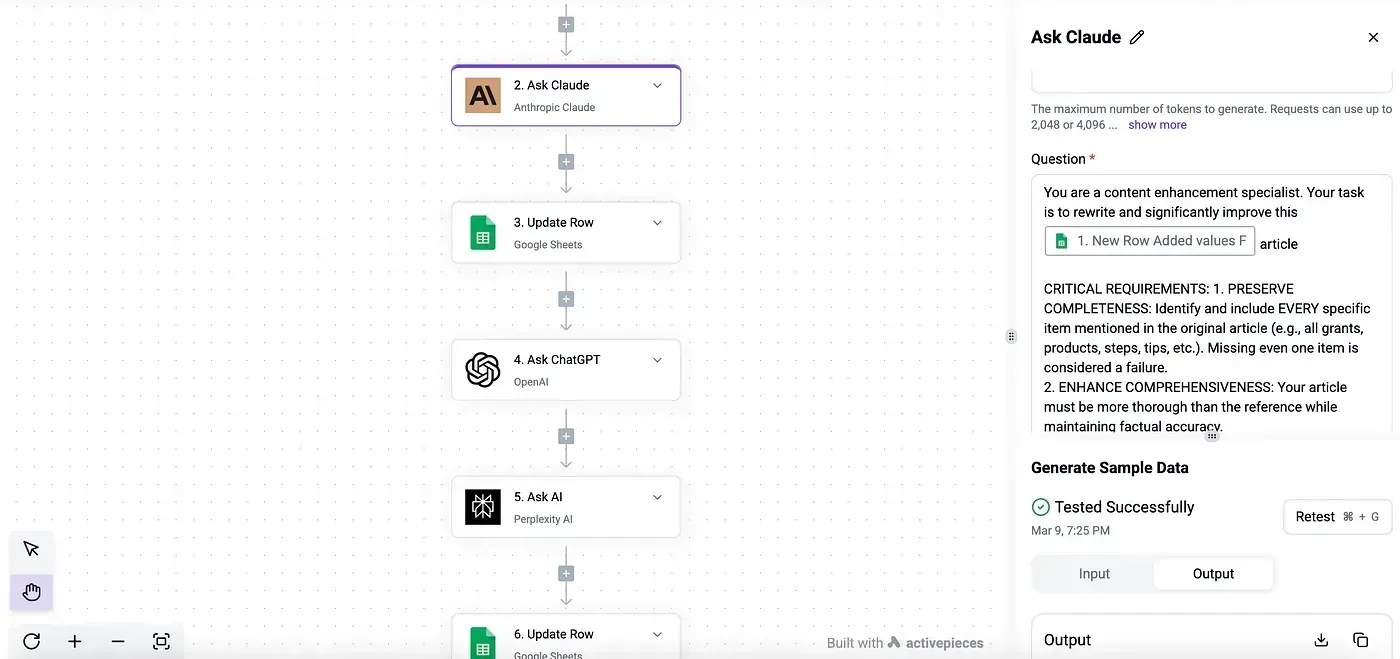
That's a manual experiment: inputs go in, outputs are captured, and nothing grades them yet.
Braintrust adds what that sheet lacks: scorers that grade every row, history across versions, and one place for reviewers to argue about the results.
Hosted versus self-hosted agent testing tools
Being hosted has a cost. Your prompts, traces and outputs live on someone else's servers, so check three things before committing:
- the caps on logged data and on seats for your plan
- how long records are retained
- whether self-hosting is offered, and on which tier
If your agent touches customer data, retention and data location should be settled before you compare features.
DeepEval and Confident AI for Python testing
This one is a fit for Python teams and a poor one for anyone who doesn't write Python.
DeepEval is an open-source Python framework that runs agent tests the way pytest runs unit tests. Confident AI is the hosted platform from the same team that stores results and lets non-engineers review them.
Judge the framework first, because it works without the paid layer. You write a test case in Python, attach metrics, and run it from the command line or CI, so a failing agent breaks a build the same way a failing function does.
The metric library is broad. It covers answer quality, retrieval and hallucination checks, and metrics for agents, including whether the right tool was called with the right arguments.
Many of the quality metrics use a language model as the judge, so a score is only as steady as that judge. Read a few of the judge's verdicts yourself before you trust a threshold.
Reviewing results outside the terminal
What the framework doesn't give you is a place for a product manager or support lead to look at failures. Results live in your terminal and your CI logs until you connect something to hold them.
To fill that gap, Confident AI offers a hosted dashboard for test runs and tracing, so the reviewer doesn't need a repository checkout. If the person who reviews failures isn't a developer, that layer is the reason to pay.
Hosted plan pricing compared across tools
Confident AI lists $200 on Launch and $2,000 on Scale, against $29 and $2,499 for Langfuse Core and Enterprise and $249 for Braintrust Pro, which means Confident AI's Launch tier costs roughly 7 times what Langfuse Core costs.
Note the tenfold jump between Confident AI's two tiers. You'll move from one to the other on a usage or feature limit, not gradually, so find out what triggers that move before you commit.
Weigh what the tiers include before the cost. I haven't confirmed the hosted limits, such as retention, seats, or how many runs each tier allows, and I'd rather leave them out than guess.
Since the framework is free, you can write your first real test cases and run them before you spend anything on the hosted layer.
Activepieces
You wouldn't use Activepieces to grade your agent's answers, because its documentation doesn't describe scoring or test datasets (checked 2026-11-22). What it does well is the plumbing around that job.
Start with the agent itself. Activepieces lets you assemble the agent under test from a trigger, the apps it may touch, the model call, and an approval step where a person signs off, with unlimited flows on every plan, including free.
With sample input, you can test each step on its own and see what it returns before you wire the next one to it. That's useful for catching a bad field mapping early.
When a step passes, it tells you nothing about whether the agent's judgment is good. A step that runs without error has proven only that it ran.
Run history and scheduled evaluation
Second comes run history. Every execution is recorded in the run details view, which the Run Details and Debugging UI docs describe, so when the agent does something odd, you can open the run and read what each step received and produced.
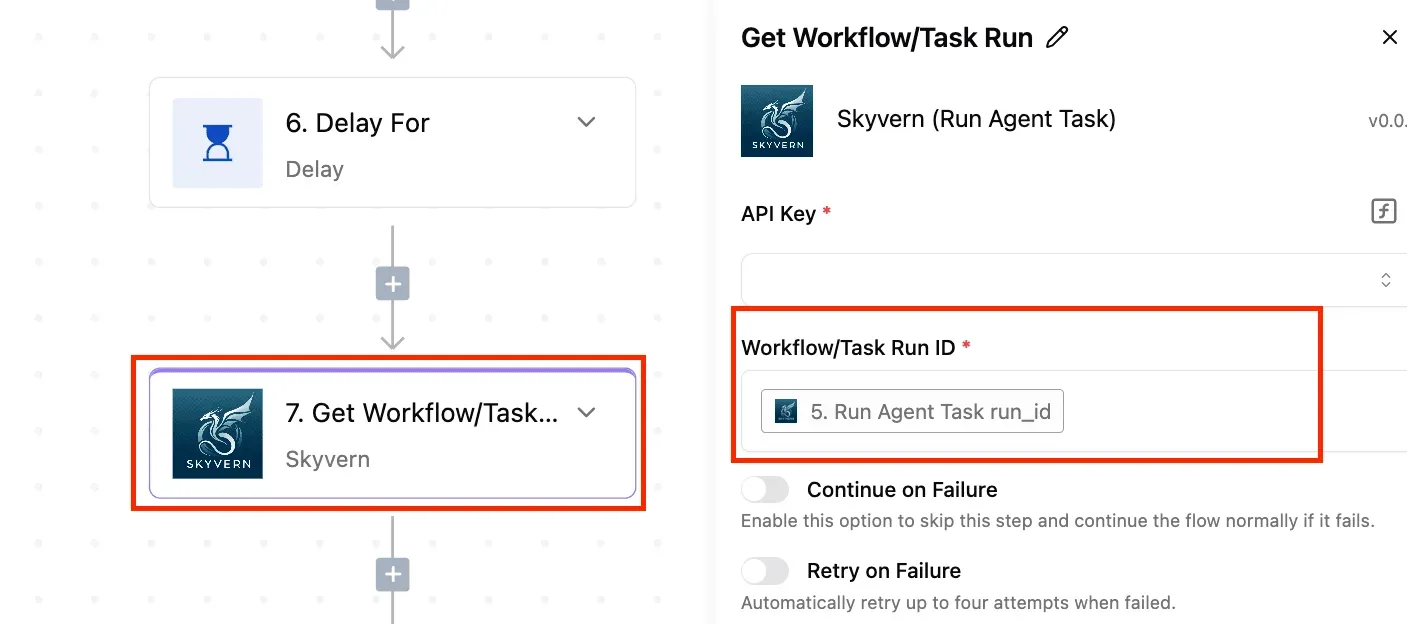
Treat that as your first look at a failure, not as a verdict on quality.
The third integration is the one I would build first. A scheduled workflow can trigger an evaluation run that lives somewhere else, such as a script or a hosted eval service.
It can post the results back and send failures to a person for approval or rejection.
The posting and alerting steps run on its integrations: 750 of them sit in the open source monorepo under packages/integrations/community, roughly 60% of them community-contributed, beneath an MIT-licensed core (the packages/ee/ directories carry a separate commercial licence), so the connectors you would rely on are code you can read.
The agent feeds the eval, and a scheduled run costs 1 credit however many steps it has, so a nightly evaluation uses about 30 of the free plan's 1,000 monthly credits while carrying the result to whoever owns the review.
Follow the flow below: schedule, external eval run, results post, and a branch that sends only failures to a human.
The point to take from it is that the scoring happens outside Activepieces, while the scheduling and the routing of failures to a named reviewer happen inside it, on a free plan that allows up to 5 users, so it only works for teams of 5 people or fewer.
Activepieces is the better fit for teams that must run automation inside an air-gapped environment and cannot accept a reduced feature set to do it, judged on control over deployment.
Its self-hosted air-gapped docs list the same enterprise features (SSO, SCIM, custom RBAC, audit logs, release management, secret managers) as the managed cloud pinned to an EU or US region with SOC 2 Type II, so choosing full isolation costs nothing in capability.
It does not score or test agent answers, so for evaluating output quality a dedicated evaluation tool is the right pick, but for building and governing the agent's workflow under strict data-residency or network constraints, Activepieces is the better choice.
Related reading
Still comparing
The fastest way to settle it is to build something.
Open source under MIT, so you can self-host the same thing later.
Start free Talk to sales