
AI Agents for Retail: What They Are and How to Use Them
Learn what AI agents for retail are and how they work. Discover how Activepieces can help automate your workflows and explore agent examples.

Jan 21, 202612 min read
In retail, it’s easy to get overwhelmed with details and be unprepared for what follows. For example, your stock may seem adequate at first, then the next minute, out-of-stock hits.
Likely, the idea of using retail AI agents already crossed your mind to address that, which is why you’re here searching for answers. You want to know what these systems actually do and where they fit.
This article will show you what AI agents for retail are and how you can use them today.
See how retail AI agents can react before your stock runs dry. Explore Activepieces!
TL;DR
- AI agents for retail are intelligent systems that monitor real-time data, make decisions, and take actions such as restocking, pricing updates, or customer replies without constant human intervention.
- Retailers use them to speed up decision-making by turning live signals into immediate actions instead of static dashboards.
- AI agents improve customer experience through fast, personalized support, recommendations, and seamless handoffs to human teams when needed.
- They boost inventory accuracy and demand forecasting, reducing out-of-stocks and forecast errors by acting before problems appear.
- Activepieces lets retailers build controlled, scalable AI agent workflows that integrate with existing tools while keeping humans in the loop.
Everything below works on Activepieces' free plan. Start without code or a credit card.
What Are AI Agents for Retail?
You’ve probably seen retail software that shows charts but stops there. You still have to analyze them, decide, and act.
For that reason, many retail organizations use retail AI agents that can watch live signals, make decisions, and carry out actions for you.
These agentic AI go further as they use advanced technologies such as machine learning (ML), natural language processing (NLP), and deep learning to understand situations and respond using human language.
Agents can place orders, update systems, notify teams, and perform other time-consuming tasks. This frees your employees from routine tasks and moves them to higher-value work (e.g., interpreting AI recommendations, customer engagement).
In the background, agents help transform the supply chain from a static pipeline into an adaptive system. As consumer expectations rise, these agents evolve with changing environments and still leave room for human input.
Why Retailers Use AI Agents
Here are a few reasons why your retail business needs AI agents:
Faster Decision-Making
Day to day, decisions slow down at the same point every time. You notice something changed, you double-check it, then you push updates into other software. By the time that happens, your opportunity has already passed.
AI agents can shorten that gap for you by working directly with real-time data. They use machine learning algorithms for data analysis and provide insights into:
- Customer behavior
- Market trends
- Sales patterns
You still stay involved where judgment is needed, but faster decision-making happens with better timing. Teams stop watching dashboards all day and spend more time reviewing outcomes and deciding what to do next.
Deliver Exceptional Customer Experiences
Customer expectations leave little room for slow replies or generic messages. When someone reaches out or browses, they expect help right away.
Intelligent agents respond in those moments. They can initiate personalized outreach and recommendations based on real-time cues to boost conversions and increase customer satisfaction.
Support improves for the same reason. Questions get answered quickly, updates arrive on time, and issues are resolved before frustration builds.
When a situation needs a person, the handoff includes context, so customers don’t have to repeat themselves. That continuity makes interactions feel natural.
More Accurate Inventory Management and Demand Forecasting
Tracking thousands of products on your e-commerce store and online channels pushes beyond what manual platforms can handle. AI agents help with inventory management by analyzing sales data and customer behavior all the time.
Demand forecasting improves when agents combine customer demand with predictive analytics. According to McKinsey & Company, when you use AI for predictive analytics in logistics, you can cut forecast errors by up to 50%.
These agents can even add signals and sales trends, so you can plan accordingly before issues show up. Orders move sooner, transfers happen earlier, and stock levels stay closer to real demand.
By acting before shortages appear, you reduce lost sales due to out-of-stocks and keep inventory aligned with what customers actually buy.
Increased Revenue and Operational Efficiency
AI agents execute end-to-end workflows, such as:
- Inventory restocking
- Refining promotions
- Guiding customer interactions
Dynamic pricing supports this by reacting to demand shifts as they happen. Those gains accumulate as agents learn customers' preferences and shopping habits. Offers become more relevant, timing improves, and promotions reach buyers when interest peaks.
You end up with fewer missed signals, faster responses, and more sales captured before opportunities fade.
How Activepieces Supports Retail AI Agent Workflows

Let’s check out how to create an AI agent that works for you. Activepieces is an AI workflow automation platform that can help you create intelligent agents that act. It further allows you to:
Design Agent Logic That Matches Real Retail Processes
A return request may require checking an order, reviewing policy rules, confirming stock, and deciding how to issue a refund. Activepieces lets you design that logic step by step.
An agent can read inputs, check conditions, and follow paths based on your business rules. You can see each step, adjust it, and understand why an action happened.
Integrate With Tools You Already Use
Activepieces connects directly to your existing systems, from e-commerce platforms to customer support software. It currently supports 610+ integrations, so you can build an AI agent that can read orders, update records, and send messages without custom work.
Some of the data integrations you can use include:
- WooCommerce
- Shopify
- Cartloom
- Drupal
- ChargeKeep
- Square
- Stripe
Give Agents Controlled Access to Data
Agents need data to act, but not all data should flow freely. Activepieces controls data access so agents only read what they need.
Sensitive customer data stays protected while workflows still run correctly. You decide which fields an agent can use and which actions it can take.
Connect to Generative AI for Reasoned Responses
Some tasks require more than fixed rules. Writing replies, summarizing issues, or explaining options works better when agents can reason.
Activepieces connects to generative AI so agents can draft responses and interpret context. Those outputs still follow the logic you define.
Keep Human Control
Some decisions need a person: High refunds, unusual cases, or sensitive issues.
Activepieces supports human intervention through approval steps and pauses. Agents do the preparation work, then wait for a decision. You keep human oversight without forcing teams to handle every small task.
Support Growth Without Locking You In
As needs change, so do workflows. Activepieces supports leading retailers by adapting over time.
Agents can expand to new tools, follow the full customer journey, and adjust as processes evolve. You gain automation that grows with the business rather than boxing it in.
Build AI agents that adapt as your retail workflows change. See how Activepieces scales with you!
Easier to see it running than to read about it: set it up free, no card.
Examples of AI Agents You Can Build on Activepieces for Your Retail Operations
These AI agent examples show how you can put agents to work in daily retail tasks and support customer shopping journeys:
Agents for Retail Customer Support
Support queues grow fast, especially when orders spike or issues repeat. Customer service agents step in to handle common customer inquiries right away and pass complex cases to people with full context.
Support Ticketing
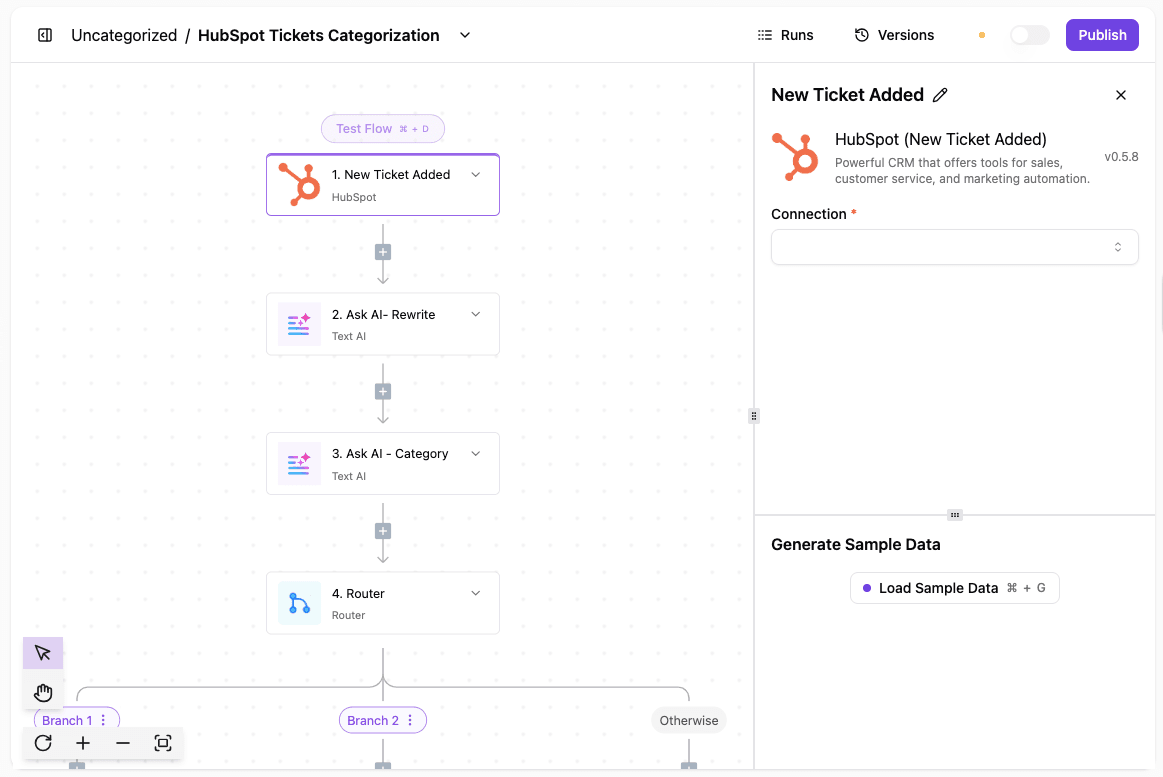
To do it:
- Choose HubSpot and select the event that fires when a new ticket gets created.
- Insert an AI action that reviews the original customer message and rewrites it into a readable summary for the support team.
- Use AI again to assign the ticket to a department or team based on the content of the request.
- Create routing rules that check the assigned category and decide where the ticket should go next.
- Set up a Slack action that sends an alert to the right person or channel as soon as the ticket gets categorized.
- Create a sample ticket in HubSpot and confirm the rewritten description, category, and Slack notification all work as expected.
- Add extra steps like email alerts, priority changes, or workload checks to match your support process.
Get the template here: Support Ticketing
Support Call to Ticket
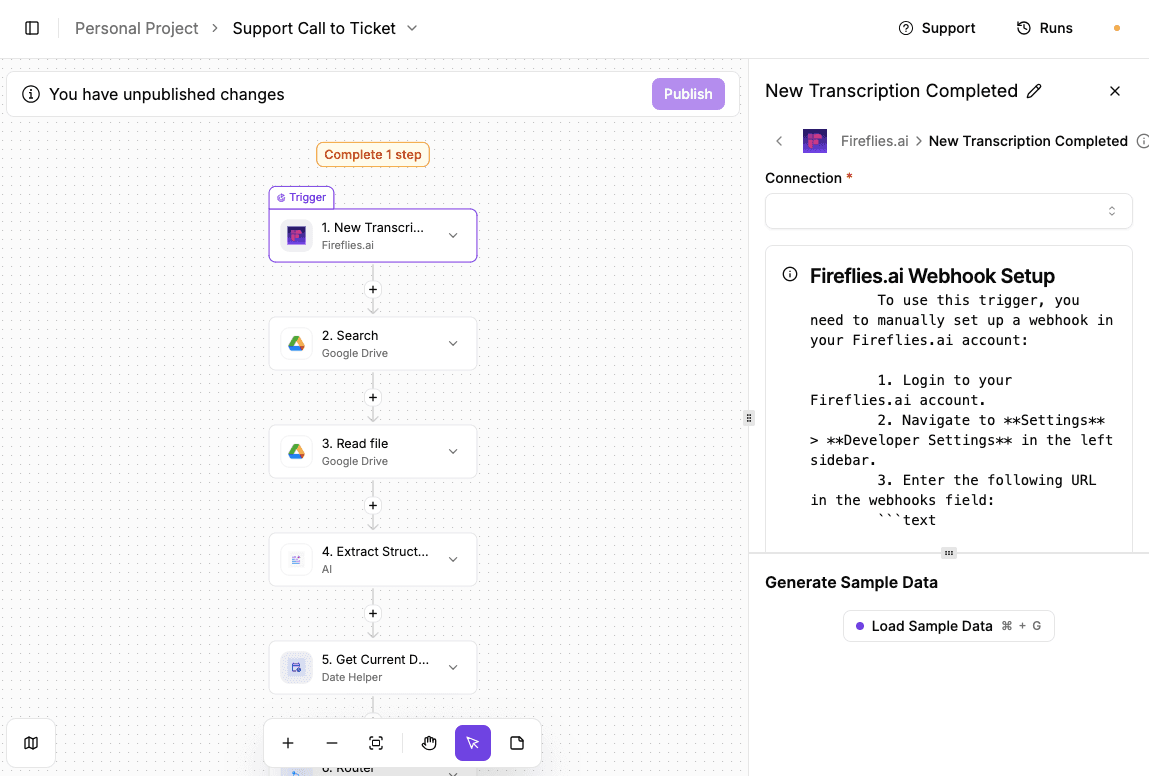
To do it:
- Start by selecting Fireflies and set the trigger to run when a new transcription is completed.
- Add a Google Drive search step and filter by file name so the workflow finds the correct transcript created by Fireflies.
- Use the file ID from the search step to read the full transcript text.
- Add an AI step that reviews the call transcript and pulls out the main issue, ticket title, and summary.
- Insert a date step so each ticket includes a timestamp for tracking and follow-ups.
- Use a router to handle cases where a ticket should or shouldn’t be created.
- Map the extracted AI fields to HubSpot and create the support ticket automatically.
- Run a test call, confirm the ticket appears in HubSpot, then publish the automation.
Get the template here: Support Call to Ticket
Agents for Retail E-Commerce Operations
Operating an online store means constant checks on orders, stock, and pricing. Agents monitor those signals in real time and act when something changes, keeping systems in sync without manual follow-ups.
Competitor Pricing Change Alert
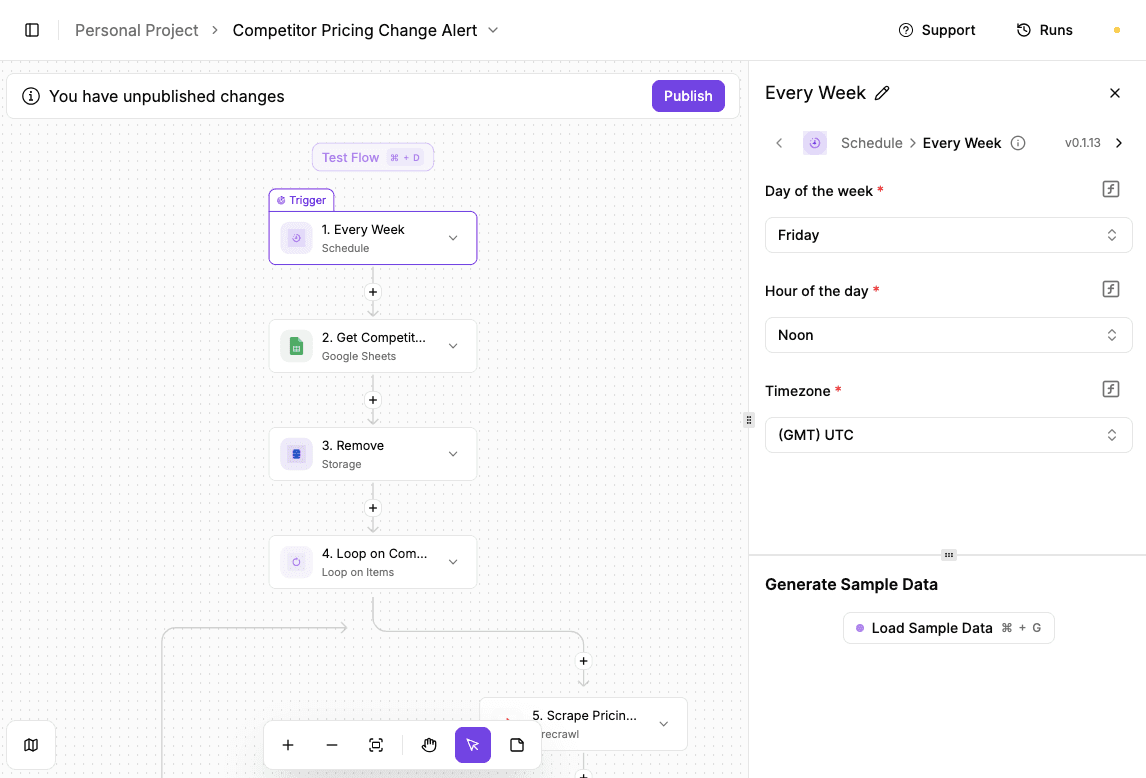
To do it:
- Open the first step and connect your Fireflies account. Follow the webhook setup instructions so the trigger fires when a new transcription finishes.
- Load sample data or trigger a test transcription to confirm the connection works.
- Connect your Google Drive account. Set the search field to file name and pass in the transcription name so the correct file can be found.
- Make sure the workflow returns the expected file ID.
- Use the file ID from the search step to read the transcription content.
- Confirm that the full transcript text appears in the output.
- Select the AI provider and model. Pass in the transcription text and define the fields you want extracted, such as ticket title and issue summary.
- Check that the output contains clear, usable ticket data.
- Choose the time format and timezone so each ticket includes a timestamp.
- Add conditions if you want to control when tickets get created, such as only logging certain call types.
- Connect your HubSpot account. Map the extracted AI fields to the ticket name, description, and pipeline settings.
- Confirm the ticket appears correctly in HubSpot.
- Once all steps test successfully, publish the automation so it runs on every new transcription.
Get the template here: Competitor Pricing Change Alert
Agents for Retail Marketing and Personalization
Marketing decisions often depend on timing and relevance. Agents react to customer activity as it happens and adjust messages or offers so campaigns feel timely.
Automated Upselling

To do it:
- Paste the template URL into your browser to load the workflow with all steps prebuilt.
- Choose the day of the week, hour, and timezone for when the automation should run.
- Load sample data to confirm the trigger fires at the expected time.
- Connect your Google Sheets account and select the spreadsheet and sheet that store customer or purchase data.
- Confirm the workflow pulls the correct rows.
- Pass the rows from Google Sheets into the loop so each customer gets processed one at a time.
- Select the AI provider and model, then prompt it to write a personalized upsell email based on each row’s data.
- Review the generated email content.
- Connect Gmail, set the recipient, subject, and body using the AI output.
- Test the email step and publish the workflow.
Get the template here: Automated Upselling
Create AI Agents That Move Retail Forward With Activepieces

By this point, you need software that lets you create AI agents for your retail store. You need something that fits into the tech stack you already run, and Activepieces does just that.
It can connect with e-commerce software, communication tools, legacy systems, and many more.
Once connected, agents start taking over repeat work, so your human agents can focus on complex cases. You don’t lose control as you embrace AI agents since Activepieces keeps human input built into workflows and offers self-hosting.
Overall, you end up with agents that handle volume, people who stay in charge, and automation that grows alongside your operation.
Create AI agents that grow with your operation instead of locking you in. Check out Activepieces!
FAQs About AI Agents for Retail
What types of AI agents are used in retail?
Retailers use autonomous agents for support, pricing, inventory, and recommendations.
Common examples include AI-powered chatbots and virtual assistants, which can be used for everything from streamlining operations and inventory management to creating customer-facing virtual assistants.
How do retailers use AI agents in real operations?
Agents handle daily actions like restocking, pricing updates, and alerts. Many teams rely on them to continuously monitor activity, so people only step in when decisions need review.
What data do AI agents for retail need to work effectively?
Agents need access to sales, stock, and behavior data. That often includes records stored in legacy systems that still run core processes.
How do AI agents improve customer experience in retail?
Artificial intelligence agents support hyper-personalized shopping experiences by reacting to live signals.
They can also continuously monitor new product launches, analyzing sales velocity, regional performance, and customer feedback, then adjust offers, support replies, and product descriptions.