
Ashby API: Keys, Rate Limits, and Errors (2026 Guide)

Nov 24, 202614 min read
With a key an admin creates in the Ashby settings, you can read and write recruiting data from your own code, or from a workflow tool like Activepieces if you'd rather not host that code yourself.
The Ashby API is an HTTP interface to the same jobs, candidates and applications your recruiters work in, so a sync can replace the weekly export someone pastes into a spreadsheet.

We follow one such sync: jobs and applications, pulled on a schedule into a reporting store. Details below come from Ashby's developer docs, last checked 24 November 2026.
Read the list calls below as a map of how the data divides, since Ashby names endpoints as resource.action. Each is a separate permission later, so the split decides what your key can touch:
Ashby API access, keys and available endpoints
- jobs:
job.list - candidates:
candidate.list - applications:
application.list - feedback:
applicationFeedback.list
If the key leaks, the damage stays small, because our sync needs only the first and third. Candidates and feedback hold personal and sensitive notes, so we leave them out.
I can't point you to a plan name from the docs, so I won't guess one. Check whether your admin can see an API keys page in Ashby.
If not, ask your Ashby contact before a contractor spends a week building against access you don't have.
When an admin creates the key in the integrations settings, they name it and tick the permission groups it needs.
Name it for its purpose, so whoever audits keys next year knows what breaks if they revoke it.
Grant read access to jobs and applications only. Adding write access "just in case" is how a reporting job ends up able to edit live hiring data.
Budget for effort, not metered cost: the docs I read state no per-call or per-record price.
If an Ashby endpoint your sync needs has no ready-made connector, Activepieces lets you generate one with AI and add it privately to your own instance, so no vendor release stands in the way.
Roughly 60% of its 750 integrations were contributed by the community, and you can count them in the open source monorepo, so most of the platform's connectors are community-contributed and verifiable.
This takes minutes, not a project: automate it in Activepieces free.
Published postings and recruiting data are separate surfaces
Everything above describes the authenticated API, the key-based one that serves jobs, candidates and applications. Ashby also documents a separate public job posting API, which returns only the postings a company has published to its job board.
It is meant for careers pages and job feeds, and it takes no key.
The form I know is a plain GET to https://api.ashbyhq.com/posting-api/job-board/ followed by your job board name.
I couldn't re-fetch that page while writing this passage, so confirm the path and the board name against the posting API page in Ashby's developer docs before you build on it.
The rule of thumb is short. If you only need open roles on a website or in a feed, use the public posting API and skip the key, the plan check and the guardrails below.
If you need applications, candidates, stages or unpublished jobs, you need the authenticated API, and everything that follows applies to you.
Authentication and a minimal working request
Code or no code, the call underneath is identical: an HTTPS POST to api.ashbyhq.com. Send your API key as the username in HTTP Basic auth and leave the password empty.
Basic authentication with the API key
Creating the key happens in Ashby's settings, where an admin picks which permissions it carries. The sync's key got read access to jobs and applications and nothing more, which means a leaked key can read that data but can't write to anything.
Encode your_key: (note the trailing colon) in Base64 and send it as Authorization: Basic .... Most HTTP libraries do this for you if you pass the key as the username. The Ashby developer docs cover the exact steps.
A minimal request to list open jobs
Even a read is a POST, because Ashby's endpoints are RPC-style. Send job.list with a JSON body that filters on open status, and set Content-Type: application/json. If you try a GET out of habit, expect an error, not an empty list.
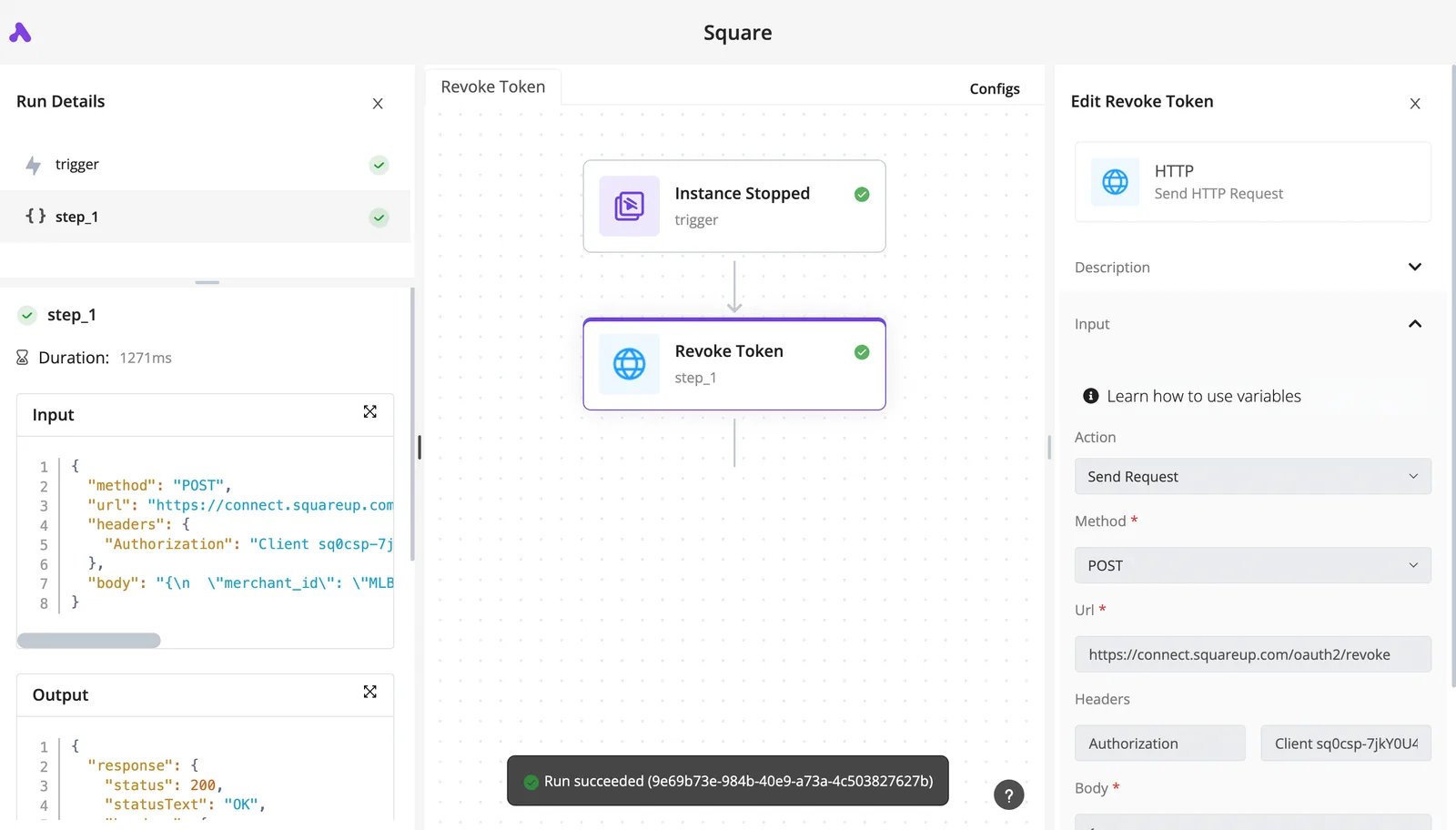
You can recognise a successful run of a plain HTTP step easily. The input records a POST with an Authorization header, and the output comes back with a 200 status and an "OK" status text.

Reading the response and pagination fields
Check success first, because Ashby can answer with a 200 and still report a failure in the body.
Then read results, the array of jobs. Two more fields decide whether your sync is complete: moreDataAvailable tells you another page exists, and nextCursor is the value you send back as cursor to fetch it. A syncToken lets later runs ask only for what changed.
Day one, the sync did what it should. It listed the open jobs, followed the cursor until moreDataAvailable was false, and wrote the rows to the team's tracker.
The sync that stopped: what broke and when
No alert came first. It was a recruiter asking why a candidate they had just spoken to was not on the tracker. The dashboard gave no hint of trouble, because stale data looks exactly like quiet data.

Everything applied after the failed run was missing:
- new applications
- stage changes
- any job opened since
Because the last good rows stayed in place, the tracker looked complete. Nobody recorded when the last good run finished, so the length of the gap had to be rebuilt from the last row that did appear.
What it cost the recruiting team
For as long as the gap lasted, reports built on the tracker were wrong. Recruiters had to reopen Ashby and check candidates by hand, which meant the tracker the team had built to avoid that work was now extra work.
Rate limits, pagination and errors behind the failure
It was probably the report-endpoint ceiling of 15 requests a minute, not the headline 1,000, that ended that run.
Per Airbyte's Ashby connector pull request, standard endpoints allow 1,000 requests a minute, as checked on 2026-11-24, meaning you can sustain roughly 17 requests per second. Report endpoints allow 15.
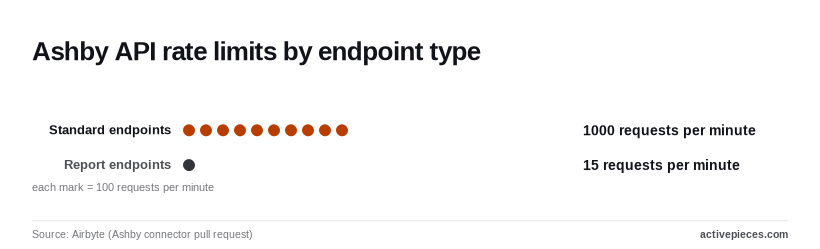
A loop that's comfortable on candidate listing therefore runs about 67 times over budget when pointed at a report. It will stall within seconds, and a sync with no retry logic will simply stop.
Pagination and incremental sync
When more data remains, Ashby list endpoints return a cursor, and you pass it back to get the next page. Many also return a sync token. Store it after a clean run and send it next time, so you fetch only what changed.
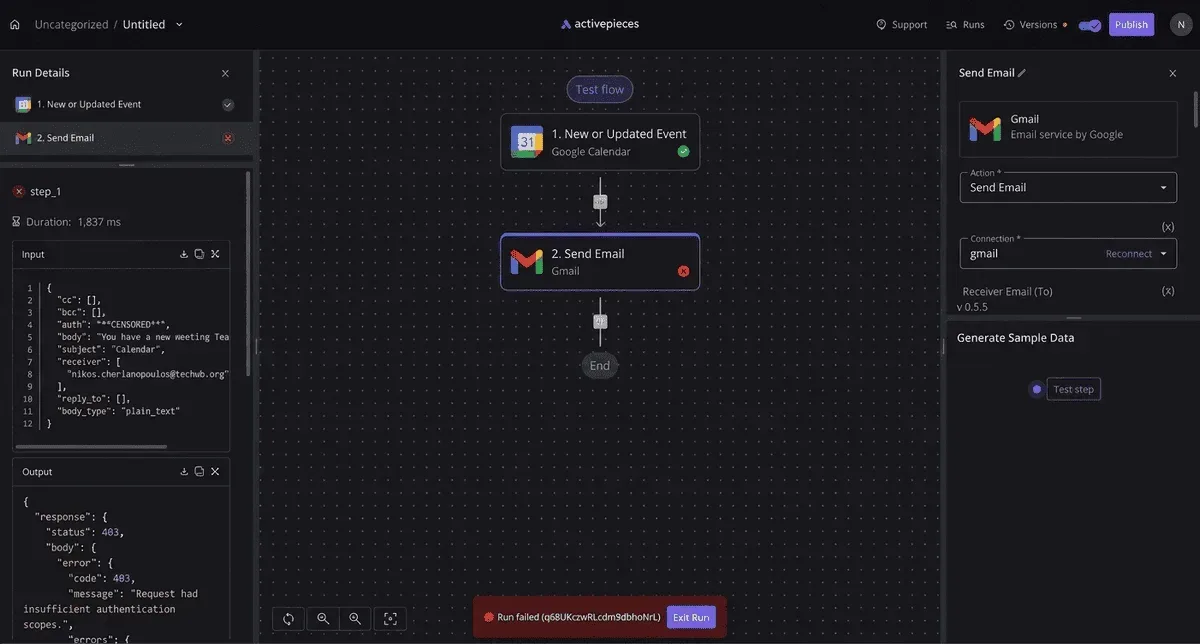
Without it, every nightly run re-reads everything. Save the cursor or token only after the whole run succeeds, or a crash will skip records without telling you.
Watch for five failures in a sync, listed in the table below. The last one is the dangerous one, because the HTTP status looks healthy. Alert on the response body, not only the status code.
| Error | Meaning | How it shows up | Docs-stated fix | Source and check date |
|---|---|---|---|---|
| 401 missing key | No credentials were sent | Rejected before any data returns | Send the API key as the Basic auth username | Ashby API docs, developers.ashbyhq.com, 2026-11-24 |
| 403 wrong or deactivated key | The key is invalid, revoked, or lacks permission for that endpoint | Some endpoints work, others refuse | Reissue the key or grant the missing permission | Ashby API docs, developers.ashbyhq.com, 2026-11-24 |
| 429 over limit | Too many requests in a minute | Calls fail until the window clears | Slow down and retry later | Ashby API docs, developers.ashbyhq.com, 2026-11-24 |
| Malformed body | The request JSON is invalid or incomplete | A client-error response naming the problem | Correct the parameters to match the endpoint | Ashby API docs, developers.ashbyhq.com, 2026-11-24 |
| HTTP 200, success false | The call was understood but not completed | Looks healthy, returns an error payload | Read the errors field before trusting results | Ashby API docs, developers.ashbyhq.com, 2026-11-24 |
Of these, 429 and the silent 200 are the two a sync must handle in code, because neither stops a script by itself.
You can follow the rest of this with the builder open. Start free, no card.
Guardrails added after the Ashby sync failure
Between our sync and Ashby now sit six rules, each firing on one trigger. The 429 and the silent 200 come first, then four more that keep a bad night from becoming a bad week.
- When a request returns 429, wait and retry with growing delays instead of firing again.
- When the sync starts a run, hold requests under a pacing cap, with report endpoints counted separately from ordinary ones.
- When a list response says moreDataAvailable is true, keep fetching with the cursor until it says false.
- When a run has finished in full, and only then, save the new sync token.
- When a run returns zero rows or fails, send an alert to a person.
- When the key is created, give it only the permissions the sync reads.
Ashby API retry, backoff and pacing rules
When a 429 does happen, backoff handles it, and the pacing cap stops most 429s from happening.
Report endpoints are throttled apart from the rest, so they get their own budget in our code. One heavy report should never use up the allowance the candidate sync needs.
What the cursor rules protect against is a quiet kind of data loss. Looping until moreDataAvailable is false means a first page is never mistaken for the whole dataset.
What the cursor rules protect against is a quiet kind of data loss.
Saving the sync token only after the full run means a crash halfway through leads to a repeat of the work, not a gap in the data.
Alerting on empty Ashby sync results
This rule exists because of the silent 200. A run that returns zero rows looks identical to a success in the logs, so we treat zero rows as a failure unless a person has said otherwise.

The alert goes to a channel someone reads, not a log file.
Key hygiene and rotation
Whoever set it up, the key belongs to the sync, not to them. Grant it read access to the endpoints the sync calls and nothing else, so a leaked key can't change a candidate record.
Store it in a secrets manager, and replace it whenever the person who created it leaves.
Calling Ashby endpoints without code in Activepieces
For routine job syncs and new-application alerts, Activepieces lets you build the checklist's guardrails as a visual flow instead of a script you maintain. It offers unlimited flows on every plan, including free, and MoneyGram, Moneypenny, Alan and FundingSocieties run it in production.
Inside a flow, Ashby's limits still apply. A no-code step makes the same calls to the same endpoints, so it's throttled and rejected exactly as a script would be. Heavy custom syncs, such as backfilling your whole history, are better kept in code.
Retries and failure handling in a workflow
In the screenshot, a webhook trigger feeds a single action step. The action's settings sit on the right: the connection, "Continue on Failure", "Auto Retry on Failure", and a test result with its output.
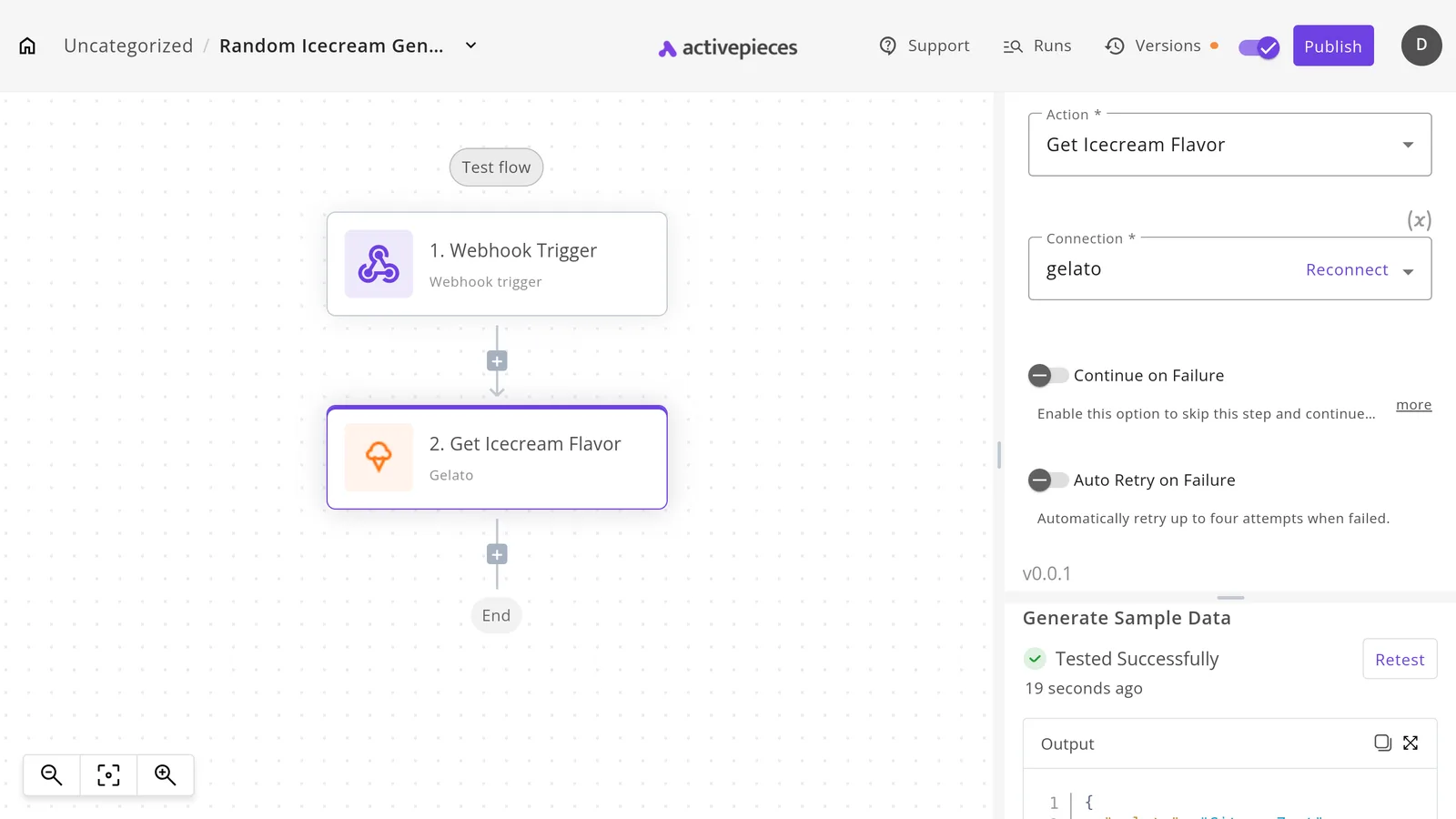
The example uses a different app's action, but an Ashby step sits in the same place. Retries and failure handling are switches on each step, and the test output shows what came back before you trust the flow.
Those two switches map to the guardrails. Auto retry covers transient errors, and "Continue on Failure" decides whether one bad record stops the run.
Leave it off for syncs where a silent gap would be worse than a loud stop. Add an alert step on the failure path, so errors reach you instead of sitting in a run log.
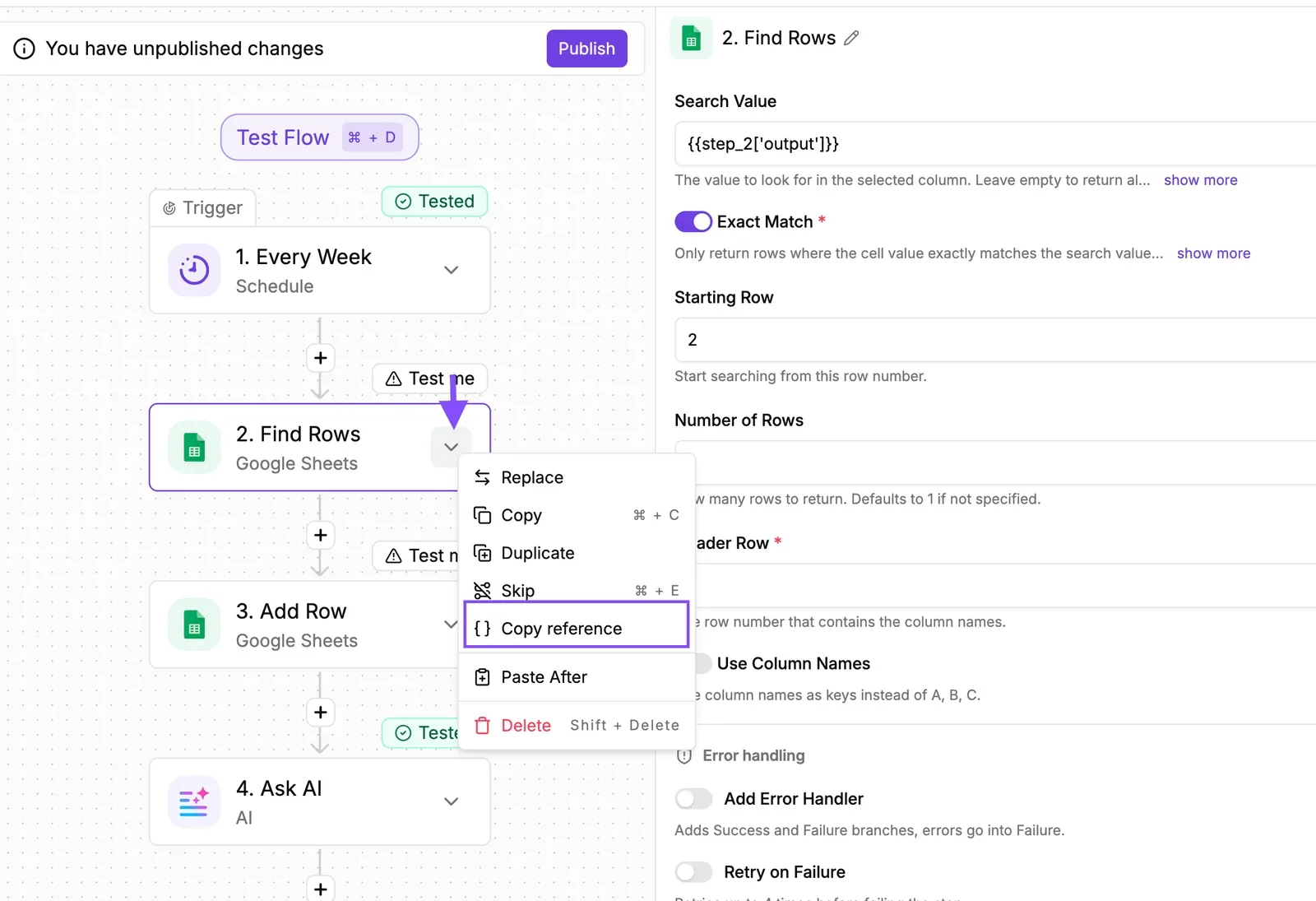
For routine reads, the HTTP step calls Ashby's list endpoints for jobs, applications and candidates exactly as the minimal request above does.
The same step covers any endpoint without a ready-made integration, and the core is MIT-licensed, so how a step behaves is something you can read in the source.
Plans, keys and cost
I haven't confirmed which Ashby plans include API access, so ask your Ashby admin before building. If the key page is missing for your account, that's the answer.
Create the key in Ashby, grant only the permissions the flow needs, and store it in an Activepieces connection, not inside a step. A read-only alert flow should never hold write access.
On the Ultimate plan, or in a self-hosted enterprise setup, secret managers are listed in the feature set alongside SCIM, custom RBAC and audit logs, so the connection's secret can sit in your own vault rather than in Activepieces' database.
I have no confirmed per-unit price for Ashby, so I won't quote one.
On the Activepieces pricing page, checked 2026-10-23, the free plan is $0 with 1,000 credits a month, and a run costs 1 credit however many steps it has, which caps you at roughly 1,000 monthly executions regardless of complexity, so anything beyond occasional, light automation requires paid plans.
A flow that loops over every application therefore costs one credit per run, though Ashby's rate limits still apply to the loop.
Frequently asked questions
Does Ashby charge per API call?
As we read them, Ashby's developer docs describe rate limits and not per-call pricing, so we found no metered billing to budget for.
API access depends on your plan and on who holds admin rights to create keys, so ask your Ashby account contact what your contract covers before a sync goes live.
A sync that fails at 2am because nobody checked the plan is a worse surprise than a line item.
Assume you're testing against real candidate data, since the docs don't point to a sandbox for the Ashby API.
Create a key with the narrowest permissions the sync needs, run read-only calls first, and keep write calls out of anything a contractor can trigger by accident.
Can Ashby send webhooks instead of polling?
Yes. Ashby offers webhooks for a set of recruiting events, and it retries failed deliveries with backoff, so a short outage on your side doesn't have to mean lost events.
Treat a webhook as a prompt to fetch the current record, not as the record itself, and keep a slow poll as a safety net for anything a retry never recovers.
We are not claiming OAuth support the docs don't show us; the sync in this integration authenticated with an API key.
If your security team requires OAuth, check Ashby's authentication page and ask Ashby directly before you design around it. Until then, store the key in a secrets manager, not in a spreadsheet or a shared chat.
Use webhooks for urgent events and a slower scheduled poll for reconciliation.
If a call is rejected for rate reasons, wait and retry with growing delays instead of hammering the endpoint, because a tight loop turns one rejected call into thousands.
Related reading
References
Build it
Set this up in minutes.
No code required. Connect your accounts, and Activepieces runs it from there.
Start free Talk to sales