
Automate Fal AI With Workflow Integrations

Nov 15, 202614 min read
To automate fal AI, submit each job to its queue endpoint, get back a request ID, wait for a webhook or poll for status, then fetch the result.
Any tool that can send an authenticated HTTP request, whether a short script or a workflow builder like Activepieces, can do all four steps, so you can have a working run in about 30 minutes.
Automating fal AI is the practice of running its generative models through the asynchronous queue API from a workflow tool, treating each generation as a job that is submitted, tracked by request ID, and fetched when finished rather than as an instant call.
Facts about the docs, endpoints and pricing were checked on 15 November 2026, so confirm anything time-sensitive against fal's own pages if you read this later.
Automating fal AI means calling its queue API
What fal AI is and what you can automate
fal AI is a hosted service that runs generative models, mostly image, video and audio, behind HTTP endpoints. You send a request and pay for the generation without running GPUs yourself.
Each model has its own endpoint ID and its own input fields: a prompt, an image URL, a duration, a seed.
Anything where a row, a form submission or a file upload should become a generated asset fits: product shots from a spreadsheet, short clips from a script, voiceovers from a draft.
Why the queue endpoint suits workflows
Generation is slow and variable, and workflow tools are built around short steps with step-level timeouts.
When a synchronous call to a video model times out, you lose the connection but may still be billed for a job whose output you never collected.
The queue splits the work into steps. Submit returns at once with a request_id. You then either give fal a webhook URL to call when the job finishes, or check status on a schedule.

Last, you fetch the result by that ID.
Store that ID and handle a result arriving later: that is the cost.
What you need before starting is four things:
- A fal account and an API key, sent in the Authorization header on every request.
- The endpoint ID of the model you want, copied from its page on fal.
- A workflow tool that can send HTTP requests with custom headers. Activepieces does it through its HTTP step, and each connected integration is also published as a tool on the project's MCP server, so Claude, ChatGPT, Cursor or an agent you built yourself can submit a fal job with no second catalogue to maintain.
- For the webhook route, a public URL that can receive a POST. If your tool can't expose one, plan on polling instead.
This takes minutes, not a project: automate it in Activepieces free.
Creating and testing a fal API key
Before anything is automated, make one manual request. Every automation later repeats this sequence:
- Create a key on the fal keys page.
- Store it as a secret in your workflow tool.
- POST to the model's queue URL with
Authorization: Key <key>and a JSON body of the model's input. - Read
request_id,status_urlandresponse_urlfrom the reply.

Storing your fal API key as a secret
Put the key in your workflow tool's credential or secret store, never pasted into a node's URL or body, where it ends up in execution logs and exported workflows.
The header takes the literal word Key, a space, then the value. Many tools default to Bearer, and fal will reject that.
Submit a request to the queue
Send a POST to the queue host with the model's ID as the path. That's queue.fal.run followed by the endpoint name shown on the model's page. Set the Authorization header and a Content-Type of application/json.
You fill the body with the model's input object, and field names differ per model. Copy them from that model's API tab rather than guessing, since a wrong field name is the most common reason a first call gets rejected.
Read the request_id and status values
Don't expect your image or video back from a successful submit. It returns a receipt, and the generation has only been queued:
- The
request_ididentifies the job - The
status_urltells you whether it is still waiting or finished - The
response_urlis where the finished output is fetched
The submit, wait, and fetch workflow
Whichever way you wait, the workflow is the same three HTTP calls: submit, wait, fetch. The table shows what differs across the three tools.
| Tool | API key stored in | How to wait | Receive a webhook | Completion status |
|---|---|---|---|---|
| Zapier | Header field of the Webhooks by Zapier step | Delay by Zapier step, then a second request | Catch Hook trigger in a separate Zap | COMPLETED |
| Make | Keychain entry or a scenario variable | Sleep module inside a repeater loop | Custom webhook module | COMPLETED |
| n8n | Header Auth credential | Wait node, plus an IF node looping back | Webhook node, or a Wait node set to resume on webhook | COMPLETED |
| Activepieces | — | — | — | — |
If you poll in Zapier, expect chained steps and a fixed number of attempts, since only Make and n8n loop natively.
The reply carries request_id, status_url and response_url. Map all three into later steps, because the status and fetch calls are built from them.
Append your receiving URL as the fal_webhook query parameter on the submit call. fal posts the result to it when the job finishes. No loop runs and no tasks burn while you wait.
Zapier and n8n handle this with a second trigger, so match it to the original row by request_id.
Option B: poll the status URL on a delay
GET the status_url until it returns COMPLETED, then GET the response_url. Size the delay to the model, because the slow tail varies a lot.
On Lumenfall's measurements, FLUX.1 schnell takes 3.7 to 6.4 seconds, so one 10-second wait usually covers it. FLUX.2 klein runs 4.6 to 9.1 seconds, which fits with little margin.

On the slow runs of FLUX.2 dev Turbo, a fixed 10-second wait fails, since it spans 6.4 to 22.5 seconds in Lumenfall's measurements. FLUX.2 max takes 33 to 46.2 seconds, so a single short delay never works there.
Poll every 5 to 10 seconds and cap the loop above the slowest figure for your model.
When the status reads COMPLETED, fetch the response and take the image URL from the output. Write that URL to a spreadsheet or database row next to the request_id.
You can follow the rest of this with the builder open. Start free, no card.
fal AI limits and pricing for volume automation
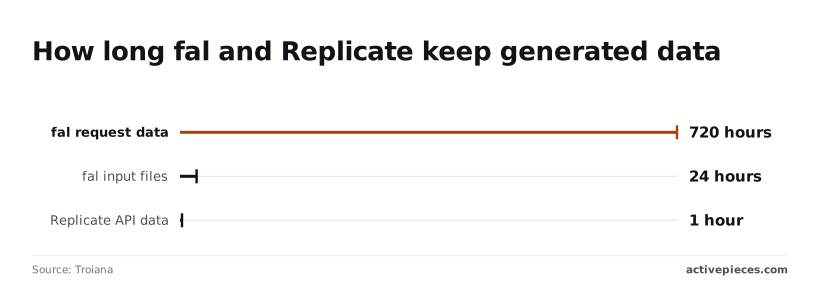
Check retention windows and per-second video pricing first, because those two decide what a high-volume run costs and how long its files survive. The table lists the limits with a documented value as of 15 Nov 2026, and what each does to a workflow.
| Limit | Documented value (as of 15 Nov 2026) | Workflow impact |
|---|---|---|
| Video pricing unit | Per second of output, $0.05 to $0.085 | Cost scales with clip length, so cap duration in the request |
| Request data retention | 720 hours | Request records can be looked up for 30 days |
| Output file retention | 168 hours | Save results within 7 days |
| Input file retention | 24 hours | Re-upload inputs for any retry after a day |
I have no documented value I can stand behind for concurrency, timeouts, webhook retry counts and rate limits, so they aren't in the table. Read those off your own account and the fal docs before you scale.
Estimating fal AI video generation costs
Multiply price by clip length by volume, because video is billed per second of output. In the AssetLab listing, Wan 3 low-res is $0.05 per second and Kling 2.6 Pro is $0.055.
On AssetLab, Kling 3 Standard is $0.07, and Wan 2.7 and Veo 3.1 Fast are $0.084. FLUX 3 Max I2V, an image-to-video model, is $0.085, the highest rate listed.
A ten-second clip costs $0.50 on Wan 3 low-res and $0.85 on FLUX 3 Max I2V. Across 1,000 clips, that's $500 against $850 for the same count, so pick the model before you size the batch.
Retention of outputs and request data
According to Troiana, fal keeps request data for 720 hours, output files for 168 hours and input files for 24 hours.
If you move a workflow between hosts, rebuild its storage assumptions too, because Replicate, a competing host, keeps API data for just one hour.
Set your download step to run well inside the 168-hour output window, then verify the saved file before deleting anything.
Common errors in fal AI automation
Most failures come down to a handful of causes, each leaving a recognisable symptom in the run log.
| Error | Symptom | Cause | Fix |
|---|---|---|---|
| 401/403 | Request rejected before a job is created | Authorization header sent without the Key prefix, or a wrong or revoked key |
Send Authorization: Key <your key> exactly, with the word and the space |
| 422 | Request rejected with a validation message | Input fields don't match the model's schema | Copy field names from the model's own API page |
| 429 | Some submissions refused during bursts | Too many jobs running at once | Cap parallel runs and retry with backoff |
| Billing error | Submissions refused on every call | Account balance or billing state blocks new jobs | Fix billing on the account, then resubmit |
| Sync timeout | Call hangs or drops, no result | A long generation sent through the synchronous endpoint | Move to queue submit, then wait or webhook |
| Expired result | Fetch fails on an older job | Output retrieved after its retention window | Download promptly and store your own copy |
| Missing webhook | Job completes, workflow never resumes | Callback URL unreachable or not public | Use a public HTTPS URL, and poll status as a fallback |
fal AI authentication and validation errors
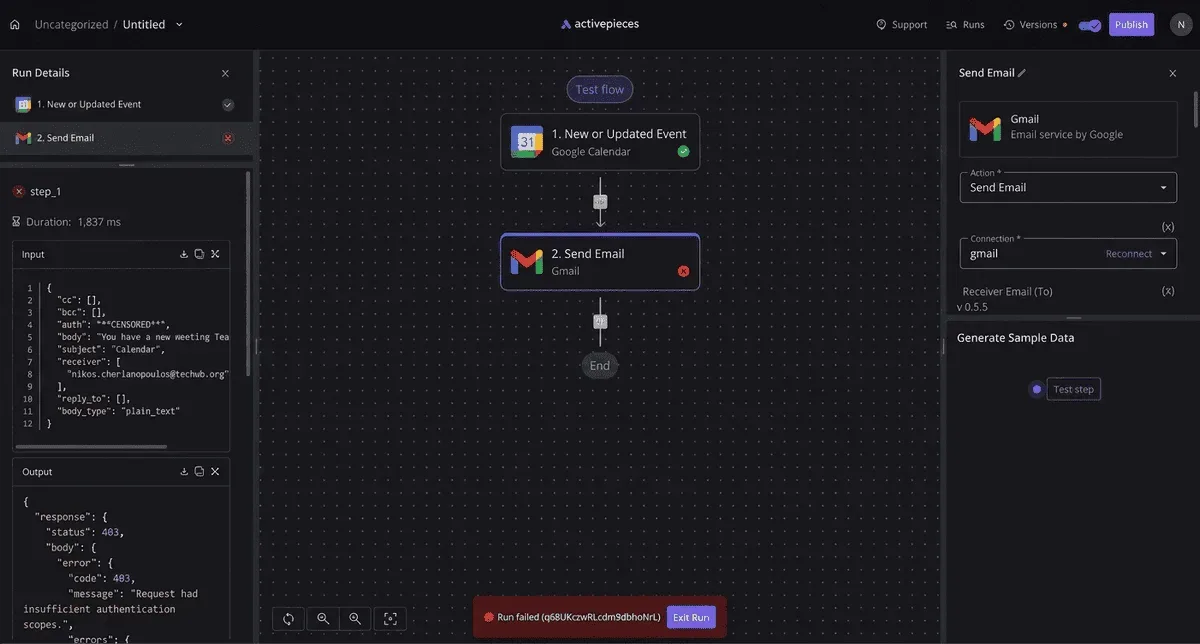
If you see a 401 or 403, the header is almost always malformed. Pasting the bare key into a "Bearer token" field in a credential preset is the usual mistake. Use a custom header instead.
A 422 means the request reached fal and failed schema checks. Each model defines its own input fields, so check the exact names and types on the model's page, and watch for numbers mapped in as text.
fal AI rate limit and concurrency errors
Treat a 429 as a concurrency signal, not an outage. A loop that submits every row of a spreadsheet at once will trip it. Limit the loop's parallelism, and let the retry step wait longer after each refusal.
Timeouts, lost results and silent failures
Missing webhooks are the quiet failure: nothing errors, the workflow just never wakes. Treat the webhook as an optimisation, and add a scheduled status check for any job still open past its expected time.
Missing webhooks are the quiet failure: nothing errors, the workflow just never wakes.
Close the workflow with an error branch. Route 401, 403, 422 and billing errors to an alert, because retrying can't fix them.
Route 429 and network errors to a delayed retry with a hard attempt limit. Anything still unresolved after that limit goes to a human, with the request ID attached.
What Activepieces does about this
The failures above come from treating a slow generation as an instant call, and Activepieces is built so the queue pattern fits in one flow.
The HTTP step sends the submit call with your key in a custom Authorization: Key header, which avoids the Bearer default that trips up credential presets. A webhook trigger receives fal's callback, and a delay step plus a loop handles the polling fallback.
Because a flow is a sequence of short steps, each step can be retried on its own. A failed 429 submit goes back through retry, while a 422 or billing error can route to an alert, as the error branch above describes.
The core is open source under the MIT licence, and you can self-host it. That matters for the webhook route, since you control whether the receiving URL is public.
The same flow can also be exposed as a tool on the MCP server, so an agent submits fal jobs through the queue logic you already built, not through a blocking call that times out.
Frequently asked questions
Does fal AI have a native Zapier or Make integration?
Don't plan around one. Whatever a platform's catalogue lists, the dependable route is its generic HTTP request module, sending an authenticated call to the queue endpoint with your key in the Authorization header.
That's the same submit, wait, fetch pattern in every tool, so the workflow moves between platforms with little rework.
If a prebuilt module exists in your tool, check that it exposes the request ID and the status step before you trust it with long jobs.
Can I run fal AI automatically on a schedule?
Yes, but the schedule lives in your workflow tool, not in fal. A schedule trigger or a cron job fires, submits a request to the queue, and stores the request ID. A second step, either a webhook receiver or a status check, collects the result.
Don't let the scheduled run block waiting for the output; a slow generation will hold the run open and overlap with the next one.
How do I chain two fal models in one workflow?
Treat each model as its own queued job. Submit the first, wait for it to finish, take the output file URL from the result, and use it as the input to a second submission.
Log both request IDs, since each stage has its own.
A webhook on the first job can trigger the second, which keeps the chain from sitting in a polling loop. Failures then stay local: if stage two fails, you retry stage two, not the whole chain.

Is the fal API free to automate?
No. Calls are billed by usage, and pricing varies by model, so read the model's own page before you schedule anything at volume.
Automation makes cost easy to multiply, because a loop that retries blindly pays for every attempt. Cap retries and alert on repeated failures.
A few short answers the sections above leave open:
- Do webhooks replace polling? Not entirely. Webhooks save you the waiting, but a missed delivery leaves a job unaccounted for, so keep a status check as a fallback.
- How long are results kept? Output URLs aren't permanent storage. Copy the files to your own storage as soon as the job completes.
- Should I use the sync endpoints? Only for fast models where a blocked request is acceptable. For anything slow, use the queue.
- How do I cancel a queued request? Send a cancel call with the request ID. It works while the job is still waiting; once it is running, assume it may finish and bill.
Related reading
Build it
Set this up in minutes.
No code required. Connect your accounts, and Activepieces runs it from there.
Start free Talk to sales