
Azure Functions Pricing: All Plans Compared (2026)

Nov 8, 202614 min read
Azure Functions pricing for all plans
Azure Functions pricing summary and last-checked date
Azure Functions looks nearly free per execution, even for small event-driven jobs of the kind teams might otherwise wire up in a tool like Activepieces, but the invoice is set by the hosting plan.
Consumption and Flex Consumption bill for use, while Premium and Dedicated bill for reserved capacity.
Azure Functions pricing is the cost model for Microsoft's serverless compute service, where the hosting plan (Consumption, Flex Consumption, Premium or Dedicated) decides whether you pay for usage or reserved capacity, plus any always-on and networking costs.
You deploy small pieces of code that run on triggers such as HTTP calls, queues or timers, and that is Azure Functions, Microsoft's serverless compute service. The rates below carry the date 2026-11-08, so confirm your region before quoting a client.
Plan table: price, included grant, limits
Start with two figures. According to Volksdroid, Flex Consumption charges $4 per million GB-seconds while an instance sits idle and $16 per million while it executes, so keeping an instance warm costs a quarter of what running costs.
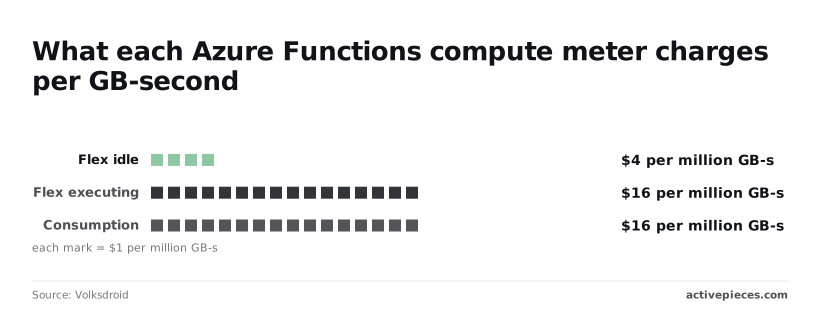
Consumption charges the same $16 per million GB-seconds, with no idle rate because it has no warm instance to bill for.
Look at the table and Flex doesn't win on executing price. It wins on warm capacity and network access.
| Plan | Execution rate | GB-second rate | Monthly free grant | Max timeout | VNet support | Always-warm option |
|---|---|---|---|---|---|---|
| Flex Consumption | $0.40 per million | $0.000016 executing, $0.000004 idle | 250,000 executions, 100,000 GB-s | Unbounded (30 min default) | Yes | Always-ready instances |
| Consumption | $0.20 per million | $0.000016 | 1 million executions, 400,000 GB-s | 10 min | No | None |
| Premium | None | Billed per vCPU and memory per second | None | Unbounded (60 min default) | Yes | Pre-warmed and always-ready instances |
| Dedicated | None | Billed as App Service plan hours | None | Unbounded (30 min default) | Yes | Always On setting |
| Container Apps | Billed under Container Apps rates | Billed per vCPU-second and GiB-second | Container Apps free grant | No Functions-imposed limit | Yes | Minimum replicas |
Storage, networking, and monitoring costs beyond the plan
Before anything runs, every plan needs a storage account for its state, and storage transactions bill separately from compute.
Networking is the line that surprises people. A VNet-integrated app often needs a private endpoint or NAT gateway, and those charge by the hour whether or not a function ever fires.
Application Insights ingestion is billed by the gigabyte, so verbose logging can outgrow the compute bill.
If you are running this arithmetic for your own team, see what the same workload costs on Activepieces.
Small production app monthly costs
Because Flex Consumption and Consumption meter a small production app's bill while Premium charges it flat, volume moves the first two and barely touches the third.
Assume 512 MB and 200 ms per execution at East US list price, after free grants, excluding storage and egress.
| Executions per month | Flex Consumption | Consumption | Premium EP1 |
|---|---|---|---|
| 1M | Metered, largely absorbed by the free grant | Metered, largely absorbed by the free grant | Full flat instance charge, grant irrelevant |
| 10M | Metered, now clearly billed | Metered, now clearly billed | Same flat instance charge |
| 100M | Metered, the dominant line item | Metered, the dominant line item | Same flat charge, possibly more instances |
Azure Functions cost at 1 million executions
At this volume the free grants cover most or all of the metered usage, so the serverless plans cost close to nothing.
Premium charges for a running instance whether or not anything calls it, so you pay the full flat rate for a month of near-idle capacity.
Steady API: 10 million executions
This is where you compare the metered total against the flat Premium charge, and where the instance's other benefits belong in the sum: no cold starts and network isolation.
Azure Functions cost at 100 million executions
Once traffic reaches this volume, the metered plans scale linearly with it, while Premium's charge moves only when you add instances. A flat plan can undercut metering here for a steady workload, provided the instance count stays low.
Before quoting anyone, run your own numbers through the pricing calculator, because the crossover depends on your real memory and duration.
Usage fees that grow your bill
Budget for the first two and you have covered only two of the seven meters that grow the bill. Longer runs make the metered columns climb faster, so it helps to know every line that moves with them:
- executions
- GB-seconds
- always-ready instances
- storage transactions
- Application Insights ingestion
- outbound data (egress)
- VNet and NAT gateway charges
The first two scale with traffic. The rest are the ones a client never sees on a quote and you still end up paying.
GB-seconds billing and memory rounding in Azure Functions
GB-seconds are memory multiplied by time, and Azure rounds the memory side up instead of measuring it exactly. A function that needs a little more than one memory step pays for the next step, so you pay for headroom you never use.
On Flex Consumption, idle provisioned instances bill at a lower GB-second rate than executing instances. That's the cheaper way to buy readiness, but it's still a charge, and it runs whether or not anyone calls the app.
Always-ready instances and Premium minimum instance costs
They look like usage, but always-ready instances and the Premium plan's minimum instance count behave as fixed costs. You pay them in a quiet month the same as a busy one.
Storage, Application Insights, and egress charges
Open the storage account first when a small app has an oddly large bill: every Functions app needs one, and touches it constantly for triggers, checkpoints and logs.
Each touch is a transaction, so a queue-heavy or timer-heavy app can run up storage charges that dwarf its execution charges.
When an overrun shows up, verbose logging is the usual cause, because Application Insights bills by data ingested. Set sampling and log levels before launch.
If an app returns large payloads or calls out to other clouds, it pays for every byte, since egress is charged on data leaving Azure.
VNet integration adds its own cost, and a NAT gateway for stable outbound addresses adds both an hourly charge and a per-gigabyte one.
The point where the next plan becomes cheaper
When your steady pay-per-use charges climb past what a flat Premium instance costs to keep running, the next plan becomes cheaper. For a production app that crossover arrives sooner than the per-execution price suggests.
Under pay-per-use, you are billed for every execution and every second of memory, so a quiet app costs almost nothing and a busy one costs more with every request.
A flat plan charges the same whether the instances are busy or idle. Somewhere between those two curves they cross, and past that point you're paying a premium for the privilege of paying per use.
Past that crossover, the decision is about what you can defend on an invoice.
If several clients share the account, pay-per-use quietly lets the busiest one run up charges the others split, and a flat plan at least makes the shared cost visible so you can allocate it.

Limits that force a move to another plan
Cost isn't the only trigger. Some limits force the move before the arithmetic does. Cold starts, private networking and execution time are the usual three.
If users feel the cold-start delay, Flex with always-ready instances is usually cleaner than a timer function that pings your app to keep it warm. The ping burns executions and still doesn't guarantee a warm instance, while always-ready is a line item you can price.
When a database sits locked behind a private network, Consumption is out, because it is the plan without virtual network integration. That pushes you to Flex or Premium regardless of volume.
On Consumption, long-running jobs hit the ceiling on per-run duration, and that ceiling ends the cost discussion.
Treat any break-even figure you find online with suspicion, including ones that look authoritative. They rarely agree because they assume different memory sizes, run durations, regions and free-grant treatment.
When the function being priced is glue code, a webhook that hands a payload from one app to another, the cheaper option may be not writing and hosting it at all.
On Azure, splitting that glue into smaller, more reliable integrations adds executions and GB-seconds to the bill, so the meter punishes good structure.
Activepieces meters the run instead: a flow is 1 credit whether it has two steps or ten, and the Free plan's 1,000 credits a month come with unlimited flows.
Worth checking against a plan that does not meter every step: one credit covers a whole run on Activepieces.
Azure, AWS, and Google pricing
At 100 million requests a month Azure Functions and AWS Lambda cost almost the same, about $180 and $187, while Google Cloud runs about $65, so platform choice becomes primarily cost-driven at this volume.
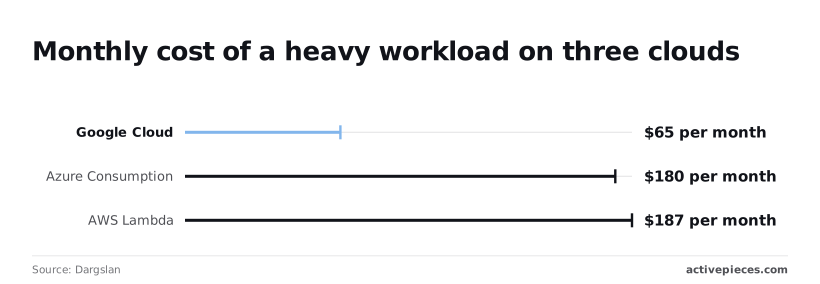
That gap is over $1,300 in annual savings at that traffic level, making this a financially material difference for architecture decisions.
The monthly totals come from Dargslan. If you rebill hosting to a client, a gap of roughly $115 a month is a line item you'll be asked to explain.
Free grants and per-request price
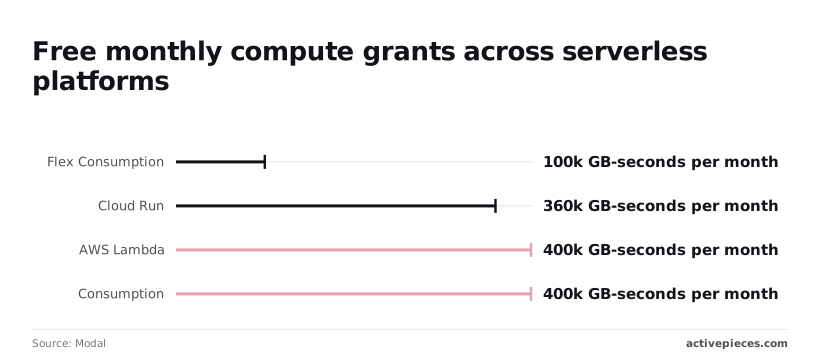
Per month, free compute is 400,000 GB-seconds on Azure Consumption, 100,000 on Azure Flex Consumption, 400,000 on AWS Lambda and 360,000 on Google Cloud Run, so staying within these allocations incurs zero compute cost.
The grant figures are from Modal. Flex Consumption's 100,000 GB-seconds is a quarter of what Consumption gives you, so moving to Flex for its networking and always-ready options means paying for compute sooner. Don't assume a small app stays free on the newer plan.

Timeouts, memory, and cold starts in Azure Functions
Because compute is billed in GB-seconds, memory multiplied by run time, timeouts and memory settings matter. A function that holds 1 GB for two seconds uses two GB-seconds, so a slow downstream call quietly turns into a larger invoice.
Scaling to zero has a cost, and cold starts are it. Consumption plans save money while idle but make the first caller wait.
If a customer-facing endpoint can't tolerate that wait, you need an always-warm option, and that's a monthly charge that exists whether or not anyone calls. Price it as a fixed cost, not as usage.
Cheapest serverless platform by workload type
For a bursty, low-volume app, all three stay near their free grants, and the difference is a few dollars. Pick on networking and tooling, not on the grant.
For a steady high-volume app, the number to carry into the plan decision is Google's $65 against Azure's $180 and Lambda's $187, therefore platform selection at this scale is primarily cost-determined.
What Activepieces does about this
The problem in this article is that the plan, not the execution price, decides the invoice.
For a webhook that moves a payload between two apps, you end up buying a storage account, an Application Insights workspace and sometimes a NAT gateway, all to host a few lines of glue. Activepieces removes that decision for work of this kind.

You build the integration as a flow, and there is no hosting plan to pick, no warm instance to keep, and no private endpoint billing by the hour.
The meter is also simpler. A flow run costs 1 credit whether it has two steps or ten, so splitting a job into clearer, more reliable steps doesn't add to the bill the way it adds executions and GB-seconds on Azure.
The Free plan includes 1,000 credits a month with unlimited flows. That is enough to run a small client's handful of integrations and see the real usage before you quote anything.
Activepieces is open source under the MIT licence for its community edition, so you can self-host it if a client's data has to stay inside their own network.
That brings hosting costs back, and you would price them as a fixed line, as you would a Premium minimum. But you pay for one deployment that serves every flow, instead of a plan, a storage account and a monitoring workspace for each function.
It doesn't replace Azure Functions when you need custom code at scale, tight latency or private networking to a locked-down database. For those jobs, price the plan as this article describes.
For the webhook-and-transform work that would otherwise sit on a function app costing more in surrounding charges than in executions, a flow at 1 credit a run is the cheaper thing to quote.
Frequently asked questions
Is Azure Functions free?
Only up to a point: the Consumption plan includes a monthly free grant of executions and compute time, and that grant is applied per subscription, not per app.
On a shared subscription, one allowance is spread across every client's apps, so the first client to spend it hides the cost of the rest. Past the grant you pay for use, and the storage account and networking sit outside it.
Does Azure Functions charge when idle?
It depends on the plan. Consumption bills for executions and the time they run, so an idle app costs nothing in compute. Premium keeps a minimum number of warm instances running, and you pay for those whether or not a request arrives.
If you put an app that is quiet overnight on Premium, the invoice carries a baseline you can't bill back as usage. Price that baseline before you quote it.
When can visual workflows replace functions?
Sometimes, when the job is moving data between well-known services with little custom logic, and a visual workflow is easier for the client's team to maintain than code.
It has its own section elsewhere in this article, which covers where it fits and where it doesn't.
Once you need custom code, tight latency or private networking, the function is the better tool.
How do I estimate my Azure Functions bill before deploying?
Work backward from the invoice line by line, using this order:
- Estimate monthly executions, average run time and memory, then run them through the Azure pricing calculator for each plan you are considering.
- Add the storage account the app requires, which is billed separately from compute.
- Add networking: private endpoints, virtual network integration and outbound data, which often cost more than the executions.
- Add monitoring, since Application Insights ingestion is billed on its own.
- Deploy a small staging copy, replay realistic traffic, and read the real figures in Cost Analysis.
When runs are very short, they cost more than their raw duration suggests, because execution time is rounded up to a billing increment. Test with your real invocation pattern, not an average.
Is the Consumption plan being retired?
Not as a whole. Microsoft has announced the retirement of the Linux flavor of the Consumption plan and points those apps toward Flex Consumption.
Check the current Azure lifecycle notice for your operating system and region before you build on it. If you are starting a new Linux app today, price Flex Consumption first, so you're not paying for a migration later.
Related reading
References
Running the numbers
See what the same workload costs here.
Free forever plan, and every paid plan self-hosts at no extra cost.
See pricing Talk to sales