Best Jotform Alternatives in 2026

Oct 2, 202613 min read
A Jotform alternative is a digital form-building platform that provides comparable features for data collection, lead generation, and workflow automation while offering different pricing structures, design aesthetics, or integration capabilities.
Why you're switching from Jotform
Jotform remains a legacy standard for complex form logic, but you're migrating toward alternatives to avoid restrictive usage tiers. The platform requires high overhead for specialized security features.
The MIT-licensed core of Activepieces allows teams to scale without the per-step tax of traditional automation, ensuring that a ten-step data validation process costs the same single credit as a simple two-step transfer.
The 'submission limit' bottleneck on your growth
When hard caps on monthly entries force you to choose between upgrading to an enterprise tier or losing data, the account has hit its limit. These limits apply across your entire account.
A single viral campaign can disable every operational form in your infrastructure. This creates a reliability risk if you can't predict monthly traffic volumes with absolute certainty.
A single viral campaign can disable every operational form in your infrastructure.
High cost of entry for HIPAA and security features
Securing protected health information requires safeguards that Jotform restricts to higher-priced plans, creating a barrier for small medical practices.
The following table outlines the entry-level monthly investment you'll need to access a Business Associate Agreement (BAA) and HIPAA-compliant data handling across three providers.
| Provider | Monthly Cost | Submission Limit |
|---|---|---|
| 123FormBuilder | $225/mo | 2,500 |
| Jotform | $39/mo | 1,000 |
| HIPAAtizer | $29/mo | Unlimited |
Because of this price delta, you'll pay a premium for general-purpose features simply to meet legal compliance. You're moving toward specialized HIPAA providers that offer unlimited submissions at a lower fixed cost.
The shift toward conversational and 'app-like' interfaces
Compared to modern interfaces, traditional long-form layouts suffer from lower completion rates. As mobile-first interactions become the standard, static legacy builders feel cumbersome.
You're prioritizing tools that treat the form as a conversational experience or a mini-application. This reduces cognitive load and increases data quality.
The fastest way to settle a shortlist is to try one. Activepieces is free to try, no credit card.
Comparing free tier submission limits
Modern form builders determine your runway by how many responses you can accept before a paywall halts collection. While legacy platforms provide a proof-of-concept environment, newer alternatives offer ten times the capacity.
The following table establishes the monthly submission ceilings for entry-level tiers:
| Provider | Submissions per month |
|---|---|
| Jotform | 100 |
| Typeform | 100 |
| Fillout | 1,000 |
100 submissions per month is all Jotform enforces. A marketing campaign generating just four leads a day will disable your forms before the month ends.
Typeform matches this 100-submission cap. In contrast, Fillout provides 1,000 submissions per month, allowing your small business to manage daily operations for an entire year on the free tier.
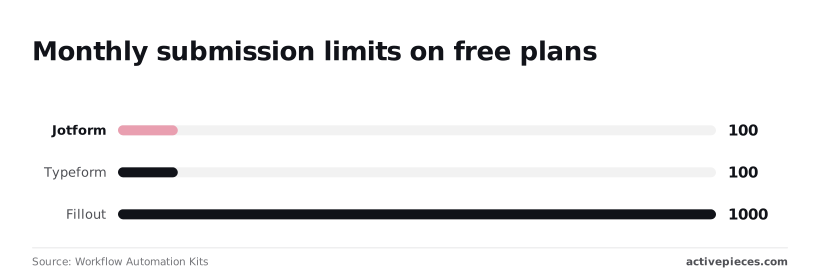
When a builder offers 10x the volume of its competitors, you gain a longer audit window to verify data integrity before committing to a recurring subscription.
Typeform for high-engagement conversational surveys
By presenting a single question at a time, Typeform prioritizes user psychology. This reduces the cognitive load that leads to form abandonment on dense layouts.
This interface transforms a data collection task into a guided dialogue. Industry benchmarks show that this conversational approach significantly outperforms traditional static forms.
Conversational vs. Traditional completion rates: 47.3% completions for conversational forms vs. 21.5% for traditional forms. Unit: Percentage of 1,000 site visitors.
This performance gap demonstrates that layout choice is a primary driver of top-of-funnel data retention.
Pricing and seat-based scaling as of January 2026
The platform operates on a tiered subscription model where costs increase based on monthly response volume and administrative seats.
Each tier enforces a hard cap. A sudden spike in traffic can gate data until you upgrade or the billing cycle resets. Higher-cost plans restrict advanced features like custom domains to the top-tier Enterprise level, meaning mid-range users still lack full white-labeling.

While the Basic and Plus tiers unlock core logic, you must commit to the most expensive monthly investment to remove Typeform branding entirely. The cost per lead is higher than builders with unlimited responses.
Where the 'one Question at a time' model fails
Linear delivery is inefficient for technical workflows where you must see the relationship between multiple data points simultaneously.
A form might require a respondent to cross-reference previous answers, such as verifying a complex order list. In these cases, the one-question constraint forces repetitive navigation. Frustration follows in professional environments where scanning the entire document is necessary to gauge the total time commitment.
Tally for unlimited free submissions and simplicity
Tally is for you if you prioritize high-volume data collection without the recurring overhead of submission limits or per-form licensing fees.
The platform operates on a freemium model where the core utility remains unmetered. This allows your startup to scale without hitting immediate paywalls.
The following table compares how specific alternatives address the trade-offs between design, cost, and data depth:
| Alternative | Starting Price | Core Strength |
|---|---|---|
| Typeform | Paid Monthly | Conversational/Design |
| Tally | Free | Simplicity/Free |
| Fillout | Paid Monthly | Database Sync |
The Notion-style editing experience
Identical to Notion, the interface utilizes a slash-command system. This document-first approach eliminates the sidebar-heavy drag-and-drop mechanics found in legacy builders.
You'll spend less time navigating menus and more time structuring content. You can rearrange blocks as modular units, making the transition from a static internal brief to a functional public form a matter of reformatting.
Feature gaps in advanced data validation and logic
While the block editor simplifies creation, it lacks the granular regex patterns and multi-layered conditional branching required for complex technical audits. You can't enforce strict character-level validation for proprietary ID formats.
The logic engine operates on linear paths. If you need to trigger disparate workflows based on intersecting variables, you'll find the native automation insufficient.
Reading a table only gets you so far. Build the same workflow in Activepieces and compare it yourself.
Activepieces for automating form-driven business workflows
Activepieces provides an MIT-licensed core for teams that have outgrown Jotform’s native integrations and require a self-hosted environment to bridge simple inputs with complex backend logic.
It treats the form as a single trigger within a broader directed acyclic graph. The published pricing page shows 1 credit per flow run regardless of the number of steps, which removes the cost penalty for building granular, multi-stage logic.

Connecting 'dumb' forms to 'smart' workflows
Standard form builders often fail when a submission requires multi-step conditional logic or interaction with proprietary internal APIs.
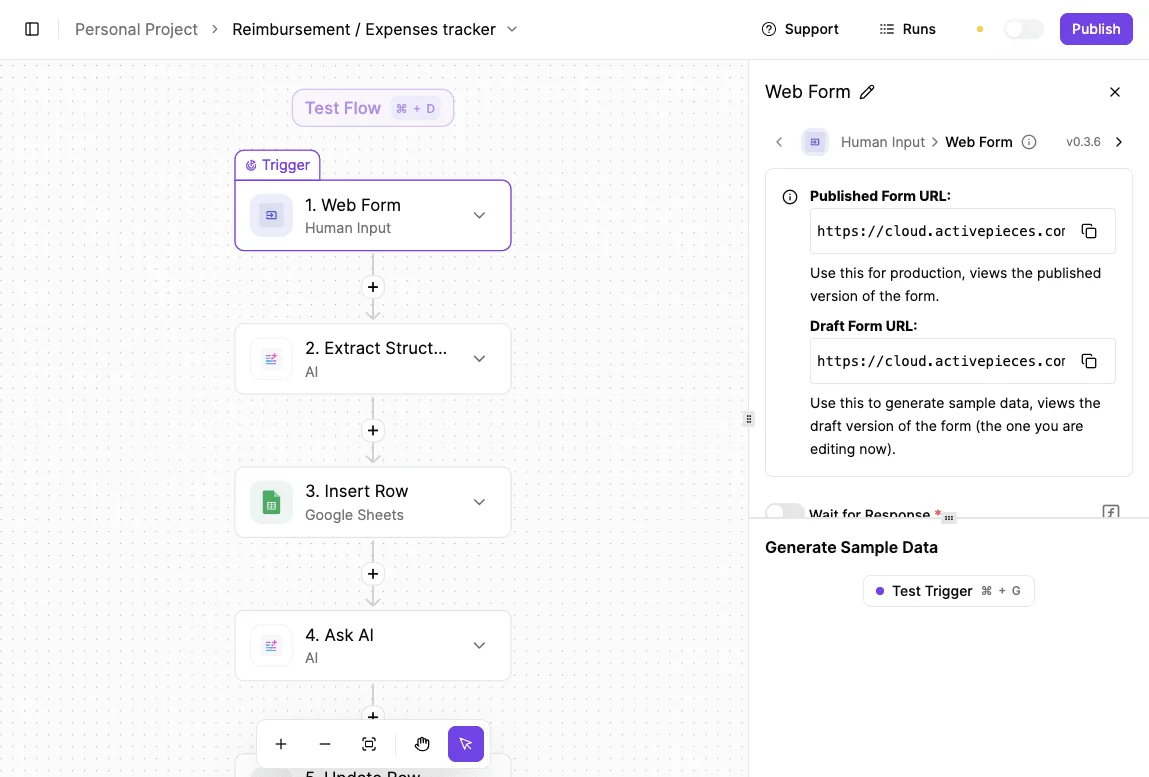
Activepieces solves this by providing a visual designer where a form submission initiates a sequence of discrete functional blocks.
[Screenshot: A five-step workflow automation flow in Activepieces builder titled "Reimbursement / Expenses tracker". The flow shows: 1. Web Form (Human Input) trigger, 2. Extract Struct (AI), 3. Insert Row (Google Sheets), 4. Ask AI, and a partially visible 5th step. The second step is selected. On the right side, a Web Form settings panel displays Published Form URL and Draft Form URL with copy buttons, plus a "Generate Sample Data" section showing a Test Trigger option.]
Raw form data passes into Gemini 3.8 Flash to structure unformatted text before it hits a database. The workflow can then query external inventory systems or send specialized notifications based on the AI's confidence score.
If a required connector is missing from the 738 integrations currently available, you can generate the integration with AI.
Self-hosting for data sovereignty and lower costs
If you're operating under strict compliance frameworks, you can't use SaaS-only tools like Jotform due to the lack of control over the execution environment.
Activepieces is available as a Docker image. Your IT department can deploy the entire engine on internal infrastructure. MoneyGram and FundingSocieties run the platform in production to maintain this level of control.

This model ensures that sensitive PII never leaves your local network. By managing compute resources internally, you'll avoid the per-submission fees that lead to unpredictable billing in traditional SaaS models.
Activepieces is the better choice for organizations that prioritize cost predictability when scaling complex, multi-stage logic.
By billing per flow run rather than per individual step or module, it removes the financial barriers to building granular workflows that would otherwise become prohibitively expensive on task-based platforms.
Fillout for advanced database and CRM integrations
Fillout functions as a specialized interface for existing databases, enabling you to build forms that modify Airtable records, Notion pages, or Salesforce leads in real-time.
Deep integration vs. simple data pushing
Standard web forms typically operate on a push-only basis. Fillout utilizes a bi-directional sync mechanism that allows the form to query the database before the user even types.
The Real-Time Sync mechanism connects a central Fillout form to an Airtable record, a Notion page, and a Salesforce lead. This visual confirms that a change in your CRM is immediately reflected in the form’s dropdown options, preventing data fragmentation.
Multi-page workflows and dynamic field population
Complex data structures require forms that adapt based on the specific record a user is accessing. By using URL parameters or lookup fields, the system pre-fills known information from your CRM.
- The form identifies the user via a unique ID in the URL.
- The integration engine fetches the corresponding row from the connected database.
- Logic gates display only the remaining empty fields or required updates.
This sequence reduces manual entry errors and ensures data remains compatible with enterprise schema requirements.
Pricing for HIPAA compliant form plans
Healthcare providers frequently pay a significant premium for regulatory compliance, as Jotform requires a Gold plan or higher to sign a Business Associate Agreement (BAA).
Jotform prices its entry-level HIPAA-eligible tier at $39 per month. This establishes a high baseline for solo practitioners, forcing you to pay for capacity you'll likely never utilize.
$8.95 per month is the specialized entry point offered by FormHippo. Mid-range options like MakeForms and HIPAAtizer both set their starting point at $29 per month.
At the higher end, HIPAA Vault charges $49 per month for managed security services.
| Provider | Monthly Starting Cost (USD) |
|---|---|
| FormHippo | $8.95 |
| MakeForms | $29.00 |
| HIPAAtizer | $29.00 |
| Jotform | $39.00 |
| HIPAA Vault | $49.00 |

How to select your next form builder
Selecting a new platform requires matching the technical limitations of your team to the specific friction point that prompted your migration.
If the primary constraint is a fixed budget, your priority shifts toward platforms with generous free tiers like Tally. If the constraint is brand guidelines, your focus moves to Typeform’s proprietary layout engine.
The 'volume vs. complexity' decision matrix
A structured transition prevents the loss of historical data. The following matrix helps you categorize your needs to select the correct tool based on your operational scale and technical depth.
| Requirement | High Volume / Low Complexity | Low Volume / High Complexity |
|---|---|---|
| Primary Goal | Mass data collection at zero cost | Deep database sync or AI workflows |
| Best Tool | Tally | Activepieces or Fillout |
| Typical Use | Feedback, RSVPs, simple leads | CRM updates, AI parsing, internal tools |
High-volume users should prioritize tools that do not penalize growth with submission caps. Conversely, if your form is a gateway to a complex backend, you should invest in a builder that offers bi-directional data flow or self-hosted automation.
The following sequence outlines the technical requirements for moving form logic:
- Audit current submission volume
- Identify must-have integrations
- Export Jotform data to CSV
- Map fields to the new builder
- Redirect live URLs
Testing for mobile responsiveness and accessibility
Validating a form requires testing it against diverse input methods. A form that lacks keyboard navigation prevents users with motor impairments from completing fields.
Testing on low-resolution mobile screens reveals whether multi-column layouts collapse correctly. If they don't, the submit button may be pushed out of the viewport. Prioritizing these benchmarks ensures your new tool serves all users regardless of their device.

Frequently asked questions about Jotform alternatives
Can I migrate my existing Jotform data to a new provider?
Most enterprise-grade form builders provide CSV import tools to move historical submission records, though live form structures rarely transfer without manual rebuilding.
Because Jotform uses a proprietary schema for its widgets and conditional logic, a direct one-to-one migration of complex workflows isn't supported by competitors.
You'll typically export all existing submissions as a CSV or Excel file to preserve the audit trail. You then re-create the form fields in the new tool to match the original data types.
Finally, you map the exported columns to the new fields during the import process to maintain data continuity.
Which Jotform alternative is best for HIPAA compliance?
Fillout and Typeform both offer specialized plans that support HIPAA compliance through signed Business Associate Agreements (BAAs). These agreements are required for handling Protected Health Information.
These plans enforce specific technical safeguards, such as data encryption at rest and restricted administrative access, to ensure the platform meets federal regulatory standards.
You must verify that your specific plan level includes these security features, as standard commercial tiers don't typically provide the necessary legal coverage for healthcare data.
Do any alternatives offer truly unlimited submissions for free?
Tally has a free tier with unlimited forms and submissions. This removes the monthly volume caps found in the entry-level versions of most other tools.
This structure allows your small team to scale its data collection without facing sudden service interruptions or forced upgrades when a form goes viral.
While most features are included, certain advanced capabilities like custom domains or partial form submissions are reserved for their paid subscription to support the platform's infrastructure costs.
Related reading
References
Still comparing
The fastest way to settle it is to build something.
Open source under MIT, so you can self-host the same thing later.
Start free Talk to sales