
Best Wix Alternatives for 2026: A Guide to Scaling Up

Oct 2, 202614 min read
A Wix alternative is a website building platform that provides an alternative to proprietary, template-based systems by offering greater flexibility for custom code, scalable architecture, and complex business logic.
Why businesses seek Wix alternatives
When operational requirements outgrow the rigid functional boundaries of a template-based ecosystem, businesses migrate. While proprietary builders provide a fast start, they eventually impose a "feature ceiling" where users cannot implement custom business logic because they lack access to the underlying source code.

Risks of proprietary platform lock-in
Proprietary platforms function as "walled gardens" where you rent your digital real estate rather than owning it.
Because Wix does not allow users to export site code to a different hosting provider, a business that outgrows the platform must rebuild its entire frontend from scratch to migrate.
Proprietary platforms function as "walled gardens" where you rent your digital real estate rather than owning it.
This creates a high exit cost that forces companies to weigh the price of a total rebuild against the mounting limitations of their current provider.
The monthly cost of maintaining these "walled gardens" varies significantly across the market:
- Wix ranges from $39 to $159.
- Shopify scales from $39 to $389.
- Squarespace spans $23 to $99.
- Webflow starts at $25 but can reach $2,500.
- Framer tiers from $30 to $100.

Performance and Core Web Vitals at scale
Standardized templates often carry code bloat that directly penalizes mobile performance. When a site relies on Wix’s server-side rendering, the business has limited control over the critical rendering path.
Meeting strict Core Web Vitals targets is difficult because the business cannot manually optimize how assets load.
This performance gap becomes a "Wix Breaking Point" because slow mobile speeds lead to higher bounce rates and lower search engine rankings that no amount of keyword optimization can fix.
No-code limitations and technical debt
The convenience of no-code tools eventually turns into technical debt when a business needs to integrate complex, multi-step workflows.
As teams attempt to bridge these gaps, they often hit the limits of what a closed template can receive or trigger.
Activepieces skips these template searches entirely; by describing a workflow to the built-in AI chat, a team can construct and publish a runnable flow even if that specific automation never existed in a catalog. This friction illustrates the three "Wix Breaking Points":

- Vendor Lock-in: The inability to export site code, which prevents moving the site to a more flexible infrastructure.
- SEO Ceiling: Limited control over server-side rendering, so technical SEO fixes are restricted to what the platform allows.
- Design Debt: Drag-and-drop bloat slowing mobile performance, which degrades the user experience as the site grows in complexity.
Once a business reaches these points, the "easy" solution of a proprietary builder becomes a bottleneck that prevents the deployment of custom logic or advanced agentic workflows.
The fastest way to settle a shortlist is to try one. Activepieces is free to try, no credit card.
Top Wix alternatives compared by use case
Selecting a platform depends on whether you prioritize design fidelity, e-commerce scale, or open-source flexibility. While Wix has an accessible entry point, businesses often migrate when they require specific infrastructure that proprietary "walled gardens" cannot support.

Monthly cost for business plans
Entry-level pricing for professional tiers varies significantly, directly impacting the overhead for startups and scaling enterprises. Wix prices its core business features at a premium, often matching specialized platforms like Shopify in monthly expenditure.
| Platform | Monthly Starting Price | Core Strength |
|---|---|---|
| Shopify | $39 | E-commerce |
| Webflow | $14 | Design Control |
| WordPress | $4 | Extensibility |
| Framer | $15 | Rapid Prototyping |
While WordPress has a low $4 entry point, the total cost of ownership often rises when adding managed hosting or premium security layers. Conversely, Shopify starts at $39, which includes a dedicated Content Delivery Network (CDN) so that high-traffic stores remain stable during flash sales.
Shopify vs WordPress strengths and limitations
The primary differentiator between these platforms is the depth of their integration ecosystems and the level of control they grant over the underlying code.
How much custom engineering a company must fund (versus how much functionality they can simply toggle on) is determined by the scale of a platform’s third-party ecosystem.
A larger marketplace of vetted integrations means a business can connect to niche logistics providers or specialized marketing tools without writing bespoke API wrappers.
The disparity in available extensions illustrates the gap between a general website builder and a dedicated commerce engine:
- WordPress has over 74,000 plugins.
- Shopify has 24,968 apps.
- Wix has 800 apps.
Shopify provides access to over 24,968 apps. Most retail logic, from local delivery routing to complex loyalty programs, is available to install without writing custom middleware.
Wix offers approximately 800 apps. Users frequently hit a "feature ceiling" where they must either wait for a third-party developer to build a tool or manually hack together a workaround using Velo, the Wix Javascript-based development platform.
WordPress plugin ecosystem and AI tools
WordPress hosts over 60,000 plugins on its official directory. This allows a developer to modify almost any aspect of the site’s behavior, though this requires constant manual updates to prevent security vulnerabilities.
When deploying advanced AI workflows, these limitations become critical. If you are using Gemini 3.8 Flash to automate customer support, a closed ecosystem like Wix may not allow the deep API hooks required for the model to fetch real-time inventory data or update user records.
In contrast, platforms with open API access allow Claude Opus 5.5 to perform long-running agentic coding tasks directly within the site's environment. This allows your custom logic to scale alongside your traffic.
Shopify for dedicated e-commerce scaling
By prioritizing a standardized, high-conversion engine over broad, general-purpose building, Shopify functions as a specialized infrastructure for high-volume retail.
While Wix attempts to serve every industry, Shopify focuses its entire architecture on the transactional lifecycle. This focus keeps backend processes like inventory syncing and tax calculations stable under heavy traffic.
Shopify vs Wix: ecosystem scale by plugin count
The scale of a platform’s third-party ecosystem determines how much custom engineering a company must fund.

A larger marketplace means a business can connect to niche logistics providers without writing bespoke API wrappers.
The disparity in available extensions illustrates the gap between a general website builder and a dedicated commerce engine. WordPress has over 74,000 plugins, Shopify has 24,968 apps, and Wix has 800 apps.
Shopify users can offload complex logic to established service providers. Wix users often hit a functional ceiling where the specific tool they need for international shipping or multi-warehouse management does not exist in the official directory.
Standardized checkout vs. Wix flexibility
To maintain a high baseline for conversion rates and security compliance, Shopify enforces a rigid, standardized checkout flow. Because specific API layers lock the checkout code, merchants cannot accidentally break the payment processing logic while adjusting visual elements.
In contrast, Wix has greater layout flexibility within its editor. This increases the risk of a user-designed element overlapping a critical "Buy" button or slowing down the Document Object Model.
For teams using Gemini 3.8 Flash to automate storefront testing, Shopify’s predictable structure keeps scripts for monitoring checkout health valid even after site-wide design updates.
Reading a table only gets you so far. Build the same workflow in Activepieces and compare it yourself.
Wix for rapid visual deployment
Wix remains a dominant choice for businesses that prioritize speed and visual intuition over deep architectural control. Its drag-and-drop interface allows non-technical users to build professional-grade layouts without touching a single line of CSS or HTML.
Wix drag-and-drop editor flexibility
The primary advantage of Wix is its absolute design flexibility within the editor. Unlike Shopify or WordPress, which often rely on structured themes, Wix allows users to place elements anywhere on the canvas to create unique brand identities.
This makes it an ideal platform for creative agencies, local service providers, and small portfolios where the visual impression is more important than complex database logic.
The learning curve is virtually non-existent, allowing a business to go from a blank page to a live site in a single afternoon.
Wix all-in-one dashboard for small business
For small teams without a developer, the Wix ecosystem provides a unified dashboard. It integrates email marketing, basic CRM functions, and booking systems into one subscription, reducing the need to manage multiple third-party accounts.
While this creates a "walled garden" effect, it also ensures that all native features work together seamlessly. A business owner can manage their calendar, send invoices, and update their blog from one login, which is a significant operational win for solo entrepreneurs.

Activepieces for advanced Wix automation
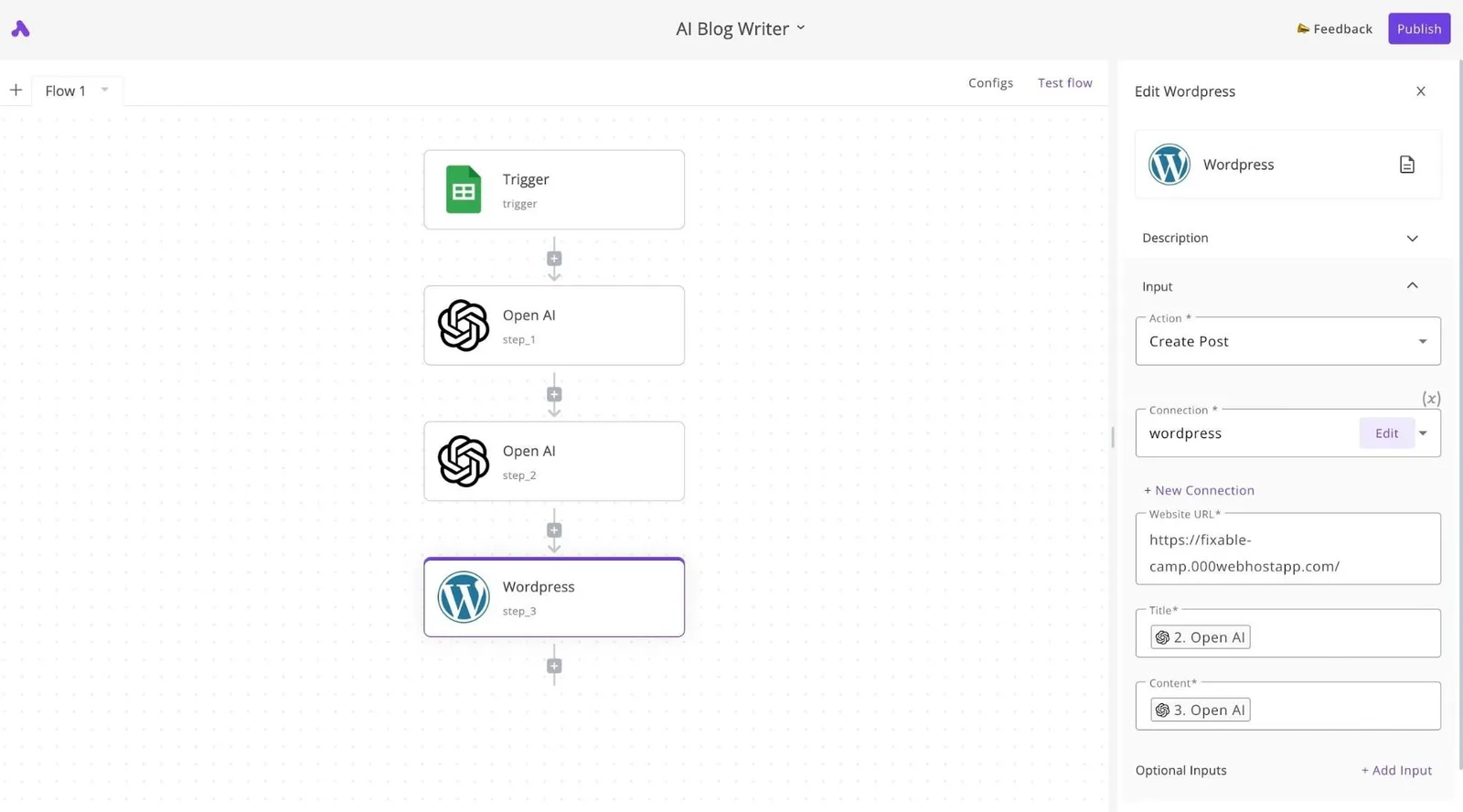
Activepieces uses its MIT-licensed core to decouple complex business logic from the Wix storefront, allowing teams to construct and publish runnable flows via AI chat even if a specific template does not exist.
It allows teams to execute multi-step workflows that exceed the platform's native trigger-action limits.
While Wix provides a stable environment for hosting product pages, its internal architecture often forces users into rigid silos when they need to sync data with external databases or specialized software.
Companies like MoneyGram and Moneypenny run Activepieces in production to maintain sophisticated backend operations while keeping their front-end on a standard builder. This allows for programmatically updating inventory across multiple channels or generating personalized marketing copy without hitting the wall of pre-defined template restrictions.
Connecting Wix to 100+ external apps
Activepieces bridges the gap between Wix and the broader software ecosystem by providing 738+ integrations, roughly 60% of which are community-contributed.
This ensures that customer data captured on a website is immediately actionable across the entire company stack without waiting for a vendor to release a specific connector.
When a user submits a form on a Wix site, the data is typically trapped within the Wix Ascend dashboard. Routing that event through Activepieces allows for immediate distribution to specialized tools.
For instance, a high-value lead can be sent to Gemini 3.8 Flash for intent analysis.
Sales representatives then receive a prioritized summary rather than a raw contact notification. This connectivity transforms the website from a static brochure into a dynamic data source that feeds every other professional tool the team relies on.
Replacing limited Wix 'Automations' with logic branches
Moving logic to Activepieces enables the creation of non-linear workflows that use conditional branching and loops, which can be verified by checking the open-source monorepo on GitHub. These are necessary for handling the edge cases that standard Wix Automations ignore.
While native Wix tools are built for simple "if this, then that" sequences, business reality often requires "if this, then check that, otherwise do this" complexity.
| Feature | Wix Native Automations | Activepieces Middleware |
|---|---|---|
| Logic Depth | Linear, single-step triggers | Multi-branching trees with loops |
| AI Integration | Limited to built-in assistants | Native support for GPT-6 Astra and Claude Sonnet 5.5 |
| Custom Code | Restricted to Velo environment | Open-source TypeScript/JavaScript pieces |
By offloading these decisions to a dedicated engine, a developer can build a workflow that verifies a customer's loyalty status.
The engine checks current stock levels in an external warehouse and then decides whether to send a discount code or a backorder notification. This granular control means the business logic is no longer a prisoner of the website builder's feature roadmap.
While other platforms limit users to a library of pre-defined templates, Activepieces allows teams to generate and publish custom workflows instantly through an AI chat interface.
Activepieces is the better choice for Wix users who need to build complex, multi-step automations that do not already exist as standard search results. By decoupling business logic from the storefront, it provides the flexibility to execute sophisticated backend operations that exceed native platform restrictions.
How to choose your next website platform
Choosing a new platform requires auditing your current infrastructure to ensure the move resolves technical bottlenecks.
You must identify the specific architectural limit to determine if you need a headless CMS for data separation or a full-stack framework for custom logic. This limit might be an inflexible checkout flow or a locked database.
Evaluating website migration complexity
Migration complexity is dictated by the volume of structured data and the specific third-party integrations currently powering your operations. Before selecting a destination, you must verify how your existing assets will move between environments.
- Export your product and customer databases to CSV or JSON formats to identify if custom fields in your current builder will map to the new schema without manual re-entry.
- Inventory your API connections, such as a Stripe payment gateway or a ShipStation fulfillment sync, to confirm the new platform supports these webhooks natively or through a middleware layer.
- Map your URL structure to prepare 301 redirects. This prevents internal links from breaking or leading to 404 errors during the transition.
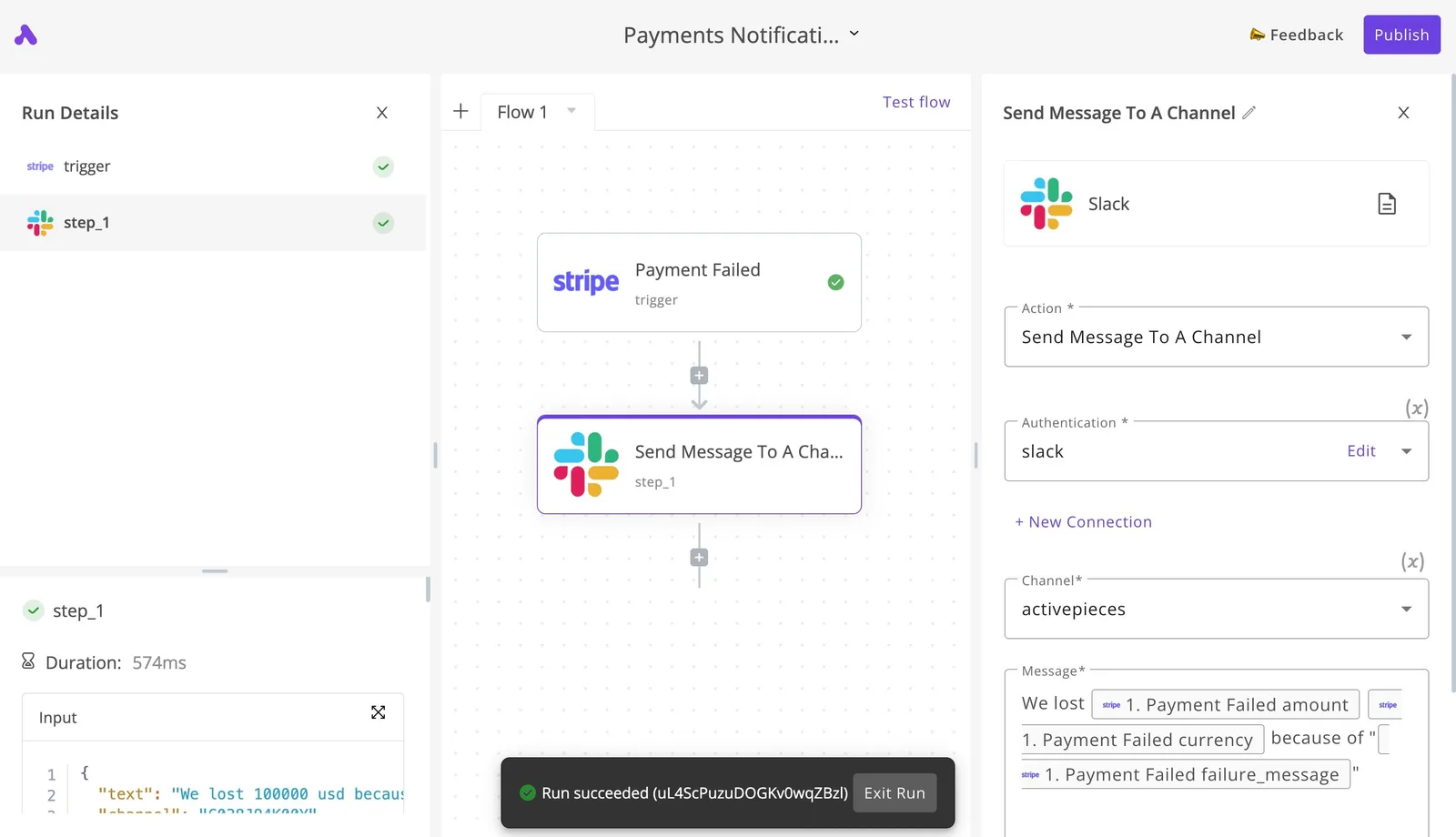
The following screenshot demonstrates a standard notification flow where a Stripe payment failure triggers an immediate Slack alert. This shows how decoupled systems maintain operational visibility during and after a transition.
Even if your frontend changes, this setup ensures that your backend logic remains intact and functional. By decoupling these services, you prevent a single platform update from breaking your entire customer notification chain.
Site speed and SEO after migration
Performance and search ranking are the primary risks when moving from a managed environment to a custom one. You must validate the new platform’s ability to handle your specific traffic load and metadata requirements.
- Core Web Vitals: Measure the Largest Contentful Paint on the new platform’s staging environment so you can identify slow-loading scripts before they impact your production SEO score.
- Schema Markup: Verify that the new system allows for JSON-LD injection so that rich snippets for products or reviews remain visible in search engine result pages.
- Server Response Time: Check the Time to First Byte on the new host to ensure the infrastructure can serve dynamic content faster than the shared hosting of a template-based builder.
Frequently asked questions about Wix migration
Can I export my Wix site to WordPress?
Wix does not provide a native tool to export your site as a structured database file, meaning you cannot move your design and functionality to WordPress with a single click.
Because Wix uses a proprietary architecture, your content must be moved via RSS feeds or manual copy-pasting so that each page can be reconstructed within the WordPress block editor.
This process requires significant manual effort to ensure that images and formatting remain consistent across the new environment.
Will I lose my Google rankings if I switch from Wix?
You will not lose your rankings if you implement a precise 301 redirect map for every URL on your site. A 301 redirect is a permanent instruction that tells search engines a page has moved.
This transfers the authority built by your old Wix links to your new platform’s pages.
If you skip this step, Google will treat your new site as an empty domain with no history, causing your organic traffic to drop until the new pages are crawled and indexed from scratch.

What is the cheapest Wix alternative for a small business?
The most cost-effective alternative depends on whether you prioritize monthly hosting fees or the time spent on manual configuration.
WordPress.org requires you to purchase your own hosting through a provider like Bluehost or SiteGround. This gives you full ownership of your site files at a lower base cost than most all-in-one builders.
Carrd is a one-page site builder designed for simple landing pages, allowing businesses to maintain a web presence without paying for the multi-page infrastructure they don't use.
GitHub Pages is a service that serves web files directly from a repository. Static site generators like Hugo or Jekyll allow you to host a site for free on this service, provided you have the technical skill to manage site updates via a terminal.
Related reading
Still comparing
The fastest way to settle it is to build something.
Open source under MIT, so you can self-host the same thing later.
Start free Talk to sales