
Buffer API: Access, Rate Limits and Errors in 2026

Nov 23, 202614 min read
The Buffer API is a publishing interface: it schedules posts to the channels connected to a Buffer account and manages the queue, whether it's called directly or from a workflow tool such as Activepieces, and it doesn't return general social-media data.
Buffer API access and capabilities
What the API does and does not cover
Use the list below as a scoping test for your project: if your requirement falls in the second group, you need a different data source. It separates the jobs Buffer's documentation describes from the ones people often assume it covers.
- Built for: scheduling posts to connected channels
- Built for: managing the queue of posts waiting to publish
- Not built for: pulling general social data from networks
- Not built for: competitor analytics or research on accounts you don't own

Which plan includes API access
Buffer's published pages confirm that API access is included on every plan, including the Free plan.
The account's plan and permissions set what any call can do, but a connector that lacks an endpoint need not leave you waiting on a vendor: Activepieces lets you have AI generate the missing integration and keep it private to your own instance, and about 60% of its 750 integrations, counted from the open source monorepo, were built by community contributors.
This section gives the limits Buffer publishes for each plan. It reflects what I could verify on 2026-11-23.
Everything below works on Activepieces' free plan. Start without code or a credit card.
Getting a Buffer API Key or OAuth App
Before you register anything, know that the Buffer account you are signed in to owns that connection. Buffer issues API credentials from the developer area of its own documentation.
Where to create Buffer API credentials
Start from Buffer's developer documentation, not from a third-party tutorial, because the registration screen and the token types it has are what Buffer currently supports. Decide whether a personal token or a registered OAuth app fits your case.
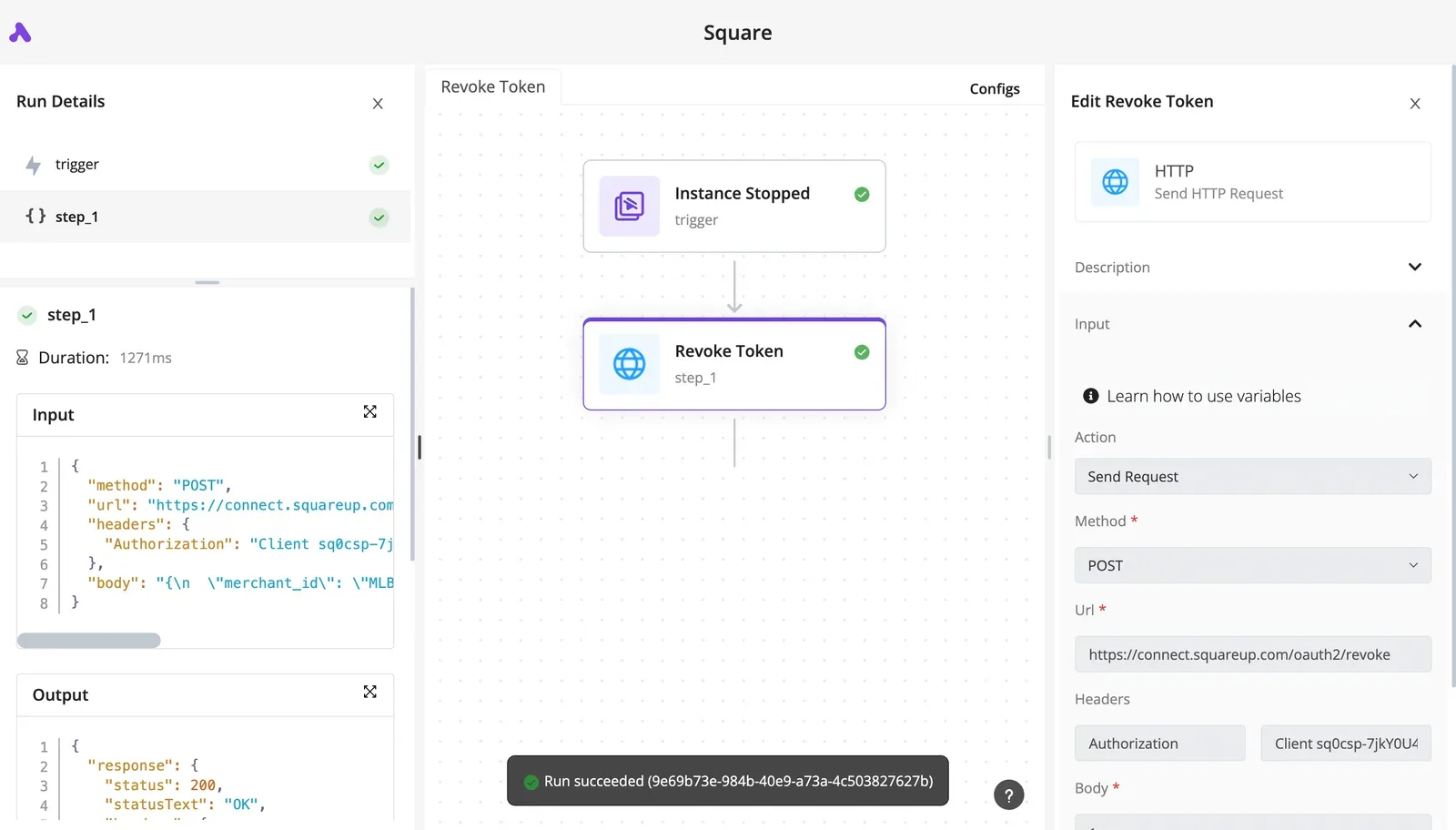
When the person whose login created a token leaves, the integration breaks, so a team product should register the app under an account the company controls.
Buffer API authentication steps and token handling
Follow these steps on the live docs page, not from memory. They show the order in which Buffer's docs lead you to a working call, and what to confirm at each stage.
- Open the developer page in Buffer's documentation while signed in to the account that will own the connection.
- Register an app, or create a token if the docs offer that route for your use.
- Set the redirect URI and the scopes. Request only the publishing scopes the docs list, and match the redirect URI exactly to what your server expects.
- Check whether the docs require approval before credentials work, and note any wait.
- Make a first authenticated call to a read endpoint and confirm the response identifies the account you intended.
After that, store the token in a secrets manager, record its owner, and ask the docs whether it expires and how you renew it. Build the renewal path before launch.
Before you register, read which API version Buffer's docs call current and which legacy, because credentials and endpoints for one version may not work on the other. If a page is marked legacy, don't build new work on it.
Buffer API Endpoints and Resources Available
Expect a small publishing surface: channels, posts, the queue and media upload. Everything else you might expect from a social data API is outside what this section confirms.
Buffer API endpoint table by resource
To decide which calls your integration will make, and which token owner must exist before any of them work, use the table below. It lists each resource, what it does, the credential it needs and whether it reads or writes.
| Resource | What it does | Auth required | Read or write |
|---|---|---|---|
| Channels | Lists the connected social accounts you can publish to | Access token from the account that owns the connections | Read |
| Posts | Creates and schedules a post to a channel | Same token | Write |
| Queue | Places a post in a channel's publishing queue | Same token | Write |
| Media upload | Attaches images or video to a post | Same token | Write |
You won't find analytics in the table, because this section doesn't confirm it as documented. Check the current scopes on Buffer's developer docs before you request a token.
Media and post-type limits
Because character limits differ by network, one draft won't fit everywhere. According to Buffer's character-limits guide, X allows 280 characters on a free account and 25,000 on a paid one.
According to Developers, Bluesky allows 300 characters, so a 280-character X post fits. Per Buffer, Pinterest allows 500, which means long captions need trimming per channel. LinkedIn allows 3,000 and TikTok text allows 4,000, so those two rarely force a cut.

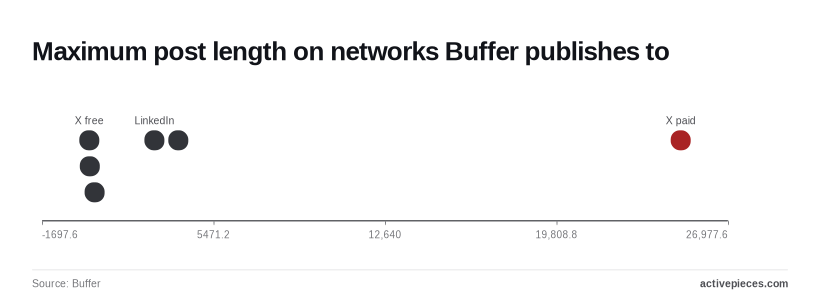
Validate length per channel before you queue a post. A rejected post found at publish time costs you a retry and a missed slot. The same guide is where to confirm media limits before you upload.
Buffer API Pricing and Rate Limits by Plan
You are not billed per API call. Access is bundled into the plan, and the plan fixes your request ceiling. All figures below were checked on 2026-11-23.
API cost per unit
Count channels, not requests: the billing unit is the connected channel.
According to SaaS Dealer, Essentials cost $5 per channel per month in Aug 2021, Jan 2022 and Jul 2022, rose to $6 in Jul 2023, then returned to $5 in Jul 2024 and Jan 2025.
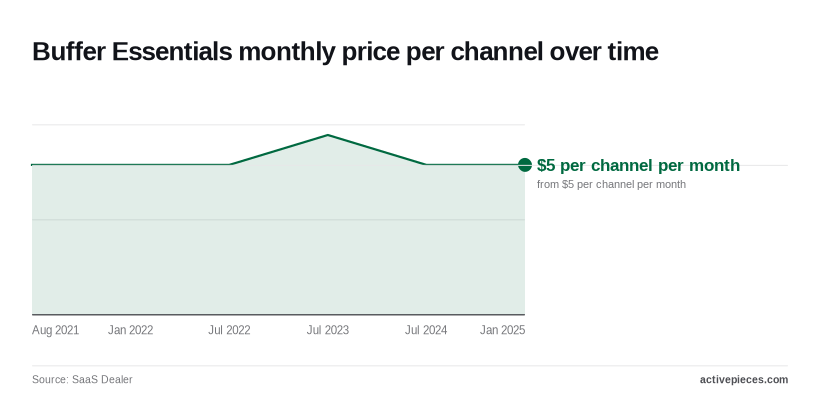
Budget on $5, but whoever owns the billing account should know the price has moved before.
Rate limits and quotas
150, 450 and 1,500 requests per 15 minutes: those are the limits Buffer's API limits guide documents across the three tiers. Per 24 hours it's 600, 1,800 and 6,000. The 30-day maximum is 3,000, 30,000 and 100,000.
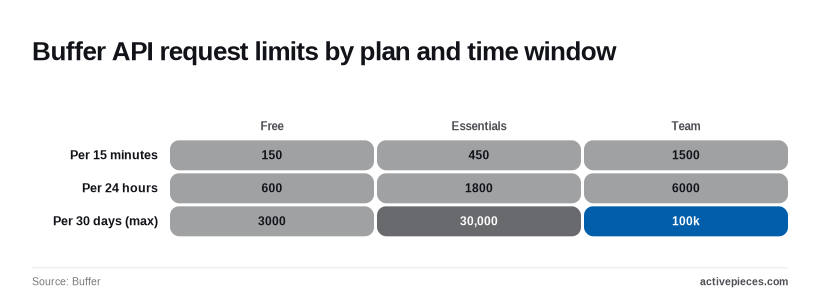
At 3,000 a month, the lowest tier averages 100 requests a day, so a polling loop will exhaust it. Queue your work and batch it.
To see which constraint binds first, read the table, which pairs each plan with its price, queue limit and documented request limits.
| Plan | Price per channel per month | Queue limit | Documented API request limit |
|---|---|---|---|
| Free | not published | not published | 150 per 15 min; 600 per 24 h; 3,000 per 30 days |
| Essentials | $5 | not published | 450 per 15 min; 1,800 per 24 h; 30,000 per 30 days |
| Team | not published | not published | 1,500 per 15 min; 6,000 per 24 h; 100,000 per 30 days |
Where a cell says "not published", don't assume a figure; confirm it in Buffer's documentation before you design around it.
Easier to see it running than to read about it: set it up free, no card.
A Minimal Working Buffer API Request
One authenticated call that creates a single scheduled post on one connected channel is the smallest request that counts as working. Copy its exact shape from Buffer's developer documentation rather than from memory or a forum thread.
I can't confirm the endpoint and body, so they are missing here, and a request that is almost right fails in ways that look like your bug.
Before sending anything, settle who owns the connection. The access token acts as the Buffer account that issued it, so the post lands in that account's channels and queue. A token created under a departed colleague's login will break the day that login is removed.
Send four things, each as the docs define it:
- The access token, sent in the authorization header.
- The identifier of the channel the post belongs to.
- The post text.
- The scheduled time, in the format the docs specify, so the post goes into the queue instead of publishing at once.
Store the identifier a successful response returns for the new post, because it's the only reliable way to match your system's record to Buffer's.
Then open the channel's queue in Buffer and confirm the post appears at the time you set. If the call succeeded but the post is missing, check the channel and the account behind the token before you change the code.
Once this single call works, the next risk is volume.
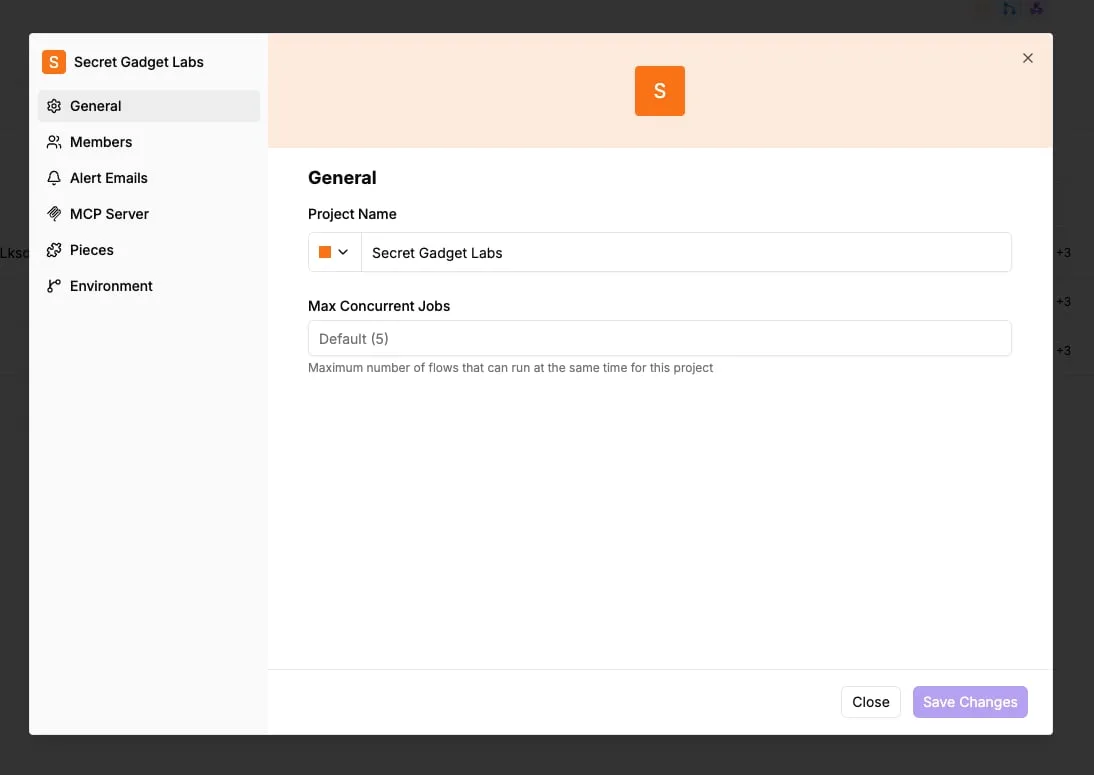
The settings dialog below, from a separate workflow tool, caps concurrent jobs at a default of five, so a sixth simultaneous posting job waits its turn.
Your own sender needs a limit of the same kind, and the next section covers the queues and retries that go with it.
Common Buffer API errors and fixes
When a Buffer call fails, it is one of six things, and each has a different fix: re-authorize, change plan, slow down, correct the payload, reconnect the channel, or stop retrying blindly.
The table shows the cause and response for each, and the docs column names the Buffer developer docs page to check before you trust any status mapping.
| Error | Cause | HTTP status | Fix | Docs |
|---|---|---|---|---|
| Expired token | Access token past its lifetime or revoked | Unauthorized | Re-authorize as the connection owner | Buffer developer docs, authentication |
| Plan or permission limit | Plan or scope does not cover the action | Forbidden | Check plan and granted scopes | Buffer developer docs, access and plans |
| Rate limiting | Requests sent faster than allowed | Too Many Requests | Back off, then retry | Buffer developer docs, rate limits |
| Validation failure | Payload rejected by Buffer or the network | Bad Request | Fix the field named in the error body | Buffer developer docs, publishing |
| Disconnected channel | Social account link broken | Varies; read the error body | Owner reconnects the channel in Buffer | Buffer developer docs, channels |
| Duplicate on retry | Retry of a request that had already succeeded | None; both succeed | Record your own post ID before sending | Buffer developer docs, publishing |
Treat the status column as a starting point; the response body and Buffer's current docs are the authority.
What to do for each Buffer API error
When you get Unauthorized, the token is expired or revoked, and only the person who authorized it can replace it. Record that person per connection, because a departed employee's token is a failure scheduled in advance.
When you get Too Many Requests, stop, wait and retry with growing delays. Respect any wait time the response states, and cap total attempts so a stuck job doesn't loop forever.
Don't retry validation errors, since the same payload fails the same way. Disconnected channels are the same: no delay fixes them, so route them to a human who owns the account.
When a call times out, that doesn't prove the post failed. Store your own identifier before each send and check it before retrying, so one queued item produces one post.
When a call times out, that doesn't prove the post failed.
Call Buffer Without Code Using Activepieces
If you would rather not write code, Activepieces lets you create a Buffer post when something happens in another app, and flows are unlimited on every plan, including free.
It does this with its Buffer integration for whatever the integration lists and an HTTP step for anything it doesn't.
That also covers the duplicate problem: the identifier check above is something you build into the flow yourself.
When no-code Buffer API access is enough
Start with ownership: the Buffer connection in a flow belongs to whoever authorised it. If that person leaves or their access lapses, every flow using it stops. Name an owner for the connection before you build anything on it.
To split the work between the integration and an HTTP step, use the list below.
Read the integration's actions and triggers on its Activepieces integrations page or in the open source monorepo on GitHub, where its 750 integrations are counted, since those sources, not this article, are the authority on what is covered.
- Anything the integrations page lists as an action or trigger: use the Buffer integration directly.
- Anything the page doesn't list but Buffer's own API docs describe: add an HTTP step, and check the endpoint and its limits in Buffer's docs first.
- Anything neither source supports: it's not available to you without a different approach, so don't design the flow around it.
Take a flow of "new row in a spreadsheet, queue a post": it fits the first line well.
When to call the API directly instead
Choose code when the flow needs the controls this article has described. Those are storing your own identifier before each send, deciding exactly when to retry, and handling token expiry in a way you can test.
A visual flow can hold some of this, but you can't easily reason about it.
If a missed or doubled post has a real cost, own the retry logic in code you can review.
Frequently asked questions
Is the Buffer API free to use?
Whether it's free depends on your Buffer plan and on the access rules in Buffer's developer documentation, so confirm both there before you build.
Record which account owns the access token, because the plan that account is on is the plan your integration inherits.
Can I read analytics through the Buffer API?
Don't plan on it. The API is a publishing interface for creating and managing posts in queues, not a reporting feed for social-media performance data. Check the current endpoint list in Buffer's docs for whatever read access exists today.
If you need engagement metrics, pull them from each network's own API or from Buffer's dashboard exports, and treat any analytics you do get from Buffer as a bonus, not a dependency.
Does Buffer still accept new API applications?
Check the developer pages on Buffer's site on the day you start, because registration rules for new applications have changed over time and a past answer may be stale.
If registration is closed or limited, you'll find out in the first hour rather than after you have built a scheduler around it.
Write down who at your organisation holds the application registration. When that person leaves, the connection shouldn't leave with them.
Can I post to Instagram or TikTok through the Buffer API?
Only to the extent that Buffer's docs list those channels as supported for API publishing. A network that Buffer supports in its web app isn't automatically available through the API, and each network brings its own content-type restrictions.

Read the supported-channel and post-type details in the docs, then test one real post per channel from a non-production account before promising the feature to anyone.