
Buffer API: Access, Rate Limits, Errors (2026 Guide)

Nov 23, 202614 min read
You get Buffer API access by creating a key in your Buffer account, then sending it with each request, whether from a script or from a workflow tool like Activepieces.
Which plans can create one, and how many keys each allows, is something to confirm in Buffer's developer docs on the day you build, not from a blog post, including this one.
Buffer API keys and limits by plan
What the Buffer API is and what it is for
When code, rather than a person in the dashboard, has to schedule and manage social posts, the Buffer API is the route. It matters to anyone wiring Buffer into something else, whether an in-house script or an automation tool.
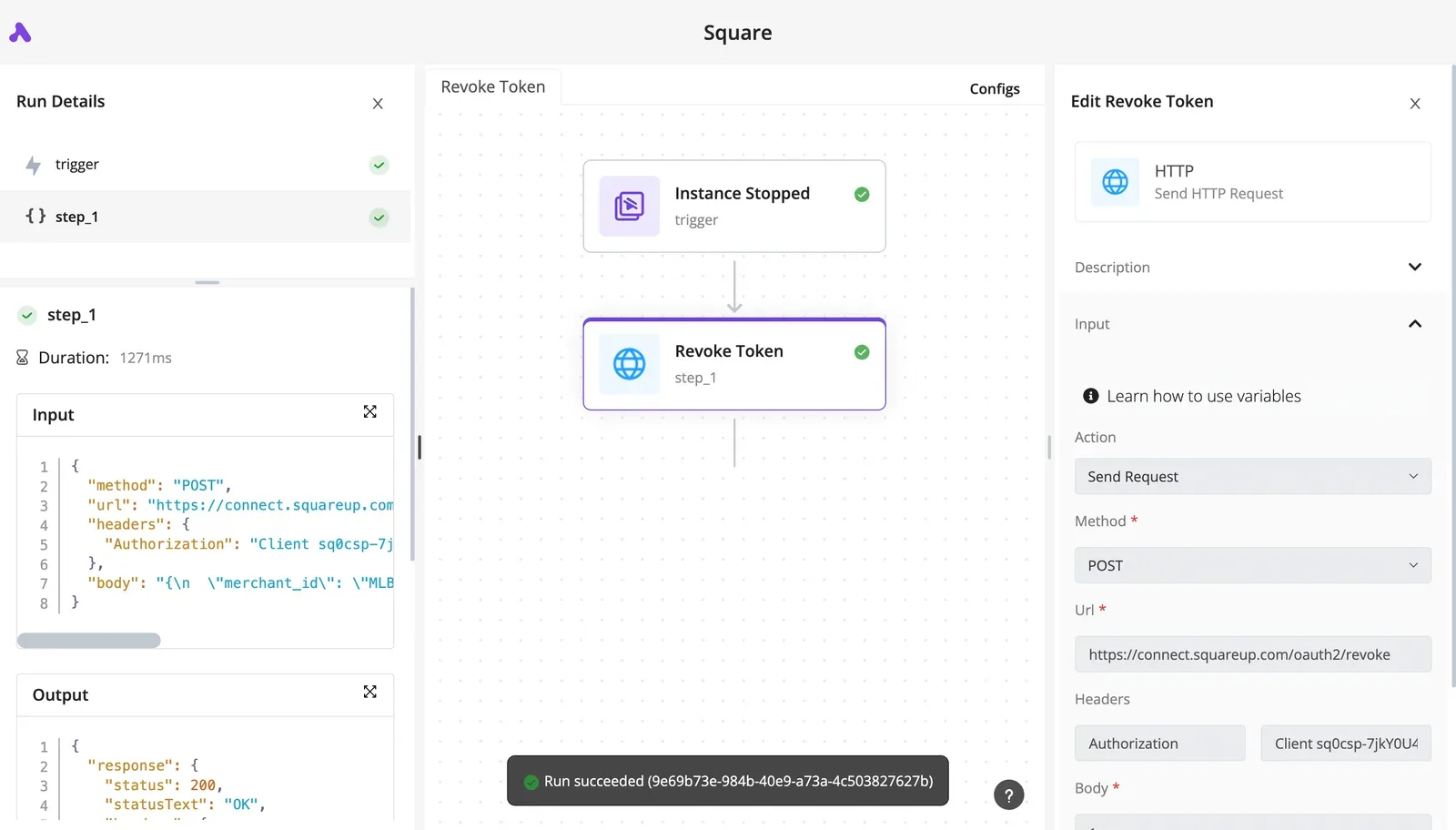
Every call then runs under one account's key, so access rules, limits and failures become your design inputs.
Who can get access, and on which plan
I couldn't confirm the per-plan figures against Buffer's docs as of 2026-11-23, so the table says so rather than guessing. Access depends on the account and its plan, and the key allowance may differ by tier.
| Plan | API keys allowed | Where the key is created | Auth header |
|---|---|---|---|
| Free | docs silent | docs silent | docs silent |
| Essentials | docs silent | docs silent | docs silent |
| Team | docs silent | docs silent | docs silent |

Read that table as a gap, not a finding.
Before committing, ask Buffer support in writing and keep the reply with its timestamp, because a quota that was never documented is hard to argue about after it breaks something.
Check these steps in order against the current docs:
- Sign in to the Buffer account that will own the integration, not a personal one that someone may leave.
- Find the key creation screen in Buffer's developer documentation and settings, and note exactly where it sits.
- Create the key and store it in a secrets manager, not in the repository.
- Copy the auth header format from the docs verbatim, and test with one harmless read request before anything that publishes.
This takes minutes, not a project: automate it in Activepieces free.
Buffer API endpoints and a minimal working request
Send the cheapest request first, the one that proves your credentials work: list your channels, then schedule one post to one of them. Everything else waits until those two calls succeed.
What the API can and cannot do
If you want to know what the API can do, Buffer's docs cover the account, channels, creating and scheduling posts, and reading posts back.
Read the API style, the version and any beta or deprecated label from the docs page itself, and write down the date you read it. A build on a deprecated surface is a rewrite scheduled by someone else.
Treat that list as complete. If a dashboard feature you rely on isn't named in the docs, assume the API can't do it until a test call proves otherwise.
Listing channels with the Buffer API
If listing channels fails, the fault is in your credentials or auth scheme, not in your post payload, which saves you debugging the wrong layer. It is one authenticated read, and it returns the channel identifiers every later call needs.
You set four parts every time in an HTTP request step:
- the method
- the URL
- the headers
- the query parameters
Copy its shape and not its values, because the step below shows all four for a different service entirely. Take the method, URL and header names for Buffer from the docs, and put your token in the header the docs specify.
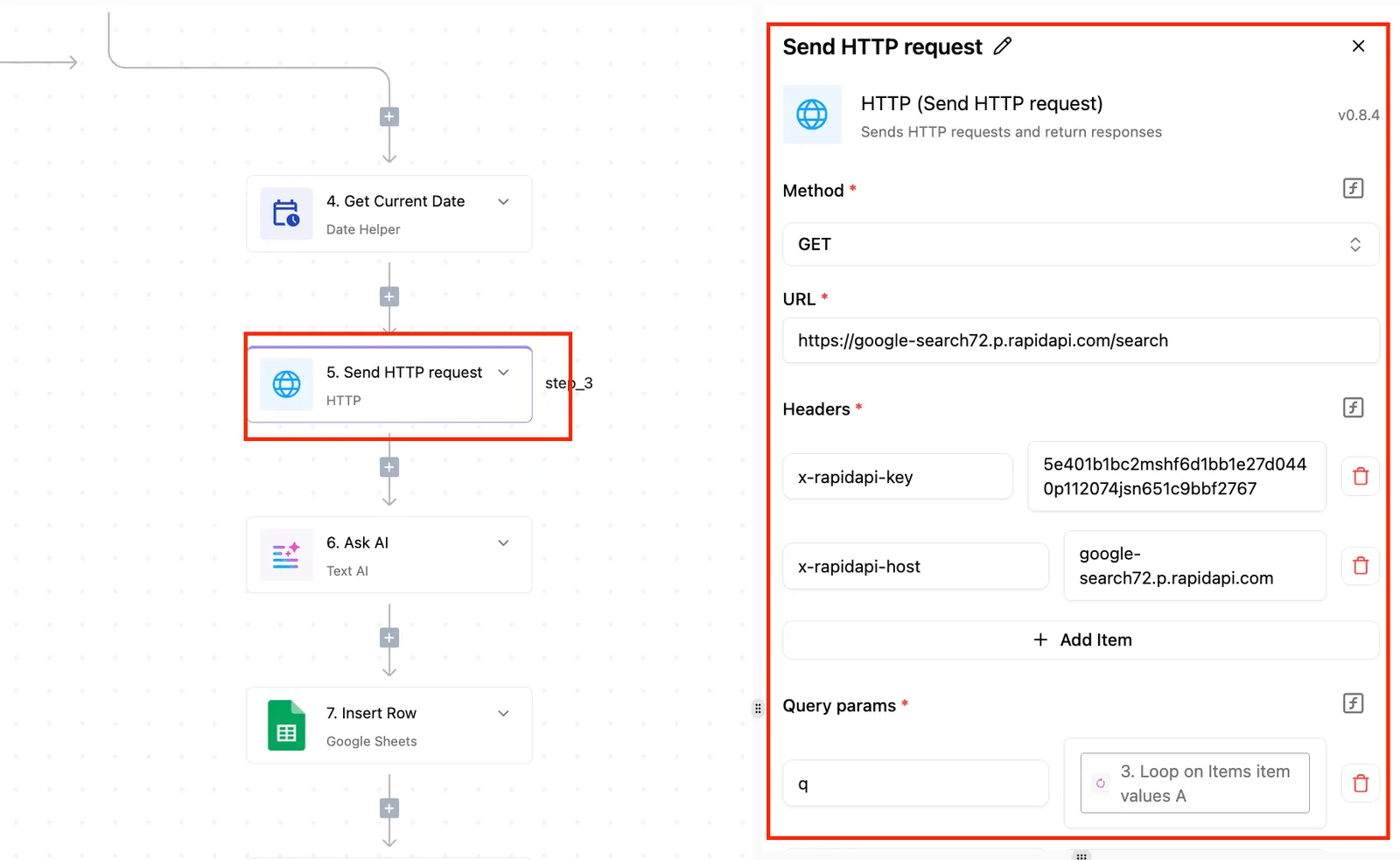
Once the call returns, store the identifier of one channel you can safely post to. A scratch channel is better than a client's live one.
Scheduling a post with the Buffer API
When you schedule a post, you need three things, with exact field names taken from the docs and not from memory or from another scheduler's API:
- the channel identifier from the previous call
- the post text
- the scheduled time, in whatever format and time zone convention the docs specify
Send one post to the scratch channel. An accepted response proves Buffer took the request. It doesn't prove the post sits in the queue at the time you meant.
So read the post back through the reading endpoint and compare the stored time with the time you sent.
Buffer API pricing and rate limits by plan
If the timestamp check turned up a mismatch, check which ceiling you are running under before you blame your code. Buffer's API is paid for through your plan, not call by call, and the rate limit that binds you depends on the tier.
Is there a per-call Buffer API price?
I found no per-call price in the material behind this article, so budget for the subscription and nothing else. That means a runaway loop won't show up on an invoice. It'll show up as rejected requests, usually at the worst moment.
Before you commit, read Buffer's pricing page and API documentation and write down the date you read them. Both change, and a figure without a date is a rumour.
Rate limits and how they are reported
Design against the plan you will run on in production, not the plan you tested on.

Then look at how limits are reported. Log the status code and any headers on every rejected call. If Buffer doesn't tell you how long to wait, your retry delay is a guess, so make it a conservative one.
Plan caps that affect API users
Staying under the rate limit doesn't make a call safe. Plans also cap channels and scheduled posts, and the API gets no exemption. Buffer can refuse a call that is perfectly within its rate limit because the queue is full.
Treat those caps as separate error cases and handle them separately from rate-limit errors, because retrying a full queue only repeats the failure.
Confirm each cap on the pricing page, with the date, before you build a feature that depends on it.
You can follow the rest of this with the builder open. Start free, no card.
The strongest case against building on Buffer's API
Don't depend on a layer that sits between you and the networks, says the objection. Buffer is a scheduling product with a narrow API, gated access and a record of changing what it offers, so going direct or using a unified social API buys control.
A cap you can't confirm can break your feature.
Limited Buffer API surface and access restrictions
If your feature needs a network-specific option that Buffer hasn't exposed, you wait or you drop it. The API exists to serve Buffer's product: queues, scheduled posts, connected channels. Anything the scheduler doesn't model is out of reach.
A closed catalogue only grows where its vendor chooses to spend, so a missing connector means waiting on someone else's priorities. Activepieces lets you generate the missing integration with AI and add it privately to your own instance, with no vendor release in between.
Roughly 60% of its 750 integrations were contributed by the community, a count you can reproduce from the open-source monorepo on GitHub, meaning you don't have to trust Buffer's representation of community contribution.
On top of that, access is granted, not assumed. If Buffer decides who may build on the API, your project depends on that decision going your way, and going your way again whenever the terms are reviewed.
Buffer API dependence on one vendor's roadmap
Here is the sharpest point of the objection: Buffer has changed API availability before. Your integration then inherits a decision made for Buffer's own priorities.
Say it plainly, as the proponents of going direct do: you are building a second-order dependency, on Buffer, which depends on each network. A change at either level reaches your users, and you have no vote at the first.

Cost of using network APIs instead of Buffer
Its supporters should say so: going direct isn't free of constraint. Each network brings its own app review, its own authentication flow, its own limits and its own habit of changing them. You would maintain one integration per network, and each one can break independently.
To compress that work into a single contract, you can use a unified social API, but then the dependency is a different vendor, with its own pricing and roadmap.
Either way you pay: direct access gives you control over the call and the failure, at the price of owning every integration. Buffer gives you one integration and takes the control.
Common Buffer API errors in production and fixes
Read the response body and not just the status line, and the limits are manageable: Buffer's documented errors are few and each has a handling rule.
The list below covers what Buffer's docs and changelog describe, as of this article's date. I mark anything outside them unconfirmed, and you should check it against the docs before relying on it.
- Rate limit: returned as an HTTP 429 error once a limit is exceeded, until the window resets. Cause: you exceeded a quota. Handling: back off and retry, as below.
- Authentication failure: also HTTP 200. Cause: a bad or revoked token. Handling: stop, re-authorise, don't retry.
- Validation error: Cause: input the API rejects. Handling: fix the payload, since retrying the same request fails the same way.
- Anything else: unconfirmed.
Because a failed login arrives as HTTP 200, a monitor watching status codes reports success while every call fails. Parse the body on every response and alert on the error type. Whether permission failures are a separate type from authentication failures is unconfirmed.
**Because a failed login arrives as HTTP 200, a monitor watching status codes reports success while every call fails.
Since a rate limit arrives as a 429, a client that retries on non-2xx status codes can honor Retry-After and slow down.
Branch on the typed error, wait, and lengthen the wait on each repeat. Whether the response tells you how long to wait is unconfirmed, so build in a delay of your own.
When Buffer refuses input, that is a validation error. Treat these as permanent: log the payload, surface the message to the user, and skip the retry queue. Per-network media limits and their exact error wording are unconfirmed.
Duplicate Buffer API posts after retries
If the first call succeeded, a retry after a timeout can publish twice. Whether Buffer supports idempotency keys is unconfirmed, so keep your own record of what you sent, and check it before resending.
When you need a network feature Buffer doesn't expose, or can't tolerate a layer that hides failures behind a 200, going direct is still better.
How Activepieces connects other apps to Buffer
When something happens in another app, Activepieces starts a flow and sends the result to Buffer. Its 750 integrations are counted from the open-source monorepo, so the trigger side rarely lacks a connector, and flows are unlimited on every plan, including free.
You can get content into Buffer in three ways:
- Custom code that calls Buffer's API directly.
- A no-code automation tool that sits between your source app and Buffer.
- Buffer's own integrations, which cover only what Buffer has chosen to build.
If you can read the response and handle a rejection in ten lines, you don't need a platform. A plain API call is enough for a simple script, such as one job pushing one post on a schedule.
Finding available actions in the catalog
The Activepieces catalogue is large, 750 integrations counted from the open-source monorepo on GitHub, and it keeps growing, so that is where to look for Buffer and read its exact list of actions before you design around one.
If Buffer or an action you need isn't there, you can generate it with AI and add it privately to your own instance. An action you assumed exists is a flow you'll have to rebuild.
Triggers come from the other apps: a new row, a published article or a calendar event can each start a flow that ends in a Buffer step.
In the canvas below, Google Calendar is the trigger and Gmail the action, not Buffer, but the mechanics are identical.
The left panel records how long each step ran and the input and output JSON, and at the bottom a failed run is listed under its own run ID with an Edit Run button.
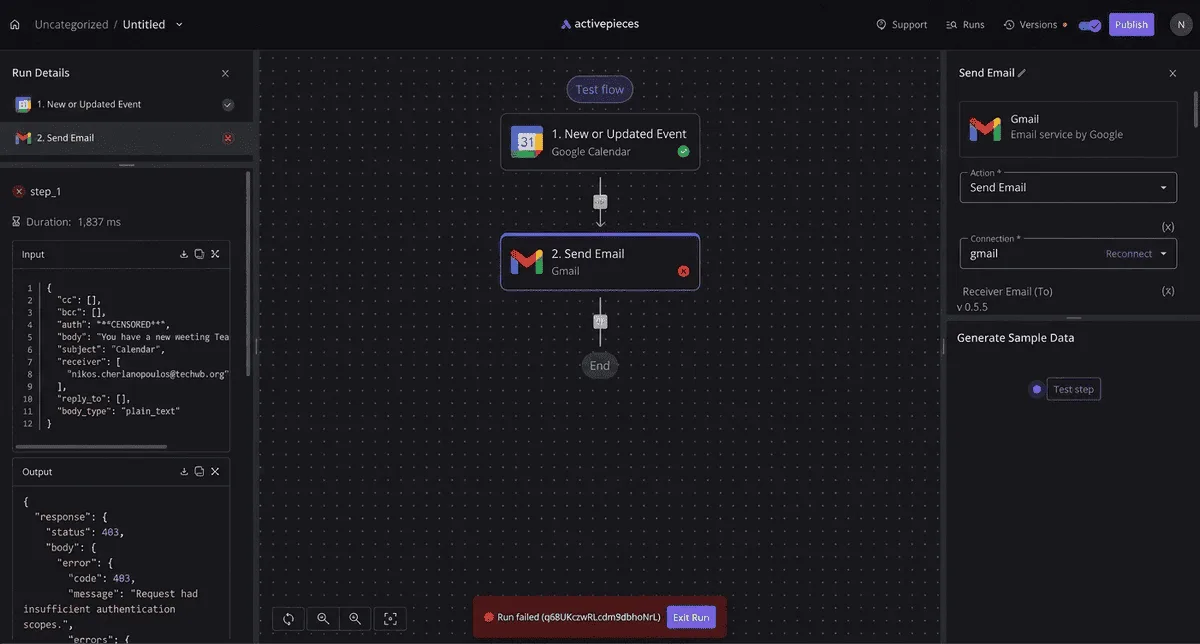
Treat the run record as the reason to use the tool. When a post doesn't arrive, you open the run and read what was sent and what came back, instead of guessing.
Per step, you set retries and error branches. That lets you decide, before launch, what happens when Buffer rejects a request: try again, route to a different step, or alert a person.
What to do on Monday:
- Read the Buffer integration page and write down which actions it offers.
- Build one flow from a single trigger to a single Buffer step.
- Force a failure on purpose and open the failed run.
- Add an error branch that notifies you, then test it again.
Frequently asked questions
These are the questions the earlier sections leave open. This article doesn't carry a figure or a dated check for any of them, so each answer says what to confirm in Buffer's own documentation before you commit.
Whether the Buffer API is free depends on your plan, and Buffer's API documentation and your own account settings are the authority, not this article.
Don't prototype on a free account until it has actually issued you a key, because a build that assumes free access can stall at the first authentication call.
Whether Buffer still accepts new API applications is unconfirmed. Buffer has at times paused new developer registrations, and its current developer pages say where that stands.
If registration is closed or gated, access becomes a schedule risk, so request it first and design around the answer.
Can I post to every Buffer channel type through the API?
Assume not until the docs say otherwise. Support can differ by network and by post format, so a channel you can schedule from the dashboard may be unavailable over the API.
Check the supported list for each channel you need and decide in advance what your workflow does when one isn't on it. A silent skip looks the same as success.
Verify analytics access endpoint by endpoint, because posting support doesn't imply reporting support. If the metrics you need aren't exposed, your reporting step needs another source, such as the networks' own data or a manual export. Find that out before you promise anyone a dashboard.
Confirm whether Buffer offers webhooks in the current docs before designing your trigger model.
Without webhooks you poll for status changes, and every poll counts against your rate limit. Poll heavily to learn whether a post went out, and you can spend the quota you need to publish the next one.
Build it
Set this up in minutes.
No code required. Connect your accounts, and Activepieces runs it from there.
Start free Talk to sales