
Monday Automations Alternatives: Best Options in 2026

Nov 15, 202615 min read
According to 28creation, Zapier suits non-technical teams that need the widest app reach. Make suits visual builders who branch a lot. n8n suits engineers, and Activepieces suits teams that want self-hosting. Stay on monday automations if the work never leaves the board.
What monday automations are and where they win
Nothing needs connecting when status changes, assignments, due dates and notifications all live inside monday. That is where monday automations win: they are built-in, no-code "when this changes, do that" recipes attached to a board.
Per SaaS Price Alerts, a 10-seat team pays $90–$120 a month on Basic and $190–$240 on Pro, depending on billing mode.
That means the automation layer comes bundled with seats rather than priced on its own, which is why it feels free until you hit a ceiling.
Hit any of three limits and teams start looking elsewhere. Recipes that must reach other apps become thin, simple recipes rarely handle real branching, and each plan caps monthly actions.
Workflows that fan out per row burn that quota fast, so a busy board can stall automations mid-month.
Cost is where alternatives diverge:
- Per Workflowmath, 10,000 runs a month costs $433.50 on Zapier Pro, so a task-metered tool can cost more than your entire monday plan.
- Workflowmath reports the same volume is $67.13 on n8n Cloud Pro and $10.59 on Make Core, so the pricing unit matters more than the logo.
- A self-hosted Activepieces install is $0 and its cloud plan is $20, meaning the only real cost of self-hosting is your own ops time.
Every tool was judged on the same criteria:
- who builds the flows
- whether it runs in the cloud or self-hosted
- how far it reaches across apps
- how it meters usage
- what it costs at 10,000 runs
Treat every price here as a snapshot, since plans change. The figures come from vendor pages and the two trackers above, checked on 2026-11-15.
Read the pricing-unit column first, because it determines what happens to your bill as volume grows. The table below sets all five tools against the same criteria.
| Tool | Who builds | Where it runs | Cross-app reach | Pricing unit | Best fit |
|---|---|---|---|---|---|
| monday automations | Board owners, no code | monday cloud | Mostly inside monday | Seats, with monthly action quotas | Work that stays on one board |
| Zapier | Non-technical staff | Cloud | Very wide | Tasks | Quick connections across many apps |
| Make | Visual builders | Cloud | Wide | Credits | Branching, multi-step scenarios |
| n8n | Engineers | Cloud or self-host | Wide, with custom code | Executions | Technical teams wanting control |
| Activepieces | Ops teams and developers | Cloud or self-host | Growing library of pieces | Free self-host, or cloud plan | Teams needing self-hosting |
Zapier for Non-Technical Owners
When an owner who doesn't write code needs to connect many different apps without asking anyone for help, Zapier is the better pick than monday automations. It gets expensive once task volume climbs.
Where Zapier wins
Nobody else on this shortlist connects as many apps as Zapier does.
That matters because the usual reason people leave monday automations is that the work stops living on a board. The invoice sits in an accounting tool, the lead arrives through a form, and the approval happens in chat.
If the app you need is niche, Zapier is the may already have a connector for it, which means you're configuring rather than waiting.
Open the builder and the second advantage is obvious. You pick a trigger, add actions in order, and test each step against real sample data. An owner can build and read a flow without learning what a webhook is.

I'd still treat "anyone can build it" as a claim about the first flow, not the fortieth. Once you add filters and branches, a Zap gets as hard to audit as any other tool's flow.
When a step fails, you can see which one failed and replay it after fixing the cause, instead of reconstructing what the run should have done. That is where Zapier is stronger than monday automations in practice.
For a non-technical owner, that's the difference between a recoverable afternoon and lost records.
Zapier task limits and cost at volume
Run a flow with five actions a hundred times and it uses five hundred tasks, not a hundred, so costs scale with action count. Zapier bills per task, and each successful action step in a flow counts as one.
So cost scales with both how often flows fire and how long they are. The plan you priced from a single simple test flow won't be the plan you end up on.
Add a polling trigger that fires on every new row or message and the bill follows your busiest day, not your average one.
**The plan you priced from a single simple test flow won't be the plan you end up on.
To fix this, measure before you commit:
- Count the actions in your longest flow.
- Multiply by its monthly runs.
- Compare that with the plan's task allowance.
Check Zapier's current pricing page for the tiers, since they change.
Outgrow a tier and you tend to cut steps or filter early, and both make flows harder to read.
Zapier suits a non-technical owner running a modest number of short flows across many apps, who values fast setup and visible, replayable errors over a predictable bill.
It suits you less if your flows are long, branch heavily, or run at high volume, or if you need to self-host.
The fastest way to settle a shortlist is to try one. Activepieces is free to try, no credit card.
Make for Visual Branching Workflows
When your flows branch, loop over lists, and need data reshaped between apps, Make is the pick.
Its canvas shows all of that as one visible map instead of a stack of hidden steps. That's exactly where monday automations run out of room, so it's the first place most people look.
Where Make wins
Wire modules together on a canvas and you have a Make scenario. A trigger module sits at the left, a router splits the run into separate branches, and each branch can carry its own filters and its own apps.

Send one branch through an iterator and it takes a list of items, such as the line items on an order, and runs the following modules once per item. The branches then merge at a final app module that writes the result.
Take from it that branching and looping are drawn, not coded, so you can see which path a record took and where it stopped.
Data mapping is the other strength. You pick fields from earlier modules and drop them into later ones, with functions for text, dates, and arrays.
Because every module's output is inspectable after a test run, debugging means clicking a module and reading what it actually received, which beats guessing from a log line.
Make limits and cost at volume
Expect a real learning curve with Make. Routers, iterators, and aggregators each have rules about how data flows through them, and the first time an iterator's output needs to be collected back into a single bundle, most newcomers get it wrong.
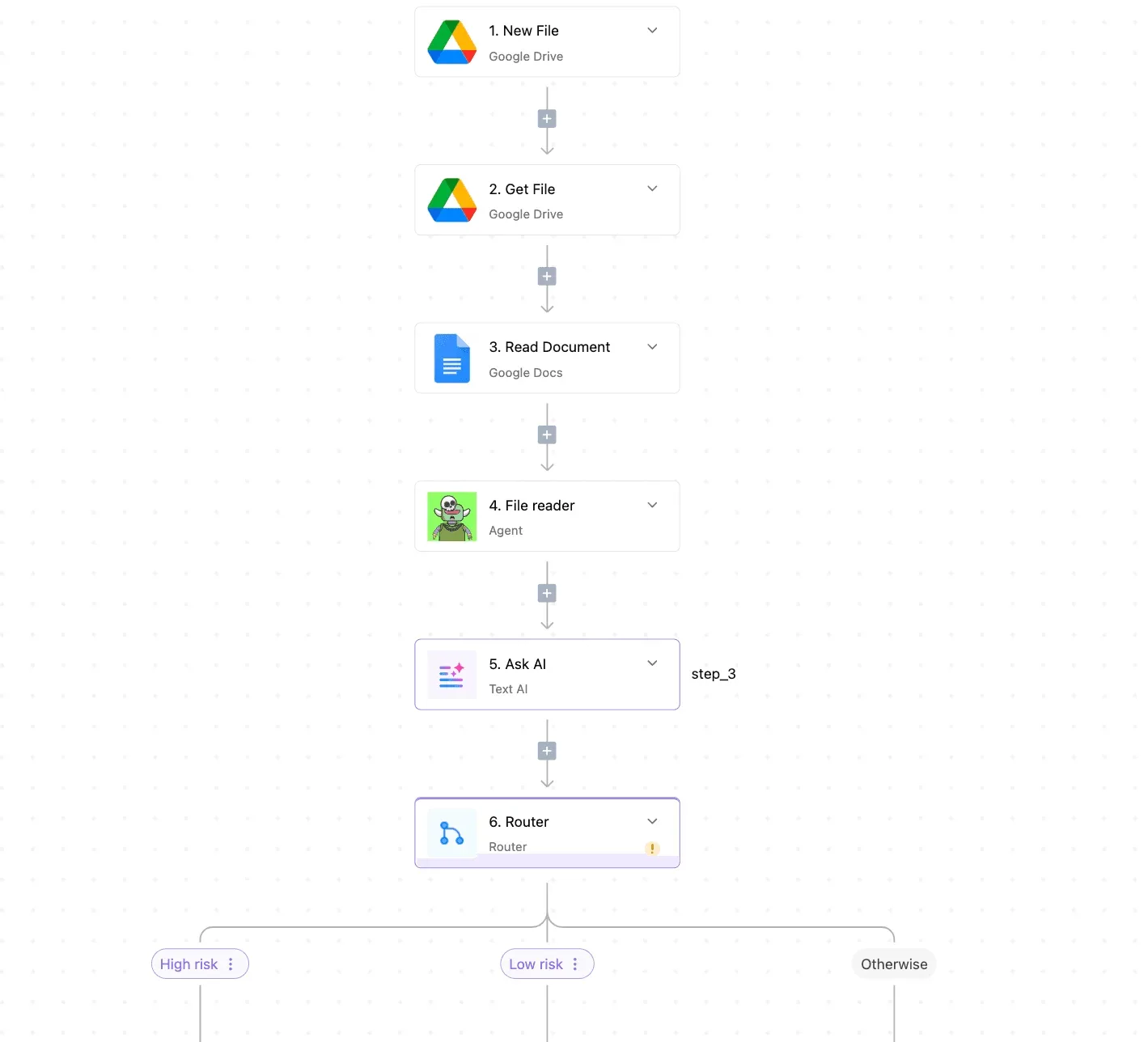
Someone who has only used monday's recipe-style automations will need practice before they trust a scenario with production data.
Pricing follows the same logic. Make charges in credits, and each module run consumes them. An iterator over a long list multiplies the consumption, so a scenario that looks cheap on the canvas can cost far more per run than its module count suggests.

Estimate cost from your busiest realistic run, not the average one. Check the current plan rates on Make's pricing page before you commit, since they change.
If self-hosting is a requirement, Make doesn't meet it, because it is a cloud product.
Make fits an operations lead or a technically comfortable analyst who builds and maintains the flows personally, works in the cloud, and needs branching and list handling across many apps.
It fits less well when non-technical colleagues must own the flows, or when run volume is high enough that per-module credits dominate the bill.
n8n for Technical Teams
If you want to self-host and write code inside your flows, n8n suits you, and it sidesteps per-module credits by billing per execution. It doesn't fix the ownership problem for non-technical colleagues.
Where n8n wins
Count one full run of a workflow as one execution, however many steps it contains. A flow with twenty nodes costs the same as one with two, so high-volume, many-step automations stop punishing you for being thorough.
Where a prebuilt step falls short, code nodes let you write JavaScript or Python instead of bolting on a workaround.
You can wire a language model to tools and memory inside the canvas with the AI agent nodes.
I'd treat those as a convenient way to prototype, not as proof an agent is reliable. You still have to test failure paths, retries and bad model output yourself.
On paper the cheapest option hands the maintenance to you. The table shows how the four ways of running n8n differ on cost model, run allowance, SSO and who keeps it alive.
| Option | Price per month | Executions included | SSO availability | Who maintains it |
|---|---|---|---|---|
| Community self-host | Free licence, plus your own server costs | No cap from n8n; limited by your hardware | No | You |
| Cloud Starter | Monthly subscription | Capped by plan | No | n8n |
| Cloud Pro | Higher monthly subscription | Higher cap than Starter | No | n8n |
| Enterprise | Custom quote | Negotiated | Yes | You or n8n, depending on deployment |
Self-hosting gives you data residency and no run ceiling, and you pay for it in upgrades, backups and uptime. If you need SSO, Enterprise is the tier built around it.
You need to be able to read a JSON payload, debug an expression and judge when a code node is the right call, because n8n assumes you can. A marketing or operations colleague can build a simple flow after some onboarding.
Owning a branching, error-handled one in production is another matter. When the original builder leaves, the flows tend to stay with whoever inherits the server.
n8n fits developers, platform teams and technical operations groups who want control over where workflows run and need branching, custom logic or AI steps without per-step billing.

If your workflow owners are non-technical, or nobody wants to run a server, look at the other options in this article before committing.
Reading a table only gets you so far. Build the same workflow in Activepieces and compare it yourself.
Activepieces for Cross-App and Self-Hosted Workflows
If your workflows start in monday.com but have to reach other apps, or you want an open-source tool you can run on your own servers, Activepieces fits. It's a poor choice for simple recipes that stay inside one board.
Where Activepieces fits and where it doesn't
Start with what it won't do for you. Activepieces doesn't make a board smarter.
If your whole workflow is "when status changes to Done, notify the person column," monday's built-in automations already do that with no setup, and moving it elsewhere adds a second system to maintain for no gain.

Here is where Activepieces earns its place, and it is the point this article keeps returning to: the work leaves the board.
A single flow can branch and call other apps, and a run costs 1 credit however many steps it has, so there is no per-action quota to design around.
A missing connector is where a closed catalogue stalls, because it only grows on its vendor's schedule.
If the app you need isn't in Activepieces, AI can build the connector for you and it stays private to your own instance, so nothing waits on a release.
Its 750 integrations are counted from the packages/pieces/community directory of the MIT-licensed monorepo on GitHub, roughly 60% of them contributed by the community, and MoneyGram, Moneypenny, Alan and FundingSocieties run it in production.
Because the product is open source, a team that can't send data through a vendor's cloud can host it themselves. That's the trade the previous section described: you gain control and lose the convenience of someone else running the server.
Since the builder is also visual, a technically inclined ops person can maintain flows without writing code. Self-hosting, though, still needs someone who is comfortable deploying and updating it. If nobody on your team is, use the hosted version or another tool in this article.
Worked workflow: a monday.com item change drives a cross-app update
Take a common cross-app case: a customer cancels a booked call, and several people need to know. The flow below uses Calendly, Slack and Gmail. The same shape works when the trigger is a monday.com item change instead, with the later steps unchanged.
In the screenshot, a three-step flow sits in the Activepieces builder. The trigger is Calendly's "Event Canceled," followed by "Send Message To A Channel" in Slack and "Send Email" in Gmail.
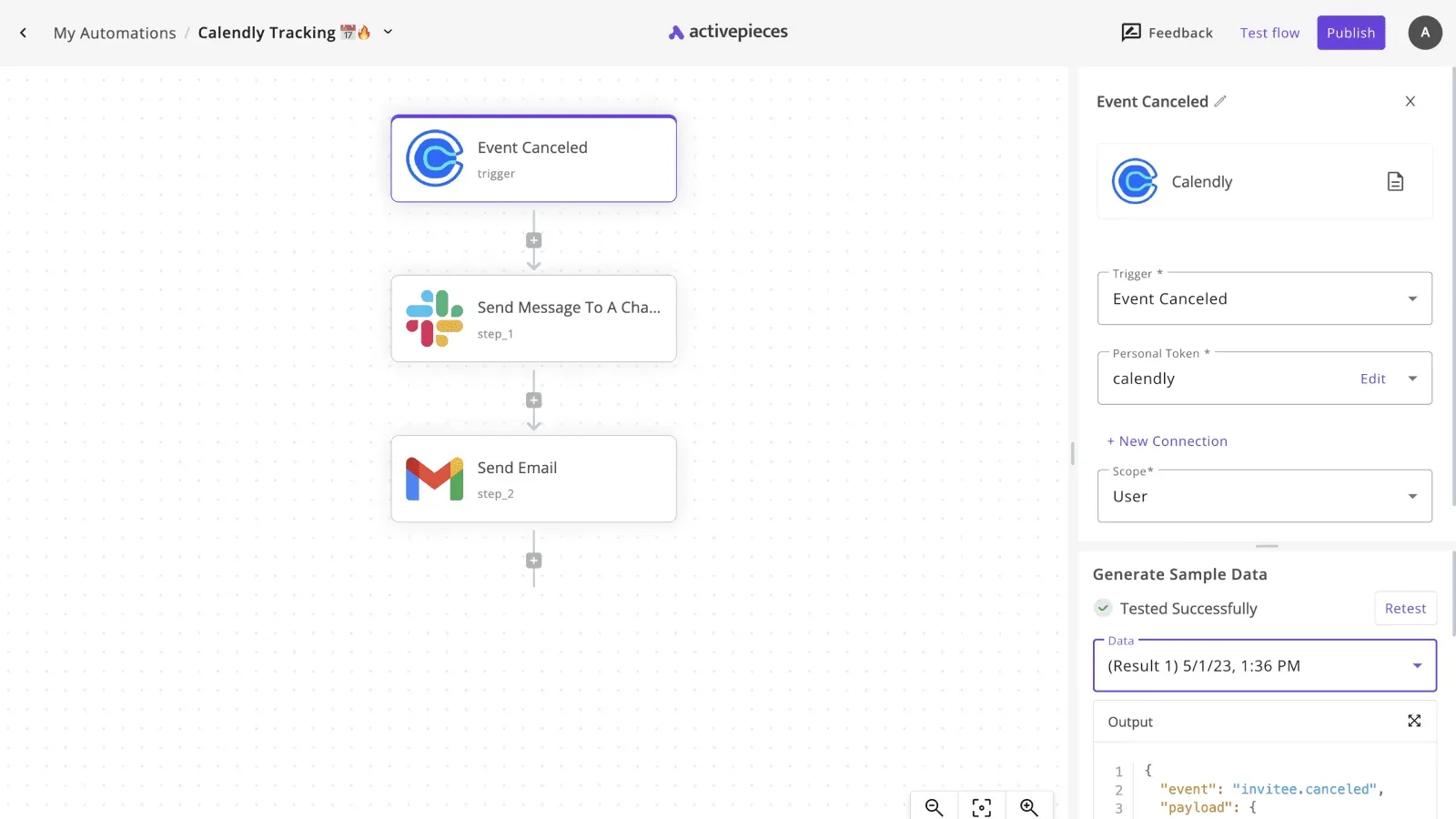
The right panel shows the trigger configured with a personal token and the scope set to User, and the sample data returns an "invitee.canceled" event marked "Tested Successfully."
What to take from it: the trigger was tested against a real event payload before anything downstream was built. Because of that, you see the actual fields you can map into the Slack message and the email.
That test step is the habit worth copying. Run the trigger, read the sample data, and only then wire up the actions. Once it passes, each later step can draw on the fields you just saw, rather than on guesses about what the app sends.
Check connector coverage before you commit
Before committing, check that the apps your workflow touches are covered. The full list of connectors, which Activepieces calls pieces, is at https://www.activepieces.com/integrations.
You can start free and build a flow like the one above to see whether the builder suits the person who will own it.
Frequently asked questions
Should I stay with monday automations?
Stay if the work lives inside one monday board, a no-code owner builds it, and nothing needs branching or a step in another app. It can't do much beyond that, and the cost is lowest when you stay inside those limits.
Move once you are working around the builder instead of using it, or once the plan's action quota starts shaping how you design flows.
Is Power Automate a better alternative for Microsoft-heavy teams?
Yes, when your identity, files, mail and approvals already run on Microsoft 365. Power Automate is Microsoft's own automation product. It connects to those services natively and inherits your existing sign-in and admin controls.
Outside the Microsoft estate Power Automate is less compelling, and its licensing is per user or per flow, which needs checking against your headcount before you commit. For a team on mixed tools, Zapier or Make usually connects more of what you already own.
Can I run both monday automations and an outside tool together?
Yes, and it's often the sensible split. Keep simple in-board rules (status changes, assignments, notifications) in monday, and send anything that crosses apps or branches to the outside tool through a webhook or monday's own integration.
The risk is two systems editing the same item, so give each field one owner. Otherwise you'll spend an afternoon debugging a status that two flows keep overwriting.
Which alternative is cheapest at high volume?
At 10,000 runs a month, the cheapest option is usually a self-hosted tool, because you pay for a server and upkeep rather than per run.

What you can check is the billing unit. Per 28creation, Zapier meters tasks, Make meters credits, and n8n's cloud plans meter whole workflow executions. A flow with many steps costs very different amounts under each.
Count the steps in your busiest flow, multiply by your run volume, and compare that against each vendor's current pricing page.
Do I need a developer to maintain these workflows?
Not for monday automations, Zapier or Make, where an operations person can own the flows. Workato is built for IT teams and integration specialists, and its governance suits them. Expect a technical owner.
n8n sits in between: anyone can build in the visual editor, but self-hosting needs someone who can run a server and read an error log.
Pick the tool for the person who will still be maintaining the flow a year from now, not the one who builds it first.
Related reading
References
Still comparing
The fastest way to settle it is to build something.
Open source under MIT, so you can self-host the same thing later.
Start free Talk to sales