
Claude Max Workflow: How to Set It Up (2026 Guide)

Nov 10, 202614 min read
You can set up a working Claude Max workflow in about 30 minutes, so the time investment is minimal.
It has three parts: a Project holding your standing instructions, Claude Code logged in with your subscription, and a written habit for the usage limit that chat and coding share, which is worth jotting down next to any Activepieces automations you already run so everything lives in one place.
A Claude Max workflow is the setup in which a Claude Max subscriber chooses a plan tier, stores standing instructions and context in a Project and in Claude Code, and manages the single usage limit that chat and coding share.
Claude Max workflow: what you'll have working
What Claude Max is
Above Pro sit the Max tiers, and that is what Claude Max is: Anthropic's higher-usage subscription for individuals. You pay a flat monthly fee, and what you consume is a usage allowance, not a count of API calls.
Because every place you use Claude draws on that allowance, a long coding session and a long chat take from the same pool.
Run the one-minute check under each item below. If it fails, that item isn't done.
- A Project with standing instructions. Done when a fresh chat inside it produces output in your format and tone without you restating anything.
- Claude Code logged in with the subscription. Done when it starts a session under your Max account, not an API key, so its usage counts against the plan.
- A written usage habit. Done when a note says which jobs run in chat, which in Claude Code, and what you do when the limit runs low.
The sections that follow build them in that order.
Claude Max pricing sources and date checked
I checked all of this against Anthropic's pricing page and Help Center as they stood on 10 November 2026. I kept specific prices and limit sizes to a minimum.
If I had copied a number here, it would go stale while you still trusted it, because Anthropic revises both.
Read current figures on the pricing page before you choose a tier, and treat the Help Center as the authority on how the limit behaves.
This takes minutes, not a project: automate it in Activepieces free.
Stage 1: Confirm your Max tier and plan settings
Pick the plan whose per-session allowance covers the busiest job in your usage note, then confirm in claude.ai under Settings > Billing that it's active.
Choose a Claude Max tier from pricing
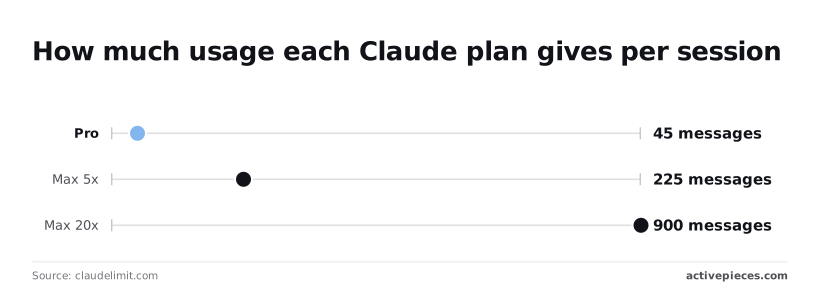
Read Claude Max messages per session
Subscribe or upgrade from Settings > Billing in claude.ai, and read each tier's current monthly price on Anthropic's pricing page. The unit that matters is messages per 5-hour session.
According to Claudelimit, Pro allows about 45, Max 5x about 225 and Max 20x about 900, meaning your tier selection depends on how many messages you need per session.
The tier names are the multiples: 225 is five times 45, and 900 is twenty times 45.
Divide your note's busiest session by those numbers. If it shows 150 messages, Pro is short by a factor of more than three, while Max 5x covers it with 75 to spare.
What the free Claude plan includes
On the free plan you pay $0 and get "limited usage every 5 hours and every week", with up to 5 projects, according to Anthropic's pricing page, which means you can experiment with Claude at no cost, but you'll quickly discover whether the rate limits constrain your work.
That is enough to try Projects. It isn't enough for a workflow where every job counts against the limit.
Confirm the upgrade applied
After checkout, return to Settings > Billing. The page should name your tier.
If it still says Free or Pro, the upgrade hasn't applied, and the 225 or 900 figures don't describe your account yet. Start a fresh chat and run one real task from your note before you rely on the plan.
Claude Max billing and cancellation settings
On that same page sit your payment method and the cancel option. Put the renewal date in your calendar, because a plan that lapses silently drops you to a lower allowance in the middle of a work week.

80% of a session disappears when you move from Max 5x to Pro, from about 225 messages to about 45, so you'll need more sessions for the same work.
Revisit your usage note before you downgrade, not after.
Stage 2: Build a Project with standing instructions
Build one Project per recurring task and load its instructions and files once, so every chat inside starts with that context instead of spending your usage re-creating it.
Create a Claude Project named by task
Name the Project for the job, such as "Weekly client report", not for the client or the quarter. A task name tells you which Project to open without thinking.
It also stops one Project from becoming a dumping ground for unrelated chats that each carry context they don't need. Start with one. Add a second only when a second task actually recurs.
Write custom instructions for your Project
State the role, the output format, and what Claude should do when information is missing. Write them as the rules you would otherwise retype: length, tone, the sections every output needs. Each rule set here is one you stop paying for in every later prompt.
Below, a variables panel lists one stored value that a later step picks up by name through its context field. That's the pattern to copy: define a thing once, then reference it wherever you need it.
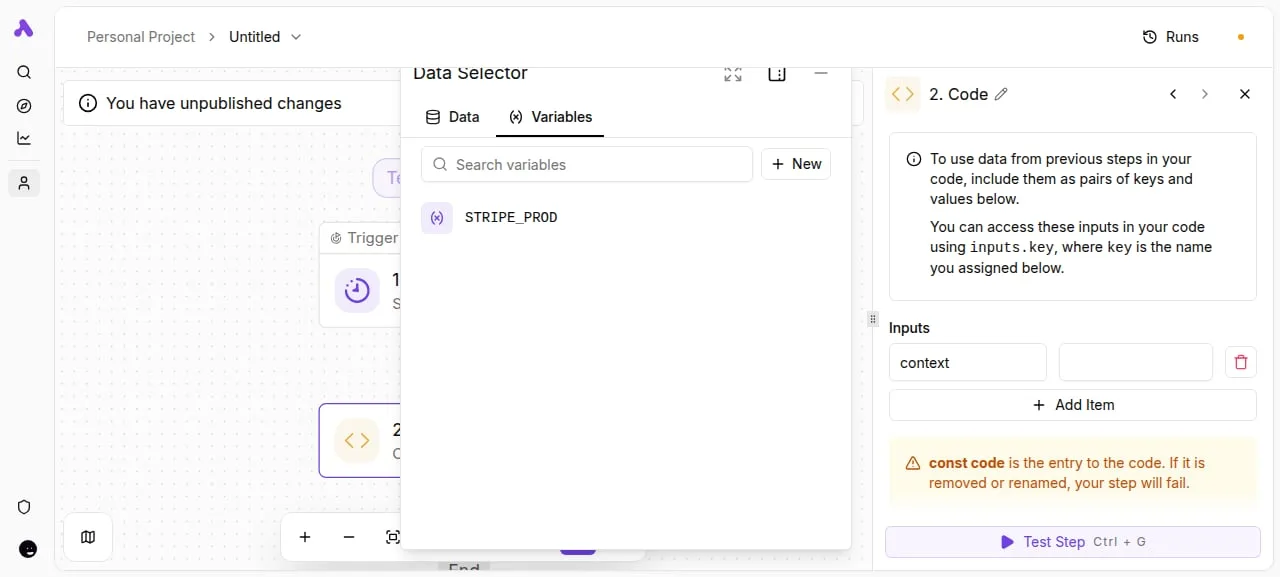
Keep your instructions short enough that you could re-read them in a minute and spot a rule that has gone stale, since they do the same job.
Add Project knowledge files and check size limits
Because files count against the chat's context window, the model you pick caps how much material you can lean on.
According to the Claude Help Center, the chat window on Max is 1000 thousand tokens for both Sonnet 5.5 and Haiku 5.5; the same page listed 500 thousand tokens for the older Opus 4.8.
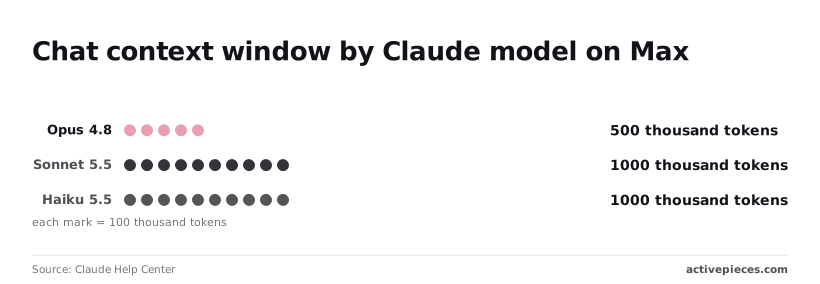
Opus 4.8 fit half as much as the other two in that listing, so check the current window for Opus 5.5 before leaning on it. For a long document set or a transcript archive, choose Sonnet 5.5, or Haiku 5.5 if the job is extraction across many files.
Keep Opus 5.5 for material where the reasoning matters more than the volume.
Check Anthropic's documented per-file limits before you upload, and attach only the files the task uses. Every unused file takes room from the window and gains you nothing.
When you finish this stage you should have one Project, for one recurring task, that you can open and use without pasting anything.
You can follow the rest of this with the builder open. Start free, no card.
Stage 3: Sign in to Claude Code with your Max plan
Install Claude Code from Anthropic's docs, run claude in a terminal, and choose the option to sign in with your Claude account. Your Max plan then covers the usage instead of a metered API bill.
The Project you just built holds context for chat. Claude Code needs the same thing for your files, and it starts with this login.
Install Claude Code and log in with Max
Follow the install steps on Anthropic's Claude Code documentation page for your operating system, then:
- Open a terminal in a project folder and run
claude. - At the login prompt, pick the subscription route.
- A browser window opens, and you approve with the account that holds your Max plan.
- The session returns to the terminal.
You paste nothing and create no key.
Add a CLAUDE.md for standing context
At the start of every session, Claude Code reads CLAUDE.md, a plain markdown file in your project root. Put in what you would otherwise retype: how the project is laid out, the commands you use to build and test, and the conventions you want followed.
Without it, every session starts cold and you spend your shared limit re-explaining. Keep it short and correct, because a stale file misleads each session that reads it.
Confirm Claude Code charges the plan, not the API
Watch out for ANTHROPIC_API_KEY, an environment variable many tools read.
If it's set in your shell, Claude Code can use it instead of your subscription, and the work bills per token to an API account while your Max plan sits idle. You pay twice and the plan's limit tells you nothing.

Other tools can do the same. In the workflow below, step 4, "Ask AI", has Anthropic selected as its provider. A connection like this is typically set up with an API key, so its runs bill as API usage and never touch your Max limit.
If you automate around Claude, Activepieces lets you place an Agent step next to ordinary deterministic steps in the same flow builder, and its run trace then logs a single execution from the first step to the last, where two tools joined by a webhook leave you reading two separate histories.
Back in Claude Code, run /status to see which account and login method the session is using, and /usage to check your plan's consumption. If /status shows an API key, unset the variable and log in again.

Understand Claude Max usage limits and errors
Max goes wrong in two ways: a stray API key, or the shared allowance running out, because claude.ai and Claude Code draw from the same pool.
The table sets each common error against its symptom, documented cause and fix, so you can tell a limit from a billing fault.
| Error | Symptom | Documented cause | Fix | Fixed number in docs? |
|---|---|---|---|---|
| Limit reached mid-session | Message says the session limit is hit | Session window used up by chat and Code combined | Wait for reset, or shorten and split work | No; depends on message length, files and model |
| Weekly cap hit | Blocked until the weekly window resets | Heavy use across the week, mostly Code | Spread heavy work, drop to a lighter model | No; varies with usage |
| Unexpected API charges | Billing on the API, not the plan | An API key overrides the subscription login | Unset the key, log in again | Not applicable |
| Long chat degrading | Slower replies, faster drain | Whole history is reprocessed each turn | Start a fresh chat, carry a summary | No; no fixed length given |
Prices and plan limits checked against docs.claude.com and claude.com and openai.com and gemini.google on November 9, 2026.
How the shared usage allowance works
Messages sent are not what the meter counts; it counts work done. A long thread, a large attachment or a Claude Code session that reads many files each consumes more of the same pool.
Messages sent are not what the meter counts; it counts work done.
A session window resets on a short cycle, and a weekly window sits above it.
Since Code and chat share the pool, a long agentic run can leave you locked out of chat. Keep standing context in Projects, start new chats for new tasks, and use a lighter model for routine work. That keeps each turn cheap.
When charges look like API billing, the key won. Check /status before long runs.
If you see overloaded or rate-limit errors, they come from service load, not your allowance, so your usage meter won't explain them. Retry after a pause. If they persist, switch models briefly and check Anthropic's status page.
Stage 4: Automate recurring Claude work with Activepieces
If the work happens while you're sitting at the keyboard, a Max plan is enough on its own and you can skip this stage.
Max covers the Claude apps and Claude Code, so anything you start yourself, in a Project or in a terminal session, draws on the shared usage limit you already manage. A second meter is metered, priced per token.
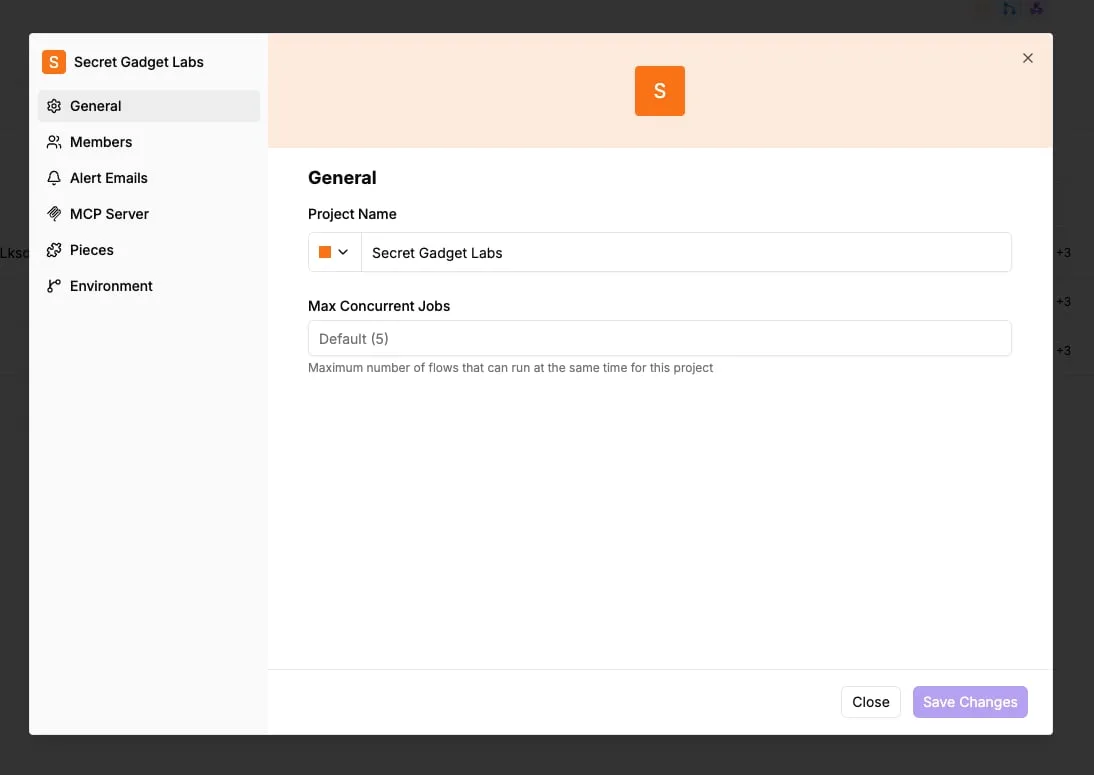
Most people stop here, and that's the right call: every automation you add is one more thing that can fail quietly.
Building workflows with triggers and steps
Activepieces is an open source, MIT-licensed automation platform with 747 integrations, and you can build a flow in it out of a trigger, such as a schedule, and a chain of steps, one of which can call Claude through its integration, so you can automate workflows with AI across hundreds of services.
It earns a place only when a task recurs on a clock and nobody wants to be the person who starts it, like a weekly digest of notes or a standing summary of a folder.

The catch is billing. Calls that another tool makes to Claude through the API are billed separately from your Max plan, as far as I can tell; confirm this on Anthropic's terms page before you build.
So the integration doesn't spend your Max allowance. It opens a second meter, priced per token, running beside the flat subscription.
A flow that fires on a schedule keeps spending whether or not you read the output, and a flat-fee plan hides that until the first invoice.
That's also why the checklist below includes an API key check. A key left set in your environment can quietly route Claude Code to metered billing instead of your plan.
Weekly Claude Max workflow checklist
Each item takes a few minutes, and together they catch the usual ways this setup drifts: a limit nobody watched, instructions that went stale, or a second meter nobody meant to open.

- Check your weekly usage against the shared limit, so you know whether the week ahead needs lighter model choices.
- Review the Project instructions and cut anything that no longer matches how you work.
- Update CLAUDE.md with whatever the codebase learned last week.
- Confirm no API key is set in your environment, so Claude Code bills to your plan.
- Review any Activepieces scheduled flow: is it still running, and is its output still read?
Frequently asked questions
Access and limits
Does Claude Max include API access? Partly. Max includes $100 a month in API credits to build on the Claude Platform, and usage beyond that is billed separately per token.
If a script or integration calls the API, budget for it as its own line item rather than expecting the subscription to cover it.
Do Claude.ai and Claude Code share one usage limit? Yes. Chat, Projects and Claude Code all draw from the same allowance, so one long agentic coding session can leave less for your chat work that afternoon.
Treat it as one meter and watch it across both.
Tiers and value
Can I switch between Max tiers mid-month? Yes, you can change tier from your account's billing settings. Upgrading is the safer move when you're already hitting the ceiling.
Downgrading mid-cycle is where billing details matter, so read what the settings page says about timing before you confirm.
Is Claude Max worth it over Pro for daily work? It's worth it when Pro's limit, not the model, is what stops you. If you reach the limit regularly, the cost of waiting for a reset exceeds the price gap.
If you rarely hit it, a bigger tier buys you nothing, and the fix is better standing context in Projects.
What happens when I hit my Claude Max limit? You're blocked until the allowance resets, unless you've turned on extra usage, which bills the overage instead of stopping you.
Decide in advance which you prefer, because a hard stop and an open-ended overage are different budgets.
Related reading
References
Build it
Set this up in minutes.
No code required. Connect your accounts, and Activepieces runs it from there.
Start free Talk to sales