
ClickHouse Pricing: Plans, Compute and Storage (2026)

Nov 23, 202616 min read
ClickHouse pricing is a metered bill layered on a tiered plan. You pay for compute time, stored data and data transfer, and the plan decides which features and limits you get.
That transfer line matters most when pipelines built in tools like Activepieces keep moving data in and out of the warehouse.
Read the plan name and you learn little about the invoice. Usage tells you more, and usage is the part nobody watches.
ClickHouse Cloud plans, prices and free-trial limits
The plan table: price, inclusions, usage limits
It lists the three Cloud plans from clickhouse.com/pricing on 23 November 2026, narrowing the choice to three tiers. Where the page doesn't confirm a figure, the cell says "not listed".
| Plan | Monthly minimum | Compute $/unit-hour (AWS us-east-1) | Storage $/TB-month | Trial credit | Key limits |
|---|---|---|---|---|---|
| Basic | not listed | not listed | not listed | not listed | not listed |
| Scale | not listed | not listed | not listed | not listed | not listed |
| Enterprise | not listed | not listed | not listed | not listed | not listed |
You can't work out a monthly cost from the plan names alone, because the cells marked "not listed" are the usage-driven ones. Take the current numbers from the vendor page, then multiply them by your own hours and terabytes.
What is free: open source and the Cloud trial
Run the open-source server and you pay nothing in licence fees, but you carry the servers, upgrades and on-call yourself.
Once the credit is gone, billing starts at the metered rates. The Cloud trial gives you credit to spend, and that credit is itself a usage cap.
Find out what happens at that point before you load real data, since the trial is the cheapest moment to set an alert.
What the price units mean: compute, storage, transfer
Leave a service awake and scaled up and the meter runs, whether or not queries are executing, because ClickHouse bills compute per unit-hour. An idle service that never sleeps keeps accruing hours.

Keep data "just in case" and it becomes a standing charge that grows quietly, since ClickHouse bills storage per terabyte-month. ClickHouse bills transfer when data leaves the cloud region, so a dashboard or export job pulling results elsewhere adds cost on top of compute.
You control a setting behind each unit: the scaling ceiling, the idle behaviour, the retention period.
Activepieces will run that spend alert as a flow, with unlimited flows on every plan including the free one, and those same three settings are what the alert should watch.
If you are running this arithmetic for your own team, see what the same workload costs on Activepieces.
The 02:10 spend alert on a modelled ClickHouse workload
To see what those three settings catch, take a modelled team, not a real customer, whose first spend alert fires at 02:10 on a night nobody was working.
They are a small analytics group on ClickHouse Cloud, and the assumptions below carry through the rest of the article.
The list fixes the workload. The first three items set a predictable baseline bill, and the fourth is what breaks it.
- Data volume, counted in terabytes compressed, so storage bills on the smaller on-disk size rather than the raw size of the source files.
- Daily query hours, a working-day pattern, so the compute meter runs for the hours the service is awake and busy, not for a full day.
- Retention period, the length of time history stays in the tables, so every extra stretch of retention is storage that keeps billing after anyone stops querying it.
- Two overnight triggers: a backfill that reloads historical data, and a dashboard refresh loop that keeps issuing queries after the office has emptied.
In the timeline below, the fourth item acts on the first three.
22:00: the backfill starts
Before leaving, an engineer starts a backfill, reasoning that overnight is when it'll disturb nobody. Users won't notice, but the meter will. The backfill's inserts and merges keep the service working, so compute hours accrue at the same unit rate as in the afternoon.

With the autoscaling ceiling left at its default, the service can also scale up to meet the load. Each of those hours may cost more than a daytime hour did.
What fires at 02:10 is a threshold on month-to-date spend, and it fires because spend crossed it, not because anything looks wrong. The team learns the total's jumped, but not which dimension moved it.
Nothing's failed, so there's no error to chase, only a number that is higher than the plan page suggested.
Open the usage page and compute hours sit well above the daily pattern, while storage and data transfer barely moved. The refresh loop explains why the line never flattened after the backfill finished: dashboards kept the service awake.

The lesson is that the culprit was a setting, not a price.
What the incident cost on each ClickHouse plan
On every plan, the same runaway night burns the same unit-hours, and only the rate changes. Enterprise bills each hour at $0.3903 against Basic's $0.2181, about 79% more for an identical mistake, so operational errors on Enterprise carry substantially greater cost.
The lesson is that the culprit was a setting, not a price.
The setting decided how many hours burned, and the plan only multiplies them.
Monthly cost of the workload by plan
On each plan the formula is the same: the monthly minimum, plus compute unit-hours times the plan's rate, plus terabytes stored times $25.30, which means storage pricing is uniform across all plans.
According to Hypequery, ClickHouse meters compute at $0.2181 on Basic, $0.2985 on Scale and $0.3903 on Enterprise. Scale therefore costs about 37% more per unit-hour than Basic, so a workload that runs steadily all month pays that premium on every hour.
Whichever plan you pick, storage is $25.30 per terabyte, so it never separates the plans. It only grows with your data.
Swap in your own unit-hours and terabytes and the table recalculates by hand in a minute.
The baseline is settled. The incident is what separates the plans.
The cost of the one bad night
When a night runs uncapped, it costs extra unit-hours times the plan rate, so the gap between plans widens in proportion to how far scaling ran.
On Basic the night is cheapest per hour, but nothing about Basic stops it from running as long as the others.
If your cluster scaled to its ceiling and stayed there until morning, you pay for every hour at the ceiling, whichever plan you chose. A cheaper rate narrows the bill, but it doesn't shorten the night.
ClickHouse Cloud maximum scaling limits and incident cost
With a maximum scaling limit in place, the extra unit-hours stop at the ceiling you chose. The incident cost becomes a figure you can calculate before the incident, not one you discover at month-end.
That's why the last column of the table matters more than the rate column.
Moving from Scale to Enterprise raises every hour by the rate difference, while a ceiling cuts the number of hours the bad night can reach. Set the cap first, then decide whether the plan's features justify its rate.
Worth checking against a plan that does not meter every step: one credit covers a whole run on Activepieces.
Hidden ClickHouse costs and limits behind the surprise
Behind the surprise bill sit five metered drivers, and the pricing page shows only some of them. The rest sit in the docs, which is why the cap matters more than the rate.
To see which drivers you'd have missed when comparing plans, read the table below, which tags each by where you can find it.
| Driver | Where it appears |
|---|---|
| Autoscaling and idling | docs only |
| Minimum compute | docs only |
| Storage and backups | pricing page |
| Data egress | pricing page |
| Plan-gated features (SSO, private networking) | pricing page |
Two of five hide in the docs, and those two decide your baseline compute spend. The rest are visible but easy to skip past.
If autoscaling can grow a service and idling is off or slow to trigger, a quiet weekend costs the same as a busy Monday, because compute is metered by the hour and every hour awake is billed.
Set a maximum size and an idle timeout before loading anything.
Storage, backups and data transfer
Retention length is a cost setting, because storage and backups are billed on volume held. Egress is billed per GB leaving the service. Rewindex lists the rates below, and pulling 10 TB out costs:
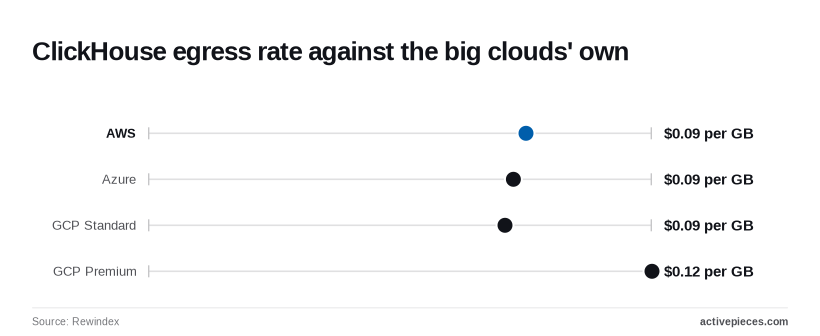
| Provider | Egress per GB | Cost of pulling 10 TB |
|---|---|---|
| AWS | $0.09 | about $900 |
| Azure | $0.087 | $870 |
| GCP Standard | $0.085 | $850 |
| GCP Premium | $0.12 | $1,200 |
Pick GCP Standard and you save money on egress costs compared to the other options. Choosing GCP Premium over Standard costs an extra $350 on this transfer. The network tier you choose on GCP changes the bill by roughly 41 percent.
Need SSO or private networking and you're on a higher plan, so a security requirement can force an upgrade you didn't budget for. Check the feature list against your compliance needs before you size compute, because the plan rate then applies to everything.
Before you load a realistic dataset, know that a trial runs against compute and storage ceilings that production data will exceed. Read the trial limits in the docs first, or the test will fail for reasons that say nothing about the paid service.
ClickHouse versus Snowflake, BigQuery and self-hosting on cost
After the incident, ClickHouse Cloud is still the cheaper choice for steady, capped workloads. The alternatives meter different units, so a spike like ours would've hit each of them in a different place, as the table shows.
| Pricing model | Free tier / trial | Similar-spike cost | Operational burden | When wrong | |
|---|---|---|---|---|---|
| ClickHouse Cloud | Compute time, storage, transfer | Trial with usage limits | Compute hours climb until the autoscaling cap | Low | Uncapped, bursty workloads |
| Snowflake | Credits for warehouse run time, plus storage | Trial credits | Warehouses run longer or larger, burning credits | Low to moderate | Always-on small workloads |
| BigQuery | Bytes scanned per query (on-demand), or reserved slots | Monthly free allowance | Every extra scan bills by data read | Low | Wide scans over large tables |
| Self-hosted | Your servers and your staff | Software is free | Queries slow down or fail; the bill barely moves | High | Small teams with no on-call |
In each row the spike lands on a different meter, so the caps you need differ too. Pricing models are as described on each vendor's own pricing page, checked 2026-11-23.
Snowflake: credits for run time
On Snowflake, warehouse run time is metered in credits. A spike keeps the warehouse awake or pushes you to a larger size, so the controls that matter are auto-suspend timing and resource monitors that stop spending.
It's the wrong choice when many small, constant queries keep a warehouse from ever suspending.
BigQuery on-demand cost by bytes scanned
One careless query over a wide table is the spike, because on-demand BigQuery bills by bytes scanned, so cost follows how much data each query reads, not how long it runs.
Per-query byte limits are the cap to set. Reserved capacity trades that risk for a fixed commitment you pay for even when idle.
Self-hosting: no meter, more upkeep
Run it yourself and the usage meter disappears, because you pay for machines whether or not they're busy. A spike degrades performance instead of inflating a bill.
The cost moves into upgrades, backups, replication and the person on call, which is the wrong trade for a team without one.
The verdict: cap before the spike
When load is predictable enough to cap, ClickHouse Cloud wins, and a capped ceiling turns an open-ended bill into a known maximum. The caveat is that the cap has to exist before the spike, not after it.
Spend caps, alerts and a Monday checklist, with Activepieces
Before a surprise invoice can reach our ClickHouse account, five rules now stand in the way, and each one is a limit set before the spike rather than a reaction to it.
First come ClickHouse's own controls, because they act inside the billing system and no outside tool can match that.
- The autoscaling maximum lets the service grow to a ceiling we chose and no further. A runaway query now hits a wall instead of buying more compute hours.
- The idle timeout stops a service that nobody is querying, so we stop paying for compute that does nothing overnight and at weekends.
- The spend alert fires at a level well below what would hurt, which leaves time to act while the month is still open.
- Large backfills run off-peak, outside working hours, so they don't push the autoscaler to its ceiling while people are using the service.
- Someone reviews the invoice monthly, reading the invoice line by line against the usage dimensions: compute, storage and data transfer. A drift in one of them is easier to spot in a month-sized slice than in a daily graph.
Set up daily usage alerts
In one narrow job, Activepieces earns its place here: a scheduled check that reads usage each day and posts to the team's chat if a number looks wrong.
If the connector for your usage or billing source doesn't exist, you generate it with AI and add it privately to your own instance, with no vendor release to wait on, and about 60% of its 750 integrations in the open-source monorepo were built by the community.
It doesn't set caps and it doesn't change billing.
The caps above do that. What it adds is a reader who never forgets to look.
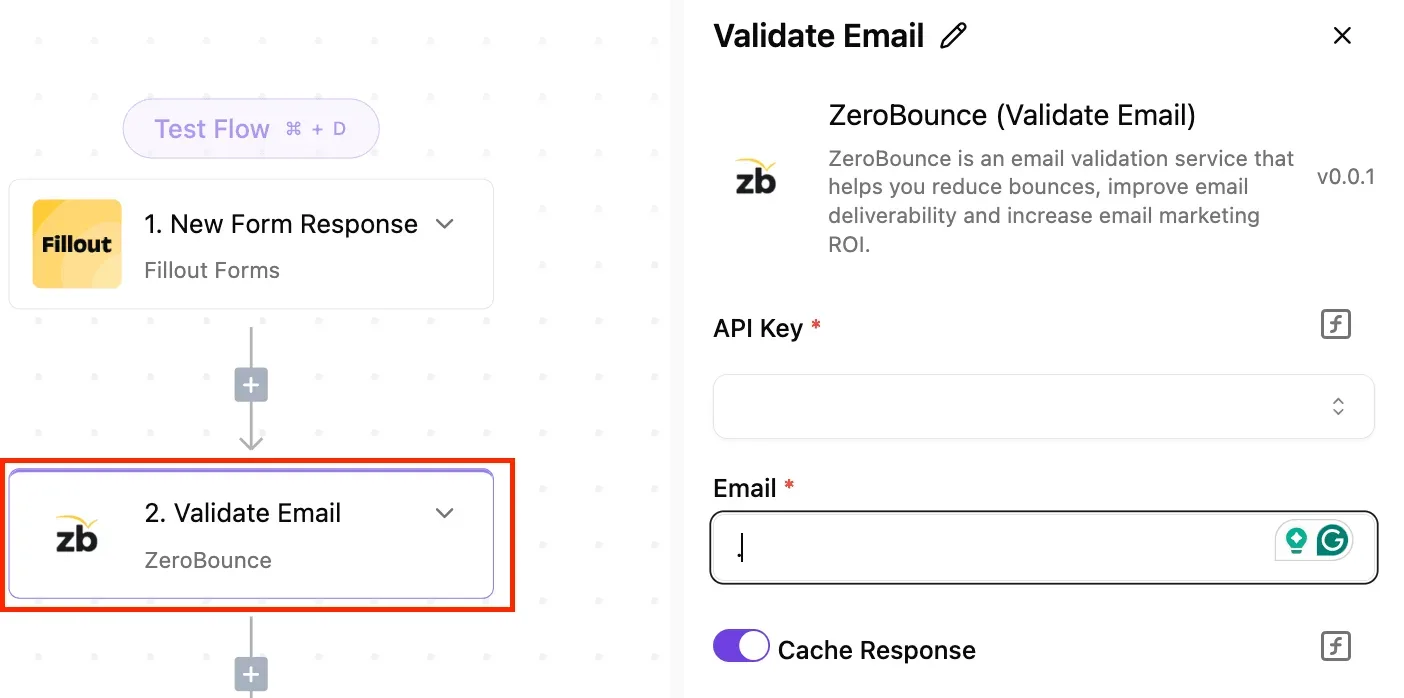
In the editor, the screenshot shows the shape of a flow. It's a three-step canvas called "Test Flow", with a form-response trigger first and an email validation step second.
The second step is selected, and the right panel lists its required fields, an API key and an email address, plus a switch for caching the response.
Take away how little there's to it: each step is a named block with a short list of inputs you fill in. You can read the whole flow at a glance.
A usage check has the same anatomy, with a schedule as the trigger, a query step, a condition, and a message.
If the built-in alert already reaches the right people and nobody wants a custom threshold or a message in another channel, you don't need the workflow. In that case, adding a second system is one more thing to maintain.
The Monday checklist:
- Confirm the autoscaling maximum is set and is a number you could afford.
- Confirm the idle timeout is on for every service that can tolerate it.
- Check that the spend alert goes to a person who'll act on it.
- Move any scheduled backfill to off-peak hours.
- Put the monthly invoice review in someone's calendar, with a name next to it.
Frequently asked questions
Is ClickHouse free to use?
You can use the database software for free: ClickHouse is open source, so you can run it on your own servers without a license fee. You then pay for the machines, storage, backups and the engineer time to operate it.
Managed ClickHouse Cloud is another matter: it's a paid product, billed on what you consume. This answer reflects the vendor's pages as read on 23 November 2026.
Does ClickHouse Cloud have a permanent free tier? Not that the vendor's pricing page shows as of 23 November 2026; what it offers is a trial.
Plan on the trial ending, and ask whether anything renews before you rely on it. Assume that once the trial lapses, every hour of compute and every stored byte is billed.
Can I keep a ClickHouse Cloud bill under a fixed budget?
You can steer the bill, but the vendor's pages don't describe a single switch that stops spending at a set amount. Spend follows compute, storage and data transfer, so the controls that matter are the scaling limits on each service and the alerts you configure.
Set the upper scaling bound to the most you're willing to pay for, and set an alert well before that point. Otherwise the first signal is the invoice.
Is ClickHouse pricing different through AWS or Google marketplaces?
Though the way you pay changes, the metered units are the same. Buying through a cloud marketplace puts the charges on your AWS or Google Cloud invoice, which can let the spend count against a commitment you already hold.
Confirm the rates in the marketplace listing itself, because that listing, not the vendor's public page, governs what you're charged. Check as well whether the alerts you rely on still reach you when billing moves to another provider.
Do ClickHouse prices differ by region? Yes, in practice. Rates for compute, storage and transfer depend on the cloud provider and region you pick, so the same workload can cost different amounts in different places.
Price your actual region in the vendor's calculator before comparing, and remember that moving data between regions is itself a metered transfer.
Related reading
References
Running the numbers
See what the same workload costs here.
Free forever plan, and every paid plan self-hosts at no extra cost.
See pricing Talk to sales