Crusoe Cloud Pricing: GPU Rates and Costs (2026 Guide)

Nov 9, 202616 min read
As of 9 November 2026, Crusoe Cloud's on-demand GPU rates run from $1.50 per GPU-hour for the L40S to $9.65 for the B200, which means hardware selection is a major cost decision.
Crusoe Cloud pricing and plans
GPU selection therefore determines whether you're near the minimum or six times higher in hourly cost, even if your Activepieces automations around the workload stay the same.
Eight H100s for 100 hours costs 8 × 100 × $3.90 = $3,120 before storage, networking or idle time, meaning teams will almost certainly exceed this figure. That is the model: Crusoe Cloud's a GPU cloud that rents NVIDIA accelerators by the hour.
On-demand, reserved and spot GPU instances
If you rent the B200 at $9.65 per GPU-hour, an eight-GPU node costs $77.20 an hour. According to Crusoe, the HGX B300's $8.96, which is cheaper per hour than the B200, so check whether a newer part finishes your job sooner.

Step up from the H100 at $3.90 to the H200 at $4.29 and you pay about 10% more, which means you need to assess whether the H200's performance advantages justify that premium.
If the H200's extra memory lets a job run on fewer GPUs, that premium pays for itself.
The L40S at $1.50, per Crusoe, suits smaller inference and fine-tuning work, but its 100-hour cost only means something once you know how many hours the job needs, without forecasting workload, the price is meaningless.
Where I couldn't confirm a figure, the table below says "not published", next to the on-demand rate for each GPU. Read those cells as open questions for a sales conversation, not as zeros.
| Offering | Unit price | Inclusions | Limits / terms | Checked |
|---|---|---|---|---|
| L40S | $1.50 per GPU-hour | not published | not published | 9 Nov 2026 |
| H100 SXM | $3.90 per GPU-hour | not published | not published | 9 Nov 2026 |
| H200 SXM | $4.29 per GPU-hour | not published | not published | 9 Nov 2026 |
| B200 | $9.65 per GPU-hour | not published | not published | 9 Nov 2026 |
| HGX B300 | $8.96 per GPU-hour | not published | not published | 9 Nov 2026 |
| Storage | not published | not published | not published | 9 Nov 2026 |
| Managed inference | not published | not published | not published | 9 Nov 2026 |
I haven't estimated reserved and spot discounts, because they aren't in the confirmed figures.
A job that keeps large datasets or checkpoints on disk has a cost you can't yet calculate, because the storage row has no confirmed unit price. Networking and CPU instances are in the same position.
I couldn't confirm a per-token inference price. Inference can't be compared with other clouds on cost per finished job until you have one.
Each GPU rate here comes from Crusoe's pricing page on the check date above.
If you are running this arithmetic for your own team, see what the same workload costs on Activepieces.
GPU overruns after fine-tuning
Even with a rate check in place, a finished job can leave its GPUs running. That second problem is what the 02:10 spend alert caught in this illustrative case. I invented the team below; it isn't a real customer.
The workload and the estimate
Picture a five-person team fine-tuning an open-weight model on a single H100 node. The estimate was one line of arithmetic: expected training hours, times GPUs, times the hourly rate. That gives a clean cost per run, and it's the number everyone approved.
It leaves out the checkpoints and dataset copies sitting on attached storage, the data pulled in and out of the cluster, and any hours between "job finished" and "instances stopped." Those lines carry no GPU-hour label, so no one budgeted them.
What actually ran overnight
The job had finished, and the bill still came in at full rate; the timeline below shows how. Read it as a sequence of small delays, each cheap alone and expensive in total.
- At 02:10 the spend alert fires, well ahead of the team's expected pace.
- The on-call engineer checks the running instances instead of the training logs.
- The job turns out to have completed hours earlier, with every GPU still on and billing.
- The engineer stops the instances.
- The team tallies billed hours by line item (compute, storage, network) against the estimate.
Step five is the useful one. The tally separates hours the job needed from hours it only occupied, and that gap's the overrun. The fix's an automatic shutdown when the job exits, not a faster human.
Rebuild the month from the same line items, not from the rate card alone:
- Compute's productive training hours plus idle hours, each multiplied by GPUs and the hourly rate.
- Storage's checkpoints and datasets, billed every day they exist, including days no job runs.
- Networking's data moved in and out, charged per volume.
- Commitment terms cover any reserved capacity, which bills whether or not it's used.
Divide the total by finished jobs, not by GPU-hours. A provider with a lower hourly rate but weaker shutdown tooling or costlier storage can lose on that measure. Run the same division on every cloud you compare.
Hidden costs beyond hourly rates
Because the estimate priced GPU-hours, the Crusoe Cloud bill beat it. The invoice also charged for storage, traffic, idle capacity and contract terms, none of which appear in the hourly rate. Five items account for the gap:
- storage that keeps billing while instances are stopped: - egress and networking charges
- quota and capacity limits
- minimum reservation terms
- billing granularity
Each one raises the cost of a finished job without changing the price per GPU-hour. The division from the previous section absorbs them only if you feed it the whole invoice.
Storage that bills while the GPUs are off
Stopping an instance doesn't stop the storage meter, because persistent disks and attached volumes bill per gigabyte-month. Our habit of shutting machines down between runs looked thrifty, but the datasets, checkpoints and container images stayed on disk and kept accruing.

Nobody saw it, because the GPU line on the invoice had gone quiet, yet every idle week added cost to the next job. Delete or snapshot-and-release volumes you won't touch soon, and count what remains as a fixed monthly cost of the project.
Crusoe Cloud egress, networking and quota charges
Moving results, checkpoints or datasets out of the cloud is a separate charge from compute. Pulling large artifacts to another provider or to local machines turned a cheap run into a more expensive one.
Check the current egress terms in Crusoe's documentation before you design a pipeline that crosses clouds.
Less directly, quotas and capacity limits cost money too. When the GPU type you want is capped or unavailable, you either wait while the project clock runs or take a larger configuration than the job needs.
Either way, the job costs more than the estimate assumed.
Commitment terms and billing granularity
Sign for reserved capacity and you take on a minimum term, and the discount only pays off if the hardware stays busy. A reservation that sits at partial utilization costs more per finished job than on-demand would have.
Read the minimum term and the cancellation rules before signing, and be wary of any rate you can't get in writing without a sales call.
For short jobs, billing granularity matters. If usage is rounded up to a billing increment, a run that finishes early still pays for the remainder, and a pipeline of many short jobs pays that rounding repeatedly.
Confirm the increment and fold it into your cost per job.
Comparing Crusoe against competing clouds
On the hourly rate alone, any of the four clouds can come out ahead. Crusoe wins on cost per finished job only when its egress, storage and commitment terms suit your workload.
Take a job that burns 100 H100 GPU-hours. At the April 2023 market rate of $8 per GPU-hour, per Virtualized.ai, that's $800. The market fell to $5.90 by October 2023, so the same job cost $590.
The table shows the rest of the slide. The lesson's that the easy savings are behind us.
| Date | Market H100 rental, $ per GPU-hour |
|---|---|
| Apr 2023 | 8.00 |
| Oct 2023 | 5.90 |
| Apr 2024 | 4.20 |
| Oct 2024 | 3.20 |
| Apr 2025 | 2.85 |
| Oct 2025 | 2.75 |
At $4.20 in April 2024 the job cost $420, and at $3.20 in October 2024 it cost $320, showing steep price deterioration in half a year.

By April 2025 the rate was $2.85, and October 2025 came in at $2.75, only ten cents (about 3.5%) lower, so the rate of decline had significantly moderated.
The same job now costs $275, roughly a third of the 2023 price. With the rate flattening, the gap between vendors' headline prices is small, so the surrounding terms decide the bill.
I haven't confirmed current vendor-specific rates for Crusoe, Lambda, CoreWeave or RunPod, so I won't put numbers beside their names. Pull five items from each vendor's published price page, in writing, not from a sales call:
- The on-demand H100 rate.
- The reserved discount, and what term it requires.
- The egress fee per GB.
- The charge for storage while instances are stopped.
- The minimum commitment, and whether availability is guaranteed at that commitment.
If a vendor makes you book a call to learn any of these, price that as a risk.
The same case workload on each cloud
Run one formula per vendor: (GPU-hours × rate) + (GB out × egress) + (storage GB × stopped-storage rate × idle days) + idle instance hours. Then add any commitment you pay for but don't use.
If a rival's on-demand rate is a few cents lower and your job moves little data, the rival wins, and you should say so. Crusoe's cheapest only if it comes out lowest on that total.
Worth checking against a plan that does not meter every step: one credit covers a whole run on Activepieces.
Activepieces workflows for GPU spend alerts and shutdowns
Monitor GPU usage and require approval
It doesn't change what Crusoe Cloud charges per hour, but Activepieces can watch your GPU usage and ask a person before anything is stopped.
It reaches its 747 integrations from one flow, and the MIT-licensed core runs on your own infrastructure or on Activepieces Cloud, so the watching that idle-instance bills depend on doesn't need a new system to host.
Why generic GPU cost controls fall short
Start with the generic fixes. You should have them in place anyway: budget alerts in the provider console, quotas on how many instances a project can launch, and a shutdown script that runs on a schedule. Each one works until it meets a real team.
Console alerts go to one inbox nobody reads. Quotas cap the count, not the waste. A blunt shutdown script eventually kills a training run that looked idle and was only in a slow evaluation phase.
The gap isn't a missing feature. It's the glue between usage data, the people who own the jobs, and the decision to stop something.
How the workflow is built
Activepieces flows are built from a trigger, steps and branches, and the free plan allows unlimited flows, so one flow per check costs nothing extra.
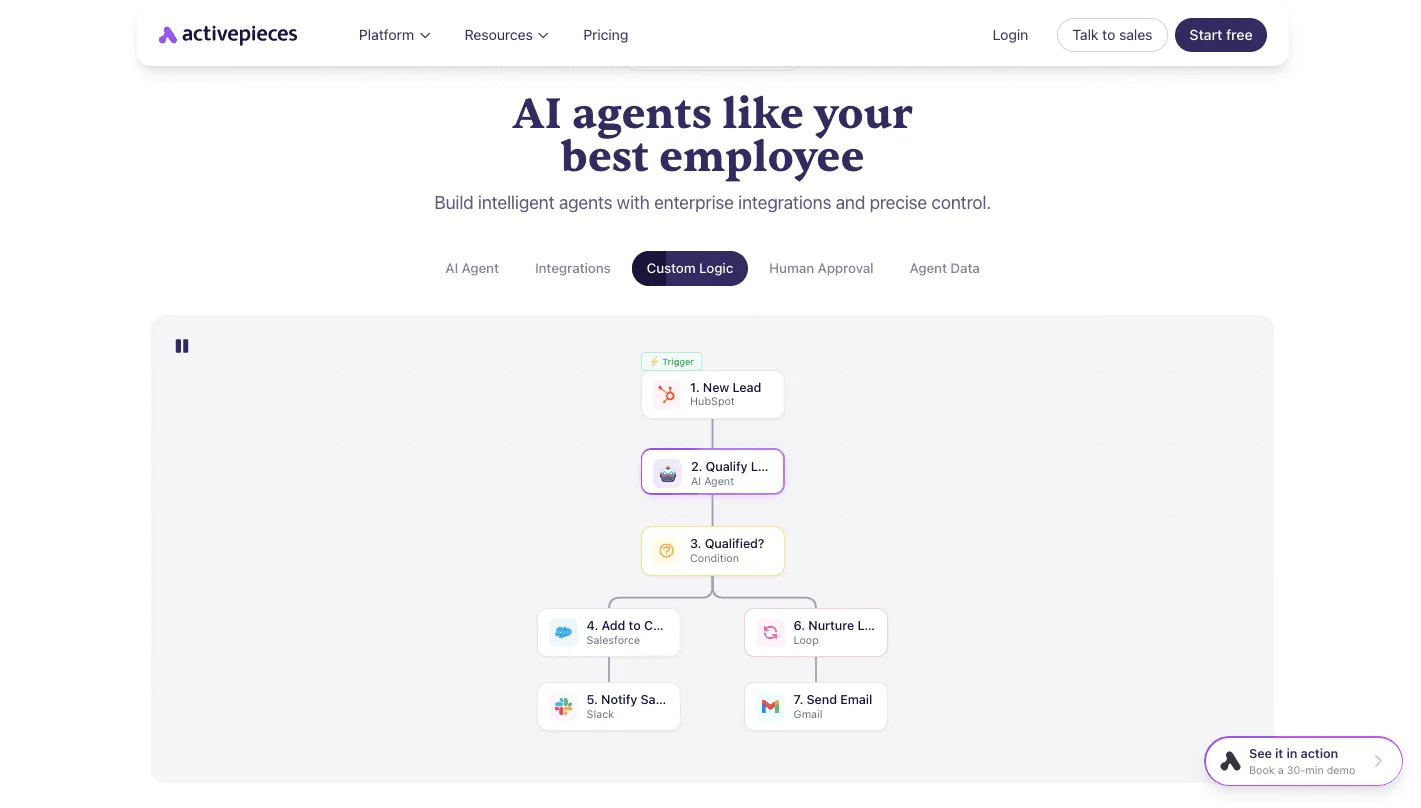
Its homepage shows the shape of what you'd build: a trigger at the top, an AI agent step that qualifies the input, a condition that branches, then actions such as posting to Slack or sending email, with the steps joined by vertical lines.

Though the homepage example's a sales-lead flow, not a GPU one, the structure transfers directly: trigger, check, branch, notify. You'd swap the lead trigger for a scheduled poll of your usage data, and the branches for "under threshold" and "over threshold."
Alerting on Crusoe GPU spend thresholds
On a schedule, the flow polls whatever usage or billing data you can export or reach through an API. It compares that data with a limit you set, and posts to Slack or sends email when the limit is crossed.
The value's routing. The alert can go to the engineer who launched the instance, not a shared billing address, and it can include the instance name and how long it's been running.
Check what usage data Crusoe exposes before you commit to a design, since the flow can only act on data you can actually pull.
Human approval before stopping idle GPU instances
For idle instances, the flow shouldn't stop anything on its own. It sends the owner a request, using a human-approval step, naming the instance and asking whether to stop it.
Approval triggers the stop; silence or refusal leaves it running and escalates later. That keeps the safety of a person's judgment while removing the chore of remembering to ask.
Nobody has to hire a builder for it, either: Activepieces' built-in chat takes a plain description of the idle-instance check and the approval step, and publishes the flow a builder would otherwise have wired by hand.
What lands in your account is an ordinary live flow, listed beside the others, and its run trace records every step the 02:10 check took, from the usage poll to the owner's reply.
It runs under the same RBAC and audit logs as every other flow, so the next overnight alert can be reconstructed by anyone on the team without a certification to decode it. MoneyGram, Moneypenny, Alan and FundingSocieties run Activepieces in production.
This is bounded help. It trims idle waste and surfaces storage and networking creep earlier. The rate card stays exactly where it was, which is why the comparison with other GPU clouds still comes down to cost per finished job.
Six cost control rules
Six rules, applied in this order on Monday, close most of the gap between the Crusoe Cloud rate card and what the invoice says. Each one targets a charge that accrues while no useful work is happening.
Protect cost per finished job above all; every rule below removes dollars from the numerator without touching the denominator.
Job caps and timers for GPU cost control
Because the first three rules are settings, not habits, configure them once and stop relying on memory. Each one stops a specific kind of silent spend, and the checklist below runs in the order that pays back fastest.
- Set a per-job hour cap. A run that hangs or loops keeps billing at the full GPU rate until someone notices, so the cap turns an open-ended loss into a bounded one.
- Set an idle-shutdown timer. An instance waiting for a next job's billed the same as one training, so the timer ends that charge without anyone remembering to do it.
- Clean up storage after each job. Checkpoints, scratch data and intermediate outputs persist after the instance is gone, so they keep charging for results nobody will read again.
- Review weekly spend against the table. Compare actual charges to the cost-per-job table from earlier, and treat any line that drifts from it as a question to answer that week.
- Reserve only past a utilization threshold. Commitment terms pay off when the hardware is busy and punish you when it isn't, so write down the utilization level at which you'll reserve and don't commit below it.
- Recheck prices monthly. Rates and terms change, and a figure that was right when you built the table may not be now.
Nothing in that list needs a sales call to understand, which's the point, and it's the whole routine. The first three need setup only once, so the ongoing effort sits in the last three.
Weekly Crusoe bill and cost-per-job review
It's in the weekly review that the table earns its keep. Pull the week's charges, divide by the jobs that actually finished, and compare the result with the figure you expected.
If it's higher, look first at idle time and leftover storage, since those are the two lines that grow without anyone launching anything.
Reserving needs the same discipline. Decide the utilization level in advance, from your own job history rather than from a vendor's pitch, and revisit it only when the data moves.
The monthly price recheck then keeps the table honest, so next month's comparison with other GPU clouds starts from current numbers.
Frequently asked questions
Does Crusoe Cloud have a free tier or free credits? Budget as if it doesn't, and count any credit only after you have it in writing.
A promotional credit is a one-time discount on your first bill. It tells you nothing about the steady-state cost per finished job, which's the number this comparison rests on.
Can you pay Crusoe Cloud by credit card without a contract?
To know whether a card works without a contract, confirm the on-demand path at signup before you plan around it. The practical test is whether you can launch an instance and stop it without anyone asking you to book a call.
If pricing only becomes clear after a sales conversation, put the quote in your table with its date and treat it as a negotiated rate, not a list price.
Is Crusoe cheaper than AWS or Google Cloud for GPUs?
Sometimes, and the hourly rate alone can't tell you. A lower rate loses its advantage if the job runs longer, if stopped instances keep billing for storage, or if moving results out costs extra.
Run the same job on each provider, then divide the full bill by the number of jobs that finished. Whichever provider has the lower figure's cheaper for that workload, and only for that workload.
How often does Crusoe change its prices? Assume prices can change without notice, and don't assume any fixed schedule.
Our checks are dated 9 Nov 2026, and a figure older than your last check's a guess. That's why the table gets a monthly recheck, and why any commitment term should state whether the rate is locked or follows the list price.
Does Crusoe charge for data egress?
Check the networking section of Crusoe's pricing page for your own traffic pattern before you assume the answer. Egress's invisible in a per-GPU-hour comparison and decisive for jobs that produce large outputs, such as checkpoints, datasets or rendered results.
If you move data out regularly, add a line for it to your cost-per-job formula. If the page is ambiguous, ask for the answer in writing.
A rate you can't find on a public page can't go into a budget.
Related reading
References
Running the numbers
See what the same workload costs here.
Free forever plan, and every paid plan self-hosts at no extra cost.
See pricing Talk to sales