
Vast.ai GPU Pricing Per Hour in 2026 and Extra Fees

Nov 2, 202614 min read
Vast AI has no plans to choose from.
You load prepaid credit, rent a machine at the hourly rate its owner set, and pay storage and bandwidth on top, drawing the balance down as you go, which suits anyone who, like a team wiring up jobs with Activepieces, wants to pay only for the hours a task actually runs.

Vast AI pricing is a pay-as-you-go model in which you draw down prepaid credit at the hourly rate a GPU host sets for each machine, plus separate charges for storage and bandwidth, rather than paying a fixed subscription fee.
Budget around a monthly plan that doesn't exist and you'll miss what the bill actually responds to, which is which machine you pick and how long it runs.
Picture the shelf below: several servers, each with its own hourly tag, and one renter paying from a single credit balance.
Vast AI's hourly billing structure
What Vast AI is
Vast AI's a marketplace for renting graphics processors (GPUs), the chips that do the heavy lifting in training and running AI models.
Owners list machines, and you rent them by the hour. People use them to fine-tune a model, generate images, or host a model that Activepieces calls from an automation. You're renting someone else's hardware, so quality varies from listing to listing.
There are three ways to rent the same kind of machine:
- On-demand keeps the machine yours until you stop it
- Interruptible rents at a lower rate, but another renter can outbid you and pause your work
- Reserved commits you to a longer term in exchange for a lower hourly rate
Where the hourly rate comes from
Based on their hardware, location and how much they want the machine to earn, the host sets the rate. Two machines with the same chip can carry different tags because of speed, connection quality or reliability.
When the host is flaky, a low tag can cost more than a higher one on a steady host, because you pay for hours that produce nothing.
If you are running this arithmetic for your own team, see what the same workload costs on Activepieces.
Vast AI rental types and rates
Vast AI charges for three ways of renting a GPU: on-demand, interruptible and reserved, plus separate storage and bandwidth fees, and the host sets each rate.
When the host is flaky, a low tag can cost more than a higher one on a steady host, because you pay for hours that produce nothing.
The table lists each line and marks what I couldn't confirm, so you know which costs to check before you rent.
| Line | Price basis | Included | Limits | Status |
|---|---|---|---|---|
| On-demand | Hourly rate set by the host | The GPU and machine while running | Rate varies by host and hardware | Confirmed |
| Interruptible | Hourly bid, usually below on-demand | Same hardware | Can be paused if another renter outbids you | Unconfirmed |
| Storage, running | Per GB, set by the host | Your disk space | Billed on top of the hourly rate | Unconfirmed |
| Storage, stopped | Per GB, set by the host | Your data is kept | Disk may keep billing while the GPU doesn't | Unconfirmed |
| Bandwidth, upload and download | Per GB, set by the host | Data moved in and out | Rates differ by host and direction | Unconfirmed |
| Minimum deposit | One-time credit | Balance you draw down | Amount not verified | Unconfirmed |
Treat the "Unconfirmed" rows as questions for the offer listing, not as assumptions.
I can put numbers on one line only, the hourly rate. According to AI Compute Radar, the cheapest offers are $0.34 per GPU-hour for an A100 and $0.36 for an RTX 4090.

At $0.47, the RTX 5090 costs about a third more than the 4090 at its cheapest, ensuring the markup persists even at deepest discount.
At the top, the H100's $1.79, the H200 $3.95 and the B200 $6.25, so each successive generation imposes a steeper financial threshold.
A day on one H100 comes to about $43, and a B200's floor is roughly eighteen times an A100's, leaving most organizations unable to justify the migration.
What Vast AI costs at realistic usage levels
On a single RTX 4090, your monthly bill tracks the hours the machine is switched on far more than the hourly rate you picked. Storage charges keep running whether or not you're computing.
Light users feel storage most, because the storage segment barely moves between workloads while the compute segment swings widely.
At quarter-time use, compute is cheap and storage becomes a visible share of the bill. Your dataset and model files sit on the host's disk between runs, and you pay for that space even while the instance is stopped.

Interruptible rental suits this job well, because a training run that saves checkpoints can resume if it's bumped. The cost of doing nothing is a forgotten stopped instance quietly billing for disk for months.
At half-time use, the habit that matters is stopping the instance when you walk away. Interruptible pricing is a poor fit here: being cut off mid-session costs you unsaved work and your focus, which is worth more than the discount.
At full-time use, the compute segment dominates and storage shrinks to a rounding error. Interruptible savings are largest here in dollar terms, but a service people depend on goes dark whenever you're outbid.
On-demand costs more and buys continuity. Host reliability matters most in this case, so pick a well-rated host before you pick the cheapest one.
Hidden costs and limits Vast AI renters hit
Five things beyond the hourly rate decide whether your bill stays small or your work gets cut off. Here's what to check before you rent:
- Storage that keeps billing while an instance is stopped
- Bandwidth fees that each host sets for itself
- Interruptible rentals that can be preempted
- Hosts with low reliability ratings
- A depleted balance that triggers an automatic stop
Vast AI storage and bandwidth charges
Stopping an instance doesn't stop the disk charge. Your files stay reserved on the host's machine, so you keep paying for that space until you destroy the instance.
If you no longer need the data, copy it out and delete the instance.
Bandwidth works the same way, with a twist: each host sets its own fee for data in and out. Check it on the listing before you rent, especially if you'll move large datasets or model files.
Vast AI interruptible rentals and unreliable hosts
Another renter can outbid you and take the machine, which is why interruptible rentals cost less.
If your job can't save its progress and resume, you lose everything since the last save. Save checkpoints often, or skip interruptible pricing for work you can't afford to repeat.
Regardless of your rental type, a host with a poor reliability rating can drop out. A weak rating means more restarts and more time spent re-uploading data.
Vast bills against a prepaid balance. When it runs out, your instances stop automatically, and work in progress can stop with them. Top up well ahead of long jobs, and remember that stopped instances still draw down storage charges.

A scheduled check can warn you before the balance reaches zero, and Activepieces' published pricing lists 1 credit per flow run however many steps it contains, where Zapier bills each step as a task and Make bills each module.
Its free plan includes 1,000 credits a month with unlimited flows, so a four-step check (list instances, read the balance, compare against your limits, post to chat) run hourly uses 720 credits in a 30-day month.
Worth checking against a plan that does not meter every step: one credit covers a whole run on Activepieces.
Vast AI's H100 pricing versus competitors
Lowest headline H100 rate of the four goes to Vast AI, but the gap only matters if the host stays up and you shut instances down when you finish.
On the latest observed H100 SXM price, per ComputeTick, Vast AI costs $2.14 an hour, RunPod's community tier $2.69 and Lambda $3.99, which means your choice of platform shifts the bill by $1.85 per hour. The chart shows how quickly that spread opens.
Over a 100-hour training run, per Vast, that's $214 on Vast AI and $399 on Lambda, so Lambda costs about $185 more for the same hours.
CoreWeave sits at $6.16, nearly three times Vast AI's rate, which turns the same run into $616. AWS is at $6.88, or $688 for those hours, putting the cloud provider at a premium that dwarfs the independent platforms mentioned above.
On a second comparison, from FastGPU, the bigger clouds look worse. It prices the cheapest current Vast AI offer at $1.79, by which time anyone hunting bargains can access a GPU for under two dollars. Against it:
- AWS capacity is $5.97
- AWS on-demand is $6.88
- Google's Iowa region is $9.80
- Google us-central1 and Azure ND are both $11.06
At $11.06, 100 hours on Azure costs $1,106, against Vast AI's best live offer of $1.73 per hour.
Don't read the two sets of numbers as one scale. AI Compute Radar notes the $1.79 is the cheapest offer on the marketplace at one moment and can disappear when that host rents out.
The $2.14 is a latest observed SXM price, which is the safer figure to budget with.
Given that, my advice is to pick Vast AI or RunPod's community tier for work that can restart from a saved checkpoint, because a dropped host then costs you minutes. Pay Lambda's or CoreWeave's premium when a lost run costs more than the savings.

Beyond the hourly rate, I can't give you reliable storage or egress comparisons from the figures above, so check those on each provider's pricing page before you commit.
Automating Vast AI cost control with Activepieces
To keep an eye on the bill, Activepieces, an MIT-licensed automation platform with 746 integrations counted in its open source monorepo, can run a scheduled check against Vast AI's API.
It can message your team when your balance runs low or a machine has sat idle too long.
It watches the bill for you, but it doesn't lower it.
The Activepieces homepage shows the shape of such a workflow. Its example is a sales one: a new lead arrives from HubSpot (a customer-tracking system), an AI step qualifies it, a condition splits the path, and the result goes to Salesforce, Slack and Gmail.
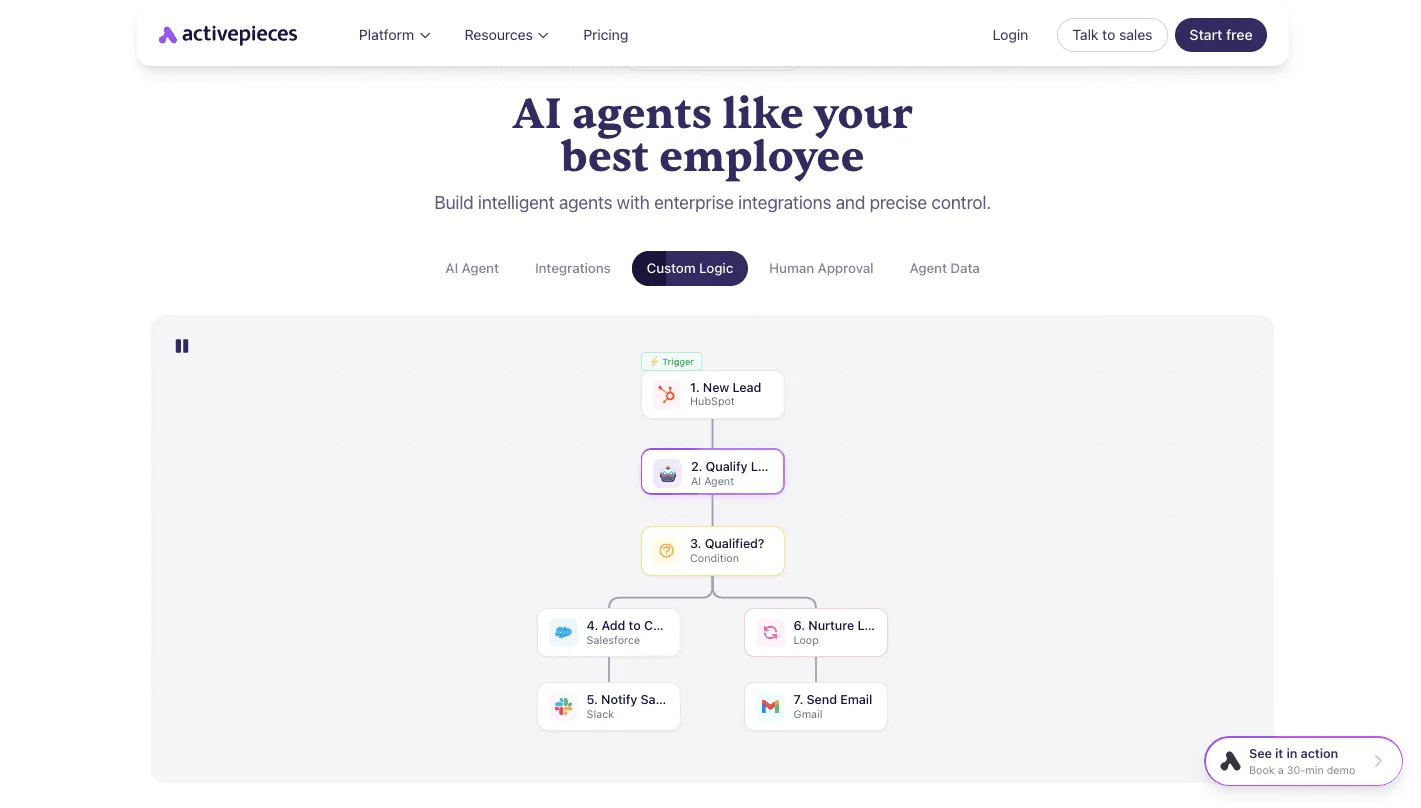
Nothing in it touches Vast.
What carries over is the structure: a trigger starts it, a check runs, a condition decides, and a message goes out. Ours swaps the new-lead trigger for a timer.
Idle-instance and balance alerts
On each run, the workflow asks Vast's API for your running instances and your account balance. A condition then compares them with limits you choose.
If the balance is below your floor, it posts to your team's chat channel. If an instance has been running past the time you consider reasonable, it names that instance in the same channel.
That matters because an idle machine bills by the hour whether or not anyone is using it. Without an alert, you find out when the invoice arrives. With one, you find out the same day.
What it cannot do
It adds no discounts. Your hourly rate is still whatever the host set, and storage and bandwidth still add to it. It also can't tell you whether a host is reliable, so a flaky machine will keep costing you in lost work.
As described here, it only alerts. Someone still has to read the message and shut the instance down.
Adding an automatic stop step is possible, but I'd test it carefully first, because stopping a machine mid-job can cost you more than the idle hours would have.
A Monday checklist for renting Vast AI GPUs
Automatic stopping carries its own risk, so the safer habit is a manual routine you run every Monday. The bill then tracks the work you did rather than the hours a machine sat waiting.
- Re-check live marketplace rates. Hosts set their own hourly prices and change them, so last week's good deal may be this week's average one. Skip this and you pay a stale price without knowing it.
- Filter by reliability and bandwidth. A cheap machine on a flaky host or a slow connection costs you in restarts and in hours spent downloading data, and both show up on the bill.
- Deposit a small amount. Your balance is your ceiling. A small deposit means a forgotten instance runs out of money before it runs up a painful charge.
- Rent and run. Start the job, then confirm it's actually working before you walk away. A machine that is rented but stuck is billed the same as one doing real work.
- Stop or destroy idle instances. Stopping pauses the compute charge but you still pay for stored data, while destroying ends all charges and deletes what's on the machine. Pick destroy only once your results are saved somewhere else.
- Hold a weekly spend review. Compare what you spent with what you got done. Idle time hides in this comparison, and a few minutes spent on it each week is what catches a leak early.
Frequently asked questions
Does Vast AI have a free tier or free credits?
No, there's no standing free tier, because there are no plans at all: you load credit and pay hosts' hourly rates from the first minute.
Promotional credits may turn up from time to time, but treat them as a bonus, never as a budget. The cheapest way to test is a small, low-rate instance that you destroy when you finish.

Is Vast AI cheaper than AWS or Google Cloud for GPUs? Often the listed hourly rate is lower, since independent hosts compete on price, but the rate is only one line of the bill.
A cheap host that drops your job halfway, or an instance you forget for a weekend, can wipe out the saving. Compare what a finished job costs end to end, not the number on the listing.
Can Vast AI charge me more than my balance?
Because you prepay, a running rental draws down credit you already put in rather than billing you afterward. The risk is the opposite one: when the balance runs dry, your instances stop, and a stopped instance can still be holding data.
Keep a cushion above what a week of normal use costs, and copy out anything you can't afford to lose.
Do Vast AI prices change during a rental? The rate you accepted when you started is the one that applies to that rental. A host editing their listing changes the price for the next renter, not for you.
Interruptible rentals work differently: your price is a bid, and someone bidding higher can pause your instance. If your work can't tolerate that, pay the steadier on-demand rate.
How does Vast AI refund unused credit? Don't assume refunds are automatic or guaranteed. Credit is meant to be spent, so the safe habit is to add only what you expect to use soon.
If you have a balance you won't touch, ask Vast AI's support directly and read the current terms before you add more.
Related reading
References
Running the numbers
See what the same workload costs here.
Free forever plan, and every paid plan self-hosts at no extra cost.
See pricing Talk to sales