
DeepInfer MCP Explained for 2026: Setup, Cost, Pitfalls

Nov 11, 202614 min read
DeepInfer MCP's a Model Context Protocol server that'd let an AI client call DeepInfer's tools. As of 2026-11-11 I have no official DeepInfer docs, pricing or changelog page I can cite that documents one.
DeepInfer MCP defined, with its requirements and cost
What the Model Context Protocol is in one paragraph
The Model Context Protocol (MCP)'s a standard that lets an AI client discover and call a server's tools. One server therefore works with many clients, including Activepieces, an MIT-licensed workflow tool with 25,470 GitHub stars.
The consequence is that a server's tool list is a permission list: whatever it exposes, your client can invoke.
By the time you read a list, it is already out of date, because the ecosystem moves faster than any list does.
CyberMaxTools counts 585 new public servers in Q4 2025 and 2,782 in Q1 2026, so a quarter's output was nearly five times larger. Q2 2026 reached 7,618, and Q3 reached 24,070, about 41 times the Q4 2025 figure.

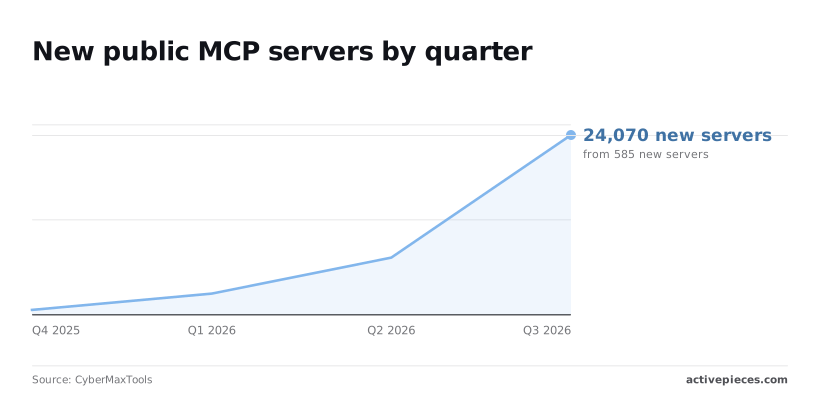
If a roundup is older than a quarter, it is missing most of what exists, and a vendor page can change as quickly.
What DeepInfer's own documentation says
As for what DeepInfer's own docs say the server exposes, there's nothing I can cite. Without an official page, treat any third-party "DeepInfer MCP" as unverified code that could expose and write whatever its author chose.
On requirements, until DeepInfer documents them I state no account tier, key type or client list. A requirement you can't trace to a vendor page is a guess.
For pricing and limits, the table shows what to confirm and where. Each claim stays unconfirmed until you open the named DeepInfer page and record the date.
| Claim | Official source page | Checked on |
|---|---|---|
| What the server exposes | DeepInfer docs, MCP page | 2026-11-11 |
| Auth needed | DeepInfer docs, authentication page | 2026-11-11 |
| Price per call | DeepInfer pricing page | 2026-11-11 |
| What it can write to | DeepInfer docs, tool reference and changelog | 2026-11-11 |
| Requirements | DeepInfer docs, setup page | 2026-11-11 |
Before connecting, have four things in place: a vendor page for each row, a throwaway account, a read-only key, and a spending cap.
Everything below works on Activepieces' free plan. Start without code or a credit card.
Three stages of DeepInfer MCP client connection
With those four things in place, the connection's three stages, and each ends with a condition you can observe before you start the next.
- Create a scoped, read-only key in the DeepInfer dashboard. Working when the key appears in the dashboard's key list with only read permissions and your spending cap attached.
- Paste the vendor's exact config fields into your MCP client and restart it. Working when the client lists DeepInfer as connected and shows the tools its server exposes.
- Run one read-only call. Working when it returns data from the throwaway account and the dashboard shows that call as the only usage.

Skipping a "working when" line is how a later failure becomes hard to place, because you no longer know which stage broke.
Stage 1: create the API key
Create the key inside the throwaway account, not your main one. Grant read access only, attach the spending cap from the checklist, and name the key after the test so you can revoke it by name.
Copy it once into a password manager, never into a chat or a shared document.
If the dashboard offers no read-only scope, stop: you've found a write-access problem before it cost anything, and it belongs in your notes with today's date.
Stage 2: add the server to your MCP client
Open the vendor's setup page and copy the config fields exactly as written, including field names, transport type and the way you supply the key.
Don't retype them from memory or from a third-party tutorial, because a renamed field often fails silently and the client simply shows no tools.
Save, then fully restart the client; a reload of the window isn't always enough for it to reread its config. Compare the tool list the client shows against the exposure row you recorded earlier. Any tool you didn't expect is a finding.

Stage 3: run one read-only test call
Pick the simplest read tool on the list and call it once, with a request that can't change anything. Then open the dashboard and check that usage moved by exactly that call and by the amount the pricing page predicted.
If the cost differs from the page, record the difference and stop there. Don't widen the key's permissions until the numbers agree.
Where teams use DeepInfer MCP in practice
Adopt a use case only when an agent decides at run time which DeepInfer tool to call. The permissions you just kept narrow are the reason that matters.
I'm not listing use cases here from memory. The vendor's documentation is the only source for what it endorses, and you should test each one against the same three questions.
DeepInfer MCP use cases in the vendor documentation
Take every example on the vendor's documentation pages and sort its tools by what they do. Then check your date against the tools list and the pricing page before you trust the sort.
The table shows the three kinds of tool you'll meet. What to take from it is that the write rows deserve the most scrutiny, because a wrong call there changes something you can't easily undo.
| Kind of tool | Reads or writes | What it touches | Cost per call | Simpler without MCP? |
|---|---|---|---|---|
| Lookup or inspection | Reads | Records or results already stored | Copy the figure from the pricing page, with the date | Often yes: a plain API call with fixed parameters |
| Submit or update | Writes | Whatever the key can reach | Same; check whether failed calls are billed | Only if the target never varies |
| Long-running job | Writes, then reads | Job state plus stored output | Same; check whether polling is billed | Often yes: a scheduled job |
Nothing in that table replaces the vendor's own listing. A tool that appears on the page but not in your server's tool list is a mismatch, and you should record it.
When MCP is the wrong fit
When you know the sequence of calls in advance, MCP's the wrong fit. If the same call runs every night with the same inputs, a scheduled job gives you one request, one log line and one cost you can predict.

Put an agent in the middle and you add a decision step that can go wrong and a per-call charge for each wrong choice.
Once a tool writes, the same applies. If a human would approve the change anyway, a plain API call behind that approval is easier to audit than an agent holding a key that can write.
Use MCP where the agent's choice is the value. Everywhere else, the rows above that say "simpler" mean exactly that.
Easier to see it running than to read about it: set it up free, no card.
Mistakes that break DeepInfer MCP setups
When a setup breaks, it is usually one of four mistakes, and each is a gap between what you assumed and what the vendor's pages publish:
- broad keys
- unmetered calls
- unreviewed writes
- stale config
Keys with more access than the task needs
Nobody notices until something calls a tool you never meant to expose; the chain starts with one key that can do everything, pasted into a client that needs one read.
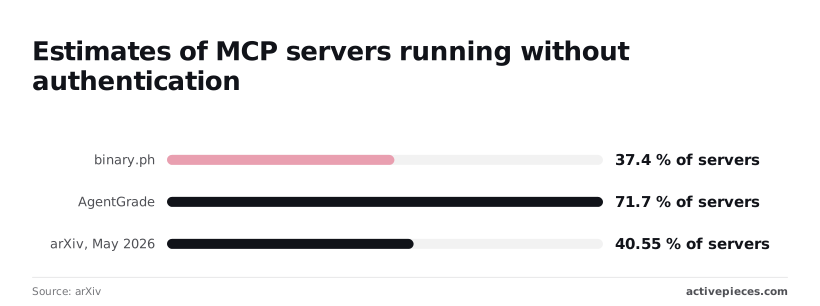
Ask how often servers ship without authentication and the answers disagree sharply. binary.ph put it at 37.4% of 539 servers in February 2026, AgentGrade at 71.7% of 1,321 in March, and an arXiv study at 40.55% of 7,973 in May.
Nobody notices until something calls a tool you never meant to expose; the chain starts with one key that can do everything, pasted into a client that needs one read.
With a spread that wide, none of the figures describes your server, so test it yourself.
When a call fails, an agent loop retries, each retry is a billed call, and once the rate limit answers, the loop retries again. That is where surprise usage charges and rate limits come from.
Read the per-call price and the limit on the vendor's pricing page on a dated visit, then set a client-side cap below it. A cap you can't point to in config isn't a cap.
Unreviewed write actions are the third trap. A tool that can write will write whenever the model decides it should. Before enabling one, list what it can modify and whether the change can be undone. Leave anything irreversible behind human approval.
DeepInfer MCP config drift after vendor updates
The ecosystem moves fast. CyberMaxTools counted 296 new servers in January 2026, 913 in February, 1,573 in March, 1,894 in April, 2,440 in May and 3,284 in June.
By June the intake was roughly eleven times January's, so a tool list you checked in spring is a snapshot, not a standing fact. Record the date you checked, and re-check after every vendor update.
- Day 1: issue a key scoped to read-only and record the date you verified the tool list.
- Day 2: write down the per-call price and rate limit from the vendor's page.
- Day 3: set a call cap below that limit and test that it trips.
- Day 4: list every write-capable tool and put approval in front of the irreversible ones.
- Day 7: re-read the vendor's pages and diff them against your day-1 notes.
Using DeepInfer MCP alongside Activepieces workflows
That re-check now covers a second vendor if you add Activepieces. Its free plan costs $0 with unlimited flows, and it can call DeepInfer's API from an HTTP step, but it doesn't replace DeepInfer's own MCP server, so your infrastructure still requires both.

The direct link works without the second path, so a missing workflow is never a reason your client can't reach DeepInfer.
When a workflow beats a direct MCP call
Use a workflow when the result has to land somewhere other than a chat window.
If a DeepInfer response should update a CRM record, add a spreadsheet row or post to a team channel, the HTTP step does that on a trigger, with no one at the keyboard.
The direct MCP link can't do this, because it only serves the client you attach to it.
Activepieces can also expose its own workflows to an MCP client, so the client reaches your automations as tools, and MCPs are included on the free plan. That's a different connection from DeepInfer's server.
It adds a hop, and every hop adds another place for a call to fail unnoticed.
Keep the direct link for interactive work where you want to see what the server exposes. Add the workflow only once you can name the destination it writes to.
Before you do, treat Activepieces the way you treated DeepInfer: read the vendor's own pages and write down the date. The plan and credit figures above come from its pricing page as checked on 2026-10-23.
- Activepieces has 747 integrations in its MIT-licensed open source repo, and one you connect for a flow is also an agent tool on the per-project MCP server, so the CRM, spreadsheet and chat connections above need no second catalog and no export step. Claude, ChatGPT, Cursor or an agent you built can reach them there. The Integrations Framework and MCP Server documentation describes this, and packages/integrations in the repo is where you can confirm the same action runs in a flow and is exposed as the MCP tool. That direction exposes your workflows to a client; it doesn't make DeepInfer's server callable from them.
- Confirm how the HTTP step authenticates, so you know where DeepInfer's credential is stored and who on your team can read it.
- Confirm what each destination connection is allowed to write to. A workflow that posts to a chat app or edits a CRM carries the permissions of the account you connected, not the permissions you meant to grant.
- Check how pricing is counted for runs or steps, because one DeepInfer call inside a workflow may be billed on both sides.
If any of the four is unclear on the vendor's page, leave the workflow out until it's clear.
Frequently asked questions
Five questions remain that this article can't settle for you, and each has a single page that can. Record the page and the date you read it next to every answer.
- Is there an official server? Source: the vendor's developer documentation, on the day you read it.
- What does a call cost? Source: the vendor's pricing page, on the day you read it.
- Is there a free tier? Source: the same pricing page, checked separately, because a free tier is often described somewhere other than the price table.
- Which versions and clients are supported? Source: the vendor's MCP setup page, on the day you read it.
- Where does the data go? Source: the vendor's privacy or data-processing page, on the day you read it.
The answers below say what to look for on each page, because an answer without a date goes stale unnoticed.
On whether DeepInfer MCP is free to use, read the pricing page and look for a free tier by name. If the page lists none, assume there's none.
A free tier that excludes write calls leaves you evaluating a server that can't do the job you bought it for.
On which AI clients work with it, the vendor's setup page is the only list that counts. A client missing from it may still connect, but then you're testing, not relying. Connect your own client once and confirm that every tool you need appears.
On running it on your own server, look for a documented self-hosted option on the vendor's pages. If only a hosted endpoint is described, treat the server as hosted-only until the vendor says otherwise in writing.
Data handling and change tracking
On whether it sends your data to the vendor, assume any tool that accepts a document or a record as input sends it to wherever the server runs.
Read the data-processing page for retention and training use, then watch the traffic from a test call and compare it with what the page says. If the two disagree, the traffic is the evidence.
On knowing when the server changes, find the vendor's changelog or release notes page, and don't rely on it alone. Save the server's tool list on the day you approve it, re-list it on a schedule, and compare the two.
A tool that appeared without a changelog entry is the signal to pause the workflow and re-run the checks above.