
DeepSeek Automation: How to Get Started (2026 Guide)

Nov 15, 202614 min read
DeepSeek automation means an event, such as a new email or a schedule, sends a request to DeepSeek's OpenAI-compatible API, whether you wire it up in code or in a workflow builder like Activepieces. The reply goes to the next step with nobody typing.
By the end you'll have one working call, about 30 to 45 minutes from now, and you'll know who gets paged when it breaks, which means you have no redundancy in the system.
At 2am on a Tuesday, a failed run lands on whoever owns the key, the trigger and the retry behaviour. If the answer is "whoever built it, who has since moved teams," the automation is already a liability.

Call DeepSeek API from triggers
The three ways to automate with DeepSeek
Only the chat app can't run unattended, so it's a place to test prompts, not to host a process. The table compares all three on the things that decide whether a job survives without you.
If the answer is "whoever built it, who has since moved teams," the automation is already a liability.
| Route | Setup time | Cost control | Runs unattended |
|---|---|---|---|
| DeepSeek chat app | Minutes, no key needed | None you can enforce; a person decides each use | No |
| API called from code | Longest, since you write and host it | Fullest: you set limits, retries and token caps yourself | Yes |
| API via a workflow tool | Short, built from ready-made steps | Moderate: per-token billing plus whatever the tool enforces | Yes |
Prices and plan limits checked against docs.claude.com and claude.com and openai.com and gemini.google on November 14, 2026.
You need four things, and missing any one stalls the build:
- A DeepSeek account with an API key, stored in a secrets manager or the tool's credential store, never pasted into a prompt or a shared document.
- A model name copied exactly from DeepSeek's docs, such as deepseek-flash or deepseek-v4-pro, because a misspelled name fails the request outright.
- A trigger you can fire on demand, so you can test without waiting for real traffic.
- A named owner for the key and the alert channel, written down before the first run.
Model names and rates change. Every detail here comes from DeepSeek's own documentation and pricing page as they stood on 15 November 2026, so re-verify after that date.
This takes minutes, not a project: automate it in Activepieces free.
Create API key and test call
Re-check the model name against DeepSeek's current list, then top up a small balance at platform.deepseek.com. Create a key and send one POST to /chat/completions with that key as a Bearer token. A test costs fractions of a cent.
Store your DeepSeek API key safely
Add a few dollars of balance first, because a key on an empty account fails with a payment error that looks like a bug.
Then create the key under the API keys page. DeepSeek shows the full value once, so a lost key means a new key and an edit in every workflow that used it.

To see how small a test is, look at the per-call prices from apicost.app. According to apicost.app, the older Coder model cost $0.00028 per call, so a hundred test calls on it came to under three cents.
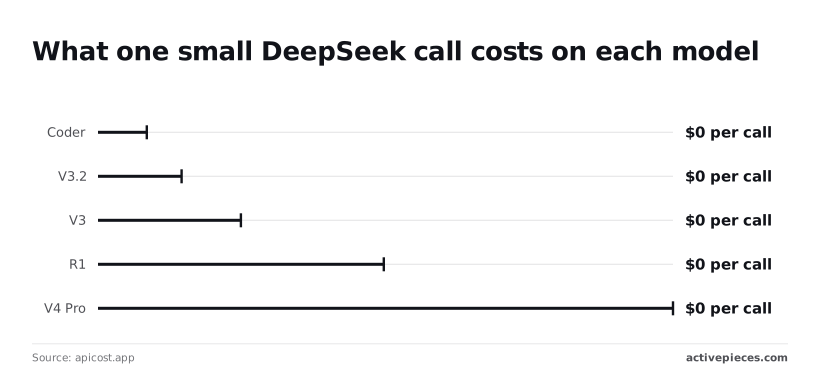
V3.2 is $0.00048 and V3 is $0.00082, so the older models are still cheap to poke at.
At $0.00164, R1 costs roughly six times Coder, because it spends tokens reasoning before it answers. Apicost.app shows V4 Pro is $0.0033, so even the most expensive model in the chart costs about a third of a cent per call.
A failed test's not a budget problem. A loop with no stop condition is.
curl https://api.deepseek.com/chat/completions \
 -H "Content-Type: application/json" \
 -H "Authorization: Bearer $DEEPSEEK_API_KEY" \
 -d '{
 "model": "deepseek-flash",
 "messages": [{"role": "user", "content": "Reply with the word ok."}],
 "stream": false
 }'
When the call works, JSON comes back with the reply under choices[0].message.content.
A 401 means the key is wrong, and a 400 about the model means the name is stale, so check the list again.
If you already have OpenAI client code, it works against this API once you change two values.
from openai import OpenAI

client = OpenAI(api_key=os.environ,
 base_url="https://api.deepseek.com")
r = client.chat.completions.create(
 model="deepseek-flash",
 messages=[{"role": "user", "content": "Reply with the word ok."}],
)
print(r.choices[0].message.content)
Make output usable by software
Until the next step can parse a model reply without a human reading it first, the reply isn't data. Whoever owns the workflow gets the 2am page when it can't.
The work here is making what comes back predictable: a system prompt that fixes the role, JSON mode for the shape, and tool calling when the model must trigger an action rather than describe one.
Force JSON output from DeepSeek
Set response_format to {"type": "json_object"} and the API constrains the reply to valid JSON, so your parser stops choking on prose wrapped around a payload. DeepSeek documents the rules, and each one maps to a failure you'll otherwise meet in production:

- The prompt must contain the word "json", and should include an example of the shape you want. Without the word the API rejects the request; without the example the keys vary from run to run.
- Set
max_tokenshigh enough for the whole object. A reply cut off mid-object is invalid JSON, and JSON mode cannot repair truncation. - Handle empty
content. The API can return a blank message, so check for it and retry or route to a fallback instead of passing an empty string tojson.loads.
Parse inside a try block and log the raw reply on failure. The person triaging the alert needs the actual text, not just the exception.
Use DeepSeek tool calling for actions
Use tool calling when the output is a decision your automation acts on, such as "create a ticket" or "look up this order".
You declare each function with a name and a JSON schema for its arguments, and the model returns a call naming the tool and its arguments instead of free text.
The model proposes; it never executes. Validate the arguments before acting, and give every tool a named owner, because a model that calls the wrong tool with plausible arguments fails quietly.
Choose DeepSeek chat or reasoning model
Use deepseek-flash for extraction, classification and routing, and reserve deepseek-v4-pro for steps where accuracy on multi-part reasoning justifies the extra cost and latency.
Because the model name lives in one variable, you can test both on the same prompt and keep the cheaper one if the output matches.
When you switch to a reasoning-capable mode, check the documentation for parameters it ignores. Settings such as temperature are the usual ones.
You can follow the rest of this with the builder open. Start free, no card.
Put calls in trigger workflows
When a form entry or incoming email comes in, an HTTP request goes to DeepSeek, your workflow parses the JSON reply, and the result lands in a sheet or message.
The question to settle first is who gets paged when that chain breaks at night, because the tool you pick decides what failure looks like.
The table below compares three ways to host the chain.
| Option | Setup effort | Hosting | Error handling and retries | Cost |
|---|---|---|---|---|
| Cron script | Highest: you write the request, parsing and logging | A server you already run and patch | Only what you code; no retry unless you add one | No tool fee, but your time maintaining it |
| Zapier | Lowest: pick a trigger, add a webhook step | Zapier hosts it | Built-in task history and replay; limited control over backoff | Subscription, scaling with usage |
| n8n | Moderate: build nodes on a canvas | Self-hosted or its cloud | Per-node retry settings and a dedicated error workflow | Free to self-host, with server upkeep; paid cloud plans |
| Activepieces | — | Activepieces Cloud or on-prem; the free self-hosted Community Edition is MIT-licensed | — | Free plan: $0 with 1,000 credits a month and unlimited flows; Plus is $20 a month flat for 10,000 credits a month; Team is $200 a month flat for 50,000 credits a month |
If one person owns the server, a cron script suits. If a team wants someone else running the scheduler, a hosted tool does. Whichever you choose, write down the owner's name next to the workflow.
A hosted tool is only as useful as its connectors, and a closed catalogue grows on the vendor's schedule, not yours.
Activepieces can host the trigger-to-reply chain, and when the app you need to act on has no connector, you can have AI build that integration and keep it private to your own instance, with no vendor release to wait for.
Its open source monorepo counts 748 integrations, and roughly 60% of them were contributed by the community, which means the community is the primary development driver.
Test with curl outside the workflow first. If it returns clean JSON, any failure you hit later is in the workflow, not the API.
Wrap any scripted call in a retry and log the raw reply, so the person paged has something to read.
Fix API errors and limits
Seven HTTP codes cover nearly every failure, and each one points to a specific fix, so whoever's paged can start from the status line rather than guess.
The table below gives DeepSeek's own name for each code, the usual cause in an automation, and the first thing to change.
| Code | Official meaning | Likely cause | Fix |
|---|---|---|---|
| 400 | Invalid format | Malformed JSON body | Validate the payload before sending |
| 401 | Authentication fails | Wrong or revoked key | Re-issue the key, check the header |
| 402 | Insufficient balance | Account out of credit | Top up, then alert on low balance |
| 422 | Invalid parameters | Bad field value, or a model name that doesn't exist | Compare against the docs |
| 429 | Rate limit reached | Requests sent too fast | Back off, then retry |
| 500 | Server error | Fault on DeepSeek's side | Retry after a pause |
| 503 | Server overloaded | Traffic spike | Retry after a pause |
With a 4xx, your request must change; with a 5xx, wait.
Behind almost every 401 is a key pasted with a trailing space or rotated by someone else. A 402 means the balance reached zero, and the workflow stops until someone tops up. Assign that owner by name, and alert before the balance runs out.
Request format errors (400, 422)
Nothing is gained by retrying a 400 or 422, because the same request fails the same way. Check the body and the model name first: the current names are deepseek-flash and deepseek-v4-pro.
Retry 429, 500 and 503 with exponential backoff and a cap on attempts, so a bad hour produces one alert rather than hundreds of queued calls.
DeepSeek pricing and context limits
Outside peak hours, prices halve, per DeepSeek's pricing page. Flash input falls from $0.30 to $0.15 per million tokens and output from $1.20 to $0.60, so operators can double their throughput for the same spend.
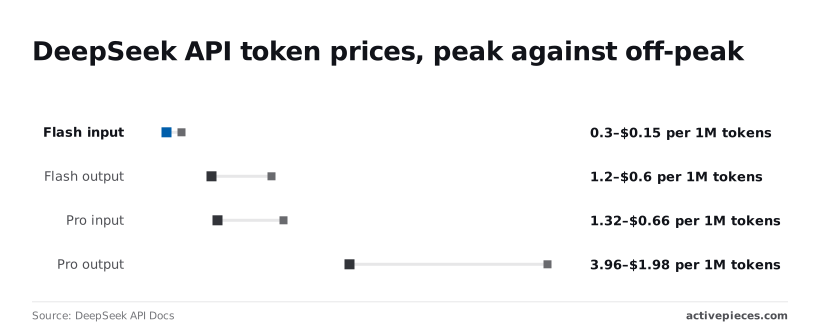
On Pro, input falls from $1.32 to $0.66 and output from $3.96 to $1.98.
Against rivals, c17.io's comparison puts DeepSeek V4 Pro output at $3.96 per million tokens. Mistral Large 4 costs $2.09, while GPT-6.1 Sol, Claude Sonnet 5.5 and Gemini 4 Argon each cost $10, so the cost difference is too significant to overlook.

Pro's therefore well under half the price of three of those four at peak.
On every call, a long prompt adds input cost, so trim the context you resend.
What Activepieces does about this
Activepieces is where we'd put the trigger-to-reply chain this article describes. The DeepSeek call is an ordinary HTTP request step: you point it at https://api.deepseek.com/chat/completions, set the Bearer header, and name deepseek-flash in the body.

The key goes into a stored connection rather than a visible field, which covers the first item on the checklist. The model name is the one thing you still copy from DeepSeek's docs yourself.
Keep it in a single place in the flow so a stale name is a one-line edit.
The failures in the error table are mostly decided by what the flow does after a bad response. Each step can be set to retry on failure, and a failed run stays in the run history with its inputs and outputs.
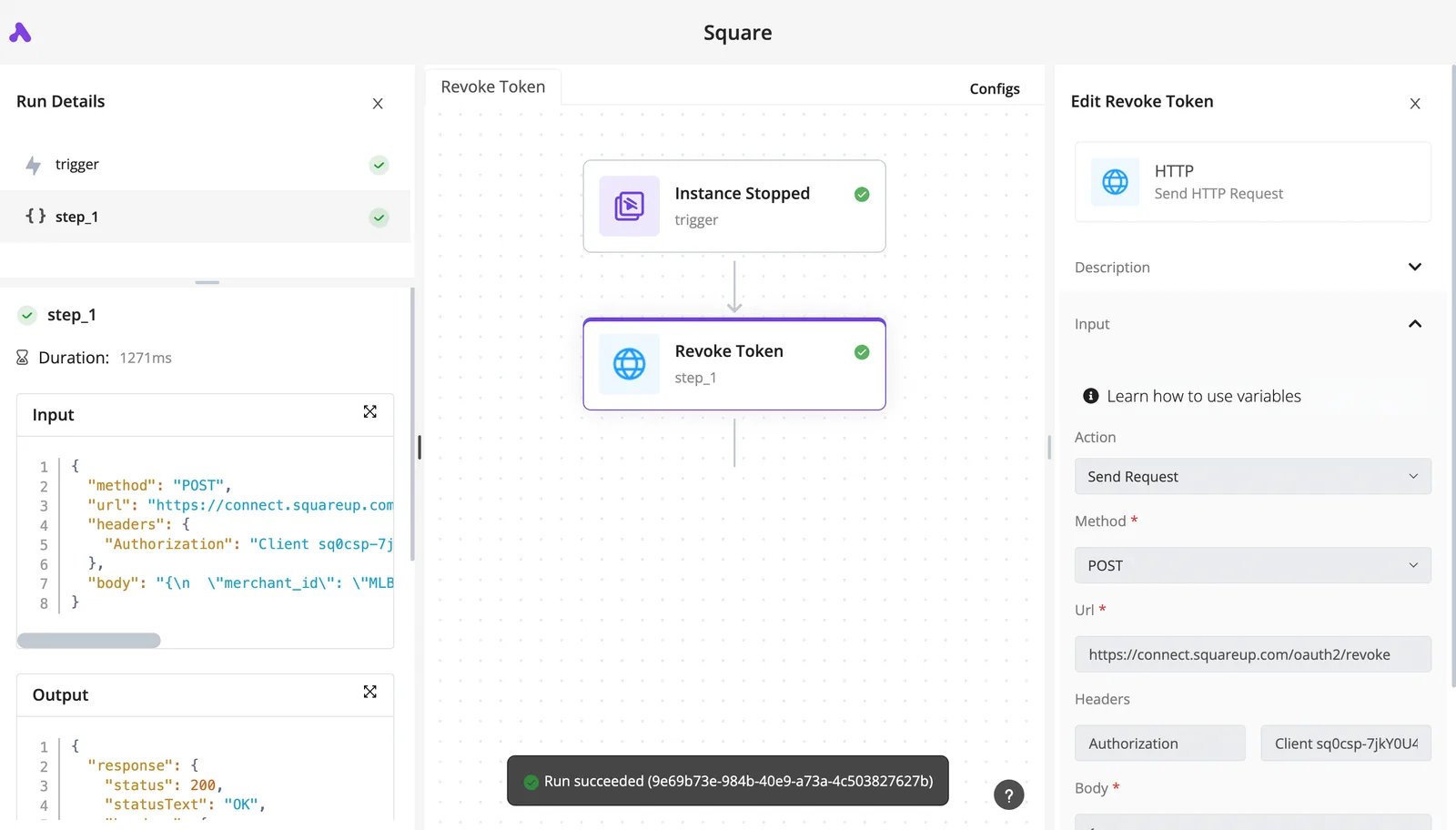
The person paged at 2am can open the raw DeepSeek reply and the status code without rebuilding the run. Add a branch after the call that checks for empty content, and send a message to a named channel on a 402 or a failed parse.
That puts the owner's name inside the flow, where it can't drift out of date.
The code is open source under the MIT licence, and the community edition is free to self-host. That matters when data can't leave your network, or when you don't want the scheduler's behaviour to change on a vendor's timetable. The catalogue is the other reason.
The monorepo has 748 integrations, about 60% of them contributed by the community, so the sheet, inbox or ticketing tool at the end of your chain usually already has a integration.
Frequently asked questions
Is the DeepSeek API free to use?
No, API calls are billed by usage, so the trimming advice above's also your cost control. The free chat app's a separate product with its own limits, and it doesn't give your automation a key or a budget.
Check the usage and balance pages in your platform account before a workflow goes live, and decide who gets the alert when the balance runs low.
Can I run DeepSeek locally instead of using the API?
You can, for models whose weights are published, but you then own the hardware, the updates and the 2am page when the server falls over. The hosted API's the quicker route to a working automation.
When data can't leave your network, local hosting makes sense, and even then smaller or distilled variants are usually what fits on a single machine. Treat it as an infrastructure project rather than a setting.
Does DeepSeek work with the OpenAI SDK?
Yes. The API is OpenAI-compatible, so you point the SDK's base URL at DeepSeek, supply your DeepSeek key, and use a DeepSeek model name.
Leave an OpenAI model name in place and the DeepSeek endpoint won't recognise it, which is where most failures here come from. For anything beyond plain chat requests, such as JSON mode or tool calls, test against DeepSeek's documentation rather than assuming identical behaviour.
Is it safe to send company data to DeepSeek?
That depends on your data classification, not on the API itself. Requests go to a hosted service run by a company under a different legal jurisdiction from yours, so read its data-handling terms before sending anything personal, regulated or contractually restricted.
Someone with authority, usually security or legal, should sign off, and that name belongs in the runbook. Where sign-off's withheld, strip identifying fields before the call or keep that workflow off the API.
Which DeepSeek model should an automation use?
Start with deepseek-flash for routine, high-volume steps such as classification, extraction and short drafting; it's the fast and cheap option. Move a step to deepseek-v4-pro only when its output fails on your own sample inputs.
Pick per step rather than per workflow, since one automation often has both easy and hard calls. Record the exact model name in the workflow so whoever inherits it knows what it was tested against.
Related reading
References
Build it
Set this up in minutes.
No code required. Connect your accounts, and Activepieces runs it from there.
Start free Talk to sales