
Docusign HubSpot Integration: No-Code Guide (2026)

Nov 16, 202613 min read
A Docusign HubSpot integration is a workflow in which a HubSpot event, usually a deal moving to a chosen stage, automatically sends a Docusign envelope to the right person.
You can build it without code, using a visual builder such as Activepieces, and one tested flow beats wiring everything at once.
Facts here were checked against vendor documentation on 16 November 2026.
Build the Docusign HubSpot integration
What people automate between the two apps
Nearly always, a HubSpot deal entering a stage such as "Contract sent" is what starts it. Docusign then creates an envelope from a saved template and emails it to the contact on the deal.
Requirements for the HubSpot Docusign integration
If a first run fails, the cause is usually missing setup, not the tool. Have these ready:
If a first run fails, the cause is usually missing setup, not the tool.
- A HubSpot account with a deal pipeline and the stage you'll use as the trigger
- A Docusign account with a saved template whose signer role is defined
- An Activepieces account to host the workflow
- A signer email populated on every contact attached to a deal
If a contact has no email, Docusign has nothing to send to, so the run fails at the final step, after the trigger already fired. That is why the last item matters most.

Before you budget, know that Docusign seat cost depends on plan and billing choice. According to GoodSign, Personal runs $11 to $15 per user per month, so five seats cost roughly $55 to $75 a month.
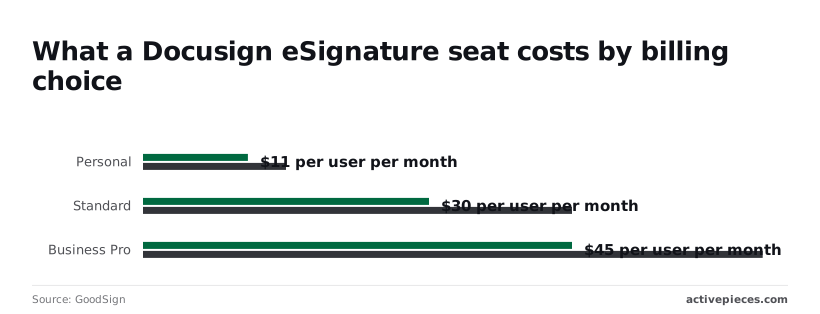
Standard runs $30 to $45, which puts five seats at $150 to $225. Business Pro runs $45 to $65, or $225 to $325 for five.
HubSpot Docusign native app versus workflow tool
When you only need to send a document from inside a deal record, HubSpot's native Docusign connection is quick, but it follows the app's fixed behavior.
Activepieces lets you choose the trigger, add conditions, and handle failures yourself. If your process is "send on stage change, then update the deal," the workflow route is the faster path, and the steps below build exactly that.
This takes minutes, not a project: automate it in Activepieces free.
Build the Docusign HubSpot workflows
Start with the first flow, because the other four hang off the envelope it sends, and the same stage-change trigger you built above feeds it. Five flows work today, each pairing a HubSpot or Docusign trigger with an action in either app or a built-in step.
To see which flows use only listed steps and which need a custom request, read the table by trigger and action. Read the last column as the job each flow takes off a person's plate.
| Trigger and its app | Action and its app | What it does for the work |
|---|---|---|
| "Updated Deal Stage", HubSpot | "Send Document for Signing", Docusign | Sends the contract when a deal reaches the chosen stage |
| "Document Fully Signed", Docusign | "Update Deal", HubSpot | Moves the deal to closed won |
| "Signing Refused", Docusign | Email step, built in | Tells the deal owner a signer declined |
| "Document Fully Signed", Docusign | "Upload File", HubSpot | Attaches the signed PDF to the contact |
| "Updated Deal Stage", HubSpot | Branch step, built in | Sends different templates by deal value |
Drag a deal back and forth and the HubSpot trigger "Updated Deal Stage" fires on every stage move, not only the one you care about, sending duplicate envelopes to a real customer. Add a filter on the stage name first.

To update the deal when signing completes, start from Docusign's "Document Fully Signed" trigger.
HubSpot has a listed "Update Deal" step that updates a deal property, so use it. It's one step, and it keeps the flow no-code.
Notify the deal owner on declined or expired envelopes
Without a Docusign Connect webhook, an expired envelope fails silently and the deal sits there untouched. "Signing Refused" and "Signing Request Cancelled" are listed triggers, but expiry isn't one I can confirm, so catch it with a Connect webhook pointed at the flow's webhook URL.
When the upload fails, the contact has no signed copy on record.
Where a filter stops a flow, a branch sends it down one of several paths. Use a branch on the deal amount so a large deal gets the legal-reviewed template and a small one gets the standard template.
Build the deal-to-agreement workflow in Activepieces step by step
Build it as one flow of seven steps: a HubSpot deal-stage trigger, two lookups, one Docusign send action, a test on a sample deal, then publish, which means you have a defined, end-to-end process from trigger to deployment.
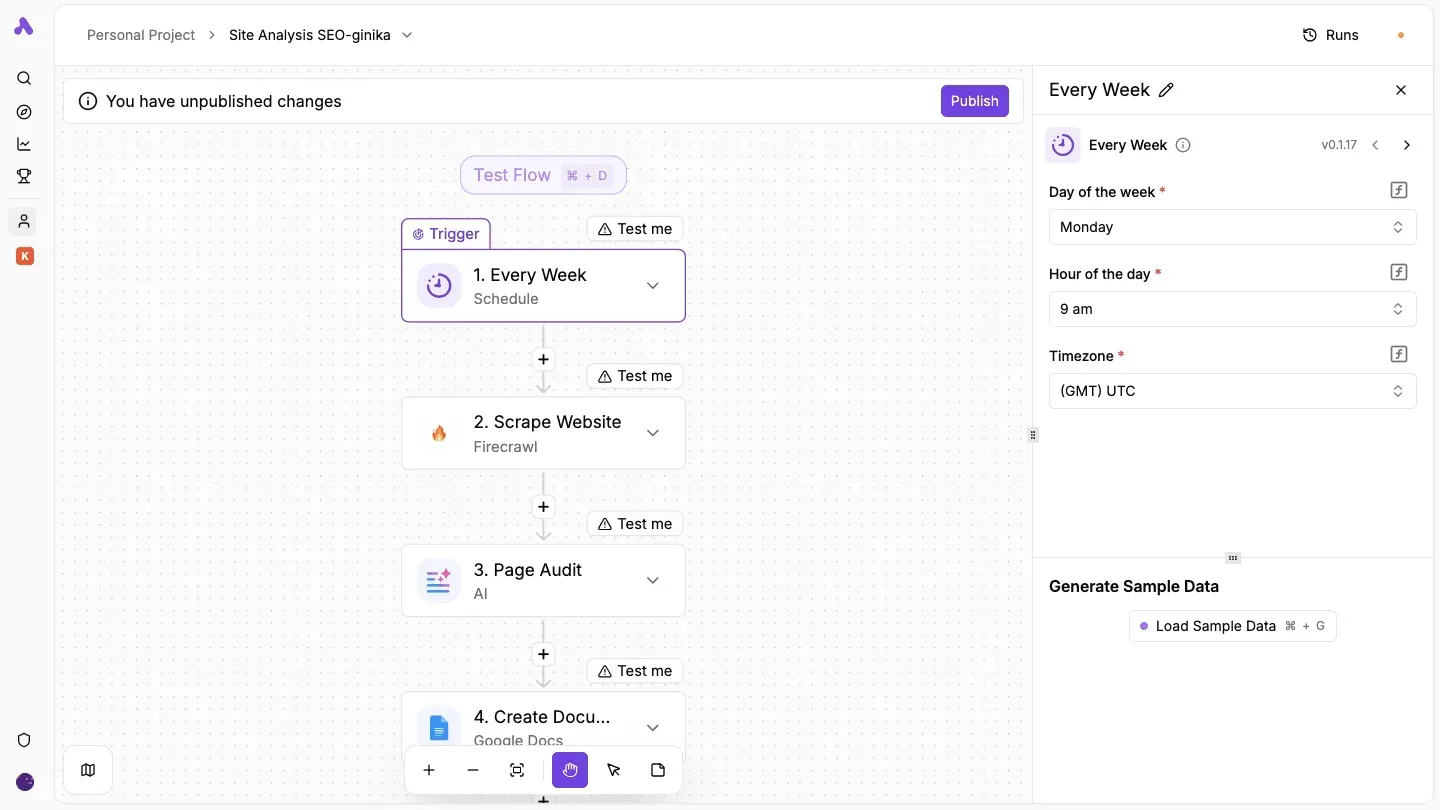
Add nothing else until that sends one agreement correctly.
Connect your HubSpot and Docusign accounts in Activepieces, then build the workflow from a trigger and steps that use those apps, with no code required.
If a step you need isn't in the catalogue, you generate that integration with AI and add it privately to your own instance, with no vendor release to wait for; roughly 60% of the 750 integrations counted from the open source monorepo were contributed by the community.
Start with the trigger, because everything downstream reads from it. The first three steps get the deal and its contact into the flow:
- Create a new flow and choose the HubSpot trigger Updated Deal Stage.
- Connect HubSpot when the dialog asks, authorizing the account that owns the pipeline you want to watch.
- Add two HubSpot actions after the trigger, Get Deal and Get Contact.
Though the trigger hands you one, a deal alone doesn't carry the signer's name or email. That's why step 3 exists. Feed Get Contact the contact tied to the deal, or the send step will have no recipient.
Connect Docusign and map the fields
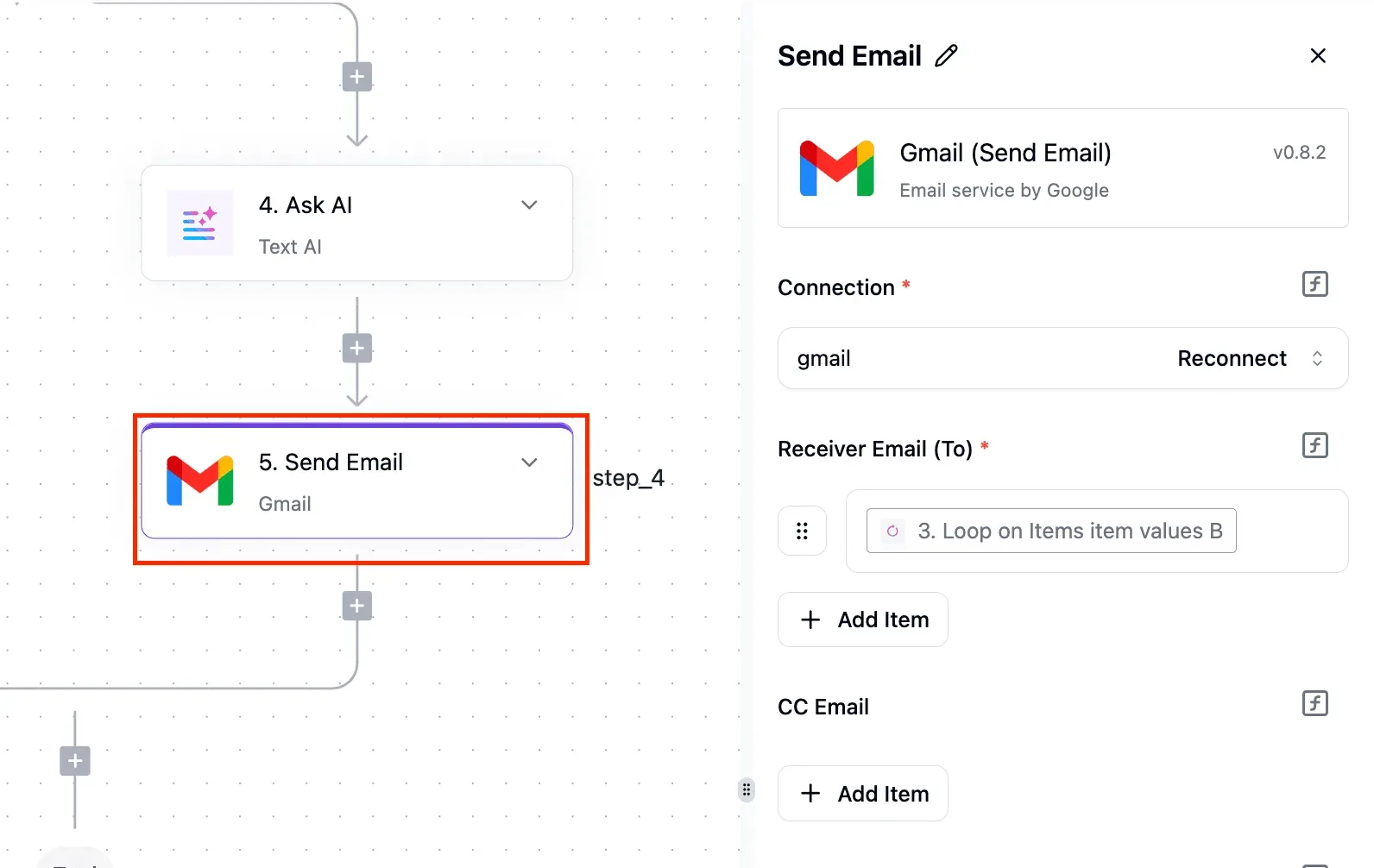
Slow down here, because the send action is only as good as what you map into it. Step 4 is to add a Docusign step and connect your Docusign account in the dialog.
Step 5 is to choose Send Document for Signing and map each field from the earlier steps: the contact's email and name as the signer, and the deal name or amount wherever your document needs them.
Pick values from the Get Contact and Get Deal outputs rather than typing them. A typed value is the same on every run, so it'll send the next customer the previous customer's details.

If a contact has no email, the send fails, so decide now whether you want a blank-email deal to stop the flow.
Test with one real deal, then publish
Use a deal you can afford to send, with a contact whose email you control, so the first envelope lands in your own inbox.
Step 6 is to move that sample deal to the target stage, then run the test and open each step's output to confirm the right values arrived.
Step 7 is to publish the flow.
Check the signer details in the Docusign step's output before you publish. A flow that ran green but addressed the wrong person is the failure that costs you a customer.
You can follow the rest of this with the builder open. Start free, no card.
Fix HubSpot Docusign connection errors
Nearly every failure in this connection comes down to six problems, and each has a short fix. The table shows the symptom you'll see in the run log and the change that clears it.
| Problem | Symptom | Fix |
|---|---|---|
| Auth expired | Runs fail with 401 or "unauthorized" on a flow that worked last week | Reconnect the account in the connection settings and rerun the failed items |
| Sandbox vs production | Envelope sends but never reaches a real inbox, or the account ID is not found | Point the Docusign connection at the production account before go-live |
| Missing scopes | 403 or "insufficient permissions" on one step only | Reauthorize with the deal and contact read scopes on HubSpot, and signature access on Docusign |
| Rate limit (3,000/hour; 500 per 30s production, 200 developer) | 429 errors during bulk updates | Queue or delay sends and retry with backoff |
| Template role mismatch | Envelope fails with a recipient or role error | Match the role name in the flow exactly to the Docusign template |
| Duplicate sends | Signer receives two envelopes for one deal | Filter the trigger and check for an existing envelope ID first |
At first glance expired auth and missing scopes look alike, but they behave differently. Expired auth breaks every step at once.
A missing scope breaks only the step that needs it, so a flow that reads the deal fine but fails at "create envelope" is a permissions problem, not a bug in your mapping.
Rate limits and duplicate sends
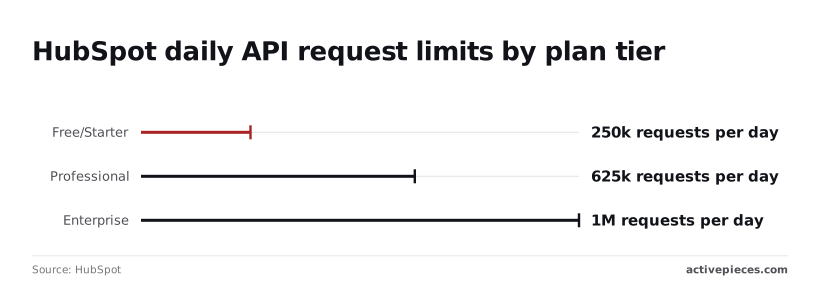
You won't reach HubSpot's daily allowance of 250,000 requests per day on Free and Starter with a single signature flow. Professional allows 625,000 and Enterprise 1,000,000, which matters only if other integrations share the account.
Per Docusign, the burst limit of 500 per 30 seconds in production (200 on developer accounts) is the one you'll hit first. That means a test that passes on a developer account can still fail on a busy production day.
When a trigger fires on every property edit, you get duplicate sends. Restrict it to the moment the deal enters your signature stage, and write the envelope ID back to the deal so a rerun can see it already went out.
Docusign sandbox versus production accounts in HubSpot
Finish testing in the sandbox, where an envelope isn't legally binding and goes nowhere real, then recreate the connection against production. Template IDs differ between the two, so reselect the template rather than copying the old one.
Docusign HubSpot integration alternatives and e-signature options
If you're weighing alternatives, other tools connect these apps, and other e-signature products can replace Docusign.
According to GoodSign, per-user monthly seat prices run $15 for Dropbox Essentials, $16.99 for Adobe Standard, $19 for PandaDoc Starter, $23.99 for Adobe Pro, $25 for Dropbox Standard and $49 for PandaDoc Business.
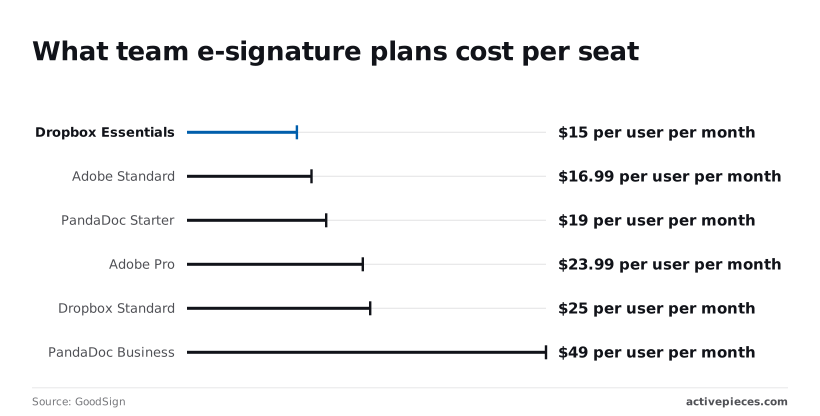
The spread means a ten-person team can pay several hundred dollars a month more for the same send-and-sign step.
If you want open source, self-hosting or unlimited steps per flow, a self-hostable automation platform fits better than a hosted one with step caps.
Build your first Docusign HubSpot workflow
Pick the one handoff between HubSpot and Docusign that your team retypes most often, and build only that flow before touching anything else.
- Choose the most painful manual handoff. Ask whoever sends contracts which copy-paste step they dread, usually pulling deal details into a Docusign envelope.
- Build that one flow. The trigger is a HubSpot event, such as a deal reaching your contract stage, and the action is Docusign sending an envelope from a template.
- Test on one real deal. Use a deal you control, with your own email as the signer, and check that every field landed where it should.
- Add the status flow. Docusign's "Document Fully Signed" event becomes the trigger, and the action updates the deal in HubSpot.
The return trip comes second, where a completed signature moves the deal to closed won and logs the signed file. Reminders for unsigned envelopes come after that, once the first two are stable.
You need admin-level access to both accounts, since connecting them means authorizing each one. You also need a finished Docusign template with its signer roles named, and a HubSpot deal property or stage that clearly marks "ready to send."
If that stage is fuzzy, the flow'll fire on deals nobody meant to send, so settle it first.
If one button on the deal record covers the whole job, HubSpot's own Docusign integration suits you.
A workflow tool earns its place when an event, not a click, must start the send, or when you want the signed status written back to specific deal fields.
Frequently asked questions
Does HubSpot have a native Docusign integration?
Yes, HubSpot's app marketplace lists a Docusign connector, but it covers the fixed actions its builders chose. A no-code workflow lets you pick the trigger, the deal conditions, and what happens on each Docusign status.
If the native connector already does exactly what you need, use it. If you need a send that fires only at a specific deal stage, or a status write-back to a custom property, build the flow.
Can I connect Docusign and HubSpot for free?
Not for real sending. Docusign charges per user for production envelopes, so the cost sits on the Docusign side, and the plan you pick decides which sending features you get.
Check the plan against your template and field needs before you build, because discovering a missing feature after testing means redoing the flow. A Docusign developer or demo account is enough to test the wiring without sending anything legally binding.
Can I self-host the workflow so documents stay in my infrastructure?
Only the automation layer can be self-hosted, and only if your chosen tool offers that option. The flow engine and its stored credentials would then run on your servers.
The documents themselves still live in Docusign, which holds the envelopes and signed copies, and HubSpot still holds the deal data.
If your requirement is that contract files never leave your environment, no connection between these two hosted services meets it. Settle that with whoever owns compliance before you build.
What if the step I need is not available?
Use the tool's generic HTTP request step and call the Docusign or HubSpot API directly. Both expose their eSignature and CRM operations over standard web APIs, so a missing prebuilt action is rarely a dead end.
You're still not writing code: you fill in a URL, a method, and a body, and map fields from earlier steps.
Test that call on its own with one real deal before wiring it into the rest of the flow, since a malformed request fails quietly more often than loudly.
Do I need a developer to maintain it?
No, but you need a named owner. Routine changes, such as swapping a template, changing the deal stage that triggers the send, or editing the email text, are point-and-click.
The risk is not difficulty but access: anyone who can edit the flow can change what gets sent and to whom.
Limit edit rights to one or two people, and have them rerun the test deal after every change. That habit catches most breakages before a customer sees them.
Related reading
Build it
Set this up in minutes.
No code required. Connect your accounts, and Activepieces runs it from there.
Start free Talk to sales