
Fathom Pricing (2026): Plans, Costs & Hidden Fees

Nov 13, 202613 min read
Fathom scales its cost based on the volume of administrative seats rather than the number of recorded meetings.
The platform has unlimited recording across all tiers, but costs increase as soon as your business requires centralized management or integration with a customer relationship management tool like Salesforce.
Furthermore, even when you're using Activepieces to automate post-meeting workflows, the underlying seat cost remains the primary driver of the monthly invoice.
Fathom pricing and plan limits for 2025-2026
Fathom free tier for individual users
When you are a solo user, unlimited recordings and summaries are available on the Free Tier. You can document every client call without hitting a functional ceiling.
However, this tier lacks the ability to sync data automatically to external databases, so you'll have to manually copy-paste action items into your project management software.
Because it doesn't support shared team folders, collaborative review requires you to manually send links to each participant.
Standard vs Pro: The cost of team collaboration
Moving to the paid tiers introduces a per-seat requirement that forces you to choose between basic CRM synchronization and advanced organizational controls.
To get single sign-on (SSO) and advanced reporting, you will need the Business plan, which you'll use to audit the connections that are tied to one person's login. CRM sync and shared folders are included in the Standard Plan.

SSO, SOC2 compliance reports, and priority support are reserved for the Pro Plan.
Annual vs monthly billing discounts
By committing to an annual contract, you reduce the per-user cost compared to the month-to-month rate, which lowers the total cost of ownership for your stable team.
This table breaks down the current commitment levels required for each tier based on the official Fathom pricing page.
| Plan | Monthly Price | Annual Price (per user) | Minimum User Count |
|---|---|---|---|
| Free | $0 | $0 | 1 |
| Standard | 1 | ||
| Pro | 1 | ||
| Business |
For a small agency, the jump from Free to Standard is the most significant transition because it moves the cost from zero to a fixed monthly overhead per employee.
Once your team surpasses the initial seat count, the predictability of the bill depends entirely on how strictly you manage new invites.
If you are running this arithmetic for your own team, see what the same workload costs on Activepieces.
Feature breakdown across Fathom subscription levels
The decision to upgrade from the Fathom free tier is driven by the need for centralized data governance and the removal of manual entry between the meeting recorder and the system of record.

While your individual experience remains functional at no cost, the platform gates the utility of historical data and automated workflows behind its paid tiers to capture value from your growing team.
Fathom AI summaries and search features by plan
Fathom provides automated transcription and basic summaries on all tiers, but you'll have to transition to a paid plan to unlock the full utility of its advanced intelligence. The free tier uses a standard summary format.

Unlimited Advanced AI Summaries are provided in the Premium and Team plans. These allow you to customize the output structure to match your specific internal reporting styles.
A ten-step process to clean and route these summaries costs the same to run as a simple two-step notification.
Activepieces bills 1 credit per flow run regardless of the number of steps, as shown on its published pricing page, which removes the cost penalty for building more granular and reliable data pipelines.
This allows teams to break complex meeting follow-ups into smaller, verifiable stages without increasing their automation bill.
This ensures that you can extract action items in a format that maps directly to your task tracker without manual reformatting. Across the entire meeting library, Fathom restricts advanced search capabilities to paid users.
You can only query the collective knowledge of all staff meetings once you've moved off the free version.
CRM integrations and automated data entry
When manual data entry becomes the primary friction point, it forces a shift to the Team plan. The free version allows for basic recording, but the ability to sync meeting highlights and summaries directly into a customer relationship management (CRM) platform is a paid feature.
Through this automation, a sales representative’s notes become instantly visible to the rest of your organization within the account record. The following triggers represent the point where manual copy-pasting becomes a liability:

- CRM Sync (Salesforce/HubSpot)
- Unlimited Advanced AI Summaries
- Team Folders for shared access
These features are what turn a personal productivity tool into a shared asset. They ensure that no verbal commitment made during a call is lost due to administrative oversight.
Security, privacy, and administrative controls
Regardless of feature usage, organizational requirements for data handling and user management often mandate an upgrade. As your company grows, the need for a SOC2 Compliance report is a prerequisite for legal clearance.

Fathom provides this document for its enterprise-level engagements. Security is further tightened through Single Sign-On (SSO) and Centralized Billing.
This allows you to provision or revoke access from a single dashboard rather than managing individual expense reports. These controls ensure that sensitive meeting recordings remain within your company's domain even after an employee departs.
Total cost of ownership for growing teams
Because Fathom’s Business plan carries a fixed monthly cost per user that scales linearly, your software spend increases immediately with every new hire regardless of their individual meeting volume.
While a small consultancy might absorb the cost of two users, a fifty-person department faces a significant annual commitment that requires strict budget justification, forcing leadership to weigh the platform's value against other operational priorities, which means every new hire triggers a rigorous financial review.
Your procurement process will likely face intense scrutiny from finance leadership.
Calculating the per-user monthly burden
At $25 per user per month when billed annually, the Business plan creates a predictable but rigid cost structure for your expanding team.
This per-seat model means a department of 10 pays $3,000 per year.
A 50-person organization pays $15,000 per year, effectively taxing your company for its internal growth rather than its actual compute usage, which penalizes scaling teams for simply adding more staff, so the platform becomes a financial hurdle to organizational expansion.
As headcount rises, the administrative overhead of managing these seats often necessitates a shift in how your company processes and stores data.
This visualization demonstrates how the lack of volume discounting at these tiers forces your mid-sized team to pay the same unit price as a two-person startup.
Manual data cleanup costs on the Standard tier
Operating on the Standard tier without centralized administrative controls forces you to manually audit individual recordings, which consumes hours of high-value leadership time every month.
Without the ability to set global deletion policies, sensitive meeting data persists in employee accounts indefinitely. This creates a liability that grows larger with every new seat added to your workspace.
Without the ability to set global deletion policies, sensitive meeting data persists in employee accounts indefinitely.
When the Business plan pays for itself in admin time
Upgrading to the Business plan becomes a financial necessity once the cost of manual oversight exceeds the $25 per-user monthly fee, meaning that sticking to a lower tier eventually becomes more expensive than the upgrade itself.

By automating SOC2-compliant data retention and providing a centralized dashboard for all company recordings, the plan reduces the time you spend on offboarding and discovery requests.
A team of 25 recovers the $7,500 annual investment if the software saves you just four hours of manual data recovery or compliance auditing per month.
Worth checking against a plan that does not meter every step: one credit covers a whole run on Activepieces.
Fathom alternatives and how their pricing compares
Fathom Business costs more per seat than its primary competitors because it bundles administrative controls and SOC2 compliance into a single premium tier. The free version of Fathom is an AI meeting notetaker for unlimited recording.
Scaling to a team requires the Business plan at $25 per user monthly when billed annually, which locks the organization into a predictable but substantial recurring expenditure, meaning the company loses the flexibility to adjust costs as project needs fluctuate.
This is a higher entry point than many specialized alternatives.
The following data compares the monthly per-user cost of Fathom Business against its closest rivals to show the premium paid for Fathom’s centralized management.
This price gap reflects Fathom’s strategy of charging for governance rather than recording volume. For your organization, if you're prioritizing budget over centralized oversight, the following alternatives offer different cost-to-feature ratios.
Fathom vs Otter.AI: Transcription vs Summarization
Otter.ai is a meeting assistant and transcription service. It prioritizes real-time text accuracy over the structured executive summaries found in Fathom. While Fathom uses advanced AI models like Gemini 3.8 Flash to categorize action items, Otter.ai focuses on a live transcript feed.
By allowing participants to highlight text during the call, the tool generates instant notes.
This makes Otter.ai more effective for journalists or researchers who need a verbatim record, whereas Fathom is built for account executives who need to sync specific bullet points into a CRM like Salesforce.
Fathom vs Fireflies.AI: Integration depth and API access
Fireflies.ai is an AI voice assistant for meetings. It is a tool for more granular API access than Fathom, allowing you to push meeting data into custom internal dashboards.
While Fathom limits its deepest integrations to the Business tier, Fireflies.ai provides a robust ecosystem for connecting to project management tools like Asana or Trello.
This flexibility means your technical team can automate post-meeting workflows without waiting for Fathom to release a native integration for your specific tech stack.
Fathom vs Grain: Video clipping and highlights focus
Grain is a meeting recording platform for insights. It targets user researchers who need to turn long interviews into short, shareable video clips.
Grain provides a full recording of the session, but the interface is optimized for "clipping."
This is the act of selecting a transcript segment to create a standalone video file.
This focus on video snippets helps your product team socialize customer feedback across Slack more effectively than Fathom’s summary-heavy format, which often requires stakeholders to watch the entire call to get full context.
Automating Fathom workflows with Activepieces
Activepieces connects Fathom’s webhooks to specialized databases like AITable or Retable using 748+ integrations from its MIT-licensed core, whether running on-prem or in the cloud.
While Fathom provides direct connectors for major platforms like Salesforce, you'll often hit a wall when trying to sync granular call data into custom internal tools without a developer.
By using Activepieces, you can capture the raw JSON output from a Fathom recording and transform it into structured rows across diverse spreadsheet applications, a process supported by roughly 60% of integrations being community-contributed, so users are relying on a vast ecosystem of volunteer-maintained connectors rather than official support.

Regulated organizations like MoneyGram and FundingSocieties run Activepieces in production to maintain this level of control over their data flows.
The platform provides the same SSO, SCIM, and audit log features in its air-gapped self-hosted edition as it does in the managed cloud, ensuring that meeting intelligence remains secure even when moving between internal systems.
How to build automated meeting workflows
The Activepieces flow builder simplifies this by providing a visual canvas where you can define exactly how meeting metadata triggers an action, using unlimited flows available on every plan.
- The interface allows you to set a Schedule trigger to poll for updates or listen for a webhook.
- You then immediately map that data to a specific action in a tool like Microsoft Excel 365.
- Fathom’s AI identifies "Action Items" and the flow automatically appends them to a project tracker rather than leaving them in a closed transcript.
An hourly schedule triggers a sequence. The integration selector modal is open.
By highlighting integration options for Google Sheets and AITable, the tool allows you to select "Insert Row" to archive meeting summaries.
To the right, the settings panel confirms the trigger is active and displays sample data from a successful test run, proving the connection is live before you commit to the workflow.
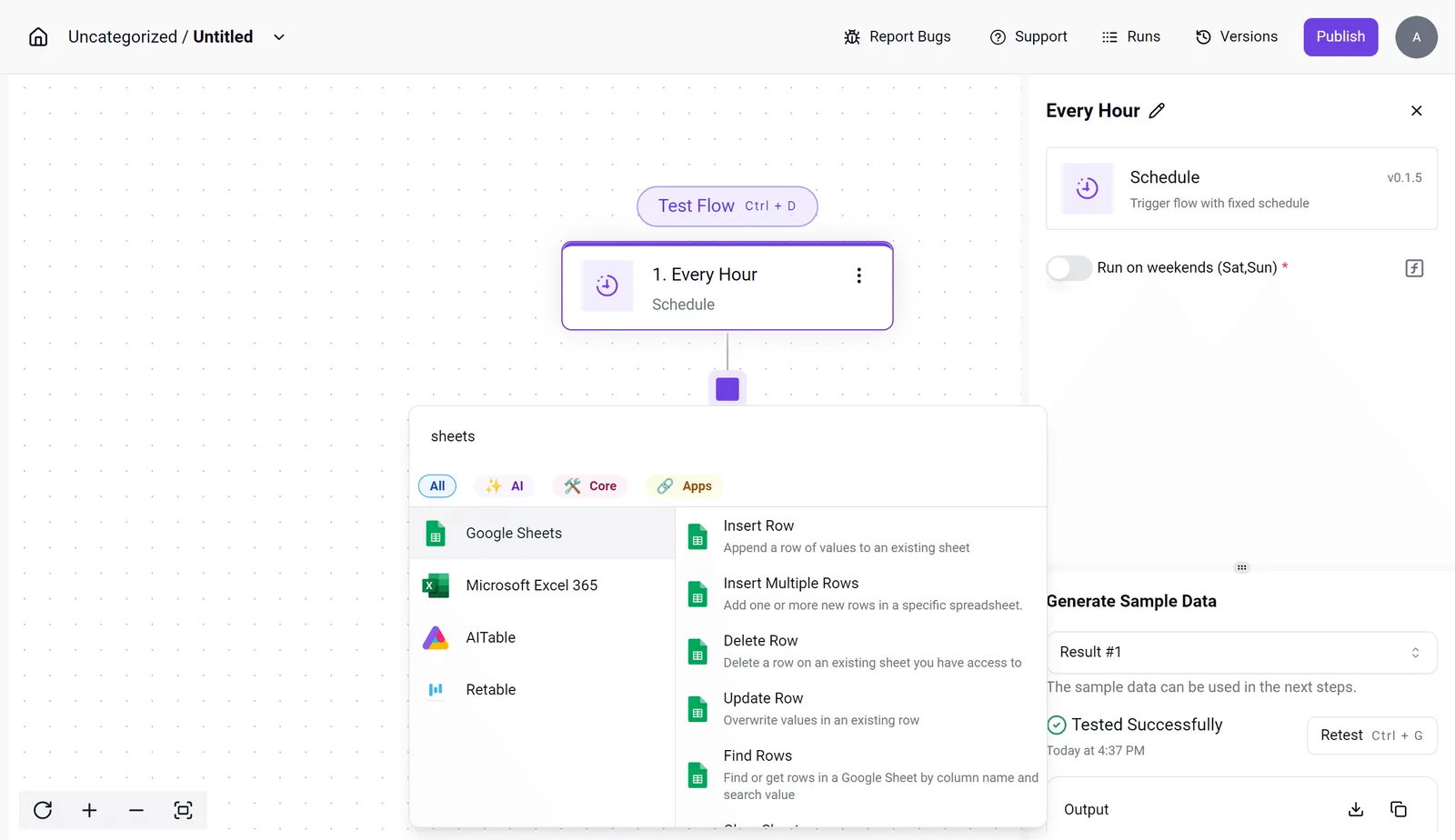
This granular control prevents the "data silos" common in Fathom's standard tier, where summaries are useful but isolated.
Once the data is flowing into a central spreadsheet via Activepieces, you can then use a reasoning model like Claude Sonnet 5.5 to analyze patterns across hundreds of calls simultaneously.
This setup transforms a simple meeting recorder into a scalable research operation without the per-seat tax of premium enterprise integrations.
Frequently asked questions about Fathom pricing
Fathom maintains clear operational boundaries to prevent the billing "creep" common in enterprise software, though these policies prioritize current liquidity over long-term data banking.
According to the Fathom Pricing page, the platform enforces specific timelines for feature access and data residency that dictate how you should manage your transition between tiers.
Does Fathom offer a free trial of Pro features?
Fathom provides a 7-day free trial for their Team and Business editions. This allows you to validate high-level features like CRM syncing or custom templates before committing capital.
Because the trial window is exactly one week, you must schedule it during a period of high meeting volume. This ensures enough data is generated to test the automated summary logic across different call types.
Can I pay for Fathom only for specific team members?
Seat-based billing is granular and pro-rated for mid-month additions. This means you only pay for the fractional time a new hire actually uses the service.
This structure prevents the "rounding up" tax often found in monthly software contracts. It requires active management of the dashboard to ensure departing contractors are removed immediately to stop the billing cycle.
What happens to my recordings if I cancel my subscription?
Fathom maintains a 30-day data retention window after a subscription is canceled. This provides a safety net for you to export your intellectual property before it is permanently purged.
This grace period is a hard limit. Failing to move recordings to a local drive or a cloud storage provider (such as Google Drive) within this month results in the irreversible loss of all meeting transcripts and video files.
Does Fathom charge for storage of past meetings?
Storage for recorded meetings is currently included in the base subscription cost. This removes the need to calculate gigabyte-per-month overhead as your library grows.
The Free tier does not support credit roll-overs for AI summaries. Any unused processing capacity at the end of the month is forfeited rather than being banked for future high-intensity projects.
To handle advanced analysis beyond standard summaries, you'll often feed these transcripts into Claude Sonnet 5.5 for intelligence work or Gemini 3.8 Flash for rapid software engineering insights.
Running the numbers
See what the same workload costs here.
Free forever plan, and every paid plan self-hosts at no extra cost.
See pricing Talk to sales