Filmora Pricing 2026: Plans, Costs, and What You Get

Nov 13, 202614 min read
Pick the Filmora plan by what the finished video's for, not by the headline price: personal projects, income-earning work and shared team use each land on a different licence, and if your team already chains its publishing steps together with a tool like Activepieces, the licence has to cover everyone who touches the export.
The figures below are current as of 2026-11-13.
Filmora pricing is the set of licence options for Wondershare's Filmora video editor, either a recurring subscription or a one-time perpetual licence, plus the AI credit and cloud storage allowances and commercial-use terms that determine what you pay beyond the base plan.
Only two prices are confirmed here: $49.99 a year on subscription and $79.99 for the perpetual licence.
I could not verify the monthly price, team pricing, AI credit allowances, cloud storage sizes, watermark limits, seat counts or commercial terms against Filmora's pricing page on this date.
Which Filmora plan fits you
Those stay marked "not stated" below, and all the three-year and team maths rests on the two confirmed prices.
Solo creator on a budget
If you edit for yourself and publish nothing that earns money, start with the free version. Move to a personal subscription or perpetual licence only when its export limits start costing you time.
The catch is AI credits. Generative features draw on a credit allowance outside the base plan, so a solo editor who leans on them will see the monthly cost rise well past the plan price.

Commercial use and client licensing rules
Once a video earns ad revenue or goes to a client, the personal licence is no longer the safe default. Confirm that the plan you buy explicitly covers commercial use.
A perpetual licence looks cheaper per month only if you can live without ongoing updates and cloud features. If you want those, price the subscription, and price the cloud storage and AI credits on top of it.
Team of 5 or more
Five personal plans and a hope for the best is not a team purchase. Check whether the business or multi-seat option covers commercial use, shared billing and the cloud limits your handoff process depends on.
Activepieces meters the handoff by the run, 1 credit whether the flow has two steps or ten, so splitting delivery into smaller steps never raises that bill, though it does nothing for the Filmora seat count, so price the seats first.

If you are running this arithmetic for your own team, see what the same workload costs on Activepieces.
Filmora plans and prices in one table
Filmora is Wondershare's video editor. The seat count you price it at depends on the plan type, so the table below sorts every plan by how it bills and marks the seat figures it doesn't state.
Filmora pricing table by plan
The table lists each plan type with the eight columns that decide your invoice. Every cell not confirmed on the pricing page reads "not stated", so treat those as questions to put to Wondershare before you quote a client, not as zeros.
| Plan | Monthly | Yearly | One-time | AI credits | Cloud storage | Export limits / watermark | Commercial licence | Seats |
|---|---|---|---|---|---|---|---|---|
| Free | not stated | not stated | not stated | not stated | not stated | not stated | not stated | Exports carry a watermark |
| Monthly subscription | not stated | not stated | not stated | not stated | not stated | not stated | not stated | not stated |
| Annual subscription | not stated | $49.99 | not stated | not stated | not stated | not stated | not stated | not stated |
| Perpetual licence | not stated | not stated | $79.99 | not stated | not stated | not stated | not stated | not stated |
| Team | not stated | not stated | not stated | not stated | not stated | not stated | not stated | not stated |
Until you fill the remaining cells from the vendor, don't build a retainer margin on this table.
Filmora free plan features and limits
Even the free plan includes a large library, according to Toolist. That means 9,600 music tracks, so a soundtrack alone is unlikely to push you onto a paid plan.

It also includes 6,600 sound effects.
Titles come to 6,000 items. Effects and filters add 1,500, and transitions 1,200. Stock media is the thinnest at 600 items, so footage is where you'll hit the ceiling first and may have to supply your own B-roll.
Filmora commercial licence terms
For client work, the gap matters more than the library size: commercial terms are missing from the figures Toolist gives and that are confirmed here, so the licence cell stays "not stated".
A large free library tells you what you can use, not whether you can bill for the result. Get the commercial terms in writing for each plan before a client's invoice depends on them.
What Filmora costs at realistic usage
The arithmetic's short. Filmora's pricing page puts a year at $49.99 on subscription against $79.99 for the perpetual licence, so perpetual wins from month 13, when the second annual charge lands.
**Get the commercial terms in writing for each plan before a client's invoice depends on them.
The table below prices three profiles on those two numbers, and shows that the break-even lands at month 13 for every profile. Seat count scales the cost, not the timing. These figures cover the base plan only, not AI credits or cloud storage.
| Profile | Subscription, first year | Subscription, 3 years | Perpetual, 3 years | Break-even month |
|---|---|---|---|---|
| Weekly YouTuber (1 seat) | $49.99 | $149.97 | $79.99 | 13 |
| Agency editor (1 seat) | $49.99 | $149.97 | $79.99 | 13 |

Break-even is month 13 because the second annual charge takes the subscription to $99.98, past the $79.99 one-off.
In year one, subscription is $30 cheaper ($49.99 against $79.99), so the first-year decision favors subscription on price.
That makes it the right choice only if you expect to quit editing within twelve months. A weekly publisher will still be uploading in month 13, so the $30 saving is borrowed against a second payment.
Agency editor doing client work
The arithmetic's identical to the YouTuber's: $149.97 over three years on subscription against $79.99 perpetual, a $69.98 gap.
What changes is who's paying. If one seat quietly serves several editors or the client work's billed at a flat retainer, you absorb that licence cost yourself.
Five subscription seats cost $249.95 in year one and $749.85 over three years, making five-user licensing a $750 commitment over three years. Five perpetual licences cost $399.95 once.
The $349.90 difference's real money, though the perpetual side buys nothing beyond the base editor, so check what your team needs in credits before treating it as savings.
Worth checking against a plan that does not meter every step: one credit covers a whole run on Activepieces.
Hidden costs and limits Filmora users hit
The limits Filmora users hit are the AI credit allowance, cloud storage caps, the renewal price, the terms on perpetual upgrades, and media sold apart from the plan.

Start with the reviews. Of the reviews on Capterra, 678 are positive, 35 neutral and 23 negative, about 92% positive out of 736.
Filmora AI credits and storage limits
Because credits and storage are metered, a shared account lets one heavy user quietly spend what the whole team pays for. Read the allowance, and what happens when it runs out: a top-up purchase, a wait, or a feature that simply stops.

Do the same with the storage cap on Filmora's cloud, since project backups and client handoffs fill it faster than a solo editor expects.
Renewal price and perpetual upgrades
A first-year price is an introductory number, not a run rate. Check what the plan costs at renewal and whether auto-renew's on by default. Budget the renewal figure, because that's what you'll be billing against in year two.
I couldn't confirm the renewal price, so the three-year figures above assume it stays at $49.99. If Filmora renews higher, subscription gets dearer than shown and the break-even arrives earlier than month 13.
If you buy perpetual, you own the version you bought and nothing more. Find out whether later major versions are included or sold as a paid upgrade, and whether the AI features are excluded. Otherwise the "one-time" cost recurs on Filmora's release schedule.
Until you've read the upgrade terms, $79.99 is the price of one version, not of the editor forever.
Filmora stock media and effects costs
If a client deliverable depends on them, price them into the job, because some effects and stock media are sold separately from the editor plan. Confirm too that the licence covers commercial use.
Filmora against its closest alternatives
Of these four editors, Filmora's the easiest to start with. It isn't the cheapest or the most capable for every job, so test it against what you can actually invoice for.
The table below shows how each editor handles pricing structure, free use, commercial rights, AI and the point where you have to pay more. Read the last column first, because that's where a shared account starts costing more than you planned.
| Editor | Pricing model | Free plan | Commercial use | AI features | Upgrade trigger |
|---|---|---|---|---|---|
| Filmora | Subscription or perpetual licence | Exports carry a watermark | not stated | Credit-based, outside the base plan | Removing the watermark, then running out of AI credits |
| CapCut | Free tier plus paid Pro | Usable free, with some premium assets locked | Check the terms for each asset | Free and paid tools | Premium effects and cloud storage |
| DaVinci Resolve | Free version plus a one-time Studio licence | No watermark, with a reduced feature set | Allowed in the free version | Most AI tools sit in Studio | Studio-only effects and AI tools |
| Premiere Pro | Subscription only | Trial only | Included with the plan | Generative features are metered | Adobe's wider cloud and AI limits |
If your output is short-form and the client only sees the finished clip, CapCut's the pick. Its free tier goes further than Filmora's, so you can prototype without paying.
The catch is that premium templates and assets can carry their own licence terms. Confirm those before a branded deliverable goes out.
On cost, DaVinci Resolve is the strongest challenger, because its free version carries no watermark. You pay in learning time, and in hardware if your machines are modest.
Studio's a one-time purchase, so it suits a team that wants a fixed cost instead of a recurring line item. For fast turnarounds by non-editors, Filmora's still quicker to learn.
Filmora versus Adobe Premiere Pro
When clients send Adobe project files, or you work in a team with shared review and asset handoff, Premiere Pro earns its subscription-only model. If you work alone and don't need that ecosystem, you're paying for integration you never use. Filmora's the better fit there.
Automate publishing after export with Activepieces
Once you've locked the plan, hand the post-export handoff to Activepieces, where the meter is the run: 1 credit each, whether the flow has two steps or ten.
Upload, share link and Slack notice can each stay their own step, which Zapier's per-task billing would charge for one by one, so splitting the work finer never raises the bill.
Locking the plan takes three small steps on Monday:
- Pick the tier that matches the limit you'd hit first.
- Set a renewal reminder for the day before it bills.
- Save a screenshot of the pricing page.
The screenshot's your invoice evidence if the price or terms change at renewal.
Set up the Google Drive export trigger
Point a Google Drive new-file trigger at a single export folder, with one subfolder per client. The per-client split matters on an agency account.
When everyone exports into one shared pile, you can't tell which client's work is driving your usage, and the heavier client is quietly subsidised by the lighter ones. Separate folders let you see who generates the handoff work and price it on the next quote.

Upload to YouTube and notify client
The first action sends the file onward: a YouTube upload for a channel you manage, or an email carrying the Drive share link for a client who reviews privately. The second posts to Slack so the team knows the delivery went out.
The run below shows the shape of this on the canvas. It's a different flow, a Stripe "Payment Failed" trigger feeding a Slack "Send Message To A Channel" action, but the Slack step's the one you'd reuse.
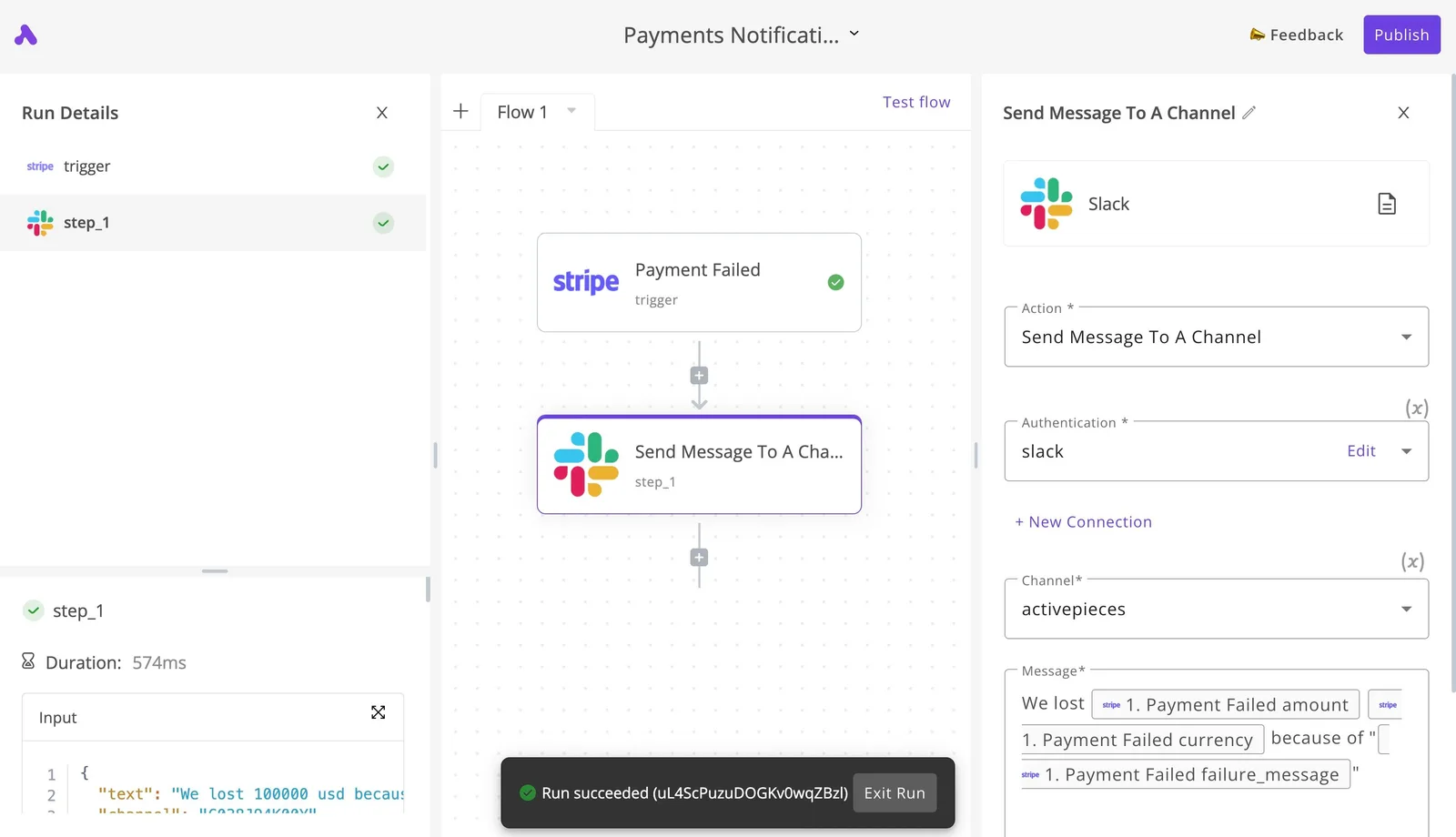
It shows an Action, an Authentication, a Channel and a Message template, and the run details mark the step completed with "Run succeeded". Take from it that the notification's four fields, not a project.
Swap the Message template for your own text, pulling in the file name and the client folder. After that, run the flow once with a test export and check that the run details show every step completed before you trust it with a real delivery.
Frequently asked questions
A clean test export proves the pipeline works, but not that the licence behind it covers the client it serves.
Some answers below were checked against Filmora's own pages on 13 November 2026, though several figures could not be verified, so check the linked page before you pay.
Is Filmora really free to use? Yes for trying it, no for delivering work. The free version lets you edit and export, but exports carry a watermark, so nothing you hand to a client should come from it.
Does the one-time Filmora licence include AI features? Don't assume so. The perpetual licence covers the editor itself, while AI tools run on credits or cloud processing that Filmora treats separately.
If a client's brief leans on AI, price those credits as a recurring line on your side. Check Filmora's pricing page for what each licence type includes.
Can I use Filmora videos on a monetized channel?
On a paid licence, Filmora's own pages do not state commercial-use terms, so confirm the license details before using it on any client-facing job. The free watermarked version isn't the one to monetize.
Stock media and AI-generated assets inside the editor may carry their own terms, so read Filmora's licence agreement and its commercial-use page before you pass work to a client.
How do I cancel a Filmora subscription?
Cancel from your Wondershare account's subscription or order management area, before the renewal date, so you aren't billed for another term. If a shared login's paying for several clients, cancel on the account that holds the billing, and check whose card's on it.
Filmora's refund policy page sets the conditions for money back, and the window and eligibility rules differ by plan, so read it on the day you buy.
Is there a student discount for Filmora? Filmora has run an education offer that requires you to verify student or teacher status.
Because it's a discount on a plan rather than a separate licence, confirm on Filmora's education page that it covers commercial use, since a discounted seat used for paid client work may fall outside it.
Related reading
Running the numbers
See what the same workload costs here.
Free forever plan, and every paid plan self-hosts at no extra cost.
See pricing Talk to sales