
Firebase MCP Server: The Complete Guide (2026)

Nov 12, 202614 min read
According to Devhunt, Firebase's own MCP server launches through the Firebase CLI.
It lets an assistant inspect and change a real project using your credentials, and that's exactly how a write reached production at 09:12, much as it could with any tool wired to live systems, Activepieces included.
The facts here were current on 12 November 2026, and the incident below is an illustrative composite, not a single real company's postmortem.
What the Firebase MCP server is
It's a local process that the Firebase CLI runs and your assistant connects to. The assistant sees a set of tools: read project config, query data, manage rules, and so on. It calls them with whatever account the CLI has logged in.
Nothing in the protocol asks "are you sure this is the staging project?"
Switch to another MCP server and the behavior is the same: it hands the assistant whatever its credentials allow.
MCP doesn't yet give you a built-in way to say "read-only here, never there", so scope is your job.
The 09:12 command that went to production
Read the sequence below for the order: the write happened first, and everything after it was cleanup.
- 09:12: A developer asks the assistant to fix a malformed field. It runs the write against the live project, because that's the one the CLI had selected.
- 09:31: Support notices customers seeing wrong account data and flags it.
- 09:38: An engineer disconnects the MCP server and revokes the session, which halts further changes.
- 10:20: The team restores the affected records from the most recent backup.
- 10:45: Customers get a notice explaining what happened and what the team corrected.

Nobody noticed for nineteen minutes, and that gap is the cost of having no guardrail up front.
This takes minutes, not a project: automate it in Activepieces free.
Firebase MCP server's scope and access
Every rule below is about scope, because the Firebase MCP server is a local process started by the Firebase CLI that acts on your project as whoever holds the CLI login. Its usefulness and its risk come from the same access.
Setup and the credentials it inherits
Clients launch it with one command:
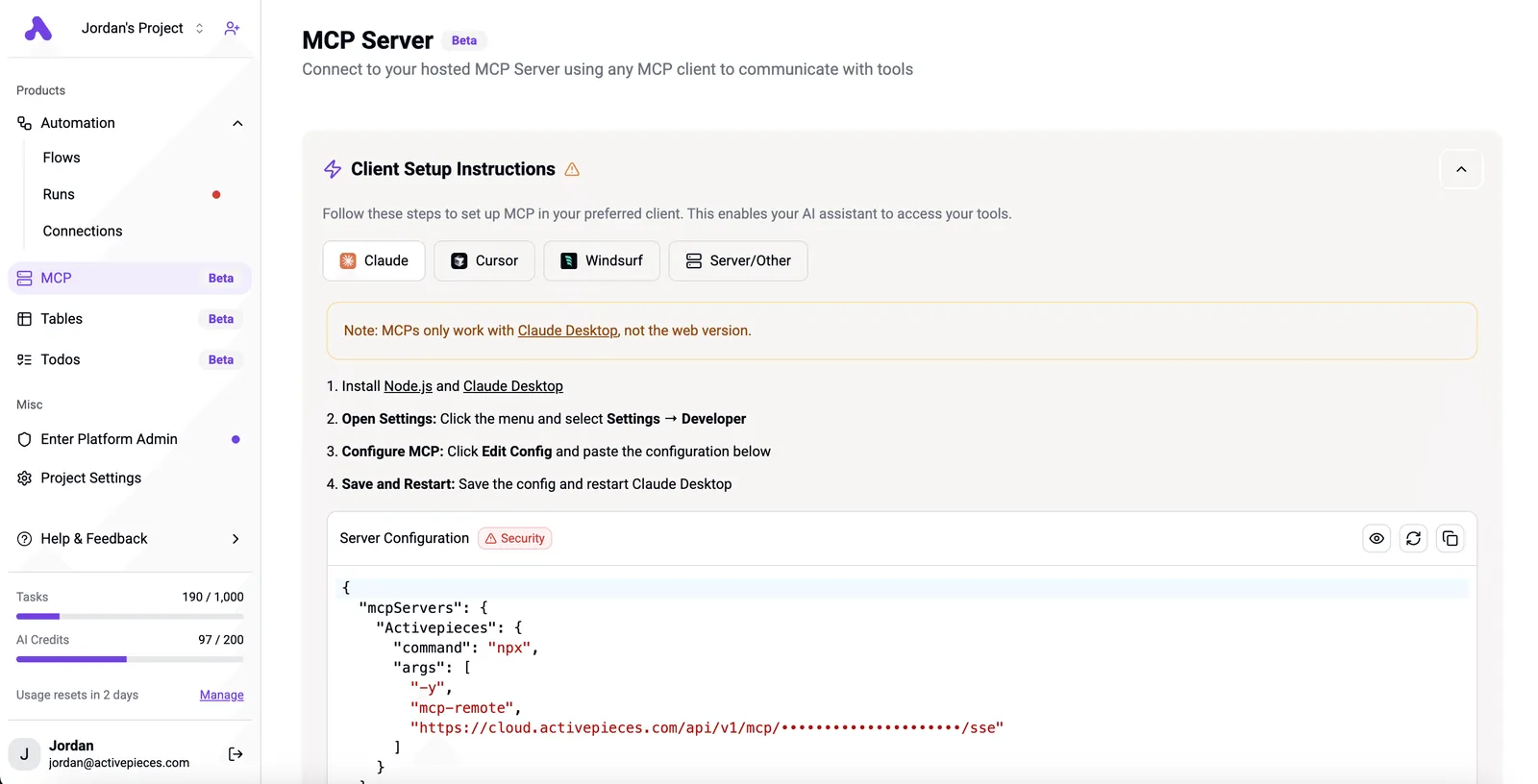
npx -y firebase-tools@latest mcpThere's no separate sign-in. The server reuses the CLI's existing login, so the assistant gets your account's permissions on every project that account can reach, not only the one you had in mind.

It also picks up the project from the directory it starts in, and a --dir flag points it elsewhere.
If you logged in as an owner on a Friday and forgot, the assistant's an owner on Monday.
Tool groups the assistant can call
The tools fall into groups by product. Those are Authentication, Firestore, Cloud Storage, Realtime Database, Remote Config, Cloud Messaging, Crashlytics, Data Connect and App Hosting, plus a core set for choosing projects and apps.
Each group is a different kind of reach. Firestore tools read and write documents, Authentication tools look up and change users, and Remote Config tools alter what live apps do on their next fetch.

To restrict the server to the groups you name, add an --only flag, for example:
npx -y firebase-tools@latest mcp --only firestore,authAnything not listed isn't offered at all. That's a real boundary, but it limits tools, not data: inside an enabled group the assistant still has everything your login allows.
Firebase MCP server supported clients and uses
Firebase's documentation lists Gemini CLI, Claude Code, Cursor, VS Code with Copilot, Windsurf and Cline among the clients, and the same config shape works in each. Any client that speaks MCP over a local process can launch it.

Typical uses are the ones where leaving the editor is the cost. They include inspecting Firestore documents while debugging a query, checking a user record, reading Crashlytics issues next to the code that caused them, or adjusting a Remote Config value.
Those are also the actions that change a real project when the credential's wrong.
Incident cost in records and hours
By the end, the composite incident had altered tens of thousands of records, taken most of a working day to restore and reached hundreds of customers.
The Firebase MCP server itself cost nothing and the Firestore operations behind it cost cents, so the cost of recovery labor alone surpassed the infrastructure expense. The damage shows up in the project's data, not the invoice.
Firebase incident damage in records and hours
In its own units, the composite's damage looks like the figures below. They are illustrative, invented to show the shape of the failure, not measurements from one real project.
48,000 records were altered by a bulk write across a whole collection instead of one test document, leaving 48,000 records in production in an altered state when only one test record should have been modified, so every system reading these records got corrupted data.
Restoring took 9 hours, most of it spent working out which records were wrong before touching any. 310 customers saw bad data before anyone noticed.
A mistake found on day eight can't be rolled back that way, because Firestore point-in-time recovery reaches back 7 days.
Damage that surfaces quietly, say a field overwritten on records nobody opens for two weeks, falls outside it.
What the server costs versus what the project costs
You pay nothing to run the server; what bills is the underlying services it calls, so every operation lands on your Firestore invoice.
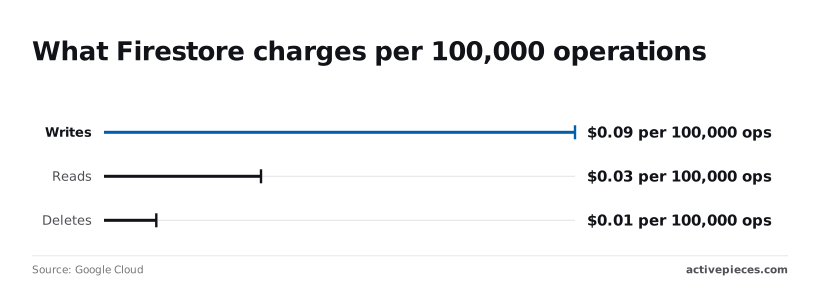
Google Cloud lists writes at $0.09 per 100,000 operations, reads at $0.03 and deletes at $0.01, which means writes are 3 times more expensive than reads.
Even so, the composite's 48,000 writes come to roughly four cents.
It's not the bill that's the problem. A runaway loop is, because at $0.09 per 100,000 it can run for hours before the charge is noticeable, and by then the data damage is already done.
At $0.01 per 100,000, deletes are the cheapest, which makes the most destructive action the one that costs least to perform.
Firebase MCP server's path to production
Nothing in the setup warns you either. The server inherits whatever your CLI session already holds. It reached production because that session had a broad login, pointed at the live project, and never asked for confirmation. The chain runs in this order:
At $0.01 per 100,000, deletes are the cheapest, which makes the most destructive action the one that costs least to perform.
- The Firebase CLI holds a login with broad roles.
- The active project points at production.
- Every tool group stays switched on.
- Write actions run without confirmation.
- At 09:12 the assistant makes a write, and it lands on live data.
Every link is a scope or permission choice, and none is a bug in the tool. Break any one and the 09:12 write either fails or waits for a human.
Broad credentials and the wrong active project
Because the server acts as the account the CLI's logged in as, an owner-level login gives the assistant owner-level reach. Pair that with an active project set to production and a vague prompt like "clean up the test users" resolves against the real user list.
The fix is a narrower login for assistant work and a non-production project as the active one.
Firebase MCP server tool groups left enabled
Leave the defaults and the assistant can reach every service the server exposes, whether or not the task touches it. A model asked to fix a Firestore index doesn't need Auth or Hosting tools in its menu.
To limit which feature groups load, pass a flag, for example --only firestore. Use it, because a tool that isn't loaded can't be called by mistake.
To save clicking, many MCP clients let you auto-approve tool calls. That's fine for reads and wrong for writes. With auto-approve on, the first time you see the action is in the log afterward.
Keep approval on for anything that creates, updates, or deletes, and the prompt shows you the target project before the change happens.
You can follow the rest of this with the builder open. Start free, no card.
Four Firebase MCP safety rules
Point the server at a dev project, log in with a narrow account, expose only the tool groups you use, and approve every write by hand. Then add a budget alert as the backstop.
Work down the table as a checklist and tick each row only after the verify step passes. It lists where each setting lives and how to confirm it took.
| Rule | Where to set it | The setting | How to verify |
|---|---|---|---|
| Separate dev project | .firebaserc in the repo |
Default alias points at dev, not production | Run firebase use and read the active project |
| Least-privilege account | IAM page in the Google Cloud console | A custom or narrow role on the logged-in account | Ask the assistant for something outside the role and expect a permission error |
| Only needed tool groups | The server launch args in your MCP client config | An --only list of the groups you use |
List the tools the client shows; the rest should be absent |
| Manual approval of writes | The MCP client's tool permissions | Auto-approve off for anything that writes | Trigger a write and confirm a prompt appears |
| Billing budget alert | Budgets and alerts in the Cloud Billing console | A budget with email alerts on the dev project | Check that the alert recipients list is not empty |
Make that identity boring, because the assistant inherits whatever firebase login gave it. Create a dev project, make it the default in .firebaserc, and grant the logged-in account only the roles that project needs. If the permission error comes back, the rule works.
At 1am, without you watching, the model can call every tool you expose. Pass an --only list in the launch args, then turn off auto-approve for anything that writes. Reads can flow; writes should stop and ask.
Don't expect a budget alert to stop a bad call. It tells you one happened, and MCP has no built-in brake for that yet.
So once a week, read the client's log of what the assistant ran against the project. If a call surprises you, tighten a tool group or a role.
Routing Firebase Changes Through Activepieces Approvals
The Firebase server gives an assistant a login and a tool list, and nothing else: no tenant, no role of its own, no audit log. Those belong to a platform rather than the server.

Activepieces treats the agent as a user, inside the same access model as your staff, so RBAC, SSO and SCIM decide what it may connect to, and the run detail view lists each tool call separately with its own input and output.
MoneyGram, Moneypenny, Alan and FundingSocieties run it. The protection that actually limits damage is still the scope you set in Firebase itself.
If a tool group or a role is already too broad, a workflow downstream won't fix it.
Where Firebase MCP approval workflows fit
The useful place for an approval workflow is between "the assistant wants to change something" and "something changes." Instead of letting the assistant call a write operation directly, you have it send the proposed change to a workflow.

The workflow posts the proposal to a chat channel and waits for a person to approve or reject. It records the decision, and only then performs the change with a credential that you scoped on purpose.
That gives you two things the Firebase settings don't: a named human who said yes, and a record you can read later without reconstructing it from console logs.
What the audit workflow looks like
The screenshot shows the logging half of this in Activepieces' own product, where audit logs are part of the Ultimate plan. It's a flow built around an "Audit event handler".
A webhook trigger catches an event, a router splits on the event type ("Flow created", "Flow published", everything else), and each branch has action slots where you attach a channel such as Slack, Gmail, Teams or an HTTP call.
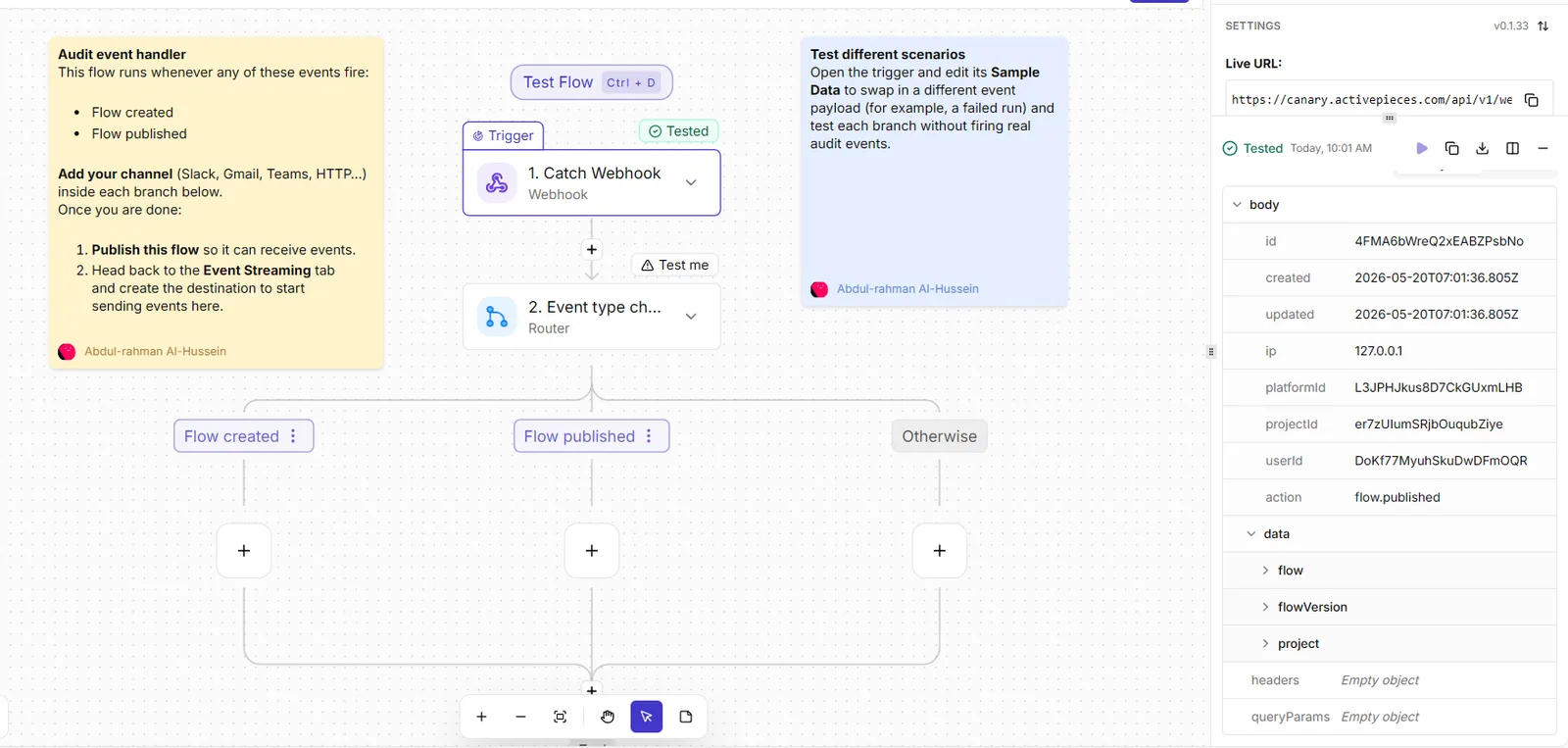
The settings panel shows the live webhook URL and a payload preview with fields like user, project, IP and action. Take from it the shape, not the content: a webhook in, a router on type, and a notification out.
Your Firebase flow has the same skeleton, with "proposed change" as the event type instead.
The open source monorepo lists all 747 integrations in its community integrations directory, so look there for the approval and chat connectors before you build; don't assume a specific connector exists.
What approvals don't replace in Firebase permissions
It doesn't replace Firebase permissions. An approver clicking "yes" on a request they only half read is still a person authorizing it, so the credential behind the approved action should be narrow enough that a mistaken approval is survivable.
It also doesn't constrain the assistant on its own. MCP calls that go straight to the Firebase server bypass the workflow entirely.
The approval only covers changes you have deliberately routed through it, so the routing has to be enforced by what the assistant is allowed to call, not by habit.
Nothing here makes review cheap. Someone still has to read the proposal.
Frequently asked questions
The server costs nothing to run, but whatever it does in your project bills at your project's normal rates.
As of 12 November 2026, an assistant that provisions resources or writes data is spending your quota exactly as you would be. Check the plan on the project before you hand it over.
Can the Firebase MCP server delete my data?
Yes, if a tool it exposes can delete and your logged-in account is allowed to. The server has no permissions of its own; it borrows yours. That's why a sloppy "yes" to a proposed call is the real risk, not the server.
Use a throwaway or staging project, sign in with an account that can't touch production, and read each call before approving it. I haven't seen a vendor claim that a switch makes this safe by default, so don't assume one exists.
Do I need Node.js or the Firebase CLI to run it?
You need Node.js, and the server ships inside the Firebase CLI package. The usual setup has your client launch it through npx, which fetches the CLI on demand, so you may never install it globally.
You still have to be authenticated, because the server reads the same login the CLI uses. When it fails, the cause is nearly always a missing login or the wrong active project, not the server itself.
Does it work with Claude, Cursor and ChatGPT?
It works with any client that can launch a local MCP server and speak the protocol, and Claude and Cursor both fit that description.
ChatGPT is the one to verify. Its support for locally launched servers has differed from other clients and has changed over time, so read its current connector documentation instead of trusting a blog post, including this one.
It's not the same thing as Genkit's MCP support. The Firebase MCP server exposes Firebase project operations to an assistant.
Genkit is a framework for building AI features in your own app, and its MCP support concerns how your app consumes or offers tools. Both involve MCP, but they solve different problems, so don't read the Genkit docs hoping to configure the Firebase server.
Related reading
References
Build it
Set this up in minutes.
No code required. Connect your accounts, and Activepieces runs it from there.
Start free Talk to sales