
Gemini 4 Hydrogen: Benchmarks, Pricing & Speed (2026)

Nov 12, 202613 min read
Gemini 4 Hydrogen is a model Google announced on its own blog on 2026-11-12, pitched at everyday coding and agentic workflows, the kind of work people also wire up in automation tools like Activepieces.
What Google released as Gemini 4 Hydrogen
Everything here comes from Google's launch post and its products page, as checked that day.
Read the launch post and you get four facts, which show how far the claims go: Google's description of the model, not anyone's results with it.
The maker is Google DeepMind, the release date is November 12, 2026, the positioning is everyday coding and agentic workflows, and the surfaces are developer, enterprise and consumer.
Because the model is brand new, no one outside Google has had time to run it on real work. Any "it is better" you hear this week is a first impression, not a finding.

The positioning is the part that matters to ops teams, because multi-step workflows are exactly where they'd use it.
How to get access to Gemini 4 Hydrogen
Google lists three surfaces: developer, enterprise and consumer. That tells you where to look, not what your team gets on each.
If someone asks in Slack whether the new model can replace the one running inside their flows, check which surface your account sits on before answering.
Google's post is where that answer lives, and it has to be confirmed there rather than assumed.
If you are running this arithmetic for your own team, see what the same workload costs on Activepieces.
Why the release matters to automation teams
Swap in Gemini 4 Hydrogen and quality, speed and cost all change at once for every step that calls the model. It needs a deliberate test on your own tasks, not a blanket switch.
How a model change goes wrong
Think of the ticket every support lead has seen: "this one got routed wrong." In an automated workflow, the cause is rarely the routing rule. It's usually the step before it, where a model read the message and labeled it.
If someone changes that model and nobody writes it down, the first sign is a customer's complaint. The person who made the change may not be on shift to explain it.

Where the risk sits in a workflow
Look at the workflow below to see where that risk sits: a trigger, an AI step, a filter, a CRM update and an email. Your current model and the new one sit beside the AI step, judged on three dials: quality, speed and cost.
Although only one box changes, every box after it inherits the result. A slightly different label sends a record down a different filter branch, and a different record lands in the CRM.

That's why the comparison belongs in a shared test, run against the messages your team actually receives, with results anyone on the team can read.
Google's description of the model tells you what it's meant to do. Only your own tasks tell you whether it does that better than what you already run.
What's measurably new, from Google's own pages
What's measurably new is short: a 1M-token context window, two Intelligence Index scores and a price list, with gaps wherever Google states nothing.
Capabilities Google lists
With a 1M-token window, a long ticket history or a full contract thread can go into one call without chunking. A workflow stops losing the first message by the time it reaches the twentieth.
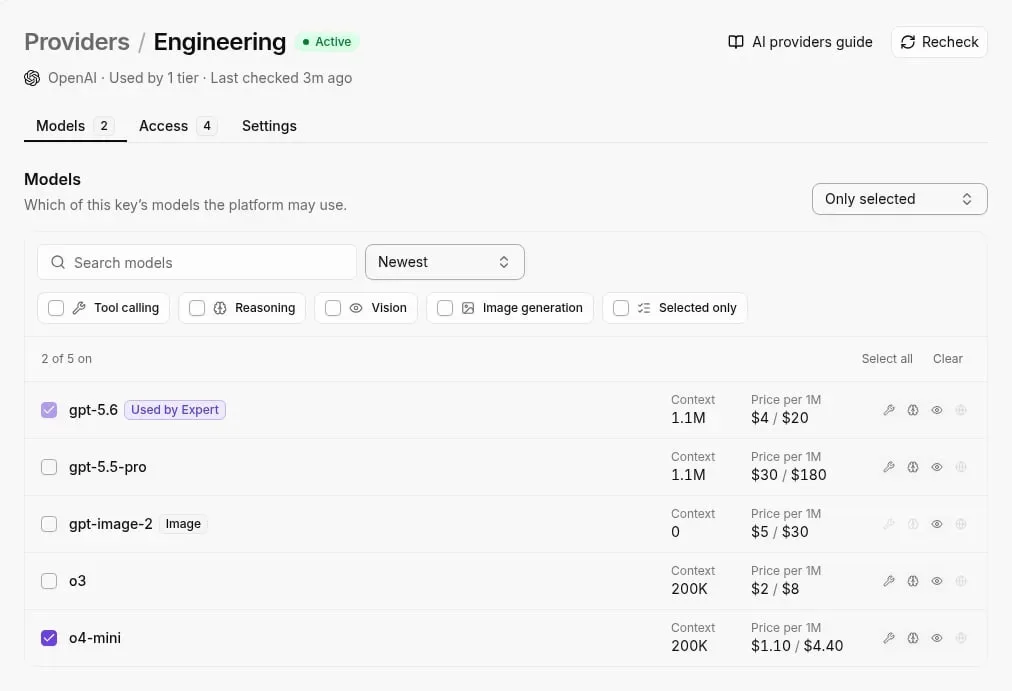
51 at high reasoning effort and 54 at xhigh are the Intelligence Index scores. The Intelligence Index is a composite benchmark score published by Artificial Analysis, an independent firm that tracks AI models.
That's three points for the extra effort, but a general benchmark says nothing about whether your triage prompt improves.
Pricing and availability as published (source) lists input at $1.50 per million tokens. Batch input is half that, $0.75, so overnight jobs like backlog tagging cost half as much. Cache read is $0.075, one-twentieth of standard, so a long shared instruction block repeated across runs is cheap.
| Figure | Source | Date |
|---|---|---|
| Context window: 1M tokens | not stated | 2026-11-12 |
| Intelligence Index: 51 (high), 54 (xhigh) | not stated | 2026-11-12 |
| Input: $1.50/MTok | LiteLLM | 2026-11-12 |
| Standard output price | $7.50 | LiteLLM |
| Standard output price | $7.50 | 2026-11-12 |
$3.75 is what batch output costs, five times batch input, so a workflow that writes long replies costs more than the input price suggests. None of these numbers gives a cost per resolved ticket. That takes your own run.

Using Gemini 4 Hydrogen with Activepieces: what to check
Nothing I found ties the Activepieces Google Gemini integration to Gemini 4 Hydrogen by name, so treat Hydrogen support as unconfirmed until your own run says otherwise.
What shipped and when
The Activepieces catalog lists the Google Gemini integration (@activepieces/piece-google-gemini) with 11 actions and no triggers. That means it runs when something else starts the flow, such as a schedule or a ticket arriving, and never starts one itself.
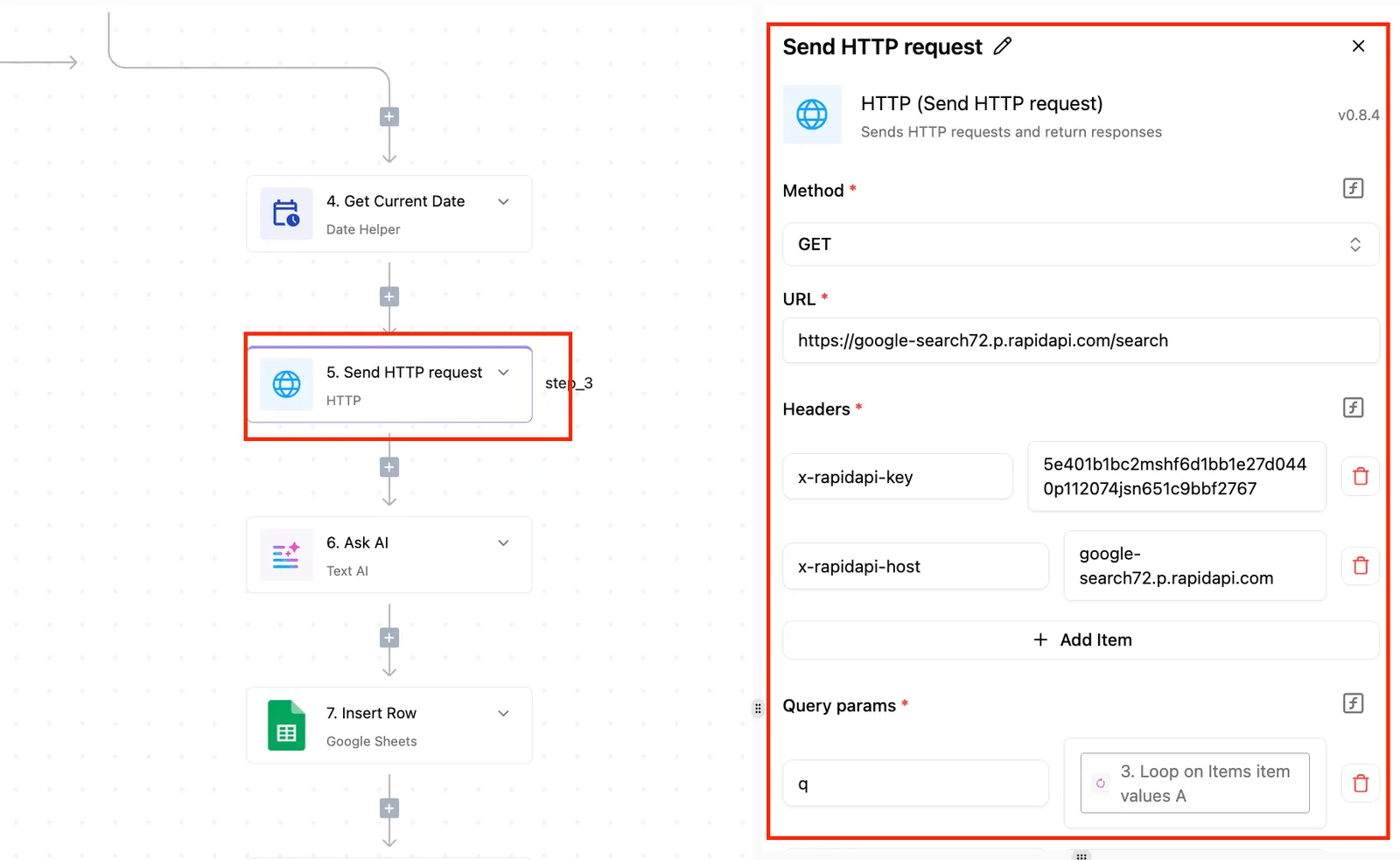
Going from version 0.4.2 to 0.5.0 tells you the integration is maintained. I couldn't confirm that this release added Hydrogen, and I have no pull request or date to give you, so I'm not claiming one.
Connecting it in a workflow today
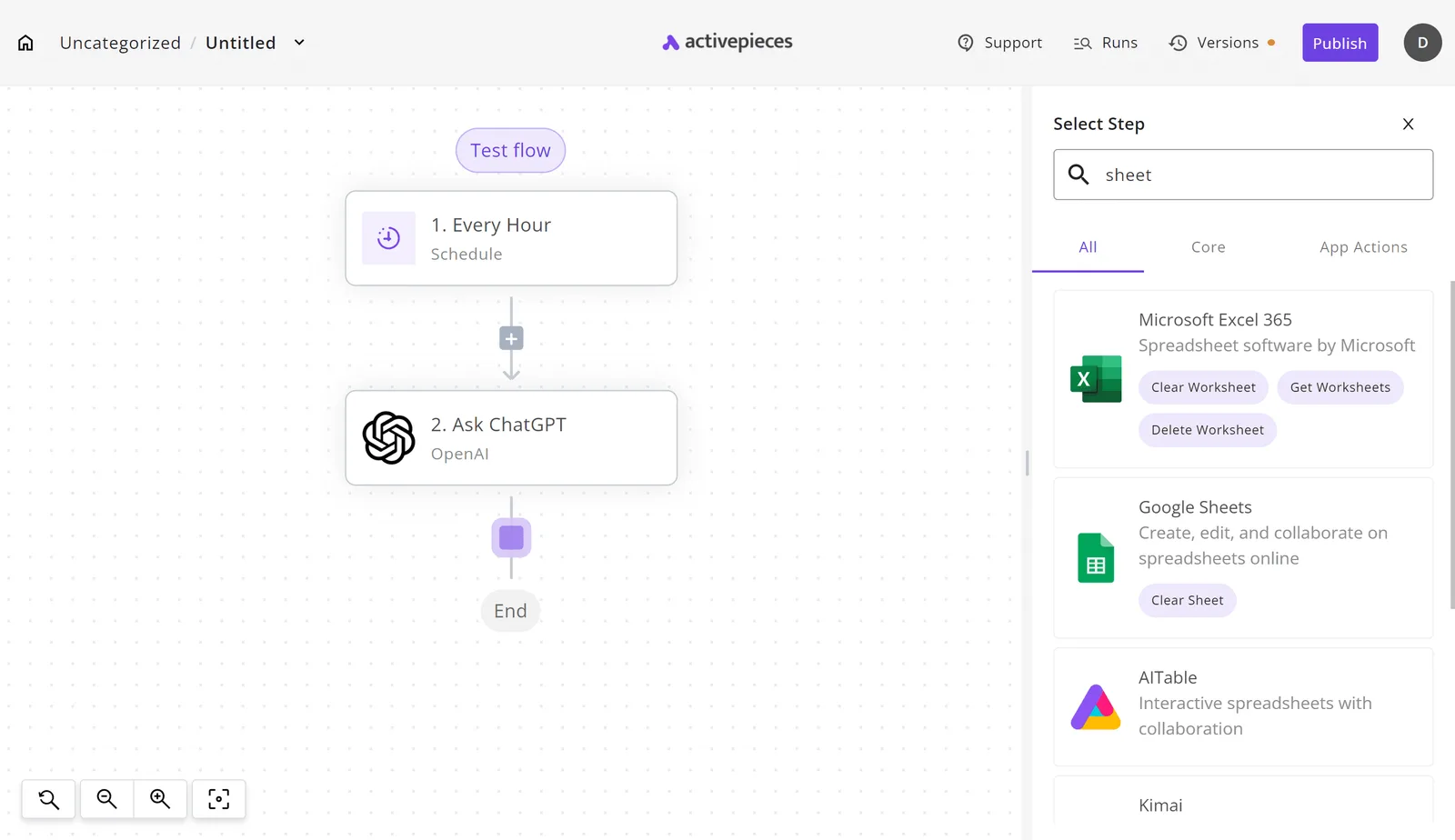
Add the Google Gemini integration as an action after whatever trigger you already use. If a flow already calls a model, such as an hourly job with an "Ask ChatGPT" step, the step picker below is where you swap that step out.
Because the model sits in one step, your current setup and the Gemini step can run on the same inputs. Check the integration's model field for Hydrogen. If it's listed, point a copy of the flow at it and compare the outputs.
A platform that sells you its own model has made the Hydrogen decision and set its price before you open the product.
MoneyGram, Moneypenny, Alan and FundingSocieties run Activepieces, and it can be reached from Claude, ChatGPT, Cursor or any MCP client, so whether Hydrogen earns a place in a flow is yours to set.
Worth checking against a plan that does not meter every step: one credit covers a whole run on Activepieces.
Our test on three automation tasks against GPT-5.4-mini
Both models got all three tasks right, so accuracy didn't separate them; Hydrogen was slower and roughly 28 times dearer per task.
The three automation tasks we tested
On 2026-11-12, Gemini 4 Hydrogen and openai/gpt-5.4-mini were run on three jobs a support queue sees daily: sort a ticket, pull fields from an invoice, summarise an email thread.
Each answer was checked against a known correct one.
Hydrogen ran on default settings, which reason before answering, so part of its delay is thinking time.
Treat this as a spot check, not a benchmark: three tasks can't support broad conclusions about which model performs better overall. It tells you where to look, not what your queue will do.
Results, speed and cost per task
Both models scored 3 of 3, but Hydrogen's median was 4.4 seconds against 0.9 and its cost $0.0040 per task against $0.000145, so the choice turns on speed and price.
The gap widens with the task. Our own test timed the ticket sort at 2.8 seconds against 0.8, the invoice at 4.4 against 0.9, and the email summary at 6.8 against 1, so each task runs 2 to 6 seconds slower on Hydrogen.
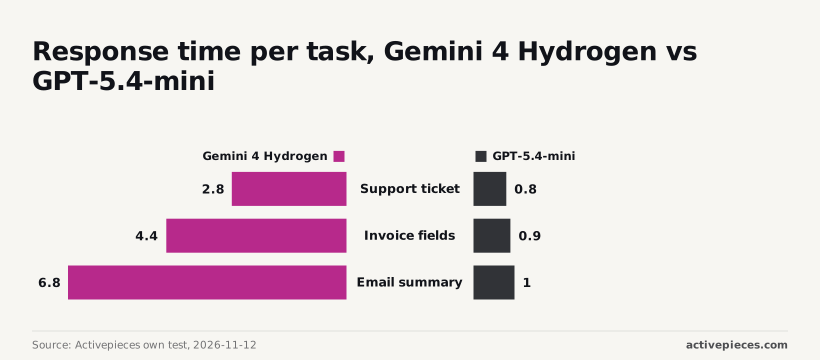
Support ticket resolution would be substantially slower with Gemini.
A sub-second sort can finish while a customer is still on the page, and a 6.8-second summary can't. At these prices, 10,000 tasks cost about $40 against $1.45, so volume decides whether the difference matters to you.
Why Hydrogen costs more and runs slower
Hydrogen is dearer and slower than GPT-5.4-mini on both published pricing and our test. The question is how many runs you make and whether anyone is waiting on the answer.
Gemini 4 Hydrogen cost at list price
On Google's published pricing, checked 2026-11-12, a run of 1,500 input and 300 output tokens costs $45 per 10,000 runs on Hydrogen against $24.75 on GPT-5.4-mini, making Hydrogen substantially more expensive. You'd pay nearly double to run that same task on Hydrogen.
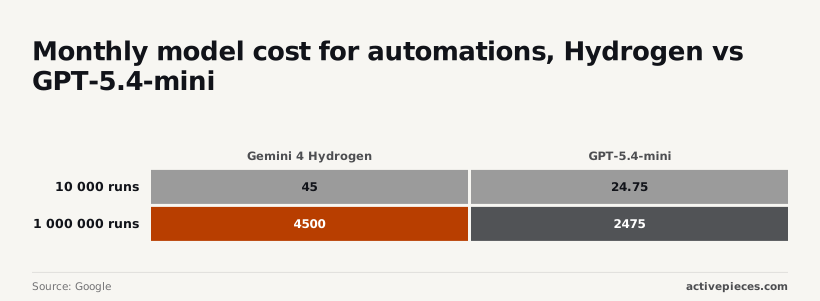
That is a difference worth weighing.
Here is the arithmetic. 10,000 runs of 1,500 input and 300 output tokens is 15 million input tokens and 3 million output tokens.
On Hydrogen, 15 million input at $1.50 per million is $22.50, and 3 million output at $7.50 per million is another $22.50, which makes $45.
It is also the only output rate that makes the $45 total work. For GPT-5.4-mini, $0.75 in and $4.50 out gives $11.25 plus $13.50, or $24.75. If either vendor's real output price differs, so do these totals.
Here is where that risk sits: a trigger, an AI step, a filter, a CRM update and an email. Your current model and the new one sit beside the AI step, judged on three dials: quality, speed and cost.
Although only one box changes, every box after it inherits the result. A slightly different label sends a record down a different filter branch, and a different record lands in the CRM.
That's why the comparison belongs in a shared test, run against the messages your team actually receives, with results anyone on the team can read.
Google's description of the model tells you what it's meant to do. Only your own tasks tell you whether it does that better than what you already run.
At 100,000 runs the difference is $450 against $247.50. At 1,000,000 runs it's $4,500 against $2,475, meaning the cost premium exceeds $2,000 at a million-run scale.
List price leaves Hydrogen at about 1.8 times the bill, which only becomes real money at the top of that range.
Hydrogen cost and speed in our test
Measured on our test, the gap is wider than the rate card suggests.
The chart sets cost and median time per task side by side: Hydrogen at $0.0040 and 4.4 seconds, GPT-5.4-mini at $0.000145 and 0.9 seconds. That's roughly 28 times the cost and nearly five times the wait.
The reason the test shows 28 times and list price shows 1.8 is tokens. The list-price comparison assumes 1,500 tokens in and 300 out for both models.
Hydrogen reasons by default, and the tokens it spends thinking are billed as output tokens even though they never appear in the reply.
Billed output can therefore run far past the 300 tokens you'd expect from a short answer, and the extra thinking time also explains part of the slower response.
Hydrogen reasons by default, and the tokens it spends thinking are billed as output tokens even though they never appear in the reply.
A model that answers directly stays close to the assumed counts, so its bill lands near the list-price estimate. That gap should narrow at a lower reasoning effort, since fewer thinking tokens means a smaller bill and a shorter wait.
We didn't test that, so the 28 times belongs to default settings only.
Measured spend can run well past what list price predicts, so count tokens on your own tasks before trusting the pricing page.
Those 4.4 seconds also matter on a ticket-triage step where a person watches the screen. The same delay inside an overnight batch costs nobody anything, so match the model to who is waiting.
What to monitor after launch
Watch Google's launch post and pricing page, your automation platform's changelog, and your own results on the same three tasks. Only the last one tells you whether anything in your workflows should change.
As of 2026-11-12, Gemini 4 Hydrogen is new: Google has just released it. Launch-day details get revised, so reread the launch post and pricing page before you commit anything.
A price or limit you noted on day one may not be the one you are billed on.
To confirm how you reach the model and whether your platform already offers it, go to Google's launch post.
Check your platform's changelog for the entry that adds it, because a model Google has released may not yet be selectable in your workflows.
Once you can select it, run this test and keep the notes where the whole team can see them, not in one person's head:
- Pick three real tasks from your workflows, the kind that show up in tickets every week.
- Save a known-good answer for each.
- Run each on the model you use now and on Hydrogen.
- Record correctness, seconds and cost per task.
- Decide per workflow, not for the whole stack.
That record is what lets a colleague on the next shift see why a workflow switched, or didn't.
This week, do steps one and two, and bookmark the launch post and pricing page. That's enough to run the comparison the day access opens.
Frequently asked questions
Is Gemini 4 Hydrogen available now?
Whether you can call it from your own account is a separate question from the model being new as of today, 2026-11-12, and only your account can answer it.
Check Google's model page and your own project's model list before you plan a test around it. If it isn't listed yet, wait and run the comparison when it appears, not before.
Is Hydrogen available in Google AI?
That depends on whether the Google AI integration in your Activepieces instance lists it, so open a flow and look at the model options.
If Hydrogen is there, you can swap it into a copy of a workflow. If it isn't, the integration may not have caught up with the release, and you shouldn't assume it will work by typing the name in.
Should I switch my workflows from GPT-6.1 Terra?
No, not on the strength of a launch announcement. Google's description says what the model is meant to do, not how it handles your tickets, your formats or your edge cases.
Copy one real workflow, run the same inputs through both models, and have the person who owns that workflow read the outputs side by side.
Switch only the workflows where the new model is clearly better, and note the result somewhere shared so the next person doesn't have to repeat the test.
Where do I check Gemini 4 Hydrogen pricing?
For pricing, the only source worth trusting is Google's own pricing page for its models. Third-party roundups copy numbers early and often get them wrong, so check the date on any figure you find.
Compare the price per task on your own inputs, not the list price alone, because a model that needs retries or longer prompts can cost more in practice than its rate suggests.
Related reading
References
Running the numbers
See what the same workload costs here.
Free forever plan, and every paid plan self-hosts at no extra cost.
See pricing Talk to sales