
GitBook Pricing 2026: Plans, Costs and Limits

Nov 10, 202614 min read
Any paid tier is cheaper billed annually, though both paid plans can also be billed monthly.
GitBook has three plans: Free at $0 for individuals, Essential at $65 per site per month, and Ultimate at $249 per site per month, which is worth weighing if your team is also paying for Activepieces or other tools elsewhere in its docs workflow.
Every figure here comes from GitBook's pricing page, so keep it open when you check your own numbers. GitBook is a documentation platform where teams write, publish and maintain docs sites.
Nearly four times: that is what Ultimate costs against Essential for every site you publish. The table shows the three current plans and the price each one charges, and that gap is the takeaway.

| Plan | Price | Monthly billing | Billing unit |
|---|---|---|---|
| Free | $0/mo | $0/mo | For individuals |
| Essential | $65 per site/month, billed annually | $79 per site/month | Per site |
| Ultimate | $249 per site/month, billed annually | $299 per site/month | Per site |
Prices and plan limits checked against gitbook.com on November 10, 2026.
That gap matters because the sticker price is only the starting point. It gets multiplied by how many sites you run.
Because Essential and Ultimate are priced per site, site count is the first multiplier on your bill. According to Gitbook, three sites on Essential come to $195 a month in site fees at annual billing, totaling $2,340 per year before member charges.

Three on Ultimate come to $747 in site fees before member charges, which is the cost of choosing the wrong tier by reflex.
Once a second person needs to edit, the Free plan stops being a fit, because it is built for individuals.
Which limit decides the plan
Count the sites you must publish, the people who must edit, and how heavily you'll lean on AI features, because your plan follows whichever limit you hit first: editors, sites or AI usage.
If you also run automations through Activepieces, the run is the meter: 1 credit per flow run, so a ten-step flow costs what its two-step workaround did, where Zapier's per-task billing charges for every step.
Splitting a chore into smaller steps never raises that line, and it won't hide the documentation bill. The sections that follow price a real team's workload against each limit.
How GitBook's monthly bill is calculated
Every total in the next section comes from one formula: sites × site rate + editors × member rate. The site rate is the per-site price in the table above.
The member rate is a charge for each person who edits, and readers of a published site add nothing.
On annual billing the member rate is $12 per editor, so five editors come to $60. On monthly billing it is $15, so the same five come to $75 on Essential.
The $12 annual rate is the same on both plans, which is why the member line stays at $60 when you move from Essential to Ultimate. Ultimate's monthly total below carries that same $60 member charge.
If you are running this arithmetic for your own team, see what the same workload costs on Activepieces.
What GitBook Costs a Five-Person Docs Team
$125 a month on Essential billed annually, against Ultimate billed monthly: for a five-person team, plan and billing choice moves the bill considerably.
Public docs site only
For one public site, GitBook charges Essential at $65 for the site plus $60 for members on annual billing, which totals $125 a month. On monthly billing the same setup is $79 plus $75, or $154.
Adding a sixth writer raises the bill, because the member charge is nearly half of it. The member charge is the smaller line only on Essential.
If you need Ultimate, the shape of the bill changes. Its annual site fee is $249, against $65 on Essential, while the member charge stays at $60.
The total is $309 a month, and the site fee accounts for the entire jump. Headcount isn't what you're paying for here, so don't size the plan by how many people write.
GitBook monthly versus annual billing costs
On monthly billing, Ultimate has a $299 site fee. For the same five people and one site, the gap between billing choices is $29 on Essential and $50 on Ultimate.
Over a year, that's $348 saved on Essential and $600 on Ultimate, just for committing to twelve months. Annual billing's the cheaper way to carry either plan, but it only makes sense once you're sure which limit your team hits first.

Hidden costs and limits beyond base price
After you pick a plan, five things move the bill that annual billing discounts and the pricing page never fully shows:
- per-member seats
- extra sites, each billed at the per-site rate
- Ultimate-only features
- AI credit caps of 2,000 versus 10,000, with credit bundles from $47.50 a month above them
- free-plan limits
To see which of these dominates, price a five-person team running one to three sites on each plan.
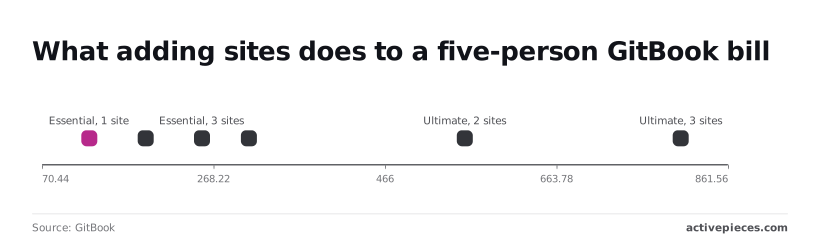
On GitBook's pricing page, Essential costs $125 a month for one site, $190 for two and $255 for three. Each extra site adds $65.
Ultimate runs $309, $558 and $807, so each extra site adds $249. At three sites, Ultimate costs more than three times Essential. Count your sites before your seats.
If you need one of the features that exist only on Ultimate, you're paying the Ultimate site rate on every site, not just the one that needs it.
If your team leans on AI drafting, it will hit the lower cap first. The two plans cap AI credits at 2,000 and 10,000, and credit bundles, starting at $47.50 a month, then become a line item you should price in advance.
Even the smallest bundle, at $47.50, comes close to the $65 cost of an extra Essential site.
Use the free plan for a trial, not a team. Once collaborators or sites pass its limits, you move to a paid plan, and the site count above sets what that costs.
GitBook Compared With Its Closest Alternatives on Price
For a five-person team, GitBook's entry paid plan's cheaper than Mintlify and ReadMe, and only Notion costs less than half as much.
GitBook, Mintlify, ReadMe and Notion price table
At five people, the entry paid tier runs $450 a month for Mintlify, $250 for ReadMe, $154 for GitBook Essential and $10 per seat for Notion Plus, according to Lekhora on dev.to.
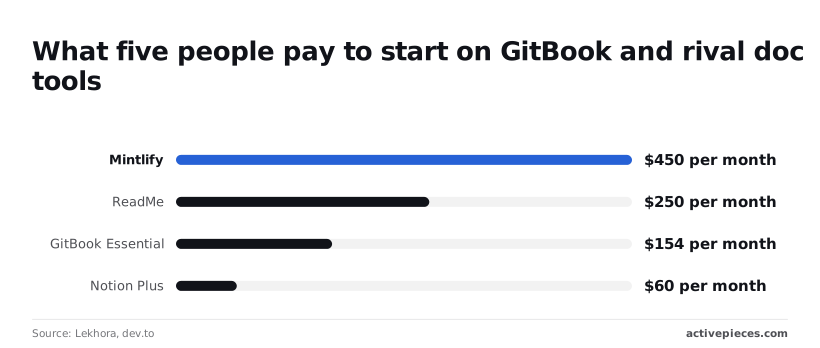
Roughly three times GitBook: that is what Mintlify costs for the same headcount, and ReadMe, which isn't in the table, sits between them. The table lines up the five tools on what you pay first and what that buys. Figures were checked in November 2026.
| Tool | Starting price (five people) | Free tier | Priced per | What the cheap tier omits |
|---|---|---|---|---|
| GitBook | $154/month (Essential) | Yes | Plan plus seats and sites | Features reserved for higher tiers |
| Mintlify | $450/month | Yes | Plan plus seats | Features reserved for higher tiers |
| Docusaurus | $0 licence | Open source | No vendor price | Hosting, search and upkeep are yours |
| Read the Docs | Free for open-source docs | Yes | Hosting plan | Private docs need a paid plan |
| Notion | $10/month (Plus) | Yes | Per seat | Purpose-built docs publishing |
At $60, Notion is the lowest paid figure here, but it buys a general workspace, so you're comparing different products. The $296 gap between GitBook and Mintlify's $3,552 a year, the real price of choosing on features you may never use.
Self-hosted docs tools versus GitBook cost
Unless someone on your team already maintains the pipeline, self-hosting isn't cheaper. Docusaurus has no licence fee, but you pay for hosting, search, upgrades and the hours spent on them.
At $154 a month, GitBook Essential equals about two hours of engineering time at a $77 hourly cost, so one afternoon of broken builds erases a month of savings.
When docs live beside the code and an engineer already owns the deploy, self-hosting wins. It loses when non-engineers need to edit.
At $154 a month, GitBook Essential equals about two hours of engineering time at a $77 hourly cost, so one afternoon of broken builds erases a month of savings.
Worth checking against a plan that does not meter every step: one credit covers a whole run on Activepieces.
Lowering GitBook costs without losing features
When you stop paying for people who never edit, the savings are real. Savings only delay the bill when your team is growing into a feature a cheaper plan gates.
Non-engineers editing's what GitBook is built for, so editors are where the money goes. Work through the order below:
- Count the people who actually edit, not everyone who has an account.
- Move readers and reviewers to the free roles.
- Trial on monthly billing with your real content.
- Switch to annual billing once the trial holds up.
- Pick the plan by the one gated feature you can't do without.
Right-sizing GitBook editor seats to cut costs
Audit who has changed a page recently. Anyone who only reads, or who comments on a draft before it ships, doesn't need an editor seat, so every one you move down is a cost you stop paying each month.
Invited as editors once and never demoted, reviewers are the usual leak. This saving lasts only if you repeat the audit as people join and leave.
You pay for a mistake for the whole term, because annual billing lowers the rate but removes your exit. Run the trial on monthly billing with your real content, not a sample space, because gated limits only show up at real volume.
Switch to annual after the limit you hit first has stopped moving.
If one gated feature forces a plan jump and nobody beyond engineers will ever edit, a docs-as-code setup in your repository costs less. The price's that non-engineers lose their editor, which is the very thing you were paying GitBook for.

Automating GitBook Chores With Activepieces
It won't lower your GitBook bill, but Activepieces can take over the manual chores around GitBook so your editors spend their seats on writing instead of relaying messages.
Its free plan covers up to 5 users, with 1,000 credits a month and unlimited flows, which matches the five-person team priced above.
Defined plainly, a flow's a workflow: a trigger followed by one or more actions. An integration's a connector to another app, such as Slack or Stripe.
If your team has no repetitive hand-offs around its docs, skip it; it adds a tool to maintain and saves you nothing.
Below, the screenshot shows the shape of a flow. A Stripe "Payment Failed" trigger feeds a Slack "Send Message To A Channel" action, and the run details on the left mark the step completed with a "Run succeeded" notice.
This one is about billing, not docs, but the pattern's the point: one event in one app, one message in another, with no person in between. Any chore you currently do by copy-pasting between tabs fits that pattern.

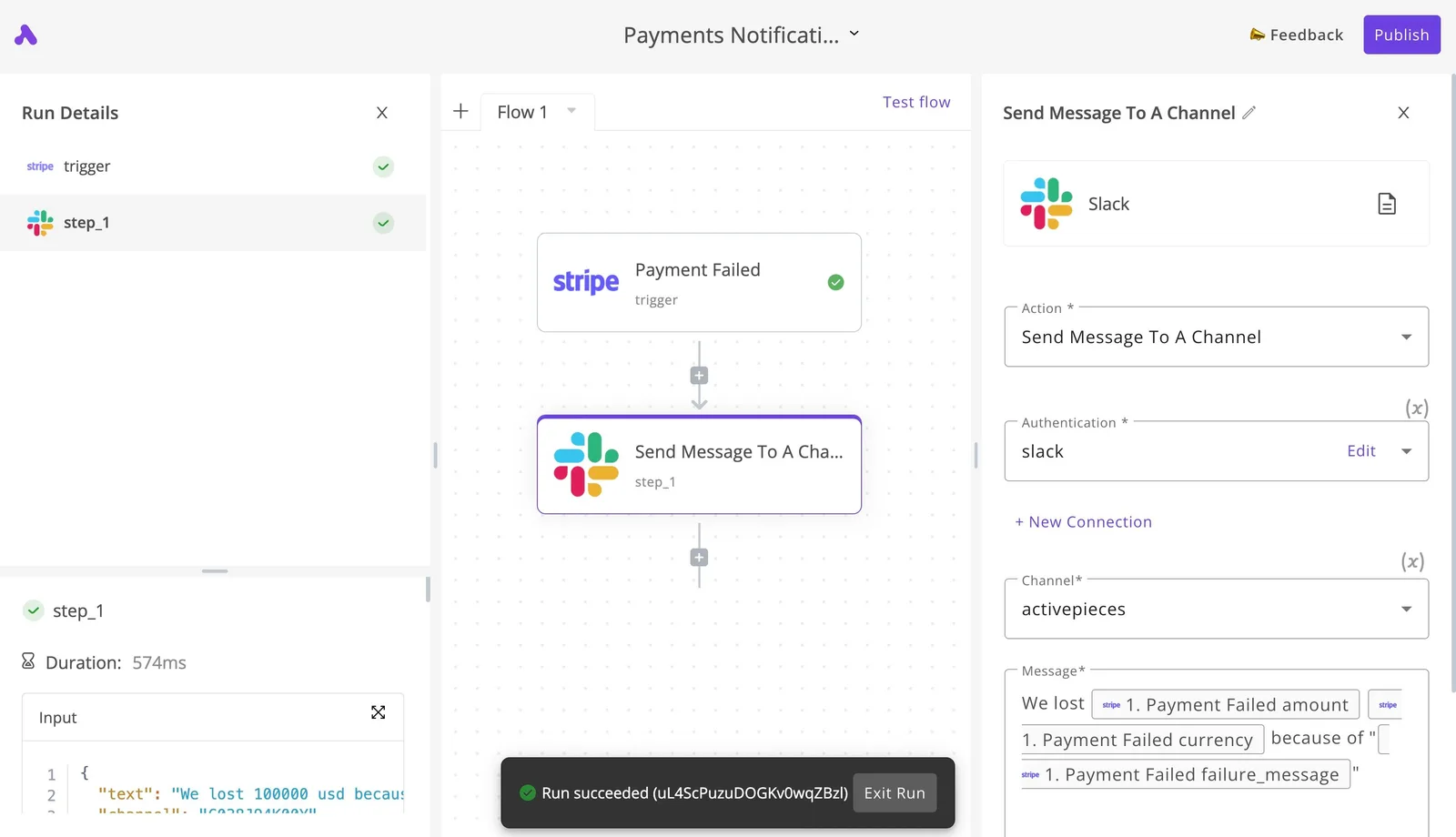
Two docs chores follow that same pattern.
Announce published docs changes
When someone publishes a change, the people who depend on the docs, such as support and sales, often learn about it by accident.
A flow can watch for the change and post a short message to a team channel in Slack, so the announcement happens every time instead of whenever someone remembers.
What this chore costs is attention, not money, and that's where the saving lies.
Once readers leave feedback, it goes stale in whichever inbox catches it first. A flow can take each submission and send it to the channel or tracker where the owning team already works.
Nobody has to triage by hand, and the editor seats you pay for stay on writing rather than sorting.
Checks before choosing your GitBook plan
Spend one morning on five checks before you pay: your editor and site counts, the gated features you need, the current figures, a real trial, and a renewal date. Do them in this order:
- Count the people who edit, separately from those who only read, and count every site you publish.
- List each gated feature your team can't work without.
- Confirm every figure on GitBook's pricing page, not from this article or a review.
- Start a trial with your real content, not a sample space.
- Set a renewal reminder before the trial converts.
Read the plan table as a list of limits, with the price as the last column. Copy the figures from GitBook's pricing page on the day you decide, because plans change and a stale number's how a bill surprises you.
Count editors and sites separately, because they are billed on different meters. A team of many readers and few writers behaves differently from a few writers running several documentation sites. Multiply each count by its rate and compare the two totals.
Whichever meter produces the larger total, or whichever gated feature you can't do without, is your deciding limit. Pick the plan that covers that limit with the least slack.
During the trial, load real content and watch which limit you approach first. Then set the reminder, so the renewal's a decision you make rather than a charge you discover.
Frequently asked questions
Is GitBook free for open source projects or nonprofits?
Before you plan around a discount, know that GitBook has run programs for open source projects and nonprofits in the past, but I have no confirmed current terms, so I won't state what they cover.
Ask GitBook directly and get the answer in writing before you plan around it.
Does GitBook charge for readers or only for editors?
You don't pay for the readers of a published site; editors, the people who write and change content, are what drives the bill.
Your cost rises as you add people who edit, not as more people read your docs. The limits that still matter are sites and AI usage, so count those alongside editors before you pick a plan.
On cancelling and keeping your content, plan for yes, but verify it before you commit. GitBook can sync content with a Git repository, which means your pages can live as Markdown files you already own.
If you rely on that sync, your exit is a repository you control. If you don't, export a copy before you cancel, and open it to confirm it's complete.
Does GitBook offer discounts for annual billing?
Treat annual billing as a lever on the bill; the section on what changes your total covers it. I have no confirmed discount figure to quote here.
Read the price on the checkout page for both billing periods and compare them at your editor count, not at the headline rate. Also check how the renewal date's handled, since an annual charge arrives all at once.
Does GitBook have a free trial of paid plans?
Yes, GitBook offers a 14-day free trial on both the Essential and Ultimate plans. GitBook also has a free tier, which is another place to test your workflow.
If your team hits the free tier's limits during testing, you have learned which limit will set your plan before you pay anything; that is part of the point.
Related reading
References
Running the numbers
See what the same workload costs here.
Free forever plan, and every paid plan self-hosts at no extra cost.
See pricing Talk to sales