
Google Cloud Storage Pricing: Classes and Fees (2026)

Nov 2, 202614 min read
Standard costs the most per GB-month and Archive the least, but that ranking misleads. Each colder class lowers the storage rate by raising retrieval fees and lengthening the minimum stay.
Pick by how often you read the data, not by the lowest rate, and if a workflow tool like Activepieces is moving files between classes, check its read patterns first.
Google Cloud Storage pricing is the set of charges for storing objects in one of four classes (Standard, Nearline, Coldline and Archive), made up of a per-GB-month storage rate plus retrieval fees, operations charges, network egress and minimum storage durations that vary by class.
Price per GB by storage class
What Google Cloud Storage is and how it bills
You keep files in buckets on Google Cloud Storage, Google's object storage service, and pay for what you store, what you read out, and how many requests you make.
Every storage class, price and limit (checked date)
As you go colder, the storage rate falls while retrieval cost and commitment rise. The table below ranks the four classes on the four things that change a bill, and it shows direction rather than dollar rates.
Read the exact us-central1 rates on Google Cloud's storage pricing page before you budget, because Google changes them. The table's based on that page as of 2 November 2026.
| Class | Price per GB-month (us-central1) | Minimum storage duration | Retrieval fee per GB | Free tier |
|---|---|---|---|---|
| Standard | Highest of the four | None | None | Small monthly allowance in select US regions |
| Nearline | Below Standard | Shortest of the three cold classes | Charged, lowest of the three | None |
| Coldline | Below Nearline | Longer than Nearline | Charged, higher than Nearline | None |
| Archive | Lowest of the four | Longest of the four | Charged, highest of the four | None |
Prices and plan limits checked against docs.claude.com and claude.com and openai.com and gemini.google on November 1, 2026.
If you delete an object before the minimum ends, Google bills you for the remaining days anyway.
Google Cloud Storage free tier coverage
The free tier covers Standard storage in certain US regions, plus a small allowance of operations and network egress.
If your plan depends on cold storage being free to try, it isn't: Nearline, Coldline and Archive get no free allowance.
If you are running this arithmetic for your own team, see what the same workload costs on Activepieces.
Which storage class fits your usage
Pick the class by how often you read the data, then check the one catch in your situation that moves you up a tier.
- A free-tier user should use Standard, in one of the regions the free allowance covers. The catch is the region. A bucket created somewhere else is billed from the first byte.
- A 1 TB backup belongs in Nearline if you expect to restore about once a month, or Coldline if it's closer to once a quarter. The catch is the minimum storage duration. If your backup job deletes copies sooner than that, you pay for the days you didn't keep them.
- A team of 25 that needs access controls should use Standard with uniform bucket-level access and permissions granted to groups, not people. Access control doesn't change the class. The catch is that 25 people reading the same files turns egress and operations into the real cost. If the shared files sit in a colder class, every read also carries a retrieval fee.
- Heavy reads or high API volume also belong in Standard. Colder classes charge more per operation and per retrieval, so a busy bucket gets more expensive the colder you go. The catch is object size. Millions of tiny files generate request charges that can pass the storage charge.
- Archive data goes in the Archive class, and only if you truly won't touch it for a long time. The catch is the longest minimum duration and the highest retrieval fee. Files in Archive can still be read right away, but if a customer emails asking for last year's records every week, you picked the wrong class.
What different storage sizes cost monthly
At 1, 10 and 100 TB, storage alone costs $20, $200 and $2,000 a month in Standard, and less in the colder classes. Those totals ignore reads, so they flatter the cold tiers.
Storage-only cost at three sizes
Using the per-GB rates nOps lists:
- Standard at $0.020 comes to $20, $200 and $2,000
- Nearline at $0.010 comes to $10, $100 and $1,000
- Coldline at $0.004 comes to $4, $40 and $400
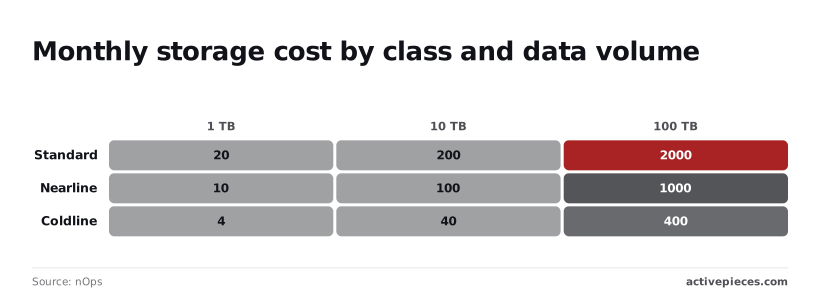
Read on its own, the storage line says Coldline saves $1,600 a month on 100 TB.
Read everything once a month and the gap narrows sharply. Coldline ends up above Standard.
Same data with realistic reads and writes
Say 30% of the data is read each month. Nearline then costs $13 per TB: $10 of storage plus $3 of retrieval. That's $130 at 10 TB and $1,300 at 100 TB, against $200 and $2,000 in Standard.

Coldline costs $10 per TB, which is $100 at 10 TB and $1,000 at 100 TB.
Two things are left out here: write and operation charges, and any minimum storage duration. Both can push a churning bucket back toward Standard.
Nearline vs Standard storage break-even point
Read 100% of the data every month and the $0.010 per GB that Nearline saves in storage is cancelled by the $0.01 per GB it charges to read. Read less than the whole bucket and Nearline is cheaper.
Read all of it and it ties at $20, $200 and $2,000. Read it more than once and Standard wins.
Coldline saves $0.016 per GB and charges $0.02 to read, so its break-even is 80%. Above that, Coldline costs more than Standard. A 100 TB bucket read in full each month costs $2,400 in Coldline, $400 more than Standard.

Hidden Google Cloud Storage costs beyond storage
Four charges decide whether a bucket that looked cheap on the pricing page stays cheap: egress, per-operation fees, minimum storage durations and the copies you keep without noticing. Each one is billed on behavior, not on how many gigabytes you store.
Google Cloud Storage network egress pricing
Egress is the charge for data leaving Google's network to the internet. At Premium Tier it costs several times more per GB than storing that same data for a month.
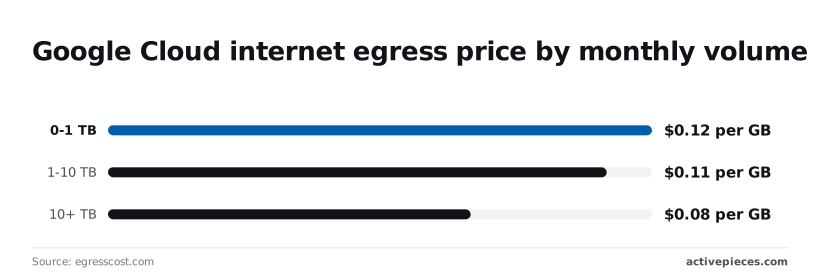
According to egresscost.com, the first 1 TB each month costs $0.12 per GB, the 1-10 TB band costs $0.11 per GB, and anything above 10 TB costs $0.08 per GB.
Reading a file out once costs six times what it cost to keep it for the month, since Standard storage costs $0.02 per GB-month.
Even at 10 TB and above, one download costs four times the monthly storage bill for those bytes.
Serve a 500 GB dataset to outside partners every month and you pay about $60 in egress against $10 in storage. The storage class you chose is then no longer the number that matters.

Operation and retrieval fees
Every read, write and list call is billed as an operation, and the colder the class, the more you pay when you touch the data. Class A operations (writes, lists) cost more than Class B operations (reads, metadata gets).
When an analyst's job lists a bucket of millions of small files every night, the listing charge can exceed the storage charge for the whole bucket.
The tool that runs the export can add a second meter on top of Google's.
Activepieces bills 1 credit per flow run however many steps the flow holds, where Zapier counts tasks and Make counts modules, so a ten-step export that lists, batches and writes costs the same as the two-step shortcut. MoneyGram and Moneypenny run it in production.
Minimum duration and early deletion
Delete or overwrite an object before its minimum storage duration ends and you still pay for the remaining days. Nearline, Coldline and Archive each carry one. The consequence is that a cold class is a commitment, not a discount.
Move a monthly report to Archive, replace it after 30 days, and you pay for the full minimum on every file you rewrote, so monthly updates cost the same as new files.
**The consequence is that a cold class is a commitment, not a discount.
Soft delete and versioning storage costs
Soft delete keeps deleted objects for a retention window, and versioning keeps every overwritten copy. Both are billed as storage at the class rate.
A pipeline that overwrites a large file every night quietly multiplies your stored bytes, and a "delete" doesn't lower the bill until the window passes. Set a retention period you can defend, and add lifecycle rules to clear old versions.
Choose multi-region or dual-region locations only when you need the resilience, not by default, since they carry a higher per-GB storage rate than a single region.
Worth checking against a plan that does not meter every step: one credit covers a whole run on Activepieces.
Google Cloud pricing vs S3 and Azure
Google is cheapest or tied for cheapest on cool storage, sits in the middle on hot, and costs the most on archive. The table below, built from CloudFinOps figures checked on 2 November 2026, shows the per-GB-month rate for each tier.
| Tier ($ per GB-month) | Google Cloud Storage | Amazon S3 | Azure Blob |
|---|---|---|---|
| Hot | 0.020 | 0.023 | 0.018 |
| Cool | 0.010 | 0.0125 | 0.010 |
| Cold | 0.004 | 0.004 | 0.0036 |
| Archive | 0.0012 | 0.00099 | 0.00099 |
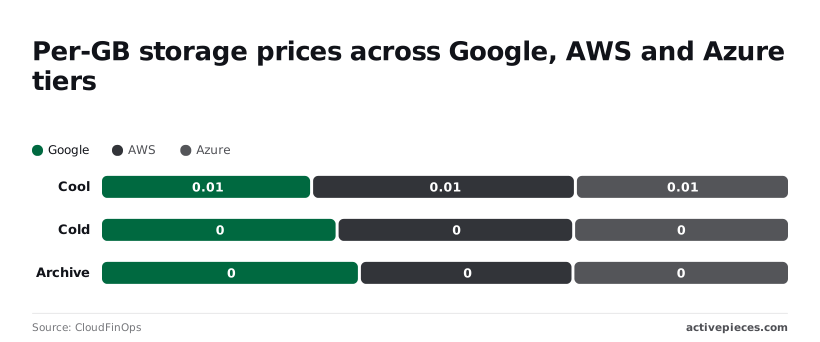
Hot storage per GB
Google charges $0.020, S3 charges $0.023 and Azure charges $0.018. On 1 TB that's $20, $23 and $18 a month.
The gap between best and worst is $5 a month, so a team with a few terabytes shouldn't move providers over hot price alone.
Cold and archive tiers
Where Google earns its place is cool storage. At $0.010 it ties Azure and undercuts S3's $0.0125, which saves $25 a month on 10 TB. Cold is closer: Google and S3 both charge $0.004 and Azure charges $0.0036, a $4 monthly difference on 10 TB.
Archive reverses the picture. Google charges $0.0012 against $0.00099 at both S3 and Azure. On 10 TB that's $12 against $9.90, so Google costs about $2.10 more a month.
Egress and free tiers across providers
I have no confirmed figures from this source for internet egress, minimum storage durations or free tiers, so the table leaves them out. Don't fill that gap with a guess. Pull the current numbers from each provider's pricing page before you commit.
Estimate how many GB you expect to read out each month, multiply by each provider's egress rate, and add that to the storage line before comparing totals.
What Activepieces does about this
The costs this article keeps returning to, egress, early deletion and runaway operations, are ones you only see after the invoice arrives. A Cloud Billing budget alert is the usual early warning, and as the FAQ above says, it warns but doesn't stop anything.
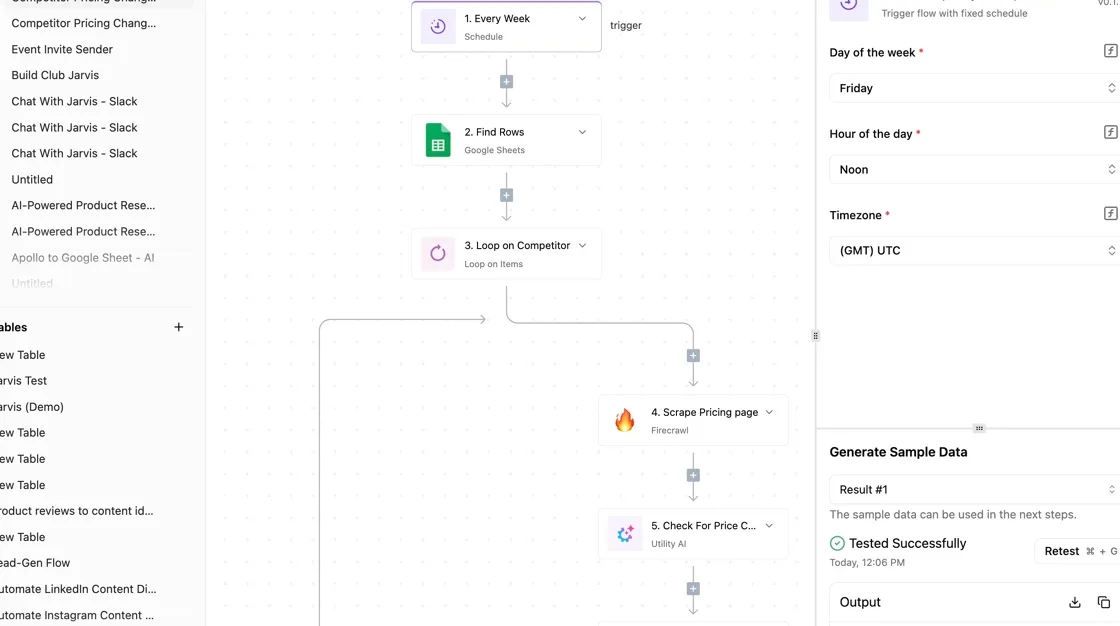
Activepieces is where we'd put the automation that acts on it.
A budget's notifications go to a Pub/Sub topic, a push subscription can post to a webhook, and an Activepieces flow that starts from that webhook can check which project and service overspent, tell the people who own the bucket, and call Google's APIs through the HTTP step to remove the cause.
Test the flow before you rely on it, since it is the hard stop your budget lacks.
The same approach works for the rewrite and deletion habits that trigger early-deletion charges. A scheduled flow can list objects by age and class and post a report before a lifecycle rule or a nightly job moves data you'll want back.
That is a cheaper place to catch the cold-class mistake than the invoice.
Cost matters for the automation itself, as noted earlier: Activepieces bills 1 credit per flow run however many steps it holds, so a ten-step check that lists, filters, notifies and acts costs the same as a two-step one. MoneyGram and Moneypenny run it in production.
The core is open source under the MIT licence, so you can self-host it next to your Google Cloud project and keep billing data inside your own network. Enterprise features sit under a separate commercial licence.
None of this changes which storage class fits your data. It means the guardrails around that choice can be built once and left running.
Frequently asked questions
Is Google Cloud Storage free for small amounts of data?
Yes, but only within a small Always Free allowance that applies to certain regions, so check your bucket's location before you count on it. A bucket in a region outside that allowance is billed from the first byte.
A small site serving many downloads can leave the allowance sooner than the stored size suggests, because operations and egress also count against it.
Does Autoclass save money, and what does it cost?
It saves money when you can't predict which objects will be read, and it costs a management fee on top of the storage rates.
Autoclass moves each object between classes based on how recently it was accessed. It doesn't charge retrieval fees or early-deletion fees for those automatic moves.
If you already know a dataset is read daily, or never, a fixed class avoids paying for monitoring you don't need. Autoclass earns its fee on mixed, unpredictable data. A wrong guess costs you more than a right one saves.
How do I set a budget alert on Cloud Storage spend?
You set it up in Cloud Billing, in this order:
- Open Cloud Billing and go to Budgets and alerts.
- Create a budget scoped to the project and to the Cloud Storage service.
- Add alert thresholds as percentages of the budget, and send notifications to the people who can act on them.
A budget alert only warns you; it doesn't stop spending. A runaway egress bill will keep growing after the email arrives.
If you need a hard stop, you have to wire the budget's notifications to automation that disables the cause, and test that automation before you rely on it.
Can I move data between storage classes without downtime?
Yes. Objects stay readable while their class changes, because a class change is a rewrite of metadata and storage, not a migration to a new location. Two things catch people out.
Changing a bucket's default class only affects objects written afterward, not existing ones. And moving an object out of a colder class before its minimum storage duration ends can trigger an early-deletion charge, with operations charges for each object moved.
For large buckets, use lifecycle rules to do the transition on a schedule instead of rewriting everything by hand.
What is the cheapest way to store backups long term?
For backups you'll almost never restore, Archive is usually the cheapest class per GB. Pair it with a lifecycle rule that deletes copies once your retention period ends.
If you test restores often, or an incident forces a full restore, retrieval and egress can outweigh the storage savings, because Archive charges the most for reads and enforces the longest minimum duration.
A cold class with cheaper reads may cost less overall for backups you actually touch.
Related reading
References
Running the numbers
See what the same workload costs here.
Free forever plan, and every paid plan self-hosts at no extra cost.
See pricing Talk to sales