Greenhouse Pricing 2026: Plans and What Each Costs

Oct 30, 202615 min read
Nobody pays the tier label.
Greenhouse sells three plans, Core, Plus and Pro, and the plan name tells you what you're getting, not what you pay, meaning you can't determine cost from the name alone, much like the way a team wiring up its hiring workflows in a tool like Activepieces only learns the real total once the pieces are in place. Budget from the quote for your own headcount and hiring volume, not from the tier label.

Greenhouse pricing is the quoted annual cost of Greenhouse's applicant tracking software, which is set per customer across its Core, Plus and Pro plans based on company headcount, hiring volume and any add-ons rather than a fixed published rate.
Greenhouse pricing is a quote model: the number on your invoice depends on inputs the plan names never show. Every claim below comes from the Greenhouse pricing page.
Greenhouse Core, Plus and Pro pricing
What Greenhouse charges for and how it is quoted
Think of it as a unit cost. The plan sets the feature bundle, and your quote sets the multiplier.
If two companies sit on the same tier, they can pay very different amounts. Comparing a competitor's published rate against a Greenhouse tier name compares a price with a label.
Anyone who's priced a per-seat tool knows the first figure rarely survives contact with the actual org chart.
Plan table: price, inclusions and limits
Look at the table for the one inclusion the page spells out, a single CRM event on every plan, and for what you still have to get from sales.
That single event is the same on all three tiers, so it gives you no reason to upgrade. Whatever separates the tiers is elsewhere, and you need it written down.
| Plan | Inclusions | Price and limits to confirm |
|---|---|---|
| Core | 1 CRM event (Sourcing & CRM row) | Ask for the quote basis and any usage caps in writing |
| Plus | 1 CRM event (Sourcing & CRM row) | Ask what Plus adds over Core and what it costs per unit |
| Pro | Unlimited CRM events (Sourcing & CRM row) | Ask what Pro adds over Plus and which add-ons are extra |
Because the inclusion row is identical, the decision rests on the rows I haven't reproduced, and on a quote you should get itemized before any call ends.
What the pricing page does not state
You will not find a dollar figure for any plan in this section, because I have none confirmed, and I won't invent one.
If you connect hiring data to other tools, say through Activepieces, where a run costs 1 credit however many steps it has and the Free plan includes 1,000 credits a month, integration volume is one more input to ask about.

Ask for the base price, the headcount tier, the hiring-volume basis and every add-on as separate lines.
A quote you can't break down is a quote you can't budget.
If you are running this arithmetic for your own team, see what the same workload costs on Activepieces.
Renewal quotes exceeding budgets
When the quote lands above budget, the reason is that it prices headcount, hiring volume and add-ons, while the budget was built from a plan name.
A quote you can't break down is a quote you can't budget.
The example below is illustrative, not a real customer: a 150-person company whose talent lead opens a renewal quote at 9:40 a.m.
Follow the timeline in order: from the assumed headcount and hires, to what the quote priced, to the dollar gap, to the recruiter hours spent reconciling. Read it as a pattern, because the same sequence repeats whenever a budget starts from a list price.
What the team budgeted from
Starting from the plan name, the talent lead multiplied by what last year's invoice implied, and assumed a company of 150 people would hire at roughly the same pace. That's a reasonable shortcut, and it's the weak point.
Of everything a hire costs, software is only a slice. According to Raffi, the tech stack is 15% of cost per hire, so a plan-name budget covers a small share of the total and leaves the larger shares unmodelled.
What the quote priced was the plan plus add-ons, scaled to headcount and expected hiring volume. Each of those moves independently of the plan name, so none of them could have been read off the list price.

This is why a quote you can't itemise can't be checked against a budget line.
The gap, in dollars and recruiter hours
I won't invent a dollar figure, but the arithmetic is simple. According to Raffi, if the software line doubled, the 15% tech-stack slice would add 15 points to cost per hire, before anyone has done any extra work.
The hours are the costlier part. Raffi places recruiter labour at 45% of cost per hire, three times the software slice. Reconciling a quote against a budget is recruiter labour, so the quote check draws on that 45% slice.

Untouched by the quote: sourcing channels at 20%, assessments at 10% and candidate experience at 10% (per Raffi). Yet they still compete for the same budget, so funding the quote means concessions from these three.

That's the real damage: hours spent decoding a quote come out of the largest slice. The checklist in the next section exists to move that work before signing.
Hidden Costs and Limits Greenhouse Teams Hit
Between the plan name and the invoice sit line items outside the headline plan. These are implementation, add-on modules, integration and API access, user limits and contract terms. I couldn't confirm a published price for any of them, so each is marked ask sales.
Use the list below to see where the quote can grow after the plan is chosen. Read it as a set of questions to put to the vendor in writing, because a cost that has no published number is a cost you can't budget yet.
- Onboarding or implementation: ask sales whether it's included or billed separately
- Sourcing and automation modules: ask sales
- API and integration access: ask sales which plan includes it
- User or seat limits: ask sales
- Job-board posting costs: ask sales
- Renewal uplift: ask sales
Each item can move the total independently, so the plan name alone tells you very little about the bill.
Add-ons and modules priced separately
Treat any capability beyond core applicant tracking as a possible separate line. Sourcing, automation and similar modules are the usual candidates.
If a feature appears in a demo, ask whether it's in your quoted plan or an add-on.
The same goes for onboarding help: a vendor that bills it separately has moved cost from the subscription to a one-time charge that never appears in the monthly comparison.
Integration, API and user limits by plan
Check the tier first, because API access and integrations may depend on it. Ask sales which of your required connections, such as your HRIS or background-check provider, work on the plan you are quoted.
If an integration is missing, you pay to upgrade or build the connection yourself. Ask the same about user limits, since a cap that fits today's team can force a tier change when hiring managers need access.
Greenhouse contract and renewal terms to check
Ask for renewal pricing in writing before signing, along with the term length, the notice period for cancellation and what happens to your data on exit.
If a discount applies only to the first term, the second year is the real price. Because I couldn't confirm Greenhouse's renewal policy, get it stated in the contract rather than relying on a verbal assurance.
Worth checking against a plan that does not meter every step: one credit covers a whole run on Activepieces.
Greenhouse Against Lever, Ashby and Workable on Price
Greenhouse Core has no published price, so buyers comparing it to Ashby should ask for a custom quote before judging annual spend. Compare all four on the same written terms rather than on sticker prices.

That's the same discipline as getting renewal terms in the contract.
Some vendors publish a price and some make you ask, and the table below shows which. The ones marked "Quote" can't be budgeted until someone replies.
| Vendor | Pricing model | Entry price | Base-tier inclusions | Limits | What to ask |
|---|---|---|---|---|---|
| Greenhouse | Quote-based, add-ons quoted | Not confirmed | Not confirmed | Not confirmed | Which add-ons my workflow needs, and the renewal cap |
| Lever | Quote | Quote | Not confirmed | Not confirmed | Price at my headcount and hiring volume |
| Ashby | Published by company size | $900/month at 76–100 staff | Not confirmed | Not confirmed | What changes when I cross a size band |
| Workable | Quote | Quote | Not confirmed | Not confirmed | Price at my headcount and hiring volume |
Two of four vendors hide the number, so half the comparison needs a sales call before it means anything.
When a cheaper Greenhouse alternative makes sense
On entry price, Pin's ATS guide puts Manatal at $180 a year and JazzHR at $1,500, meaning budget becomes the primary selection criterion at the entry tier.
At that level, a team making a few hires a year can pay for the tool with a single avoided agency fee.
Take Ashby: $3,000 a year is the entry figure, but the $900 a month I found for 76–100 staff works out to $10,800 a year. The entry price therefore applies only to the smallest teams, and the cost climbs as you grow.

When Greenhouse is worth the premium
It still sits well under iCIMS at $14,500 and SmartRecruiters at $14,995, so the upgrade from Ashby to Greenhouse is far more modest than jumping to enterprise solutions.
If you would otherwise be quoted in that upper range, Greenhouse is the cheaper path to a full-featured ATS for a mid-sized team.
The premium over Ashby only pays off if you need something Core includes that the cheaper tool charges extra for. I couldn't confirm what that is, so ask each vendor to itemize it.
Where Activepieces Fits Around a Greenhouse Contract
If you are weighing Activepieces, know that it doesn't replace an applicant tracking system.
It moves data between the one you buy and the other tools your team already runs, across 746 integrations counted from its open source monorepo, which is where the unbudgeted hours tend to sit once the contract is signed.
Manual handoffs that eat Greenhouse recruiter hours
Every hire creates a few small manual jobs. Someone copies the hired candidate's details into the HRIS (the system of record for employees).
Someone notices a candidate has sat in one stage too long and pings the hiring manager. Someone chases an offer approval through email. None of these is expensive on its own.
Multiply by every hire and the cost is recruiter time that never appears on the vendor's quote.
Each of those handoffs can be its own small flow, because the Activepieces pricing page lists "unlimited flows" on every tier from Free through Ultimate and meters only credits per run, at 1 credit per run however many steps it has, while Zapier's pricing page bills a task per action and Make's a credit per module.

The screenshot below shows the shape of one with a different pair of apps.
A Stripe "Payment Failed" event triggers a Slack "Send Message To A Channel" action, the run details show the first step completed in 574ms, and the canvas reports "Run succeeded."
Swap the trigger for a Greenhouse event, such as a candidate reaching a stage, and the same two-step pattern covers a stalled-stage alert.

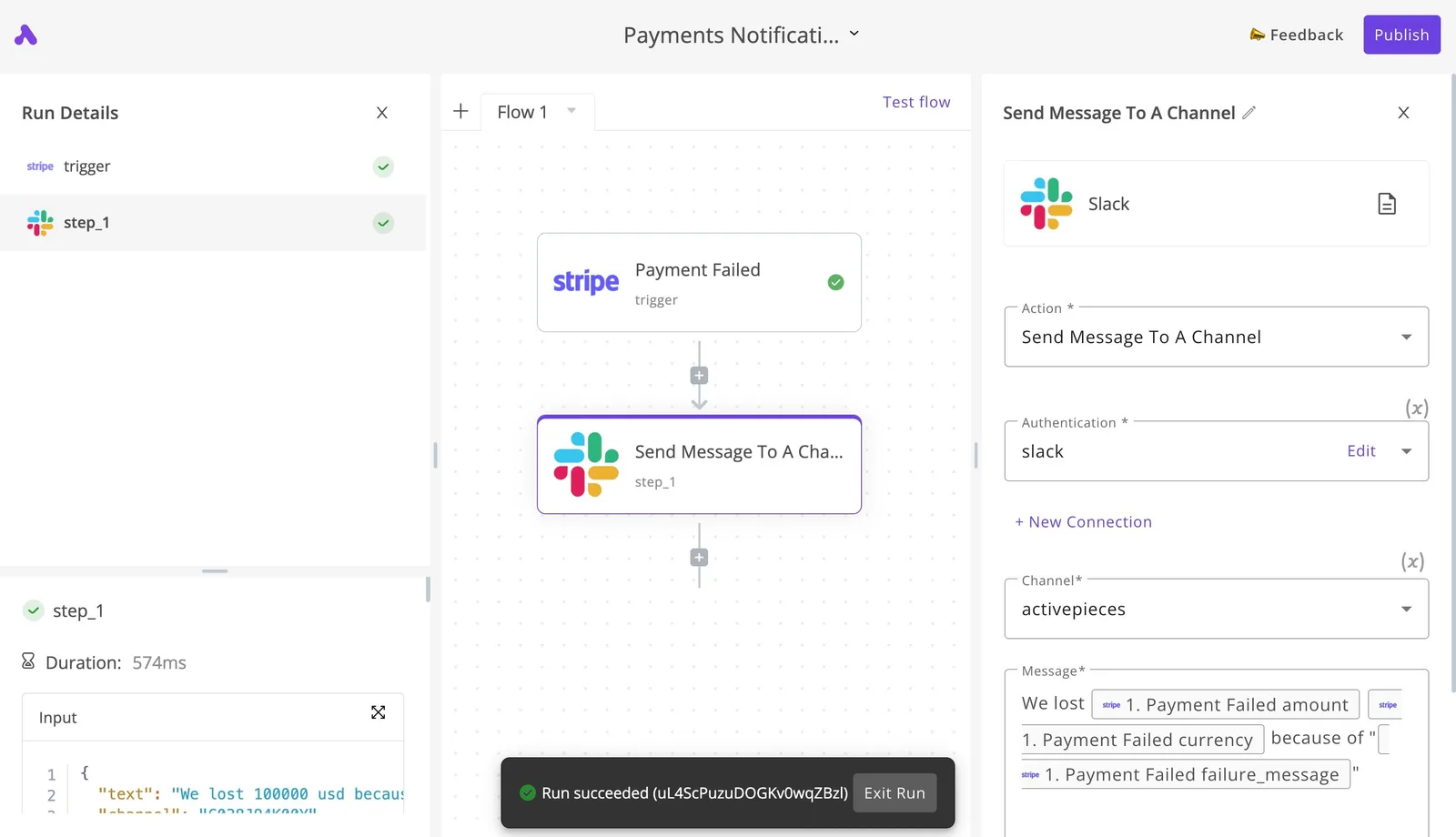
What the screenshot proves is narrow: you can see each step, its configuration, and whether the run worked.
That visibility is what lets you audit a handoff instead of trusting it. I wouldn't call it proof that any particular Greenhouse flow is available, so test the one you need before relying on it.
What to check about API access on your plan
For automation to work, the source system has to let another tool read its data.
Before signing, ask Greenhouse in writing whether API access is included in your plan or priced as an add-on, and whether it limits which data or how many requests you can make.
Ask the same of webhooks, since those are what trigger a flow when something changes.
I couldn't confirm how Greenhouse packages this by tier, so treat it as a line item to have itemized. If the answer is vague, assume it costs extra. An integration budget that starts after signing is the same surprise this article warns about, only later.
The Monday Checklist Before Signing a Greenhouse Quote
Six steps, done in order the day after the quote arrives, turn a plan name into a per-hire ceiling you can defend before anyone signs.
Start with what you can count yourself and end with what only the vendor can tell you: the first two steps need nobody's permission, which means you can begin without organizational approval.
- Count current headcount and the hires you expect this year, using payroll and signed offers rather than the hiring plan.
- List every integration you need live on day one, such as your HR system, background checks and job boards.
- Get a written quote for each plan, not a verbal range.
- Confirm the renewal uplift and the price of each add-on in writing.
- Get one competing quote on the same headcount and hire volume.
- Set a per-hire ceiling and hold the contract to it.
Steps one and two give you the inputs the quote moves on. Step six needs an anchor.
The Cognitive reports non-executive hires at $1,200 to $5,475 each. At the low end, a few hundred dollars of software per hire is a visible share of the whole cost, so a quote that looks small in total can still break your ceiling.

The same source puts executive hires at $10,625 to $35,879. At that level the same software fee barely registers, so set one ceiling per level, not a single blended number.
Questions to ask Greenhouse sales about pricing
Ask for the quote itemized by plan, with headcount and hire volume stated as the assumptions behind it. Then ask what the renewal uplift is and what each add-on costs on its own line.
If an answer needs "it depends" or another call, treat the price as unknown and budget the high end. The competing quote exists to show you what the same volume costs elsewhere, whether or not you switch.
Rules the team now keeps
Review the contract 90 days before renewal, while you can still walk away, which means waiting until closer to renewal eliminates your options. Recount headcount and hires each time, since both set the price. Price any new integration before agreeing to it.
Compare actual cost per hire against the ceiling every quarter, so the surprise shows up in a report, not an invoice.
Frequently asked questions
Free plans and how the quote is built
Does Greenhouse have a free plan or free trial?
We couldn't confirm a free plan or a self-serve trial from Greenhouse's published pages, so assume neither exists until a rep says otherwise in writing.
If you want to test the product, ask for a sandbox or a pilot before signing, and get its terms in the same email thread as the quote.
Is Greenhouse pricing per user or per employee?
Neither label fits cleanly. The quote moves with company headcount, hiring volume and add-ons, so it behaves less like a per-seat price and more like a bracket you land in.
Ask the rep which of those inputs sets your bracket, and whether adding recruiters or hiring managers changes the number mid-term.
Switching plans and onboarding costs
Can you switch between Core, Plus and Pro mid-contract?
That depends on your order form, not on the plan names. Moving up is usually easier to arrange than moving down, since the vendor gains revenue from one and loses it on the other.
Before signing, ask what an upgrade costs, whether a downgrade is allowed before renewal, and put the answers in the contract.
Does Greenhouse charge extra for onboarding?
Possibly, so treat it as an open line item until the quote shows otherwise. Implementation, data migration and training can be bundled, billed separately or priced as a package.
Ask for each as its own line, because a quote that hides them inside one total gives you nothing to negotiate against.
Can a small company afford Greenhouse?
Sometimes, and the test is arithmetic, not reputation. A small company with modest headcount and light hiring may land in a lower bracket, but every add-on pushes it back up.
Divide the full quote, including onboarding and add-ons, by the hires you realistically expect in the term. If that cost per hire sits above what a cheaper tool would produce, the answer is no, however good the product is.
Related reading
References
Running the numbers
See what the same workload costs here.
Free forever plan, and every paid plan self-hosts at no extra cost.
See pricing Talk to sales