
Harness2: Google Research Repository Overview (2026)

Oct 19, 202613 min read
Harness2 is a new open repository from Google Research, published at github.com/google-research/harness2, and this reading of its page, which sits alongside workflow tools such as Activepieces, is dated 2026-10-19.
Harness2 was released by Google Research on GitHub
What harness2 is
The repository describes Harness² as "a plug-and-play framework for recursive agent harnessing in an open world." It keeps model weights fixed. So it's not a new model you call by name.
It's scaffolding around an existing one, and that decides how you wire it up: there's no model endpoint to point a step at, only a framework to run and then connect.
An agent harness is everything wrapped around a model so it can act as an agent: the prompts it is given, the tools it can call, the memory it carries between steps, and the control loop that decides what happens next.

The model itself only predicts text. The harness turns that into something that plans, calls tools and checks its own work.
"Recursive harnessing" is the page's phrase for applying that idea to the harness itself, so the scaffolding is adjusted as part of the process. "Fixed weights" means the model is never retrained or fine-tuned.
Whatever improvement you see comes from changing the setup around the model, not the model. I haven't confirmed from the page how the recursion is carried out step by step.
Whatever improvement you see comes from changing the setup around the model, not the model.
The page speaks of eight editable components. I haven't checked what they are, so I won't name them. In practice they are the parts of the harness you can change, and the article only relies on the count.
An executor is the runtime that actually carries out the agent's work. OpenCode is the default executor, and --substrate cx is the flag that switches to Codex.
Both OpenCode and Codex are coding-agent runtimes, meaning tools built to let a model read, write and run code. The practical consequence is that harness2 needs one of them available where you run it.
The three benchmarks behind the gains are LAB, WorkBuddy-Bench and JobBench. I couldn't confirm from the checked page what each one measures, so treat their exact scope as unconfirmed.
Their names suggest lab-style and workplace or job-style tasks, but that is an inference, not a statement from the maker.
There is no release date to give you. The maker is Google Research, and the repo sits under the google-research organization on GitHub. The page presents it as new, and I won't guess at a date it doesn't state.
How to get harness2 from GitHub
Clone or read it from the GitHub page above. Setup steps, requirements and licensing belong to the README, and I haven't confirmed them here, so check them before you scope any work.
For automation teams, the practical point is that no native integration exists. Reaching it from a flow means general building blocks, such as an HTTP request or an MCP step, pointed at whatever you host yourself.
Activepieces has no harness2 integration either, but a missing entry isn't a dead end there: its 742 integrations are counted straight from the open source monorepo, and roughly 60% of them were contributed by the community, not by the vendor.
So a gap like this doesn't wait on anyone's roadmap. Activepieces lets you have AI draft the missing integration and keep it in your own instance, so nothing depends on a vendor release.

Next comes what the maker's pages actually commit to, since that's what you'd be building against.
Everything below works on Activepieces' free plan. Start without code or a credit card.
What harness2 means for automation teams
Although the maker's page stops short of promising support you could build a workflow on, harness2 matters: it's a Google Research release that wraps a model with parts you can edit.
It's not a trigger or an app connector. It sits at the agent layer, deciding how a model gets steered, so a flow would call it as a step rather than find it in a catalogue. The maker backs four points:
- Eight editable components surround a fixed-weight model, so you tune the setup, not the model.
- OpenCode is the default executor, and Codex runs via
--substrate cx. - Results are reported as gains, not absolute scores.
- It's not officially supported.
That last point sets the risk. Treat the repo as a research artifact until Google says otherwise.
On GitHub, harness2 has 9,912 stars. Among Google Research repos, it trails:
- bert has 40,045 stars
- google-research has 38,924 stars
- timesfm has 33,788 stars
- tuning_playbook has 30,364 stars
- vision_transformer has 12,302 stars
So it draws real but modest attention next to long-established projects. Stars measure interest, not reliability, and a young repo will naturally sit below years-old ones.
What to check before relying on harness2
Read the reported gains as relative to a baseline, not as a score you can reproduce on your own tasks. Confirm which executor your environment can run, since OpenCode is the default and Codex needs the flag.
Then test on a small, reversible task before wiring it into anything customer-facing, because "not officially supported" means no one owes you a fix.
What's new in harness2
Plan around the small verified part, not the headline numbers: the maker's page gives a short list of structure and three gain figures.
Because the Google Research harness2 GitHub page describes eight components and two executors but doesn't hand you a native connector, each component is something you wire in yourself.
The page reports gains from one harness2 step:
- The gain on LAB is 11.8 points
- The gain on WorkBuddy-Bench is 11.5 points: - The gain on JobBench is 4.5 points
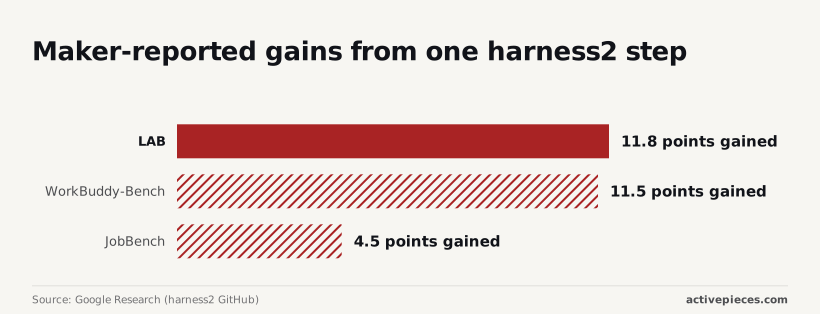
These are the maker's own figures, not independently verified. The JobBench gain is less than half the other two, so expect the benefit to vary sharply by task type.
Gains are also not pass rates, so none of this tells you how often a run succeeds.
You can't budget a flow around this yet. The checked page states no pricing, and without a per-run or per-token figure, any cost estimate would be your own guess.
Two more things are missing: absolute scores and speed. Without baselines, an 11.5-point gain could sit on a weak starting score or a strong one. Without speed, you can't judge latency for anything a person is waiting on.
| Item | What maker states | Stated or not | Source checked 2026-10-19 |
|---|---|---|---|
| Components | Eight | Stated | Google Research (harness2 GitHub) |
| Executors | Two | Stated | Google Research (harness2 GitHub) |
| WorkBuddy-Bench gain | 11.5 points | Stated | Google Research (harness2 GitHub) |
| JobBench gain | 4.5 points | Stated | Google Research (harness2 GitHub) |
| Absolute scores | None given | Not stated | Google Research (harness2 GitHub) |
| Pricing | None given | Not stated | Google Research (harness2 GitHub) |
| Speed | None given | Not stated | Google Research (harness2 GitHub) |
Prices and plan limits checked against github.com on October 19, 2026.
The structure and the relative gains are usable today, and everything else is a question to settle in your own test run.
Easier to see it running than to read about it: set it up free, no card.
Harness2 integration without native support
You reach it through general steps, and which one works depends on how Google exposes it.
The list below ranks the routes from least to most setup, and the first thing to take from it is that you confirm the exposure before building anything:
- An HTTP request step, if harness2 has a documented endpoint.
- An AI step with a custom or OpenAI-compatible provider, if the endpoint follows that request format.
- An MCP server, if harness2 is offered as tools rather than a plain model call.
Testing harness2 integration routes
We haven't run any of these against harness2, so treat each as a route to test, not a confirmed recipe.
Harness2 through the HTTP request step
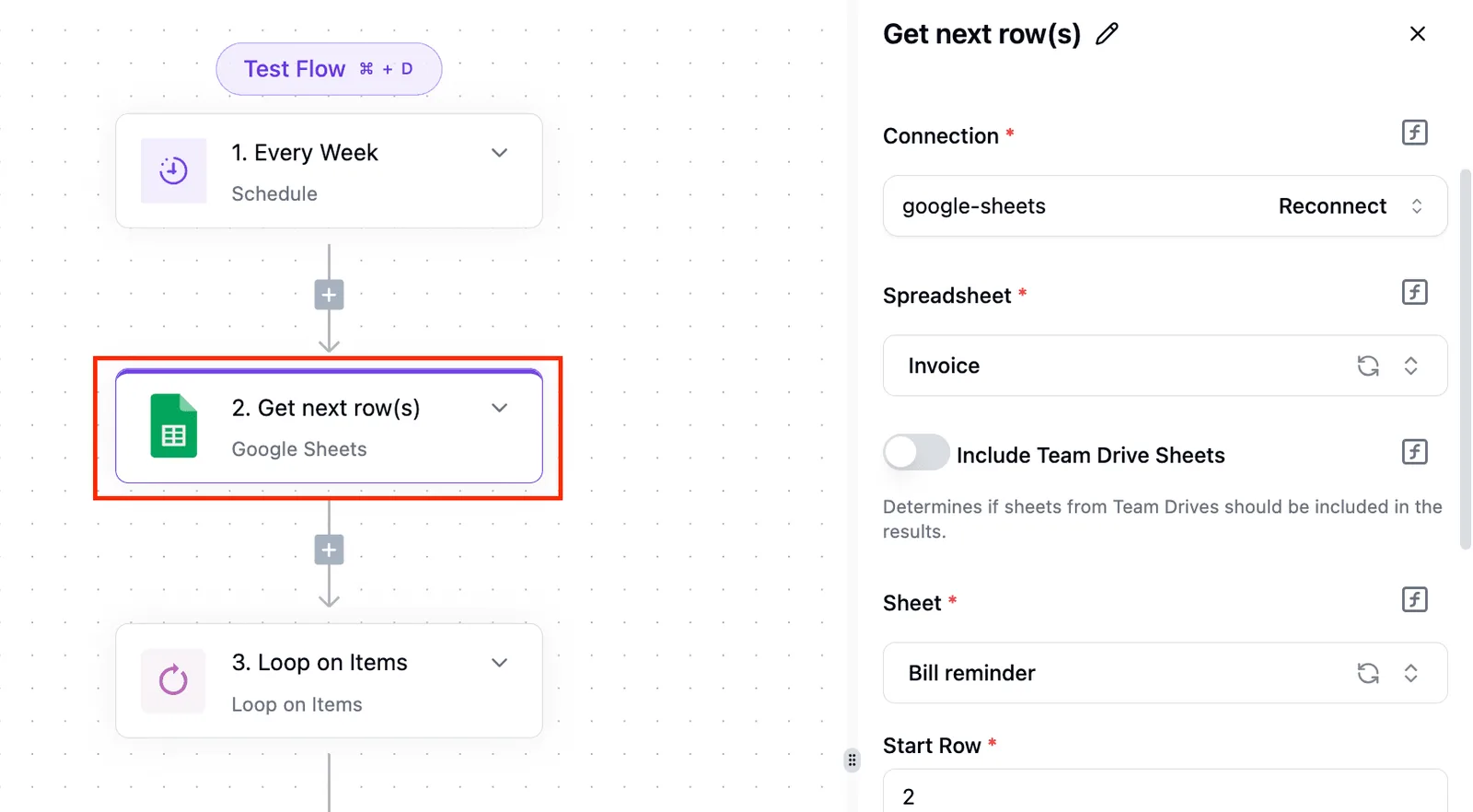
If Google's pages give a URL, an auth method and a request body, the HTTP request step is the shortest path. You set the method, paste the headers, map the prompt into the body field, and read the response in the next step.

The catch is that you own the details: authentication, error handling and any polling for long-running jobs.
Harness2 as a custom AI provider
Only if harness2 accepts OpenAI-style requests does the custom-provider route apply. Then you point the step at its base URL, supply a key and name the model, and you get the AI step's prompt handling without hand-building JSON.
If the maker's pages don't state that compatibility, skip this option, because a near-match fails on field names.
Harness2 through an MCP server
Choose the MCP route if harness2 is published as an MCP server, or if you wrap it in one yourself. It suits agent-style flows where the model decides which tool to call. It's also the heaviest setup, so don't start here without a reason.
Whichever route you use, the result arrives as a field in a step's output. Map that field into the next step, such as a message, a row or a ticket, and check one real response first so you map the right key.
Harness2 cost and speed compared with alternatives
Because the maker states no per-task cost and no speed for harness2, the token prices of whichever model it calls set your bill.
Model token prices behind harness2 costs
For models harness2 might call, TokenScale lists input and output prices per million tokens. GPT-6 Luna runs $0.10 to $0.50, so it suits high-volume steps where each run is cheap.
Flash-Lite 3.5 runs $0.30 to $2.50, while the older Haiku 4.5 was listed at $1 to $5; Claude Haiku 5.5 is the current fast Claude model, and that listing gives no price for it.
In the middle, for work that needs more reasoning, sit Gemini Pro 3.1 at $2 to $12 and GPT-6 Sol at $2 to $10 (GPT-6.1 Sol is the current model in that tier, and the listing's figure belongs to GPT-6 Sol).
Opus 5.5 costs $4 to $20, forty times Luna at both ends, so a step that runs thousands of times a day shouldn't default to it.
The table shows what each option publishes. Only the three tools with published plans state a price, and none gives a per-task cost or speed from its maker.
| Option | Published cost | Maker per-task cost and speed | Tested by us |
|---|---|---|---|
| harness2 | None stated | None | No |
| LangSmith | $0 or $39 per seat | None | No |
| Zapier | From $19.99 for 750 tasks | None | No |
| Gemini Flash API | Billed per token | None | No |
| Activepieces | $0 free plan with 1,000 credits a month; Plus $20 a month; Team $200 a month; Ultimate through sales | — | — |
LangSmith and Zapier price by seat and by task, so they can't be compared directly with per-token billing until you measure your own token counts.
No page we found gives harness2 latency or throughput, so any "faster than" or "cheaper than" line is a guess. Run ten real inputs, record tokens in and out, and multiply by the prices above before you commit a flow to volume.
What to watch next after the harness2 launch
Re-check two places before you commit volume, because on 2026-10-19 the project reads as days old and has no dedicated connector. Anything you build today rests on pages that can still change under you.
Signals on the maker's repository
The dated checks so far:
- Releases tab: nothing published on 2026-10-19.
- Commit history: the first commit is dated Oct 8 2026.
- Documentation at harness2.app: read for what it states about inputs, outputs and limits.
- Issues tab: scan for reported failures.
Because the Releases tab is empty, there's no tagged version to pin to, so a flow built now points at whatever the latest commit happens to be. A first commit on Oct 8 tells you the code is young and the interface may still move.

Re-run these checks on a schedule, and treat a first tagged release as the earliest sign the maker expects people to depend on it.
Next to the commit log, the documentation matters more. If a field, limit, or authentication step isn't written on the docs pages, don't map it in a flow.
The Issues tab shows what breaks in practice: look for repeated reports about authentication, malformed responses, or timeouts, since those are what stall an automated run.
Harness2 in the integration catalog
Search the catalog for harness2 and note the date you looked.
Until a dedicated entry appears, the only route is the general building blocks: an HTTP request step with the endpoint and headers the docs describe, or an MCP step if the maker publishes a server.
A native entry would change the work, because it would bring named triggers, actions and authentication handled for you.
Check that any new entry exposes the specific action your flow needs, not just the product name. A listing with one generic action still leaves you building the rest by hand.
What Activepieces does about this
The article's problem is a gap: harness2 has no native integration anywhere, and the maker's pages state no endpoint, pricing or speed. Activepieces doesn't have a harness2 integration either, and I'd rather say so than imply otherwise.
What it does have is a way of closing that kind of gap without waiting on anyone.
Its integrations, called pieces, are open source. The catalog stands at 742, counted from the monorepo, and roughly 60% were contributed by the community, not by the vendor.
The core is MIT-licensed, so you can read how a integration is built, copy the pattern and run it in your own instance.
Once Google documents how harness2 is exposed, a integration for it is the same kind of work the community has already done hundreds of times.
Until then, the general building blocks the article describes are all in the product: the HTTP request step, an AI step that accepts a custom provider, and MCP. You can try the first route today against whatever you host yourself.
If you want a typed integration instead, you can have AI draft it and keep it in your own instance, so nothing depends on a vendor release.
None of that makes harness2 any less of a research artifact, and Activepieces can't supply the absolute scores or latency figures the maker leaves out. It does let you run the small, reversible test the article recommends without committing to a connector first.
If the repo gets a tagged release and documented inputs, you can promote the test into a integration afterward.