
Housecall Pro API Keys and Limits for Developers

Nov 23, 202614 min read
Whether you can call the Housecall Pro API depends on your plan or partner status, and it is worth confirming that before you build anything on it, whether you wire it up by hand or through a tool like Activepieces.
It is a REST API for jobs, customers and related data.
The Housecall Pro API is the set of authenticated REST endpoints that lets an approved account or partner read and write its Housecall Pro jobs, customers and related records, governed by documented API keys, rate limits and error responses.
Decide who owns the key before writing code, because that person gets paged when a sync fails at 2am on a Tuesday.
Determine Housecall Pro API access by plan
What the API lets you do
It exposes the records your office staff touch by hand: customers, jobs and their related data. That means you can read and write them from your own systems, so a booking made elsewhere doesn't have to be retyped.
Decide who owns the key before writing code, because that person gets paged when a sync fails at 2am on a Tuesday.
The vendor's developer docs list the exact endpoints. Treat anything not listed there as unavailable, however confidently a forum post describes it.
Whoever owns the integration, whether that's you, a contractor or someone running a no-code flow, holds a credential that can change customer records.
Which plan includes API access
Of the three plans, only Max includes API access. The table shows price, seat limit and access side by side.
| Plan | Price (monthly / yearly) | User limit | API access |
|---|---|---|---|
| Basic | $79 / $59 | 1 user | Not included |
| Essentials | $189 / $149 | Up to 5 | Not included |
| Max | $329 / $299 | Up to 8 | Yes |

At more than four times Basic's monthly price, Max means a solo operator is paying for the integration, not for extra features.
The eight-user ceiling means a company with a ninth technician or office hand outgrows the plan that carries the API. Check both before you promise anyone an integration.
API key versus OAuth app for partners
If you are a customer automating your own account, the docs' account-level credential is the route. If you build software that other Housecall Pro companies will connect to, partner status and an OAuth app are the relevant route.
When the person whose login a key is tied to leaves, the key stops working in the way you least expect. Read the authentication page in the developer docs and note which credential your use case falls under before you request anything.
Housecall Pro API sources and date checked
The plan names, prices, seat limits and API access flag come from Housecall Pro's plan listing as supplied for this article. Endpoint scope and credential types come only from the vendor's developer docs.
Prices and plan rules change, so confirm both pages on the day you build. The next step is a single authenticated request, which tells you in seconds whether your account has access.
Everything below works on Activepieces' free plan. Start without code or a credit card.
Authenticating and making the first Housecall Pro request
If a JSON list of customers comes back from your first request, you have access. Generate a key in your account's API settings, then send it in the Authorization header on a GET to the customers endpoint.

Decide first whose key this is. A key created under one employee's login stops working when that person leaves, and whoever gets paged at 2am will be debugging an expired credential.
Generate the key or register the app
You create keys inside the Housecall Pro account, in the area the docs point to for API or app management. If you don't see that option, your plan or partner status probably doesn't include it, so stop there and ask Housecall Pro rather than guessing.
Building a product for other contractors means registering an OAuth app, which follows the partner path in the docs. Record who created the key and where you store it.
Take the header format straight from the docs, since the scheme differs between API keys and OAuth tokens. This sketch assumes the key scheme and keeps the key in an environment variable:
curl -H "Authorization: Token $HCP_API_KEY" \
 -H "Accept: application/json" \
 https://api.housecallpro.com/customers
If the docs show a different scheme or path for your account type, follow the docs.
Reading the Housecall Pro API response
When the call succeeds, you get a JSON object whose main field is a list of customers, each with an identifier, a name, and contact details.
It also carries pagination fields, so a short list doesn't mean you have seen everything. Check the exact field names against the reference before you write a parser around them.
Once this call works, you can repeat it on a schedule and write its rows to a spreadsheet without code, which is where this walkthrough ends up.
When you get a 401, the request wasn't authenticated. Check these in order:
- You copied the key whole, with no trailing space or line break.
- The header name and scheme word match the docs exactly.
- The key belongs to the account you are calling, and hasn't been revoked or regenerated.
- Your plan or partner status actually includes API access.
Don't build retries or error handling on top of a 401. Fix it first, because a retry loop only repeats a failure that has a known cause.
Review Housecall Pro API pricing and limits
The documentation defines a fixed set of resources. Any per-call charge or rate limit that applies to you is whatever your plan's terms state, so read them before you size a retry policy.
Whoever is paged when a sync stalls at 2am will need those terms, not a recollection of them.
Housecall Pro API endpoints and webhooks
The developer docs expose these resources:
- customers
- jobs
- estimates
- invoices
- employees
- webhooks
Read it as the boundary of what you can call: a resource with few operations is read-and-create territory at best, and an operation that appears in no table isn't documented, whatever a forum thread claims.
Build only against the bars.
Of everything here, webhooks are the part to assign an owner to. They push events to your receiving URL, so that URL, its uptime and its failure handling belong to someone on your side, and you should name that person before launch.
Housecall Pro API per-request pricing
I found no per-request price in the documentation I worked from, and I won't infer one. Access is gated by plan or partner status, which means the cost sits in the subscription tier rather than in a meter on each call.
The consequence is that your budget question is "does my plan include API access," not "how many calls can I afford." Confirm that with Housecall Pro in writing, and note the date you checked, because plan terms change.

Rate limits by plan
I have no confirmed figure for request limits on any plan, so none appears here. Don't borrow a number from another vendor or a blog post.
Check the rate-limit statement in the official docs for your plan, record the date you read it, and treat anything the docs leave unstated as unknown.
Until you have the documented limit, write your client to read the error responses and back off when it's throttled, rather than to a guessed ceiling.
Once the limit is confirmed, set your request pacing below it and put the limit in your runbook, so the person on call can tell a throttle from a fault.
Easier to see it running than to read about it: set it up free, no card.
Handle Housecall Pro API errors in production
Build the retry path first, because most rejected calls in production are 429 throttles, not faults. Treat every other error as a specific mistake with a specific fix.
The five rules below each tie to one error. Items from community reports rather than the docs are marked.
- A 401 means a bad or missing key: stop, check the key, and don't retry.
- A validation error means the payload is wrong: fix the body, because resending it fails the same way.
- A 404 means the wrong ID: confirm you are using the ID from the right resource.
- A 429 means back off and retry, with a pause that grows each attempt.
- For lists, request with
pageandpage_sizeand keep going until a page comes back short. The stop-on-short-page rule is community-reported.
The sections below take these in order of how often they will page someone.
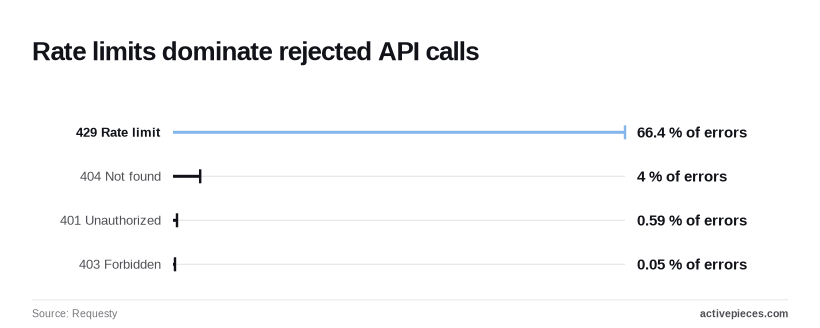
In Requesty's October 2026 status-code data, 401 Unauthorized is 0.59% of errors and 403 Forbidden is 0.05%. Both are rare, so one appearing is a signal, not noise.
A 401 points to a rotated or mistyped key. A 403 suggests your plan or partner status doesn't cover the endpoint. Retrying fixes neither, so alert the key's owner.
429 rate limiting and backoff
Roughly two in three errors are 429s: Requesty puts it at 66.4%, so your system is choking on volume, not functionality. Rate limiting is therefore the failure you'll see most, and the one your retry code must get right.
Honour any retry guidance in the response, otherwise wait with exponential backoff plus jitter, and cap the attempts so a stuck job fails visibly.
At 4% of errors in the same data, a 404 is small but usually a wrong ID, not an outage, meaning the system is responding correctly to invalid requests.
Missing records are more often a paging bug: if you read only the first page, everything past page_size silently vanishes. Loop until a page returns fewer rows than requested.
If you can use webhooks, you skip the polling that feeds the 429 count. Duplicate delivery is a general webhook hazard, and I couldn't tie it to Housecall Pro's docs, so treat it as a design precaution.
Record each event ID you process and skip repeats, so a replay can't create a second job or invoice.
Calling Housecall Pro without code using Activepieces
Without writing a service, you can reach the same Housecall Pro endpoints through Activepieces. Someone still has to own the flow, because when it fails at 2am the person paged is whoever holds the account, not the tool.
Deduplicating events is code you may now have to place inside a flow, and the same discipline applies: decide who owns it before you build it.
Use the connector for common actions
Activepieces chains a trigger to one or more actions, and it has no per-run step charge: a run is 1 credit however many steps it has. Check its Housecall Pro connector first.
If the trigger or action you need appears there, use it: the connector handles the request details, so you have less to maintain and fewer places for a header to go wrong.
Read the connector's action list rather than assuming coverage.
If an endpoint you need is absent, that's a gap in the connector, not proof the API lacks it, and you don't have to wait on a vendor release to close it: Activepieces lets you generate the missing integration with AI and add it privately to your own instance.
About 60% of its 750 integrations, counted from the open-source monorepo, were contributed by the community, so the platform's ecosystem grew beyond what the company alone could have built. The Housecall Pro docs remain the authority on what exists.
Use the HTTP step for the rest
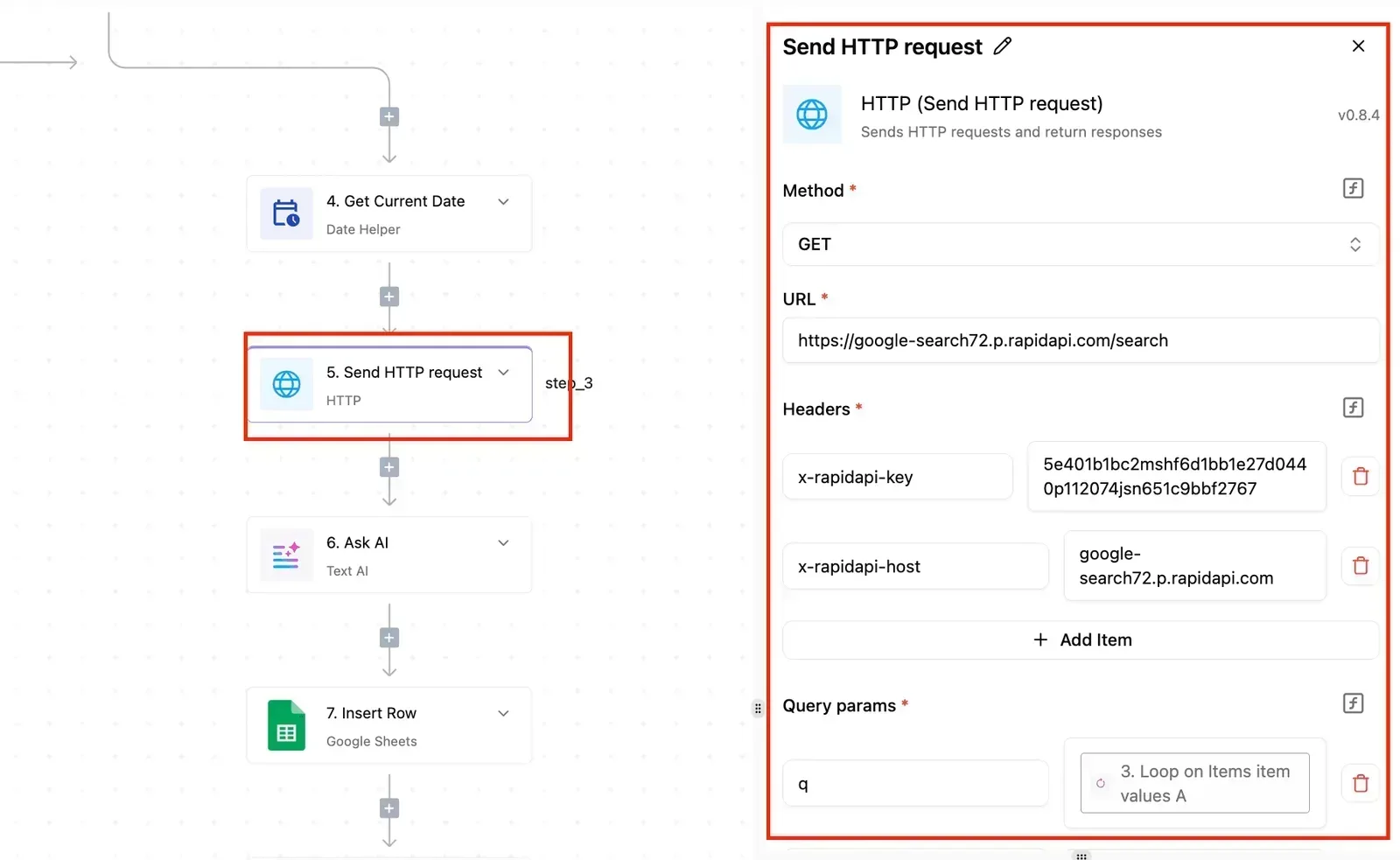
When the connector doesn't cover your action, add an HTTP step and send the same request you verified earlier: the same URL and the same authorization header.
Connections in Activepieces are held centrally and reused across flows, and the run history shows which step failed, so a failing call is something you can inspect rather than guess at.
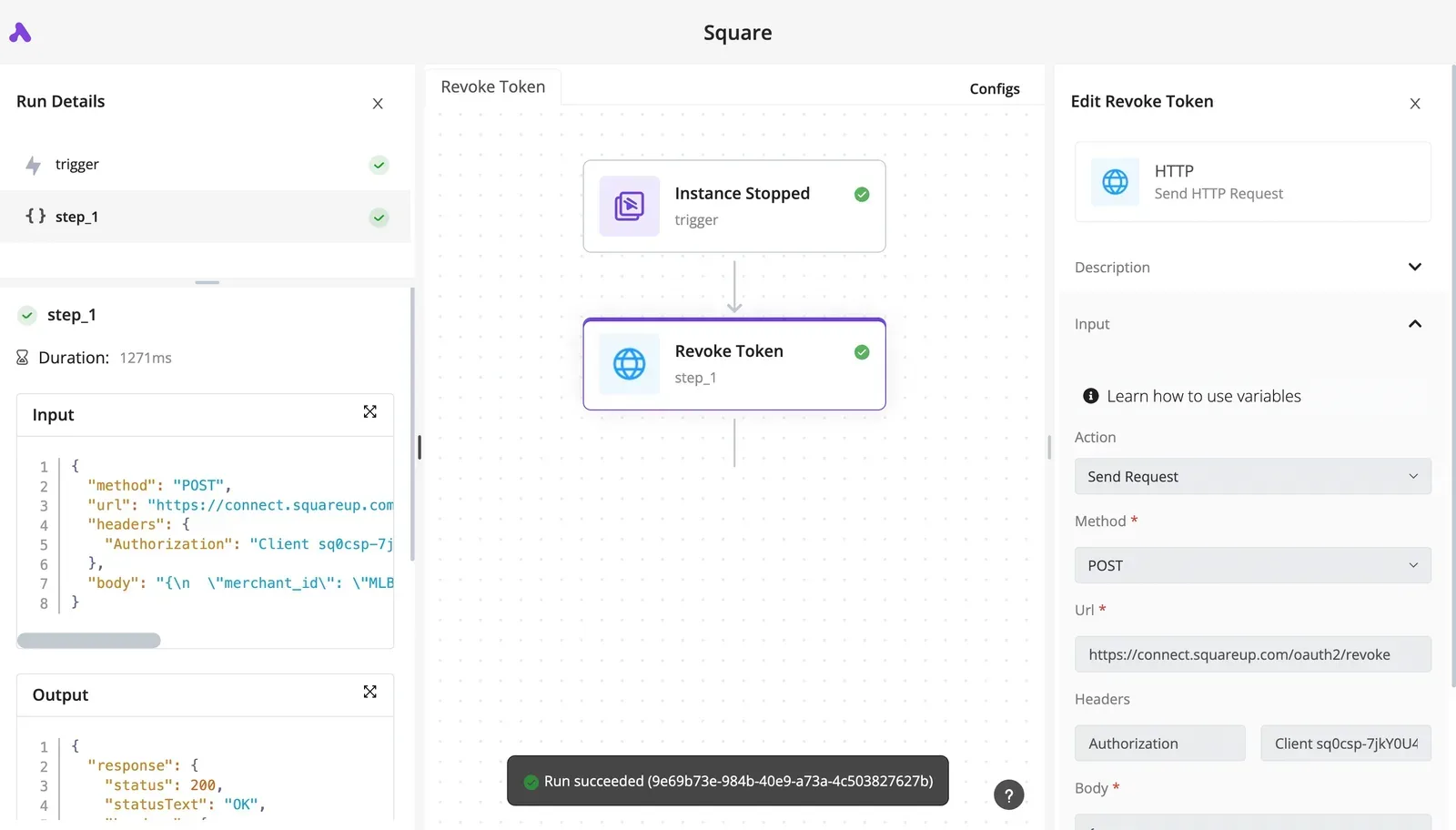
Keep the credential in the flow's stored connection or secret field, not pasted into the step text, so whoever inherits the flow can't read it off the screen.
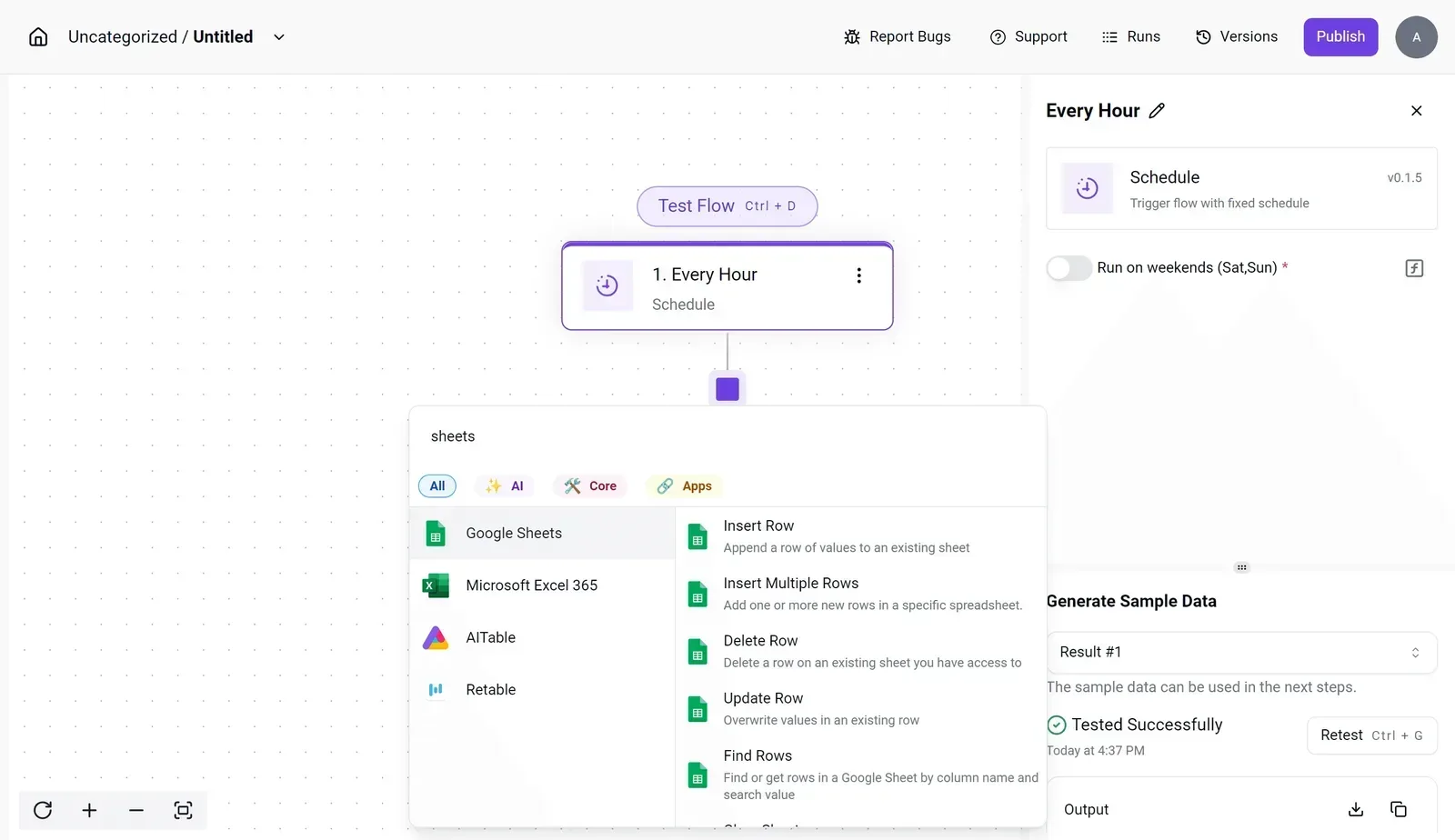
Build a Housecall Pro job-to-Google Sheets workflow
In the flow below, a new Housecall Pro job is written as one row in a Google Sheet, with the HTTP step carrying the authentication header between them.
It shows three stages with nothing hidden between them: an event arrives, a request authenticates, a row lands. Take from it that any failure belongs to exactly one stage, which tells you where to look first. Once it runs, the next step is Monday's work:
- Name an owner for the flow and a place where its failures are sent.
- Run one test job and confirm the row appears.
- Check the flow's run history for errors before trusting it.
For heavy volume, unusual endpoints, or logic the flow builder can't express, custom API calls remain the better choice. For a simple job log, though, this route is enough.
Frequently asked questions
After the body, four questions stay open, and the docs for your plan settle each of them, not anyone's memory of what the API used to allow.
Is the Housecall Pro API free? Unconfirmed. Access depends on your plan, and I haven't verified that the API carries no per-call charge.
Treat it as an unpriced dependency until the developer docs or your account manager say otherwise. If a charge appears later, the person who owns the automation is the one who finds it on an invoice.
Does Housecall Pro have webhooks? Check the developer docs for an events or webhooks section before you design around one. I haven't confirmed which events are offered or whether your access level includes them.
Without webhooks, you poll on a schedule, and that makes your error handling and your request budget part of the design from the start.
Can you use the API on a lower plan? No, it is available only on Max. The article's premise is that access depends on plan or partner status, so a lower tier may not include it.
Make one authenticated request against your own account before you write anything else. A rejected request tells you more than any forum thread, and it costs nothing to run.
Is there a sandbox for testing?
I found no documented sandbox, so don't assume one exists. Without one, your tests run against live customer records. Use a dedicated test company or clearly labelled test records, and keep write calls out of anything that runs unattended until you know what they change.
Here is what this article couldn't confirm. Each item is marked unconfirmed because I have no docs link to cite. Until the docs or Housecall Pro support answer them, build as if the answer is the least convenient one.
- Basic or Essentials plan access to the API: not included.
- Per-call fees: unconfirmed.
- Numeric rate limit: unconfirmed.
- Number of keys allowed per company: unconfirmed.
Get written answers on these four before the integration goes into production. Otherwise you'll meet them as failures, at the hour when nobody who understands the account is awake.