
How Much Does Salesforce Cost? CRM Pricing by Edition

Nov 1, 202615 min read
Salesforce starts at $25 per user per month and climbs past $500, so the headline number tells you which tier you are shopping in, not what you'll pay.
It's customer-relationship software that tracks leads, deals and service cases, the kind of system that Activepieces users often connect to the rest of their stack.
Salesforce pricing is the subscription cost of Salesforce's CRM, made up of a per-user monthly fee set by edition plus add-ons, data and API limits, and implementation work that together determine the total bill.
Salesforce pricing by plan, verified November 2026
Current plans, prices and limits in one table
Read the last column first, because the usage cap, not the price, is where a plan runs out. The table shows the four plans most buyers compare, which means you're in sync with market practice.
| Plan | Price (USD) | Billing cycle | Key inclusion | API limit per user |
|---|---|---|---|---|
| Starter Suite | $25 per user per month | Monthly or annual | Lead management basics | Capped per edition; get the figure in writing |
| Pro Suite | $100 per user per month | Quoted on contract | Sales, service and marketing together | Capped per edition; get the figure in writing |
| Enterprise | Quoted per user | Quoted on contract | Deeper customization | Capped per edition; get the figure in writing |
| Unlimited | Quoted per user | Quoted on contract | Highest support and sandbox allowances | Capped per edition; get the figure in writing |
Prices and plan limits checked against salesforce.com on November 1, 2026.
A fourfold gap separates the two cheapest plans: Salesforce lists Starter Suite at $25 and Pro Suite at $100. You shouldn't pick Starter just because it's cheap. Otherwise you may discover it lacks what your team does daily.

What the per-user price does and does not cover
Pay the per-user price and you have the licence and nothing around it.
In its 2025 pricing update, Salesforce raised Professional by $5, Enterprise by $15 and Unlimited by $30 per user per month, which means you're locked into higher monthly bills that scale with your headcount.
At 50 users, the Unlimited increase alone adds $1,500 a month before you change anything about how you use it, so you're paying more to use exactly what you use today.
Expect to pay extra for storage, API calls (the requests other software makes to your Salesforce), add-ons and the consultant who sets it all up.
Connecting Salesforce to your other tools draws on those API calls, whatever tool does the connecting, so a plan with a low cap can throttle you in a busy month.
Products that sit outside the core CRM editions
Step up through the Sales Cloud tiers and it gets steep: Core is $195, Advanced is $395 and Max is $550 per user per month.

Max costs about 2.8 times Core, so a 20-person team pays $7,100 more per month for Max than for Core.
Ask what the extra $355 per user buys that you'll use in the first year, and if you can't answer immediately, you're buying unused capability.
If you are running this arithmetic for your own team, see what the same workload costs on Activepieces.
Salesforce cost at realistic team sizes
At 5, 25 and 100 users, the subscription is rarely the biggest first-year cost: setup, plus someone to run the system afterward, usually matches or beats it.

The license is the one line you can read off a price page, which is why it feels like the whole bill.
They are the annual license, a one-time implementation estimate of $10,000 to $35,000, and the yearly cost of the admin or support person who keeps the system working, which means implementation and operations are as much a cost line as licensing.
The license is the one line you can read off a price page, which is why it feels like the whole bill.
Read the height of each bar as what you'd write checks for in year one, and watch how much of it isn't the license.
Salesforce cost for a five-person team
With five people, the entry editions fit and the license is a small number. The $10,000 to $35,000 implementation estimate often runs several times that license, so you pay for setup before you pay for software.
Skipping setup costs more: the team ends up typing contacts into a tool nobody configured.
At 25 users
At 25 users the license grows with headcount, but the admin line grows faster in importance, so the cost of scaling is dominated by operations, not licensing.
Someone has to own permissions, reports and fixes, and if that person is a part-time hire or a consultant on retainer, their cost belongs in your total.
This is also where edition limits start to bite. If you need automation, extra sandboxes or higher data and API caps, you step up an edition for every user, not just the one who needs the feature.

At 100 users
At 100 users the license becomes a visible budget line, but implementation can still dwarf it. One 120-user deal, documented by Branch8, spent $340,000 on implementation in year one against $180,000 on subscription, so implementation costs are substantially higher than the annual subscription.
Set against the license, implementation ran nearly twice as much, about 65% of the $520,000 total, which means the annual subscription isn't the primary cost driver in these deals.
If you budget from the per-user price alone, you'll underestimate year one by more than the subscription itself. Ask for the implementation quote before you sign the license.
Hidden Salesforce costs and limits teams hit
Expect the implementation quote to be only the first extra bill.
The limits built into your edition produce the rest, and most teams meet them after signing, when changing course costs the most. Salesforce documents each limit below, so you can check it before you buy.
Then there is waste, the other half of the problem.
Read that as a warning about your own seat count. If you buy for the headcount you hope to have, you pay full price for more than half a building nobody walks into.
(chart)
That waste matters because Salesforce prices the limits below per tier, so overbuying seats and still hitting a cap is the most expensive way to get this wrong.
Storage and API limits
Cross the allowance and you buy more.
Each edition includes a fixed allowance of data storage (records) and a separate one for files, and the extra costs well above ordinary cloud storage. Old attachments and duplicate records are what usually fill it, so a cleanup habit costs less than a bigger allotment.

When a chatty integration uses up the daily allowance, your other connections stop mid-afternoon.
An API call is one request from another system, such as your billing tool or website forms, to Salesforce, and editions cap how many you can make per day. So ask your vendors how many calls each sync makes before you trust the edition's number.

Add-ons, support tiers and sandboxes
You'll often find that features you assumed were included sit in add-ons that cost extra, such as extra automation or analytics. Premium support is also a paid tier, and the default level may not cover urgent outages.
With fewer sandboxes in the smaller editions (practice copies of your system where changes get tested), and the cheaper types holding less data, your testers may be working with a thin sample. Price each add-on you expect to need, and add them to the quote.
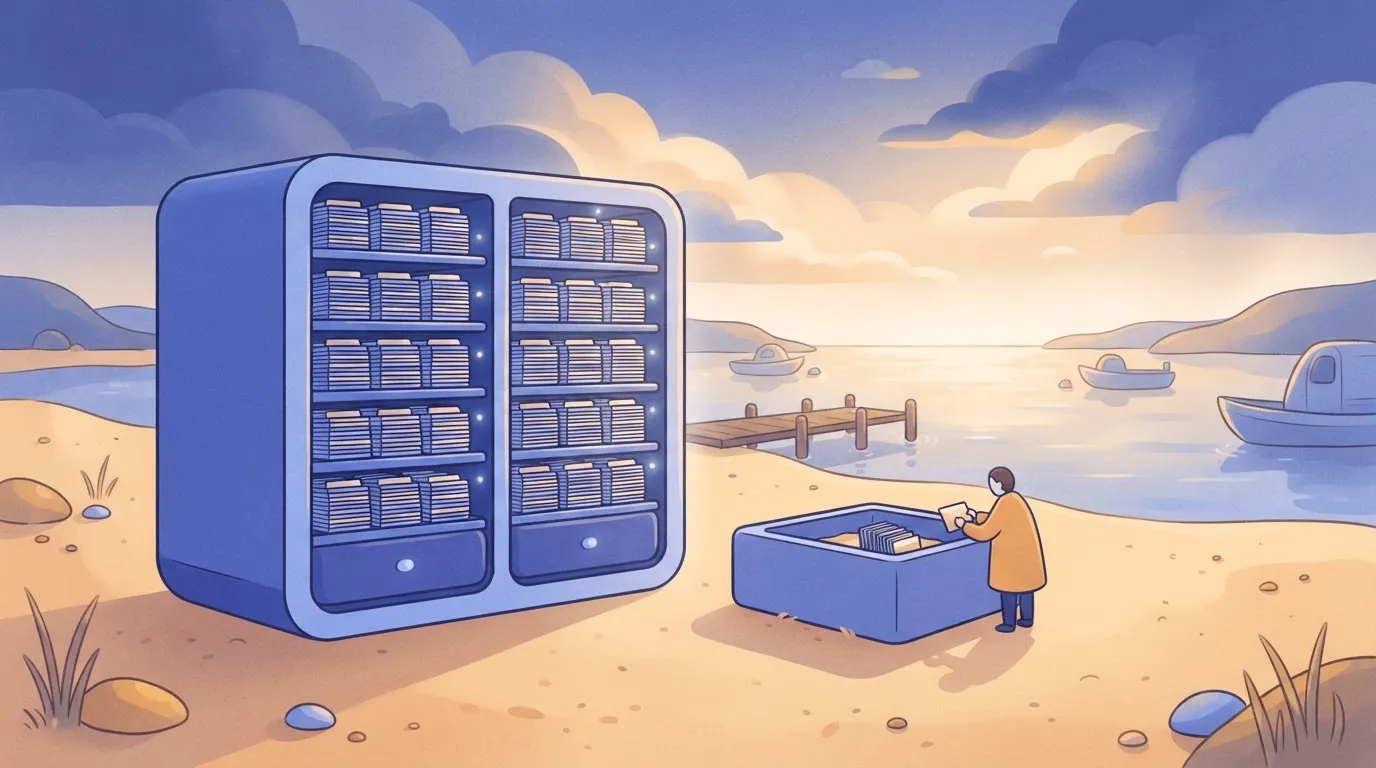
Someone has to configure the system and keep it running after launch. That means a consultant up front and an administrator, in-house or contracted, afterward. Skip that hire and the system drifts until people stop trusting it.
At renewal, Salesforce can raise prices, so negotiate the uplift limit into the first contract while you still have leverage.
Worth checking against a plan that does not meter every step: one credit covers a whole run on Activepieces.
Salesforce against HubSpot, Pipedrive and Zoho
Against its rivals, Salesforce usually costs more, and the gap widens once limits, add-ons and setup are counted. The uplift cap you negotiate therefore protects a bill that's already the highest of the group.
The one place it doesn't cost more is when your needs are large enough that the cheaper tools would force you to buy workarounds.
Price comparison table
The obvious comparison is sticker price. It is not the main difference between the three.
The table below compares them on a 25-user mid-tier plan, and the real gaps are in how much the plan automates, how many records it holds, and how much work it takes to get running.
Take from it the cost of effort, not just the cost of licences.
| Mid-tier Price (25 users) | Automation Limits | Record Limits | Setup Complexity | |
|---|---|---|---|---|
| Salesforce | Highest of the three before add-ons, and it climbs further with them | Deep, but capped by edition, so heavy use pushes you up a tier | Higher ceilings, with storage and data caps that still apply | High |
| HubSpot | Mid-range, with the cost rising as you add contacts and features | Solid at this tier, with the strongest tools held for higher plans | Tied to the number of contacts you pay for | Med |
| Zoho | Lowest of the three | Capable for common workflows, thinner for complex ones | Adequate for a small or mid-sized team | Med |
For teams that mostly need to track deals, Pipedrive, a simpler tool built around the sales pipeline, belongs in the same conversation.
When a cheaper CRM is enough
If your team tracks leads, logs calls and sends follow-ups, a cheaper tool covers it. Paying for Salesforce's depth here means paying every month for features nobody opens, plus an administrator to keep them tidy.
Running in days, not months, is realistic with HubSpot, Zoho and Pipedrive, so you start selling sooner. A small team with no one technical on staff should lean this way, because a system nobody can maintain turns into expensive clutter.
When Salesforce's cost is justified
When several departments share one set of customer records, or when approvals and reporting need to follow your own rules, Salesforce earns its price. It also earns it if you expect to outgrow a lighter tool within a couple of years.
Moving later means paying for a second implementation and a data migration. If that describes you, budget for setup and add-ons from the start, and buy by the edition's limits, not the headline price.
Salesforce integration work with Activepieces
When the expensive part is custom syncing between Salesforce and your billing, support or marketing tools, Activepieces, whose MIT-licensed core ships with 746 integrations, can take it over, and that's the part of the integration budget it touches.
It's an automation tool where you build workflows by connecting steps on a canvas instead of writing code. It doesn't touch the licence bill or the limits behind it.
What it can take off the integration budget
Look at custom syncing first, because that is where implementation money tends to go. Someone writes code that watches for a change in Salesforce, passes it to another system, and then has to be paid again whenever either side changes.
To cover this, Activepieces has a large, growing integration catalogue, and flows start from triggers and run deterministic steps. If an integration is missing, a team can generate one with AI and add it privately to its own instance.
You wire those to the other tool in a visual workflow, and a person who doesn't write code can maintain it.
One such flow is shown in the screenshot below. A failed payment in Stripe, a payment processor, starts a run, and a Slack message goes to a channel with the failure details, all for 1 credit.
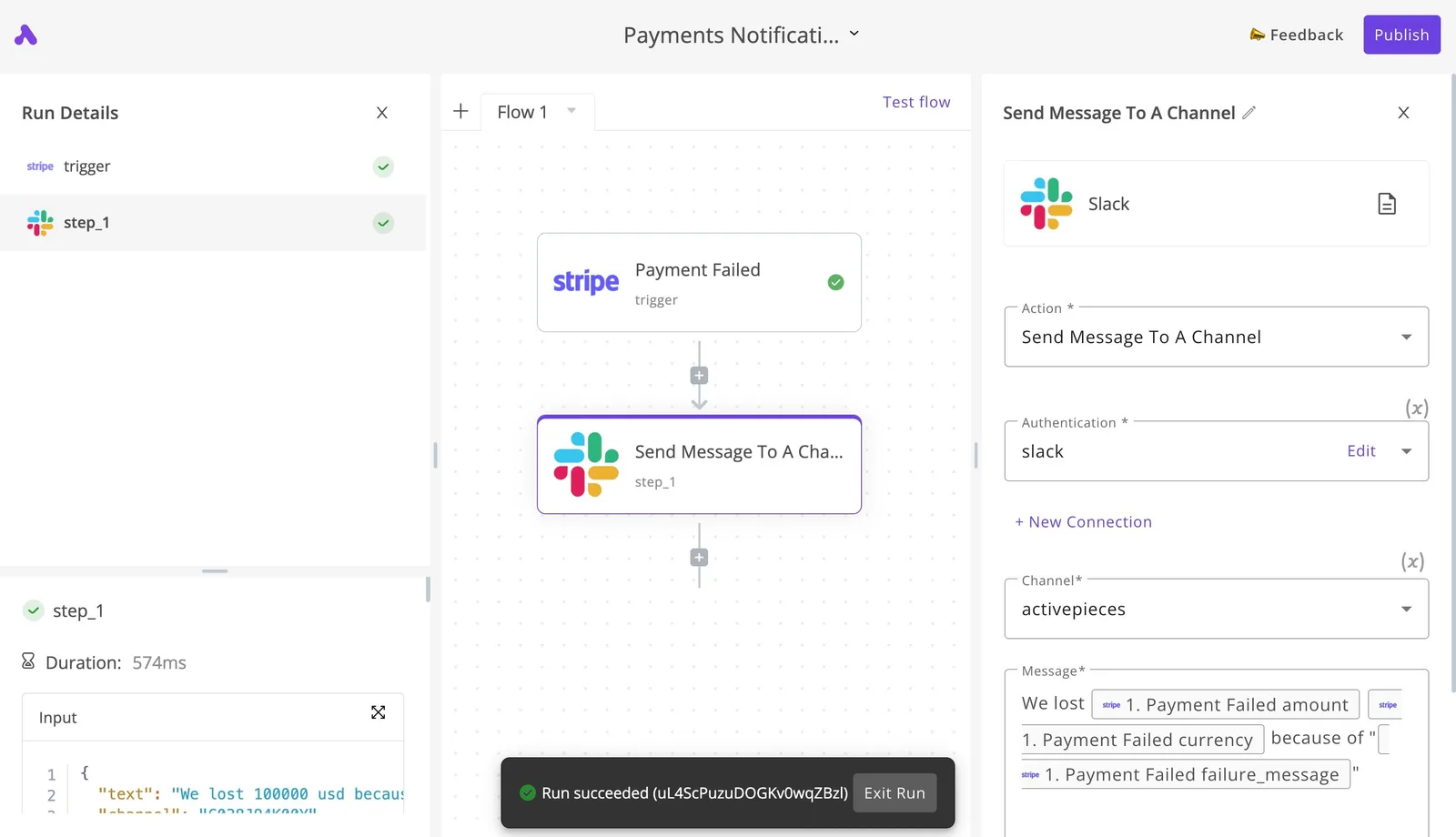
In the run details on the left, the step completed in well under a second, and the notice at the bottom confirms it succeeded.
Swap Salesforce in as the trigger or the destination and you have the same pattern: a billing event updates an account, or a case change alerts the team that owns it.
What follows from that is practical. Work you'd have scoped as a custom build becomes a workflow you can inspect, rerun and change yourself, so the next small request costs you an afternoon instead of a new quote.
What it doesn't change
Activepieces counts the run, not the steps inside it: 1 credit per flow run, so a ten-step Salesforce sync costs the same as the two-step workaround it replaced.
Splitting the work into smaller steps never raises that bill, but every read or write still counts against your edition's API call allowance.
Build workflows around the triggers that fire on a change instead of polling, and count the calls before you launch.
Nor does the per-user licence price change. If your edition lacks a feature you need, or your data and API caps are too low, a workflow tool won't raise them.
It lowers one line of the bill, implementation, and leaves the rest where it was. That's a narrow fit, but for teams paying developers to keep syncs alive, it's a real one.
A Monday plan for pricing a Salesforce quote
Since most buyers aren't paying developers to keep syncs alive, the practical fix is a five-step routine you can start Monday, before Salesforce (the customer-records software your sales team would work in daily) sends its final quote.
- Audit user roles. Count people by what they do, not by who asked for a seat. Someone who only reads reports may not need the same license as a daily user, and every seat you overbuy comes back at each renewal.
- Map features to edition limits. List what you need, then find the edition that includes it. Miss one and you buy an add-on or an upgrade after signing, when you have no leverage.
- Get storage and API caps in writing. An API call is one request from another program to Salesforce. A cap set too low means failed syncs or overage charges, and you find out mid-quarter.
- Get a separate implementation bid. Setup work is usually done by a partner firm. Folded into the license quote, it hides the largest cost and can't be compared.
- Negotiate the renewal cap. Without a written ceiling on increases, the first-year price is only an introduction, and by renewal your data lives there.
Questions to put to the Salesforce rep
Ask which edition includes each feature on your list, and ask it feature by feature. A rep who answers "most of it" is telling you something is an add-on.
Ask what happens when you exceed the storage or API allowance: whether calls are blocked, throttled or billed. Blocked calls stop your business processes, and billed calls arrive as a surprise invoice.
Ask what support level the quote includes and what the next level costs. Then ask for the renewal increase ceiling in the contract itself, not in an email. A verbal promise leaves when the rep does.
Numbers to gather before a Salesforce quote call
Bring your headcount by role, so the rep prices your actual mix instead of a rounded guess. Bring a list of every system that must connect to Salesforce, because each connection draws on your API allowance.
Bring your record count and file volume, since storage limits are set by edition and run out quietly.
Finally, bring a competing quote. Without one, you're negotiating against a price you can't check.
Frequently asked questions
No free plan will run a real business, though Salesforce has time-limited free trials of its main products and a free Developer Edition for building and testing.
The trial is for kicking the tires. Don't load real customer records into it, because when it ends you'll be rebuilding.
Even when the invoice is split into smaller payments, Salesforce contracts are typically annual commitments. Some products have month-to-month terms, but the commitment on your quote is what binds you.
Read the term length before you read the price, because it decides how long you're stuck with a mistake.
Licenses, quotes and price changes
You can mix user license types inside one org, but the edition belongs to the org, not the person. That means its storage, API and customization limits are shared by everyone in it.
Cheaper seats don't escape those limits, and a heavy user on a cheap seat still draws from the same pool.
Treat the published list price as the starting point, not the number you pay. Quotes are built per customer from the edition, add-ons, contract length and whatever discount the rep can justify.
Get the quote itemized, line by line, so you can compare it against the edition's limits and see what you're actually buying.
Expect list prices to move: Salesforce adjusts them from time to time and usually announces changes in advance, but there's no schedule you can plan around.
The exposure comes at renewal, when your locked-in rate expires. Ask what happens to your price at renewal now, and get the answer in writing.
Related reading
References
Running the numbers
See what the same workload costs here.
Free forever plan, and every paid plan self-hosts at no extra cost.
See pricing Talk to sales