
Inspector Pricing: Plans, Limits and Costs (2026)

Nov 24, 202614 min read
Inspector's price is set by three limits, not one sticker number: how many applications you monitor, how many transactions you send each month, and how long the data is kept, a calculation that matters just as much for teams who also run background automations through tools like Activepieces.

Inspector pricing is the tiered, subscription-based fee structure for Inspector's application monitoring service, in which each plan sets a cap on monitored applications, monthly transaction volume and data retention, and your real bill depends on which of those caps your traffic reaches first.
Inspector pricing plans and limits
Which Inspector this covers
Inspector here means Inspector.dev, the code-level application monitoring service that traces transactions, database queries and errors inside your own code.
It's not Amazon Inspector, AWS's vulnerability scanner, which bills per scanned resource and shares nothing with Inspector.dev's plan structure. If your invoice shows scanned instances or container images, you're reading the wrong pricing page.

Others arrive here from comparison searches that put Inspector next to Activepieces, an MIT-licensed automation platform with 750 integrations, which signals what integration depth is now a competitive necessity.
That's a different category of product, and the comparison only works once you have sized Inspector's own bill.
Inspector pricing figures and unpublished numbers
I haven't confirmed every figure for this edition, so each one I couldn't verify reads "not published" rather than a guess. A blank you can see is cheaper than a wrong number you budget around.
The columns follow what inspector.dev/pricing uses: monthly and annual price, monitored apps, monthly transactions and retention.
The plan table
The table is dated 24 November 2026 and holds only what this edition confirms. Where a cell says "not published", read it from the live page and write the date beside it.
| Plan | Monthly price | Annual price | Monitored apps | Included transactions | Retention | Overage per 50K |
|---|---|---|---|---|---|---|
| Free | not published | not published | not published | not published | 3 days | not published |
| Beginner | not published | not published | not published | not published | 7 days | 2.5 € |
| Developer | not published | not published | not published | not published | 14 days | 2.25 € |
| Team | not published | not published | not published | not published | 14 days | 2 € |
| Scale | not published | not published | not published | not published | 21 days | 1.65 € |
| Enterprise | 169 € | 1,690 € | not published | 6M | 21 days | 1.4 € |
The Enterprise row is the only complete one. The 6M allowance follows from the worked example later in this article, where 20M transactions leave 14M in overage.
Annual here is twelve times the monthly price. If the live page shows a discounted annual rate, use that instead and note it.
Until you fill the blanks from the live page, treat any quoted price as incomplete. The next step is to measure your own application count, monthly transaction volume and the retention window you need, then read each plan's limits against them.
If you are running this arithmetic for your own team, see what the same workload costs on Activepieces.
What Inspector plans cost at realistic usage
Run your three measurements against the published limits and the bill is set by whichever limit you cross first. The table below applies that to three assumed profiles, and the headroom column shows how far traffic can grow before the bill changes.
| Profile | Assumed apps and monthly transactions | Fitting plan | Monthly cost | Annual cost | Headroom |
|---|---|---|---|---|---|
| Solo developer | 1 app, 100K | Beginner, the smallest paid tier | Beginner's price from the plan table | 12 × monthly | Cap minus 100K |
| Small agency | 10 apps, 1M combined | Developer or Team, whichever app cap covers ten | That tier's price from the plan table | 12 × monthly | Cap minus 1M |
| High-traffic team | 1 API plus workers, 20M | Enterprise | 561 € | 6,732 € | None; 28 € per extra million |

Sizing wrongly is what the third row shows. Only that row is a fixed price here; the first two stay open until the app caps and prices in the plan table are filled from the live page.
One app, low traffic
At 100K transactions, one app needs the smallest tier that covers a single application. The risk is retention, not volume, because a short window can lose the data you need to debug last week's incident.
For an agency with ten client apps, the application count decides the tier, and combined volume is the second check.
Ten apps at 1M transactions is a modest total, but one busy client can use most of the pooled allowance, so the clients share the headroom rather than each having their own.
A high-traffic API with queue workers
Because queue workers count as transactions, a single product can reach 20M a month. The Inspector pricing page lists the Enterprise base at 169 € a month.
At 20M transactions, 14M are overage, which adds 392 € a month, or 28 € per extra million. The monthly bill is therefore 561 €, more than three times the base, and 6,732 € a year instead of 2,028 €.

That gap is the real price, so size the plan before you compare alternatives.
Hidden costs and limits Inspector users hit
Outside the plan row, five items can move your bill: how transactions are counted, what happens at quota, app or seat limits, retention, and billing terms. Confirm each on the Inspector pricing page.
Check them in that order, because transaction counting sets the volume the other four are measured against.
If your app runs heavy background work, your real volume can be well above your request count, because queued jobs and commands may count as transactions alongside web requests. Size from total executions, not page hits.
Extra usage is billed per 50K block. The rate falls as you move up: 2.5 € on Beginner, 2.25 € on Developer, 2 € on Team, 1.65 € on Scale and 1.4 € on Enterprise.
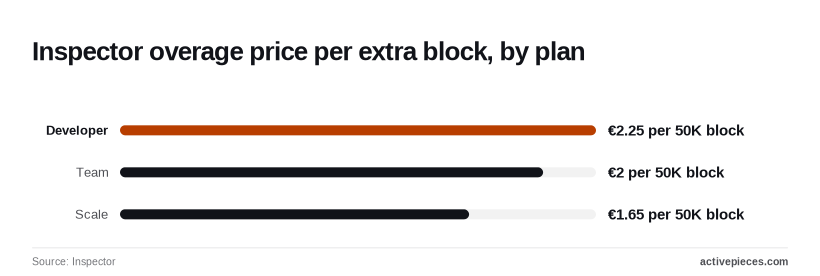
Enterprise overage is 44% cheaper than Beginner, so a team that regularly overshoots pays less by upgrading than by absorbing blocks.
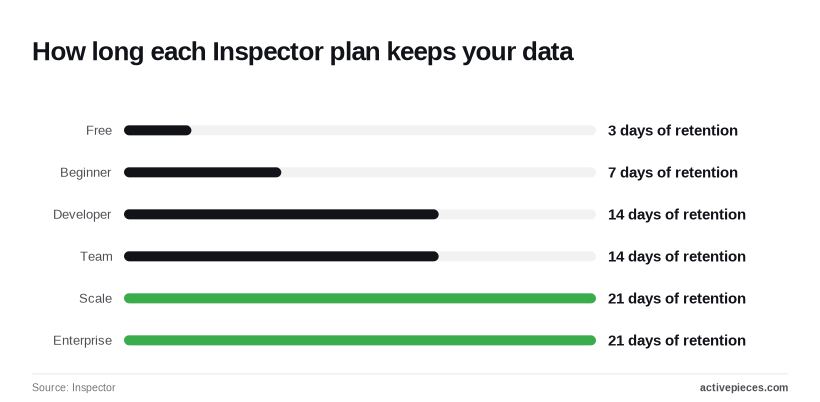
Retention is 3 days on Free, 7 on Beginner, 14 on Developer and Team, and 21 on Scale and Enterprise.
**Enterprise overage is 44% cheaper than Beginner, so a team that regularly overshoots pays less by upgrading than by absorbing blocks.
On Free, a regression noticed after a long weekend is already gone. Team buys no more history than Developer, so don't pay for it expecting that.
Confirm the billing cycle and any trial on the pricing page before committing, since they decide how long a wrong sizing guess lasts.
Worth checking against a plan that does not meter every step: one credit covers a whole run on Activepieces.
Inspector against its closest alternatives on price
Because the five tools charge for different things, a price comparison only holds once you convert each one to your own traffic. The table below shows what each vendor meters, and that unit decides whether your bill follows applications, events, data volume or servers.
| Vendor | Billing unit | What your bill grows with |
|---|---|---|
| Inspector | Monitored applications, transaction volume and retention, set by plan | Number of apps and request volume |
| Sentry | Events (errors, transactions, other telemetry) | Error rate and traffic |
| New Relic | Data ingested, plus users | Telemetry volume and team size |
| Datadog APM | Hosts running the agent, plus ingested and indexed spans | Server count and trace volume |
| Laravel Nightwatch | Events per month | Request volume and logged activity |
I've left out entry prices, retention and overage terms. They change often, and a figure I haven't checked against the vendor's page today is worse than none. Read those from each pricing page on the day you buy.
Inspector flat tiers versus usage-based billing
When your traffic sits comfortably inside a flat tier, that tier is cheaper, because you pay the same on a quiet month and a busy one.
Usage billing is cheaper when traffic is spiky or small, since you pay only for what arrives. The reverse also holds: a traffic spike that crosses a flat tier's limit can cost more than the usage model would have charged.
Per-host pricing, as at Datadog, punishes many small servers running light traffic. Per-event pricing, as at Sentry and Nightwatch, punishes a chatty application. Data-volume pricing, as at New Relic, punishes verbose telemetry.
Inspector's per-application plans suit a few busy apps best. Count your apps, hosts and monthly events first, then price each vendor against those counts.
Choosing the right Inspector plan before you pay
Size the plan from your own monthly transaction count, plus queued jobs and a margin for spikes, then take the smallest tier that clears that total.
The steps below turn the counts from the previous section into a plan choice. A numbered sequence follows because the order matters: each step feeds the next.
- Pull your monthly transaction counts from your own logs or load balancer for the last several months. Use the busiest month, not the average, because the busiest month sets your bill.
- Add queued jobs and console commands. Inspector counts these as transactions too, so a web-only count understates your volume, and the gap shows up as overage.
- Add a spike margin for launches, sales and retry storms. Without it, one bad week pushes you into overage on a plan that looked fine on paper.
- Pick the smallest plan above that total. Larger plans carry lower overage rates, so if you routinely land just over a boundary, compare the next tier up against the overage you'd otherwise pay.
- Price both billing options against the same transaction total. Annual billing usually lowers the effective rate, but it commits you to a tier before you know whether your estimate holds. If your volume is still moving, pay monthly for a quarter, then switch once the numbers settle.
- Write down a switch trigger before you subscribe: for example, overage charges in consecutive months, or a plan upgrade that costs more than a tool billed on a different unit, such as per host or per event. When that happens, price the alternative on the same counts and decide on the arithmetic, not the habit.
Route Inspector alerts with Activepieces
Inspector's alerts need somewhere to go, and Activepieces, which connects to 750 integrations, decides where. It earns a place only if Inspector's own notification options leave you with a gap.
Treat it as plumbing, because it monitors nothing. Inspector still finds the errors; Activepieces only moves the message, and its MIT-licensed core is free to self-host.
Every workflow you add is also another thing you pay for and maintain, so price it the way you priced Inspector: by your own alert volume, not the headline plan.
Activepieces' published pricing page lists 1 credit per flow run however many steps the flow has, while Zapier's pricing page bills per task and Make's bills per module. The Free plan carries 1,000 credits a month with unlimited flows.
A webhook, a filter and three branches therefore cost one credit per alert, and 1,000 alerts a month fit inside the free allowance.
When Inspector's built-in integrations are enough
If your alerts need to reach one chat channel or one email list, stop here. Inspector's built-in notification integrations already do that, at no extra line on your bill.
Adding a second tool means a second place for alerts to fail silently, and you'd be paying to rebuild something you already have.
Reach for Activepieces only when you need a rule Inspector can't express, such as sending different severities to different people, or creating a ticket without anyone copying details by hand. Since every plan, including free, allows unlimited flows, each extra rule adds no per-flow charge.
Inspector alert webhook to ticket workflow
Starting at an Inspector alert, the flow below passes through an Activepieces webhook trigger and a severity filter. It then splits into three destinations: a Slack channel, a ticket tracker and an on-call tool, all buildable on the Free plan's 1,000 monthly credits.
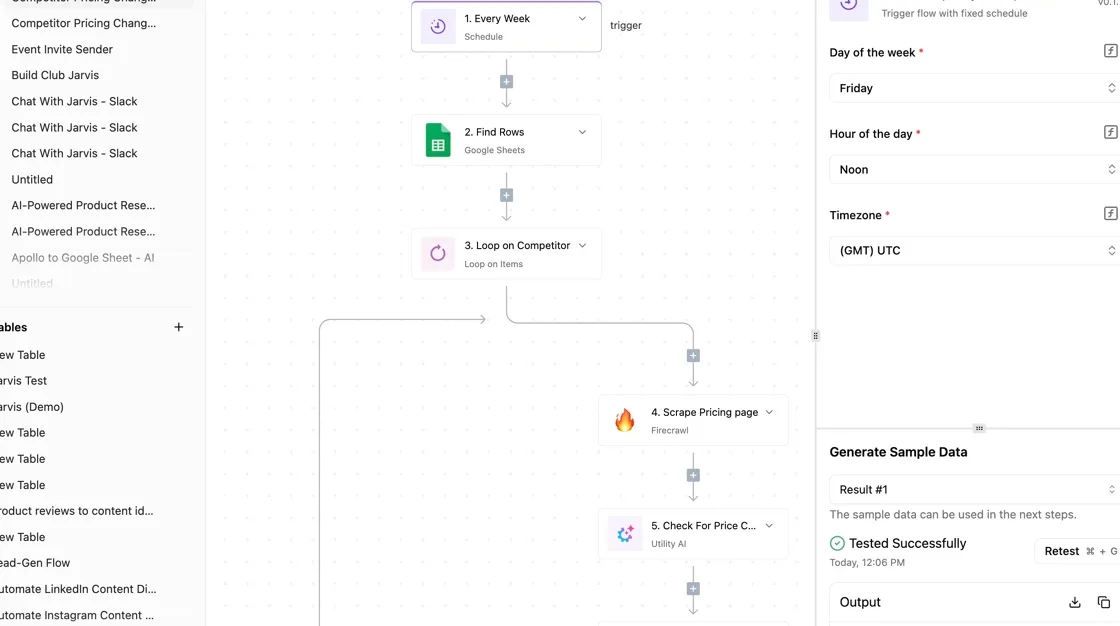
The point to take from it is that the filter is the only decision step, so noise is cut once, before it reaches any of the three.
The build is short:
- Create a flow in Activepieces with a webhook trigger and copy its URL.
- Point an Inspector alert at that URL.
- Add a filter step that passes only the severities you care about.
- Connect the branches: low severity to Slack, medium to a ticket, high to the on-call tool.
A Monday checklist for pricing an Inspector purchase
Pricing Inspector takes five actions, and the order matters because each one narrows what the next has to check:
- Confirm you mean Inspector.dev, not Amazon Inspector.
- Reopen the live pricing page and write down the date you read it.
- Pull your real transaction count from your own application.
- Read the docs on what happens when you exhaust a quota.
- Set a calendar reminder for renewal, and a re-check of the plan limits ahead of it.
The first two keep you from pricing the wrong product or a stale page. The last three turn a sticker price into a bill.
Read the plan table on inspector.dev itself, not a review or a cached summary, and note the date beside every limit you record. Plans change, and a figure with no date can't be audited later.
Then set it against your own transaction count, not an estimate. The docs on quota exhaustion tell you whether you hit a hard stop, throttled data or an automatic upgrade, and that behavior decides what an overrun costs you.
Last, put the renewal reminder in the calendar now, because that's when the limits get re-read.
Frequently asked questions
At renewal, each of these questions tends to resurface, so here's a short answer to each, with the Inspector page that settles it.
Plans and billing
Does Inspector have a free plan? Yes, the Free plan includes 30K transactions a month, so treat it as a test of the limits rather than a place to run production.
Size it against your own application count, transaction volume and retention before you rely on it.
Is Inspector billed per user or per transaction? The limits that decide the bill are monitored applications, monthly transaction volume and data retention, not headcount. The pricing page lists them per plan. Add up your own traffic first, then read the table.
Can I change Inspector plans mid-month? The billing settings page in your account is where plan changes are made. Read how it handles the current period before you click, because a mid-cycle switch changes what you're charged for the days already used.
If you can wait, move at renewal, when you're re-reading the limits anyway.
Does Inspector offer a discount for annual billing or startups? Look at the pricing page for any annual option, and treat a discount as real only if it's written there or confirmed in writing by support.
A figure you only heard on a call can't go into a budget. Compare the discounted price against your sized plan, not against the sticker.
Naming confusion
Is Amazon Inspector the same product? No. Amazon Inspector is Amazon Web Services' vulnerability scanner for cloud workloads. Inspector, the subject of this article, monitors your application's performance and errors in code. They share a name and nothing else, so don't compare their prices.
Related reading
References
Running the numbers
See what the same workload costs here.
Free forever plan, and every paid plan self-hosts at no extra cost.
See pricing Talk to sales