
JetBrains Junie MCP: What It Is and How It Works

Nov 21, 202612 min read
JetBrains Junie and the Model Context Protocol defined
What is JetBrains Junie?
Integrated directly into your IDE, JetBrains Junie is an autonomous AI agent designed to handle complex software engineering tasks by navigating codebases, executing terminal commands, and managing file structures independently, much like how developers use Activepieces to automate their broader operational workflows.

Unlike passive chat interfaces that require you to manually copy-paste snippets, Junie acts as a delegated operator that can implement entire feature requests or bug fixes across multiple files.
When the Chief Technology Officer at JetBrains positioned Junie as a proactive collaborator, they signaled a shift in responsibility. The burden of task execution moves from the developer to the agent’s internal reasoning engine.
How the Model Context Protocol (MCP) works
The Model Context Protocol (MCP) is an open standard that enables AI models to securely discover and interact with local and remote data sources through a unified interface.
By decoupling the intelligence of the model from the specific implementation of its tools, the protocol allows a single LLM to query a database, read a file system, or trigger a workflow in Activepieces without requiring custom integration code for every new service.
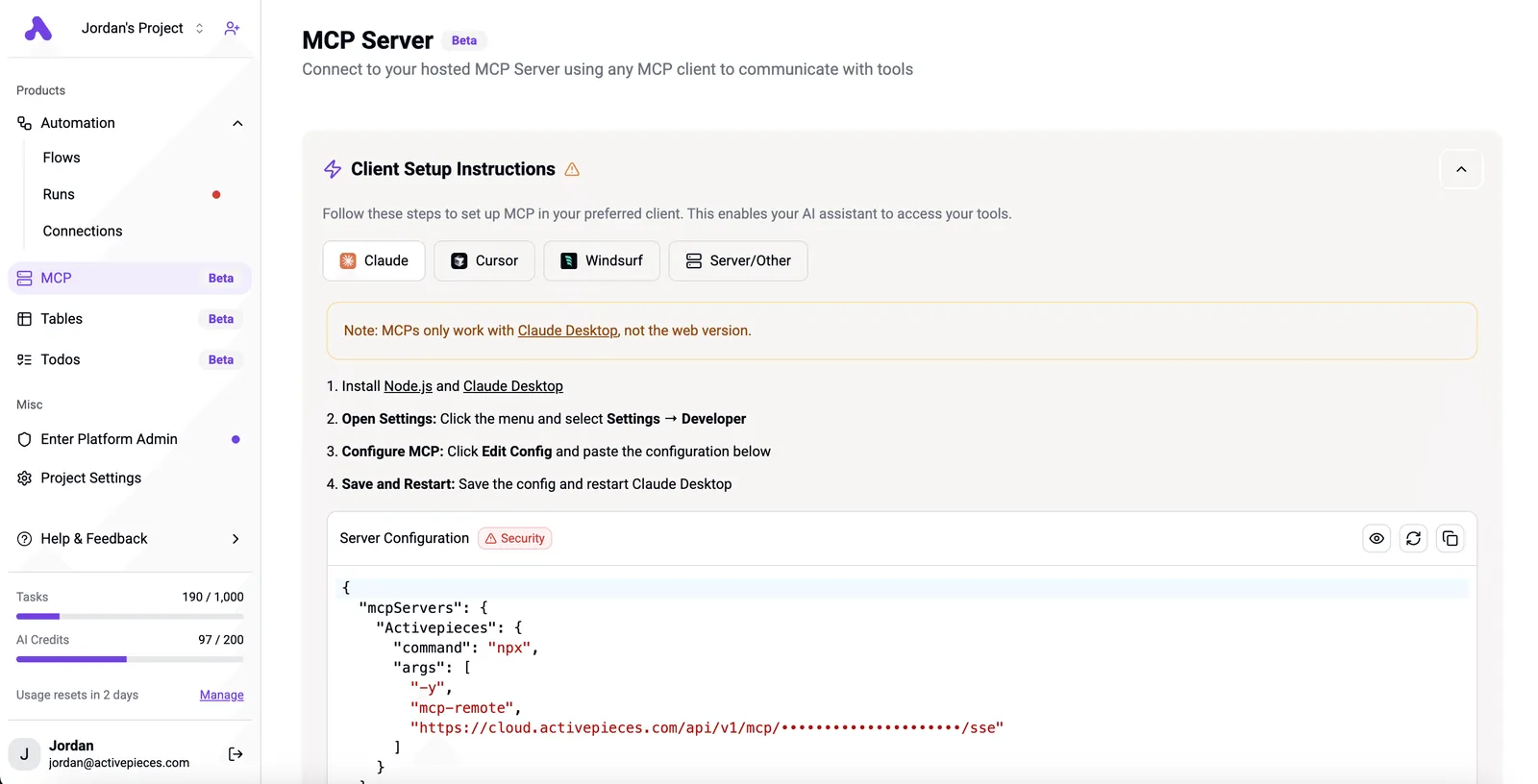
Security permissions remain under the management of the host application thanks to a standardized client-server architecture. You can then audit and restrict the specific data an agent is allowed to access.
Why JetBrains adopted MCP for AI agents
To solve the "context gap" where frontier models like Gemini 4 Carbon or Claude Opus 5.5 lack real-time visibility into your local environment and private documentation, JetBrains adopted MCP.
Relying on unaided models forces you to manually provide context, whereas providing direct access to tools significantly increases the reliability of the output.
Providing a model with structured access to the environment is the primary driver of production-ready code, as shown by tinybench metrics.
68% accuracy is the ceiling for unaided methods, while methods using tools reach 99%. Consequently, JetBrains can now offer a consistent agentic experience regardless of whether you choose to deploy GPT-6.2 Astra or Grok 4.7.
**Providing a model with structured access to the environment is the primary driver of production-ready code, as shown by tinybench metrics.
Everything below works on Activepieces' free plan. Start without code or a credit card.
How Junie uses MCP to execute developer tasks
The role of the MCP Host in JetBrains IDEs
By acting as the Model Context Protocol (MCP) Host, the JetBrains IDE provides the execution environment where Junie manages the lifecycle of various tool servers.
The IDE bridges the inventory gap by maintaining persistent JSON-RPC connections to MCP servers, such as a local Git server or a remote documentation index.
Because of this architecture, the LLM has a standardized way to interact with your workstation. You no longer need to act as a manual data relay between your compiler and the AI.

How Junie discovers and calls MCP tools
By querying the MCP Host for a manifest of tools exposed by both bundled and third-party servers, Junie identifies its available capabilities.
When you provide a prompt, Junie selects a specific tool and sends a structured request to the Host.
Underlying complexity from different APIs is abstracted into a unified format by this flow. Consequently, Junie can use a single logic path to request a file edit on the local disk or a pull request status from a remote repository.
Junie security and human-in-the-loop consent
Security in Junie is governed by a strict "human-in-the-loop" requirement; the IDE intercepts any sensitive tool call before execution.
Access is restricted to the current project directory by the Local Filesystem Server. This ensures the LLM can't traverse into sensitive system folders or private SSH keys. The IDE's credential store manages authentication tokens instead of passing them to the LLM.
Leaking third-party credentials into the model's training data or context window is prevented by this design.
For every destructive action, such as a code refactor or a cloud deployment, Consent Dialogs trigger a modal prompt so you retain final authority over any changes to the production environment.
Setting up Junie MCP servers
Because JetBrains restricts agentic execution by default to prevent unauthorized local file modifications, enabling Junie requires a manual toggle within the IDE's bundled plugin architecture.
Enabling Junie in IntelliJ or PyCharm settings
Activating the Junie agent is a governance-gated process that ensures you explicitly opt into the extended tool-calling capabilities required for autonomous coding.
- Open the IDE Settings and navigate to the AI Assistant section to confirm your account has an active subscription.
- Locate the Junie tab within the AI Assistant menu, which houses the specific permissions for agentic behavior.
- Toggle the Enable Junie checkbox to allow the model to process context beyond the current active file.
- Select the preferred reasoning engine, such as Claude Opus 5.5 for complex refactoring or Gemini 4 Carbon for large-scale architectural analysis, to match the computational cost to the task complexity.
Adding a new MCP server via JSON configuration
To define how the IDE communicates with the server process, connecting an external tool requires a standardized JSON entry in the Model Context Protocol (MCP) configuration file.
Locating the Junie MCP configuration file
You can access the configuration settings directly through the IDE interface by navigating to Settings, selecting AI Assistant, and clicking on the MCP Servers sub-menu. From this screen, clicking the Edit Configuration button will open the mcp-config.json file in the editor.

On your local machine, this file is stored within the IDE's application support directory. For macOS users, the path is typically ~/Library/Application Support/JetBrains/IntelliJIdea/options/mcp-config.json. Windows users can find it under %APPDATA%\JetBrains\IntelliJIdea\options\mcp-config.json.
This configuration acts as a security boundary. It limits the agent to specific binaries and arguments authorized by you.
In the Junie console, the Server Name appears as a unique identifier. The Command is the absolute path to the executable. Arguments are the specific script path and flags that initialize the server. These limit the agent's scope to the defined functions of that script.

Testing the Junie MCP connection
Before the agent attempts high-stakes file operations, verifying the MCP integration through a basic tool call ensures the transport layer is functional.
A successful response from the remote LLM through the MCP server, displayed in the IDE, demonstrates this verification. The presence of the "Hello! How can I assist you today?" output in the execution logs confirms that the IDE, the MCP server, and the remote LLM are communicating without latency.
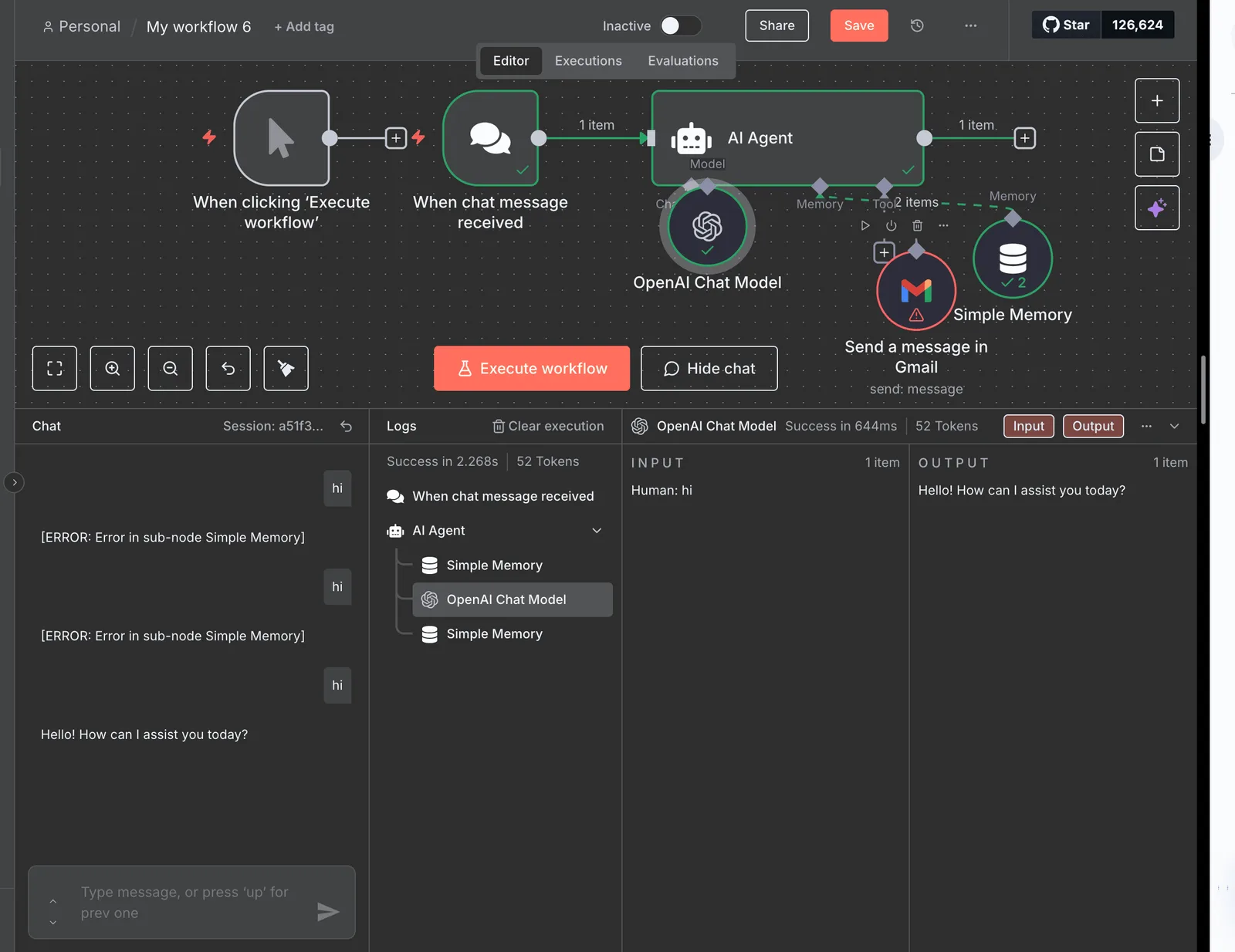
If the Simple Memory sub-node displays an error in the sidebar, you'll know the issue lies in state persistence rather than the primary tool-calling logic.
Easier to see it running than to read about it: set it up free, no card.
Common use cases for Junie-driven automation
Junie utilizes the Model Context Protocol to execute precise, multi-file edits and state synchronizations that previously required manual intervention.
Automated bug fixing across multiple files
Before committing changes, Junie resolves complex architectural defects by using MCP to map dependencies across the entire project structure.
While a standard LLM might suggest a local fix that breaks a remote call, Junie identifies every affected call site across disparate directories. For identifying deep-seated logic flaws in legacy monoliths, you can use Gemini 4 Carbon.
Claude Opus 5.5 handles long-horizon refactoring where maintaining consistent variable naming across modules is critical. GPT-6.2 Astra manages complex reasoning tasks that require navigating large-scale microservices architectures.
Generating documentation from live code context
By pulling real-time function signatures and type definitions directly into documentation files through local filesystem tools, Junie maintains technical accuracy.
This ensures that README files and API specifications reflect the current state of the main branch. The efficiency of this context retrieval is visible in how the agent handles tokens.
Modelbound's analysis indicates that optimized MCP sessions reduce this to 19%, representing an 81% saving in API overhead.
This reduction allows you to document entire repositories without hitting the rate limits common in high-volume development environments.
Synchronizing Jira tickets with local commit history
By mapping your local development progress to the Jira project management platform via authenticated API connectors, Junie automates administrative overhead. When you complete a feature, Junie parses your local commit messages and updates the corresponding ticket status.
The accountability for these updates rests with you. You define the specific MCP server permissions to ensure the agent only modifies tickets within the designated active sprint.
Expanding Junie with third-party tools and Activepieces
Connecting Junie to non-technical SaaS apps
Activepieces functions as a per-project MCP server, allowing Junie to build or modify automations directly within the IDE. By exposing CRUD control through the protocol, the agent can manage the logic of a flow without requiring you to switch to a web UI. You can verify this by connecting Junie to the server endpoint and reviewing the tool calls in the run trace as it executes changes to your automation.
While an IDE agent is naturally proficient at refactoring, it lacks inherent visibility into the project management and communication stacks that define a sprint.
By connecting to Activepieces, an open-source automation platform, you enable Claude Opus 5.5 to read context from disparate sources without manual copy-pasting. Activepieces reaches every model provider a company uses among its 750+ integrations, and pushes the combined spend into the sheet finance already reads.
This architecture ensures that the agent operates as a participant in the full development lifecycle rather than a siloed text generator.
How to create custom MCP endpoints
Every connector in Activepieces is an agent tool; once a piece is registered, it is automatically exposed as a schema on the per-project MCP server. This allows Junie to call any of the 750+ integrations as a native capability without a secondary migration or manual export step. You can inspect this mechanism in the packages/pieces directory of the MIT-licensed core, where the same logic used in a standard flow is surfaced as a standardized tool call.
When you use a proprietary internal API, you can wrap that service in an Activepieces flow, exposing it as a standardized tool that Junie can call.
The visual designer maps incoming MCP tool calls to specific API requests, so the agent receives structured data instead of raw, unparsed HTML.
Managed centrally within Activepieces, authentication headers are kept secure.
This prevents sensitive API keys from being stored in local environment files. Custom logic steps can sanitize data before it reaches the LLM.
Scaling AI agent workflows beyond the IDE
To scale AI agent workflows beyond the IDE, you need a centralized execution layer that can trigger actions based on events, not just manual prompts.
By offloading complex, multi-step sequences to Activepieces, you ensure that high-reasoning models like Claude Fable 5.2 are only invoked when necessary. Webhooks trigger workflows when a GitHub pull request is opened, so Junie can automatically generate a summary of changes for the product owner.
When scheduled monitors check for stale documentation in Confluence, the agent can suggest updates based on recent commits to the main branch.
Frequently asked questions about JetBrains Junie MCP
Does Junie MCP require a JetBrains AI Pro subscription?
Currently, access to the Model Context Protocol (MCP) features in Junie is restricted to the JetBrains AI Pro tier.
The agent requires the high-compute reasoning capabilities and extended context windows maintained on JetBrains' dedicated infrastructure.
While basic chat remains available in the standard IDE license, the active agentic layer depends on the Pro subscription to cover the higher token costs of multi-step planning.
The current market landscape for agentic IDE tiers is outlined in the following table. It shows that while entry-level pricing is consistent, the ceiling for high-reasoning "Ultra" tiers is scaling rapidly to accommodate long-horizon tasks.
| Provider | Monthly Price | Target Tier |
|---|---|---|
| Augment Code | $20 | Individual Developer |
| IBM Bob Pro | $20 | Enterprise Professional |
| GIDE Business | $60 | Regulated Teams |
| IBM Bob Ultra | $200 | Specialized Engineering |
You are now paying for the autonomy of the agent rather than just the presence of a chatbot, and this pricing structure reflects that shift.
Which LLMs are compatible with Junie's MCP implementation?
Optimized for the latest generation of frontier models, Junie's MCP implementation supports multiple reasoning engines, including Anthropic's Claude Opus 5.5 and OpenAI's GPT-6.2 Astra. These models possess the specific reasoning density required to follow complex tool-calling schemas without hallucinating file paths.
Can I use Junie MCP with local models like Llama 3?
Llama 3 is not supported for agentic workflows in the current version of Junie. Local models often lack the native MCP-specific training required to securely handle the protocol's standardized tool-access requests.
Technically, you could proxy a local model through a gateway. However, the lack of tool-use reliability in smaller open-weight models means the agent would likely fail to execute complex sequences. This leads to broken builds and increased manual oversight.