
Sales Automation: A Complete 2026 Guide
Learn how sales automation works and explore common types of sales automation tools. Discover how to implement sales automation with Activepieces.

Jan 22, 202616 min read
One sales rep opens an inbox at 9 AM and sees 20 new leads waiting. Without automation tools, that morning disappears into data entry.
Sales automation changes that moment by handling repetitive tasks before you can even do anything.
Your sales teams spend fewer hours on manual data entry and more energy building customer relationships. Sales managers, on the other hand, see up-to-date data and clearer pipeline movement.
In this article, you’ll learn what sales automation is, how it works, and how you can apply it to sales activities.
Stop losing mornings to manual work. Put sales automation in motion with Activepieces!
TL;DR
- Sales automation helps you follow up, track activity, and move deals forward without relying on memory or manual work.
- It works by streamlining repetitive tasks like data entry, routing, and follow-ups tied to daily sales activities.
- A connected sales automation platform keeps CRM, outreach, and reporting tools in sync with real-time data.
- Activepieces lets you build automation around how they already sell, with AI steps, approvals, and flexible workflows.
This takes minutes, not a project: automate it in Activepieces free.
What Is Sales Automation?
Have you ever ended a call feeling good, only to realize later that you forgot to send the follow-up you promised? That happens to everyone.
Sales automation software can keep track of what happens as you move on to the next thing. When you talk with someone, the system logs the call. As the lead clicks a pricing page at night, the system notices.
Sales process automation takes over manual tasks throughout your sales cycle. As you automate repetitive sales tasks, your day feels lighter.
Coverage extends to every stage of your sales funnel:
- Early outreach
- Active deals
- Closing steps
Since you don’t rely on your memory, you get more accurate data. Insights into customer behavior come from actual actions.
The Three Layers of Sales Automation
These are the three layers of sales automation:
1. Data Layer
The data layer is the backbone of your whole system. Logic and execution can look impressive, but everything collapses if the inputs are disorganized.
Here, customer data lives in one place. Web visits, customer relationship management (CRM) history, and social activity connect into a single profile that updates as things happen.
Information enters the system automatically. Data entry then fades into the background, since enrichment tools pull company size, role, and context the moment a lead appears.
2. Logic Layer
The logic layer is the brain. Data flows in, decisions come out.
Modern sales automation solutions no longer run on fixed rules. They reason through intent and adjust when behavior changes. Rather than firing the same sequence every time, the system asks, “What moves this deal forward now?”
Lead scores update as signals shift, too. Next steps adapt to objections, timing, and engagement. The layer also connects tools behind the scenes, which keeps CRM updates, alerts, and outreach aligned.
3. Execution Layer
The execution layer (also called the presentation or action layer) is the face of your automation. Buyers experience everything here.
Emails go out with context, not just a “First Name” tag. Messages reference recent activity, public announcements, or specific interests.
Internally, reps work from a single view that shows who matters right now. During sales calls, live prompts surface at the right moment, so you can manage objections or emphasize the right detail.
What Modern Sales Automation Does for the Business
Some of the benefits of sales automation include:
Closing Deals Faster
Deals close faster when buyers get the right response at the right moment.
Automation shortens the gap between interest and action by removing delays that usually happen behind the scenes. You don’t need to wait for leads to be assigned. Your sales reps receive the next steps as soon as intent appears.
The system takes over time-consuming tasks, such as:
- Routing leads
- Sending confirmations
- Preparing proposals
As a result, conversations move forward while interest stays high.
With fewer interruptions and fewer delays, your sales teams focus on active deals rather than recovering stalled ones.
Improving Sales Efficiency and Satisfaction
Automation improves efficiency by changing how everyday work gets done.
A sales process captures calls, meetings, and follow-ups automatically, which removes the pressure to constantly update systems by hand.
You get time to prepare, think, and respond with intention. Automated nurturing further reduces the stress of chasing silent leads, while built-in guidance helps your reps improve through real examples from past deals.
Revealing New Market and Revenue Opportunities
Sales automation also lets you see patterns that are difficult to spot manually, including:
- Behavior trends
- Intent signals
- Deal outcomes
Advanced sales tools analyze those signals to highlight where demand is forming and where attention should shift.
Through this, your team can discover new segments that resemble their best customers and spot buying signals earlier in the cycle.
Over time, this clarity supports steady revenue growth and increases sales.
Reducing Churn
Customer retention improves when issues are addressed early rather than after frustration builds.
Automation monitors engagement, usage patterns, and communication signals to flag risk before it escalates to cancellation. This gives sales professionals and customer teams time to step in with support.
Consistent attention and clear communication create trust, which keeps relationships stable well beyond the initial sale.
Types of Sales Automation Software
Here are the different types of sales automation tools:
Sales Automation CRM Software
Sales automation CRM platforms are where relationships actually live and evolve.
Customer relationship management systems no longer wait for reps to update fields after a long day. They observe activity as it happens and keep records current on their own.
Sales data flows back and forth between your CRM and connected tools, so nothing falls out of sync. When a document gets signed or a meeting happens, the system reacts right away and can automate tasks like:
- Moving deal stages
- Notifying finance
- Kicking off onboarding
Sales Prospecting Tools
Sales prospecting software can help you decide who deserves attention right now. They support your sales operations team by surfacing signals that show when interest forms and when timing matters.
These tools analyze behavior, job changes, and technology usage to identify accounts that show intent. With this, you can identify strong prospects in the sales pipeline and prioritize engagement with those already researching solutions.
As a result, prospecting becomes focused work.
Lead Enrichment Software
Sales lead enrichment software fills in the blanks that slow sales down.
Most forms only capture an email address, which leaves your reps to guess. Enrichment steps in immediately and builds a full profile in the background.
The process supports lead generation without asking users to fill out long forms. To help you understand potential customers before reaching out, it automatically collects:
- Company size
- Role
- Tools used
- Recent activity
You get a “short form” for the user but “long data” for your sales team, which makes conversations more relevant and helps you close more sales.
Email Outreach Software
Email outreach software keeps communication both structured and human. Sales email automation manages timing, pacing, and sequencing while leaving room for personalization.
A typical flow looks like this:
- Day 1: Automated LinkedIn connection request
- Day 3: Personalized email based on recent company news
- Day 5: Soft touch nudge on a LinkedIn post
- Day 7: Phone call task created for the rep
- Day 10: Follow-up email with a relevant case study
The system, in addition, can scan drafts in real time and warn you if words like “free,” “limited time,” or “guarantee” could trigger spam filters.
Replies get analyzed for intent, so a “Check back in six months” response pauses outreach automatically.
E-Signature Platforms
E-signature platforms sit at the very end of the sales cycle, right where intent turns into commitment.
Signing no longer means emailing a PDF and waiting days for it to come back. The process now happens inside a guided flow that confirms identity, syncs records, and moves money without extra steps.
Agreements connect directly to your CRM, so signer details, dates, and deal status update automatically once the document is completed. Identity checks run during signing to reduce risk and confirm the person approving the contract has the right authority.
These changes lead to faster close rates, increased security and fraud prevention, reduced paper use, and improved customer satisfaction, as buyers can complete everything from their phones.
Subscription Management Systems
Subscription management systems do everything that happens after the deal closes, especially when pricing changes over time.
These systems calculate prorated charges automatically when customers upgrade or downgrade mid-cycle. Payment recovery runs quietly in the background, retrying failed charges at the right time and sending reminders before access is interrupted.
For leadership, sales reports alone don’t capture recurring behavior. These platforms provide the “North Star” metrics that traditional sales reports miss, including:
- Retention trends
- Expansion signals
- Lifetime value
Sales Analytics Software
Sales analytics software helps you understand what’s happening now and what’s likely to happen next.
Conversation analysis, for instance, can highlight objections, competitor mentions, and moments where momentum drops. Managers can ask questions in plain language and get answers instantly.
When used correctly, sales software supports better decisions. Insights feed directly into sales strategy, guiding where effort goes and when intervention helps most.
Over time, this improves sales performance by replacing intuition with evidence that reflects buyer behavior.
You can follow the rest of this with the builder open. Start free, no card.
How Activepieces Supports Sales Automation

Activepieces is an AI workflow automation platform that connects everything your sales stack uses. From there, information moves freely, which keeps everyone working with up-to-date data.
Here’s what the platform provides:
Data Integrations That Talk to Each Other
As of now, Activepieces offers 610 pre-built integrations, called pieces, and they work both ways. Since it’s open source, the number of data integrations keeps increasing through community contributions.
These are some of the sales software you can connect with:
- Salesforce
- Zuora
- Zoho CRM
- Zendesk-sell
- Vtiger
- Signrequest
- PredictLeads
- Pipedrive
- Microsoft Dynamics CRM
- HubSpot
- LeadConnector
Native AI Steps
AI steps sit inside the workflow. Activepieces can look at a prospect’s website or recent activity and draft a short, relevant message for outreach.
Your reps still decide what goes out, but they stop starting from zero every time.
Human Approvals for Sensitive Actions
Automation pauses when judgment is needed. Approval steps send drafts or actions to Slack or Teams and wait for confirmation.
Outreach only continues once someone approves it, which keeps high-value conversations on track.
Self-Hosting Option
Activepieces works for small teams and large orgs without changing how you build. Self-hosting remains an option for sensitive environments.
For sales leaders, it fits naturally into a broader automation strategy and offers visibility without adding another tool to manage.
How to Implement Sales Automation: A Step-by-Step Guide Using Activepieces
You can implement sales automation from administrative tasks to customer interactions. Here’s how:
Lead Appointment Qualification
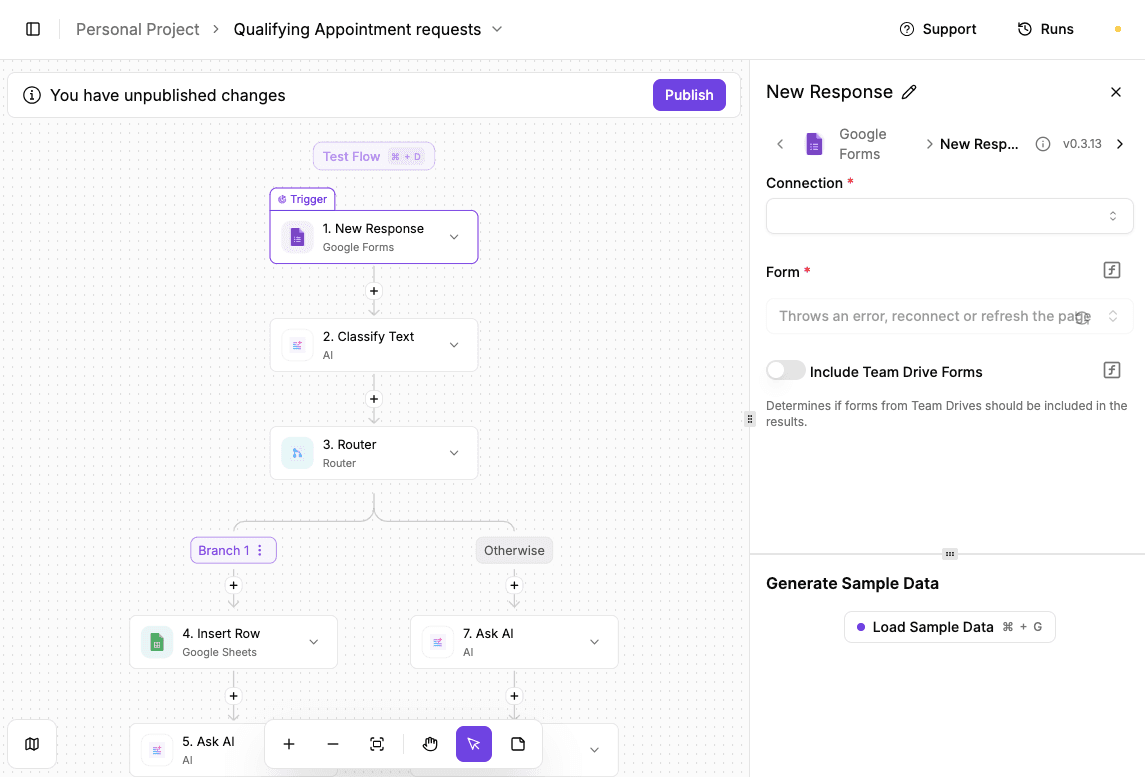
Manual review turns simple appointment requests into a headache.
AI-based qualification fixes that by reviewing every submission the moment it arrives and deciding what should happen next. Sales-ready requests move forward immediately, while early inquiries get a helpful response without filling your inbox.
How to build the workflow:
- Start by triggering the flow with a new Google Forms response and loading sample data so the submission fields are available.
- Add an AI classification step and pass in the form response text. Define categories such as:
- Sales
- Inquiry
- General question
- Test the output to confirm AI labeling looks right.
- Insert a router and split the flow based on the classification result. One path should handle sales requests, while the other catches everything else.
- For sales submissions, log the request in Google Sheets, generate a short internal summary using AI, and send it to the assigned salesperson by email.
- For non-sales submissions, use AI to draft a helpful reply with relevant resources and send it directly to the lead.
- Once tested, the workflow runs automatically and treats every request consistently.
Try this template now: Lead Appointment Qualification
Automatic Scraping of Company Information Before Call
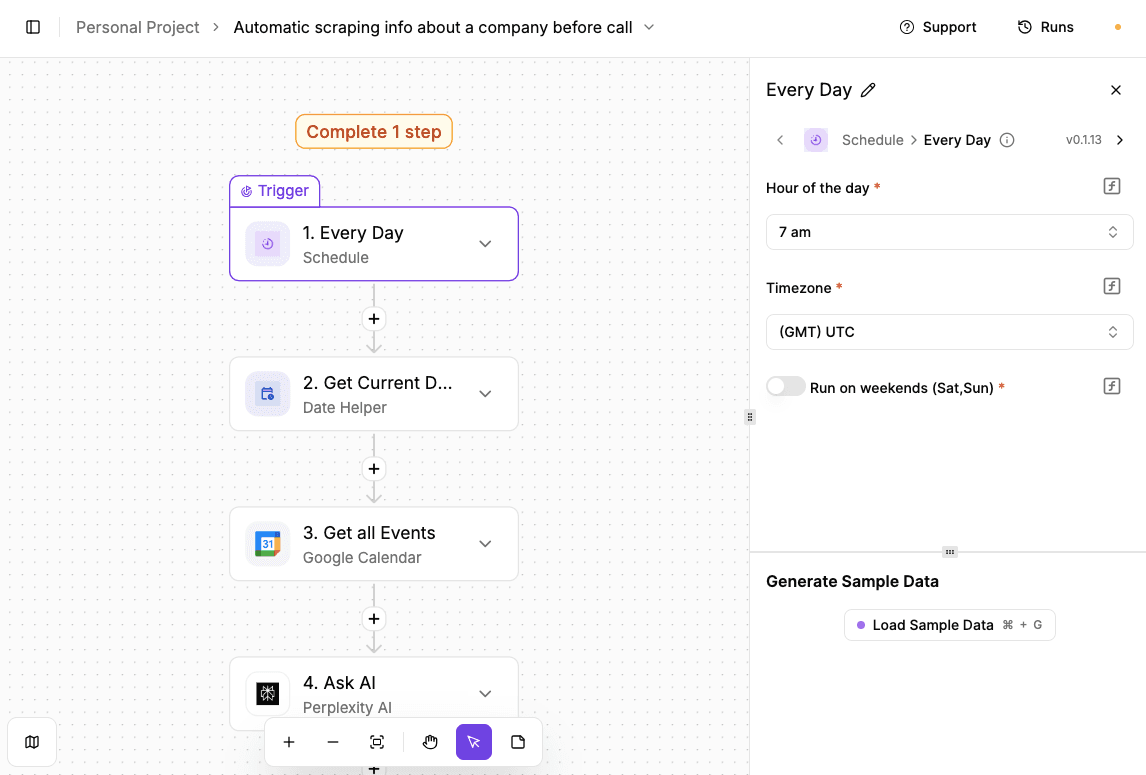
Sales calls go better when the context is ready before the conversation starts. This workflow gathers company information in advance, organizes it in one place, and gives reps a clear view of who they are speaking with.
How to build the workflow:
- Add a scheduled trigger and set it to run daily at a time that works for your team.
- Add a “Date Helper” step to get the current date. This keeps calendar lookups aligned with the right day.
- Connect Google Calendar and pull all upcoming events for that date. Event descriptions usually include the company name or website, which becomes the input for research.
- Add an “Ask AI” step and pass in the event details.
- Prompt the model to find recent company information, common pain points, and relevant trends based on the event description.
- Finish by adding a Google Docs step. Create a new document for each meeting, use the event title as the document name, and insert the AI-generated research as the content.
Try this template now: Automatic Scraping of Company Information Before Call
Sales Call Transcript Analyzer
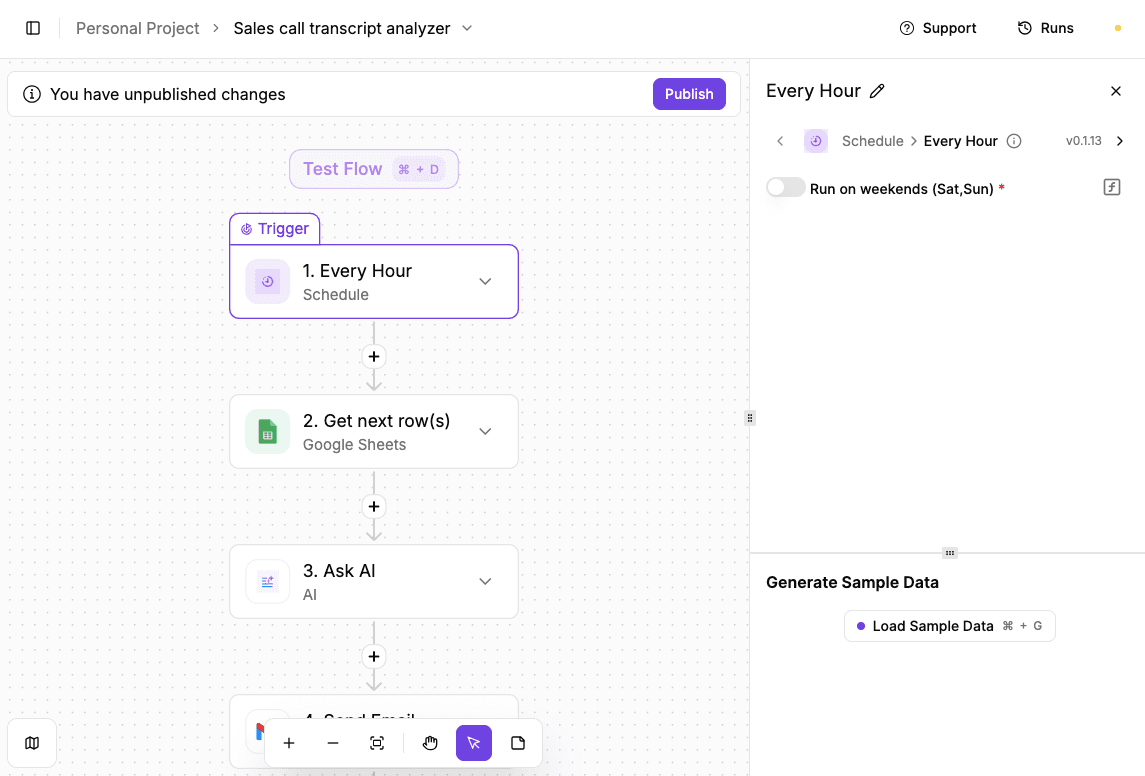
Sales call transcripts hold a lot of insight, but reviewing them manually takes time and usually gets pushed aside.
This workflow checks for new transcripts automatically, asks AI to turn each one into an action plan, and sends the results straight to email, so follow-up never gets delayed.
How to build the workflow:
- Begin with a scheduled trigger set to run every hour, so the workflow checks for new transcripts without needing manual input.
- Connect Google Sheets and use the “Get next row(s)” action.
- Select the spreadsheet where sales call transcripts are stored, and pull the next unprocessed row so each transcript is handled once.
- Add an “Ask AI” step and pass in the transcript text from the sheet.
- Write a prompt that tells AI to analyze the call and produce next steps for your sales rep, such as:
- Follow-ups
- Objections to address
- Opportunities to pursue
- Finish with a Gmail step. Send the AI-generated action plan to the appropriate recipient, using a clear subject line so it’s easy to spot.
Try this template now: Sales Call Transcript Analyzer
Competitor Pricing Change Alert
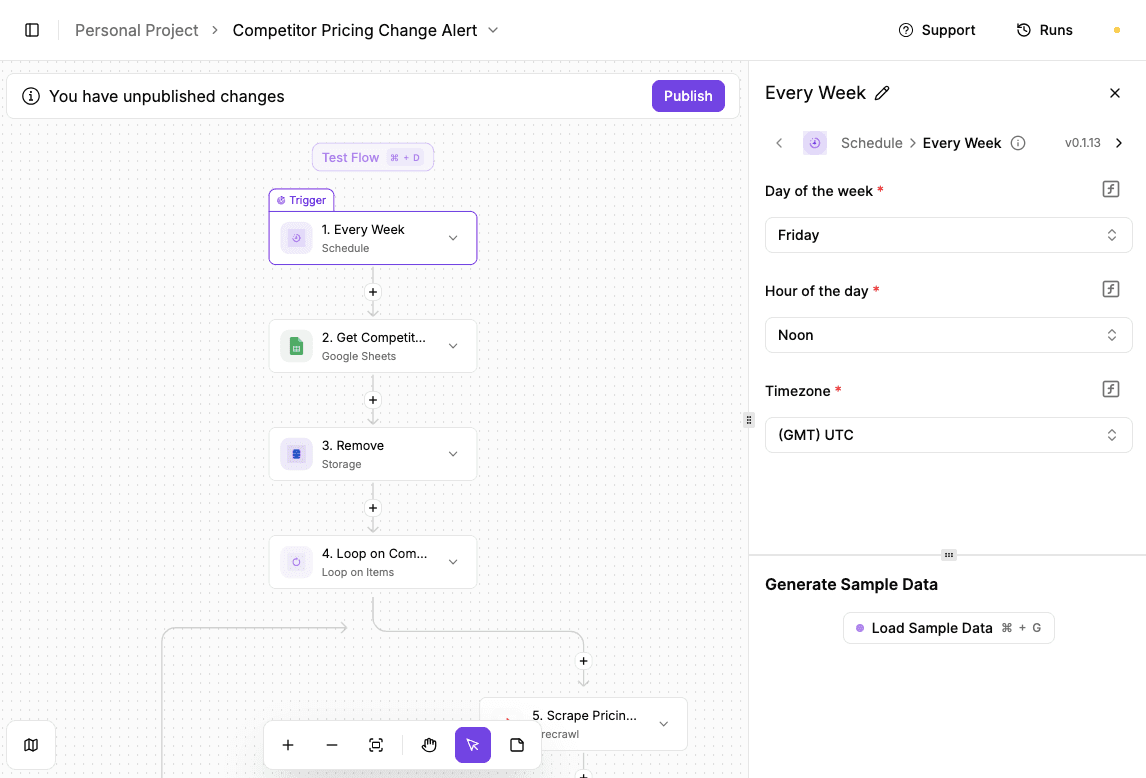
Tracking competitor pricing by hand takes time and usually slips through the cracks.
Automating competitor pricing change alerts allows AI to check competitor pages on a schedule, compare current prices with past values, and alert the sales team the moment something changes.
How to build the workflow:
- Set up the Schedule step first. Choose the day, hour, and timezone when the automation should run, then test the trigger to confirm it fires correctly.
- Connect Google Sheets and use the “Find Rows” action to pull the competitor data you want to monitor.
- Select the spreadsheet and the specific sheet that contains URLs and stored prices, then test the step to make sure rows load correctly.
- Add a Loop step and pass in the rows from Google Sheets. The loop ensures each competitor URL gets checked one at a time rather than all at once.
- Connect Firecrawl and pass in the website URL from the current row. Firecrawl scrapes the page and returns clean content that AI can analyze.
- Test the step to confirm data comes through.
- Add the price comparison AI step. Select a model and pass in the old price from Google Sheets along with the new price from Firecrawl.
- Insert a “Router” to split the flow. Configure one branch to continue only when a price change is detected.
- Inside that branch, update the Google Sheet with the new price and then send an email alert with the details.
- Test the final steps, publish the flow, and let it run automatically.
Try this template now: Competitor Pricing Change Alert
Implement Sales Automation Around How You Sell With Activepieces

Activepieces lets you build automated workflows that match how sales already happen. You start with simple flows and add logic as needed.
Your sales representatives can still keep control over conversations and approvals, while background steps like syncing tools, updating records, and triggering tasks run on their own.
To build a workflow, even non-technical users can do it through the visual builder, and developers can extend flows with custom logic or AI steps when needed.
Activepieces also has a predictable cost. The Standard plan starts with ten free active flows and then costs $5 per active flow per month. It includes unlimited runs, AI agents, tables, MCP servers, and email support.
For larger teams, the Ultimate plan runs on an annual contract and adds security controls, single sign-on (SSO), audit logs, role-based access control (RBAC), private pieces, and enterprise deployment options. A fully embedded version starts at $30,000 per year.
Instead of forcing change, Activepieces supports automating sales processes the way your team already works.
FAQs About Sales Automation
What is sales automation?
It uses sales automation technology to handle routine sales activities with software instead of human effort. Sales automation also supports sales teams by managing tasks like follow-ups, updates, and scheduling, so reps spend more time talking to buyers.
What are the four types of automation?
The four types usually include task automation, workflow automation, data automation, and communication automation.
Together, they help you automate manual tasks such as reminders, handoffs, record updates, and internal notifications that slow deals down when done by hand.
What is an example of sales automation?
A common example is when a lead fills out a form, and the system handles automated data entry by saving the information directly into a CRM, enriching the record, and preparing it for follow-up without any copying or pasting.
What is the difference between CRM and a sales automation system?
A CRM stores customer information and deal history, while a sales automation system actively moves work forward.
Automation tools trigger actions like lead routing, task creation, and follow-ups based on activity, rather than just holding records.
How do sales automation and marketing automation work together?
Marketing automation attracts and nurtures interest, while sales automation takes over once intent appears. Together, they align timing and messaging to boost sales productivity by reducing delays between engagement and conversation.
Build it
Set this up in minutes.
No code required. Connect your accounts, and Activepieces runs it from there.
Start free Talk to sales