
Jina AI API Pricing: Token Costs & Limits (2026)

Nov 9, 202613 min read
Jina pricing plans and limits
Jina AI API pricing summary
A plan's price alone can't tell you your bill, because the Jina AI API bills by tokens consumed, not by seats or monthly plans, which matters if you're wiring it into a workflow tool like Activepieces where call volume can creep up unnoticed.

The figures here come from the Jina API Pricing Dashboard as it stood on 9 November 2026.
Plans compared on price, tokens and rate limits
Where a cell says "not listed", the figure was absent from the page checked.
| Key state | Price per 1M tokens | Tokens included | Reader RPM / TPM | Search RPM / TPM | Embeddings RPM / TPM | Free allowance |
|---|---|---|---|---|---|---|
| No key | not listed | not listed | not listed | not listed | not listed | not listed |
| Free key | not listed | not listed | not listed | not listed | not listed | not listed |
| Standard key | not listed | not listed | not listed | not listed | not listed | not listed |
| Premium key | not listed | not listed | not listed | not listed | not listed | not listed |
What does exist on the dashboard is the per-request token cost, and that's where the real spread lies. Tokens per request decide how long a balance lasts.
Jina AI endpoints sharing one token balance
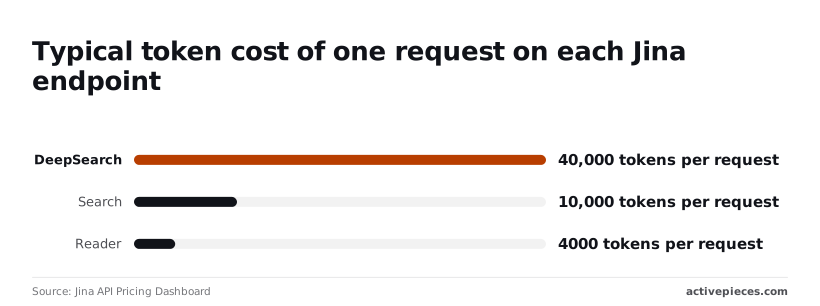
Budget against a single token count, because Reader, Search and DeepSearch are all metered in tokens on the dashboard. Each endpoint drains it at a different speed.
Jina's meter follows content, while Activepieces meters the run at 1 credit however many steps it contains.
A fetch, a clean-up and an embed split across ten steps cost the same credit as two, so you can break the job into small, retryable integrations and only Jina's tokens move with the pages.
Start with Reader: the dashboard puts a typical request at 4,000 tokens. One million tokens therefore covers about 250 Reader requests, which is comfortable for page-by-page extraction.
Move to Search and the cost climbs to 10,000 tokens per request. The same million tokens buys about 100 searches, so a job that searches before it reads spends tokens 2.5 times faster than reading alone.

At 40,000 tokens per request, DeepSearch is the outlier. One million tokens covers only about 25 DeepSearch calls, so a loop that runs it a few hundred times a day can empty a balance that would've lasted weeks on Reader.
If you are running this arithmetic for your own team, see what the same workload costs on Activepieces.
Your free API key and token balance
Sign in to Jina AI, copy the API key the dashboard generates, and read the free token balance beside it before you spend anything.
Finding your Jina API key and balance
Because Jina AI meters tokens, not seats, the dashboard has no user count to look at. The two things worth finding are the API key and the remaining token balance, and they sit close together on the same account view.

Copy the key into an environment variable rather than a script, because this key is the thing your rate-limit tier attaches to.
Note the balance now; you'll compare against it after the next two calls.
One embeddings request, with the model name to enter
Send a POST to https://api.jina.ai/v1/embeddings with your key in an Authorization: Bearer header. The body needs a model name and an input.
Use the model name exactly as the model page prints it. The example below uses jina-embeddings-v3, so substitute whatever identifier the page currently lists.
curl https://api.jina.ai/v1/embeddings \
 -H "Authorization: Bearer $JINA_API_KEY" \
 -H "Content-Type: application/json" \
 -d '{"model": "jina-embeddings-v3", "input": ["A short test sentence."]}'
Look in the response for a usage block with the token count for that request. A short sentence consumes very few tokens, so the balance will barely move.
Jina Reader request token cost example
Now the Reader request, which works differently. You prepend https://r.jina.ai/ to the page address you want converted to clean text, and you send the same Bearer header.
curl https://r.jina.ai/https://example.com \
 -H "Authorization: Bearer $JINA_API_KEY"
Here the token cost depends on the page, not on your request. A sparse page costs little, while a long article with heavy navigation and boilerplate costs far more, even though the call looks identical.
Refresh the dashboard and compare the balance to your starting note. The embeddings call should account for a small drop and the Reader call for a visibly larger one.
If you see that gap, you've found the variable that drives your bill: the length of the content, not the number of requests.
Your realistic workload and monthly costs
Content length sets this workload's bill:
- At an assumed $0.05 per million tokens, month one costs about $26.21
- Steady state costs about $24.31
- Reranking is nearly all of it
The workload and its token assumptions
Take support-docs search: 50,000 pages embedded as 800-token chunks, 30,000 queries a month, each reranking the top 20 chunks, and 2,000 Reader fetches.
The $0.05 rate is my assumption, applied to every endpoint so the token counts do the work. Substitute your own key's rates.
Embed raw HTML and the ingest line balloons. Skryp's benchmark puts HTML as served at 65,378 tokens per page, so embedding raw HTML for 50,000 pages means about 3.27 billion tokens, or $163.45.

At 3,520 tokens per page, Firecrawl's Markdown comes to about 176 million tokens and $8.80. Skryp's Markdown runs 1,800, about 90 million tokens and $4.50.
Cleaning pages before you pay for them cuts the ingest bill by up to 97%.
Jina AI first-month versus steady-state costs
Read the table this way: ingestion is a one-time spike and reranking is the recurring cost. Steady state assumes 5% of pages change monthly, so 2M tokens are re-embedded. The Reader line uses 1,800 tokens per fetch.
Cleaning pages before you pay for them cuts the ingest bill by up to 97%.
| Item | Tokens | Rate per 1M | Month 1 | Steady state |
|---|---|---|---|---|
| Embed 50,000 pages at 800 tokens | 40M (2M steady) | $0.05 | $2.00 | $0.10 |
| 30,000 queries at 20 tokens | 0.6M | $0.05 | $0.03 | $0.03 |
| Rerank top 20 (20 × 800 tokens × 30,000) | 480M | $0.05 | $24.00 | $24.00 |
| 2,000 Reader fetches | 3.6M | $0.05 | $0.18 | $0.18 |
| Total | $26.21 | $24.31 |
91% of the steady-state bill is reranking, because each query sends 16,000 tokens of candidates. Cutting the candidates from 20 to 10 halves that line, which saves more than any ingest optimization.
Because Jina meters the free allowance in tokens, the ingest pass spends it first. Embedding 40M tokens in one afternoon drains a trial key before the first query runs, and the 480M rerank tokens a month later are a far larger draw.
Worth checking against a plan that does not meter every step: one credit covers a whole run on Activepieces.
Your hidden costs and limits
Hidden costs sit in three places: the requests-per-minute ceiling your key tier sets, the token count a single Reader call can generate, and the full-corpus bill you pay when an embedding model changes.
Rate limits by key tier
Though Jina AI meters tokens, your key tier also caps how fast you can spend them. The ceiling belongs to the key, not the account, so a prototype key and a production key can behave differently against the same endpoint.
If a batch job that finishes overnight on a higher tier stalls on a lower one, retries still consume tokens. Look up the limit for each endpoint you call, because the Reader, embeddings and reranker are limited separately.
Jina Reader token counting and long documents
Pick the mode with care, because the Reader bills by the tokens in the converted page, and the mode you pick changes that count more than the page does.
Standard mode bills 5,000 tokens, according to Usage Pricing, which makes it the baseline for any estimate.
Switch to the old premium mode and it bills about 15,000, so the same page costs three times as much and a crawl budgeted at standard rates runs out at a third of the pages.
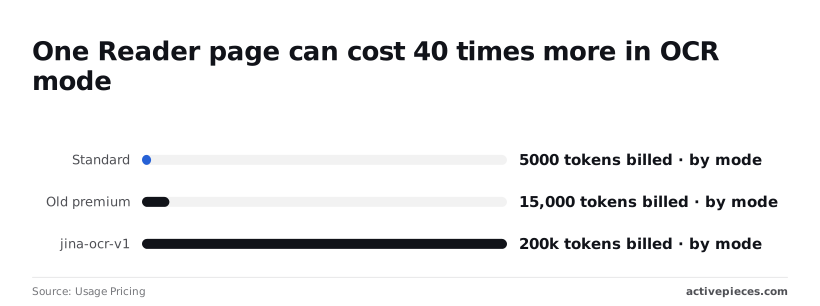
The jina-ocr-v1 mode bills about 200,000 tokens, which is 40 times the standard figure.
At 200,000 tokens per page, a thousand-page crawl bills 200 million tokens instead of 5 million. Set the mode per request instead of leaving it as a global default.
Run the OCR mode only on scanned or image-heavy sources, and measure a sample of your own pages first, because a long document makes every figure scale with its length.
Re-embedding cost when the model changes
Change embedding models and you re-embed everything you have stored, not just new content, because vectors from different models aren't comparable.
The bill is your corpus tokens multiplied by the new model's per-token price, and that's before any queries. Count the tokens in your index now, since that number is the migration cost.
Keep the old index running until the new one is verified, or you pay for both while you cut over.
How Jina AI pricing compares
Only when your workload uses both embeddings and reranking, or when a retirement notice has already forced you to reprice, is Jina AI usually the cheapest of the four. Compare vendors on the unit each one meters.
Embedding pricing per million tokens by vendor
All four vendors bill embeddings by the token, so the per-million figure is comparable on its face.
Read the limits column first. A cheap rate that throttles you at launch costs more in engineering time than the price gap saves.
| Vendor | Embeddings billed by | Reranking | Free tier | Rate limits |
|---|---|---|---|---|
| Jina | Token | Separate reranker, billed by token | Starter token allowance on a new key | Set by key tier |
| Voyage AI | Token | Separate reranker, billed by token | Free token allowance per account | Rise with usage tier |
| Cohere | Token | Rerank, billed per search | Trial key for non-production use | Trial keys capped harder than production keys |
| OpenAI | Token | No reranking endpoint | Generally none | Rise with usage tier |
Pull each vendor's current per-million rate from its pricing page on the day you decide, and date your note.
Reranking and web reader support by vendor
Of these four vendors, only OpenAI has no reranking endpoint. A retrieval pipeline built there needs a second vendor or a model-based reranker you pay for as ordinary generation tokens.
On Cohere, a search that returns many long documents costs the same as one with short snippets, because rerank is billed per search rather than per token. Jina and Voyage AI bill rerank by token, so long documents cost more.
Jina also sells endpoints that read a web page into clean text and search the web. None of the other three has a comparable URL-to-text endpoint, so you'd assemble that yourself from a scraper and your own cleanup.
Price that labor before calling a rival cheaper.
When Jina is not the cheapest choice
When your corpus is small, when you only embed and never rerank, or when you already hold committed spend with another vendor, Jina loses. Under those conditions, one bill with one rate limit often beats a lower rate split across two.
There is one more case: self-hosting. Jina publishes open weights for some models, but the license on a given model may restrict commercial use. Read it before you count the API fee as avoidable.
If the license allows your use, the saving is the token fee minus GPU hours and the engineer who keeps the service running. At low volume that arithmetic usually favors the API.
What Activepieces does about this
Activepieces can't lower Jina's token count, but it can keep the pipeline from spending more of it than it should. Jina's endpoints are plain HTTPS calls with a bearer key, so each one is an HTTP step.
Set the Reader mode in that step's headers and keep the key in a stored connection. That is the per-request mode choice and key hygiene described above.
Put the cheap decisions before the expensive call. A step can trim the rerank candidates from 20 to 10, or skip pages that haven't changed, before any tokens are spent.
A run costs 1 credit however many steps it has, so those guard steps add nothing to the Activepieces side.
The core is MIT-licensed, so you can self-host it and read the code.
Frequently asked questions
Each answer below is short on purpose, because the details that decide your bill sit on Jina AI's own pages and can change. Confirm anything that affects spend against the current pricing page before you commit a budget.
Is the Jina AI API free to use?
Partly. A new API key typically comes with a starter allowance of free tokens, so you can test the endpoints before paying. That allowance is metered like paid usage and runs out, so it's a trial, not a free plan.
Whether you can use it in a commercial product is a terms-of-service question. Read the current terms before you build a paid feature on it.
Check the pricing page for the current expiry terms before you buy a large balance. Tokens are the unit of billing, so an expiry rule decides whether a bulk purchase is a discount or a write-off.
If the page doesn't state expiry clearly, buy in small amounts and watch your balance until it does.
For some models, yes. Jina has published open weights for several of its models, but licenses differ from model to model, and some restrict commercial use.
Self-hosting also swaps a per-token bill for GPU hosting and maintenance work. Read the license on each model you plan to deploy. Don't assume the hosted API's terms carry over.
What happens when I hit the rate limit?
Past the limit, the API rejects further requests until your allowance resets, usually with an HTTP 429 response. Your code should catch that status, wait, and retry with a growing delay rather than hammering the endpoint.
If a batch job stalls on a free key, it may run cleanly on a funded one, because your key's tier sets the ceiling.
If you hit the limit regularly, you're paying for it in delayed jobs, so work out whether a higher tier costs less than the delay.
Can a scheduler call the Jina API?
Yes, in the sense that matters here. Jina's endpoints are ordinary HTTPS requests authenticated with a bearer key, so any scheduler that can send a request with custom headers can call them. The scheduler adds no Jina charge of its own.
You still pay per token for whatever each run sends, so a frequent schedule over long pages costs more than a rare one over short pages.
Related reading
References
Running the numbers
See what the same workload costs here.
Free forever plan, and every paid plan self-hosts at no extra cost.
See pricing Talk to sales