
Jira Pricing 2026 for Project Tracking and Automation

Nov 20, 202615 min read
Jira, Atlassian's tool for tracking tasks, bugs and projects (and one that plenty of teams connect to workflow tools such as Activepieces as they grow), comes in four cloud plans: Free, Standard, Premium and Enterprise, so teams can start without spending.
Jira pricing today: every plan in one table
Which Jira plan you need depends on your user, automation, storage and support limits more than on the per-seat rate.
Ignoring those limits is the expensive mistake. You pick the cheap plan, hit a cap mid-project, and upgrade under pressure.
Plan table with check date
Read the user cap and automation columns first, because those are the walls teams hit earliest. The limits in the table below are as published on Atlassian's pricing page, checked 20 November 2026.
Atlassian adjusts per-seat rates by headcount and billing term, so confirm the live figure before you budget.
| Plan | Price per user/month | User cap | Storage | Automation limit | Support | Key features |
|---|---|---|---|---|---|---|
| Free | $0 | 10 users | 2 GB | Small monthly run allowance | Community forums | Boards, backlog, basic reporting |
| Standard | Listed per seat, falls as headcount rises | Up to 35,000 | 250 GB | Monthly runs shared across the whole site | Business-hours | Audit logs, permissions, data residency |
| Premium | Listed per seat, higher than Standard | Up to 35,000 | Unlimited | Higher monthly runs, scaled by user count | 24/7 for critical issues | Uptime guarantee, advanced planning, sandboxes |
| Enterprise | Annual contract, quoted by sales | Larger than Premium | Unlimited | Unlimited | 24/7 with named contacts | Multi-site admin, analytics, tighter security controls |
One hire past ten people and a team has already outgrown the Free row. Automation runs are the quieter limit.
A team that connects Jira to other tools through an automation platform can burn through a shared monthly allowance faster than headcount suggests.
Cloud versus Data Center
Look at Atlassian's own numbers to see where the company wants you to go. Cloud revenue was $968 million in FY2021 and $1,515 million in FY2022, then $2,085 million, $2,699 million and $3,447 million, reaching $4,411 million in FY2026, making cloud Atlassian's growth engine.
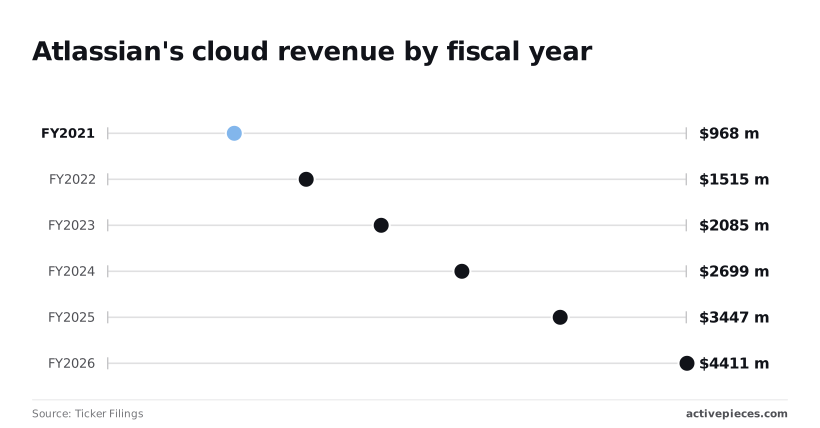
That's more than four times the FY2021 figure in five years.
For you, the money and engineering effort now go to cloud, which is the product this table describes. Data Center, the version you run on your own servers, gets less of both, so weigh any plan to stay on it against that.
If you are running this arithmetic for your own team, see what the same workload costs on Activepieces.
Jira pricing at 10, 50 and 250 users
On Jira Cloud, the version Atlassian hosts for you, Tool Dossier puts Standard at $950 to $4,850 a year and Premium at $1,950 to $9,800, so a team on the high end of Premium pays roughly ten times what a team on the low end of Standard pays.
Premium costs roughly double Standard at every size.
At 10 users, Free costs $0, Standard $950 (10 × $95) and Premium $1,950 (10 × $195). At 250 users, Free isn't available, Standard is $4,850 (250 × $19.40) and Premium is $9,800 (250 × $39.20), meaning your Jira bill starts at $4,850 annually.

Headcount and plan together drive the bill, and Premium climbs more steeply.
25 times the people costs about five times the money, because the per-user rates fall as you grow. Reaching those bills still depends on the limits below.
When the eleventh person needs access, Free stops and a paid plan starts at $950 a year or more. Ten users cost nothing.
Plan for that jump before you hire, because the cost of doing nothing is a surprise invoice the week someone new needs access.
Jira Standard versus Premium cost at 50 users
I don't have a confirmed bill at 50 users, so I won't invent one. The two ends of the range show the pattern, though.
Premium's about 2.05 times Standard at 10 users ($1,950 against $950) and about 2.02 times at 250 ($9,800 against $4,850). At 50 users, expect to pay about double for Premium, and only take it if a Premium-only limit is the first one you'd hit.
250 users: volume tiers and Enterprise
At 250 users, Standard works out to $19.40 per person a year, against $95 at 10 users. Premium falls from $195 to $39.20. That's the volume discount, and it means a large team gets a much lower rate than a small one.

Atlassian negotiates Enterprise terms, so no sticker price applies. If your headcount is heading past 250, ask for a quote before you commit.
Limits and charges that surprise Jira buyers
Before you trust a Jira quote, know that headcount isn't the only thing that moves it: automation caps, storage, per-user apps, add-on seats and tier-locked features each add cost that the per-seat rate never shows.
Automation run caps
When a rule hits its monthly cap, it simply stops firing, and your team goes back to moving tickets by hand without anyone announcing why.
Automation is Jira's built-in rule engine, the thing that moves a ticket when someone changes its status. Lower tiers cap how many times those rules can run each month.
Check the cap against how many rules you run and how busy your projects are before you pick a tier.
Once teams attach screen recordings or exports to tickets, they hit the storage limit sooner than they expect. Every attachment, screenshot and log file counts against an allowance that depends on your plan.
Once you're at the limit, the fix is usually a higher tier or a cleanup project, and the cleanup is slower than it sounds.
Jira Marketplace apps billed per user
If a tool looks cheap per seat, it can still add a second bill nearly as large as Jira's own.
The Atlassian Marketplace is the app store where Jira gets test management, extra reporting and similar features. Many apps there charge per user, and the count is often your whole Jira user base, not just the handful who use the app.
Ask each vendor who counts as a user, and check the app's own pricing page for the current rate.
If someone needs both Jira and Confluence, that costs you two seats. Confluence, Atlassian's documentation tool, and Jira Service Management, its help-desk product, are sold separately, each with its own seat count and its own bill.
Service Management bills a support agent on that product's terms, not Jira's. Count people per product, not per company.
Jira features limited to higher plans
You won't miss them until an auditor asks for a log or an outage drags on. Some admin controls, such as finer permissions, audit logs and sandbox environments, sit on higher tiers only.
Support response times and uptime commitments also improve as you climb. Decide in advance which of them you can't do without, and let that set your tier.
Jira versus Linear, Asana, ClickUp and monday.com
Once your rules and reporting get complicated, Jira pulls ahead.
For a small team, the four rivals (Linear, a bug and task tracker aimed at software teams, and Asana, ClickUp and monday.com, which are general work-management tools) can cost less or feel lighter. Your must-have limit decides which side you land on.
Price and free tier side by side
Because free plans stop at very different points, a growing team leaves some of them much sooner than others.
The table gives the free-plan user cap where one's confirmed and says where to look for the rest. Prices, storage, automation limits and add-on charges change often, so read each maker's own pricing page on the day you buy.
| Tool | Free tier user cap | Read before you commit |
|---|---|---|
| Jira | 10 users | Automation runs, storage, support level |
| Linear | Free plan offered | User cap on the pricing page |
| Asana | 2 users | Which features sit behind the paid tier |
| ClickUp | Free plan offered | Storage and automation allowances |
| monday.com | Free plan offered | User cap and add-on charges |
At Jira's 10, an eleventh person puts you on a paid plan that same day. At Asana's 2, a pair can use it free, and the third person forces an upgrade. Treat it as a trial.

The strongest case against paying for Jira
If your team is small and your process is simple, you may be paying for depth you never touch. Linear's built around a short list of software tasks, so there's little to set up and little to learn.
When the work isn't software at all, such as marketing or operations, Asana, ClickUp and monday.com suit it better. For those teams Jira's configuration is cost without benefit.
Doing nothing about it costs you as well: people stop updating a tool they find heavy, and the data you were paying for goes stale.
Why Jira still holds for larger teams
When many teams share one system and each needs its own rules, permissions and reports, Jira holds up. Its limits are real, but they're published and predictable, so you can see the wall before you hit it.
If you expect to cross the free cap, need tighter control over who sees what, or want support you can call on, price the paid tier you'd actually need, not the cheapest one, and compare that figure with the rivals' equivalent.
Worth checking against a plan that does not meter every step: one credit covers a whole run on Activepieces.
Automating cross-tool Jira work with Activepieces
If the limit you would hit first is Jira's automation allowance, or the job spans several tools, Activepieces, an MIT-licensed automation tool with 750 integrations that you can self-host, runs that work outside Jira. It doesn't change what you pay per seat.
That distinction matters because the two costs are separate. Jira's built-in automation counts runs against your plan, so a busy team can hit the cap long before it hits a user limit.
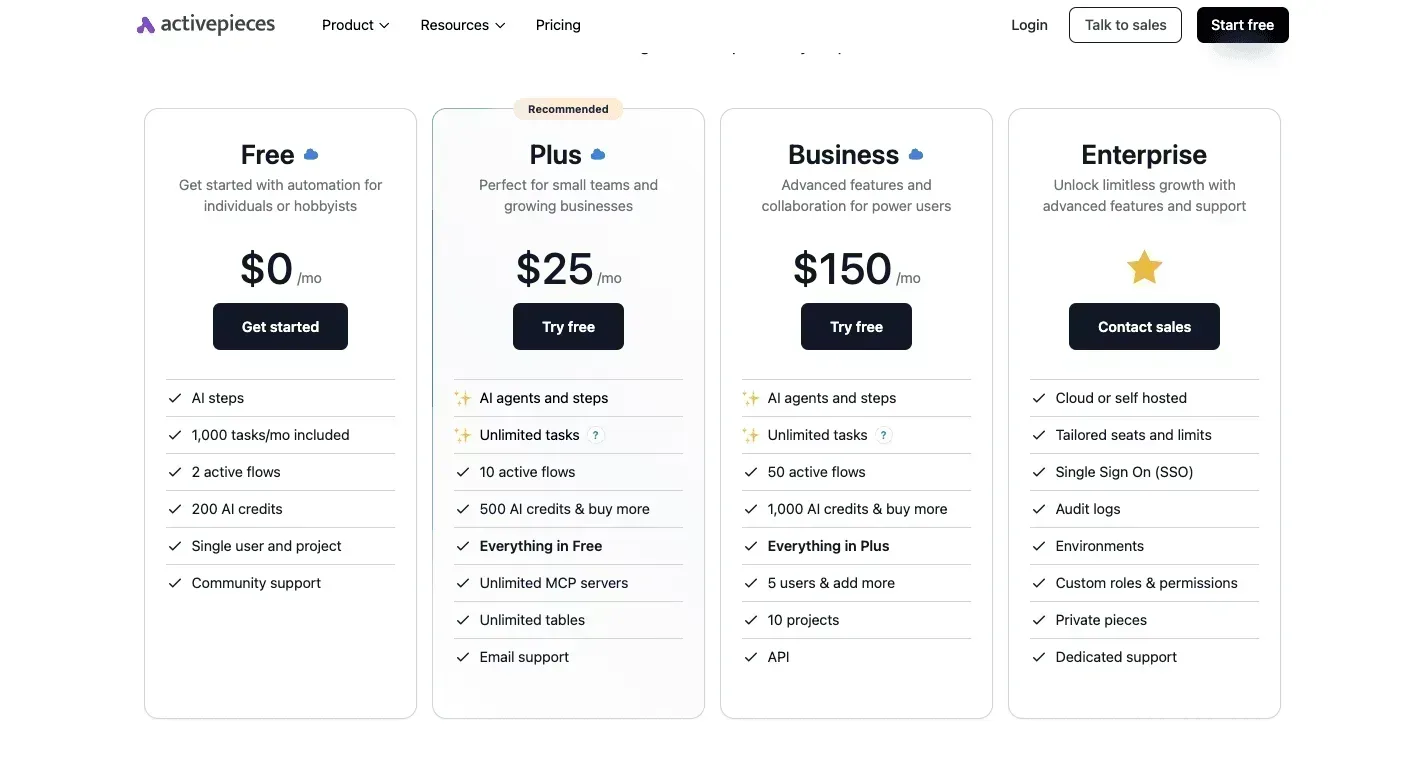
Activepieces has a Jira connector and meters by the run: its published pricing page lists 1 credit per flow run, any number of steps, where Zapier's pricing page bills per task and Make's bills per module.

Those runs don't draw on Jira's allowance, so breaking a brittle workaround into ten small steps costs the same as the two-step version.
The Free plan's 1,000 credits a month, with unlimited flows, cover 1,000 runs of that ten-step flow, and you still pay Jira for every person who logs in, which means team costs are per-headcount.
In the workflow below, a new ticket arrives in HubSpot, the customer-relationship tool a support team might log requests in. HubSpot and Slack are two of Activepieces' 750 integrations, roughly 60% of which are community-contributed, so a job like this needs no custom connector.
After two AI steps rewrite and categorize the ticket, a router, which is a fork that sends each ticket down one path depending on its content, posts a message to the right Slack channel, which means each ticket is standardized and properly categorized before reaching the right team.
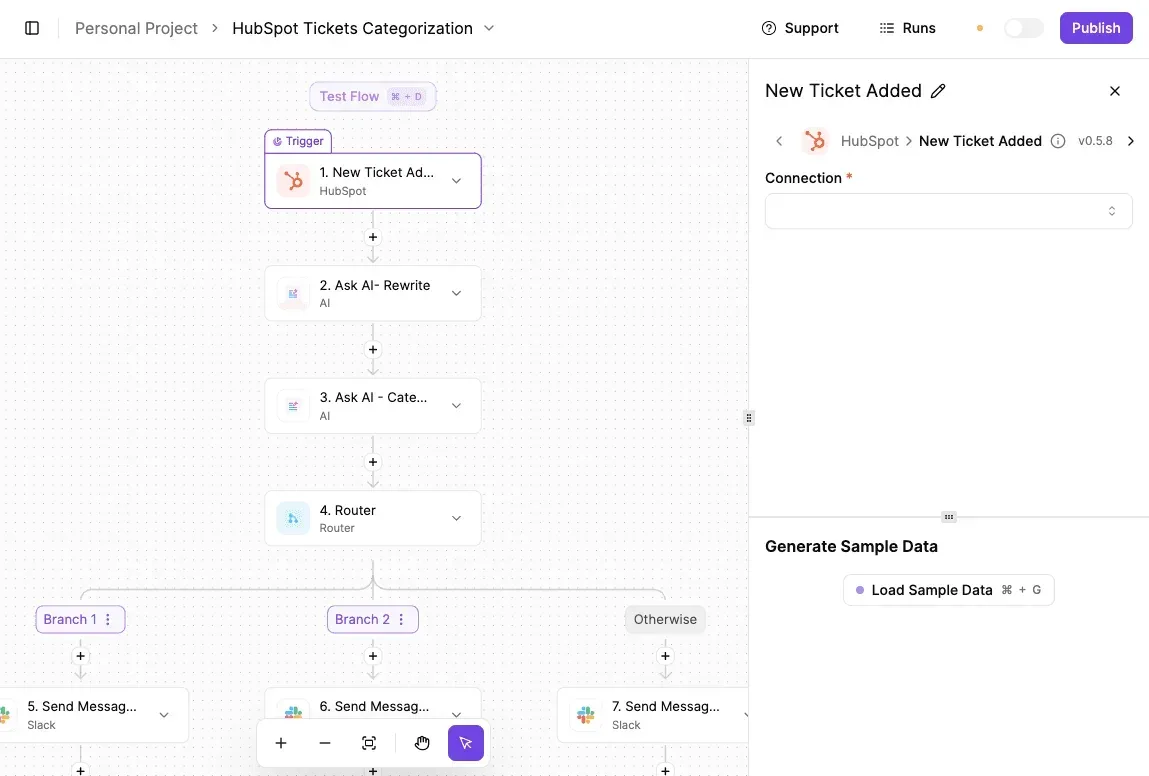
The panel on the right shows the trigger waiting for a new ticket, with test mode on and a publish button ready.

Nothing in that flow lives inside Jira, which is the point. Swap the first step for a Jira trigger and the same pattern covers an issue created in Jira that needs to reach a chat channel, a customer record, or a spreadsheet.
When it fits and when it does not
It fits when the work crosses tool boundaries, or when automation runs are the first Jira limit you'd hit. It also suits a team that has someone able to host and maintain a server.
That upkeep is a real cost, and doing nothing about it means the server falls behind on updates.
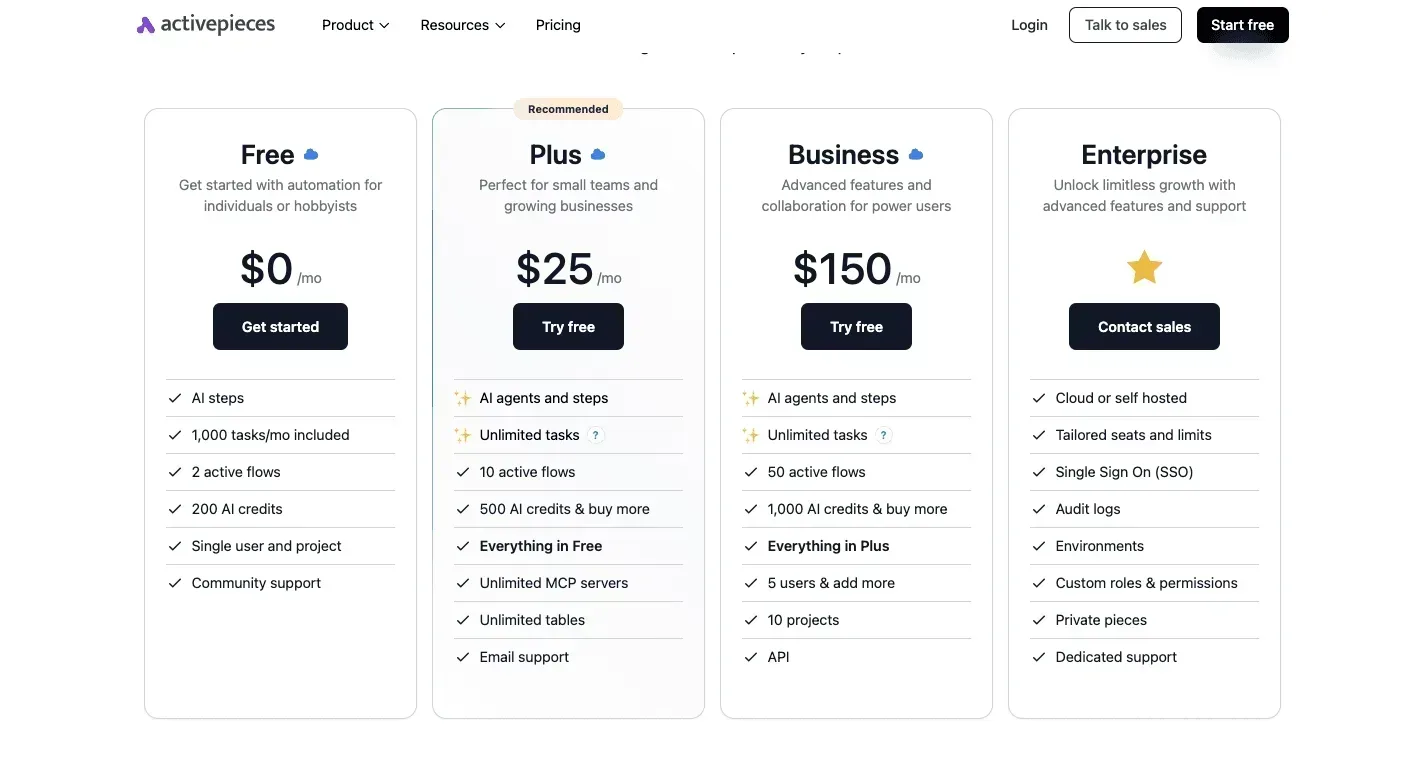
It doesn't fit if your pressure is on users, storage, or support. Jira's 10-user Free cap, the 2 GB of Free storage and the business-hours support on Standard all sit on Atlassian's side of the line, and 1 credit per run changes none of them.
If those are your first limits, the Jira tier is still the decision.
As of 20 November 2026, the source for what the hosted version costs is Activepieces's own pricing page, not this article, and its plans and limits can change.
Monday preparation before choosing a Jira plan
Spend Monday collecting your own usage, because the pricing page tells you what each plan allows but not which allowance your team will outgrow first. Skip it and you pay for the wrong tier, or find out mid-year that you picked one too small.
Five numbers to gather before choosing Jira
Work through the steps below in order, because each one feeds the next, and the last two keep your decision from going stale.
- Count real users, including stakeholders. Include the manager who only approves requests and the contractor who comments twice a month, since each can count as a paid seat.
- Export your automation runs. Pull the history from your current setup, or from a trial, so you know how many rules fire in a normal month and in a busy one.
- Check your storage against the cap. Add up attachments and files, then compare the total with the limit on the plan you're eyeing.
- List per-user app costs. Marketplace add-ons are often billed per person, so every seat you counted in step 1 also multiplies the cost of each app.
- Pick the tier by the first limit you hit. Lay the results from steps 1 to 4 beside each plan's limits and see which one gives out first.
- Re-check pricing before renewal. Plans and limits change, so confirm them on the maker's page before you commit again.
One more number is the one no export will give you: how long your team can wait for help when Jira stops working. Ask the people who depend on it, then compare their answer with what each tier's support promises.
Choosing the right Jira plan tier
Look for the lowest number on your list, the one closest to a ceiling, and let that set your plan. A team with few users but heavy automation will hit the automation limit long before the user limit, and the cheapest-looking plan won't hold it.
If you pay for a bigger tier you never fill, that is a small, steady waste. Staying on a tier you've outgrown means rules that stop firing, uploads that fail, and a forced upgrade at the worst moment.
A team with few users but heavy automation will hit the automation limit long before the user limit, and the cheapest-looking plan won't hold it.
Write the winning limit and the date you checked it at the top of your notes. At renewal, run the same steps again and see whether the limit that decided it has moved.
Frequently asked questions
Once you've picked a tier, five billing questions tend to come up. Refunds are decided by Atlassian's billing terms for your plan and region, so read them before you buy.
Tax is added at checkout based on your billing country, so read the quote Atlassian shows you, not the headline rate.
Free plan limits, downgrading and nonprofit discounts are covered in the questions below, and for the free plan you should count users, storage and automation against your own team before you commit.
Is Jira really free for 10 users? Yes, but the free plan has ceilings on users, storage and automation, not just headcount. Your team can be small enough for the user cap and still outgrow the plan through stored attachments or automation runs.
Check all three against your real usage. Whichever you'd hit first is the cost of staying free.
Can I switch Jira plans mid-term?
Moving up is straightforward, and you can generally do it when you need to. Moving down is where people get caught.
A lower tier has lower limits, so your user count, storage and automation must fit under them first. Otherwise you either pay for the tier you meant to leave or lose features you rely on. Look at the lower tier's limits before you click.
For eligible nonprofits and academic institutions, Atlassian runs discount programs. Eligibility is checked and the discount isn't automatic, so a qualifying organization paying the full rate is simply overpaying. Apply through Atlassian, and confirm the current terms on their pricing page.
Do I pay for users who only view issues?
Generally, yes. Anyone with a licensed account counts toward your user total, even if all they do is read.
A stakeholder who checks a board once a month costs the same seat as an engineer who lives in it.
Jira Service Management treats people who submit requests through a portal as customers rather than licensed agents, so a support desk can look different. Before you buy, list who actually needs to log in.
Related reading
References
Running the numbers
See what the same workload costs here.
Free forever plan, and every paid plan self-hosts at no extra cost.
See pricing Talk to sales