
Kajabi Alternatives: Top Picks Compared (2026 Guide)

Nov 17, 20269 min read
Five things decide whether a Kajabi alternative saves you money:
- entry price
- transaction fees
- caps on products, students or contacts
- what's built in (email, community, marketing tools), since anything missing has to be bolted on with outside tools, whether you connect them through a automation builder like Activepieces or by hand
- whether the platform fits what you sell
Start with the baseline. Kajabi's Basic plan costs $179 a month, Growth $249 and Pro $499. Even the cheapest tier is over $2,100 a year before you've sold anything.
What Separates Kajabi Alternatives: Price and Limits
viz type=stackrank title="What Kajabi's three plans cost each month" unit="$ per month" source="SaaSPriceAlerts - https://saaspricealerts.com/price-increases/kajabi-2026/"79 Basic plan." Basic: 179 Growth: 249 Pro: 499
At entry, Teachable's $39 plan is $15 cheaper, which adds up to $180 over a year. Kajabi reports that Podia's $49 entry plan saves $60 a year.
At the top, Thinkific's $219 costs $360 a year more than Teachable's $189 and $480 more than Podia's $179.
Teachable and Podia start below Kajabi's entry price, so leaving can save money at the entry level. But price alone won't point you to Thinkific. Pick it because the course experience is what your students pay for.
You can close a thin marketing gap without changing platforms. A daily routine like the one below is typical: a schedule starts it each morning, one step picks a topic, and another looks up search keywords.
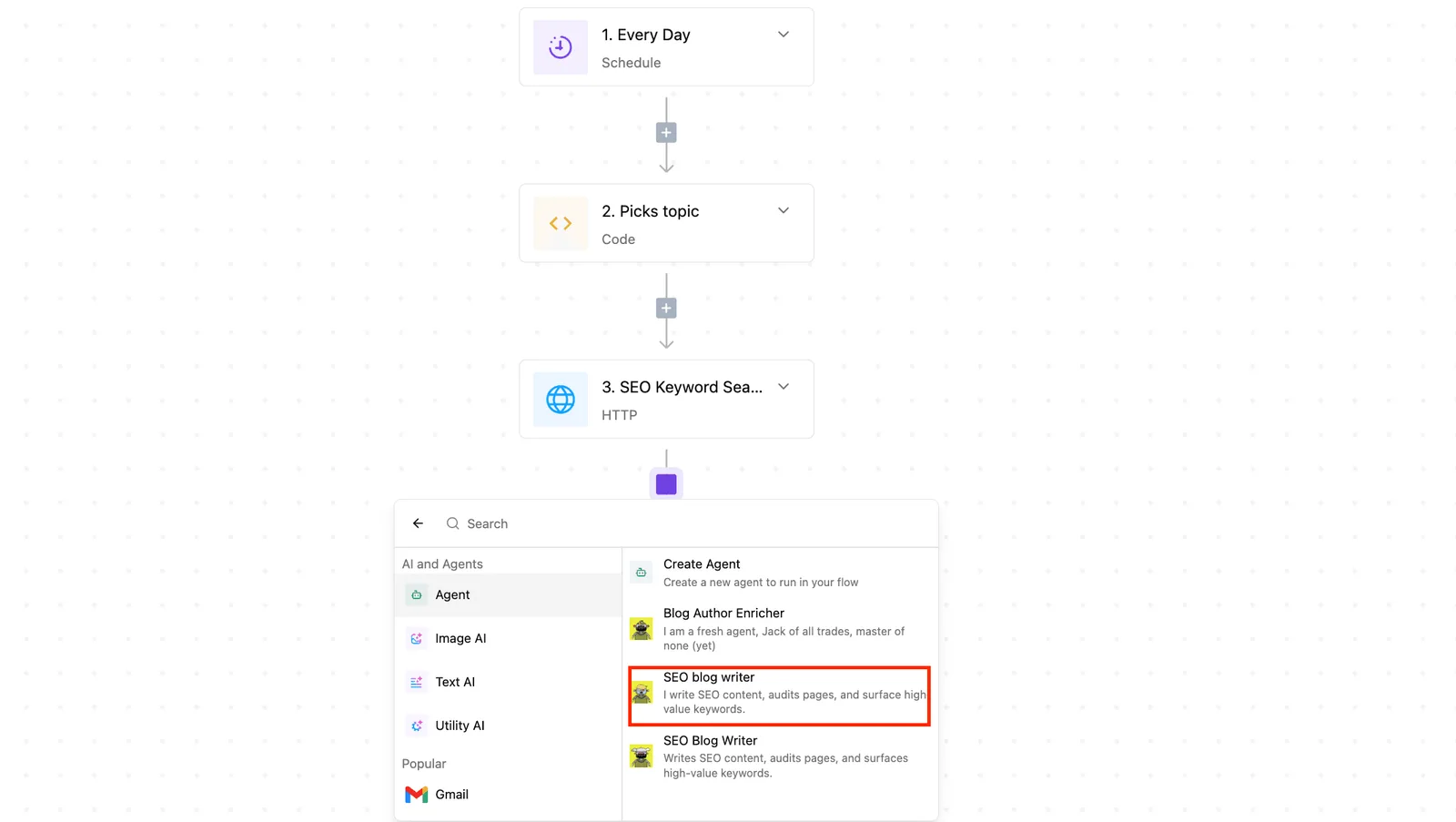
An AI blog-writing agent from the sidebar drafts the post. The routine runs beside your course platform, so it works the same on Thinkific as on anything else.
The fastest way to settle a shortlist is to try one. Activepieces is free to try, no credit card.
Teachable for simple course setup
Teachable suits you if your catalog is mostly courses and you want the simplest setup. The lowest tier takes a cut of every sale and ships with lighter marketing tools. Whether it's cheaper than Kajabi depends on which plan you land on.
Setup is the real selling point. You build a course, set a price, and open a school without wiring together email and checkout first. For someone who has never run an online business, that is a lighter first month than most all-in-one platforms ask for.
Teachable plan pricing and feature limits
Once you look at the plans, the catch shows: Teachable gates features by plan.
The plans run from Starter up to Advanced, and the more serious marketing tools, such as the ones that help you sell more than once to the same customer, sit on the higher ones.
If you stay on the bottom tier to keep the monthly bill small, you may end up running your marketing in a separate tool anyway.
How Starter's fee adds up
Staying cheap can backfire on fees. Treat the break-even point as a threshold, though the fee itself grows gradually with sales.
On a $100 course sale, Starter hands over $7.50 before your payment processor takes its own cut. A school that sells steadily can pay more in fees than the price gap to the next plan up.

When to upgrade your Teachable plan
So the rule is practical. If you sell rarely or are still testing an idea, Starter's fee barely registers and its simplicity wins.
Once sales become regular, the move up to Builder is likely to pay for itself, and the question becomes whether Builder's tools cover what you actually sell.
If you also need memberships or a community, that's the point to compare Teachable against a platform built for those, not to pay for upgrades that still leave gaps.
Where Kajabi is still worth the price
Leaving isn't right for everyone. Kajabi's real strength is that courses, email, funnels, community and a site builder share one login and one bill. For a seller who uses most of them, that is cheaper than stitching four tools together.

Its pages and student area also look more finished than the budget rivals manage.
If you run launches on timed email sequences, sell a high-ticket program, and open the community and funnels every month, the bundle is doing its job. Run the five criteria honestly.
If the "what's built in" question comes back with most boxes ticked, you're paying for something real, and your effort is better spent on automation than on a migration.
Reading a table only gets you so far. Build the same workflow in Activepieces and compare it yourself.
Activepieces
Activepieces connects your course platform to your CRM, email and chat without replacing any of them, using an MIT-licensed core and 750 integrations counted in its public GitHub monorepo.
That matters because the platform you land on, whether Systeme.io, Thinkific or Teachable, will probably do less out of the box than Kajabi did.
The gap Kajabi leaves is usually the glue: the small automatic actions that used to happen without you thinking about it.
Think about what Kajabi did quietly in the background. A student buys, gets tagged, lands on the right email list, and receives a welcome message.
When you move to a cheaper tool, those steps don't vanish from your business. They just stop happening unless someone does them by hand.
Doing nothing about that costs you hours every week, plus the occasional customer who paid and heard nothing back.
Rebuilding Kajabi's background steps
To rebuild those steps, you set them up in Activepieces as workflows, which the free plan covers at $0 with 1,000 credits a month. You pick a trigger, such as a new enrollment.
You then tell it what should follow: add the person to your CRM (the customer database), subscribe them to an email list, post in a chat channel so you know someone joined.
You build it by connecting blocks in a visual editor, so you don't need to write code to get started.
In the picture below, your course platform on the left feeds Activepieces in the middle, which hands the right information to the CRM, email and chat tools on the right.
Take from it that the course platform is one connection among many, roughly 60% of the integrations being community-contributed, so it stays interchangeable.
If you switch from Teachable to Thinkific next year, you reconnect one side of the diagram and leave the rest alone.
(illustration)
The tagging, the welcome email and the Slack alert can each be their own small flow, because the Activepieces pricing page lists "unlimited flows" on every tier from Free through Ultimate, and a run costs 1 credit however many steps it has.
Zapier's pricing page bills a task per action and Make's a credit per module, so on both, the tidy version of this setup costs more every time it runs.
Cloud or self-hosted
You can run Activepieces on their hosted cloud, or host it yourself on a server you control. Cloud is the quicker start, and its free plan costs $0.
Self-hosting runs the free Community Edition under the MIT licence, and suits you if you want your data on your own machine and are comfortable maintaining a server, or paying someone who is.
What Activepieces doesn't do
One limit is worth stating plainly: Activepieces sells no courses and hosts none. It has no checkout, no lesson pages, no student logins.
You still need a platform for that, and Activepieces connects to it through its 750 integrations, which is why the choice in the earlier sections comes first.
Once that choice is made, the automation layer is what lets you keep the Kajabi behavior you liked without paying for the Kajabi bundle.
Zapier and Make as Kajabi alternatives
Zapier and Make are the established names here, and both are good at what they do. Zapier's strength is reach and familiarity: if a tool exists, someone has probably built a connection to it, and the editor is easy to learn.
Make suits people who want to see and shape branching logic on a visual canvas, and it handles tangled data well.
If you run only a few small automations, or you already work in one of them, switching adds effort for little gain. The case for Activepieces rests on cost at volume and the option to self-host.
Judge it on the same criteria as the course platforms: price, caps and fit. Pay for the others when their connections or editor suit your work better than a lower bill would.
How to choose and switch from Kajabi
Switch in a fixed order, matching the tool to what you sell first and cutting over last.
Your buyers never see a gap, because the old platform keeps selling until the new one has proven itself.
- Match the tool to what you sell. List what you actually use each month: courses, a community, email, landing pages. Pick the cheapest tool that covers that list and nothing else.
- Check current prices on the vendor's own page. Plans change, so confirm before you commit. Look for a free tier while you're there.
- Export your content and student lists. Download your videos and files, plus a CSV of student names and emails. Doing this first means you hold a copy even if something goes wrong later.
- Run both platforms in parallel. Keep Kajabi live while you load the new tool and test a real purchase end to end.
- Rebuild your automations. Recreate welcome emails and access rules on the automation layer, then test each one with a dummy buyer.
- Cut over. Point your sales links and domain at the new tool, tell students where to log in, and cancel Kajabi only after a full billing cycle runs clean.
If you're dropping Kajabi's bundled community, entry cost varies more than you'd expect. Skool starts at $9 a month, so if community is the only integration you still need, it's the cheapest way to keep it.
At $95 a month, Mighty Networks starts at more than ten times Skool's entry price, so only pay it if you'll use what the extra buys.
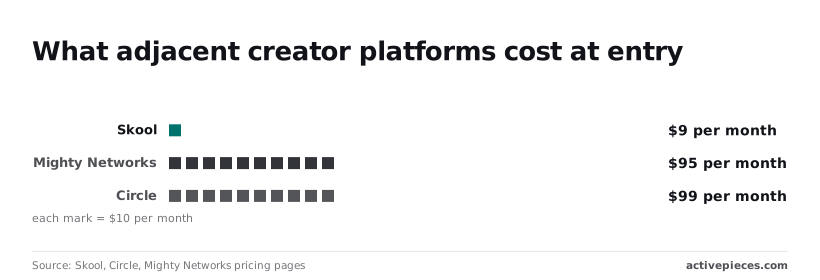
Circle starts at $99 a month, which puts it within a few dollars of Mighty Networks, so choosing between those two comes down to features rather than price.
Related reading
Still comparing
The fastest way to settle it is to build something.
Open source under MIT, so you can self-host the same thing later.
Start free Talk to sales