
Make.com Enterprise Plan: Pricing and Features 2026

Oct 27, 202614 min read
Make Enterprise plan pricing and features
The direct answer
You will not find a published price for Make's Enterprise plan, because it is the top tier and you get a custom quote from sales, much as with other automation platforms such as Activepieces once you move past the standard plans.

As of 27 October 2026, make.com/en/pricing lists no fixed monthly figure for it.
Any price comparison starts with how many credits you burn per month, because the credit is the unit Make meters.
The table shows how the five plans are priced. Free through Teams are published, and only Enterprise is quote-only, so you can price those four yourself before involving anyone.
| Plan | Price basis | Starting monthly price | Credits |
|---|---|---|---|
| Free | No charge | None | Small fixed monthly allowance |
| Core | Monthly subscription | Listed on pricing page | Scales with the tier you pick |
| Pro | Monthly subscription | Listed on pricing page | Scales with the tier you pick |
| Teams | Monthly subscription | Listed on pricing page | Scales with the tier you pick |
| Enterprise | Custom quote | Custom quote | Negotiated |
What 'contact sales' means for price
You can't model Enterprise cost in a spreadsheet beforehand, because a quote-only tier means the price depends on a negotiation, not on a rate you can multiply by your usage.
Recheck the page before you rely on this table. The plan names, price basis and the absence of a listed Enterprise price come from make.com/en/pricing, checked on 27 October 2026, and Make can change its plans and pricing without notice.
You can't model Enterprise cost in a spreadsheet beforehand, because a quote-only tier means the price depends on a negotiation, not on a rate you can multiply by your usage.
If you are running this arithmetic for your own team, see what the same workload costs on Activepieces.
Enterprise features on Make's pricing page
Six features are attributed to Enterprise on Make's pricing page: SSO, audit logs, overage protection, custom functions, longer log retention and 24/7 support.
I couldn't verify any of them against Pro or Teams, so the table marks each one that way. Where a cell says "not verified", check the live page before relying on it.
| Feature | Pro | Teams | Enterprise | Verified against |
|---|---|---|---|---|
| SSO | Not verified | Not verified | Attributed | Not verified |
| Audit log | Not verified | Not verified | Attributed | Not verified |
| Overage protection | Not verified | Not verified | Attributed | Not verified |
| Custom functions | Not verified | Not verified | Attributed | Not verified |
| Log retention | Not verified | Not verified | Attributed | Not verified |
| 24/7 support | Not verified | Not verified | Attributed | Not verified |
Don't read any of these rows as proof you need a quote, since an "attributed" feature may still exist lower down.
Once many people share one account and someone must answer who changed what, SSO and audit logs start to matter. They are governance features. A team of five rarely needs either.
Scale: operations, overage and execution limits
Start with API rate limits, the clearest measured gap, per Make Developer Hub. Core allows 60 requests per minute and Pro 120, so Pro doubles your headroom. Teams allows 240.
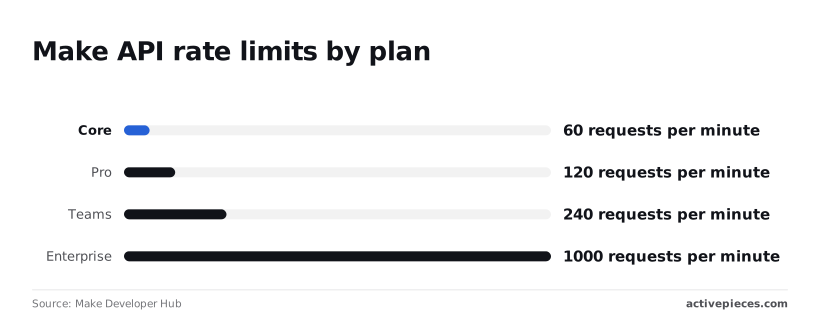
According to Make Developer Hub, Enterprise allows 1000, about four times Teams, which matters only if you manage scenarios programmatically at volume. Overage protection and log retention are the other scale claims, and both stay unverified here.
If your workflows can wait until business hours, 24/7 support is a cost you may not need to carry. It is attributed to Enterprise.
Test each unverified row against Pro and Teams before the sales call.
Make's credit limits and operations shaping Enterprise costs
Your quote depends on how many module executions your scenarios run each month, not on how many scenarios you build, because Make meters work in operations, which its newer plan language frames as credits.
Published plan prices versus Enterprise quote
The price you see is a floor. Core, Pro and Teams list monthly prices on Make's pricing page, and each price buys a monthly allowance of operations. Because the unit is metered, the real bill is that price plus whatever volume you add.

Because Enterprise has no listed price, Make quotes it against your volume and your governance requirements. So the useful question is whether your volume fits a published tier's allowance, because if it does, the quote buys you nothing on the metering side.
How Make scenarios consume operations
Count the trigger too: every module that runs in a scenario counts as an operation. A scenario with a trigger, a lookup, a filter and a write therefore costs several operations per run, not one.

Then iterators multiply the count again, because a loop over a hundred rows runs the downstream modules once per row.
Limits that push teams to Enterprise
Before you buy a contract, redesign your scenarios, because that is cheaper. Batch records, replace polling with webhooks where the source app supports them, and filter early so unneeded runs stop at the first module.
If you still hit your allowance, or run into per-plan caps on data transfer, execution time or scheduling frequency, you have a real case for a quote.
Check each cap against your heaviest scenario, not your average one. If the heaviest one fits, you're paying for governance, not capacity.
Mistakes teams make when buying Make Enterprise
Mostly, buyers go wrong by treating governance as a default: assuming SSO is included, sizing on the wrong unit, and leaving overage unwritten.
Assuming a lower plan includes SSO
When a team assumes a lower plan includes SSO, it finds out during a security review, because SSO and audit logs are most often held back for the top tier.
The check is to read the plan comparison for each governance feature by name, then ask support in writing whether Teams covers it.
Take from it that gating governance behind a costly tier is a common pattern, so Make's Teams plan needs verifying, not trusting.
Sizing Make Enterprise by scenarios, not operations
A feature name tells you nothing about the limit behind it.
File size caps, run history and execution time are the limits that break a real workflow, and two plans can share a feature name while differing on these, which means you cannot judge a plan's actual capability from its feature list.

The check is to list your three heaviest scenarios, find each limit they touch, and compare them against the plan's stated numbers.
A scenario with a loop over many records spends operations on every item, so the monthly bill follows your data volume.
Missing overage and retention terms in Make contracts
If a spike pushes you past your allowance, overage is where a quote becomes a bill. You need to know whether the platform charges extra, throttles you or stops runs. Ask for the overage rate and the stop behavior in writing.
Do the same for log retention and support response. A verbal promise from a sales call isn't a term, and it won't be there at renewal. Put each term in the order form, then compare it against the lower plan you rejected.
Worth checking against a plan that does not meter every step: one credit covers a whole run on Activepieces.
Make Enterprise versus Activepieces on SSO and self-hosting
Activepieces publishes its Team price at $200 a month flat, with SSO and 25 users included, and it can be self-hosted, while Make's Enterprise tier is quote-only and has no standard self-hosting.

That gives you a number to compare before any sales call, so the order form from the last step has something to be measured against.
Requirement-by-requirement table
As of 27 October 2026, the table below sets each requirement against both products. Read it as a checklist: a row where Make says "quote" is a row where you can't compare until someone sends you a figure.
The Activepieces cells come from its pricing page as checked on 23 October 2026. Confirm each cell against Make's pricing page and Activepieces' pricing page and docs before you rely on it.
| Requirement | Make | Activepieces |
|---|---|---|
| SSO | Enterprise plan | Team plan |
| Self-hosting | No standard self-hosting | Available |
| Audit logs | Enterprise plan | Listed by Activepieces among its paid-plan governance features; check the docs for your tier |
| Price basis | Quote-only for Enterprise, after the operations you buy are scoped | Published monthly price for Team |
| Plan needed | Enterprise | Team, at $200/month with SSO |
Look The only text I received is the fragment "hardest at the price-basis row," which has no numbers, product names, or competitor compliment to work with. Could you paste the full sentence? Then I'll return just the rewritten version.
Make meters operations, so Enterprise cost scales with how many your scenarios consume, and you only learn the multiplier in the quote.
Activepieces' Team figure is $200 a month flat, with 50,000 credits included and $0.007 a credit beyond that, so you can put it in a spreadsheet today.
If you want a managed service with its vendor's support and a mature visual builder, and you have no appetite for running infrastructure, Make is stronger.
If your team already builds scenarios there, switching means rebuilding every one of them, and that labour is a real cost against any licence saving.
When data residency or network control is the requirement, self-hosting changes the answer, because Make's standard offering can't meet it and Activepieces can: its MIT-licensed core self-hosts free on your own servers.
Activepieces doesn't hand self-hosting buyers a cut-down product: the air-gapped build carries the same governance list as its managed cloud, from SSO and SCIM through custom RBAC, audit logs, release management and secret managers, and regulated and public-sector organisations run that edition in production today, alongside MoneyGram, Moneypenny, Alan and FundingSocieties, who run Activepieces in production.
The consequence is that your own team now owns upgrades, uptime and backups, so price that engineering time against the Team plan before you count it as savings.
Questions to put to Make sales before signing
Price and volume
Ask for a written quote that states the price basis, credit volume and overage rate, because Enterprise has no list price and the discount depends on contract size.
Vendr's data on software contracts generally, not Make specifically, shows average discounts of 28.3% under $50k and 30.9% at $50-100k, meaning you gain little leverage from larger contracts.
At $100-250k the figure is 34.7%, and at $250-500k it is 46.2%, so a contract near a band edge is worth restructuring.
Above that it reaches 49.8% at $500k-$1M and 69% past $1M, so the discount structure vendors apply fundamentally shifts between mid-market and enterprise scale.
If you're small, expect the lower end and don't assume a deep cut.
Security and compliance
Get log retention, SSO provider support and data residency in writing, because these are the reasons to buy Enterprise at all. If your identity provider or region isn't named in the contract, you're relying on a sales call.
The full list to request in writing:
- Price basis, so you know whether you pay per credit bundle, per seat or a flat fee.
- Credit volume, so you can compare it with your measured monthly usage.
- Overage rate, since this is where a quiet month becomes an expensive one.
- Log retention, so audit evidence outlasts your compliance window.
- SSO provider support, so your identity provider works on day one.
- SLA, so uptime and response times carry a remedy if missed.
- Data residency, so processing stays in the region your policy requires.
- Term length, so a multi-year commitment doesn't lock in volume you may not use.
Once these eight answers are in hand, compare them with the Pro and Teams limits to see whether the gap justifies the quote.
Make Enterprise quote evaluation in five steps
Comparing your eight answers with the Pro and Teams limits is step three of a five-step sequence. Running all five in order tells you whether a quote is worth requesting.
- List your requirements, separating hard ones (SSO, audit logs) from preferences.
- Export three months of operation usage.
- Check both against the lower plans.
- Request quotes from Make and one alternative.
- Score everything on one scorecard.
Each step feeds the next, so the sections below cover the three that happen before any sales call.
Audit current usage
Make meters operations, so start there. Export three months of operation counts per scenario, and note which scenarios spike.
A single month can hide a seasonal peak, and a peak is what pushes you past a plan's allowance and into overage charges. Without that history, a sales rep's estimate is the only number on the table, and it isn't yours.
Take the requirements list and mark each item as met, partly met, or unmet by Pro and Teams. Only unmet hard requirements justify a quote.
If SSO is the sole gap, you're paying for governance, not for more automation power, and that's worth knowing before you negotiate.
Run the comparison
Put your measured operations beside each lower plan's allowance and note the shortfall, if any. If usage fits and requirements are met, you can stop.
If not, request quotes from Make and one alternative that covers the same hard requirements, then score both on one scorecard: cost at your measured volume, requirements met, and the cost of leaving later.
Frequently asked questions
Does Make.com Enterprise have a free trial? Not as a self-serve checkout, because Enterprise is quote-only and the route in is a sales conversation.
Test the workflows you care about on a lower plan first, then ask sales whether a time-limited proof of concept is available for the governance requirements you want to evaluate.
Is there a self-hosted version of Make? Make is sold as a hosted cloud service, and I found no self-hosted edition of the platform on its pricing page.
Its on-premise agent exists to reach apps inside your network, so it doesn't move the platform itself onto your servers. If self-hosting's a hard requirement, confirm it in writing before the call goes further.
Can you move from Teams to Enterprise mid-contract?
Usually yes, but the terms come from your contract, not a public rule. Ask whether the unused Teams balance is credited and whether the Enterprise term starts fresh or runs from your original date.
Cost creeps at the renewal that follows, Isvcosell reports. The median SaaS renewal uplift has climbed each year, from 4.8% in 2022 to 7.2% in 2026, so staying with a SaaS vendor costs more with each renewal cycle.
Read it as a reason to assume your next renewal won't be flat.
Because uplifts compound, a multi-year deal with a capped increase is worth more than a lower first-year quote. Get the cap into the order form.
Does Make Enterprise include a dedicated account manager?
Don't assume a named account manager, though support is part of what Enterprise buys. Ask for the contact model in the quote: a named person, a shared team, or a support queue with response targets.
Whatever they say, have it written into the contract, because a verbal promise from a sales call won't survive a change of staff.
Related reading
References
Running the numbers
See what the same workload costs here.
Free forever plan, and every paid plan self-hosts at no extra cost.
See pricing Talk to sales