
Metricool Pricing 2026: Free, Starter & Advanced Plans

Nov 5, 202614 min read
Metricool Pricing Plans Compared in One Table
Metricool pricing tiers and when checked
You pay Metricool by tier, and the tier you need is set by how many brands you manage, not by how much you post. There are five:
- Free
- Two Starter sizes
- Advanced
- Custom

I dated this comparison 5 November 2026. Any cell marked "Not confirmed" is a figure I couldn't verify, so I left it blank rather than guess. Read those from Metricool's pricing page before you budget.
Every current plan, monthly and yearly price
The table below lays out all five plans on the same six measures, so you can see where each one stops.
| Plan | Monthly price | Yearly price | Brands | Scheduled posts | Users | Analytics history |
|---|---|---|---|---|---|---|
| Free | Not confirmed | Not confirmed | Not confirmed | Not confirmed | Not confirmed | Not confirmed |
| Starter 5 brands | Not confirmed | Not confirmed | 5 | Not confirmed | Not confirmed | Not confirmed |
| Starter 10 brands | Not confirmed | Not confirmed | 10 | Not confirmed | Not confirmed | Not confirmed |
| Advanced | $53 (annual billing) | $636 | 12 (OneThread example) | Not confirmed | Not confirmed | Not confirmed |
| Custom | Not confirmed | Not confirmed | Not confirmed | Not confirmed | Not confirmed | Not confirmed |
Advanced is the only row with a sourced price, and it comes from OneThread's 12-brand example, not from Metricool's own page. I haven't filled the other rows from memory, because a wrong entry price is worse than a blank one.

With six brands, you pay for the ten-brand tier and carry four empty slots, because the two Starter rows differ only in brand count.
What each plan caps
Hit any of three limits and the damage starts: brands, scheduled posts or user seats. Brands force the tier jump. The post cap decides whether a busy month fits inside your plan. Seats decide whether a second person can log in without you upgrading.
If you are running this arithmetic for your own team, see what the same workload costs on Activepieces.
Real Metricool pricing for solos, teams and agencies
Depending on the buyer, the bill separates:
- a solo creator can stay on the lowest tier
- a five-person team pays by brands and seats
- a 20-seat agency pays the most once it counts add-ons
For a solo creator, one brand and one person means the brand and seat limits never bite.
Your only check is whether your monthly scheduled posts fit under the cap. If they do, the entry tier is the right buy.
Five-person marketing team
Run five people across several brands and the limits arrive first. Brand count and seat count each have a ceiling, and the cheapest tier usually runs out of one before the other.
The cost of ignoring this is a mid-month upgrade, or two people sharing one login, which breaks approvals and leaves no record of who published what.
Metricool pricing for a 12-brand agency
For a 12-brand agency, OneThread puts base Advanced at $636 a year, which is $53 a month on annual billing, or roughly $4.40 per brand monthly.
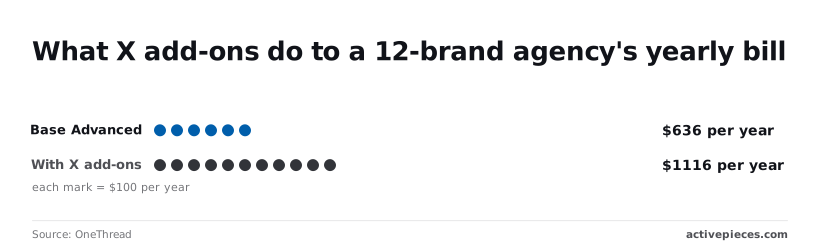
Add four X (formerly Twitter) add-ons and the yearly total rises to $1,116, which is $93 a month, so each add-on costs about $120 yearly.
$480 a year is the gap, nearly as much as the plan itself, and every dollar of it is add-ons, meaning the actual cost is nearly double the base plan price.
The arithmetic is $53 × 12 for the base plan and $636 + $480 for the total.
$480 a year is the gap, nearly as much as the plan itself, and every dollar of it is add-ons, meaning the actual cost is nearly double the base plan price.
If X is on your calendar for every brand, price the plan and the add-ons together, because the headline number covers only the first.
Usage Limits That Force a Metricool Upgrade
Before the add-ons even come into it, the plan's own caps on brands, scheduled posts, history and features limit how long you stay on a tier. Four limits do most of the forcing, and each bites at a different stage of growth:
- The free plan's brand allowance, which runs out the moment you take on a second client or business
- The monthly cap on scheduled posts, which a steady posting calendar can use up early
- The window of analytics history, which decides how far back you can compare results
- Features reserved for higher tiers, which you only discover when you reach for them
I've left out exact figures because I couldn't verify them; read the current numbers off Metricool's pricing page before you commit.
Juggling logins or merging unrelated accounts to avoid the cap muddies your reports, so upgrade as soon as the second brand is real.
Plan a week ahead across several networks and count your posts honestly, because one post sent to three networks may count as more than one; the scheduled-post cap is a monthly allowance.

Whatever your brand count, higher tiers lock some tools. List the two or three you'd miss, check which tier unlocks them, and buy that tier rather than the cheapest one.
Hidden Costs Around Metricool Plans
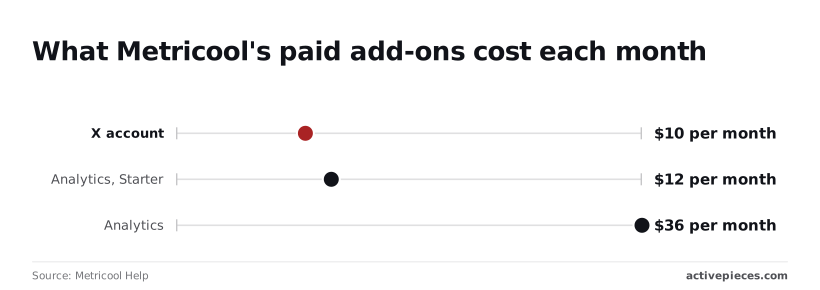
On top of the plan price, Metricool Help confirms three add-on charges.
They are $10 a month for X (Twitter), $12 a month for Advanced Analytics on Starter, and $36 a month for it on Advanced, so the same feature costs three times more for Advanced tier customers.
The table below shows which extras have a confirmed price and which don't.
| Item | Price | Per what | Source | Status |
|---|---|---|---|---|
| X/Twitter add-on | $10 | Month | Metricool Help | Confirmed |
| Advanced Analytics on Starter | $12 | Month | Metricool Help | Confirmed |
| Advanced Analytics on Advanced | $36 | Month | Metricool Help | Confirmed |
| Monthly vs annual gap | No figure found | Not stated | None | Unconfirmed |
| White-label reports | No figure found | Not stated | None | Unconfirmed |
| Ad spend | Set by you | Campaign | None | Unconfirmed |
Budget for the unconfirmed rows until Metricool puts a number in writing.
Metricool billing terms and add-on costs
If X is where your audience lives, the X add-on matters: it adds $120 a year.
Analytics costs three times as much on Advanced as on Starter ($432 a year against $144), so check whether you need it before assuming the bigger tier is cheaper overall.
I couldn't confirm the monthly-versus-annual gap, so price both terms at checkout before committing a year.
I couldn't confirm the free plan's caps or any trial length. Test your real workload on the free plan before you enter a card, and ask what happens when you hit a cap.
None of the figures above include ad budgets, because those are paid to the ad networks, not folded into your Metricool plan. I couldn't confirm whether white-label reports cost extra, which matters most if you report to clients under your own name.
Worth checking against a plan that does not meter every step: one credit covers a whole run on Activepieces.
Metricool Against Buffer, Later and Hootsuite on Price
I have no verified dollar figures for any of the four tools, so I won't claim Metricool is cheaper than the rest. What I can say is that the vendors charge for different things, and that decides which one suits you.
The alternatives win when you need one polished workflow or heavy team approvals.
The table below shows what each vendor charges for, not what it charges. Take from it which limit sets your bill, then read the exact number off the vendor's own pricing page.
| Tool | Entry paid price | Free tier | Brands included | Post limit | Seats | Analytics depth | 5-person team cost | Check date |
|---|---|---|---|---|---|---|---|---|
| Metricool | Priced by brand count | Yes | Grows with plan | Capped on lower plans | Rises with plan | Broad, with reports | Set by the brand tier you land in | Not verified for this piece |
| Buffer | Priced per channel | Yes | Per channel | Capped per channel | Team access varies by plan | Lighter | Multiplies with every channel you add | Not verified for this piece |
| Later | Priced per social set | Check the vendor | Per social set | Capped on lower plans | Rises with plan | Focused on visual content | Depends on how many social sets you need | Not verified for this piece |
| Hootsuite | Highest entry of the four, in my read | No | Per plan | Plan-based | Per user | Deepest at upper tiers | Climbs fastest as seats are added | Not verified for this piece |
Because Metricool prices by brand rather than charging for every connected channel, it can cost less when your count is brands, though I haven't verified that against current prices.
An agency with several small clients may avoid the per-channel multiplication that can make Buffer expensive. The catch is that you pay for it when a lower plan's post cap runs out mid-month.
If several people need to approve content, Hootsuite fits, since it's built around seats.
Later suits a brand whose work is mostly visual planning. Buffer suits a small team with few channels that wants a simple tool. If you report to clients under your own name, confirm white-label terms before choosing.
Metricool Reporting and Approvals with Activepieces
Don't expect Activepieces to replace Metricool or lower its bill.
It's a workflow automation tool that connects apps so one action triggers another, and it fills two gaps Metricool leaves, which are an approval step before content reaches the scheduler and automatic reports sent to the places your team already reads.
Where a workflow helps
If you run several brands, the cost of doing nothing is a wrong post going live under the wrong client's name.
A workflow puts a checkpoint in front of that. The draft is submitted, a reviewer gets an approve button, and only an approved post moves into Metricool's scheduler.
Nothing reaches the queue on a hunch. Rejected drafts go back to the writer with a note instead of sitting unseen.
The second use runs the other direction. Metricool can produce reports, but someone has to remember to open them and forward them.
A workflow can take that data on a schedule and drop it into Slack (the team chat app), a Google Sheets spreadsheet, or an email. Your client sees numbers without anyone logging in to fetch them.
In the illustration below, a draft passes through the approval step before the scheduler, and a second branch from Metricool carries a report out to Slack, Sheets and email.
Activepieces sits on either side of Metricool and never in place of it, and it meters the run rather than the steps: its pricing page lists 1 credit per flow run, so a ten-step approval chain costs what a two-step one does, whereas Zapier's per-task billing and Make's per-module billing each count every step on their own pricing pages.
Once the paths are clear, the practical question is whether your plan lets the two tools talk at all.
What Metricool's plan allows for integrations
I can't confirm from Metricool's documentation which API or integration access each plan includes, so I won't guess.
Check Metricool's current API documentation and plan comparison page before you build anything, because a workflow that depends on access your tier lacks is wasted setup.
Ask support in writing which plan unlocks it, and keep the answer. Then price that tier, not the cheapest one, into your budget.
Choosing and Trimming a Metricool Plan on Monday
Start Monday by counting what you actually run, then pick the lowest Metricool tier that covers it with room to grow. The order below keeps you from hitting a cap mid-campaign or paying for capacity nobody touches:
- Count your brands, monthly scheduled posts and team seats.
- Pick the lowest tier that covers all three with headroom, and note any add-ons you'd need on top.
- Test it on the free plan or a trial.
- Compare the monthly and annual prices for that tier.
- Recheck the pricing page before you pay.
- Set a renewal review date.
Count brands, posts and seats before choosing Metricool
Pull the last few months of your calendar. Count each brand or client account you manage, the posts you scheduled in a typical month, and the people who log in.
Count your busiest month, not your average, because a limit gets reached in the busy month.
Then add what you expect to take on in the next six months. If the lowest tier fits with a little room, take it. If you'd already be at the edge, move up one tier and no further.
Test Metricool free before paying annually
Run a real week of work on the free plan or a trial before you commit. Connect your accounts, schedule actual posts and have your teammates log in, so you find a missing feature or an awkward limit while it costs nothing.

Then compare monthly and annual billing for your tier. Annual usually costs less per month, but it locks in a plan you've only just confirmed.
Put a renewal review on the calendar, so you can trim or upgrade before the next charge rather than after it.
Frequently asked questions
Where Metricool's pages don't settle something, I say so rather than guess.
The free plan and annual billing
Is Metricool free to use?
Yes, there's a free plan, but it's a trial-sized tool, not a working setup. It caps brands, scheduled posts and features tightly, so a team publishing on a regular calendar will hit the ceiling quickly.
Check the current caps on Metricool's pricing page before relying on it.
Does Metricool offer a discount for annual billing?
Metricool advertises a lower effective monthly price when you pay yearly, so the saving is real. What I couldn't confirm is the refund policy on an annual payment.
Until you've read the terms at checkout, assume you're committing for the full year, and pick the tier you'll still need in month eleven.
Changing or cancelling a plan
Can I change or cancel my Metricool plan at any time?
Plan changes and cancellation are handled from your account settings. I couldn't confirm whether a mid-term downgrade is prorated or takes effect at the next renewal. Doing nothing costs you the next charge, so make any change before the renewal date, not after.
What you're charged for, and integrations
Does Metricool charge per user or per brand?
Mainly per brand, since plans are tiered by how many brands you manage. Team seats are limited by plan on top of that, so a growing team can outgrow a tier even when the brand count stays the same. Count both before you choose.
Does Metricool have an API or Zapier-style integrations?
Metricool has integrations with automation tools and an API, but I couldn't confirm that every plan includes them. If your workflow depends on automation, check which tier unlocks it, because that requirement alone can push you past the cheapest plan.
Related reading
References
Running the numbers
See what the same workload costs here.
Free forever plan, and every paid plan self-hosts at no extra cost.
See pricing Talk to sales