
Microsoft Entra ID Pricing: Plans and Costs (2026)

Nov 5, 202618 min read
Microsoft Entra ID pricing looks simple on the tier list but gets less so once a real team starts counting users.
The free tier covers basic single sign-on and directory needs, while the paid Premium plans are billed per user each month and add features like Conditional Access and risk-based protection.
What a team actually pays depends on how many people need those protections, not on headcount alone, and many organizations license only the admins and high-risk roles at first.
Even teams that handle joiner and leaver tasks with a tool like Activepieces still pay for the licenses sitting underneath, so the first job is to work out which users genuinely need which tier before the bill arrives.
Microsoft Entra ID pricing is the tiered, per-user licensing structure (Free, P1, P2, plus add-on SKUs and metered features) that determines which identity and access controls a organisation can enforce and what it pays in total to do so.
TITLE: Microsoft Entra ID Pricing 2026 and What a Team Pays
TITLE: Microsoft Entra ID Pricing 2026 and What a Team Pays
According to Zero Trust Cost, Microsoft Entra ID costs $0 to $12 per user per month. A 40-person team therefore pays between $0 and $480 a month depending on the plan, which makes tier selection a material monthly budget decision.
Microsoft Entra ID is Microsoft's cloud identity service: it handles sign-in, single sign-on and access policy for your apps.
Between the ceiling and the plan you need, there is a gap, and that is where budgeting goes wrong. The $480 ceiling is the Suite, not the plan most teams need, which means most organizations operate well under this published maximum.
Teams either overspend or accept undersized plans.
Because the per-user price only covers employees, customer and partner sign-ins are metered separately. The table shows the unit each plan bills, its price and its free allowance. Checked 5 November 2026.
| Plan | Unit billed | Price | What it adds | Free allowance or limit |
|---|---|---|---|---|
| Entra Free | Per user | $0 | Basic sign-in, single sign-on, MFA via security defaults | Included with a Microsoft cloud subscription |
| P1 | Per user per month | $7 | Conditional Access, group-based licensing | None; every covered user needs a licence |
| P2 | Per user per month | $10 | Risk-based access, privileged identity management | None; every covered user needs a licence |
| Governance add-on | Per user per month | $7 | Access reviews, lifecycle workflows | Added on top of a base plan |
| External ID | Per monthly active user (MAU) | Metered above the free tier | Sign-in for customers and partners | First 50,000 MAU free |
What each paid tier unlocks
You can't enforce "managed device only" rules on Entra Free, which is $0 per user, per Zero Trust Cost, because it has no Conditional Access.
P1 is $7 per user, which is $280 a month for 40 people, and it's the first tier where policy enforcement exists, and therefore represents the cost floor for conditional access policies.

Group-based licensing lives in P1, and the joiner-and-leaver routine around it doesn't need a specialist hire: describe what should happen when someone starts or leaves to the built-in chat in Activepieces, and it publishes a live flow you can open and edit like any other.
That flow sits under the same RBAC and audit logs as every flow built by hand, and its run trace lists which accounts it touched, in plain terms anyone can read. MoneyGram, Moneypenny, Alan and FundingSocieties run Activepieces in production.
At $10 per user, or $400 a month, according to Azureblog, P2 adds risk-based access and privileged identity management.
On top of a base plan, ID Governance costs $7 per user, so P1 plus Governance's $14, or $560 for 40 people.
The Entra Suite is $12 per user, which means it costs less than P1 plus Governance only if you'd use most of what it bundles.
In the table, the only sizeable free allowance is External ID's 50,000 monthly active users, checked 5 November 2026, meaning external identity costs nothing for customer-facing apps that stay below this threshold. Other features will put you on a paid tier before External ID does.

A team with a few hundred customer logins never touches the meter. Past that allowance you pay per active user, so volume forecasts matter more than headcount.
The Expected Bill for a 40-Person Team
On list price, the modelled 40-person team pays $295 a month, or $3,540 a year, as long as its customer app stays inside the External ID free allowance, your budgeting target given these conditions.
That's the figure a budget owner would approve, and the one the rest of this article tests.
Entra ID licence needs for 40 employees
This is a modelled scenario, not a real customer. The company has 40 employees. Thirty-five of them need Conditional Access and MFA policy applied to their sign-ins, which puts them on P1 at $7 per user.
Five are administrators who need privileged access, which puts them on P2 at $10 per user.
Licensing only those five on P2 keeps the dearer rate away from 35 people who don't need it. Putting all 40 on P2 would cost $400 a month, $105 more than this plan.
Then there is the customer-facing app. Customer sign-ins fall under External ID, and the budget assumes the free tier covers them. That line is $0 only while active users stay under the allowance, which is why the previous point about volume forecasts matters here.
Monthly and annual total on list price
Protect the P1 count when headcount changes: the 35 P1 seats are $245 of the $295 monthly total. The table prices each line separately.
| Line | Quantity | Rate | Monthly | Annual |
|---|---|---|---|---|
| Entra ID P1 seats | 35 | $7 | $245 | $2,940 |
| Entra ID P2 admin seats | 5 | $10 | $50 | $600 |
| External ID free tier | App users | $0 | $0 | $0 |
| Total | $295 | $3,540 |
The arithmetic is simple, and that's the weakness. Every cell assumes each person who touches a policy holds the right licence, that no feature outside P1 and P2 is needed, and that nothing is metered.
The arithmetic is simple, and that's the weakness.
If any of those assumptions fails, $3,540's a floor, not a forecast. The next sections go through the coverage rules, add-on SKUs and metered features that move it.
If you are running this arithmetic for your own team, see what the same workload costs on Activepieces.
Entra ID cost components beyond the per-user rate
Because the per-user rate's only the base, the first invoice outgrows the budget. Each of licence coverage, admin P2, Governance, External ID, workload identities and support adds a line on top of it.
Read the chart for the size of the segments, not the base bar, because the segments are what nobody priced.
It sets a 40-person team's budgeted monthly bill against its first real invoice, with each added fee as its own segment. Each one has a cause.
Licence coverage: who must hold which plan
If conditional access rules cover all 40 people, all 40 need the plan that includes them. A feature that needs a paid plan generally needs it for every user it touches, not just the people you had in mind.

Budget for only the three admins who configure it, and most of the licence bill goes unpaid. Count the people covered by each policy, not the people who edit it.
Entra ID add-ons and metered extra costs
Because that cost is spread over a handful of seats, it's easy to miss: admins who use privileged-access features need P2. Identity Governance's a separate add-on, billed on top of the base plan.

Once a customer or partner sign-up takes off, External ID's billing per active user beyond its free tier becomes a variable line.
When your automations run as app and service identities, called workload identities, they're metered separately from people. Of these, External ID and workload identities scale with usage, not headcount, so they can grow without anyone buying a seat.
Then there is support, its own line, which rises with the tier you choose.
Billing terms matter too: an annual commitment can price lower per month, but it locks the seat count, so a 40-seat contract for a team that shrinks to 32 still bills 40.
Check whether monthly billing carries a premium before you assume the cheaper term suits you.
Paying twice for what Microsoft 365 bundles
Before buying standalone identity add-ons, check what the suite you already own includes. According to IT Broker, Business Premium is $22 per user per month, which is $880 a month for 40 people.

E3 is $39, or $1,560. E5 is $60, or $2,400. E7 is $99, or $3,960.
Price the bundle against the full stack of fees, not against the base rate: a suite that costs more per seat can still cost less overall if it replaces separately billed add-ons you'd otherwise buy.
Entra ID versus competing platforms
Once the full stack of fees is on the page, the cheapest identity provider for 40 people is the one whose included features cover what you must enforce. No rival is the cheapest on headline rate alone.
Beside Okta, Google Cloud Identity and JumpCloud, Entra ID is compared in the table below on the dimensions that move the invoice. It shows which costs sit inside each plan and which arrive as extras.

| Per-user SSO plus MFA price | Device management and directory | Governance extras | Minimums | Microsoft 365 or Google fit | Check date | |
|---|---|---|---|---|---|---|
| Entra ID | Read from Microsoft's pricing page | Directory included; device management depends on tier | Separate add-on SKUs | Confirm per plan | Native to Microsoft 365 | Verify on the day you buy |
| Okta | Read from Okta's pricing page | Sold as separate products | Priced as separate products | Confirm with Okta | Works with either suite | Verify on the day you buy |
| Google Cloud Identity | Read from Google's pricing page | Basic device management in the paid tier | Limited | Confirm per edition | Native to Google Workspace | Verify on the day you buy |
| JumpCloud | Read from JumpCloud's pricing page | Directory and devices in one platform | Bundled or tiered | Confirm with JumpCloud | Works with either suite | Verify on the day you buy |
I've left the dollar figures out of this table on purpose. I have no price I can date and source to each vendor's own page, and a number without a check date is worse than none.
Pull each rate yourself, write the date beside it, and multiply by 40 before comparing anything. What follows is which line items tend to surprise a team of this size.
Okta pricing for 40 users
For 40 users, Okta's cost is the sum of its separately sold products, so the quote you need covers every product you intend to enforce, not just SSO.
Each of single sign-on, MFA, lifecycle automation and device features has its own price, so a team that needs all of them is adding line items.
Ask whether a contract minimum applies at your headcount, because a floor above 40 seats turns a per-user rate into a flat charge. If a vendor will only explain this on a sales call, treat the opacity as part of the price.
Google Cloud Identity for Workspace teams
When your users already live in Google Workspace, Google Cloud Identity's the cheapest route, because the directory and basic device controls are already in that bill.
Outside Workspace it gets thin: governance and privileged-access depth are limited, so a team that must enforce conditional access across non-Google apps may buy a second tool anyway.
Check which tier has which features before you count the bundle as one price. Also check whether a minimum applies at 40 users.
JumpCloud as an Entra ID alternative
With mixed Windows, Mac and Linux machines and no Microsoft or Google suite to anchor on, a team gets the most from JumpCloud, which bundles directory, device management and SSO.
Check which tier has which features before you count the bundle as one price. Also check whether a minimum applies at 40 users.
When staying on Entra ID is cheaper anyway
If you already pay for Microsoft 365, Entra ID's usually cheaper. Part of the identity layer's already licensed, so a rival must beat only the remaining gap, not the full rate.
What's left is the gap: the add-on SKUs for governance and the licence coverage rules. Price those against a rival's complete stack. Switch only if the rival covers every feature you must enforce for less.
Worth checking against a plan that does not meter every step: one credit covers a whole run on Activepieces.
Fix Licence Waste with Activepieces
Don't expect Activepieces to cut your Entra bill; it can stop you paying for licences that nobody is using. Once you've picked the plan that covers the features you must enforce, the remaining leak's people: leavers and movers who still hold a paid seat.
Activepieces's an automation tool that chains triggers and actions into flows. Its connectors library, where each integration is called a piece, is what makes it usable here.
Below is a searchable grid of several hundred integrations, sorted by popularity, with Webhook, Google Sheets, Gmail and HTTP at the top.
Those four are the ones to notice: HTTP lets a flow call the Microsoft Graph API directly, Google Sheets gives you a cheap place to keep an audit log. Gmail sends the review request. You aren't waiting for a dedicated Entra connector to exist.
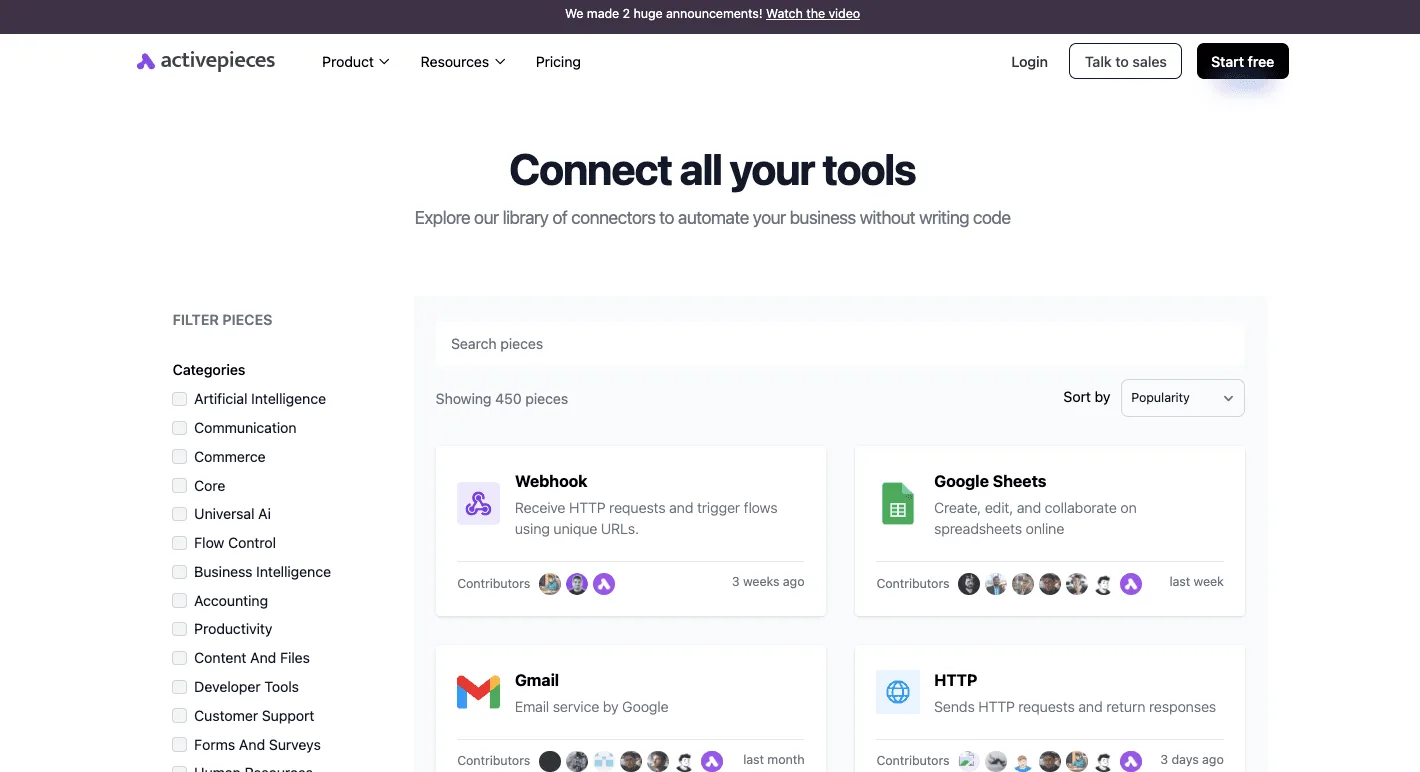

What matters is which parts you wire together and how much judgement you leave to a person, because the grid is only a menu of parts.
Scheduled licence-audit workflow
Every week or month, whichever matches how often your team changes, a schedule trigger starts the flow.
Next, an HTTP step asks Microsoft Graph for the list of users along with their assigned licences and account status. A filter then keeps only the accounts that are disabled, or that your HR record marks as departed, and still hold a paid SKU.

Expect a short list, not a verdict. Write it to a spreadsheet row per account, with the licence name and the date you flagged it.
That dated record's your evidence when someone asks why the seat count dropped, and it shows you which add-on SKUs keep appearing on accounts that should have none.
Joiner and leaver checks with human approval
Don't let the flow remove licences on its own. A departed account can belong to a contractor who's returning, or a shared mailbox someone still relies on.
To pause the run until a named person responds, use the approval step that Activepieces supports.
Route the flagged list to the IT owner by email, and only on approval let a follow-up HTTP call strip the licence.
The same pattern covers joiners. When a new starter's added, the flow checks that they received the licence tier their role needs and not a more expensive one by default.
You still choose the plan by the features you must enforce. The workflow only makes sure you pay for the seats that plan actually requires.
Licence Rules to Set Before the Next Renewal
Assign licences by group, cap the seats that carry admin P2, and count External ID active users every month. Those three habits keep the bill tied to the features you actually enforce.
A workflow decides what you need on the day you choose a plan. These rules stop the bill drifting away from that decision afterwards.
Group-based licensing and a seat cap
Assign licences to security groups, never to individuals. A group makes the licence follow the role: someone joins the group and gets the feature, someone leaves and the seat frees up. Individual assignments get forgotten, so you keep paying for people who changed jobs.

Treat admin P2 the same way, with a hard cap. Only the people who need privileged identity management or risk-based policies should hold it, so keep them in one small group and make any addition a deliberate request.
If a policy needs P2 for everyone it touches, that's a pricing fact to know before renewal, not after.
Monthly review of metered lines
Per-user rates are predictable. Metered lines aren't. External ID bills by active users, so a campaign, a partner onboarding or a stale test tenant can raise the figure without anyone buying anything.
Put a monthly look at the active-user count on the calendar, and compare it with the previous month. A jump you can explain is fine. One you can't is a bill you're about to receive.
Run the routine below in order. The order matters because the first step can remove the need for the later ones.
- Check which Microsoft 365 bundle you already hold, since it may already include identity features you were about to buy separately.
- Assign licences by group, and clear out individual assignments.
- Cap admin P2 seats at the people who need them.
- Review External ID active users for the month.
- Re-verify the vendor's pricing page, and don't rely on a quote or a remembered figure.
- Record the date you checked, next to the plan and the features it must enforce.
Of the six, the last step's the one people skip. A dated note tells whoever handles the next renewal what was true when you decided, so they can see what changed, not guess.
Frequently asked questions
Is Microsoft Entra ID free?
Yes, a Free tier exists, and any tenant created with a Microsoft cloud subscription such as Microsoft 365 or Azure gets it at no extra charge. It covers basic user and group management and single sign-on.
If a team must enforce policy by device, location or app, it needs a paid plan, because the Free tier doesn't include Conditional Access. Microsoft's Entra pricing page lists what each plan includes.
Do I need P1 if I have Microsoft 365 Business Premium?
No, Business Premium already includes Entra ID P1, and so does Microsoft 365 E3, so buying P1 separately would pay twice for the same entitlement. Conditional Access works under that licence.
Where it falls short is risk-based policy: Identity Protection's sign-in and user risk detection sits in P2, which is a separate purchase. Check the licensing details in Microsoft's documentation for the exact SKU before adding anything.
What happened to the Azure AD name and plans?
Microsoft renamed Azure Active Directory to Microsoft Entra ID, and the Free, P1 and P2 tiers carried over under the new name.
If an older invoice, script or forum answer says "Azure AD Premium", it refers to the same plans. Microsoft's rename notice says the service, its features and its licensing stayed in place, so a budget built on the old names is still valid.
The newer add-ons, such as Governance, are sold under the Entra name.
Does Entra ID charge for sign-ins or API requests?
For a workforce tenant, no: the bill is per licensed user, not per sign-in, and ordinary directory sign-ins are not metered.
Metering appears elsewhere. Entra External ID, the product for customer-facing apps, is billed on monthly active users, and some Microsoft Graph APIs are billed on usage through an Azure subscription.
If your 40 people only sign in to company apps, you're on seat pricing. If you build an app for customers or call metered Graph APIs, you've a usage line to estimate.
Can I mix Free, P1 and P2 users in one tenant?
Yes, licences are assigned per user, so one tenant can hold all three.
The catch is that a premium feature must be licensed for every user it applies to. A Conditional Access policy aimed at all users with only some on P1 leaves you out of compliance, so scope each policy to a group of licensed users.
Microsoft's licensing documentation sets out the coverage rule for each feature.
Related reading
References
Running the numbers
See what the same workload costs here.
Free forever plan, and every paid plan self-hosts at no extra cost.
See pricing Talk to sales