Mixpanel Pricing: Plans and What You'll Pay in 2026

Oct 20, 202614 min read
Three rungs make up Mixpanel pricing: Free, Growth and Enterprise.
The plan name matters less than how many events your product sends each month, whether they come straight from your app or are routed through a workflow tool like Activepieces, because that count decides which rung you stand on and what you pay.
Skip that count and you find out on the invoice.
Here are the three plans as Mixpanel's pricing page lists them, with the headline price and event allowance side by side, which lets you see the cost per event for each tier. Read the event column first, since it sets your ceiling.
Mixpanel pricing plans and limits

| Plan | Monthly price | Included events |
|---|---|---|
| Free | $0, free forever | 1M |
| Growth | Rises with your usage | Up to 20M |
| Enterprise | Custom quote | Up to 1T |
Prices and plan limits checked against mixpanel.com on October 20, 2026.
If you want to test it on a small product, the Free plan costs nothing and includes 10K session replays a month (recordings of real visitors using your product). Growth stretches to as many as 500K replays.
The gap between 1M and 20M events is where most growing teams end up paying more than they planned.
What counts as a billable event
Think of an event as one recorded action: a click, a signup, a page view, a purchase. A single visitor can generate dozens in one sitting.
A product with 10,000 monthly users each firing 100 actions produces 1M events, which uses up the entire Free allowance, so you can't scale further without paying. Your user count therefore tells you little. Multiply users by actions per visit before you compare plans.

Which plan most teams start on
Because $0 carries no risk while you learn how many events you really send, most small teams start on Free. If you sit near the 1M cap, price Growth now rather than after you hit it.
Pull the number from your own dashboard, or have an Activepieces flow copy it into a sheet each month. Activepieces includes unlimited flows on every plan, including free, and credits meter AI usage, so splitting a workflow into more steps doesn't add to the bill.

Then you can compare every rival tool on the same volume instead of on its sticker price.
If you are running this arithmetic for your own team, see what the same workload costs on Activepieces.
What each Mixpanel plan costs at realistic usage
Don't trust the sticker price: on Growth, BudgetForge puts the bill at $0 for 1M events.
Take from it that the bill's a slope, not a flat fee.
Run the numbers and one rule fits the figures: the first million events are free, then the bill rises with volume at a discounted rate, so your costs stay at zero until you exceed a million events. Every estimate below rests on that assumption.
At 1M events a month, Growth costs $0, because one million is the free threshold. If you stay under that line, the plan's free, and nothing else in this article should worry you yet. Cross it and the meter starts.

Mid-size SaaS at a few million events
At 5M events the bill's $613 on monthly billing, and at 10M it's $1,176.
Doubling your traffic does not quite double the bill, because the free million stays fixed. If your volume might double in a year, budget for the second number, not the first.
Doubling your traffic does not quite double the bill, because the free million stays fixed.
Mixpanel pricing at 50M events a month
At 50M events the same arithmetic gives $13,720, which is 49M times $280. That's the figure to hold against any rival's offer, since you should price the rival at 50M too.
This stops being clean at the 20M bar. Our rule gives $5,320, matching the quoted figure, but the monthly-billed number of $2,289 is less than half of that. I can't tell you which one your invoice will show.
Treat that gap as a reason to ask Mixpanel for a written quote at your volume before you sign.
None of the figures above include add-ons, which sit on top of all of these numbers, so a quote should list them line by line.
Hidden costs and limits Mixpanel buyers run into
Past event volume, six things change what you pay. Data retention decides how far back you can look when comparing this quarter to last year. Seat and project limits decide how many colleagues and products fit before you pay more.
Session replay allowance is 10K on the free plan against 500K on Growth, so a team watching user sessions daily can use up the free amount fast.
You need the group analytics add-on to analyse by company or account rather than by individual person. Overage behaviour covers what Mixpanel charges once you pass your plan's event count.
Instrumentation labour is the staff time to tag what users do in your product. Each can turn a quote that looks fine into a larger invoice.
Ask for each of these in writing, because the vendor pages rarely put a price on all of them side by side.
Usage overages and event spikes
When a busy launch month pushes you past your plan, the pages don't spell out how Mixpanel bills that, so ask before signing.
How you pay matters too. According to Rybbit, 1.5M events costs $140 a month on monthly billing and $120 on annual, a $240 yearly saving.

At 20M events it's $2,289 against $1,635, which is $654 a month, or $7,848 a year. The bigger your volume, the more the commitment is worth, and the more a spike hurts if you've locked in too small.
Expect to pay extra for replay, group analytics and longer retention, which sit behind plan tiers or add-ons. If your team needs account-level reporting, price the add-on into the comparison now, because you'll be buying it later at the worst moment, mid-project.
Someone has to decide which actions to track, write that in code, and fix it when names drift. Mixpanel only reports what your product sends it. That's engineer time, and no plan page lists it. Skip it and you pay later in reports nobody trusts.

Worth checking against a plan that does not meter every step: one credit covers a whole run on Activepieces.
Mixpanel against Amplitude, PostHog and Heap on price
Which of the four costs least depends on your monthly event count, not on any one vendor's headline. The free allowances below show why: a small gap at the start becomes a large one as volume grows.
Comparison table
Read the pricing unit first, because you cannot compare a vendor that counts something other than events to the others until you convert your own volume.
The table lines up what each vendor gives away, what it counts, and what it holds back. The figures date from October 2026.
| Vendor | Free allowance | Pricing unit | Gating |
|---|---|---|---|
| Mixpanel | 1M events | Events | Some advanced features sold as add-ons |
| Amplitude | 2M events | Events | Features split across plan tiers |
| PostHog | 1M events | Events, priced per product | Each product billed separately |
| Heap | Free plan offered | Sessions | Fuller features on higher plans |
I've left out entry prices and the cost at 10M events. Those move with contract terms and add-ons, so get a quote against your own count before trusting any published number.
With the free tiers on the page, the next question is where each one stops being enough.
When Amplitude or PostHog costs less than Mixpanel
Just over 1M events a month, a product can stay free on Amplitude while paying elsewhere, because its free tier is twice Mixpanel's. That's the clearest case.
If you want several tools under one bill, such as session recordings next to analytics, PostHog suits you. Each is priced on its own meter and you only pay for the ones you switch on.
Turn on everything and the meters add up, so total it before you commit.
When Mixpanel is the better buy
When your volume sits inside its free allowance, or the features you need are included rather than sold as add-ons, Mixpanel's the better buy.
Count the add-ons you'd actually use before comparing totals. A plan that looks cheaper per event can cost more once you add what the cheaper plan leaves out.
Only if you can convert your traffic into sessions and the result comes out lower does Heap deserve a look.
Activepieces for Mixpanel event routing and reporting
It won't lower what Mixpanel charges you, but Activepieces, a no-code automation tool, can keep unwanted events from being counted and move non-product events into Mixpanel without an engineer.
Its free plan costs $0 with 1,000 credits a month, so you can test the routing before it touches your budget.
If your bill is driven by volume, that matters, because every event you send is one you pay for.
Doing nothing has its own cost. Without a gatekeeper, whatever your form, CRM, or billing tool pushes into Mixpanel counts toward your volume, useful or not. You find out when the bill arrives, not when the events do.
Sending non-product events into Mixpanel
Product events usually reach Mixpanel through code on your site or app. Sign-ups, deal stages, and payments happen elsewhere: in a web form, a customer database (your CRM), or the tool that charges cards.
Activepieces connects to those tools through 742 integrations, counted from its open source monorepo, and sends each action to Mixpanel as an event, so you can see a sign-up next to the behavior that led to it. No developer needs to write the connection.
There's a catch: this adds events. Each one you route in counts toward your monthly total, so decide which ones you need before you switch anything on.
Trimming events before they hit your quota
Your form, CRM, and billing tool on the left feed one Activepieces flow, which filters and batches before anything reaches your Mixpanel project, and a second path sends a summary to Slack.
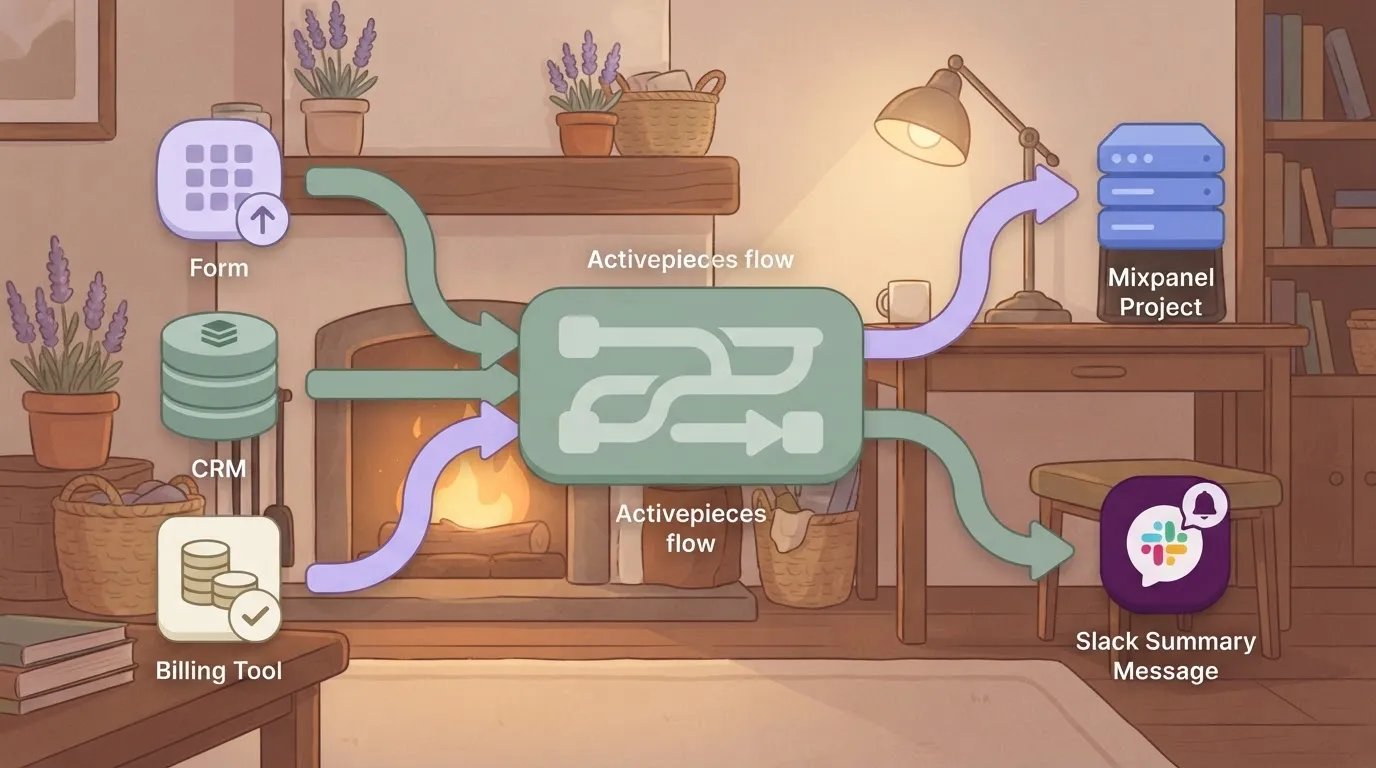
Flows are unlimited on every plan, including free, so splitting the routing across several of them adds nothing to the plan price.
Take from it that the filter sits in front of Mixpanel, so events it drops never count against your plan.
Drop whatever you'd never look at, such as internal test submissions or repeated status updates, with a filter step. A batch step groups the remaining events and sends them together, which keeps the flow tidy and the arrival of events predictable.
Batching doesn't reduce how many events are counted. Only the filter does that.
You get a running tally to hold against your plan's limit from the Slack summary, a scheduled message with the count of what was sent and what was dropped. That way you catch a runaway source in days, not at invoice time.
What follows from this is practical: price your real monthly volume after filtering, not before, and use that number when you compare Mixpanel with its rivals.
Monday morning steps to control Mixpanel spend
Do these six steps in order, because each one needs the result of the one before it, and skipping ahead means pricing a number you haven't checked.
Doing nothing is the expensive option: your bill keeps rising with your traffic, and you find out when the invoice arrives.
- Pull last month's total event count from your Mixpanel usage page.
- Match that count to a plan in the table earlier in this article, and note which limit you sit closest to.
- List your top event types by volume.
- Drop or sample the noisy ones.
- Set a usage alert.
- Set a review date.
Two steps give you a starting price, the middle two lower it, and the last two keep it from creeping back up.
Use last month's actual total, not your forecast, because a forecast's a guess and the bill follows the real number. Compare it to each plan's included volume and write down how much headroom's left.
A count sitting right at a plan's limit means one busy month pushes you into overage charges or a forced upgrade.
Cut the noisiest events
Sort your event types from busiest to quietest. Usually a handful of them make up most of the total, often automatic ones like page pings, scroll tracking or repeated button clicks.
Ask of each: would anyone on the team make a decision from this? If not, stop sending it. If the answer is "sometimes," sample it, which means recording only a share of those events instead of every one.
Your trends stay readable and the count drops. Each event you cut now is volume you stop paying for every month after.
Set a Mixpanel budget alert and review date
Set the alert below your plan's limit, not at it, so the warning arrives while you still have room to act.
Then put a review on the calendar, because new features add new events and your volume drifts upward without anyone deciding it should. At that review, repeat step one and compare the result with rival tools on the same volume.
Frequently asked questions
Is Mixpanel free to use? Yes, Mixpanel has a free plan, but it comes with a monthly event allowance and a smaller feature set than the paid plans. Mixpanel's pricing page lists the current limits.
Count your own monthly events against that allowance first. A product that outgrows it quietly will force an upgrade at a moment you didn't pick.
Does Mixpanel charge per user or per event? Per event. Mixpanel's paid pricing is built around how many events you send each month, not how many teammates log in.
Adding a colleague to your account isn't what raises the bill. A new tracked action in your product is, because every time a customer does it, it adds to the count.
Can I switch Mixpanel plans mid-month? Yes, you can change plans from your account's billing settings. Mixpanel's billing terms decide how it settles the current month, such as whether charges are prorated or the new rate starts at the next cycle.
Read those before you switch. Otherwise you may pay for a month at a rate you didn't expect.
Does Mixpanel offer discounts for startups?
If you are an early-stage company, Mixpanel runs a startup program, described on its own site. Eligibility rules and what the program covers can change, so check the current terms there rather than relying on a review or a forum post.
If you qualify, you still need to know your event volume. A discount on a plan that doesn't fit your traffic is still the wrong plan.
What happens if I exceed my Mixpanel event limit?
It depends on your plan, and Mixpanel's pricing documentation spells out the difference. Going over on a free plan generally means you hit the cap on what Mixpanel will accept. Going over on a paid plan generally means Mixpanel bills you for the extra volume.
In either case, doing nothing has a cost: lost data on one side, a surprise invoice on the other. Set a reminder to compare your monthly event count against your plan's limit, and move up a tier before you reach it.
Related reading
References
Running the numbers
See what the same workload costs here.
Free forever plan, and every paid plan self-hosts at no extra cost.
See pricing Talk to sales