
Rippling MCP Server Setup and Access Permissions

Nov 16, 202613 min read
Through the Model Context Protocol, which tools such as Activepieces also use to connect AI clients to other systems, Rippling MCP lets an AI client query Rippling. Permissions, not the connection, set what that client can see or change.
Confirm each detail against Rippling's current documentation before you rely on it.
By the end you'll have one AI client answering one read-only question, and you'll know who is accountable when it answers wrongly at 2am.
Understanding Rippling MCP server and permissions
MCP in one paragraph
Instead of a custom integration for each system, MCP gives an AI client a standard interface for calling external tools. It is an open protocol, and adoption has been fast.
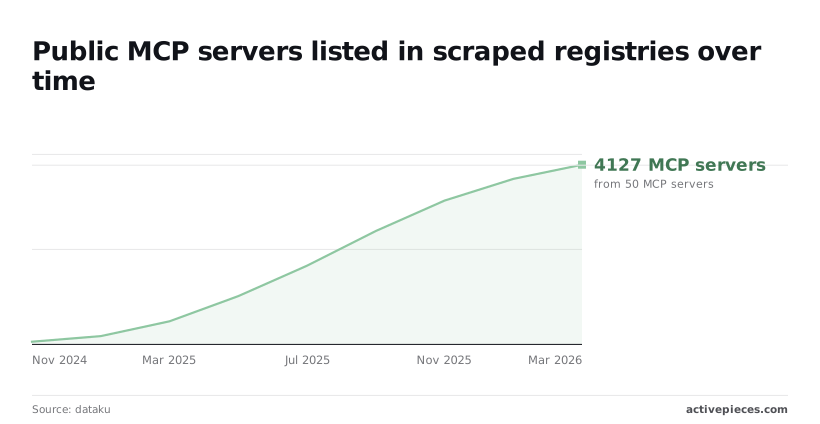
50 public MCP servers in November 2024 and 180 by January 2025: that is dataku's count, so the number more than tripled in two months.
It reached 520 in March and 1,100 in May 2025, which means the ecosystem more than doubled in about two months.
By July it was 1,800 and by September 2025 it was 2,600. A protocol that spreads this quickly gets connected before anyone has decided who owns the connection.
What the server exposes depends on which tools Rippling's docs list and which permissions your connecting user holds. Treat that tool list as the inventory you're approving, not a feature menu.
A protocol that spreads this quickly gets connected before anyone has decided who owns the connection.
Rippling holds payroll, personal and device data in one place, so a broad role connected carelessly gives the AI broad reach.
Common Rippling MCP use cases for teams
When teams start, it's with headcount questions, who reports to whom, who's on leave: read-only lookups.
Start with a question whose wrong answer costs nothing, and only then consider anything that writes.
Hold five things at the end of the steps that follow:
- One AI client connected to Rippling MCP
- One limited-role Rippling user the client connects as
- One read-only question answered and checked against Rippling itself
- The permission scopes recorded, with a named owner
- A known path for revoking the connection: ## What Rippling MCP requires before starting

We couldn't confirm a price, plan tier, beta status or tool counts for Rippling MCP from a Rippling page. Treat every prerequisite as unverified until someone on your side has read Rippling's own documentation and recorded who did.
Held to that standard, each prerequisite looks like the table below. Where Rippling's published pages state nothing we can cite, the cell says so, and the gap itself is the finding.
| Prerequisite | What Rippling's page states | Linked source |
|---|---|---|
| Plan needed | Not published | None available |
| Admin role | Not published | None available |
| Availability or beta status | Not published | None available |
| Supported AI clients | Not published | None available |
| Usage limits | Not published | None available |
| Price | Not published | None available |
Before connecting, every blank is a question to close, and the subsections below say who should close each one.
Rippling plan and admin permissions
Ask your Rippling account contact and get the answer in writing, because whether your current plan includes MCP access is a contract question, not a technical one.
Pay more attention to who holds the admin role.
The connection inherits whatever the authorizing account can see and change, so the person who approves it effectively decides what the AI can read in payroll, benefits and employee records. Name that person, and name who takes over when they leave the company.
Which clients can connect should be listed in Rippling's documentation, not the AI vendor's marketing. If your team uses a client that isn't on that list, don't assume it works or that Rippling supports it.
Also check where the client stores its connection credentials. A token saved on a personal laptop is an access path you can't revoke centrally.
Rippling MCP pricing, limits and beta status
Because the material we could cite states no price, usage limit or beta status, you can't budget for it, predict when it throttles, or know whether Rippling may change its behavior without notice.
Until you confirm those, run any pilot on a restricted role, with a named owner, and write down what you didn't know when you started.
Everything below works on Activepieces' free plan. Start without code or a credit card.
Stage-by-stage: Connecting an AI Client to Rippling MCP
Build the restricted role first, then connect in stages, each of which should leave something working before you start the next. The sequence below shows six actions in order. The limited user exists before you switch the server on, never after.
- Create a limited-role user.
- Open MCP Gateway and select Rippling MCP.
- Assign access to that user only.
- Add the connector in the AI client.
- Approve the scopes the client requests.
- Run one read-only
ask_aiquestion.

Each stage below names what should be working, and who owns it, before you continue.
Stage 1: Create a limited role
Create a dedicated user with a narrow role and record who owns it. That person's the one who gets the page when the connection misbehaves.
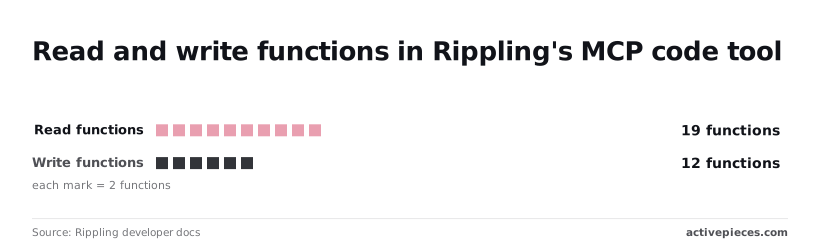
19 read functions and 12 write functions: that is what Rippling's tools documentation lists. That means 12 operations can change records, so the role's permissions are the only thing standing between a vague prompt and a changed record.
Check in the docs which permissions each function needs before you grant any.
Next, enable the server in Rippling (Stage 2): open MCP Gateway, select Rippling MCP, and assign access to the limited user from Stage 1 only. Working state: that one user appears as assigned and nobody else does.
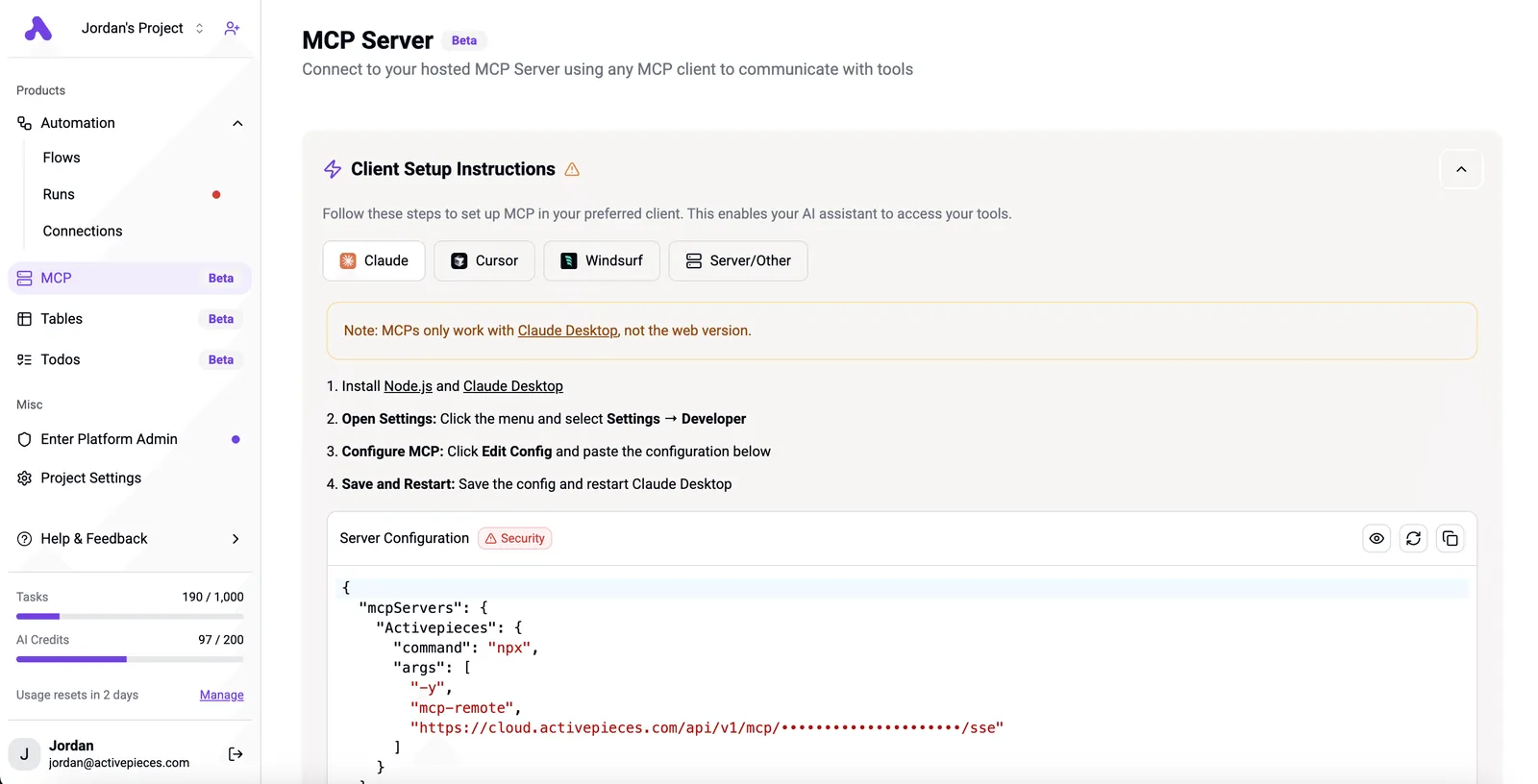
If you assigned an administrator account instead, the AI inherits administrator reach, so stop and fix it here.
Once the server is enabled, add it in the AI client (Stage 3) using the values Rippling's admin screen shows. Copy them rather than retyping, and sign in as the limited user, not as yourself.
Working state: the client lists the server as connected under the limited identity.
Stage 4: Approve scopes and run a read-only test
Read the consent screen line by line and refuse anything broader than the role you intended. Then ask one ask_ai question that only reads, one whose answer you can verify by hand in Rippling.
With 19 read functions available, the test needs no write capability to succeed. A correct answer proves the connection and the role together. Note who ran the test and what Rippling's own screen showed, so the result can be checked later.
Common Rippling MCP Mistakes and a First-Week Checklist
Nobody signed off on any of the five mistakes that recur: a super-admin connection, sensitive data in chat, writes before testing, unchecked answers, and no revocation at offboarding.
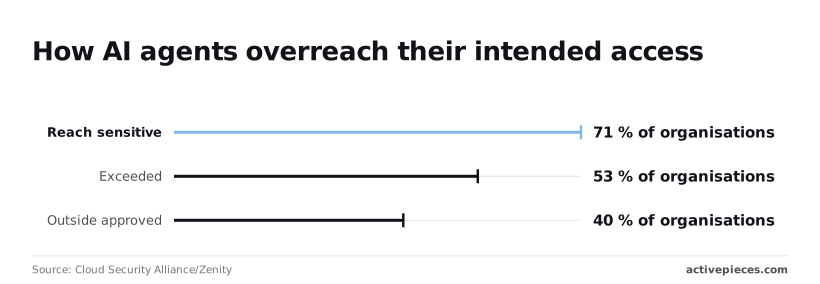
71% of organisations had AI agents reaching sensitive data, according to Cloud Security Alliance and Zenity, so assume it'll happen.
They also found 53% exceeded their permissions, so a boundary you haven't verified isn't one you have. And 40% acted outside approved scope, so a written policy alone doesn't hold.
The table shows what each mistake costs, how to prevent it, and what to confirm in Rippling's documentation.
| Mistake | What goes wrong | Prevention | Rippling doc to verify |
|---|---|---|---|
| Super-admin connection | Every query runs with company-wide rights | Connect through a role scoped to one task | What permissions the MCP connection inherits from its user |
| Sensitive data in chat | Pay or ID data lands in transcripts nobody approved | Reference records, never paste values | What data the connection can return and how it is retained |
| Writes before testing | A wrong edit reaches live employee records | Keep read-only until tested on non-production data | Which actions the connection can write |
| Unchecked answers | A fluent but wrong figure drives a decision | A named person checks against Rippling's own report | How reports are defined |
| No offboarding revocation | A departed owner's connection keeps working | Revoke access in the offboarding checklist | How connections and tokens are removed |
Three of these need more than a row. When the connection is super-admin, the AI acts with the widest rights in the company, and whoever answers the 2am page on a Tuesday inherits whatever it changed.
Name an owner before connecting, scope the role to one task, and leave writes off until a test has passed.
Once a salary or national ID is pasted into a chat, it has been copied somewhere HR never approved. Tell staff to name the record, not paste the value, and read the retention terms for both Rippling and your AI client.
Fluent isn't correct. Any figure that feeds payroll or headcount decisions gets compared with Rippling's own report first.
Monday checklist:
- Name the connection's owner and the person who gets paged.
- Confirm in Rippling's docs which permissions the connection inherits.
- Connect with a scoped role, read-only.
- Write the rule on sensitive data and send it to everyone using the connection.
- Add connection revocation to the offboarding checklist, then test one write on non-production data before enabling any.
Easier to see it running than to read about it: set it up free, no card.
Where Activepieces Fits Next to Rippling MCP
When the work runs unattended
When the work is the kind nobody's watching, Activepieces fits, and it carries unlimited flows on every plan, including free, so one flow per Rippling event never runs into a flow quota.
That means a workflow that runs when a Rippling event fires, while Rippling MCP stays the tool for a person asking questions and checking the answer. That split follows from the rule above.

When someone compares a figure with Rippling's report, a human's in the loop. A new-hire alert has no such step, so it shouldn't depend on a chat session.
The two lanes side by side
Side by side, the two lanes look like the illustration below. In the first, a person at a laptop asks a chat client connected to Rippling MCP, reads the reply, and decides what to do with it.

In the second lane, a Rippling new-hire event feeds an Activepieces workflow that posts an alert to Slack, the team chat tool, with no one asking anything.
A run costs 1 credit however many steps it has, and the free plan includes 1,000 credits a month.
Take from it that the lanes differ in who's accountable at the moment of action: in the first it's the person reading, in the second it's whoever owns the workflow.
That's the question to settle before building anything. When the alert fails at 2am on a Tuesday, someone gets paged, and it needs to be a named owner rather than whoever last edited the flow.
Rippling permissions to check before building workflows
Because a workflow acts under a stored credential, the permissions behind that connection matter as much as the ones you verified for MCP. Check them in Rippling's documentation, and scope the workflow to the one event it needs.
The Rippling connection is where the risk sits, and an SDK gives an agent code to run without giving it a tenant, a role or an audit log.
Activepieces treats the agent as a user: SSO and standard roles come with the Team plan at $200 a month, SCIM, custom RBAC and audit logs with Ultimate, and run history and a step-by-step trace of what the agent decided and which tool it called, plus log streaming into the tools your security team already watches, so agent activity appears in the same logs as any other system event.
Before you design around Activepieces, know that MoneyGram, Moneypenny, Alan and FundingSocieties run it, and that its open source repository holds 750 integrations.
Confirm the specific triggers and actions in its connector listing, because a connector name doesn't tell you which Rippling data it can read or change.
Activepieces doesn't replace Rippling MCP. It gives scheduled or event-driven work a place to run, with a run history you can review, which a chat conversation doesn't. The free self-hosted Community Edition is MIT-licensed, so you can try that split without a contract.
Frequently asked questions
Settle five open questions in Rippling's documentation before anyone connects, because each one changes how much access you're handing over:
- Whether you can switch write functions off, leaving the assistant read-only
- What rate limits apply, and what happens to a workflow that hits them
- Whether Rippling prices AI access separately from your existing plan
- How to revoke a connection, and who on your team may do it
- Which AI clients Rippling supports
Cost, access and clients
The answers below say what can be said without those details, and who should chase the rest.
Is Rippling MCP free to use? This article can't confirm it. Whether access is included in your plan or priced separately is a question for your Rippling account owner and the pricing page.
Get the answer in writing, because a free pilot that quietly becomes a line item is a budget problem with no owner.
Can Rippling MCP change employee data or only read it? Assume it can change data until Rippling's documentation says otherwise for your setup. Start with a role that has read access only, and confirm in the docs whether write functions can be disabled.
Name one person who approves any change the assistant is allowed to make.
Which AI clients work with Rippling MCP? MCP is an open protocol, so several clients speak it, but support for any given client is Rippling's call, not the protocol's.
Check the supported list in Rippling's docs, then test the exact client your staff use. A client that connects isn't the same as one that's supported.
Safety and the API
Is it safe to connect employee data to an AI assistant? It's as safe as the permissions you grant and the person who answers when something goes wrong.
Connect with the narrowest role that does the job. Record who owns the connection, and rehearse revoking it before you need to. If nobody can say how to cut access off, you're not ready to connect.
Does Rippling MCP replace the Rippling API? Nothing here suggests it does. Treat MCP as a conversational way in for questions, and keep fixed, repeatable integrations on the API, where behavior is predictable and someone owns each job.
Confirm the boundary between the two in Rippling's docs before you retire anything.