
Snowflake API: Which One to Use? (2026 Guide)

Nov 22, 202618 min read
Snowflake exposes several separate REST APIs.
They're chiefly the SQL API, the Snowflake REST API for object management, the Cortex REST API and Snowpipe Streaming, and each has its own purpose, accepted credentials and billing basis, which is worth checking before you wire any of them into a workflow tool such as Activepieces.
The Snowflake API is the set of REST interfaces for working with Snowflake programmatically: the SQL API runs statements, the Snowflake REST API manages objects, the Cortex REST API serves AI models and Snowpipe Streaming ingests rows, each with its own authentication, limits and errors.
According to Github, this was checked against docs.snowflake.com and snowflake.com/pricing on 2026-11-22.
Before you pick one, ask who owns the connection. Every call runs as a specific user or service identity, and that identity's role decides what the call can touch.
Snowflake API means several REST interfaces, not one
Read the table below as a routing guide: match the task to the row first, then confirm that your credential type and your billing expectations fit that row. It shows the four interfaces side by side.
| Interface | Purpose | Auth methods accepted | Sync or async | Billing unit |
|---|---|---|---|---|
| SQL API | Submit SQL statements and fetch results | Key pair JWT, OAuth, programmatic access tokens | Both; long statements return a handle to poll | Warehouse compute time |
| REST API (object management) | Create and manage objects such as databases, warehouses, tasks | Key pair JWT, OAuth, programmatic access tokens | Sync request; some operations complete in the background | Mostly no direct charge; any compute used by the objects is billed normally |
| Cortex REST API | Call hosted LLM functions | Key pair JWT, OAuth | Sync, with streaming for responses | Tokens processed |
| Snowpipe Streaming | Low-latency row ingestion | Key pair JWT | Async; data is committed after acknowledgement | Ingestion compute and data volume |
Because the rows differ on billing and completion behaviour, a wrong choice shows up later as a surprise invoice or a lost result, not as an error on day one. The subsections below take each interface in turn.
Use the SQL API when you need to run SQL from outside Snowflake and read the results.
A long-running statement returns a statement handle instead of rows, so your code must poll or fetch by handle, and a client that assumes an immediate answer will fail on the first slow query. Billing follows the warehouse that executes it.

Use the Snowflake REST API to create, alter and drop objects without writing DDL strings. It suits infrastructure automation, where the identity should hold only the privileges for the objects it manages, not broad administrative roles.
Use the Cortex REST API to call hosted models for completion, embedding and similar tasks. Its billing unit is tokens, so an unbounded prompt loop becomes a cost problem before it becomes a performance one.
Snowpipe Streaming for ingestion
Use Snowpipe Streaming to push rows continuously with low latency. It accepts key pair authentication, so provision a dedicated service user and store its private key under a named owner. Rows are acknowledged asynchronously, so your pipeline must track committed offsets and retry from them.
When a workflow spans these interfaces, Activepieces can call them in sequence, and since every plan, including the free one with 1,000 credits a month, allows unlimited flows, giving each interface its own flow costs nothing extra.
Each step still carries its own credential and its own limits, which the next section covers.
This takes minutes, not a project: automate it in Activepieces free.
Snowflake API access with key pair or OAuth
Do not look for a single static API key, because Snowflake issues none; each caller authenticates as a named user, with a signed key-pair JWT, an OAuth token or a programmatic access token.
Each credential belongs to one user and one role, so decide who owns that user before you create anything.
To find the account identifier and URL, use the organization-account form, orgname-accountname, and build the base URL as https://orgname-accountname.snowflakecomputing.com. The JWT you sign later embeds this identifier, so a wrong one produces an authentication failure that looks like a bad key.
Anyone holding the private key acts as that user, so treat it as the credential and keep it out of source control. The sequence below runs from generating the key to the first authenticated call.
- Generate an RSA private key, preferably encrypted with a passphrase.
- Derive the matching public key from it.
- Register the public key with
ALTER USER <name> SET RSA_PUBLIC_KEY='...', which needs a role with rights over that user. - Build a JWT signed with RS256. The issuer is the uppercase account, user and public-key fingerprint joined by dots; the subject is the account and user.
- Send it as
Authorization: Bearer <jwt>, with the headerX-Snowflake-Authorization-Token-Type: KEYPAIR_JWT.
The JWT is short-lived, so your client must regenerate it rather than cache it.
For integrations acting for people, OAuth is the fit, and its access tokens expire and they're refreshed. A programmatic access token is closer to a long-lived secret and is restricted to a role at creation. Send either with the matching token-type header, OAUTH or PROGRAMMATIC_ACCESS_TOKEN.
When the request names no role or warehouse, Snowflake falls back to the user's defaults, and a missing default or missing USAGE on the warehouse returns a permission error rather than an authentication one.
Role and warehouse permissions cause silent failures, because a valid token proves identity, not entitlement. Set both explicitly and check grants first.
Role and warehouse permissions cause silent failures, because a valid token proves identity, not entitlement.
A minimal Snowflake SQL API request that works
Once you have a bearer token, a token-type header and a JSON body naming the statement, warehouse and role, a complete request is one POST to /api/v2/statements. Everything after that is reading the statement handle it returns.
Send Authorization: Bearer <token>, X-Snowflake-Authorization-Token-Type set to KEYPAIR_JWT or OAUTH, and JSON for both content type and accept. The token's owner determines which identity runs the statement, so name the role in the body instead of inheriting a default.
{
 "statement": "SELECT order_id, total FROM orders",
 "warehouse": "REPORTING_WH",
 "database": "SALES",
 "schema": "PUBLIC",
 "role": "REPORTING_READER"
}
When a statement finishes, it returns resultSetMetaData, the first rows in data, and a statementHandle. When the result is large, partitionInfo lists the remaining partitions.
Fetch each with a GET on the handle plus a partition query parameter. Code that reads only data silently truncates large results, so loop over every listed partition.
Poll asynchronous Snowflake SQL API statements
If the statement outlasts the request, you get an HTTP 202 with a handle and no rows. Treat that as "running", not as failure.
Resubmitting the statement starts a second execution on the same warehouse. Instead, GET the handle until it returns success, and read failures from the error body.
Polling also draws on whatever runs your calls. The project settings below belong to an automation project, "Secret Gadget Labs", and cap how many flows may run at once at the default of five.
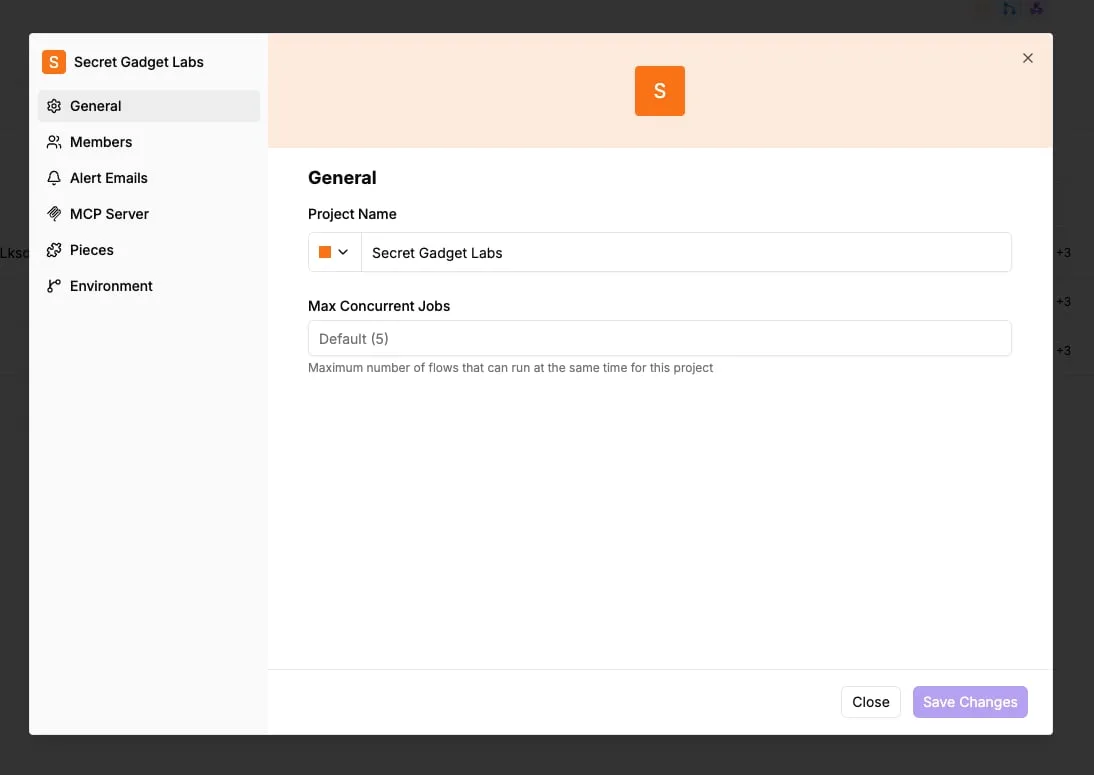
Each flow that waits on a statement holds one of those five slots, so a handful of slow queries can queue every other flow in the project.
Snowflake API pricing is credits, not calls
A polling loop costs nothing by itself, because Snowflake charges no per-request fee; what you pay for is the compute running behind the statement. Owner of the connection, owner of the bill: confirm whose warehouse each integration uses.
On 22 November 2026 the rates below were checked, and they vary by region, edition and cloud, so verify them against your own contract. The table shows what each interface bills in and what triggers the charge.
| Interface | Billing unit | Rate | Cost trigger |
|---|---|---|---|
| SQL API | Warehouse credits | $2 Standard, $3 Enterprise | Warehouse running, 60 s minimum per resume |
| Cortex REST API | Tokens | Per 1M tokens, by model | Input and output tokens per call |
| Snowpipe Streaming | Serverless compute | Varies by region and edition | Data ingested through the channel |
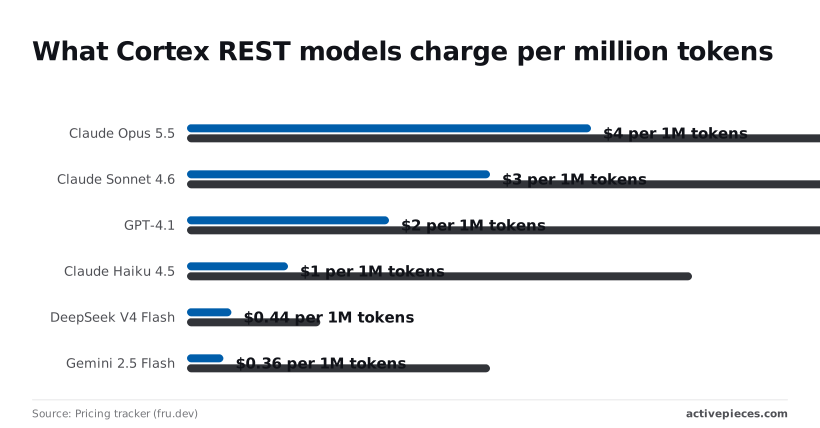
Read it as three different meters, so one budget line won't cover all three.
$2 on Standard, $3 on Enterprise and $4 on Business Critical: those are the on-demand credit prices in the Snowflake consumption reference. The same query therefore costs up to twice as much on Business Critical as on Standard, so check the edition before you forecast.
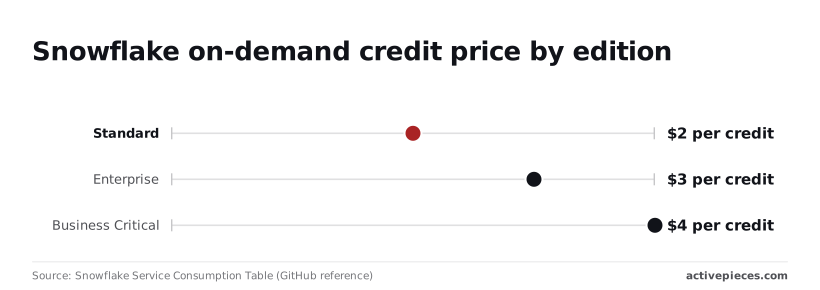
Snowflake Cortex API token pricing by model
On the fru.dev pricing tracker, Claude Opus 5.5 costs $4 input and $20 output per 1M tokens, so output volume becomes the primary cost driver.
According to the pricing tracker (fru.dev), older models were listed at these rates: Claude Sonnet 4.6 at $3 and $15, GPT-4.1 at $2 and $8, and Claude Haiku 4.5 at $1 and $5, which shows cost shapes model selection as much as capability does.
On the pricing tracker (fru.dev), DeepSeek V4 Flash was listed at $0.44 and $1.32, and Gemini 2.5 Flash at $0.36 and $3. Output runs three to eight times input on most of these, so a verbose response costs more than a long prompt. Cap output length.
Resume a suspended warehouse for a one-second statement and you pay a full minute, because of the 60-second minimum. Bursty API traffic spaced just beyond your auto-suspend window pays that minimum every time, so batch statements or lengthen the window.
You can follow the rest of this with the builder open. Start free, no card.
Snowflake rate limits and size caps by interface
Once you batch statements, the fix above, you run into the next ceiling. Each interface caps payload size, file count, statement duration and token lifetime separately, and none publishes a requests-per-second figure you can plan around.
Limits change between releases, so the table below is deliberately without values. It lists the limits that matter, what each one caps, and where to read the current value.
Copy the figure from the cited page into your own runbook with the date you checked it.
| Limit | What it caps | Where to verify |
|---|---|---|
| SQL API request payload | Size of one submitted request | SQL API reference |
| Snowpipe insertFiles | Files named in one call | Snowpipe REST reference |
| Snowpipe Streaming REST | Size of one write request | Streaming REST reference |
| Statement timeout | Synchronous wait versus the account default for a running statement | Parameters reference |
| OAuth refresh token | Lifetime before re-consent | OAuth integration documentation |
Exceed the payload cap and the batch is rejected, so size your batches against the verified value, not the largest one your client library allows.
The refresh token is the limit with an owner problem: when it expires, whoever authorized the integration must re-consent, so name that person in the runbook.
SQL API limits
Large results come back in partitions, and a statement can outlive the request that submitted it. Submit, keep the statement handle, and poll for completion.
A synchronous wait shorter than the statement's runtime hands you a handle, not an error, so a client that treats the first response as final will read an unfinished statement as a failure.
Because Cortex limits are applied per account, not per caller, another team's batch job can consume the allowance your service depends on. Confirm the current figures for your account with Snowflake, and make the calling role's owner part of that conversation.

For the SQL API, the documentation gives no requests-per-second figure. Treat throttling responses as the signal: retry with exponential backoff and jitter, and cap concurrency in your client. Warehouse queueing, not an HTTP counter, is what slows you first.
Common Snowflake API errors in production and fixes
Eight failure patterns cover most production incidents. Only some are safe to retry: authentication and SQL errors fail identically every time, while throttling, timeouts and lost handles usually succeed once you know what the server already did.
Read the last column of the table first, because it decides what your client code does automatically. The table maps each symptom to its likely cause, fix and retry safety.
| Symptom | Likely cause | Fix | Safe to retry |
|---|---|---|---|
| 401 | Expired JWT, clock skew, wrong key fingerprint | Regenerate token, sync clock | Yes, with a new token |
| 403 | Role lacks privilege, or network policy blocks the caller | Grant the role or allow the IP | No |
| 422 | Bad SQL | Fix the statement | No |
| 429 | Request rate exceeded | Back off with jitter | Yes |
| 503 | Service overloaded | Back off with jitter | Yes |
| Timeout | Warehouse queueing or slow query | Poll the handle | Check first |
| Statement running after disconnect | Client dropped, server continued | Cancel by handle | Check first |
| Expired handle | Result retained too briefly | Re-run | Yes, if read-only |
The next four paragraphs cover the rows that need judgement.
When you see a 401, the key pair JWT failed validation, so check expiry and clock skew before anything else. A 403 means the token was valid but the role or network policy refused it. Ask who owns the service user and its role.
For 429 and 503, retry both with exponential backoff and random jitter, and honour any retry hint the response carries. Cap attempts, so a sustained outage surfaces as an alert rather than an endless loop.
For long-running statements and lost handles, treat every statement as asynchronous. Store the statement handle before polling, so a restart can resume. If a client abandons a statement, call the cancel endpoint, or it keeps consuming warehouse time.
To retry without duplicating writes, send a client-generated request ID with each submission and mark resubmissions as retries. Snowflake can then recognise the original statement instead of running an INSERT twice.

Run Snowflake queries from workflows with Activepieces
Activepieces suits Snowflake work that a schedule or an event starts, such as a weekly query or a row-triggered lookup, and a run costs 1 credit however many steps it has. It handles the retry and error-branch plumbing so your own code doesn't have to.
When a workflow tool is the right layer
Start with ownership: every Activepieces flow that touches Snowflake runs under one stored connection, and that connection holds one Snowflake user's private key or token.
On a self-hosted instance or the enterprise cloud tier, that secret can sit in your own secret manager instead of the Activepieces database, so no vendor, us included, ever holds the key to your Snowflake user.
Point a self-hosted instance at an external secret manager and the key is simply absent from its database; secret managers are listed in the enterprise feature set alongside SCIM, custom RBAC and audit logs.
Name that user, record its role, and give it only the grants the flow needs. If the answer is "whoever built the flow", the flow will break the day that person leaves.
Two routes to Snowflake
Activepieces has two routes. Its Snowflake integration is one of 750 in the open source monorepo, so the current action list can be read in packages/pieces/community rather than taken from a description; plan around that list.
Where it falls short, an HTTP step can call the SQL API with a bearer token, and for key pair authentication you sign the JWT yourself and pass it in the header.

Because statements may complete asynchronously, the flow should submit, then poll or branch on status, rather than assume a result came back.
Retry and error rules in the builder
The builder is where the retry and error rules live. The screenshot shows a four-step flow: a weekly schedule trigger, "Find Rows" and "Add Row" steps on Google Sheets, and an "Ask AI" step.
The highlighted Find Rows step has its panel open, with a search value of {{step_2['output']}}. This shows one step's output feeding the next, and an error handling section sits at the bottom of the panel.

Treat that pattern as your template: each Snowflake step takes a reference from the step before it, and each has its own failure setting, so a failed statement can route to an alert instead of silently stopping the run.
Idempotent Snowflake API retries in workflows
That reuse of output is also why idempotency matters here. A retried step with an INSERT needs the request identifier from the previous section, or the retry duplicates rows.
When native Snowflake tasks are better
Once the work is heavy transformation, continuous file ingestion or a dependency graph of models, move it inside Snowflake.
Tasks run scheduled SQL under Snowflake's own roles and warehouses, Snowpipe loads files as they arrive, and dbt manages model dependencies and tests. Each keeps data and credentials inside the platform, so there's no external connection to own, rotate or audit.
Use Activepieces to notify, trigger or reconcile around those jobs, not to replace them. Its core is MIT-licensed, so a security review can clone the repository, read the queue and worker architecture, and run it self-hosted or air-gapped before any Snowflake credential goes near it.
Frequently asked questions
Each answer below assumes someone owns the connection and the service user behind it, because that person is who gets paged when the answer turns out wrong.
No. The APIs carry no separate price, but every statement that runs consumes compute credits on your account.
A trial account comes with promotional credits, so you can build against it, but once those run out a polling loop that wakes a warehouse is billed like any other workload. Set a resource monitor on the warehouse the integration uses.
Can I use the Snowflake API without a warehouse? Only for some calls. Object management through the REST APIs and metadata commands such as SHOW don't need a running warehouse.
Queries that read or transform table data do, so the role calling the SQL API needs USAGE on a warehouse, and a default warehouse should be set on the user.
Is the SQL API better than a driver or connector? Not in general. It suits stateless, HTTP-only callers that submit a statement and collect the result later.
Drivers suit long sessions, transactions spanning several statements, and large result sets read in volume. Choose by the task, not by which one is newer.
How do I rotate the key pair without downtime? A Snowflake user can hold two public keys at once, which makes rotation a sequence rather than a cutover:
- Generate the new key pair and keep the private key in your secrets store.
- Using a role that can alter the user, set the new public key in the user's second key slot.
- Deploy the new private key to the client and confirm it authenticates.
- Unset the old public key from the first slot.
Tokens already issued from the old key stay valid until they expire, so running jobs aren't cut off mid-statement.
Which Snowflake API should I use for LLM calls? Use Cortex, Snowflake's inference service, which is reachable over REST or from SQL functions. It keeps prompts and data inside your account's governance boundary.
The calling role needs the Cortex user database role, and authentication follows the same key pair or OAuth rules as everything else.
Related reading
Build it
Set this up in minutes.
No code required. Connect your accounts, and Activepieces runs it from there.
Start free Talk to sales