
Sora MCP Server: Costs, Risks and Spend Caps (2026)

Nov 18, 202614 min read
Nothing between the agent and the meter says stop. That is the risk, not the connection.
A Sora MCP server lets an AI agent trigger video renders by itself, much as a workflow built in Activepieces can fire steps without anyone clicking, and every render draws on your credits.
02:14: The Sora MCP Server Started Rendering Alone
What a Sora MCP server is
A Sora MCP server is a program that exposes Sora video generation as tools an agent can call over the Model Context Protocol. The agent sees a tool like "generate video," fills in the arguments, and the server forwards the request.

No person clicks anything. Each call is a decision the model makes alone, and each successful call spends credits.
Official versus community servers
If OpenAI didn't publish it, it's community code, and this article checked those servers on 18 Nov 2026. Each one has a maintainer working on their own schedule, with whatever spend controls they chose to write. Many have none.
Because MCP itself does not add budgets or approvals, a server that doesn't ship them leaves you without them. Read the repository before you hand it a key, because the README won't tell you what happens on a failed call.
What the team had connected
At 02:14 one team's agent hit a failed render, read the failure as "try again," and called the tool again. The logs showed the same request over and over. The server did what it was built to do, and the credit meter kept climbing.

With the server wired directly to the agent, no workflow step held a call for approval, and there was no cap at the account level.
The retry is the agent being helpful, and it's why a failure path costs more than a success path.
Everything below works on Activepieces' free plan. Start without code or a credit card.
Sora MCP tools reaching the video API
When your client sends a tool call, the server adds your API key and forwards it to OpenAI's video API, and you pay for every forwarded call.
The retry is the agent being helpful, and it's why a failure path costs more than a success path.
Client, server and API key
The agent can spend without ever needing credentials, because the client (the agent's host app) never sees the key. The server holds it and attaches it to each request.

Setup is easy and common. Dataku's count of public MCP server listings went from 50 in Nov 2024 to 520 by Mar 2025, then 1,100 in May 2025. It reached 2,600 in Sep 2025, 3,300 in Nov 2025 and 4,127 in Mar 2026.
On most Sora servers a single render passes through a handful of tools, in this order:
- The client sends a tool call, such as "create video", with a prompt.
- The server attaches the API key and forwards the request.
- The API creates a job and returns a job ID. This is the billable step.
- The client polls a status tool until the job reports done.
- The client calls a download tool to fetch the finished file.

Remix isn't a free edit; it starts a new job with its own charge.
Only steps 3 and 4 touch the meter, and the agent controls both.
Why Sora MCP async jobs trigger retries
Because a render takes a while, the create call returns before the video exists. The agent then sees a status of "queued" or "in progress", and an agent that reads that as failure will call create again.
Each retry starts a new job, while the first keeps rendering and billing in the background.
Nothing in the protocol links a retry to the job it replaces. MCP defines how tools are called, not whether a repeat call is a duplicate.
So you have to build that guard into your server or your approval step.
Overnight loop costs in renders and dollars
Before anyone is awake, a few hundred retries become four figures. An unattended loop costs jobs multiplied by clip price, and in published Sora 2 pricing one 10-second clip ran from $1 to $7, so a thousand iterations would incur thousands of dollars.

Sora video cost per job in seconds
I don't have a verified invoice figure, so here is the arithmetic.
Per Framesurfer, a hundred 10-second clips is 1,000 seconds of video. According to Aicostplanner, at $1 per clip for Sora 2 at 720p that's $100, which is a bad night.
At $7 per clip for Sora 2 Pro at 1080p it's $700, which is an incident. Nothing in the loop distinguishes the two, so the model tier the agent picks matters as much as the number of calls.

What Sora API access requires
Once the agent can call the render tool, every call bills to one key. Access is an API key, and the MCP server holds it.
Sora 2 pricing per second by tier
Resolution and tier, not clip count, drive the spread.
Sora 2 Pro costs $3 at 720p, $5 at 1024p and $7 at 1080p. An agent that "just wants it sharper" triples the bill against the 720p Pro tier and multiplies it by seven against Sora 2 at 720p.
Look to the references for the floor. Luma Ray 2 is $0.80 per clip, and Runway Gen 4 is $0.56, which means the cheaper option only saves money if usage stays controlled. Top-tier Sora is 12.5 times Runway's price per clip.
Those gaps are why the approval gate should depend on the tier, not the call count. A $1 render can run on its own, and a $7 render should wait for a human.
Nothing stopping the Sora MCP loop
Nothing made the loop wait, because five controls were missing and no human was ever asked about a single render. Here's what each absence allowed:
- An unrestricted API key let the agent bill against the entire account.
- No spend limit meant the only ceiling: was the payment card.
- A "retry until done" instruction turned every failure into another paid attempt.
- No approval on the billable create tool let each call fire without a person seeing it.
- No usage alert meant the first signal was the invoice.
Other agents have failed the same way, and the bills weren't small.
When a key has no cap, the account balance becomes the budget. One overnight invoice reached $47,300, and LangChain agents ran up $47,000; tens of thousands accumulated in a single night.

Tell a model to retry until done and it will follow the order literally. A Claude Code loop cost $6,000, and a planner loop cost $4,217.43, so the vulnerability affects multiple agent types with each incident costing thousands.
Nothing separated "look something up" from "charge the card" when a provisioning agent lost $6,531.30, by which point the query was already executed as a charge. A call that spends money ran with the same friction as a read.
Requiring approval on the create tool is what restores that separation.
At $1,818 lost to a cron job, this is the smallest figure here, and it still ran unwatched until someone read a bill.
An alert at a few dollars would have caught it in minutes.
Easier to see it running than to read about it: set it up free, no card.
Sora MCP Rules the Team Added
The team now runs the Sora MCP server on five rules. Each was written to close a specific way the loss happened, and none of them depends on the agent behaving well.
So that none of them can lapse by being everyone's job, every rule has one named owner.
| Rule | Incident cause it closes | Owner |
|---|---|---|
| Dedicated project key with a monthly budget | The agent spent from a shared key, so no single budget could stop it | Platform lead |
| Tool allow-list with a duration cap | Every generation tool was exposed, including long renders nobody asked for | Platform lead |
| Per-run job cap | One loop queued jobs until the run ended on its own | Engineer who wires the agent |
| Human approval above a set length | A long, expensive render started with no one looking | Team lead on call |
| Usage alert | The overrun surfaced only after the spend was final | Finance contact |
Sora API key scope and monthly budget
The Sora key the agent uses belongs to its own project, and that project carries a hard monthly budget. A hard budget stops requests when it's reached, which is the property a shared key never had.
Because nothing else draws on the key, a runaway agent can only exhaust its own allowance, and the rest of the team keeps working.
Tool allow-list and job cap
Only the tools the agent needs are exposed, and the generation tool is capped on clip duration. Anything not on the list is invisible to the agent, so it can't call it by mistake.
The per-run job cap sits beside it: when a run reaches its limit, it stops instead of queuing more. MCP doesn't enforce either one for you; the server configuration and the project settings have to.
Sora MCP approval and usage alerts
Above the set length, any request pauses until a person approves it. The agent can ask, but it can't grant itself the approval. The usage alert fires well before the budget is reached, so someone sees the trend while it can still be changed.
Add an Approval Gate with Activepieces
Put a workflow between the agent and the video API, and it holds the key, runs a fixed number of jobs, waits for a person to say yes, and only then spends credits.
It's not a Sora MCP server, and it doesn't make one safer by being near it.
Workflow versus direct Sora MCP tool
Give the model a direct MCP tool and the API key sits in the server's environment, with the model deciding how often to call it.
That's the failure this article is about: a loop, a retry, a confused plan, and the credits are gone before anyone reads the log.
You build the limits yourself, because MCP itself doesn't give you a spend cap or an approval step, and a tool definition is a poor place to do it.
Move those decisions into a workflow and they leave the model's reach. The steps are fixed in advance: take a prompt, check the job count, request approval, call the video API, post the result.
The agent can ask for a video, but it can't change the number of jobs or skip the pause. The key lives in the workflow's connection, not in the agent's context.
Activepieces exposes flows to MCP clients as tools, so the agent sees one narrow tool instead of the raw API, and the free plan ($0, 1,000 credits a month) allows unlimited flows, so the gate costs nothing to add.

I wouldn't claim it ships a Sora integration or a built-in credit cap. You supply both in the flow.
Sora MCP spend cap, approval and logging
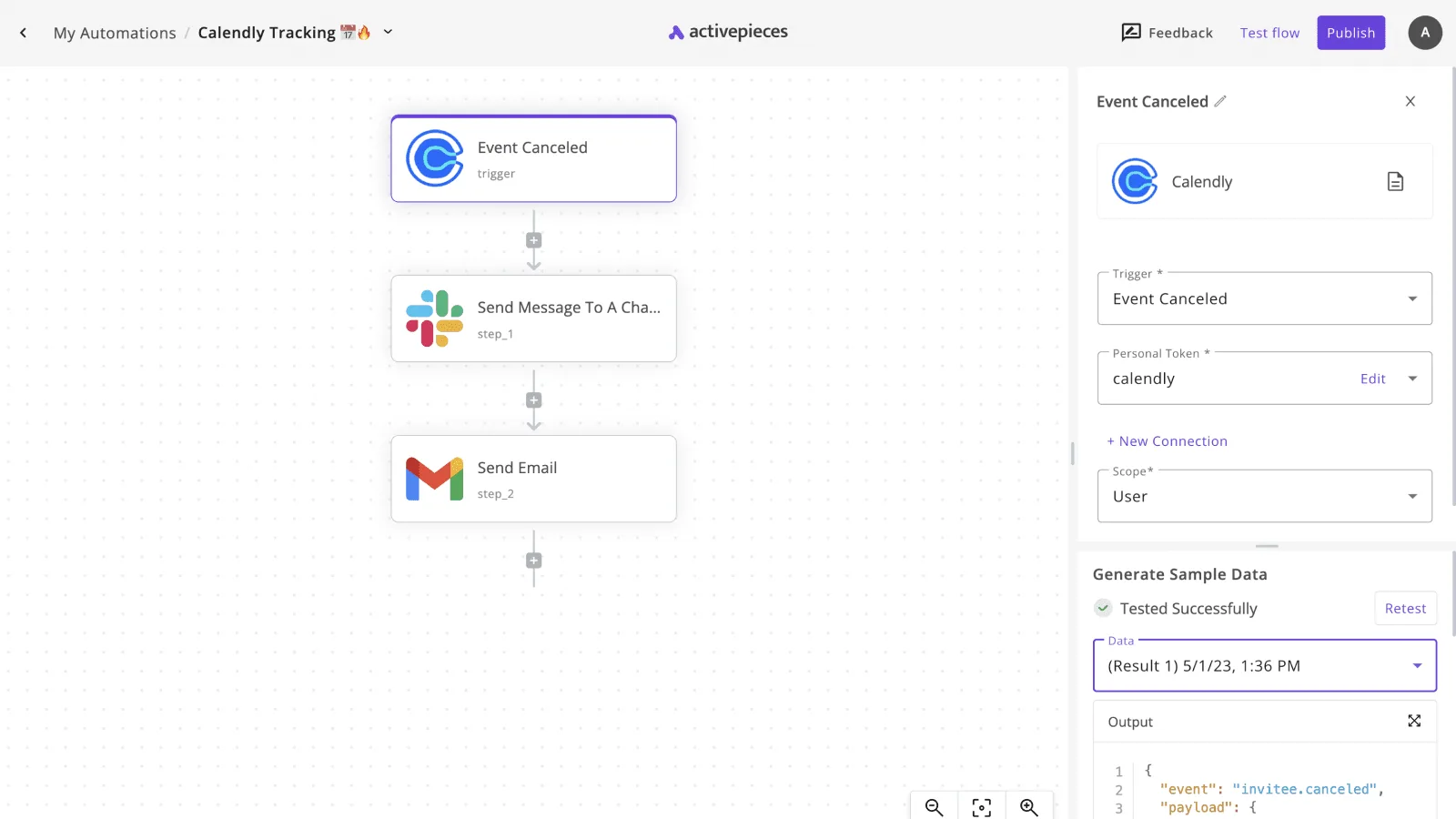
Nothing in the screenshot below has to do with video, but it shows the shape you want: a flow named "Calendly Tracking" in a workflow builder, with a Calendly "Event Canceled" trigger feeding a Slack message step and a Gmail email step.
One trigger, then visible, ordered actions that notify a person through channels they already read. Swap the trigger for an agent request and the notification steps for an approval message, and you have the skeleton.

Build it in this order, since the gate only works if nothing spends before it:
- Trigger on the agent's request, with a fixed job count set in the flow rather than read from the prompt.
- Post the request to Slack or email and pause until someone approves.
- On approval, call the video API once per allowed job.
- Post the results and keep the run history as your log.
If the approval is rejected or ignored, the run ends with nothing spent. That's the property you're paying for.
The run detail view for any agent step lists each tool call on its own line, with its own input and output, so a repeated render shows up as a separate entry instead of one opaque result.
The enterprise RBAC docs cover the other half: access policies there apply to what an agent may connect to, which makes the video API connection a matter of policy rather than prompt. MoneyGram, Moneypenny, Alan and FundingSocieties run Activepieces in production.
Frequently asked questions
There's no official Sora MCP server from OpenAI that we could confirm. The Sora servers you'll find are community wrappers around OpenAI's video endpoints, so read the source before you hand one a key.
Whoever wrote it decided what gets logged, what gets retried and whether anything stops a second call.
Does Sora MCP work with Claude Desktop, Cursor or ChatGPT?
For Claude Desktop and Cursor, compatibility is rarely the problem: they can load any server that speaks the protocol. ChatGPT is the uncertain one: it depends on which kinds of MCP connectors your plan and mode allow, and that has shifted before.
Check its current connector docs rather than trusting a README.
Connecting is the easy part. The server still decides whether a generation needs a human click.
Do I need a paid plan to use Sora through MCP?
Expect to need billing. A server that calls the API spends against your API account, which is separate from any ChatGPT subscription, so a subscription doesn't cover it.
If a server drives the consumer app instead, that is a different thing, and one you should be warier of. Check which of the two you installed before you assume where the charges land.
Is it safe to put my OpenAI API key in an MCP config?
It's safe only if the key is worth little. Think about where the config lives: it is a plaintext file that every process you run can read, and people sync dotfiles without thinking.
Create a dedicated project key for this server alone, set a spend limit on that project, and pass the key as an environment variable instead of pasting it into the JSON. If the key leaks, you lose the limit and nothing else.
To stop an agent calling a Sora tool in a loop, put the limit somewhere the agent can't argue with it. A prompt saying "generate once" is a suggestion, and a loop will ignore it. The server or the project should enforce the limit:
- a per-session call counter that refuses after a set count
- a spend limit on the API project
- required approval on every generation call, not only the first
Of the three, the project limit is the only one that still holds when the server code is wrong.