
Sora Workflow: How to Set One Up (2026 Guide)
Nov 17, 202615 min read
A Sora workflow is a repeatable loop that turns a written brief into a finished clip: write a structured prompt, generate, review, revise, export.
, at which point you can wire it into an automation tool such as Activepieces if you want it to run without you.
The usual report is "the model ignored my prompt", and the cause is nearly always an unstructured prompt or a limit nobody read.
Build your Sora workflow path
The three ways to run Sora
Pick one before you build anything, using the list below, which sorts the options by who each one suits and what it demands up front. Every option runs the same loop, and only the effort of setting it up differs.
- The Sora app suits a solo creator drafting clips and iterating quickly. It needs an account with access and nothing else.
- The web editor suits someone who wants a larger workspace for reviewing and revising. It needs a browser and the same account.
- API automation suits a team generating clips from a queue or a script. It needs an API key and something to call it, whether code or a workflow tool.
Before you rely on any of this, confirm access and limits on OpenAI's pages, because both depend on your plan. These options were last checked on 2026-11-16.
Start with the app or editor, because any flaw in your prompt structure will show up there at the cost of a few attempts, not a failed batch job.
What you'll have working at the end
You'll have a prompt template with the structure OpenAI documents, a generate-and-review routine that tells you what to change after each attempt, and an export step you can repeat. If you later move to the API, the template carries over unchanged.
Only the trigger changes, whether that's a script or Activepieces, which has 750 integrations and an MIT-licensed core, so you're not limited in what can serve as that trigger. Automating a loop that fails by hand just fails faster and at volume.
How this Sora workflow guide was verified
Where OpenAI's pages didn't state a figure, this article doesn't supply one. Every claim about limits, prompt structure and available routes was checked against those pages on 2026-11-16.
Automating a loop that fails by hand just fails faster and at volume.
Sora's access, limits and features change, so treat that date as the point after which you should re-verify before relying on anything here. Test any step on a single clip before you build on it.
This takes minutes, not a project: automate it in Activepieces free.
Get access and generate your first clip
Check that your plan, region and credits cover video, set aspect ratio, resolution and duration deliberately, then generate one clip and download it. That single clip is the test of the whole loop, and it's cheap to run before anything depends on it.
Confirm your Sora plan, region and credits
"The Create button does nothing." "Sora isn't in my account." Those are the usual first reports, and the cause is nearly always access, not the model.
Open OpenAI's pricing page and its Sora help articles and confirm three things: your plan includes video generation, Sora is offered in your country, and your account has credits or quota left.
Each one fails silently in a different way, so check all three before you blame a prompt.
Write down what the help pages say about your plan's limits on resolution, duration and simultaneous variations. Those limits decide which options in the next stage are available to you. If a setting is greyed out, the plan is the likely reason.
Choose Sora aspect ratio, resolution and duration
When you open the settings, you will find aspect ratio, resolution, duration and the number of variations, and each one draws on the same credit allowance. So the first clip should use the cheapest combination that still shows you what you need.
- Pick the aspect ratio for where the clip will end up. Cropping a landscape clip into a vertical slot afterwards throws away part of the composition you prompted for.
- Start at the lowest resolution your plan offers. Composition and motion problems show up there as clearly as at the highest.
- Keep the duration short. A long clip with a flaw costs the same as a long clip that works.
- Ask for a single variation until the prompt is stable. Extra variations multiply spend before you know what you are comparing.
Stage 3: Generate and download your first clip
Submit your structured prompt and wait for the render to finish. Don't resubmit while it's processing, because a duplicate job spends credits without telling you.
In the canvas below, a multi-step automation has its first step selected and a Load Sample Data button sits under its settings. That's the habit to copy: pull one real sample through the first step, and look at it, before anything after it's wired up.

Once the clip finishes, play it through and then download it. Confirm the file opens outside the browser and that its shape matches the aspect ratio you chose. Review and revision come next, and they have a real file to work from.
Write prompts and revise your clips
When a clip is wrong in ways nobody can name, the usual cause is a prompt that never said what was intended, because the file you review is only as revisable as the prompt that made it.
Stage 4: Use a six-part prompt structure
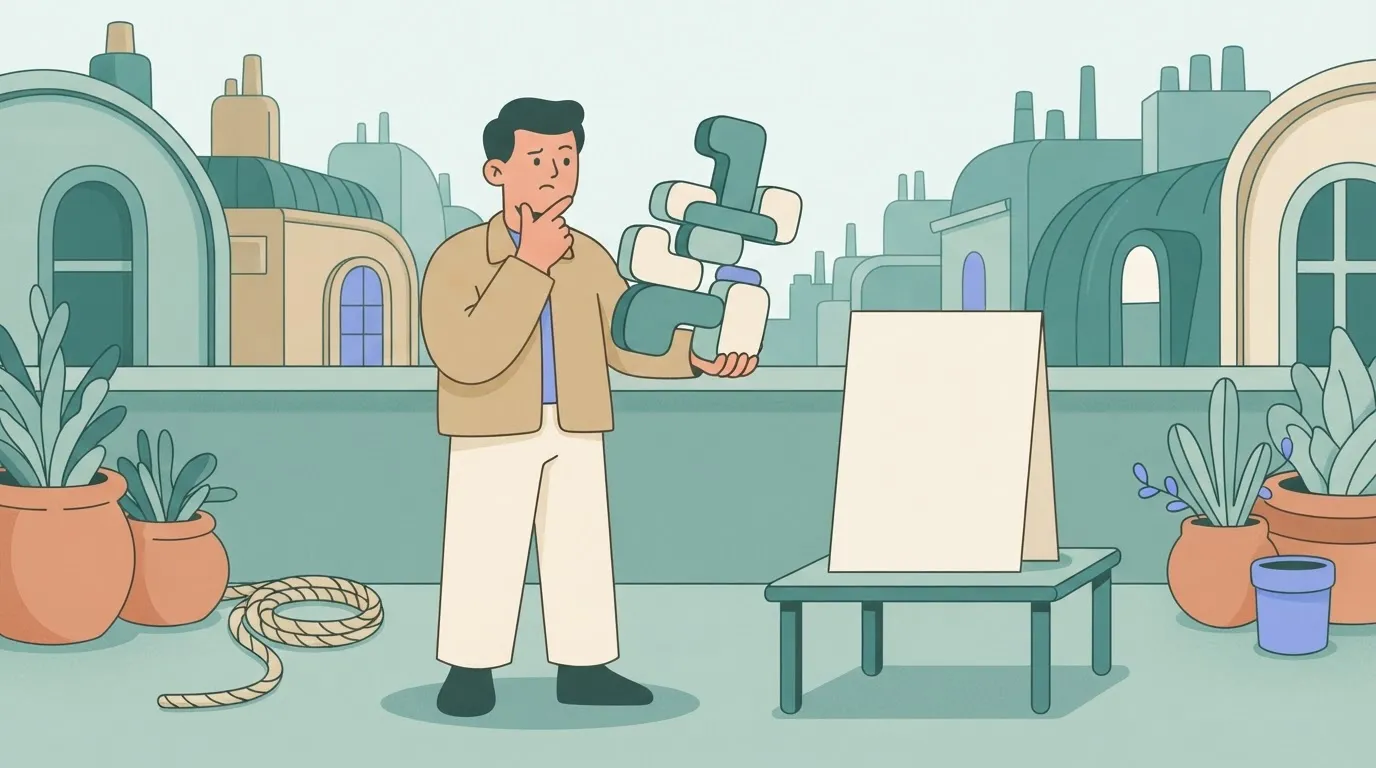
Write every prompt as six parts in a fixed order: subject, action, camera, setting, lighting, style. A fixed order means that when a clip fails, you can point to the part that was missing or vague and change only that.
Here's one you can paste and adapt:
Subject: a courier in a yellow rain jacket, mid-30s, carrying a cardboard box.
Action: she steps off a tram and walks toward a doorway, checking the address.
Camera: medium tracking shot at eye level, slow push-in.
Setting: wet city street at dusk, neon shop signs, light drizzle.
Lighting: soft overcast sky mixed with warm shop-window glow.
Style: grounded documentary look, muted colour, shallow depth of field.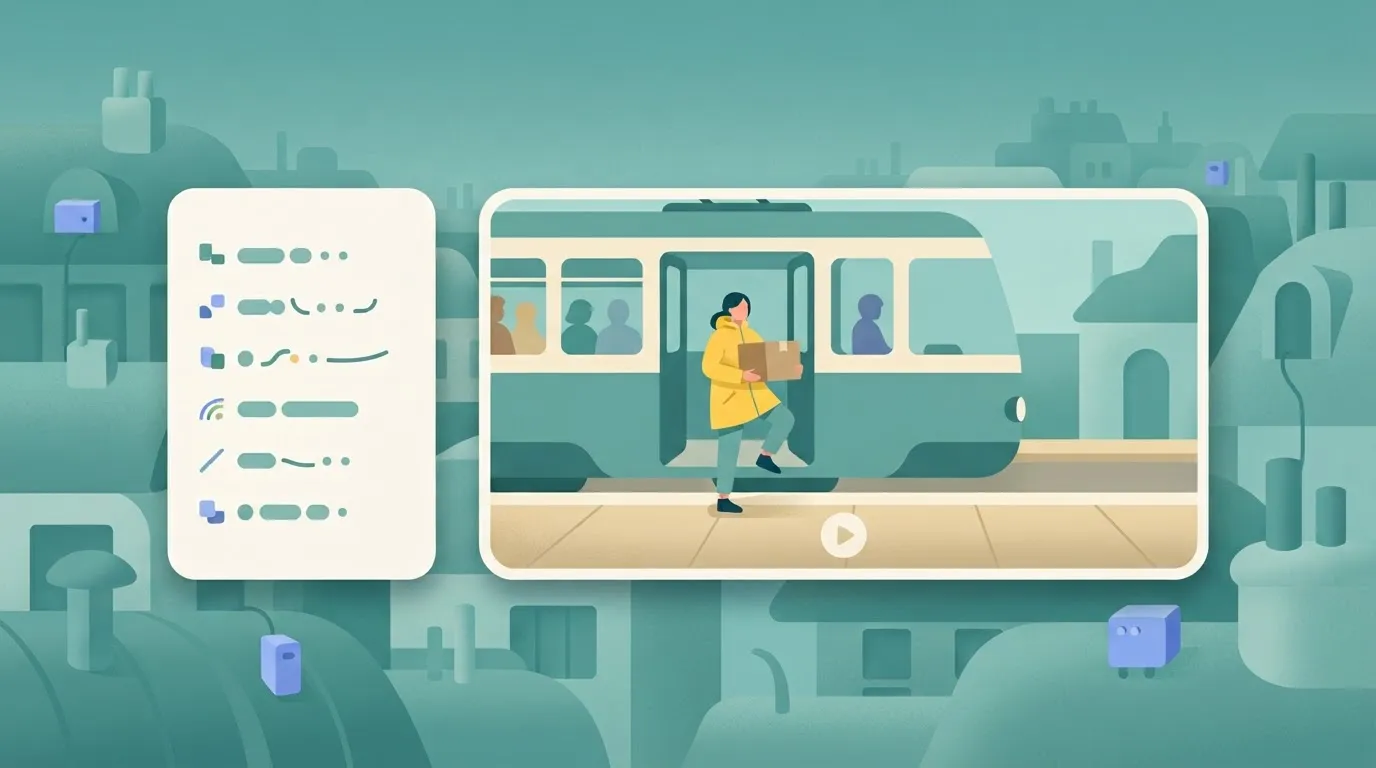
Change one line per attempt. If you rewrite all six, you can't tell which edit fixed the clip, and you've lost the point of the structure.
Stage 5: Revise with the editing tools
Use the editing tool that matches the one thing wrong with the clip, rather than regenerating from scratch. The table shows what each tool needs and what it alters, so you can pick the narrowest one.
| Tool | Input needed | What changes in the clip | Plan limits |
|---|---|---|---|
| Remix | An existing clip and a text description of the change | Elements you describe; the rest is kept as far as possible | Uses your plan's generation allowance; output caps still apply |
| Re-cut | An existing clip | Trimmed or re-timed span of the footage | Same allowance and output caps |
| Storyboard | A sequence of prompts or beats | Structure and order of scenes across the clip | Same allowance and output caps |
| Blend | Two clips | A transition or merge between them | Same allowance and output caps |
| Loop | An existing clip | The ends are matched so playback repeats cleanly | Same allowance and output caps |
Because each revision is a new generation, a careless remix spends allowance the same way a fresh prompt does. Test the change on your shortest clip first.
Save a Sora prompt template and organise outputs
Save the six-part prompt as a blank template and copy it for every new clip, because a template removes the most common skipped step.
Name each export with project, scene, version and the tool used, for example courier_s03_v02_remix.mp4. When a revision regresses, the name tells you which file to go back to, and the prompt saved beside it tells you why.
You can follow the rest of this with the builder open. Start free, no card.
Sora limits, content rules and errors with fixes
When a Sora generation fails, it is for one of three reasons: the request exceeds a plan limit, it trips a content or likeness rule, or the prompt is too loose to repeat. The first two are documented, so check them before blaming the model.
Sora limits by plan and output
"My 25-second clip never rendered." That is the usual report, and the cause is a ceiling, not a fault.
The table lists each limit class and where OpenAI documents it. Treat the plan column as the thing to verify on your own account, because caps move with the plan.
| Limit | Value | Plan | Source page |
|---|---|---|---|
| Duration | Capped per clip; 20 seconds is the Sora 2 maximum | Depends on plan | OpenAI Sora help center |
| Resolution | Capped per plan | Depends on plan | OpenAI Sora help center |
| Generations | Daily or monthly allowance | Depends on plan | OpenAI Sora help center |
| Credits | Each generation draws from a balance | Depends on plan | OpenAI Sora pricing page |
| Watermark and C2PA | Visible watermark plus provenance metadata on output | All plans | OpenAI Sora help center |
| Likeness and cameo rules | Real people appear only with their consent | All plans | OpenAI usage policies |
| Usage terms | Governed by OpenAI's terms of use | All plans | OpenAI terms of use |
Budget clips against the cap, not against the idea.
Sora 2's 20 seconds sat in the middle of the field, according to Sera Studio, which listed Kling 4.0 at 30 seconds, Runway Gen-4 at 10 and Veo 3.1 at 8; those figures describe those versions, so check current limits for any newer video model, such as Google's Gemini Omni Flash, before choosing on length.
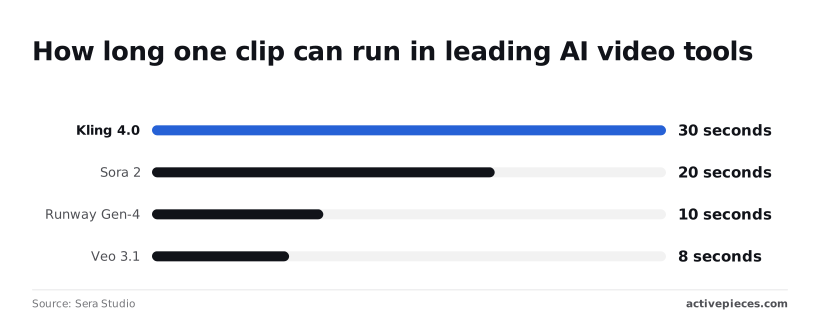
By those figures, a 30-second scene needed two Sora 2 clips cut together, while a Veo 3.1 scene of the same length needed four. The chart below shows that gap.
Since the metadata and watermark travel with every export, don't plan a workflow that depends on stripping them.
Content and likeness rules that block prompts
When a prompt is blocked, no video comes back, so the fix is in the wording. The most common trigger is a real person's face or name without that person's consent.
Cameos exist for exactly this: the person opts in, and you prompt with their permission. Prompts naming protected characters or living public figures are the other frequent block.
Common Sora errors and how to fix them
| Symptom | Likely cause | Fix |
|---|---|---|
| Prompt rejected | Content or likeness rule | Remove the real person or protected character; rewrite generically |
| Generation fails or stalls | Plan limit or credit balance reached | Check allowance, wait for reset, then resubmit |
| Clip shorter than requested | Duration cap | Split into clips within the cap |
| Output differs between runs | Loose prompt structure | Pin subject, setting, camera and lighting; change one element per revision |
Reproduce each fix once on a throwaway prompt before relying on it in a real project.
Automate the Sora workflow with Activepieces
When to automate your Sora workflow
You do not need automation for Sora itself, and it pays off only at high volume. A throwaway prompt like the ones you just reproduced fixes takes minutes by hand, and a flow built around it adds failure points you then have to debug.
If you have dozens of prompts in a sheet, each needing the same generate, review, export routine, that is the case for a flow.
Activepieces doesn't improve the prompts or lift any Sora limit, but the Drive save you connect for this loop is also a tool an agent can call.
A integration registered once runs as a step in the flow and as a tool on the project's per-project MCP server, so Claude, ChatGPT, Cursor or an agent you built can save a clip without a second integration, an export step or a separate catalog.

You can verify it in packages/integrations in the open source repo, where the action a flow runs is the same one the MCP server exposes, among 750 integrations, so there's likely one for your use case.
Start on its Free plan, which costs $0 per month. That means you can build the flow and test it on one row without paying.
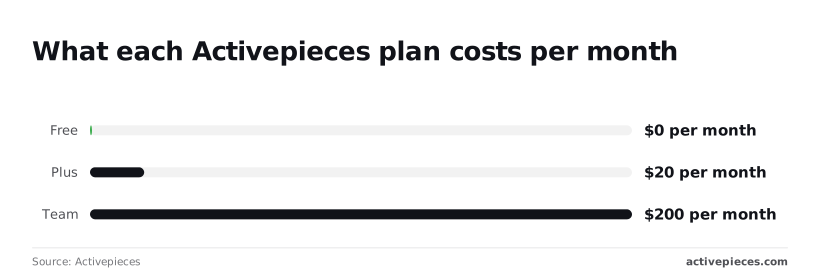
Plus is $20 per month and Team is $200 per month. The Team price is ten times Plus, so check what the higher tier actually adds before upgrading, and never upgrade to fix a flow you haven't first reproduced on Free.
If your account lacks API access under OpenAI's docs, the HTTP step has nothing to call. That is the one precondition.
Sheet to Sora to Drive: the four steps
Start the flow from a Google Sheets row; five steps follow it. The numbered list below shows the order.
The point to take from it is that the wait-and-poll step is the one that matters, because video generation isn't instant and a flow that assumes it's will save nothing.
- Google Sheets row trigger: a new row, holding your structured prompt, starts the run.
- HTTP request to a video endpoint: the flow would send that prompt using your API key, but the OpenAI Videos API is no longer available.
- Wait and poll: the flow pauses, then checks the job's status until it reports finished or failed.
- Save the file to Google Drive: the finished video lands in a folder you choose.
- Post a Slack message: your channel gets a note that the file is ready for review.
Treat a failed poll as a result, not an exception. If the flow has no branch for it, a rejected prompt produces silence, and you find out when someone asks where the video is. Route failures to the same Slack channel as successes.

Run one row end to end before queuing a batch. What follows is the plan price chart, which sets the Activepieces tiers side by side so you can decide whether any paid tier is justified.
Frequently asked questions
These are the questions the body leaves open. Each answer carries the date it was last verified, because every one of them can change without notice.
Is Sora free to use in 2026?
Treat free access as a trial, not a plan. Availability and allowances have shifted more than once, so run one realistic prompt through the full loop before building a schedule around it.
If the free allowance runs out mid-project, you want to learn that during a test and not on deadline day. Checked 2026-11-16.
Can I use Sora videos commercially?
Generally yes, but the terms that apply to your account decide it, not a blog post. Read OpenAI's current terms for your plan before publishing anything paid or client-facing.
Separately, the output can still contain a recognizable person or someone else's characters, and the license doesn't cover that. Keep a record of the prompt and the terms version you relied on. Checked 2026-11-16.
Does Sora have an API I can build on?
Not reliably. The API was scheduled to shut down on September 24, 2026, and that date has passed. Check OpenAI's deprecation notices before you design anything around it.
A pipeline built on an endpoint that no longer exists fails silently in the worst place, usually the export step. Until you've confirmed a replacement, use the app interface as the only supported path in your workflow. Checked 2026-11-16.
Why does Sora block my prompt?
Somewhere in the prompt, or in what the model was about to generate, a moderation filter matched something. Common triggers are real people's likenesses, protected characters, and violent or sexual content.
The refusal rarely names the offending phrase, so cut the prompt down, find the trigger by removing one element at a time, and rewrite that element. Resubmitting the same text unchanged just spends your allowance on the same refusal. Checked 2026-11-16.
How long can a Sora video be?
Which ceiling applies depends on your plan and the model version, and both have changed. The duration control in the generation settings shows what your account allows today, so read it there instead of trusting a number quoted elsewhere.
If your idea needs more runtime than the control offers, plan it as separate shots and join them in the edit. Checked 2026-11-16.
Related reading
References
Build it
Set this up in minutes.
No code required. Connect your accounts, and Activepieces runs it from there.
Start free Talk to sales