Suno Pricing 2026: Free, Pro and Premier Compared

Nov 9, 202616 min read
Suno, the AI music app, sells three plans (Free, Pro and Premier), so you select the tier that matches your budget.
What separates them for a team is how many songs you can make, whether you may use them commercially, and how many jobs run at once, a detail that matters most if you plan to line up track requests through a workflow tool like Activepieces instead of queuing them by hand.
Suno Pricing Today: Every Plan, Price and Limit
Which Suno plan fits a team
Treat the plan as a bundle of three limits: a credit pool, a rights rule and a queue. The monthly fee is the least informative part.
If your team makes a handful of tracks for internal demos, the free tier may carry you.
If anything ships to customers or goes on a public channel, you need a paid plan, because the free tier doesn't give you the rights. Guess wrong and you find out after the track is already in a video.
**If anything ships to customers or goes on a public channel, you need a paid plan, because the free tier doesn't give you the rights.
Plan table checked on the vendor page
I've kept dollar amounts out of the table because Suno changes them often and a stale figure is worse than none. Read the current numbers on that page and set them against the relative limits below.

At the paid line, rights and queue depth change; from Pro to Premier, it is the credit pool that grows.
| Free | Pro | Premier | |
|---|---|---|---|
| Credits | Small daily allowance | Larger monthly pool | Largest monthly pool |
| Models | Previous-generation model | Current models | Current models |
| Commercial rights | No | Yes, for songs made while subscribed | Yes, for songs made while subscribed |
| Downloads | Limited | Limited monthly | Limited monthly |
| Concurrent queue slots | Fewest | More | Most |
Pick the plan from how many generations you actually run in a month, which the next sections work out.
What the free tier allows and forbids
Free lets you try the product and make songs for listening. It forbids using those songs commercially, and that restriction is the real cost of "free."
If a marketing teammate drops a free-tier track into a client video, the team has built something it may not be allowed to publish.
You can fix that by regenerating the song on a paid plan, but you pay for it in credits and in redoing the work.
Automated output makes it easy to lose track of which account made which file, and any team sharing logins and folders hits the same trap.
If you are running this arithmetic for your own team, see what the same workload costs on Activepieces.
Credit walls on paid plans
Knowing which account made a file is only half the bookkeeping. The other half is knowing what each click cost, because a three-person team on a 2,500-credit Pro plan ran dry at 4:42 p.m. on the 19th with its jingle unfinished.
How a shared Suno credit pool runs out
Nobody on the team did anything reckless. They regenerated, extended and covered the same jingle, and every one of those actions drew from one shared pool.
According to the Suno Help Center, spread evenly, 2,500 credits is about 131 a day over 19 days, which is thirteen generations a day, meaning your allocation lasts less than three weeks at that pace.
on the 19th. Take from it that the wall arrives as a steady slope, not a spike, and no single day looks alarming.
After the wall comes the cost of the 11 days still left in the month.
Credits burned per finished track
Retry one idea ten times and 100 credits are gone, because a generation costs 10 credits, according to the Suno Help Center. That means every retry is a tenth of a bar of the budget.
According to the Suno Help Center, a cover also costs 10 credits, so reworking a draft in another style costs as much as starting a new one.
Per the Suno Help Center, Split from Mix costs 10 credits too, which makes it cheap to pull a vocal or backing track from a finished mix.
Run Auto Split on every draft, instead of only the take you're keeping, and one click spends what five new attempts would. The Suno Help Center puts those stems at 50 credits, five times a generation.

What running out of Suno credits costs
In credits, the team spent 2,500 and had nothing left for the last version. In hours, they lost the 11 remaining days of the month to waiting on a refresh or finding another way to finish.
For a client deadline, a top-up or a higher plan almost always costs less than a missed delivery. That is the dollar question.
Set a rule before the pool runs low: stems only on the approved take, and a retry limit per track.
Hidden Suno Limits Behind the Credit Count
You can read the song count off the credits. What you may do with those songs is decided by Suno's help pages and terms, and none of that sits beside the price.
Upgrading later doesn't reach back, because commercial rights attach to a song according to the plan you held on the day you made it.
A team that spends weeks auditioning on the free tier and then subscribes has to regenerate every track it wants to publish, and that's a month of work paid for twice.
Five limits in Suno's help docs and terms shape the real cost:
- Rights are fixed by the plan at creation date, so the date on the track matters more than the date on your receipt.
- The free tier is non-commercial and caps downloads for the life of the account, so it works for auditioning and not for producing.
- Paid tiers cap downloads each month, and the cap differs by tier, so you can run out of exports while credits remain.
- Queue slots limit how many generations run at once, so a deadline afternoon stalls behind your own jobs.
- Unused credits follow the renewal rules, so a leftover balance isn't something to plan around until you've read them.
Check each one against your own volume before the plan name or credit total.
How retries and extends use Suno credits
When a team retries freely, a month's credits can be gone in the first week, and top-ups are what finish the work. Every retry and extend draws on the same pool as the take you keep.
The version you pick changes what a generation gets you, since Suno's help docs also describe differences between model versions. It's worth settling that once per project and not per attempt.
Keep a short log of each track, its model and its retry count; that log is what makes the retry limit enforceable.
Suno credit top-ups, rollover and renewal
When the pool runs low, a top-up adds credits, but it doesn't change the rights or download cap tied to your plan. It fixes the credit shortage and leaves the export shortage untouched.

Credits you leave unspent are the ones to ask about, because renewal restarts your allowance: read Suno's help page on what happens to them before assuming they carry over.
Until you've, budget as if they vanish at renewal, and pick the plan from the generations you actually make in a month, retries included.
Suno and competing music platforms
Measured in monthly allowance, the paid plans differ far more than their names suggest, and the stock libraries trade that allowance for a flat fee.
" Artlist Music Pro: 16.58 Artlist Music+SFX: 24.92 Epidemic: 39
The table shows the figures I could confirm; read it as a ceiling on how many tries a month buys, not a price per song.
Four options on price, allowance and rights
| Option | Plan | Confirmed figure |
|---|---|---|
| Suno | Pro | 2,500 credits a month |
| Suno | Premier | 10,000 credits a month |
| Udio | Standard | 2,400 credits a month |
| Udio | Pro | 6,000 credits a month |
| Artlist | Music Pro | $16.58 a month |
| Artlist | Music+SFX | $24.92 a month |
| Epidemic Sound | Commercial | $39 a month |

The credit counts come from the Suno Help Center, the stock prices from CCHound. Suno Pro and Udio Standard are nearly level, at 2,500 against 2,400, so neither wins on volume at the entry tier.
I left out ElevenLabs Music and Envato because I've no confirmed figures for them. Whatever you choose, read the commercial terms and export limits on the vendor's page and note the date, because those are the lines that change after you've paid.
Which plan fits three everyday uses
Four finished tracks a month is a weekly jingle. Per the Suno Help Center, even with ten tries each, an entry plan of roughly 2,400 to 2,500 credits is likely enough.
A stock library is the alternative if you'd rather not generate at all.
With client backing tracks, each client wants revisions, so the retries multiply. That's where the 6,000 credits on Udio Pro or the 10,000 on Suno Premier start to matter.
For hobby songs, take the cheapest tier, because running dry mid-month costs you nothing but patience.
The break-even for the next plan up
Four times the credits separates Suno Premier from Suno Pro, and two and a half times separates Udio Pro from Udio Standard. So the next plan pays for itself when you'd otherwise run out before renewal and need work you can't skip.
Count last month's generations, retries included, and divide the plan's credits by what each generation costs in the app.
If you'd run short twice in a row, move up. If a stock plan at $16.58 to $39 covers your tracks without retries, it may be the cheaper answer.
Worth checking against a plan that does not meter every step: one credit covers a whole run on Activepieces.
Tracking Credit Use With Activepieces
If the cheaper plan only works when nobody retries, you need a running count of what each track costs, and Activepieces, which counts 747 integrations in its open source repository, the spreadsheet apps among them, can keep that count for you.
It's a workflow tool: you pick a trigger, chain a few actions after it, and it runs them without anyone watching.
For this problem, the useful job is narrow. Each time a track is finished, Activepieces adds a row to a spreadsheet, and when your estimated credit use for the month passes a line you set, posts a warning in Slack.

That is one flow, and flows are unlimited on every plan, including free.
Activepieces charges 1 credit per flow run, whether the flow holds two steps or ten.
A tracker split into small steps (log the row, tag the model, add the retry count, check the threshold) costs the same as a two-step shortcut, so nothing nudges you to cut corners on the part that makes the count reliable.
Zapier bills per task and Make per module, and on both pricing pages the same split gets dearer with every step. On the free plan's 1,000 credits a month, the tracker for a team spending 2,500 Suno credits stays a rounding error.

A row per track means you can see, in your own sheet, how many generations a project took, including the retries nobody mentioned.
Building the workflow
You don't need to have written code to use the builder. The screen below shows a three-step workflow on the canvas, a timer trigger, an action that asks ChatGPT something, and an end node.
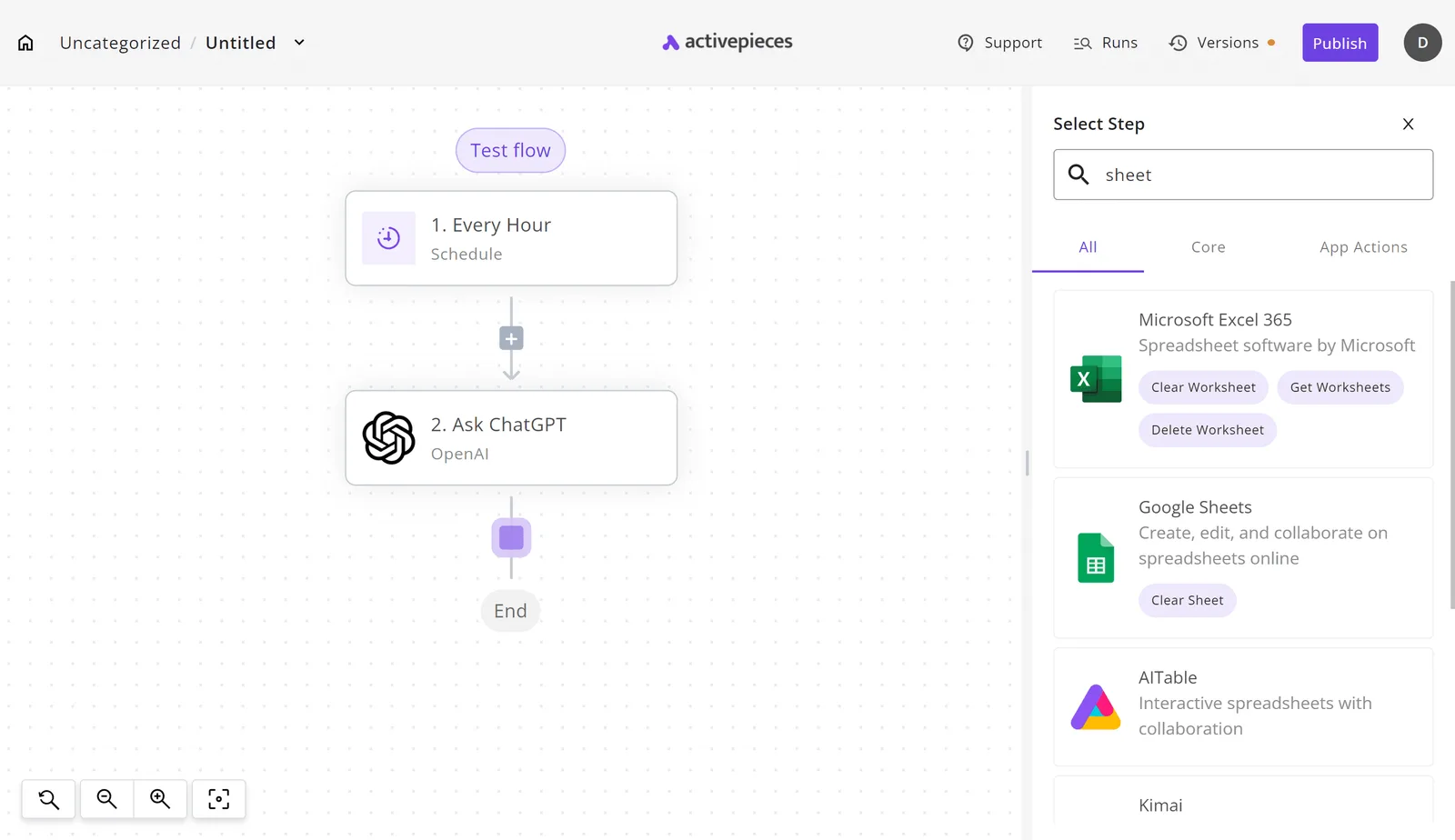
The step picker is open on the right, with "sheet" typed into its search box.
With "sheet" typed in, the list that comes back includes Google Sheets and Microsoft Excel 365, which tells you the logging half needs no custom work. You choose the spreadsheet you already use and add a step that writes to it.

What it can't see
Be honest about the next part, because it decides whether this is worth your afternoon. Activepieces can't read your live Suno balance.
If you generate outside the workflow, the estimate drifts.
The credit figure in your sheet is built from the tracks you log and the per-generation cost you assume. Treat the Slack alert as a prompt to go check the real balance in Suno, not as the balance itself.
What follows is the rule you set around it: pick the threshold, and decide in advance what you do when it fires.
Team credit management rules
You can set all six rules on one Monday morning, before anyone generates another track in Suno, the AI music app. Each one is cheaper than the week you lose when credits run dry mid-project.
- Divide the monthly credits into a per-person budget and tell everyone their number.
- Set an alert at 70 percent of the pool, so you catch it before you run dry.
- Cap retries per brief.
- Draft first, finalize second.
- Check rights before anything is delivered.
- Decide annual or monthly.
Setting Suno credit budgets and alerts
Without a personal budget, the one person who generates the most also drains the pool for everyone else, and you find out when a client deadline is two days away. A named number per person makes overspending visible early.

At 70 percent, the alert is your warning light: it leaves enough credits to finish current work, so you don't lose progress mid-song. It also forces a conversation about whether to slow down or move up a plan while you still have a choice.
Suno retry cap and draft rule
Each "one more try" feels free, which is how retries quietly eat the pool. Give every brief a fixed number of attempts. When it's spent, rewrite the brief instead of rerolling it, since a vague prompt will keep producing vague music.
Pair the retry cap with a draft rule: explore cheaply, and spend credits on a polished version only after someone's approved the direction. Otherwise you pay finishing prices for tracks the client rejects.
Pre-delivery rights check
A track made under a plan that doesn't cover commercial use is wasted credits and an awkward email to the client.
What you may do with a track depends on the plan it was made under. Before delivery, confirm the plan covers the use, and keep a record of which plan produced each file. Check this against Suno's current terms, not memory.
Last, decide annual or monthly using what the first month's tracking showed. If usage stayed steady against the budget, annual saves money. If it swung wildly, stay monthly until it settles.
Frequently asked questions
Is Suno free to use in 2026?
Yes, Suno has a free tier that gives you a small daily allowance of generations, enough to test whether the app suits your work.
Treat it as a trial, not a production plan, because the allowance runs out fast once a team starts retrying prompts, and the rights rules on free songs are tighter than on paid ones.
Check the current daily allowance on Suno's pricing page before you rely on it.
Can I use Suno songs commercially on the free plan?
No. Suno's terms say songs made on the free plan belong to Suno and are for non-commercial use only.
A free-plan track in a client video or a paid ad is a rights problem waiting to happen. Songs made while subscribed to a paid plan carry commercial use rights under Suno's terms.
Read the wording on Suno's terms page yourself, because it governs your situation more than any summary does. The cost of ignoring this is a track you've got to pull and replace after it's already published.
Does Suno offer a refund if I cancel mid-month?
Don't count on it. Subscription services of this kind typically stop renewal at cancellation and let you use what you already paid for until the period ends, rather than refunding the unused days.
I wouldn't plan around an exception, because Suno's billing and refund terms set the actual rule. The safe habit is to cancel a few days before renewal, not the day of, so you're not paying for a month you didn't intend to use.
Do unused Suno credits roll over?
Generally, monthly credits are meant to be used within the month, and Suno's help pages describe how any leftover balance is treated. Assume unused credits don't carry forward unless the current page says otherwise.
That makes the end of the month the point where waste happens: credits you didn't spend are money you paid for nothing.
If you consistently finish the month with a big balance, you're on a plan larger than your real generations need.
Is the annual Suno plan worth it?
It's worth it only if you've already run a few months on the monthly plan and your usage held steady.
The annual price is lower per month, but you pay up front and a refund is unlikely, so a plan you outgrow or abandon costs you the whole year.
Count your real monthly generations first. If they stay near the plan's credit count, annual saves money. If they swing a lot, stay monthly.
Related reading
References
Running the numbers
See what the same workload costs here.
Free forever plan, and every paid plan self-hosts at no extra cost.
See pricing Talk to sales