
SurveyMonkey Pricing 2026: What Each Plan Really Costs

Oct 22, 202615 min read
SurveyMonkey pricing today: every plan in one table
The direct answer
Start with the free Basic plan, as you would with a tool like Activepieces, and the paid plans above it rise by feature level, billing method and number of users. The paid price on the page is only the entry point.
SurveyMonkey pricing is the tiered structure of plans, from the free Basic plan to paid individual, team and enterprise tiers, that sets what a customer pays based on features, response limits, billing method and number of users.
The tier you actually need depends on response caps and locked features, so read the limits before the price. The figures below match SurveyMonkey's pricing page as of 2026-10-22.
All current plans, prices and limits
Where the monthly price and the annual total sit side by side, the gap is the first thing to notice. The table lists every plan, from free to team.
SurveyMonkey publishes the exact feature lists and some caps only on the pricing page itself, so the last column carries what's confirmed.
| Plan | Price | Billing | Seats and responses |
|---|---|---|---|
| Basic | Free | None | Individual plan |
| Standard Monthly | $149 | Monthly | Individual plan |
| Advantage Annual | $39/mo ($468/yr) | Annual | Individual plan |
| Premier Annual | $139/mo ($1,668/yr) | Annual | Individual plan |
| Team Advantage | See pricing page | Per team | 3+ users; 50,000 responses per year* |
| Team Premier | See pricing page | Per team | 3+ users |
Prices and plan limits checked against surveymonkey.com on October 22, 2026.
Before you count on that number, read its conditions: the asterisk on the Team Advantage cap comes from SurveyMonkey's own page. Fifty thousand responses a year is plenty for an occasional customer check-in.
A team running surveys all year may find the cap arrives sooner than expected, and then the next tier up is no longer optional.
SurveyMonkey annual versus monthly billing and per-seat pricing
Commit for a year and you pay far less than you would month to month.
According to SurveyMonkey, Standard Monthly at $99 comes to $1,188 over twelve months, while Advantage Annual at $39 a month comes to $468, which means the annual plan costs significantly less for a full year of service.

You pay about two and a half times as much for the flexibility of leaving whenever you like.
Go from Advantage to Premier Annual at $1,668 a year and you add $1,200, so the premium tier comes at a substantially higher price. That's worth paying only if you need what Premier unlocks, and you won't know that from the price alone.
You pay about two and a half times as much for the flexibility of leaving whenever you like.
Seats work differently. Both team plans start at three users, so a group of three or more pays for the team structure even if only one person builds surveys.
If you only need to collect answers and pass them along to other tools, count how many people truly need to write surveys before you buy seats for everyone.
If you are running this arithmetic for your own team, see what the same workload costs on Activepieces.
What SurveyMonkey costs at realistic usage
Price it realistically and most buyers land one tier above the plan they first priced; the push comes from answer volume and seat count, not from the sticker.
Two questions settle it: how many people write surveys, and how many answers come back in a year.
Find the row closest to yours and read across, because the reason column matters more than the cost column. The table below puts four common situations side by side, with responses per year, seats, the plan each lands on, the annual cost and the reason.
| Scenario | Responses per year | Seats | Plan it lands on | Annual cost | Why that plan |
|---|---|---|---|---|---|
| Solo freelancer | |||||
| Five-person marketing team | |||||
| High-volume customer feedback | |||||
| Annual HR survey |
Because each row follows from the same logic, here's how it plays out in practice.
Which SurveyMonkey plan suits individuals and small teams
If you are one person with light volume, the entry plan can hold, and that is the only case where it does.
The risk is a single good survey: if it travels further than you planned, you hit the response cap and find the answers you need are locked until you upgrade.
Price in one busy quarter, not an average one.
For a five-person team collecting steady feedback, seats are what move this bill. Every extra person who needs to build or edit a survey is another paid seat, so five writers cost far more than one.
Count the people who build surveys, not the people who read the results, and expect the team tier, not the entry plan.
High-volume and company-wide surveys
For high-volume customer feedback, the response cap decides everything. A survey that runs all year, with answers arriving from every customer, passes a low cap early, and the features you need to sort those answers sit on the higher tiers.
Budget from the answers you expect, then add room, because going over costs more than planning for it.
When it goes to a whole company, one employee survey a year stops looking cheap. A single large send can use up a cap in days, and anonymity or reporting features usually sit on higher tiers.
Pay for the busy week, then check whether a shorter-term plan fits better than a year-round one.
Hidden limits and costs pushing up tiers
Before you buy, know the five limits that push people up a tier: response caps, locked exports and analysis, branding, per-seat pricing and renewal terms. The response cap is the one that can cost real money, so it comes first.
SurveyMonkey response caps and overage charges
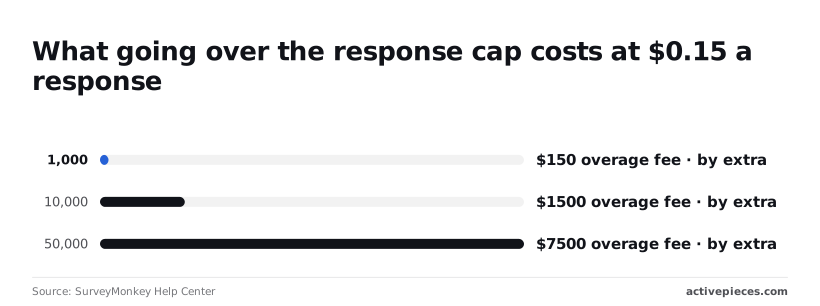
Go over your plan's response cap and you pay per response. At $0.15 each, according to the SurveyMonkey Help Center, 1,000 extra responses cost $150, 10,000 extra cost $1,500, and 50,000 extra cost $7,500.

The first's an annoyance, but the last is more than many small teams spend on software in a year.
When a single campaign succeeds, it can therefore cost more than the plan above yours would have. Upgrade before the spike, not after it.
If you need to hand a clean report to a client or run the numbers yourself, the cheap plan won't do it: higher plans alone include some exports, analysis tools and the removal of SurveyMonkey branding.
You then pay for the higher tier anyway, just later and with more irritation.
Add a colleague who needs to build or edit surveys and the bill grows, because pricing is per seat. Three people on a plan priced for one is a cost you'll meet at the first team review.

Read the renewal terms before you sign too, because a plan that renews on its own keeps charging for months you don't use.
The case that the sticker price is honest, and the answer
The obvious objection: plenty of people never touch these limits. A person sending a short survey to a few hundred customers will pay the listed price and nothing more, and for them the headline plan is the whole cost.
That's true, and it's why the advice is to budget from usage.
Count your expected responses, your seats and the exports you need. If all three fit under the cap, the sticker price is honest for you. If any of them doesn't, price the tier that covers it.
Worth checking against a plan that does not meter every step: one credit covers a whole run on Activepieces.
SurveyMonkey against the closest alternatives on price
Priced on the same terms you just used, the four tools differ less in sticker price than in what each makes you upgrade to get.
I've left dollar amounts out because vendors change them often; the comparison below follows each vendor's own pricing page as checked in October 2026.
To see which limit you'll hit first, read the table for how each tool charges and where it stops you.
| Entry paid price per month | Free-plan response limit | Seats | Locked behind upgrades | |
|---|---|---|---|---|
| SurveyMonkey | Lowest paid tier, rising with each step up | Capped, and small | Charged per user on team plans | Advanced logic, data exports, branding removal, higher response volume |
| Typeform | Lowest paid tier, scaled by response volume | Capped, and small | Extra seats cost more | Logic, branding removal, higher response volume |
| Google Forms | None; free with a Google account | No stated cap | Shared through your Google account | Admin controls come with paid Workspace plans |
| Jotform | Lowest paid tier, scaled by forms and submissions | Capped submissions and form count | Team access sits on higher tiers | Higher submission volume, extra storage, compliance features |
Read the free-limit column first. A cap you'll exceed in a month means the free plan is only a trial.
If you run simple surveys, such as event feedback or an internal poll, Google Forms is enough, and you pay nothing for doing nothing fancy.
Jotform fits when you need payments or file uploads inside the form and your volume stays modest. In both cases, a bigger SurveyMonkey plan spends money on features you won't open.
When SurveyMonkey earns its price
Pay for SurveyMonkey when several people build and analyze surveys together, or when you need branching questions and exports your reporting depends on. Cheaper tools can be made to do this, but your team's time spent working around them costs more than the plan.
Price that tier from your expected responses and headcount, and treat the headline plan as the one you'll outgrow.
Send SurveyMonkey responses to other tools with Activepieces
If your real job is getting survey answers into a CRM, a spreadsheet, Slack or a helpdesk, Activepieces can do that by starting a workflow every time SurveyMonkey records a new response, with unlimited flows on every plan including the free one, but it does nothing to lower what you pay SurveyMonkey.

Put simply, Activepieces starts from an event in one app and carries out the steps in others, so nobody has to copy and paste responses between them.
The apps it can hand responses to are listed in the community directory of its open source monorepo on GitHub (packages/pieces/community), where its 744 integrations are counted directly from the MIT-licensed core, so you're not left hunting for a missing connector, and Alan and FundingSocieties run it in production.
Without it, someone on your team exports results by hand, and the cost of that is a delay. A low score sits unread in a spreadsheet for days while the customer who gave it waits.
SurveyMonkey automations after a response arrives
The takeaway's that one response can feed several tools at once, and the billing tag stays on SurveyMonkey the whole way through.
Between them, those four branches cover the common cases:
- The CRM (your customer database) gets the answer attached to the contact, so a salesperson sees it before the next call.
- The spreadsheet gets a new row, so reporting stays current without an export.
- Slack gets a message, so a bad score reaches a person the same day.
- The helpdesk gets a ticket, so a complaint lands in the queue someone already watches.
You set this up once, and each response after that follows the same path.
What it doesn't fix
Because Activepieces sits downstream of SurveyMonkey, your response caps, locked features and per-seat pricing stay exactly as they were, while its own free plan costs $0 with 1,000 credits a month and up to 5 users.
If your plan limits how many responses you can collect or view, the automation inherits that limit. It can only forward what SurveyMonkey lets through.
Check one more thing before you build. SurveyMonkey's own documentation indicates that API access, the door other tools use to reach your data, may depend on your plan.
Confirm that your tier includes it first. If it doesn't, the automation may push you toward a higher tier, and that belongs in your budget.
Choosing a SurveyMonkey plan on Monday
To price from your usage, work through six steps, and keep the order because each one narrows the next:
- Count the responses you collected over the past year, not the ones you hoped for.
- List the features you can't work without, such as data export or skip logic (which sends respondents past questions that don't apply to them).
- Test whether a free tool covers that list.
- Buy the cheapest SurveyMonkey plan that clears both the response count and the feature list.
- Put the renewal date in your calendar.
- Reconfirm prices on SurveyMonkey's own pricing page before you pay.
Skip the order and you end up choosing from the sticker price, then hitting a cap or a locked feature in the middle of a project. That's the expensive way to find out.
Three numbers to count first
Start with responses per year. Pull last year's totals from your existing surveys and add them up. If you pick a plan below that total, you'll hit the cap and either lose data or pay for an upgrade mid-year, usually at the worst moment.
Next, count the people who need to log in and build or read surveys. Pricing is often per seat, so every colleague you add multiplies the bill. Ask who really needs an account and who only needs to see a report someone can send them.
Last, count the features on your must-have list that sit behind a higher tier. This is the number that moves most teams up a plan, so write it down before you look at any price.
Before you buy, run your must-have list against a free survey tool. If it covers everything, you've saved the whole subscription. If it fails on one item, you now know exactly what you're paying SurveyMonkey for.
Then calendar the renewal. Plans renew on their own, and a forgotten date means a full year at a tier you may have outgrown or no longer need.
Finally, check the vendor's pricing page yourself. Prices and plan limits change, and anything written down elsewhere, including here, can be out of date.
Frequently asked questions
Confirm the figures first
Since the figures move, the safest use of these answers is as a list of things to confirm on SurveyMonkey's own pricing and terms pages before you commit.
Free plan, cancelling and discounts
Is SurveyMonkey free to use?
Yes, there's a free plan, but it's built to show you the product, not to run a real survey program.
Expect tight limits on survey length and on how many responses you can see, so a survey that gets traction can leave you looking at only part of your own data.
Can I cancel SurveyMonkey mid-term and get a refund?
Don't assume so. Cancelling usually stops future charges, but whether you get money back for the unused months depends on the billing term you chose and the refund terms in force when you bought.
Read those terms before paying for a full year, because an annual plan you outgrow or abandon may be money already spent.
Does SurveyMonkey offer discounts for nonprofits or education?
Discount programs for nonprofits and educational users have existed, but eligibility and the amount come from the vendor and can change. Ask sales or check the current program page, and get the discounted quote in writing before comparing it with the standard tiers.
Respondent charges and price changes
Does SurveyMonkey charge extra for more respondents?
Effectively, yes. Response limits are tied to your plan, so more respondents means a higher tier, not a small add-on fee. Before buying, put these questions to the vendor:
- How many responses can I view on the free plan, and is anything hidden after that?
- What does the same plan cost billed monthly versus annually?
- What happens to responses that arrive after I pass the cap?
- How is team pricing counted per seat, and who needs one?
- What am I owed if I cancel partway through the term?
Get written answers to those five and you will know the real price far better than the headline number tells you.
How often does SurveyMonkey change its prices?
There's no fixed schedule you can plan around. Plans get renamed, features move between tiers, and limits shift without much warning.
Treat any quote as valid only for the day you receive it, and check your renewal terms so a price change doesn't catch you at the end of a term.
Related reading
References
Running the numbers
See what the same workload costs here.
Free forever plan, and every paid plan self-hosts at no extra cost.
See pricing Talk to sales