
Twilio Google Sheets Integration: Setup Guide (2026)

Nov 24, 202616 min read
A Twilio Google Sheets integration is a workflow that moves SMS data into a spreadsheet row, or a row into a text message, without code. Built as one small flow in a builder like Activepieces, it works in under an hour.
Most of that hour goes to permissions and sending limits, not to clicking.
Getting started with Twilio and Google Sheets
What people automate between the two apps
When support teams want to sort and filter instead of scrolling a console, the most common job is logging: every inbound text from Twilio lands as a new row in Google Sheets.

The reverse is also common, where a new row triggers a reminder or confirmation text.
Build only one of these first. Two directions means two sets of failure modes, and you won't know which one broke.
Twilio and Google Sheets prerequisites before you start
You need a number, and it is the only prerequisite that costs money. On Twilio's number pricing page, a US local number rents for $1.15 per month, so a test setup costs about a dollar.
A US toll-free number is $2.15, which is worth it only if customers expect an 800-style sender.
In the UK, a mobile number is $2.50 and a local number is $3.50, according to Dograh, so the same pilot costs up to three times as much there.
Pick the cheapest type that matches who you're texting, and check that it can send SMS before you pay.
Have these in hand before you open the builder:
- A Twilio account with an SMS-capable number
- Your Twilio Account SID and Auth Token
- A Google account with a spreadsheet that already has a header row
- An Activepieces account, where the free plan is $0 with unlimited flows
If the first row is empty, there is nothing to map to, because the connector maps columns by name. The Auth Token is a password. Paste it only into the connection field and never into a cell.
With those ready, the build itself is five steps:
- Connect Twilio using the Account SID and Auth Token.
- Connect the Google account and grant access to the one spreadsheet.
- Choose a trigger the Twilio connector actually lists.
- Choose a Sheets action from the connector's list and map each field to a header.
- Send one test message, confirm one row appears, then turn the flow on.
Once that single row lands, the real work starts: you must determine how many messages you can send, define who can edit the sheet, and handle what happens when a run fails.
This takes minutes, not a project: automate it in Activepieces free.
Five Twilio and Google Sheets Workflows Worth Building
Start with workflows that use only listed steps, because each one shows you a different limit: inbound volume, outbound cost, call data, or timing.
The table shows five, with the one that needs an unlisted step flagged, per the Twilio connector listing and the Google Sheets listing.
| Trigger (owning app) | Action(s) | Job done | Unlisted step? |
|---|---|---|---|
| "New Incoming SMS" (Twilio) | "Add Row" | Logs every inbound text | No |
| "New Row Added" (Google Sheets) | "Send SMS" | Texts a customer from a new row | No |
| "New Call" (Twilio) | "Add Row" | Records call details | No |
| "New or Updated Row" (Google Sheets) | "Send SMS", "Update Row" | Reminds and marks the row sent | Yes, the date check needs HTTP request or webhook |
| "New Transcription" (Twilio) | "Add Row" | Stores call transcripts | No |
Prices and plan limits checked against activepieces.com and activepieces.com and docs.claude.com and claude.com and openai.com and gemini.google on November 24, 2026.
Read the fourth row first. Every listed Sheets trigger fires on a row change, never on a date, so nothing in the list says "send at 9 a.m. the day before."
To log every inbound SMS, "New Incoming SMS" feeds "Add Row", one text per row. Every reply from a customer, including "STOP", lands in your sheet, so give the sheet a column for it from day one.
To text a customer when a row is added, "New Row Added" in Google Sheets triggers "Send SMS" in Twilio. Anyone with edit access can now send a text by typing a row, so permissions on this sheet are your send controls.
Before you share the sheet widely, check Twilio's pricing page for your countries, because each message is billed per segment and prices differ by destination country.
**Anyone with edit access can now send a text by typing a row, so permissions on this sheet are your send controls.
Twilio call logs and transcripts in Google Sheets
To record call details after each call, "New Call" followed by "Add Row" gives you a call log without opening Twilio's console.
If you also want transcripts, "New Transcription" works the same way, and you'll want a separate worksheet so long text doesn't crowd your call columns.
For reminders from a sheet of appointments, pair "New or Updated Row" with "Send SMS", then "Update Row" to write "sent" back. Without that last step, any later edit to the row can text the customer again.
The timing is the gap: nothing listed fires on a date, so the reminder goes out when the row changes, not when the appointment approaches.
Using Custom API Call for unlisted Twilio actions
If an endpoint has no dedicated action, Twilio's list includes "Custom API Call" to reach it. For the date check, use a webhook that something on a schedule calls, or an HTTP request step that reads the sheet.
Both work, but they're unlisted, so you carry the authentication and the error handling yourself. Build the listed version first and add this only after it runs cleanly.
Building the Inbound SMS Log in Activepieces, Stage by Stage
In Activepieces, the listed version takes four stages, and a run costs 1 credit however many steps it has, so the free plan's 1,000 credits a month are plenty for testing.
Each stage leaves something working: a tested Twilio trigger, one written row, mapped columns, then a published flow checked with a real text.
You only use what the connectors list: the Twilio integration has a New Incoming SMS trigger, and the Google Sheets integration has an Add Row action.
Stage 1: Connect Twilio and test the trigger
Create a flow, choose Twilio's New Incoming SMS trigger, and open the connection dialog. You need two values from the Twilio console: Account SID and Auth Token.
Every Activepieces connection, across the 750 integrations in the open source monorepo, opens the same kind of dialog, shown here for the Drip connector, which means a change to this dialog affects all 750 integrations.
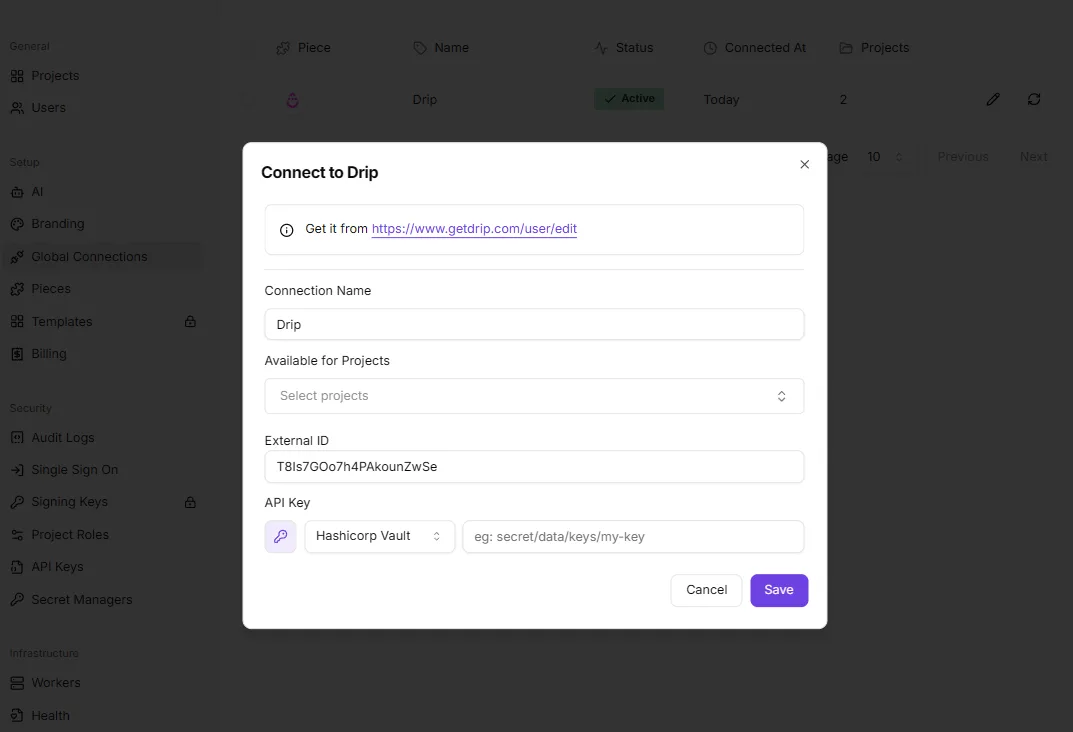
It has a connection name, a project scope, and a credential field.
Name the connection after the Twilio account, not "Twilio," or you won't know which one you picked six months from now. Leave project scope narrow so other builders can't reuse your auth token.
If the trigger shows a webhook URL, paste it into the number's messaging settings in Twilio. Then send a text and run the trigger test. Don't move on until sample data appears.
Stages 2 and 3: Write a row, then map the fields
Before anything gets mapped, connect Google Sheets and write one row. Add the Add Row action and sign in with Google. Use a dedicated account that owns only this sheet, because the permission you grant is the real risk here.
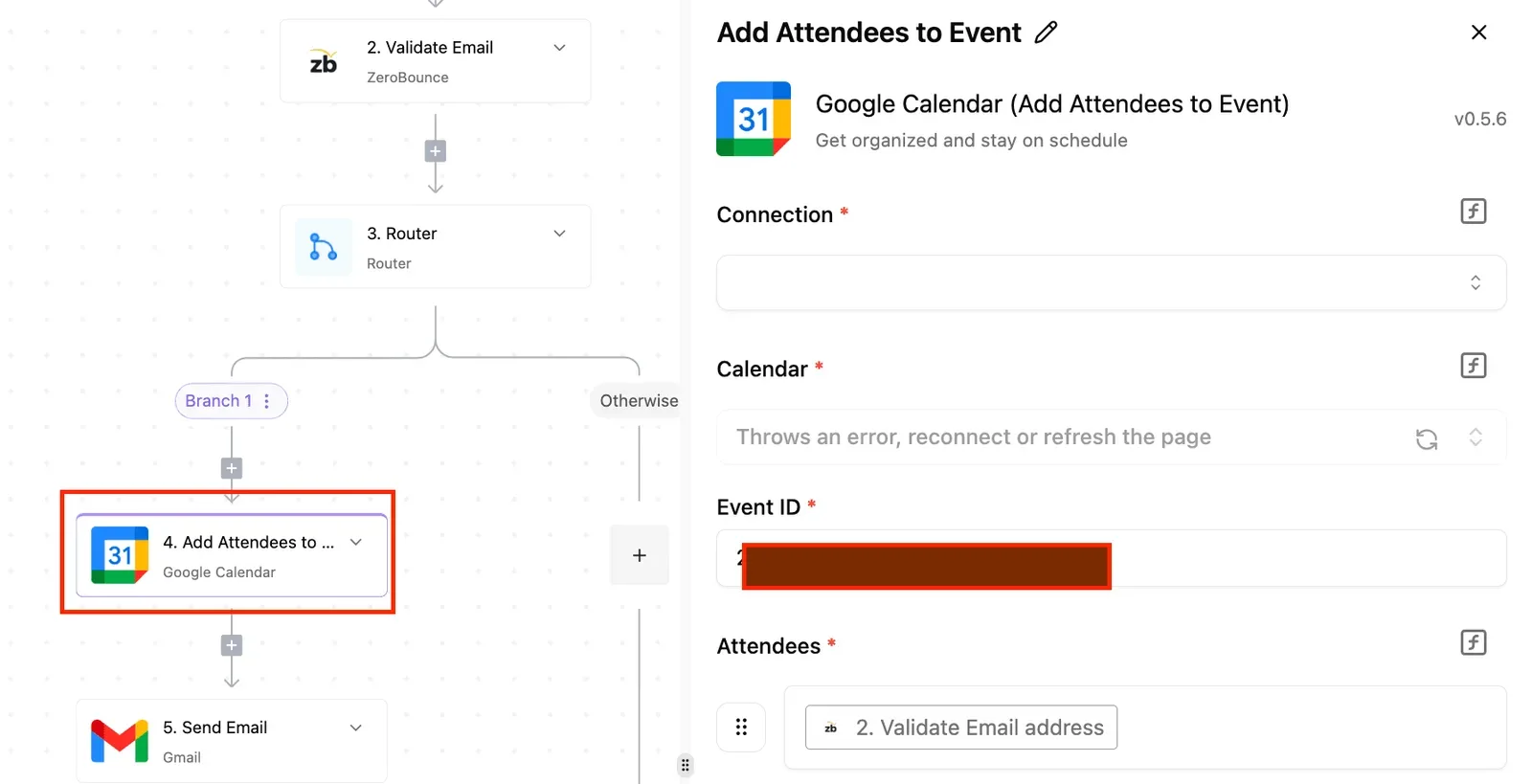
Put headers in row one of a fresh sheet before selecting it. The action reads those headers to build its fields. Write one hardcoded test row and confirm it lands before mapping anything.
With the test row in, stage 3 is mapping fields, filtering blanks and publishing. Map the sender number, message body, and timestamp from the trigger sample into their columns.
Add a filter step ahead of the insert that stops the flow when the body is empty. Picture messages with no text otherwise leave blank rows that look like bugs later. Publish only after the sheet shows clean mapped data from the test.

Stage 4: Test with a real message
Text the Twilio number from your own phone and watch the run history. A new row should appear, and the run should show every step as successful.
If it doesn't, the history shows which step failed and what it received. That is usually a pasted webhook URL or an expired Google sign-in.
If one of the other tools that connect these two apps is already in your company, use it.
The date-based reminder from the table has no ready-made template to find, and Activepieces doesn't need one: describe it in plain language to the built-in AI chat and it builds and publishes a runnable flow, drawing on the 750 integrations in its open source monorepo, which means you can build flows connecting to nearly any service you use.
A request like "text the customer the day before their appointment row, then mark the row sent" is a workflow no template library is likely to list, and what comes back is a published flow in your account rather than a search result, with a run history that shows each step's result the same way the one above does.

You can follow the rest of this with the builder open. Start free, no card.
Limits and Errors When Twilio Meets Google Sheets
Whichever platform runs the flow, the same few failures stop a Twilio-to-Sheets build, and each has a known cause and a fix you can apply in minutes.
Twilio-side errors and account restrictions
Message a real customer for the first time and nothing arrives, and nothing says why. A trial account can message only numbers you have verified, so a flow that works for you will fail silently for them. Upgrade before you test with anyone else.
Up to a third of your "sent" rows may never arrive, because in the US unregistered 10DLC traffic (the carrier-approved registration for business texting on local numbers) is commonly filtered at an estimated 20-30%. Register the brand and campaign first.
When you hit an authentication error, the Account SID or Auth Token in the connector is almost always wrong, or you pasted an API key's SID without its secret. Re-enter both.
Where the text goes sets the cost. Per Twilio, a segment costs $0.0083 in the US, $0.056 in the UK, $0.0599 in Brazil, $0.0832 in India and $0.112 in Germany.
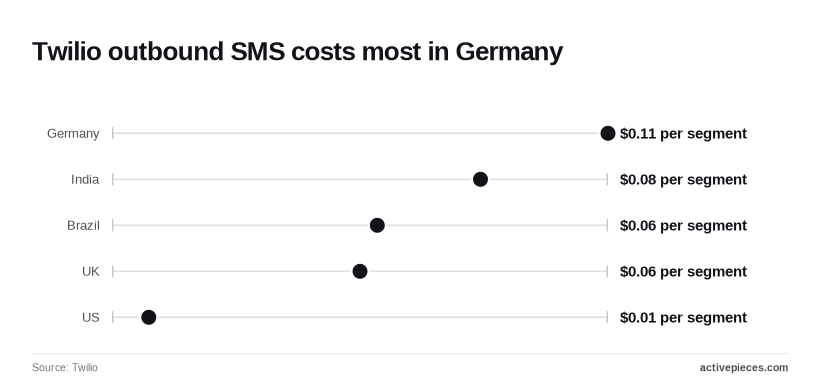
A sheet that triggers a text per row to German numbers costs about 13 times the US rate, so check the country column before you loop.
Google Sheets quotas and permission errors
Per project, Google allows 300 read requests and 300 write requests per minute, but only 60 of each per minute per user.
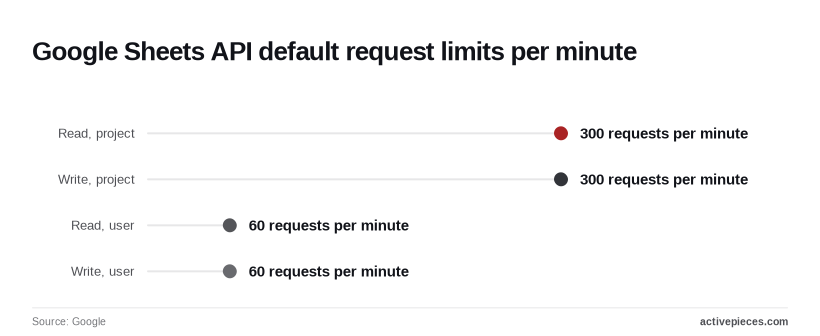
Because your connector authenticates as one user, the 60 is your real ceiling: a burst of 100 inbound texts can push writes past it within a minute. Batch rows or add a delay step.
When you see "Permission denied", the connected Google account lacks edit access to that spreadsheet. Share the file with that account as an editor, or reconnect with the right account.
Fixing duplicate, missing or misaligned Google Sheets rows
If Twilio times out and resends its webhook, the flow appends the row twice, so retries create duplicates. Store the message SID in a column and look it up before writing.

Misaligned rows come from renamed or reordered headers, since connectors map by header text. Lock the header row and rerun the field mapping after any edit.
Below, each failure sits with its cause, fix, source and date checked.
| Failure | Cause | Fix | Source | Date checked |
|---|---|---|---|---|
| Trial limits | Messaging unverified numbers | Verify recipients or upgrade | Twilio documentation | 2026-11-24 |
| 10DLC filtering (20-30%) | Unregistered US traffic | Register brand and campaign | Twilio documentation | 2026-11-24 |
| Twilio auth error | Wrong SID or token | Re-enter both credentials | Twilio documentation | 2026-11-24 |
| Sheets quota | Over 60 requests per minute per user | Batch or delay writes | 2026-11-24 | |
| Permission denied | Account lacks edit access | Share as editor | Google documentation | 2026-11-24 |
| Header mismatch | Renamed or moved headers | Lock headers, remap | Connector behavior | 2026-11-24 |
| Duplicate retry rows | Webhook resent | Dedupe on message SID | Twilio documentation | 2026-11-24 |
Fix these in the order the table lists them, since the earlier ones block everything after.
Your First Week With the Workflow
Spend the week in the same order: prove the log on a test number, widen it only after the logs are clean, then lock down access and credentials. The plan below puts each step where the one before it has already caught its mistakes.
- Run the log on a test number and confirm every message lands as a row.
- Review run history and compare each run against its row.
- Add a second workflow.
- Set error notifications on both workflows.
- Restrict who can open and edit the sheet.
- Rotate the Twilio Auth Token and update the connection.
Day one: log and verify
Send a handful of messages from a test number you control, including one empty message and one with an emoji. Each should produce exactly one row in the sheet.
If a message produces none, or two, you've found the problem while it only affects your own phone.
Then open run history and read it against the sheet, row by row. A run marked successful can still write a blank cell if a field was mapped wrongly, so the history tells you what ran and the sheet tells you what landed.
Do not move on until the two agree.
Day two to five: add a second workflow
Reuse what you've already verified. Keep the same Twilio connection and the same sheet, and give the second workflow one narrow job, such as logging outbound delivery status to a separate tab.
A separate tab means a mistake in the new workflow cannot overwrite rows the first one depends on.
Set error notifications on both workflows before you leave them alone. An email or chat alert on a failed run is the difference between hearing about a gap today and finding it in a monthly review.
Send the alert to a shared inbox rather than one person, so it still gets read when that person is out.
Before you share the sheet
Check the sharing settings first. Anyone with edit access can change a column header, and a renamed header can quietly break the field mapping in your workflow.
Give most people view access, give edit access only to the account the workflow runs under and one named owner, and check the list again before you add anyone.
Last, rotate the Twilio Auth Token. The old token may be sitting in screenshots, chat messages or a teammate's notes from setup.
Once you rotate it, the old connection stops working, so update the token in the workflow straight away and send one more test message to confirm the log still writes.
Frequently asked questions
Once the builder is open, five questions come up. Each has a short answer; where the body already covers one in full, the answer here just points you to the right decision.
On whether there's a native Twilio Google Sheets integration: neither product ships a built-in link to the other.
You connect them through an automation tool that lists a Twilio connector and a Google Sheets connector, and you build only from the triggers and actions those connectors actually show.
On sending SMS from a Google Sheet without code: yes. Use a new-row trigger on the sheet and a send-message action for Twilio, then map the phone number and message columns into it.
Test with one row you own before pointing it at a real list.
Trial accounts and self-hosting
On whether the integration works on a Twilio trial account: it works, with restrictions. A trial account can only message numbers you've verified in Twilio, and outgoing texts carry a trial notice.
So a green test run to your own phone says nothing about whether a customer's number will receive anything. Upgrade before you judge the workflow.
On self-hosting the workflow: you can only if the automation tool you chose offers a self-hosted edition, and that varies by tool.
Check before you build, because a self-hosted version may not list the same connectors, triggers or actions as the hosted one. Then you've rebuilt the workflow for nothing.
How do I stop Sheets dropping the plus sign in phone numbers?
Type +15551234567 into a cell and Sheets reads it as a number and strips the plus, and Twilio then rejects the number because it's no longer in international format.
Set the phone column to plain text before you enter data (Format > Number > Plain text), or start each entry with an apostrophe.
Already-typed rows need re-entering after the format change, because the plus is gone for good. Then check one mapped value in the workflow's test output to confirm the plus survived.
Related reading
Build it
Set this up in minutes.
No code required. Connect your accounts, and Activepieces runs it from there.
Start free Talk to sales