
What Is MAI Code 2? MCP and Copilot Plans Explained

Nov 21, 202611 min read
MAI Code 2 MCP establishes a unified interface that allows AI models to discover and execute functions across disparate data silos, much like how Activepieces connects various cloud applications, which removes the need for a unique integration for every new tool.
MAI Code 2 is a specialized development environment and agent framework designed to host these autonomous connections. It functions as a high-level command center where developers manage the lifecycle of AI agents and their access to local or remote resources.
By decoupling the model’s reasoning from the specific transport logic of the underlying data source, it prevents the integration hell where a developer must write custom glue code for every database or SaaS platform an agent needs to touch.
Mai Code 2 MCP defines the standard for agentic data access
MAI Code 2 2026 implementation scenario explained
This guide is written from the perspective of a 2026 technology stack to illustrate the full maturity of the Model Context Protocol. The models and version numbers referenced, such as GPT-6.2 Astra and Claude Opus 5.5, represent today's frontier AI models.
The underlying logic of schema management and context saturation remains the primary challenge for agentic workflows today.
What makes MAI Code 2 different from standard LLM calls
Standard LLM calls treat external data as a static injection into a prompt. MAI Code 2 treats the model as an active processor capable of navigating a live filesystem or database.
According to Aiagentnews, in a typical setup, a developer manually fetches a log file and pastes it into the chat. In an MCP-enabled workflow, a model like Claude Opus 5.5 queries the server directly to find the relevant lines.
Standard LLM calls treat external data as a static injection into a prompt. MAI Code 2 treats the model as an active processor capable of navigating a live filesystem or database.
The role of the Model Context Protocol in 2026 AI stacks
Because the protocol standardizes tool descriptions, the model can see a list of available actions without the developer pre-defining the exact parameters for every possible interaction.
The Model Context Protocol (MCP) is the universal adapter between frontier models and the private data they are otherwise blind to.
In the current stack, models like GPT-6.2 Astra or Gemini 4 Carbon rely on MCP servers to act as secure gateways. This ensures that sensitive enterprise data stays within a controlled environment rather than entering a global training set.
The sheer volume of SDK downloads indicates that MCP has moved from an experimental niche to a fundamental requirement for production-grade agents.
Why developers are moving away from custom API wrappers
Custom API wrappers create a maintenance burden where every upstream change in a service's schema breaks the agent's ability to function. Standardized protocols allow developers to swap out a reasoning engine without rewriting the underlying tool definitions.
Every connector in Activepieces serves two roles at once: an agent can call it as a tool schema on a per-project MCP server, or it can run as a step inside a structured flow.
This mechanism allows agents to reach 750 integrations in the MIT-licensed core without developers having to wire up a separate catalog or perform a second migration for every new data source.

Everything below works on Activepieces' free plan. Start without code or a credit card.
Connect your first MAI Code 2 MCP source
Integrating a local data source into MAI Code 2 requires a standardized bridge that translates raw database schemas into tool definitions the model can navigate.
Step 1: Installing the MCP inspector and host environment
The Model Context Protocol relies on a Node.js-based environment to manage the communication between the local server and the AI client. You must install the official SDK to handle the JSON-RPC lifecycle.
- Install MCP SDK via npm;
- Define the resource schema;
- Implement the read_resource handler;
- Register the server in the MAI Code 2 config file.
Step 2: Configuring the mai-code-2.JSON manifest file
MAI Code 2 looks for a specific manifest file to identify which local servers are authorized to provide context. You must define the absolute path to your executable and any environment variables within the mcpServers object of your mai-code-2.json file.
Step 3: Testing tool definitions in the MCP debugger
Before letting a model like Gemini 4 Carbon attempt a write operation, you must verify that the server correctly broadcasts its capabilities via the MCP Inspector. The inspector is a local proxy that displays exactly how your SQL queries are mapped to tool arguments.
Granting MAI Code 2 agent local query permissions
By default, MAI Code 2 operates in a read-only state to prevent accidental data loss. You must explicitly toggle the "Allow Tool Execution" flag in the connection settings for your specific server.

Budget for MAI Code 2 MCP deployments
MAI Code 2 deployments require a dual-layered budget for local infrastructure to host the Model Context Protocol (MCP) servers and cloud-based subscriptions to access the underlying reasoning models.
Hardware specs for local MCP server hosting
Hosting an MCP server locally demands high-bandwidth memory rather than raw compute cycles to prevent the agent from timing out during tool discovery.
For enterprise environments where multiple agents query a centralized server, using a dedicated Linux instance with high-speed NVMe storage is necessary. This ensures that the file-system operations required for schema validation don't bottleneck the agent's reasoning loop.

Subscription tiers for enterprise MAI Code 2 access
Enterprise access is divided into tiers that scale based on the volume of concurrent tool calls.
| Model | Performance (%) | Cost (%) | Avg. Cost per Task ($) |
|---|---|---|---|
| MAI Code 2 | Verified High | Optimized | Fixed per Seat |
| GPT-6.2 Sol | High | Balanced | Variable |
| Claude Opus 5.5 | Maximum | Premium | Variable |
Model selection and cost management
Flagship models like Claude Opus 5.5 offer the highest reasoning ceiling for complex coding. MAI Code 2 provides a predictable cost structure for teams that require a fixed monthly spend.
Every tool call through MAI Code 2 incurs a token overhead because the model must ingest the entire JSON schema of the MCP server before it can select a function.
To prevent context saturation, developers must prune unused tool definitions from the server manifest so that the agent retains enough space to process the primary task instructions.
Easier to see it running than to read about it: set it up free, no card.
Common pitfalls in MAI Code 2 MCP implementations
Effective MCP implementations fail when developers treat the protocol as a transparent pipe rather than a resource-constrained gateway.
The 'Context Bloat' problem in long-running sessions
Context saturation occurs when an agent is forced to ingest every available tool definition and resource schema into its active memory. This leaves insufficient tokens for the actual reasoning task.
If a developer connects ten specialized servers to a single session with Gemini 4 Carbon, the model may hallucinate tool arguments. Developers must implement dynamic server activation, where only the tools required for the immediate sub-task are mounted to the agent's environment.
Security risks of unrestricted filesystem access via MCP
Granting an agent broad filesystem permissions creates a direct path for prompt injection to execute destructive shell commands or exfiltrate sensitive environment variables.
- Define a strict subdirectory as the only visible "root" for the MCP server.
- Use a read-only mount for servers that only need to index documentation.
- Implement a human-in-the-loop confirmation step for any
writeordeleteoperation.
Handling latency in multi-server MCP architectures
Chaining multiple MCP servers introduces cumulative network and processing delays that can cause an agent to time out.
To prevent session expiration, developers should move from sequential tool calling to parallel execution blocks within the MCP host. This ensures that data retrieval from independent sources doesn't bottleneck the model's reasoning cycle.
Scaling MAI Code 2 MCP implementations with Activepieces
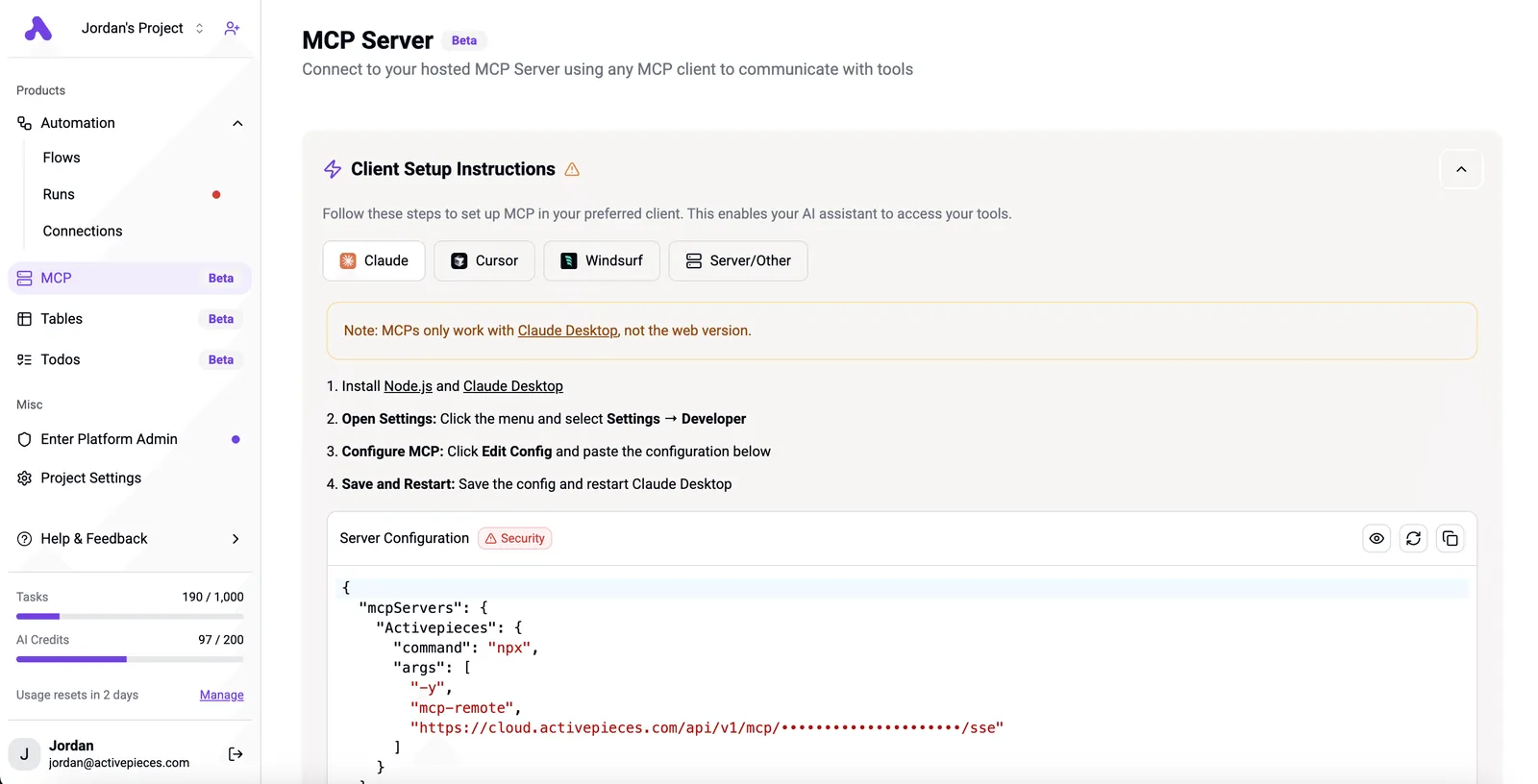
Activepieces transforms the Model Context Protocol from a local developer utility into a cross-platform orchestration layer by exposing its 750+ integrations as standardized MCP tool definitions.
While a raw MAI Code 2 agent struggles with the shifting authentication headers of a custom CRM, Activepieces provides a stabilized execution environment where the agent simply calls a unified Action node.
Centralizing SaaS connections
By centralizing these connections, developers avoid the context bloat that occurs when forcing a model like Gemini 4 Carbon to memorize the unique API quirks of every individual SaaS provider.
Activepieces exposes the visual workflow steps of over 750 integrations as JSON-RPC tool schemas, allowing agents to interact with complex SaaS logic through a single MCP server.
By using Activepieces, the agent gains immediate access to the same ecosystem components that companies like MoneyGram and Moneypenny run in production:
- Communication platforms like Slack and Microsoft Teams.
- Customer data platforms such as Salesforce and HubSpot.
- Project management tools like Jira and Linear.
Automating the maintenance of MCP server manifests
Activepieces automates the generation of the mcp-server.json manifest, ensuring that the tool definitions available to the agent always reflect the current state of the underlying workflows.
Activepieces eliminates friction by exposing its workflow triggers as dynamically updated MCP tools, where roughly 60% of these integrations are community-contributed and maintained. A new automation built in the visual editor is instantly discoverable by the agent without a manual deployment cycle.

Building human-in-the-loop triggers for MCP tool calls
Activepieces puts every agent inside the same access model as your employees, using enterprise RBAC and SSO to govern what it may connect to.
When a model like Gemini 4 Carbon attempts a sensitive operation, Activepieces intercepts the tool call and pauses the execution.
The process follows a strict governance path:
- The agent sends a tool request to the Activepieces MCP server.
- Activepieces triggers a "Wait for Approval" node.
- The workflow remains suspended until a human clicks "Approve" or "Reject".
- The result is passed back to the agent.
Frequently asked questions about MAI Code 2 MCP
Does MAI Code 2 MCP work with legacy OpenAI models?
MAI Code 2 MCP requires models capable of native tool-calling and structured output to interpret the protocol's standardized schema. While older completions-only models can be wrapped in a shim, they lack the reliable reasoning needed to navigate complex tool discovery without hallucinating parameters.
For production stability, the protocol is designed for current-generation reasoning models like GPT-6.2 Astra or GPT-6.1 Terra. These possess the architectural support for the function-calling cycles that MCP automates.
How do I rotate API keys within an MCP configuration?
The transport layer handles key rotation by updating the environment variables or configuration files read by the MCP host process.
Because the protocol decouples the client from the server, you can restart a specific server instance with a new credential without forcing a re-indexing of the entire tool catalog.
This isolation ensures that a leaked key for a single service (such as a GitHub repository connector) can be invalidated and replaced without disrupting the sessions of other active agents.
Can I run multiple MCP servers on a single machine?
You can run as many MCP servers as your system resources allow by assigning each a unique local socket or port. The host application aggregates these disparate servers into a single context window for the model.
This means an agent can pull data from a local database server and a separate cloud API server simultaneously. This modularity allows you to update the code for one toolset without taking down the entire operational environment.
What is the maximum payload size for an MCP tool response?
The protocol doesn't enforce a hard byte limit, but the practical maximum is dictated by the context window of the model being used.
If a tool response exceeds the token limit of a model like Claude Sonnet 5.5, the model will truncate the data and lose the ability to execute the next step.
To prevent this context saturation, developers should implement pagination or summarization within the MCP server logic. This ensures the model receives only the specific data points required for the task.