WhatsApp Integration: How to Set It Up (2026 Guide)

Nov 12, 202615 min read
As of 2026-11-12, a solo owner belongs on the free Business app, and every team that needs automation or shared inboxes, whether it wires up its own flows in a tool like Activepieces or not, belongs on the Cloud API, which bills per message.
A WhatsApp integration is a connection between your business's systems and WhatsApp that lets software send and receive messages on a verified business number, typically through Meta's official WhatsApp Business Platform (Cloud API) using approved message templates.
50 million users sit on the Business app and 5 million on the API, by SocialVik's count, so the split's lopsided. Most people reading API documentation are in the minority and are there because the app stopped being enough.

Read the table for each route, what it costs monthly, and the catch that forces the move to the next row.
Which WhatsApp plan fits you
| Situation | Route | Monthly cost | The catch that pushes them up |
|---|---|---|---|
| Solo owner | Free Business app | Free | No automation, and one person answering every chat |
| Small team sending alerts | Cloud API | Per message only | Templates must be approved, and the 24-hour window limits free-form replies |
| Team using a BSP (business solution provider) | Cloud API through a provider | Per message, plus the provider's own charges | The provider's fees stack on top of message costs |
| High-volume marketer | Cloud API, marketing templates | Scales with sends | Per-message rates vary by country |
Look at the catches, not the prices: they decide which row you are in.
One person, one phone and no integration: that is the solo owner. The free app costs nothing and needs no approval, and nothing runs without you.
The moment a second person needs to answer, or an order should trigger a message automatically, the app has nothing to offer.
When five people are sending order alerts or appointment reminders, you sit in the Cloud API row, with messages wired up through Activepieces, which counts 747 integrations in its open-source monorepo, about 60% community-built, and lets you generate a missing connector with AI and add it privately to your own instance instead of waiting on a vendor's release.
You pay per message, not per seat.
The catch is operational: an unapproved template or a reply outside the 24-hour window fails, and the code is rarely the cause.
At 25 people, several agents need to share conversations, and the business needs a verified identity. That's where a BSP earns its fee, because it supplies the inbox.
The catch is the second bill: the provider's charges arrive on top of what Meta charges per message.
WhatsApp pricing for high-volume marketing senders
When the send is marketing, per-message pricing hurts. Sendr puts the US at $0.004 to $0.025 per message, so costs scale linearly with volume. So 10,000 messages cost $40 to $250.

For the same send in India, the range is $0.004 to $0.0107, or $40 to $107, which means you can't know the exact cost of a send in advance.
Brazil runs $0.00917 to $0.0625, which is $91.70 to $625. The same campaign can cost up to about six times more in Brazil than in India, so budget per country, not per campaign.
This takes minutes, not a project: automate it in Activepieces free.
Integrating WhatsApp through Cloud API
Strip it down and a WhatsApp integration's a link between a business phone number and your software. It's made through Meta's WhatsApp Business Platform, so your systems can send messages to customers and receive their replies. Each stage below leaves something working.
At developers.facebook.com, choose Create App, pick the Business type and attach it to your business portfolio. From the app dashboard, add the WhatsApp product.
Meta creates a test WhatsApp Business Account and a test number. You now have an app ID and a sandbox, which is enough to call the API but not enough to message real customers.
Stage 2: Send the first test message
Open WhatsApp > API Setup. Copy the Phone number ID, add your own phone to the recipient list and confirm it with the code WhatsApp sends. Then run the sample request, which posts to the /messages endpoint with the hello_world template.
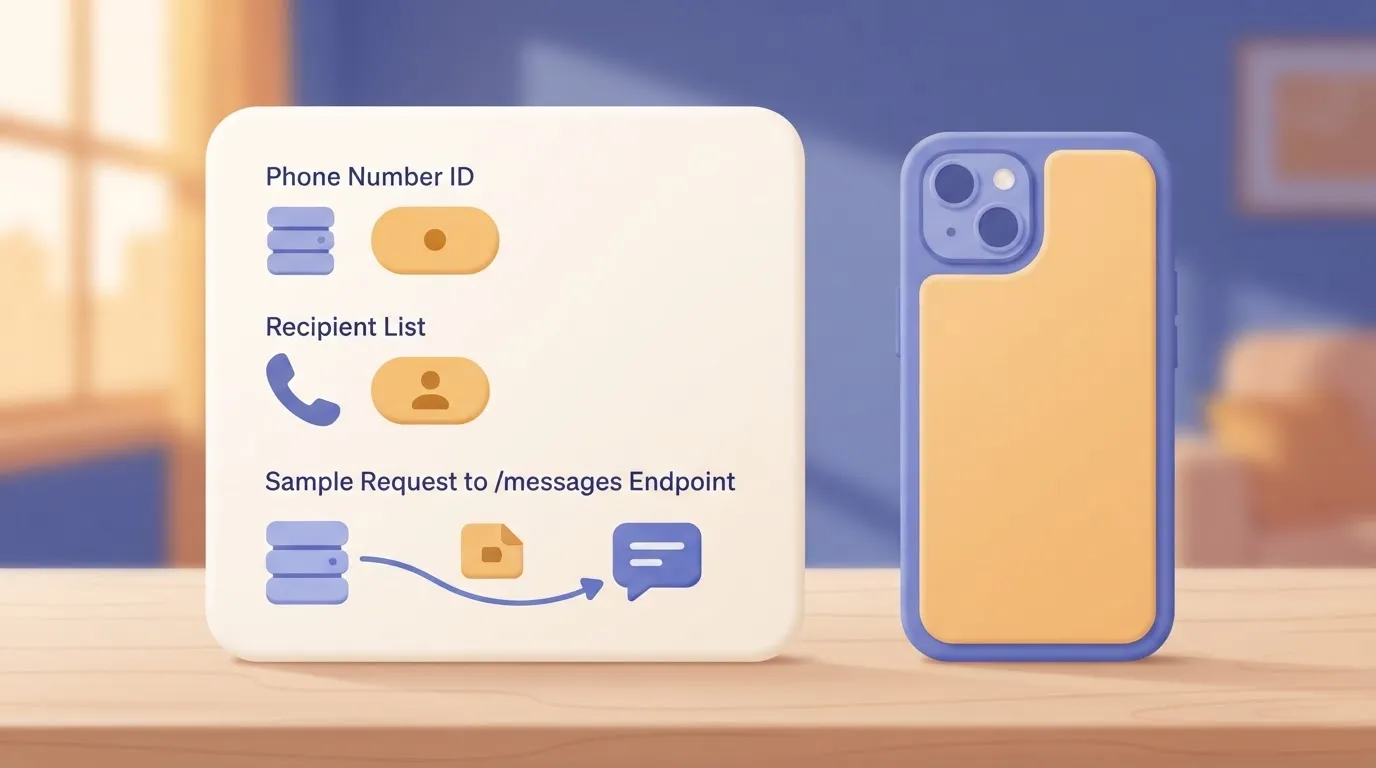
When a call that worked this morning returns an authentication error later, it is a stale token, not a bug in your code, because the token on this page is temporary.
Stage 3: Register your number and create a permanent token
In WhatsApp Manager, add your real number and verify it by SMS or voice call. It can't already be active on the WhatsApp app.
Then, in Business Settings > Users > System users, create a system user, assign it the app, and choose Generate token with the whatsapp_business_messaging and whatsapp_business_management permissions. This token doesn't lapse, so store it in a secrets manager rather than in source control.

Stage 4: Create and submit a message template
In WhatsApp Manager, open Message templates and choose Create template. Set the category (utility, marketing or authentication), the language and a body with numbered variables such as {{1}}. Submit it for review.
Until the status reads Approved, WhatsApp rejects any send outside a customer-initiated conversation, and a carelessly chosen category is the usual cause of a bounced review.
Stage 5: Set up the webhook and receive replies
Under WhatsApp > Configuration, enter a public HTTPS callback URL and a verify token of your choosing. Your endpoint must answer Meta's verification request by returning the hub.challenge value it receives.

Then subscribe to the messages field. Delivery statuses and customer replies will arrive as POST requests to that URL.
You will find most integration failures here, in the run log rather than in the send call.
In the workflow view below, a Google Calendar event triggering a Gmail send shows what to expect from any builder. It displays each step's input and output data, and a failed run marked with its ID and an Edit Run button.
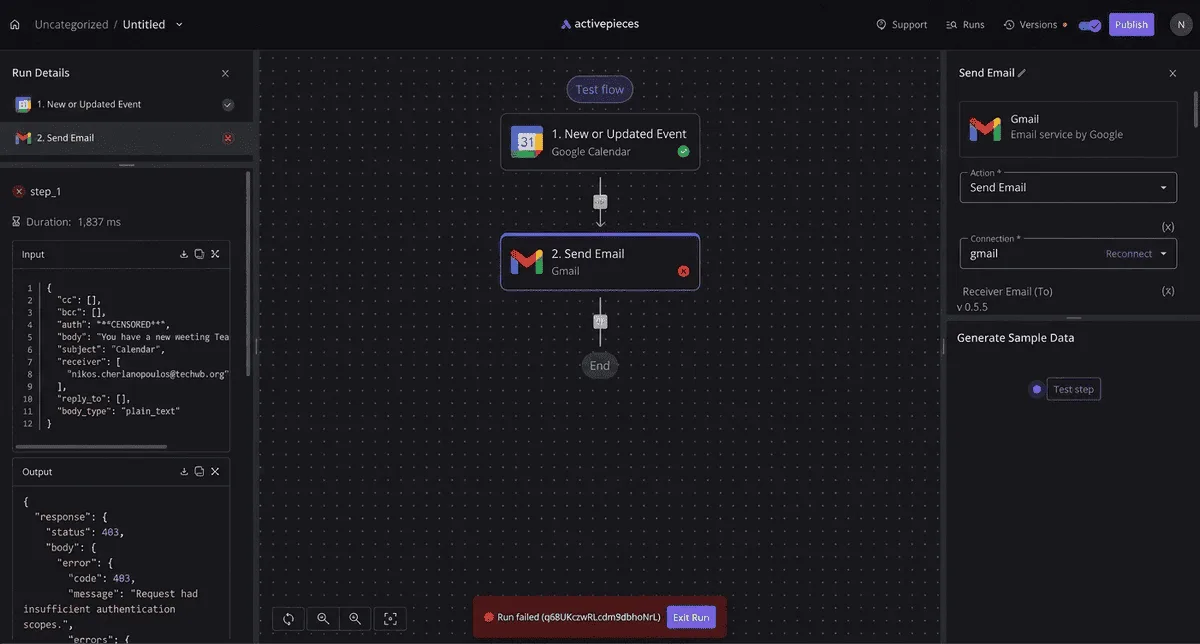
Read the failing step's output before changing anything.
WhatsApp Cloud API limits and errors, with fixes
Seven causes account for most Cloud API failures. The first is the 24-hour window: a free-form message sent a day after the customer's last reply fails with error 131047.
The table below lists each cause with what triggers it, the code you'll see, and the fix.
When a send fails, find the row that matches before you touch the code.
| Trigger | Code | Fix |
|---|---|---|
| Free-form message sent more than 24 hours after the customer's last reply | 131047 | Send an approved template, or wait for the customer to write first |
| Template rejected in review | None; status shows as rejected | Reword, fix the category, resubmit |
| Daily cap reached at 250, with 2,000 unlocked by verification | None; sends are blocked at the cap | Complete business verification, keep quality high |
| Too many requests too quickly | 130429 | Queue sends, back off, retry |
| Access token expired | 190 | Replace it with a system user token |
| No valid payment method | 131042 | Add one in the business account's billing settings |
| Callback URL unreachable or failing verification | None; no events arrive | Return 200 fast, check the verify token |
Take the window first, since each row has a longer story.
WhatsApp 24-hour window and template messages
When a customer messages you, the window opens; 24 hours later it closes. Inside it, you can send anything. After it, only an approved template goes through, and error 131047 is the Cloud API telling you so.
Nothing warns you when a campaign is scheduled on a rejected template: it silently never leaves. Templates fail review for vague wording, wrong categories or broken variables, and a rejected one can't be sent at all.
WhatsApp messaging limits and quality rating
A 5,000-person announcement stalls after 250 sends, because Meta caps a new portfolio at 250 messages per 24 hours.
Business verification opens the first tier at 2,000 messages per 24 hours, enough for a small customer list but not a large one.
The second tier allows 10,000, and the third allows 100,000, so a large list needs a number that has already climbed.

Sending to people who didn't expect the message costs you the next tier, because Meta's quality rating, driven by blocks and reports, decides whether you move up.
WhatsApp token, permission and webhook errors
Error 190 usually means a temporary token has expired, often a day or so after you generated it for testing, and production quietly stops. A system user token avoids that.
Slow down and retry on error 130429, a throughput limit. Error 131042 means billing isn't set up. Webhook failures give no code at all: events simply don't arrive. Check the endpoint first, then the verify token.
With those causes ruled out, what remains is usually code.
You can follow the rest of this with the builder open. Start free, no card.
Connecting WhatsApp messages to other apps with Activepieces
When the code is sound and the messages still go nowhere useful, the missing integration is often the hand-off.
Activepieces, an MIT-licensed open-source automation tool that MoneyGram, Moneypenny, Alan and FundingSocieties run, receives each WhatsApp event and passes it to your CRM, sheet or helpdesk without custom glue code.
On the free plan, Activepieces gives you 1,000 credits a month, and a run costs 1 credit however many steps it has, so a hand-off with six steps costs the same as one with two.

When you need a workflow tool and when you do not
Count how many places a message has to land. One destination is a code problem.
Several destinations, or colleagues who must change the routing without a deploy, is a workflow problem, and Activepieces offers unlimited flows on every plan, including free, so the count never changes what you pay. These are the cases where Activepieces adds nothing:
- Your own code sends the replies and nobody else needs to edit the logic.
- You're sending one-off messages from Meta's own tool.
- Your CRM already has a native WhatsApp integration.
- A single webhook endpoint that you control covers everything you need.
If none of those describe you, a workflow tool earns its place, because it removes the glue you would otherwise maintain yourself.
For a team that doesn't want to run anything, Zapier and Make are hosted services that do the same job, and either will do. Activepieces differs in that its MIT-licensed core can be self-hosted, which matters if message content should stay on your own infrastructure.
If you write a custom webhook, you get the most control and the most upkeep: you own retries, logging and every API change in the destination apps.
Build a workflow that logs inbound messages and replies
Build it in this order, and test each step before adding the next:
- Create a trigger that receives inbound WhatsApp events, then register its URL as the callback in your Meta app and confirm Meta accepts it.
- Add a step that pulls the sender's number, the message text and the timestamp out of the payload.
- Write those fields to a row in your sheet, or to a new ticket or contact note in your helpdesk.
- Add a branch that checks whether the customer wrote recently enough for a free-form reply.
- On the open-window branch, send the reply through the WhatsApp connector with your phone number ID and token.
- On the closed-window branch, send your approved template instead.
At step four most hand-built flows fail, which is why it belongs in the workflow itself.
The platform rejects a reply that ignores the window, and the tool shows you the failed run rather than hiding it. Open that run first when a message goes missing.
The first-day checklist for a live WhatsApp integration
Before the first real customer message goes out, seven things must be true. Most failed launches trace back to a skipped item, not to the automation built on top.
Follow the order below on Monday morning. It puts everything that can silently block a send ahead of the send itself, so nothing fails in front of a customer.
- Confirm the number and display name are approved.
- Store the token in a secrets manager.
- Check that the webhook responds.
- Attach a payment method.
- Record opt-in.
- Make a small first send.
- Recheck Meta's pricing and policy pages.
Taken in the order you'll meet them, each item maps to a stage of the build.
Create an app in Meta's developer dashboard and add the WhatsApp product to it. This gives you a test number and the business account that'll own everything later.
Create it under the company's verified business, not a personal login, or you'll be migrating ownership after launch.
Send one message from the dashboard to your own phone. The purpose is to prove the request format works, not to test your workflow.
The test number only reaches recipients you have listed in advance, so unexplained silence usually means the recipient was never added.
Register the real number and wait for the display name to be approved. Checking this is item one on Monday's list, not something to assume.
Then replace the temporary token with a permanent one and keep it in a secrets manager. That's a vault that hands credentials to your code at run time instead of leaving them in a file.
A token pasted into a workflow is one export away from leaking.
For any message you start outside a customer's reply window, Meta requires a template: pre-approved wording. Rejections tend to come from vague text or variables with no sample values, so write it plainly and expect to resubmit once.
A token pasted into a workflow is one export away from leaking.
Record opt-in at the same time: who agreed, when, and to what.
The webhook is the public HTTPS address Meta calls when a customer replies or a message status changes. Confirm it answers Meta's verification request, then send a small first message to a few known people.
Attach the payment method before that send, and reread Meta's pricing page afterward, because your cost model is only as current as your last read.
Frequently asked questions
Can I use my existing WhatsApp Business app number with the Cloud API?
Yes, but you can't simply point the API at it. Either you remove the number from the app and register it to the API, or you use Meta's coexistence onboarding, which lets the app and the API share one number where it's offered.
Check eligibility for your country and account before you promise anyone that the shared inbox will keep working. The migration path decides whether your team keeps its chat history and its phone.
Do I need a business solution provider to integrate WhatsApp?
No. You can connect to the Cloud API directly with your own verified business account, number and approved template. A provider earns its fee by handling onboarding, a ready-made inbox and support, and it usually adds its own markup on top of Meta's charges.
If you have one developer and a single use case, going direct is the shorter path. If you need an agent inbox this week, a provider may be cheaper than building one.
Can I message customers who have not messaged me first?
Yes, but only with an approved template, and only to people who have opted in to hear from you. Free-form text works only while a customer's last message to you is recent enough to keep the conversation window open.
Once the window closes, a plain-text send is rejected, and that rejection is the most common reason an integration that passed testing fails in production. Templates are billed, which is why the payment method has to be attached before the first send.
How long does WhatsApp template approval take?
Often quickly, but Meta publishes no guarantee, so don't build a launch date on it. The status shows in your template manager, and a rejection comes with a reason.
When a rejection comes, it most often traces to the template itself. The usual faults are variables with no sample values, wording that reads as promotional under a utility category, or placeholders stacked so tightly that the message makes no sense.
Submit the real wording early, and keep a second version ready in case the first is sent back.
Is there a free way to test a WhatsApp integration?
Yes. The developer dashboard provides a test number you can use to send messages to a short list of recipients you have verified. Use it to prove your webhook, your payload format and your handling of delivery statuses.
Because your real number's approval state, template categories and sending limits aren't in play yet, the test number doesn't prove production behavior.
Treat a passing test as proof that the code works, and a first send from the real number as proof that the account does.
Related reading
Build it
Set this up in minutes.
No code required. Connect your accounts, and Activepieces runs it from there.
Start free Talk to sales