
Workday API Integration for Developers in 2026

Nov 20, 202617 min read
Workday API: Access, Endpoints and Limits One Sync Hit
Everything below works on Activepieces' free plan. Start without code or a credit card.
Workday API access, authentication and endpoint families
There's no public, self-serve key for the Workday API; REST and SOAP web services are exposed through an API client registered in your own tenant, which is also the point where teams wiring it into automation tools such as Activepieces typically begin.
Facts are current as of 2026-11-20, and any figure Workday doesn't publish appears as unpublished.
The Workday API is the set of REST and SOAP web services (such as Workday Web Services and the REST endpoints) that let approved applications read and write data in a Workday tenant, accessed through an API client registered in that tenant and subject to its credentials, scopes and rate limits.
What the Workday API is and who can get access
Picture a three-person HR systems team syncing new hires into a ticketing tool, with one engineer paged when it fails. The API's a set of interfaces onto your tenant's HR and finance data, and a tenant administrator grants access.
If the administrator who registered the client leaves, the sync loses its owner and nobody is told. The first question's who owns the credential.
When a 403 comes back, it usually points to a permissions gap in your tenant, not a bug in your request. An administrator registers the API client in the tenant, and the security groups attached to it decide what it can read.
REST, SOAP and report-as-a-service endpoints compared
Choose by the data you need, not the interface you prefer. The table shows what each interface is for, how it authenticates, and whether you register an API client.
| Interface | Used for | Authentication | Registered API client |
|---|---|---|---|
| REST | Reading and writing individual records | OAuth 2.0 | Yes |
| SOAP web services | Full-coverage operations, including bulk and complex writes | Integration system user credentials, or OAuth 2.0 | Needed for OAuth |
| RaaS | Pulling custom report output as data | Integration system user credentials, or OAuth 2.0 | Needed for OAuth |
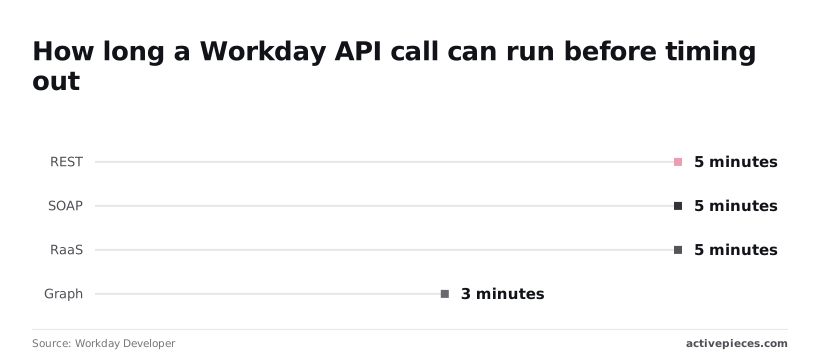
According to Workday Developer, REST, SOAP and RaaS requests each time out at 5 minutes, so a report that runs longer fails and you have to narrow or split it. Graph times out at 3 minutes, so it has the least headroom of the four.

If you go looking for a per-call price or a quota figure, you will find neither: Workday publishes no per-call price, and no public quota figure turned up in the pages checked; treat both as unpublished.
Ask your Workday account representative whether API use falls under your existing subscription before you size a sync.
First Workday request and sync failure
Once you've settled the subscription question, the first request is short: a GET against your tenant's workers endpoint with an OAuth bearer token in the header. Workday's REST documentation, available to customers through its community, describes the same call.
GET https://{host}/ccx/api/v1/{tenant}/workers
Authorization: Bearer {access_token}
Accept: application/json
Who owns the Workday API token
You fill in the host and tenant from your own Workday environment, and the token comes from an API client someone in your organization registered. That's the first ownership question.
If the person who created the client has left, the token still works until it doesn't, and nobody has the job of noticing.
Why a 200 response doesn't prove Workday sync
Do not read much into a 200 response with a page of workers. It shows the credential's valid today, for one call, from your laptop.
It says nothing about what happens when a scheduled job pages through the entire worker list overnight, which is where the trouble starts.
What a stalled Workday sync leaves behind
Consider the illustrative case. A nightly sync starts after midnight, pulls workers page by page, and writes them to a downstream HR or payroll-adjacent system.
At 02:10 it stops partway through the list. No error reaches anyone, because the script logged to a file on a server that nobody reads.
By morning the directory is half-updated, and the first person paged is whoever owns the downstream system, who has no idea Workday was involved. They can't tell whether the token expired, a limit was hit, or one page returned something unexpected.
What a Workday sync failure log should show
What you need at that moment is a record that names the step that failed and what it said.
In the screenshot below, a canvas from Skyvern, a browser-automation tool, shows a delay step sitting before a step that fetches the status of an earlier run by its ID, and that step carries its own Continue on Failure and Retry on Failure toggles.
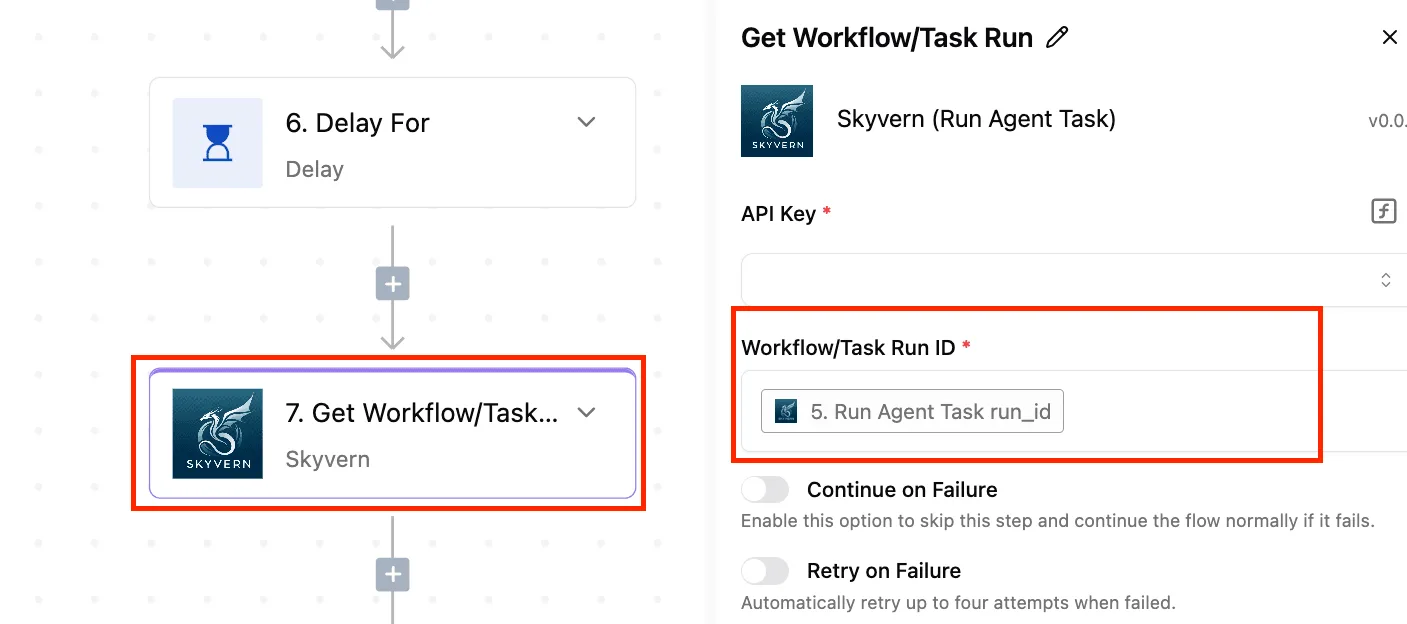
Every step has a name, a position, and a failure policy, so a stopped run points somewhere. A script that dies silently at 02:10 gives you none of that.
Reading the failure at that level of detail depends on knowing which limits and credential problems Workday can produce, and those come next.
Business impact of a stalled Workday sync
At 02:10 the stall left the worker population split. Some records were current, the rest stale, and new hires had no accounts, which turned a failed overnight job into a reconciliation task that landed on a person. Every figure in this scenario is illustrative.
What paged the on-call engineer was a sync that had stopped, not the damage it left. The chart shows worker records synced before the stop against records left stale, plus the new hires provisioning never saw.
One failure was reported, and two populations were held: the job reported one failure while the business held two, and nothing in the alert said how large either was.
Because the stop came partway through, the stale group is the part that deserves the attention.
When a sync stops mid-run, it doesn't fail cleanly. Records processed before the stop carry the new data, records after it carry the old, and both look equally valid in the target system.
If you read a worker's department, manager or status, you can't tell which side of the line that record fell on, so every record is suspect until proven otherwise.
Sharpest of all are the new hires: they were never written, so the downstream account was never created, and the first sign's a person arriving on day one with no access.
Manual reconciliation after a Workday sync failure
Nothing listed what'd been processed, so recovery was manual. Someone had to export the worker data from Workday, export the same from the target, and compare them field by field to find the cut-off.
Without a trace you must check all of them to find the few that're wrong, so the reconciliation work scales with the whole population, not with the number of records actually affected.
The cost is therefore mostly the hours spent establishing the boundary, not the hours spent fixing records.
Who notices a failed Workday sync first
It wasn't the job's owner. The people who noticed were the ones downstream: a manager whose new starter couldn't log in, and a help desk fielding requests that should never have existed.
That's the audit finding. The automation had no named owner for its output, so the first reliable signal came from the people it was supposed to serve.
Easier to see it running than to read about it: set it up free, no card.
Why Workday API calls fail
When a Workday sync fails at 2am, the cause is usually one of five things. Those are an expired token, a missing permission, throttling, a maintenance window or page size, and whoever's paged has to work out which.
Read the code first, not the log volume; the table below sorts the five by status code.
| Status code | Likely cause | Fix | Workday doc |
|---|---|---|---|
| 401 | Expired or invalid token | Refresh or reissue the credential | None cited here |
| 403 | Integration user lacks access to that data | Adjust the user's security group | None cited here |
| 429 or throttling | Too many requests in a short span | Back off and retry; no published figure | None published |
| 5xx in maintenance | Tenant unavailable during a window | Retry after the window | None cited here |
| Pagination limits | Page size above the allowed maximum | Request pages within the limit | Workday Developer |
Of these rows, only the pagination one rests on a published number, so the others are diagnosis, not guarantees.
If you get a 401, Workday doesn't accept who you are, usually a token that expired between runs. A 403 means it knows you and refuses the data.
Treat them differently: the first's a credential owner's problem, the second belongs to whoever administers the integration user's security groups.
You can't read a ceiling off a page and size your sync under it, because Workday doesn't publish rate limits by tier. So a 429's evidence to collect, not a number to plan around. Record the time and the step that received it.
Workday API pagination for large worker pulls
By the Workday Developer reference, the REST default is 20 records per page, so you'll need to handle pagination if you're retrieving more than 20 records.
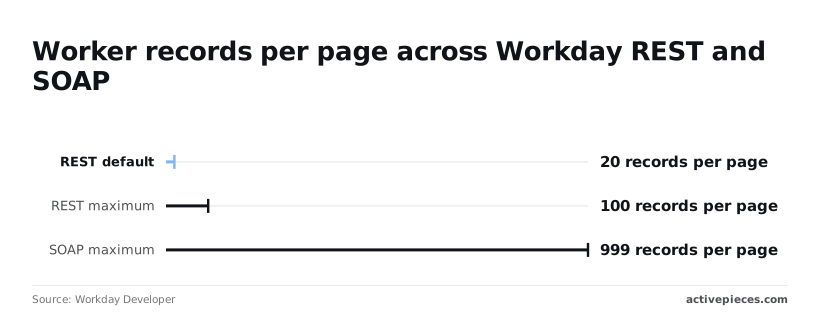
Per [Workday Developer], a pull that never sets a page size makes five times as many calls as one that asks for the REST maximum of 100.
A 10,000-worker sync is 500 requests at default and 100 at maximum, making the choice of page size settings critical for efficiency, so the wrong configuration commits you to unnecessary request volume.

If your integration uses SOAP, the maximum is 999 per page, which cuts the same pull to about ten calls.
Workday maintenance windows and 5xx errors
When a 5xx lands during a maintenance window, it isn't a defect in your sync. It's a failure with a schedule, so retry after the window instead of paging anyone. No figure for window length is cited here, so check your tenant's announced times.
Once each failure has a code and an owner, the remaining question's how to see which step produced it.
Calling Workday endpoints without code in Activepieces
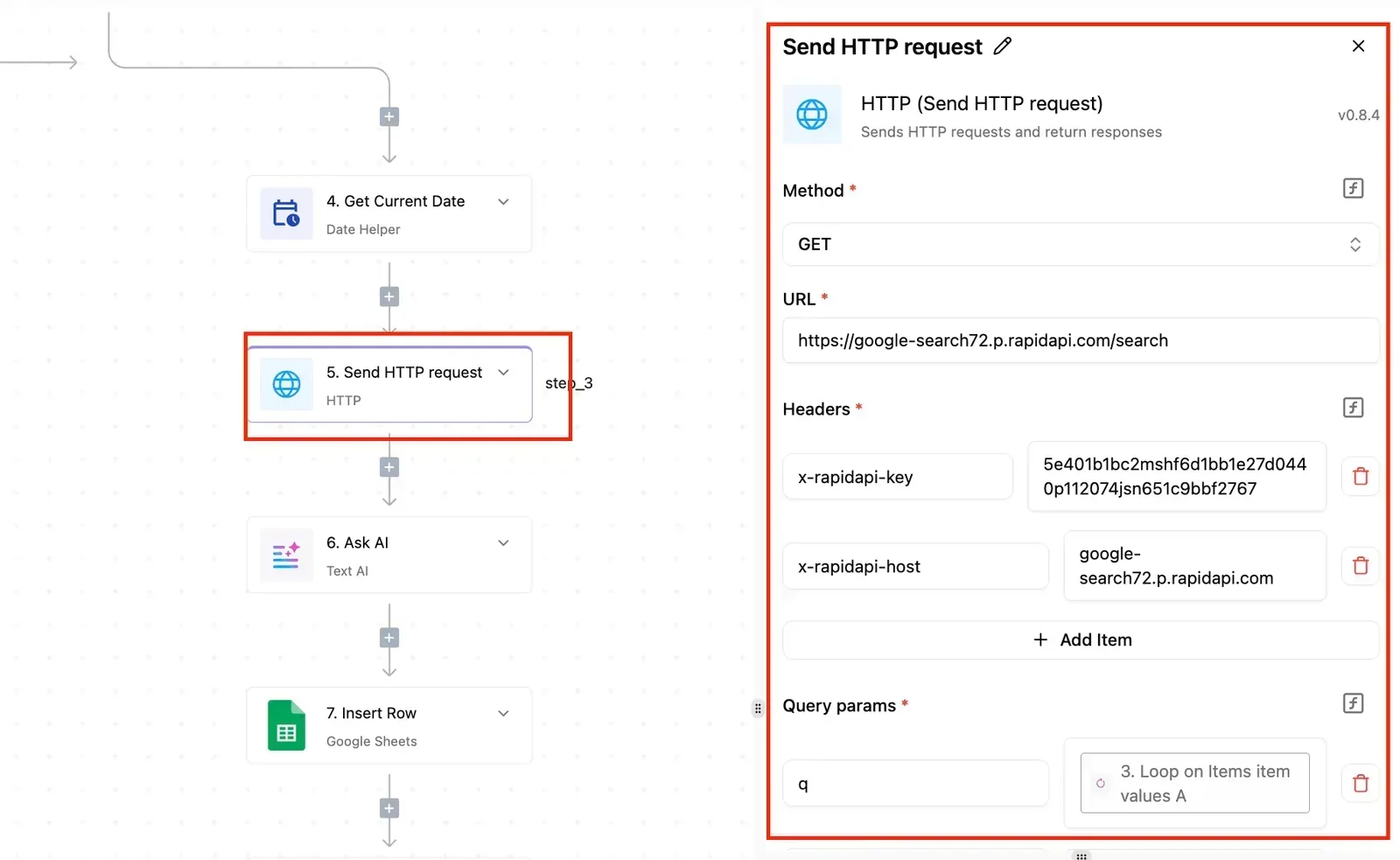
If you want the same Workday REST calls without maintaining a script, Activepieces fits. I can't point to a dedicated Workday integration I have verified, so the dependable route's its HTTP integration with OAuth 2.0.
Check the integrations list before you build; if one exists, it'll sit on the same API and inherit the same limits.
Start with who gets paged. When a scheduled sync fails at 2am, the person on call needs to open one place and see which step failed. A script on someone's server answers that only if its author logged well.
You don't hire for this; you describe it.
Tell the built-in chat in Activepieces to page through workers, write them downstream and alert you when a call fails, and it publishes a live flow in your account, identical to one a builder would have assembled step by step.

That flow sits under the same RBAC and audit logs as every other flow on the platform, and each run leaves a trace of every step's input and output, so whoever's on call can read where the 02:10 call failed without a Workday certification.
That's the real gain, and it's a narrow one.
Activepieces doesn't raise Workday's rate limits or widen your integration user's permissions, but a run costs 1 credit however many steps it has, so the free plan's 1,000 credits a month cover a nightly sync with room left over for the trace you'll read when it fails.
Setting it up looks like this:
- Register the API client in Workday and note the token endpoint for your tenant.
- In Activepieces, store the Workday client credentials once as a connection, where they're held centrally, and have the flow use that connection, so rotating them updates every flow that depends on it.
- Put the Workday endpoint, method and parameters in the step, and map the response into the next step.
- Set a named owner for the flow and the connection. A connection tied to one person's login stops working when that person leaves.
Mapped onto the flow, the rules in the next section look like this. A throttled response's a retry case, so give that step a retry with a delay rather than an immediate repeat.
Don't retry an authentication failure; route it to a branch that alerts the owner, since only a person can fix an expired or revoked credential. A malformed request's a defect, so let it fail loudly and read the run trace to find the step.
If the work is heavy, scheduled, and lives inside Workday's own tooling, Workday Integration Cloud's the alternative.
It keeps the process within Workday's own permissions and monitoring, at the cost of the tool's learning curve and of living in a second place that someone must own.
Choose Activepieces when the process touches other systems: it has 750 integrations, roughly 60% of them community-contributed, so the downstream system your sync writes to is likely a step in the same run trace as the Workday call.
Configure Workday sync rules
After the incident, the sync gained six rules. Each one maps to a failure that someone had to be woken up for, so a named person now owns every one of them.
Seeing which step produced a failure is only useful if the step's also built to survive it, and the list below's what the sync now enforces.
- Retry with backoff on 429 and 5xx responses, so a throttled or briefly unavailable call waits and tries again instead of failing the run.
- Resume from the last page that completed, so a failure on a late page doesn't restart the whole pull.
- Alert before the token expires, so expiry's a calendar event and not a 2am surprise.
- Use a least-privilege integration user, so a leaked or misused credential can read only what the sync needs.
- Check the record count on every run, so a sync that finishes green but pulls too little is caught.
- Send every alert to a named owner, so nobody has to guess whose problem it is.
Those rules are grouped below by what they protect against.
Retry, resume and page limits
When the API returns a 429, it's telling you to slow down, and a 5xx means the service had a problem that may clear on its own. Both deserve a retry with a growing wait between attempts.
If a 4xx isn't a 429, such as a rejected credential or a malformed request, waiting won't improve it, so it should fail at once and say so. Retrying it only delays the page.
Record the last page that completed, and on a retry or a rerun start from the next one.
Without that checkpoint, a failure on the final page repeats all the earlier work, which spends more of your request allowance and raises the chance of hitting a limit again.
Credential and permission checks
Nobody is told when a token expires: the sync doesn't announce it until the first call after expiry fails. Put the expiry date somewhere that triggers an alert ahead of time, and assign the renewal to a person, not a team alias.
Give the integration user only the access the sync reads. If it can do more, a mistake in the automation can do more. Review that access when the sync's scope changes, and again whenever the user's owner leaves.
Run-level alerts and count checks
Finishing without an error proves only that nothing threw. Compare the number of records pulled with what you expect, whether that's the previous run or the source's own total, and fail the run when the gap is larger than you accept.
A permission change or a lost page that returns less data and no error is the quiet case the count check catches.
Send every alert to one named owner, with the run and the failing step in the message. An alert to a shared channel is read by everyone and acted on by no one.
Monday checklist:
- Confirm the retry rule covers 429 and 5xx, and only those.
- Confirm the checkpoint resumes from the last completed page.
- Check the token expiry date and the alert that precedes it.
- Review what the integration user can access.
- Confirm the record-count check ran on the last run.
- Confirm each alert names a person.
Frequently asked questions
Whoever owns the Workday tenant will be asked the same few things once the sync is live. Four of them the body above can't settle from public documentation:
- Whether any free tier exists
- Whether rate limits are published by tier
- How long an issued token lasts
- How the March and September releases change an integration
Treat each as a question for your Workday administrator or account representative, and put the answer in writing. The four answers below cover what can be said without them.
On whether Workday charges per API call, nothing public says it does, and nothing public says it doesn't. API access is tied to your contract and tenant, so the answer sits in your agreement, not in a rate card.
Ask your account representative before you design a high-volume sync, because a surprise there lands on whoever owns the budget, not on the developer.
On a free Workday API sandbox, I can point to no self-serve offering. Sandbox tenants come through a customer relationship, so you test against a tenant your organization already has.
Confirm with the tenant administrator how fresh its data is before you trust a passing test.
Should I use REST, SOAP or RaaS for new work?
Start with REST where it covers the object you need. Fall back to SOAP where REST doesn't reach, and use RaaS (Workday's custom reports exposed as endpoints) for read-heavy reporting pulls.
Check each object against the API reference for your release, because coverage differs by area. Pick one per integration and record the choice, so the next owner knows why it was made.
You can't get a Workday API key without being a customer. Access runs through a tenant: an administrator creates an integration system user and registers an API client there. Without a tenant, there's nothing to authenticate against.
If you're a contractor, ask the customer's administrator to issue the credentials and name who rotates them.