
Workday Autopilot Agents: What They Do (2026 Guide)

Oct 16, 202613 min read
Workday released its autopilot agents on October 13, 2026, according to its own newsroom announcement: vendor-built agents that automate work inside Workday itself, a different approach from workflow tools such as Activepieces that sit outside any one system.
The announcement is the only source for what follows. Where it says nothing, we say so below.
Learn what Workday's autopilot agents launched
What Workday announced and when
Mark October 13, 2026 as the launch date. The agents are Workday's own, built by the vendor and running inside its platform, not something a customer assembles.
For anyone automating across apps, that makes them one step in a longer chain. The announcement doesn't tell you how that step hands data to the next one, so treat any claim about triggers or outbound connections as unconfirmed until you see them documented.
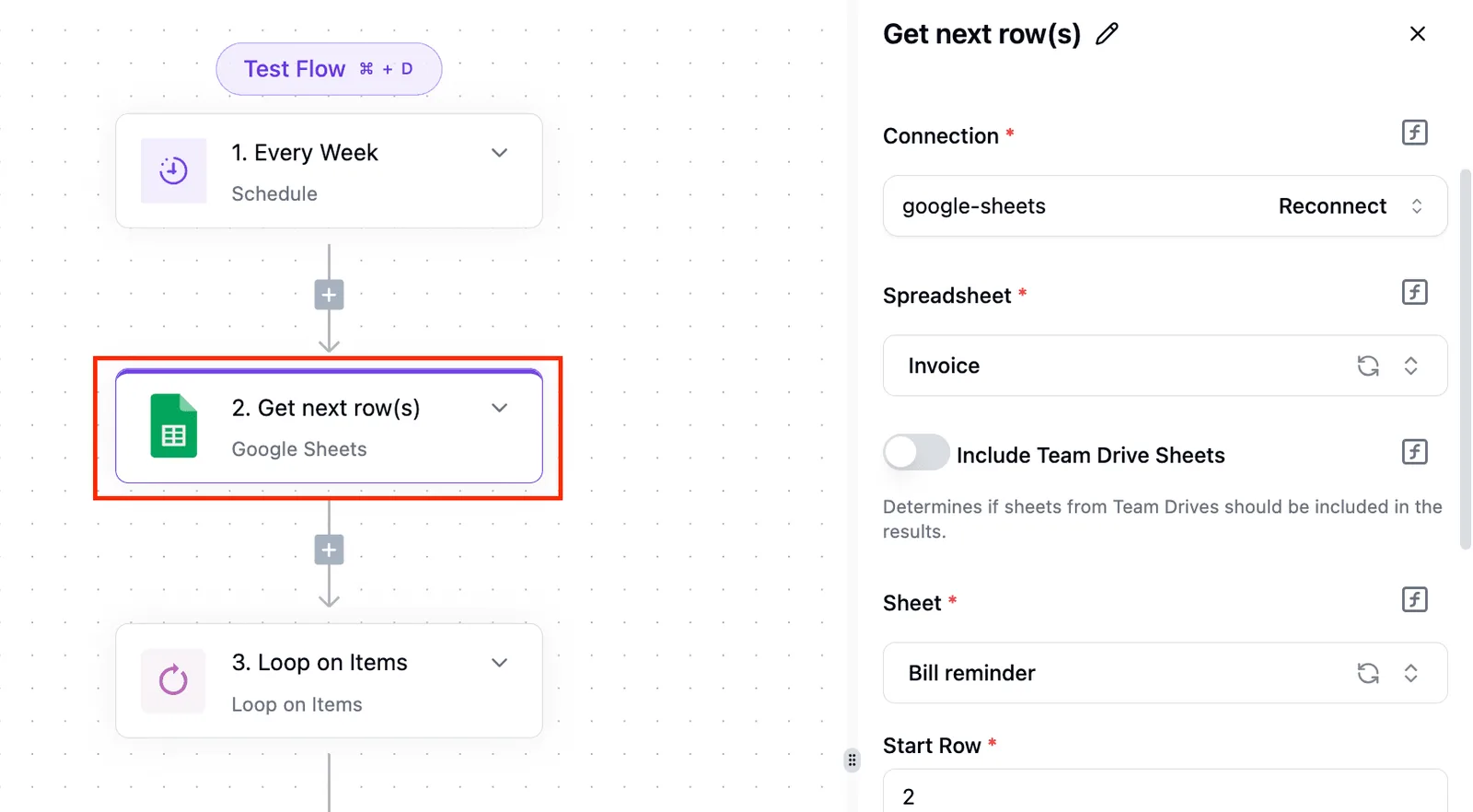
We couldn't confirm which customers have access now, which editions include the agents, or whether a rollout is staged.
Don't assume your tenant has them because the launch happened. Ask your Workday account contact whether they have switched the agents on for you and which modules they cover.
What the agents do
Workday's newsroom page and its recruiting datasheet describe agents that take over routine tasks in HR, finance and IT.
"Autopilot" here means the agent does the task itself instead of suggesting a next step for a person to carry out. A person sets the work going and reviews the outcome, but the steps in between are the agent's.

The pages we read don't spell out where an agent stops and hands back to a person, so confirm that boundary for each one.
The Deployment Agent, which the next section counts at 5,000 users, is one of these agents. We found no definition of it in the pages we used, so we can't say what it deploys or in which area it works.
Ask Workday what it does before you assume it applies to your process.
Workday autopilot agents pricing and availability
Whether Workday bundles the agents, meters them or sells them as an add-on, the announcement doesn't say, so we won't guess. Get the commercial terms in writing before you plan a workflow around them.
Look at the Agents screen in Activepieces for the opposite arrangement. Activepieces connects apps across its 741 integrations, and that screen lists agents your own team defines, each with a plain description of its job, such as a blog enricher and an SEO writer.
On the other side of that line sit Workday's agents, defined by the vendor, which is why the open questions above matter.
This takes minutes, not a project: automate it in Activepieces free.
How autopilot agents benefit teams
Once the vendor announced autopilot agents that run those tasks for HR, finance and IT teams, hiring, payroll, accounting and compliance work now starts inside Workday. Any cross-app workflow has to decide where the agent's job stops.
Work that now starts inside Workday
5,500 customers use at least one of its AI agents, Workday reports, and 5,000 of them use the Deployment Agent.
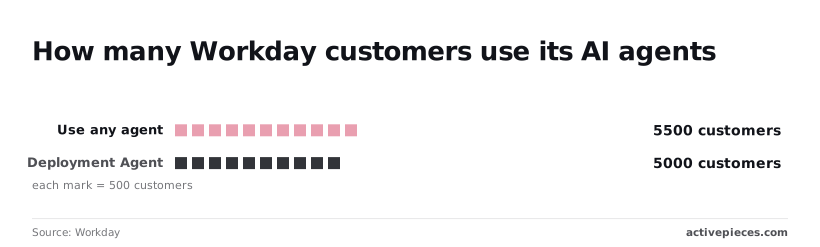
Nearly all of the agent users have reached the same agent, which means the vendor layer is already the default route for this work, not an experiment you can route around.
If your HR or finance process touches Workday, an agent is probably already handling a step you used to wire up yourself.
You don't get to set the boundaries. Each agent works inside Workday's own definitions of a task: what it can read, what it can write, and when it hands off are set by the vendor, not by you.
If your HR or finance process touches Workday, an agent is probably already handling a step you used to wire up yourself.
Where cross-app workflows still matter
It has a trigger app on the left, the Workday agent boxed in the middle, downstream apps on the right, and a line where the agent's job ends.
Take from it that the agent covers one segment, and everything on either side of that line is still yours to build.
At the trigger, work enters: an offer accepted in a recruiting tool or an invoice arriving in a mailbox.
On the downstream side, the result has to land somewhere: a ticket in the IT queue, a message to a manager, a row in a ledger outside Workday. The agent's output only pays off if a workflow carries it across that line.

Check three things for each agent before you rely on it. They are which event it can start from, which fields it returns, and whether a failure raises something an outside workflow can catch.
The answers decide whether the agent is one connected step or a closed box.
What is measurably new in Workday's own announcement
Only what Workday states on its newsroom page counts as new here. The answers from the last section tell you which parts of it matter: the named agent functions, their dates, and the hooks that let other tools reach them.
Everything else is inference, and I treat it that way.
Capabilities Workday states
Read the page for verbs and nouns, not adjectives. A capability counts when it names a function an agent performs, in which area (HR, finance or IT), and as of what date.
"Autopilot" is a label; "reconciles this record type" or "routes this request" is a capability.
Quote each function with the page's own date and link, and discard any claim that lacks one. I'm not restating individual functions here, because a summary of the page that I can't tie to its date and link is exactly the loose claim to avoid.
Figures Workday publishes
If the page gives a figure, such as a count of agents, customers or hours saved, it only helps you if it describes your workload. A headline number about the vendor's customer base says nothing about whether your approval flow gets shorter.
Check what the figure measures and which baseline it compares with. If the page gives none, you have no basis for a business case yet.
Before you quote an automation job around these agents, put these questions to Workday, because a launch page rarely answers them:
- What does it cost, and is it bundled or priced per agent?
- Are there benchmarks, and on whose data?
- Which triggers and actions can an outside tool call, and through which API?
- Who can use it today, and in which tenants?
Until Workday answers those, treat the agents as one step you can't yet wire into the rest.
Ways to connect any system to Workday
An agent only pays off if its results reach the rest of your stack, so it helps to know the routes into Workday before choosing one. There are three broad ones, and they differ in how much your team has to build and keep running.
Workday's own APIs and integration tooling
Workday exposes its data and business processes through web service and REST APIs, and it sells its own integration tooling for building and scheduling data exchanges with other systems. This route is the most direct and the most closely tied to Workday's permissions.
It also asks the most of your team, since someone has to build, secure and maintain each integration.
We haven't confirmed whether the autopilot agents can be started or read through these APIs. That is one of the questions to put to Workday above.
Other workflow tools
General workflow and integration platforms offer a ready-made Workday connector, which saves you writing against the API yourself. You chain it between a trigger and an action, and the platform handles scheduling, retries and logs.
The trade-off is that you depend on what the connector exposes, which may be narrower than the full API.
Understanding workflow tool options for Workday
Activepieces is one of those workflow tools, and the section below shows what its Workday integration offers. It is also open source, and it can expose the same actions to AI assistants, which the next section explains.
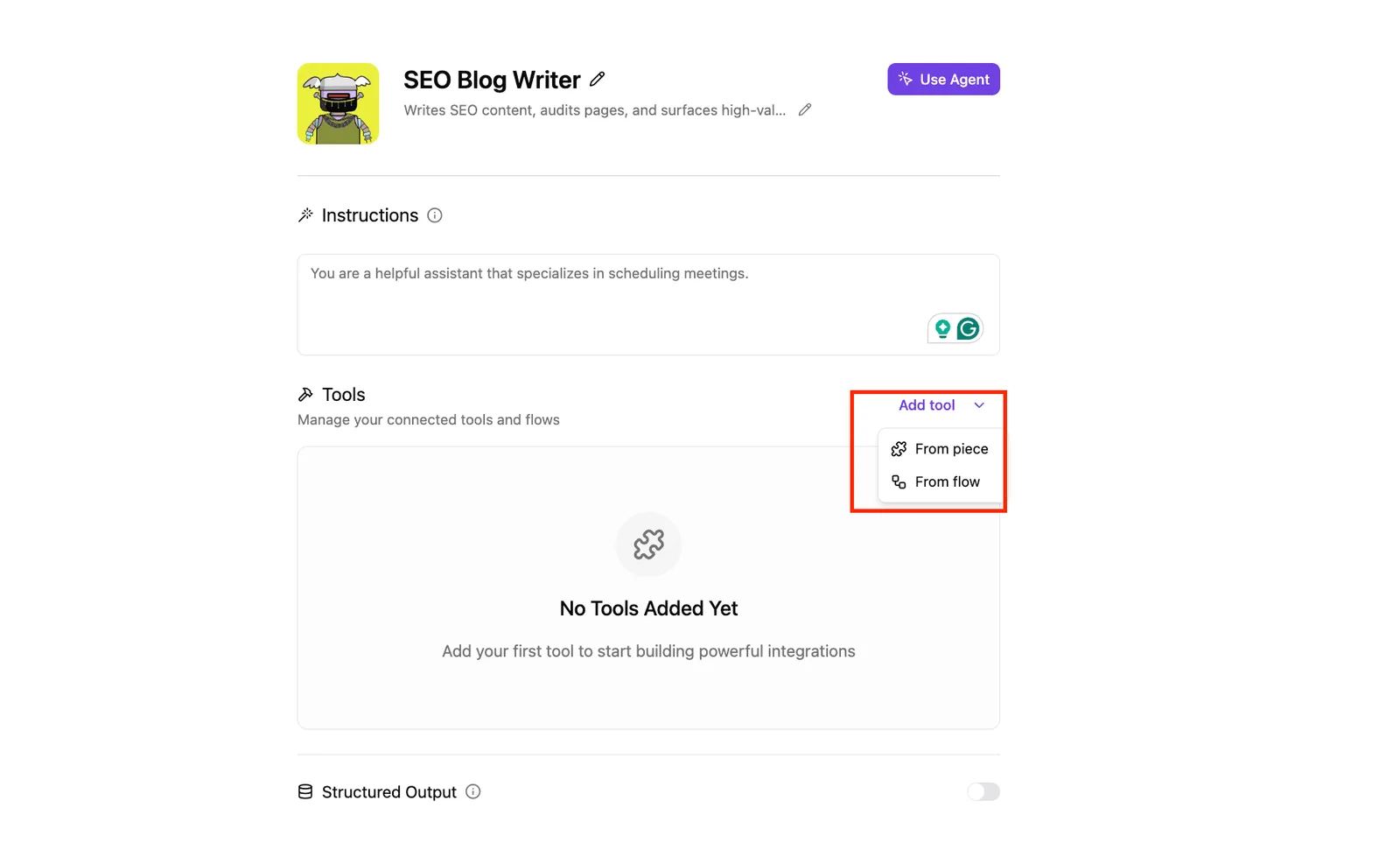
Treat it as one option among the three, not the only way in.
You can follow the rest of this with the builder open. Start free, no card.
How to connect Workday autopilot agents to other apps in Activepieces today
In Activepieces, an automation builder, each app is an "integration" you chain into a flow. It already lists a Workday integration, so the AI agent step can sit between a trigger and a downstream action rather than stand alone.
Integrations are called pieces and live in packages/pieces in the MIT-licensed open source repo, 741 of them counted from packages/pieces/community, and each piece action is defined once: the same definition that runs as a flow step is the one published as a tool schema on the per-project MCP server, which is the mechanism the Pieces Framework and MCP Server documentation describes.

That means Claude, ChatGPT, Cursor or an agent you built yourself can call the Workday actions without a second integration.
An MCP server is a service that offers a set of actions to AI assistants through a shared protocol, the Model Context Protocol. A tool schema is the written description of one such action: its name, what it does, and the inputs it expects.
The assistant reads the schema to know how to call the action correctly.
What the Workday integration includes
Listed in the Activepieces catalog is @activepieces/piece-workday, described as a cloud-based enterprise platform for human resources, finance, and planning. It carries 25 actions and 14 triggers, per Activepieces.
That's enough surface to start a flow from a Workday event or write back to Workday, but the listing doesn't name autopilot agents.
I can't give you a release date from the findings, and I haven't tested this integration against the agents. Check which of those actions reaches an agent before you commit.
A workflow pattern to try today
Below is what to build and where to look for failure. It shows one agent step bracketed by apps you already run, so you can see exactly where a field mismatch would break the chain.
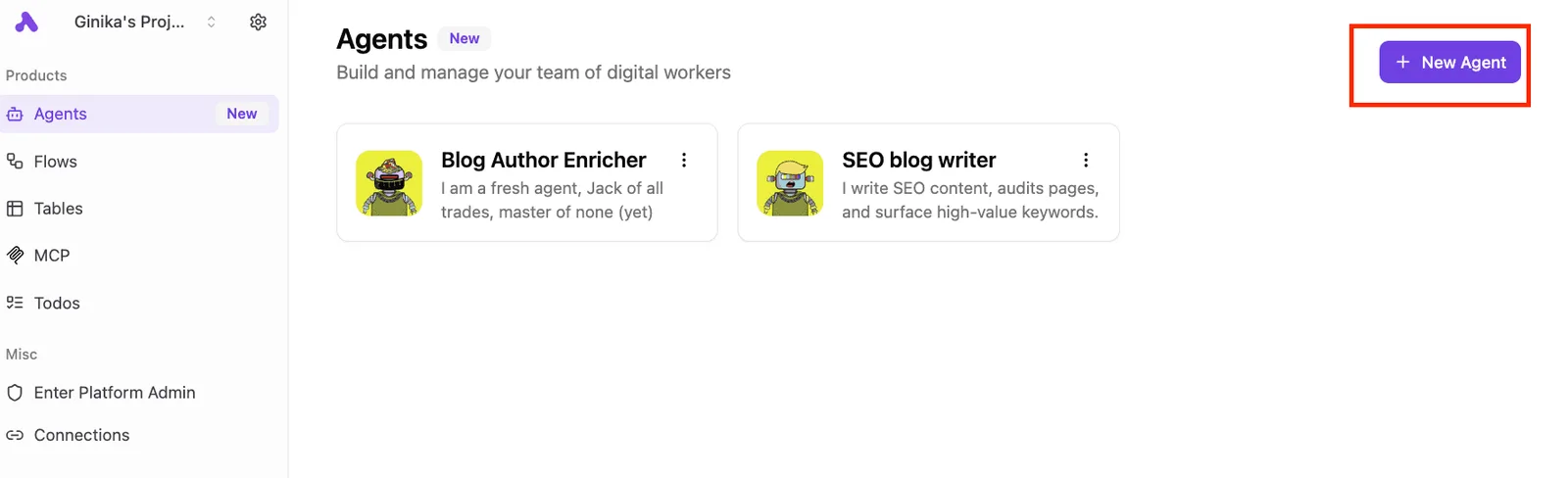
- Pick the trigger app, such as a form, ticketing tool or inbox, whose event should start the run.
- Add the Workday integration step from the shipped pull request.
- Map the agent inputs from the trigger's fields. Match field names and types by hand, because a blank mapping fails quietly.
- Add the downstream action, for example a message to a chat channel or a row written to a finance sheet.
- Check the run log and confirm the agent step returned what step four expects.
Whether the agent is a usable step or still a dead end shows up in the run log. If step five shows the output is empty or unstructured, the downstream action has nothing to work with, and that's the answer to the open questions above.
Workday autopilot agents cost and speed compared
Without running the agents ourselves, we have no cost-per-task or speed measurement, so every number below is Workday's claim and every cost cell is blank for the same reason.
The table shows where each route stands on cost, setup time and upkeep; take from it that Workday has published nothing you could put in a budget.
| Route | Cost | Time to set up | Who maintains it |
|---|---|---|---|
| Workday's own agents | Not published | Not published | Workday maintains the agent; your team maintains the data and configuration it relies on |
| General workflow tool connecting to Workday | Not published | Not published | Your team, for every trigger, action and field mapping |
| Manual work or existing automation | Not published | Not published | Your staff, or whoever built the scripts |
Prices and plan limits checked against newsroom.workday.com and activepieces.com on October 16, 2026.
Since the table has no prices, the only quantified evidence is the speed claims, and they come from the seller.
With no figure for per-task, per-seat or per-agent pricing in the findings, any comparison of cost would be invented. Get a written quote before you commit, and ask what is included.
A workflow tool you run yourself will have its own bill, plus the hours spent keeping each field mapping working when Workday changes a form.
Workday autopilot agents speed claims
97% is the headline: Workday's recruiting agents datasheet claims that reduction in interview scheduling time, which means scheduling stops being a bottleneck. That is the biggest claim, and it fits: scheduling is a matter of matching calendars, which software handles well.

Because time to hire covers the whole process, the gain there is diluted by steps no agent touches, such as offer approval and candidate notice periods. Manager review shows the least movement because it depends on people reading and deciding.
Treat the ranking as useful and the percentages as unverified. The next question is what happens to the output of each of these steps once it leaves Workday.
What to watch next in Workday
Recheck four Workday pages and the workflows that touch HR, finance or IT, because those are where the launch will either hold up or change how you build.
Across five fiscal years, Workday reports subscription revenue. It went from $4.55 billion in FY2022 to $5.57 billion in FY2023, $6.6 billion in FY2024, $7.718 billion in FY2025 and $8.833 billion in FY2026.
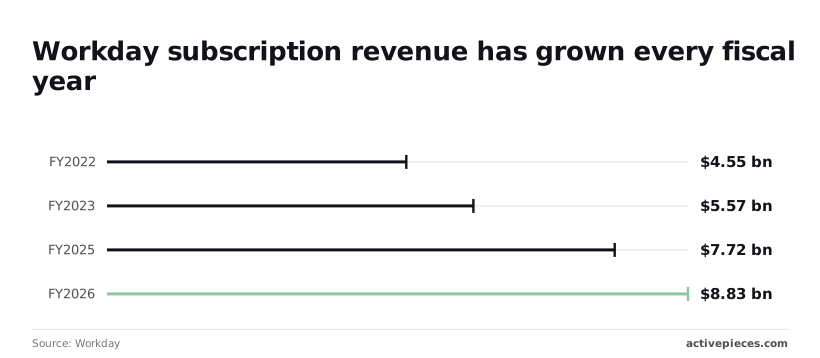
Revenue has risen every year, which means the installed base is large and every change to agent behavior lands on a lot of live workflows at once.
Take from it that Workday sits underneath many teams' core processes, so a quiet change to an agent isn't an edge case. What follows is what to check.
Put a date on each of these and look again in a week.
- The pricing page. Confirm whether the agents are priced separately or bundled, because that decides whether a pilot needs a budget line.
- The availability and eligibility statement. Confirm which customers can use the agents today, so you don't design around something your tenant can't switch on.
- The documentation updates. Look for changes to triggers, outputs and API behavior, since those decide what you can pass to other apps.
- Any release notes tied to the October 13 announcement, for scope changes after launch.
Workflow checks for this week
Start with existing automations that read from or write to HR, finance or IT records. Note where a person currently approves or re-keys data, since that is where an agent could take over a step.
Then check what each step emits: a status, a record ID, a document? An agent that finishes a task but exposes no output you can trigger on leaves a gap in the chain.
Related reading
Build it
Set this up in minutes.
No code required. Connect your accounts, and Activepieces runs it from there.
Start free Talk to sales